import matplotlib.pyplot as plt
import pandas as pd
import squarify
import plotly.graph_objects as goTreemap & Sunburst (Python)
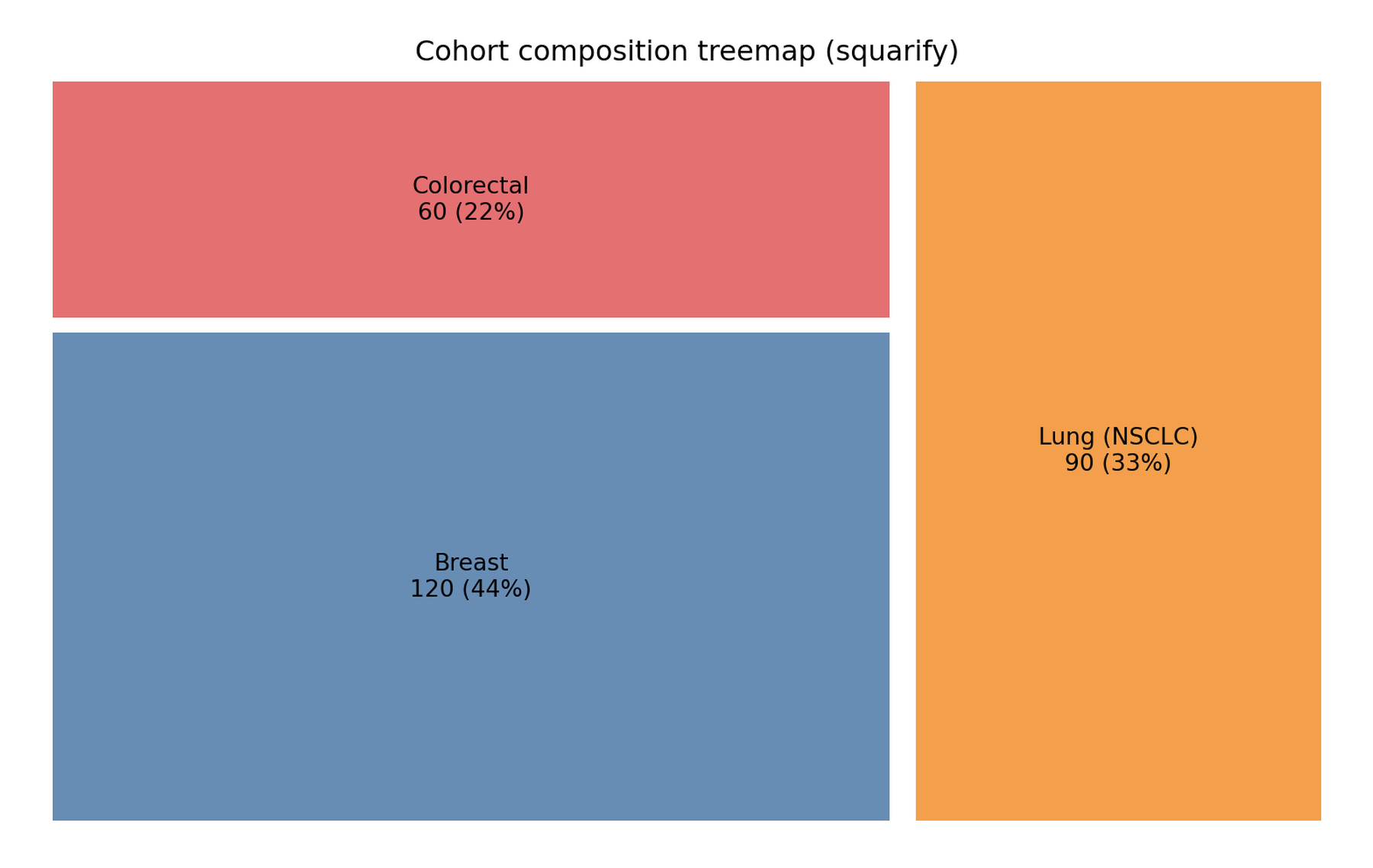
The Python counterpart of Treemap and Sunburst: two displays for hierarchical composition. A treemap nests rectangles whose area encodes a value — the best static overview of one or two hierarchy levels; a sunburst nests rings radially and stays interactive — level structure and click-to-zoom. In clinical data they suit cohorts that decompose naturally (cancer type → response), cost trees, and taxonomic abundance.
This tutorial builds a static treemap with squarify [1] on matplotlib and an interactive sunburst with plotly.graph_objects [2], using the same cohort so the two designs can be compared directly.
This tutorial covers two workflows:
- A static treemap of cohort composition (
squarify); - An interactive two-level sunburst (
plotly).
Example
Setup
- System Requirements: Cross-platform (Linux/MacOS/Windows)
- Programming Language: Python
- Dependencies:
matplotlib,pandas,squarify,plotly
Data Preparation
A 270-patient oncology cohort of three cancer types (120/90/60) with three response categories each. For branchvalues="total" the parent value must equal the sum of its children — validated programmatically before plotting.
counts = {"Breast": (55, 25, 40),          # (PR, SD, PD)
          "Lung (NSCLC)": (30, 35, 25),
          "Colorectal": (18, 24, 18)}
cnt = pd.DataFrame(
    [{"cancer": c, "response": r, "n": n}
     for c, resp in counts.items() for r, n in zip(["PR", "SD", "PD"], resp)])
cnt["id"] = cnt.cancer + "-" + cnt.response

agg = cnt.groupby("cancer", as_index=False)["n"].sum()

# parent values must equal the sum of their children
parents_ok = all(int(agg.loc[agg.cancer == c, "n"].iloc[0])
                 == int(cnt.loc[cnt.cancer == c, "n"].sum())
                 for c in counts)
assert parents_ok
cnt| cancer | response | n | id | |
|---|---|---|---|---|
| 0 | Breast | PR | 55 | Breast-PR |
| 1 | Breast | SD | 25 | Breast-SD |
| 2 | Breast | PD | 40 | Breast-PD |
| 3 | Lung (NSCLC) | PR | 30 | Lung (NSCLC)-PR |
| 4 | Lung (NSCLC) | SD | 35 | Lung (NSCLC)-SD |
| 5 | Lung (NSCLC) | PD | 25 | Lung (NSCLC)-PD |
| 6 | Colorectal | PR | 18 | Colorectal-PR |
| 7 | Colorectal | SD | 24 | Colorectal-SD |
| 8 | Colorectal | PD | 18 | Colorectal-PD |
Visualization
1. Static Treemap with squarify
colors = {"Breast": "#4E79A7", "Lung (NSCLC)": "#F28E2B", "Colorectal": "#E15759"}
total = agg.n.sum()

fig, ax = plt.subplots(figsize=(8, 5))
squarify.plot(
    sizes=agg.n,
    label=[f"{r.cancer}\n{r.n} ({r.n / total:.0%})" for r in agg.itertuples()],
    color=[colors[r.cancer] for r in agg.itertuples()],
    ax=ax, alpha=0.85, pad=True)
ax.axis("off")
ax.set_title("Cohort composition treemap (squarify)")
fig.tight_layout()
plt.show()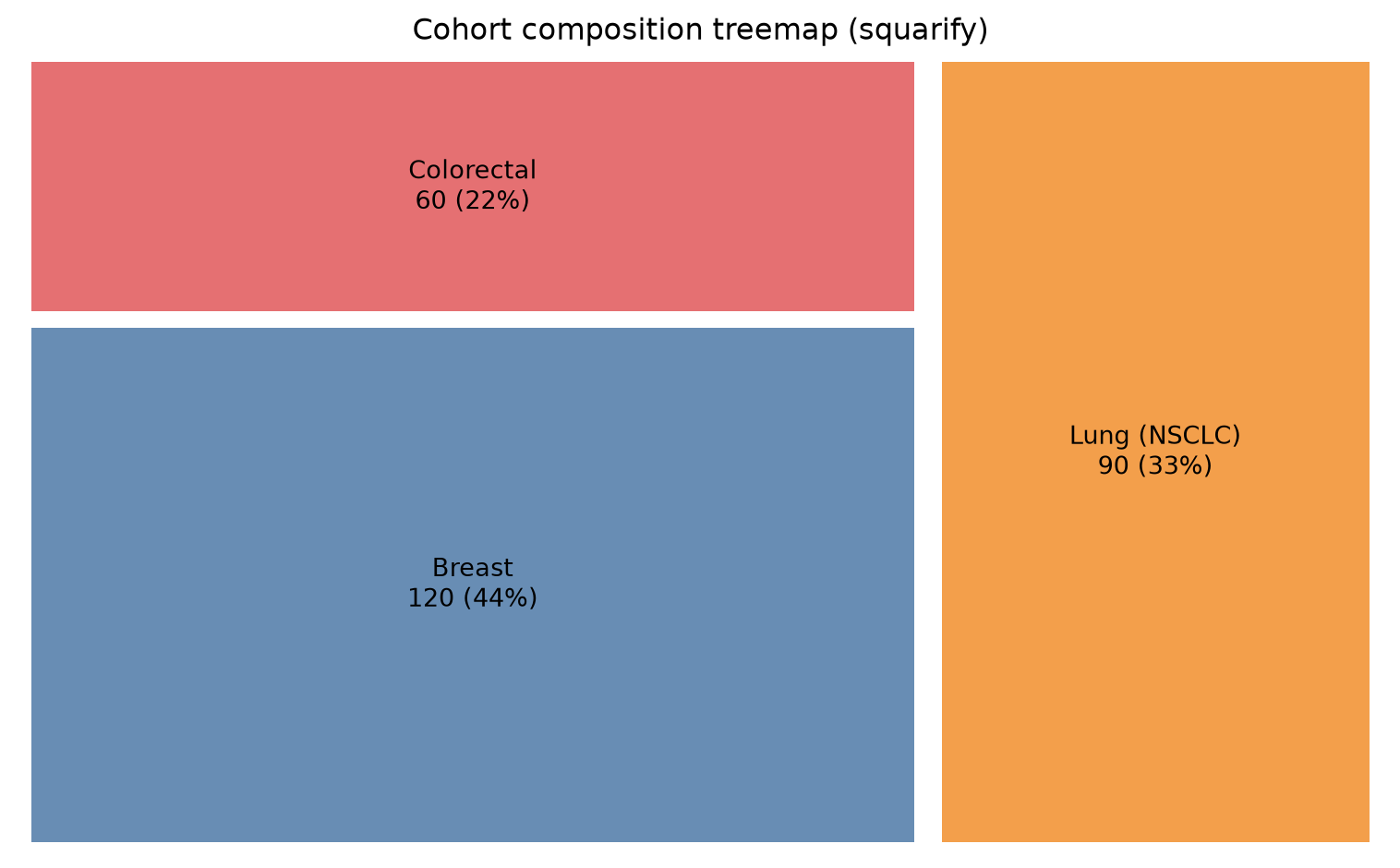
squarify lays out one flat list of rectangles; to show two levels, draw the parent rectangles first and then each parent’s children clipped to the parent’s rectangle (or hand the whole hierarchy to plotly’s treemap trace, which nests automatically).
2. Interactive Sunburst with plotly
roots = agg.cancer.tolist()          # groupby sorts alphabetically: use ITS order
rcolors = {"Breast": "#4E79A7", "Lung (NSCLC)": "#F28E2B", "Colorectal": "#E15759"}
lcolors = {"PR": "#7fa8cc", "SD": "#f5b767", "PD": "#e98a8a"}

fig = go.Figure(go.Sunburst(
    ids=roots + cnt.id.tolist(),
    labels=roots + cnt.response.tolist(),
    parents=[""] * len(roots) + cnt.cancer.tolist(),
    values=agg.n.tolist() + cnt.n.tolist(),
    branchvalues="total",
    marker=dict(colors=[rcolors[c] for c in roots]
                + [lcolors[r] for r in cnt.response]),
    hovertemplate="%{id}<br>n = %{value}<extra></extra>"))
fig.update_layout(width=800, height=800,
                  title="Cohort hierarchy: cancer → response")
fig
TipPractice tips
-
branchvalues="total"requires parentvalue= sum of children — assert it (as in Data Preparation) or plotly draws overlapping wedges;"remainder"is the alternative where parents hold only their own value. -
squarifysorts nothing for you: passsizesin decreasing order for the classic large-to-small layout, andpad=Trueso adjacent rectangles stay readable. - Sunbursts and treemaps both hide small categories: collapse anything below ~2% into “Other” before plotting.
- The plotly figure is an HTML widget — the rendered page is interactive; static export for print needs a screenshot (no kaleido in this environment).
Application
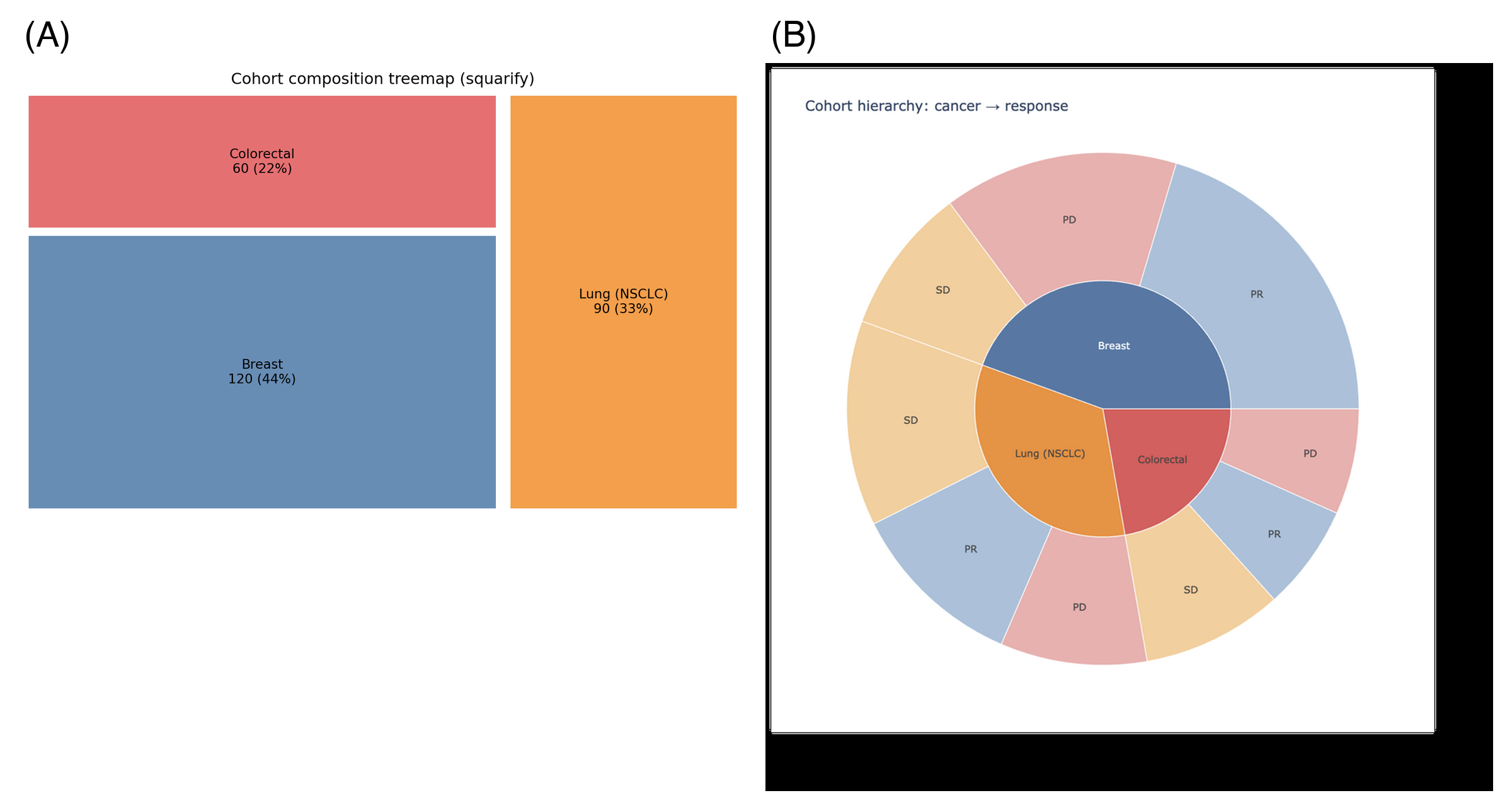
Treemaps and sunbursts appear in cohort-reports (registry composition), cost/utilization decomposition, and metagenomics (phylum → species). The panel below mirrors a typical report layout: (A) the static treemap and (B) the interactive sunburst.
Reference
[1] Lambrechts G. squarify: pure Python implementation of the squarified treemap layout. https://github.com/gregorl/squarify
[2] Sievert C. Interactive Web-Based Data Visualization with R, plotly, and shiny. Chapman and Hall/CRC; 2020. doi:10.1201/9780429447273