import matplotlib.pyplot as plt
import seaborn as sns
import pandas as pd
import numpy as npLine Plot (Python)
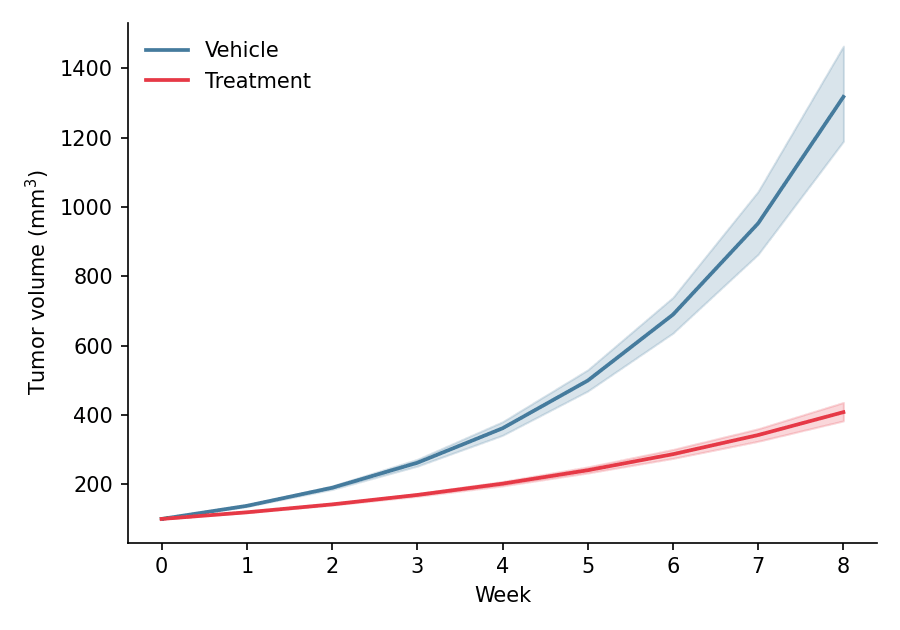
A line plot displays the trend of a continuous variable over an ordered axis such as time. In biomedical research, line plots are the standard figure for growth curves, pharmacokinetic profiles, and longitudinal omics time courses, usually with an uncertainty band around the group mean. Python’s seaborn aggregates replicates into a mean line with a confidence band in a single call, while matplotlib provides fine-grained styling.
Example
Setup
- System Requirements: Cross-platform (Linux/MacOS/Windows)
- Programming Language: Python
- Dependencies:
matplotlib,seaborn,pandas,numpy
Data Preparation
We simulate a preclinical tumor-growth study: 12 mice per arm (vehicle vs treatment) measured weekly for 8 weeks, using a two-phase exponential growth model with mouse-to-mouse variability.
np.random.seed(21)

weeks = np.arange(0, 9)
n_mice = 12
records = []
for arm, growth_rate in [('Vehicle', 0.32), ('Treatment', 0.18)]:
    for mouse in range(n_mice):
        size = 100 * np.exp(growth_rate * np.random.normal(1, 0.08) * weeks)
        records.append(pd.DataFrame({
            'Week': weeks,
            'Size': size,
            'Arm': arm,
            'Mouse': f'{arm[:2]}_{mouse:02d}'
        }))
tumor = pd.concat(records, ignore_index=True)
Visualization
Basic Line Plot
Aggregate first, then draw: one line per group with distinct markers keeps small summaries readable.
mean_size = tumor.groupby(['Arm', 'Week'], as_index=False)['Size'].mean()

plt.figure(figsize=(6, 4.2))
ax = sns.lineplot(data=mean_size, x='Week', y='Size', hue='Arm',
                  style='Arm', markers=['o', 's'], markersize=6,
                  palette={'Vehicle': '#457b9d', 'Treatment': '#e63946'},
                  linewidth=1.8)
ax.set_xlabel('Week')
ax.set_ylabel('Tumor volume (mm$^3$)')
ax.legend(frameon=False, title=None)
ax.spines[['top', 'right']].set_visible(False)
plt.tight_layout()
plt.show()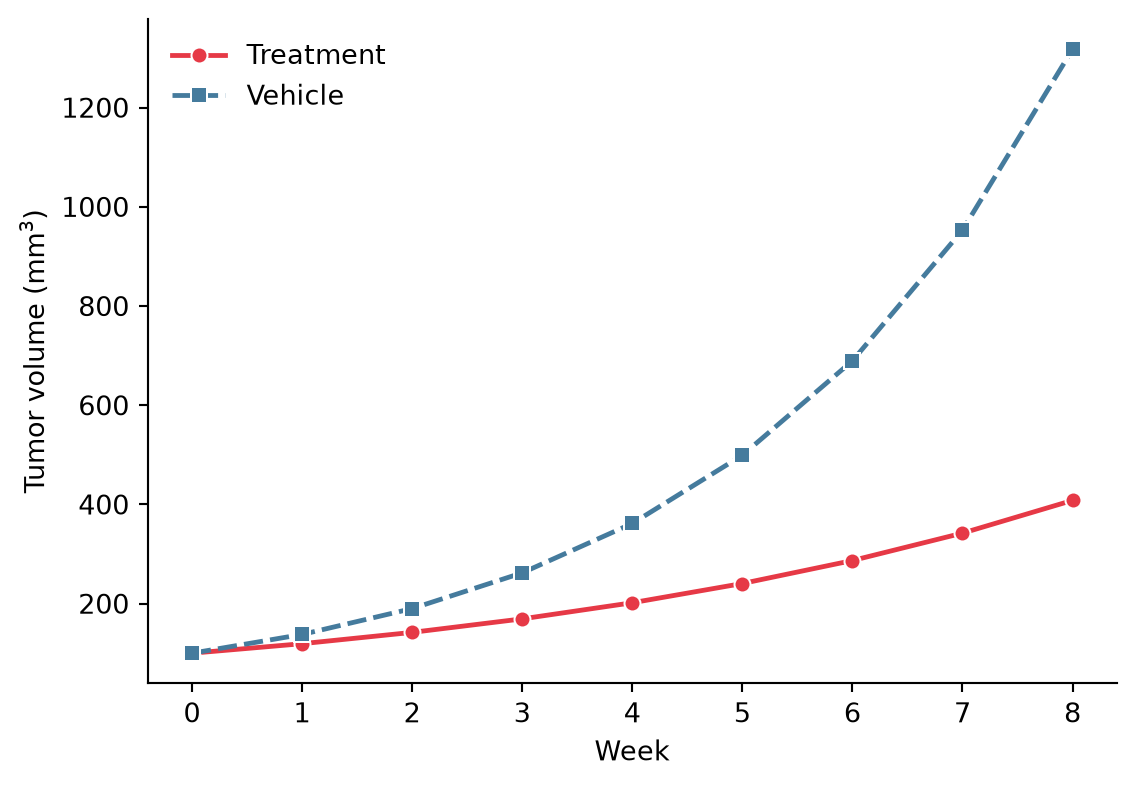
Line Plot with Confidence Band
Passing the raw replicate measurements to seaborn.lineplot with errorbar=('ci', 95) bootstraps a 95% confidence band around each group mean — the default uncertainty display in preclinical figures.
plt.figure(figsize=(6, 4.2))
ax = sns.lineplot(data=tumor, x='Week', y='Size', hue='Arm',
                  errorbar=('ci', 95), err_kws=dict(alpha=0.2),
                  palette={'Vehicle': '#457b9d', 'Treatment': '#e63946'},
                  linewidth=1.8)
ax.set_xlabel('Week')
ax.set_ylabel('Tumor volume (mm$^3$)')
ax.legend(frameon=False, title=None)
ax.spines[['top', 'right']].set_visible(False)
plt.tight_layout()
plt.show()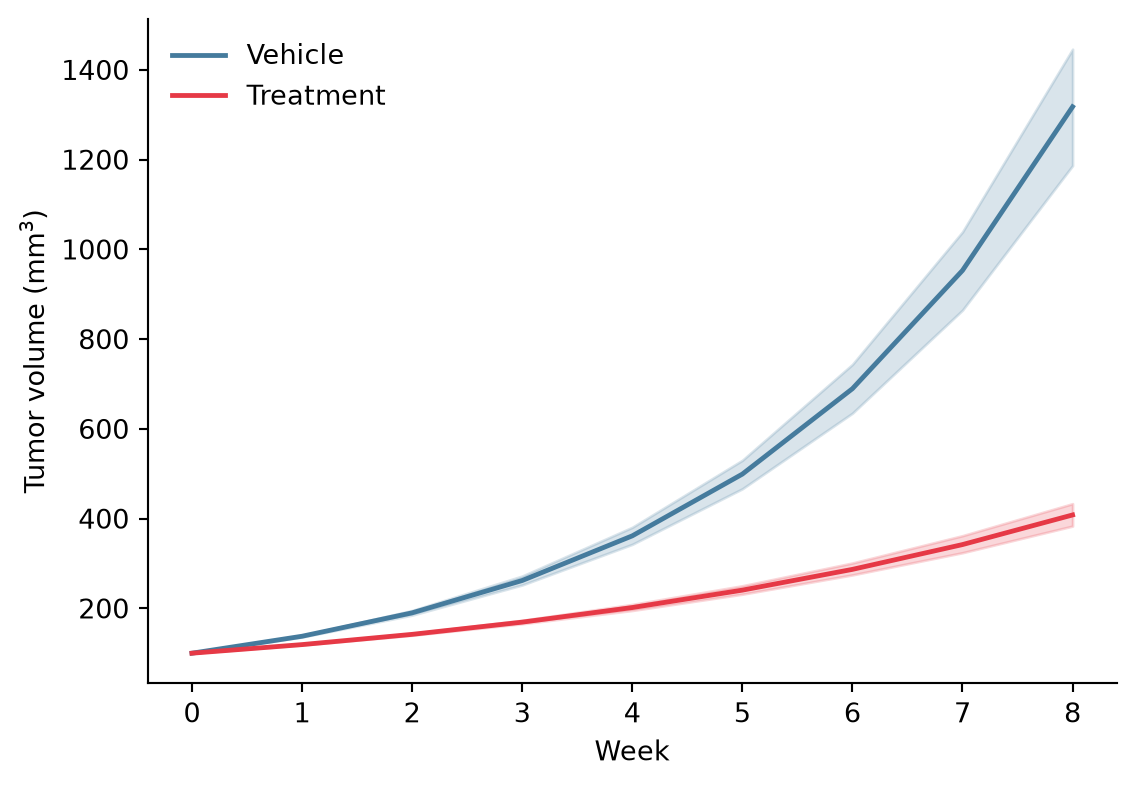
Spaghetti Plot with Population Mean
Showing every subject as a thin line behind the bold group mean communicates both the trend and the animal-to-animal variability — preferred by many journals over a band alone.
fig, ax = plt.subplots(figsize=(6, 4.2))
sns.lineplot(data=tumor, x='Week', y='Size', hue='Arm', units='Mouse',
             estimator=None, alpha=0.25, linewidth=0.9, legend=False,
             palette={'Vehicle': '#457b9d', 'Treatment': '#e63946'}, ax=ax)
mean_size = tumor.groupby(['Arm', 'Week'], as_index=False)['Size'].mean()
sns.lineplot(data=mean_size, x='Week', y='Size', hue='Arm',
             palette={'Vehicle': '#457b9d', 'Treatment': '#e63946'},
             linewidth=2.4, ax=ax)
ax.set_xlabel('Week')
ax.set_ylabel('Tumor volume (mm$^3$)')
ax.legend(frameon=False, title=None)
ax.spines[['top', 'right']].set_visible(False)
plt.tight_layout()
plt.show()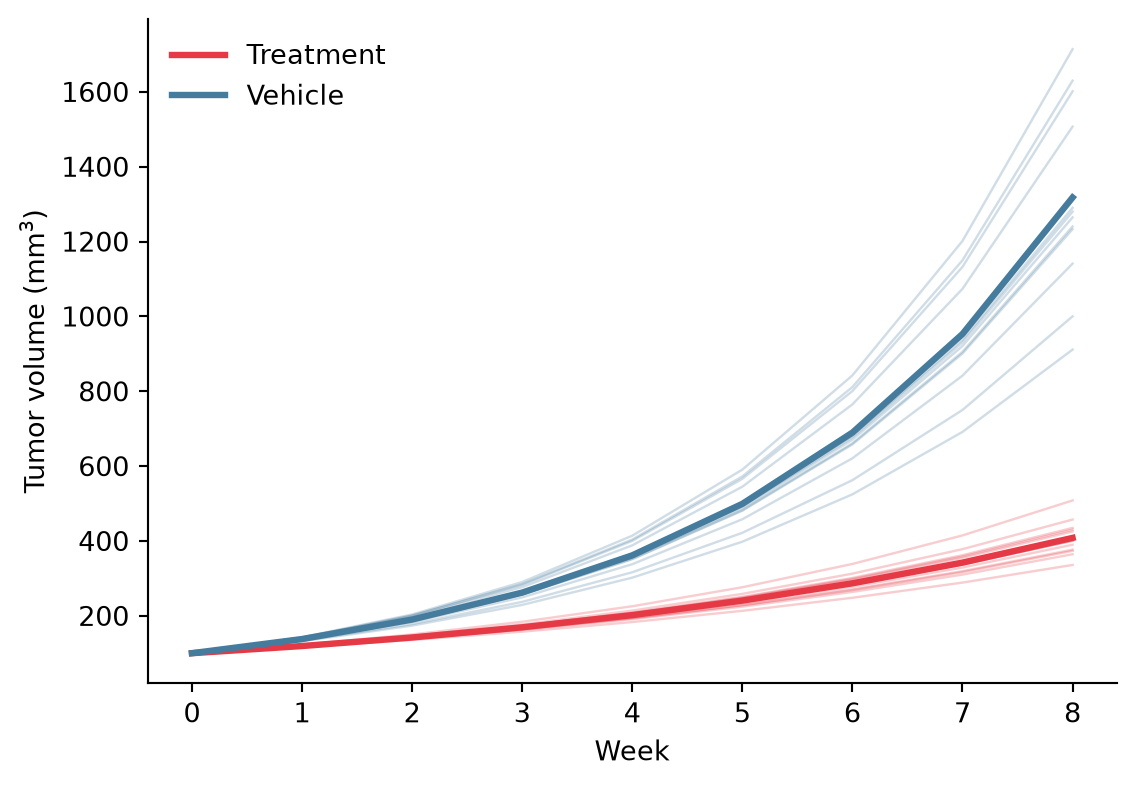
References
- Hunter, J. D. (2007). Matplotlib: A 2D graphics environment. Computing in Science & Engineering, 9(3), 90-95.
- Waskom, M. L. (2021). seaborn: statistical data visualization. Journal of Open Source Software, 6(60), 3021.