# Load packages
library(plotly)
library(dplyr)Sunburst Chart
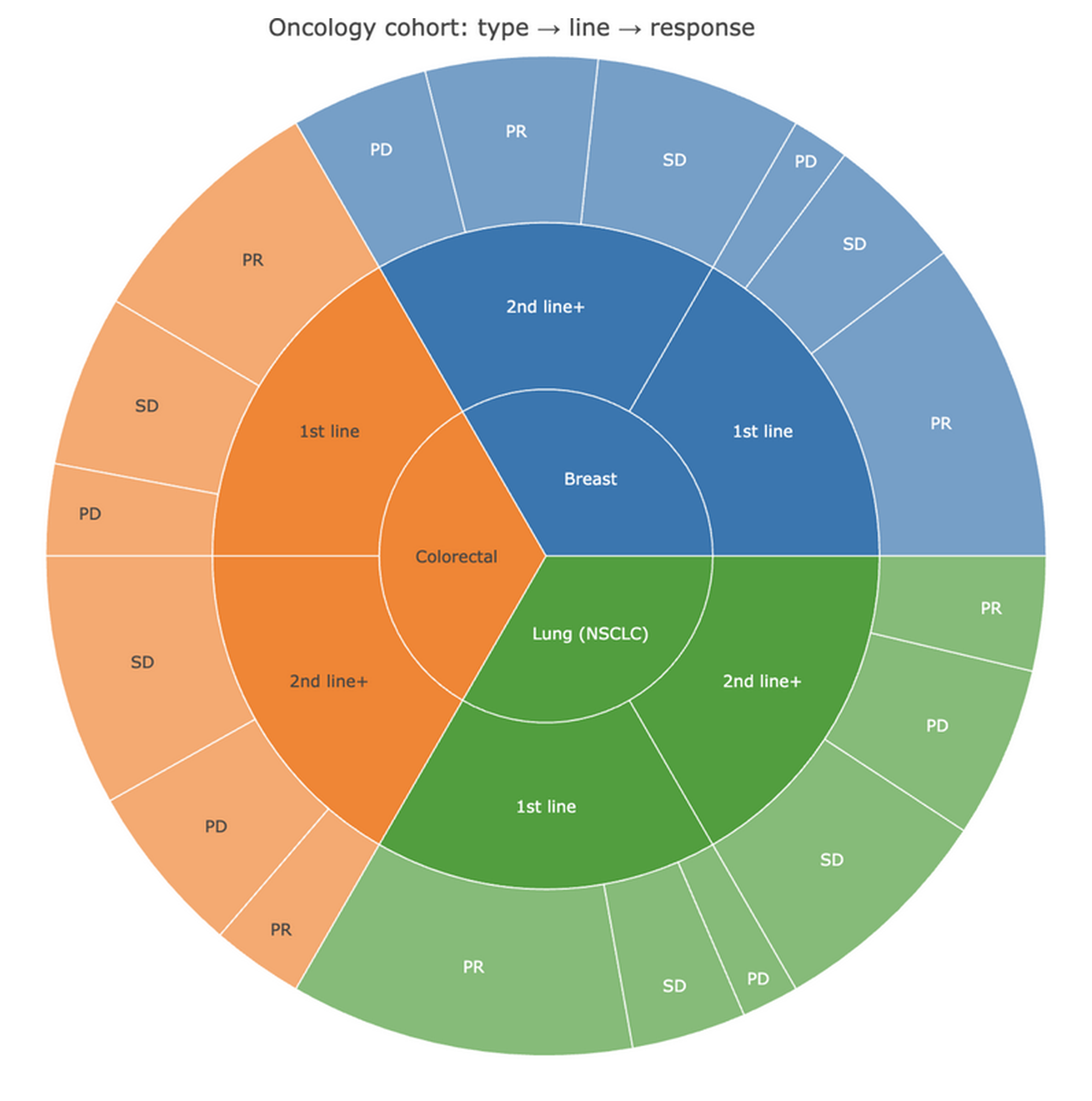
A sunburst chart is a multi-level donut for hierarchical composition: each ring is one level of the hierarchy, angular width is proportional to a value (counts, cost), and segments nest radially from root to leaves [1]. Compared with a treemap it emphasizes the levels of the hierarchy; compared with stacked pies it keeps every level quantitative and interactive (hover to inspect, click to zoom into a subtree). In clinical data it shines for cohorts that decompose naturally — cancer type → treatment line → response, or department → diagnosis group → procedure.
This tutorial builds sunbursts with plotly [2] using the ids/labels/parents/values node table. Because the figure is an interactive HTML widget, the rendered page supports hover tooltips and click-to-zoom.
This tutorial covers two workflows:
- A basic three-level cohort sunburst;
- A color-coded variant with per-branch colors and hover text.
Example
Setup
System Requirements: Cross-platform (Linux/MacOS/Windows)
Programming language: R
Dependent packages:
plotly;dplyr
sessioninfo::session_info("attached")─ Session info ───────────────────────────────────────────────────────────────
setting value
version R version 4.6.2 (2026-10-29)
os Ubuntu 24.04.5 LTS
system x86_64, linux-gnu
ui X11
language (EN)
collate C.UTF-8
ctype C.UTF-8
tz UTC
date 2026-10-31
pandoc 3.1.3 @ /usr/bin/ (via rmarkdown)
quarto 1.10.20 @ /usr/local/bin/quarto
─ Packages ───────────────────────────────────────────────────────────────────
! package * version date (UTC) lib source
P dplyr * 1.2.1 2026-04-03 [?] RSPM
P ggplot2 * 4.0.3.9000 2026-10-30 [?] Github (tidyverse/ggplot2@b638d65)
P plotly * 4.12.1 2026-07-22 [?] RSPM
[1] /home/runner/.cache/R/renv/library/Bizard-5140bdc6/linux-ubuntu-noble/R-4.6/x86_64-pc-linux-gnu
[2] /home/runner/work/_temp/Library
[3] /opt/R/4.6.2/lib/R/library
* ── Packages attached to the search path.
P ── Loaded and on-disk path mismatch.
──────────────────────────────────────────────────────────────────────────────Data Preparation
We simulate an oncology cohort of 270 patients across three cancer types, two treatment lines, and three response categories (PR = partial response, SD = stable disease, PD = progressive disease). The node table needs exactly four columns: id (unique path), label, parent (empty for roots), and value (the leaf count; with branchvalues = "total" every parent’s value must equal the sum of its children).
set.seed(251)

coh <- data.frame(
  cancer = rep(c("Breast", "Lung (NSCLC)", "Colorectal"), each = 90),
  line   = rep(c("1st line", "2nd line+"), each = 45, times = 3),
  response = c(rep(c("PR", "SD", "PD"), times = c(28, 12, 5)),
               rep(c("PR", "SD", "PD"), times = c(15, 18, 12)),
               rep(c("PR", "SD", "PD"), times = c(30, 10, 5)),
               rep(c("PR", "SD", "PD"), times = c(10, 20, 15)),
               rep(c("PR", "SD", "PD"), times = c(22, 15, 8)),
               rep(c("PR", "SD", "PD"), times = c(8, 22, 15)))
)
cnt <- coh |> count(cancer, line, response, name = "n")

nodes <- bind_rows(
  # roots: one per cancer type
  data.frame(id = unique(cnt$cancer), label = unique(cnt$cancer), parent = "",
             value = sapply(unique(cnt$cancer), function(x) sum(cnt$n[cnt$cancer == x]))),
  # level 2: treatment lines
  cnt |>
    distinct(cancer, line) |>
    mutate(id = paste(cancer, line), label = line, parent = cancer,
           value = sapply(paste(cancer, line), function(x) sum(cnt$n[paste(cnt$cancer, cnt$line) == x]))) |>
    select(id, label, parent, value),
  # level 3: responses
  cnt |>
    mutate(id = paste(cancer, line, response), label = response,
           parent = paste(cancer, line), value = n) |>
    select(id, label, parent, value)
)

# parent values must equal the sum of their children (branchvalues = "total")
stopifnot(all(sapply(unique(nodes$parent[nodes$parent != ""]),
                     function(p) sum(nodes$value[nodes$parent == p]) ==
                       nodes$value[nodes$id == p])))
Visualization
1. Basic Cohort Sunburst
fig1 <- plot_ly(
  type = "sunburst",
  ids = nodes$id, labels = nodes$label,
  parents = nodes$parent, values = nodes$value,
  branchvalues = "total",
  hovertemplate = "%{id}<br>n = %{value}<extra></extra>"
) |>
  layout(title = "Oncology cohort: type → line → response")
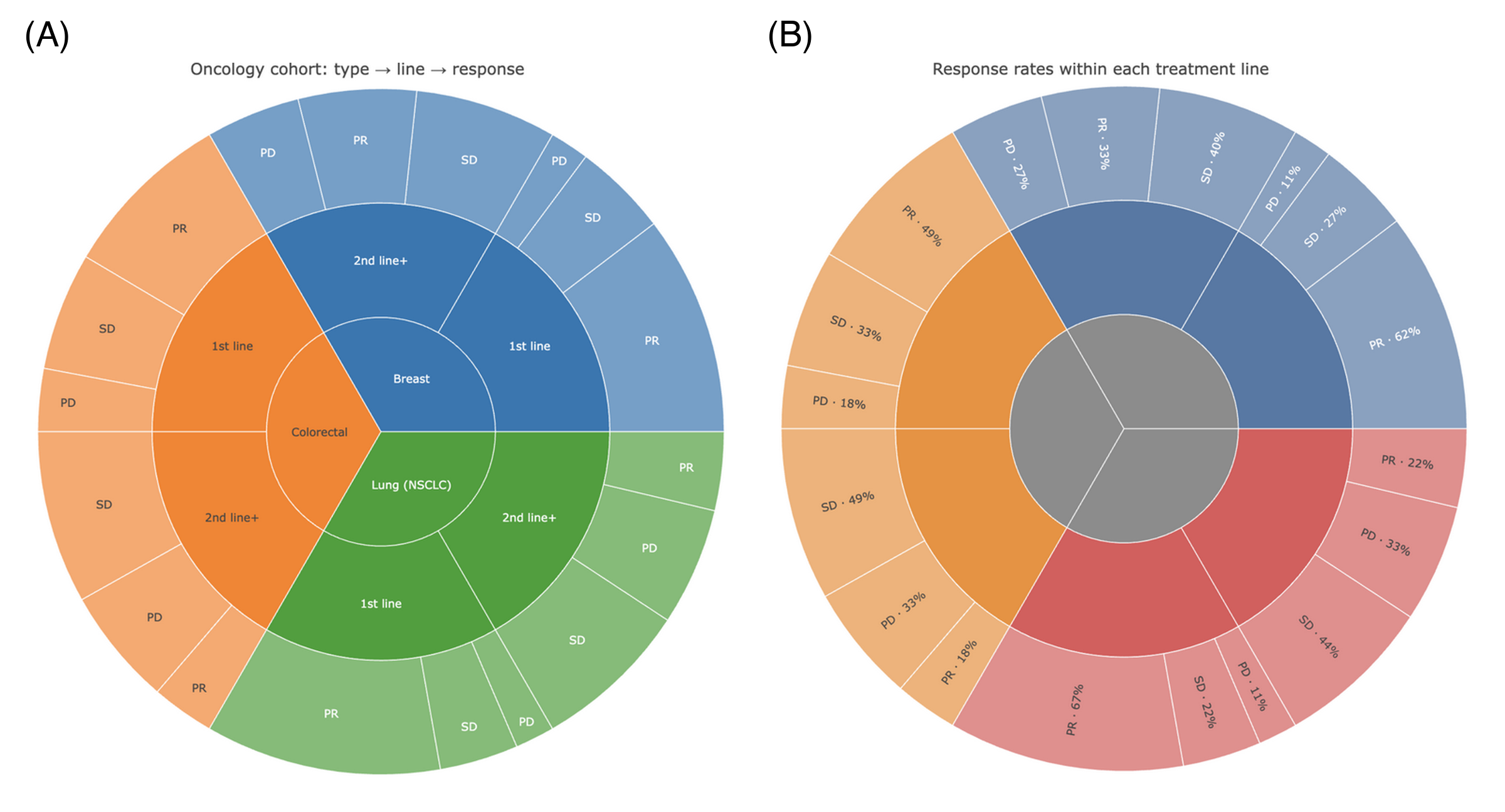
fig12. Color-Coded Sunburst
cols <- setNames(c("#4E79A7", "#F28E2B", "#E15759"), unique(cnt$cancer))

resp_rate <- cnt |>
  group_by(cancer, line) |>
  mutate(rate = scales::percent(n / sum(n), accuracy = 1)) |>
  ungroup()
lbls <- resp_rate |>
  mutate(id = paste(cancer, line, response),
         label = paste0(response, " · ", rate))

fig2 <- plot_ly(
  type = "sunburst",
  ids = nodes$id, labels = lbls$label[match(nodes$id, lbls$id)],
  parents = nodes$parent, values = nodes$value,
  branchvalues = "total",
  marker = list(colors = ifelse(nodes$parent == "", "#8C8C8C",
                                cols[substr(nodes$parent, 1, nchar(nodes$parent))])),
  textinfo = "label",
  insidetextorientation = "radial",
  hovertemplate = "%{id}<br>n = %{value}<extra></extra>"
) |>
  layout(title = "Response rates within each treatment line")
fig2
TipPractice tips
- With
branchvalues = "total", parentvalues must equal the sum of their children — validate the node table programmatically (as in Data Preparation) or plotly draws overlapping wedges. Alternatively usebranchvalues = "remainder"and give parents only their own value. - Keep
ids unique full paths (paste(parent, child)) — duplicated ids silently merge subtrees. - Sunbursts read badly beyond ~3 levels and ~30 leaves; collapse rare categories into an “Other” segment first.
- Static export for print figures needs a screenshot of the widget — the
webshot2package or a browser screenshot; hover interactivity is the web version’s advantage.
Application
Sunbursts are used for cohort composition (registry papers), cost decomposition (diagnosis → procedure), and taxonomic abundance (metagenomics: phylum → genus → species). The panel below mirrors a typical publication layout: (A) the full hierarchy and (B) the response-rate variant.
Reference
[1] Data-to-Viz. Sunburst. https://www.data-to-viz.com/graph/sunburst.html
[2] Sievert C. Interactive Web-Based Data Visualization with R, plotly, and shiny. Chapman and Hall/CRC; 2020. doi:10.1201/9780429447273