# Installing necessary packages (Bioconductor)
if (!requireNamespace("BiocManager", quietly = TRUE)) {
  install.packages("BiocManager")
}
if (!requireNamespace("clusterProfiler", quietly = TRUE)) {
  BiocManager::install("clusterProfiler")
}
if (!requireNamespace("patchwork", quietly = TRUE)) {
  install.packages("patchwork")
}

# Load packages
library(clusterProfiler)
library(enrichplot)
library(ggplot2)
library(dplyr)
library(patchwork)GSEA Running-Score Plot
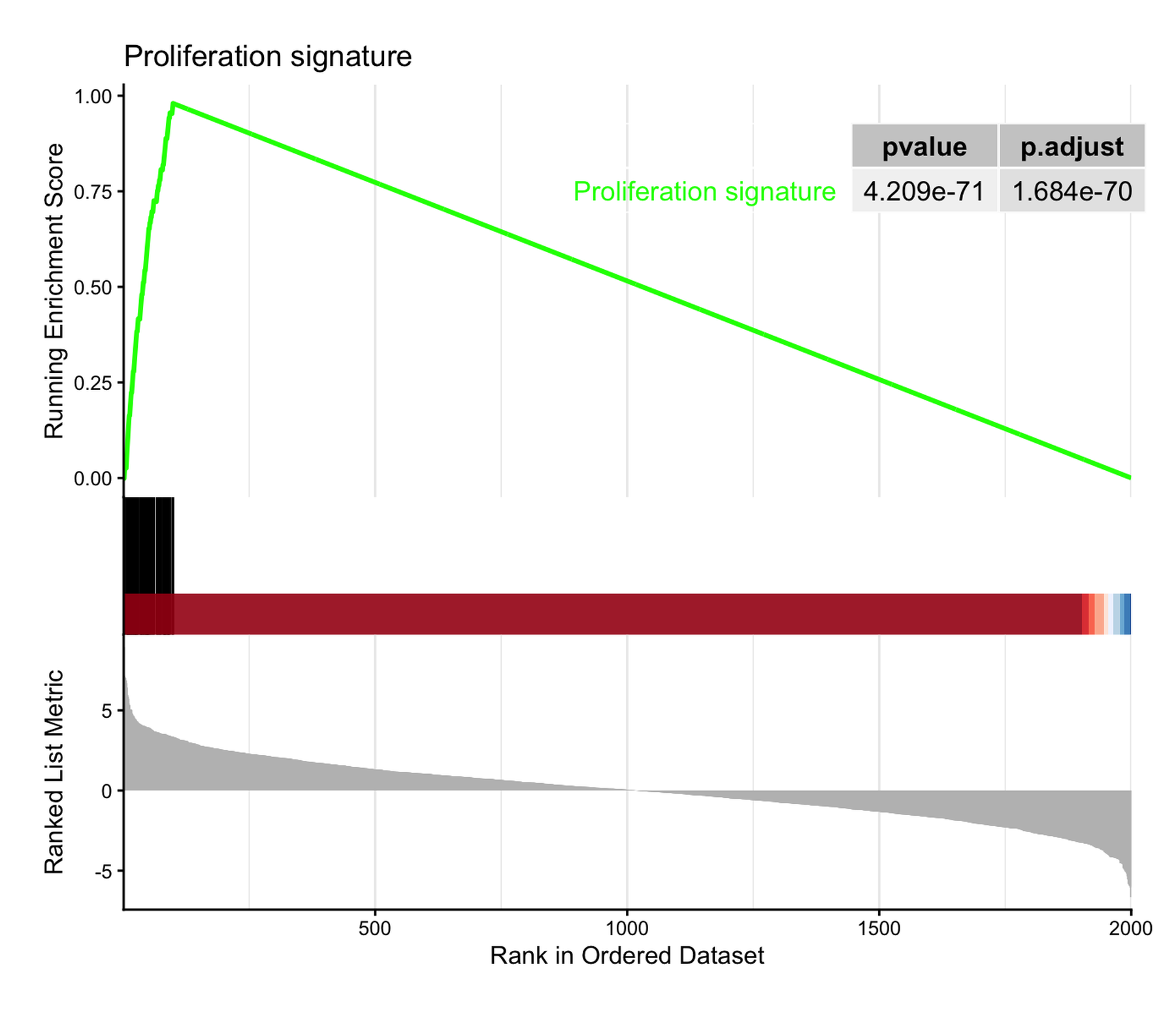
Gene Set Enrichment Analysis (GSEA) asks whether the genes of a defined set (a pathway, a signature) cluster towards one end of a genome-wide ranked list [1]. Its canonical figure is the running-score plot: the ranked statistic as a bar code (top), the walking enrichment score that rises at set-member hits and falls at misses, peaking at the enrichment score (middle), and the set membership as a rug (bottom). Unlike over-representation analysis, GSEA uses the full ranked list — no arbitrary significance cutoff on the input genes — which is why the plot, not a table, carries the argument.
In R the analysis is handled by clusterProfiler::GSEA() [2] and the canonical figure by enrichplot::gseaplot2() [3]. This tutorial renders the canonical plot, stacks several gene sets on one ranked list, and then rebuilds the running score from primitives in ggplot2 so the statistic itself becomes legible. The Python counterpart of this tutorial is GSEA Running-Score (Python).
This tutorial covers three workflows:
- The canonical
gseaplot2running-score plot with a p-value table; - Several gene sets overlaid on one ranked list;
- A hand-built three-panel reconstruction of the running ES (ggplot2 + patchwork).
Example
Setup
System Requirements: Cross-platform (Linux/MacOS/Windows)
Programming language: R
Dependent packages:
clusterProfiler;enrichplot;ggplot2;dplyr;patchwork
sessioninfo::session_info("attached")─ Session info ───────────────────────────────────────────────────────────────
setting value
version R version 4.6.2 (2026-10-29)
os Ubuntu 24.04.5 LTS
system x86_64, linux-gnu
ui X11
language (EN)
collate C.UTF-8
ctype C.UTF-8
tz UTC
date 2026-10-30
pandoc 3.1.3 @ /usr/bin/ (via rmarkdown)
quarto 1.10.19 @ /usr/local/bin/quarto
─ Packages ───────────────────────────────────────────────────────────────────
! package * version date (UTC) lib source
P clusterProfiler * 4.20.3 2026-10-19 [?] Bioconductor 3.23 (R 4.6.2)
P dplyr * 1.2.1 2026-04-03 [?] RSPM
P enrichplot * 1.32.1 2026-09-28 [?] Bioconductor 3.23 (R 4.6.2)
P ggplot2 * 4.0.3.9000 2026-10-30 [?] Github (tidyverse/ggplot2@b638d65)
P patchwork * 1.3.2 2025-08-25 [?] RSPM
[1] /home/runner/.cache/R/renv/library/Bizard-5140bdc6/linux-ubuntu-noble/R-4.6/x86_64-pc-linux-gnu
[2] /home/runner/work/_temp/Library
[3] /opt/R/4.6.2/lib/R/library
* ── Packages attached to the search path.
P ── Loaded and on-disk path mismatch.
──────────────────────────────────────────────────────────────────────────────Data Preparation
To keep the tutorial fully reproducible we simulate the ranked list and the gene sets instead of downloading MSigDB: 2,000 genes ranked by a Wald-like statistic, a 60-gene “proliferation” set concentrated among the top ranks, a 50-gene “metabolic” set among the bottom ranks, and two neutral sets — the configuration that produces cleanly interpretable enrichment scores. clusterProfiler::GSEA() consumes a named, decreasing-sorted numeric vector (geneList) plus a TERM2GENE data frame.
set.seed(251)

n_genes <- 2000
genes <- paste0("Gene", sprintf("%04d", 1:n_genes))
stats <- rnorm(n_genes, sd = 2)
names(stats) <- genes

geneList <- sort(stats, decreasing = TRUE)   # must be decreasing-sorted

# Synthetic gene sets: one top-ranked, one bottom-ranked, two neutral
gs_up   <- genes[order(stats, decreasing = TRUE)[1:100]] |> sample(60)
gs_down <- genes[order(stats)[1:100]] |> sample(50)
gs_neu1 <- sample(genes, 80)
gs_neu2 <- sample(genes, 70)

term2gene <- dplyr::bind_rows(
  data.frame(term = "Proliferation signature",     gene = gs_up),
  data.frame(term = "Metabolic repression",        gene = gs_down),
  data.frame(term = "Hypoxia response",            gene = gs_neu1),
  data.frame(term = "Immune checkpoint pathway",   gene = gs_neu2)
)

set.seed(251)  # GSEA permutes gene sets; keep p-values reproducible
gser <- GSEA(geneList, TERM2GENE = term2gene,
             minGSSize = 40, maxGSSize = 500,
             pvalueCutoff = 1,      # keep all sets for teaching
             eps = 0, seed = TRUE, verbose = FALSE)

as.data.frame(gser) |>
  dplyr::select(ID, setSize, enrichmentScore, NES, pvalue, p.adjust)
ID setSize enrichmentScore
Proliferation signature Proliferation signature 60 0.9798969
Metabolic repression Metabolic repression 50 -0.9743590
Hypoxia response Hypoxia response 80 0.2660821
Immune checkpoint pathway Immune checkpoint pathway 70 -0.2202139
NES pvalue p.adjust
Proliferation signature 3.951487 6.001589e-73 2.400636e-72
Metabolic repression -3.780863 4.617454e-58 9.234909e-58
Hypoxia response 1.136434 2.030361e-01 2.707147e-01
Immune checkpoint pathway -0.925151 6.088710e-01 6.088710e-01The negative NES of Metabolic repression marks a set enriched at the bottom of the list (down-regulated genes); the neutral sets hover around NES ≈ 0.
Visualization
1. The Canonical Running-Score Plot
gseaplot2(gser, geneSetID = 1, pvalue_table = TRUE,
          title = "Proliferation signature")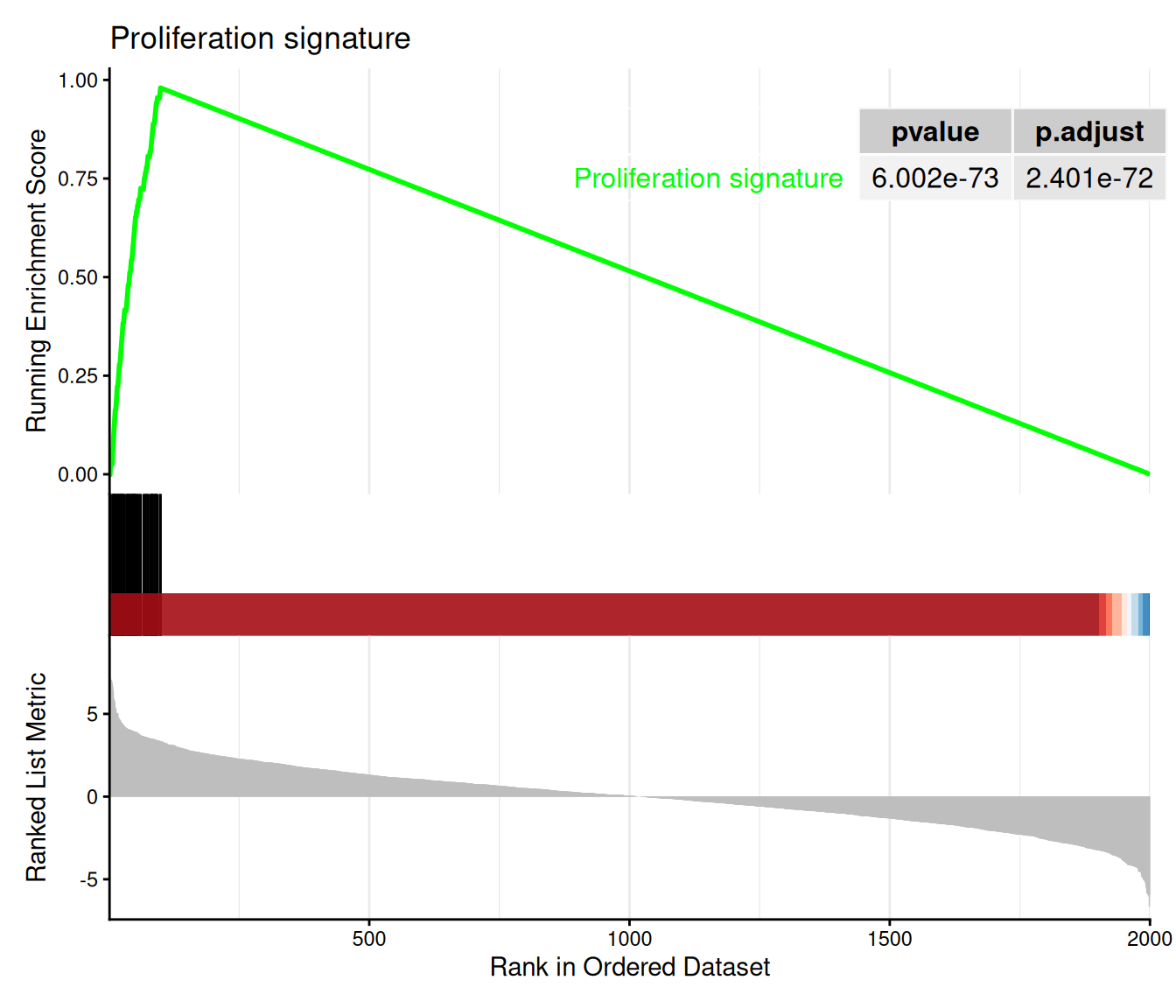
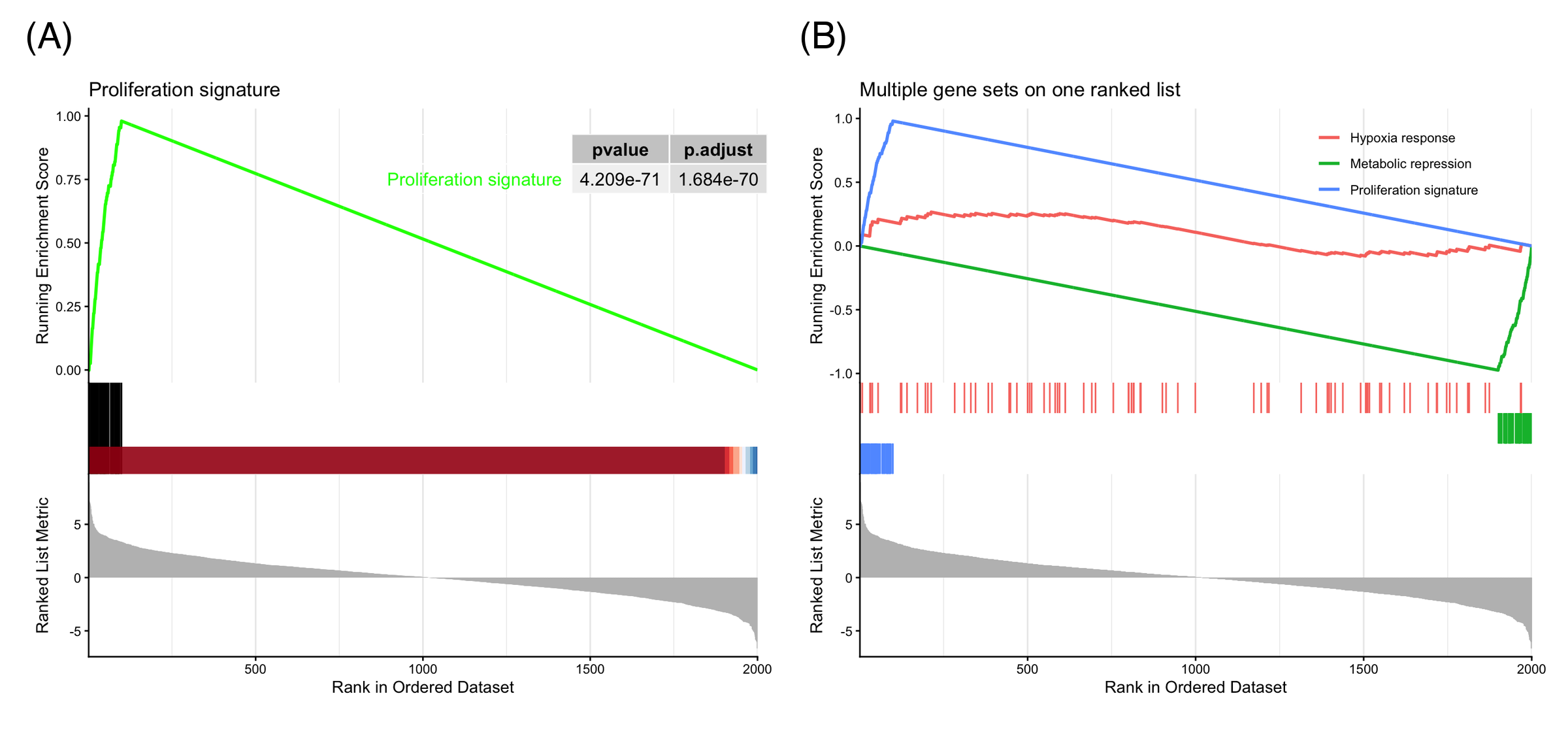
Three panels share one x-axis of rank positions: the running ES climbs steeply over the first 100 ranks (where the set members sit), peaks at the enrichment score, then decays; the rug marks the member positions; the bottom curve is the ranked statistic itself. The peak position defines the leading edge — the genes that drive the enrichment.
2. Several Gene Sets on One Ranked List
ids <- match(c("Proliferation signature", "Metabolic repression", "Hypoxia response"),
             gser$ID)
gseaplot2(gser, geneSetID = ids, pvalue_table = FALSE,
          title = "Multiple gene sets on one ranked list")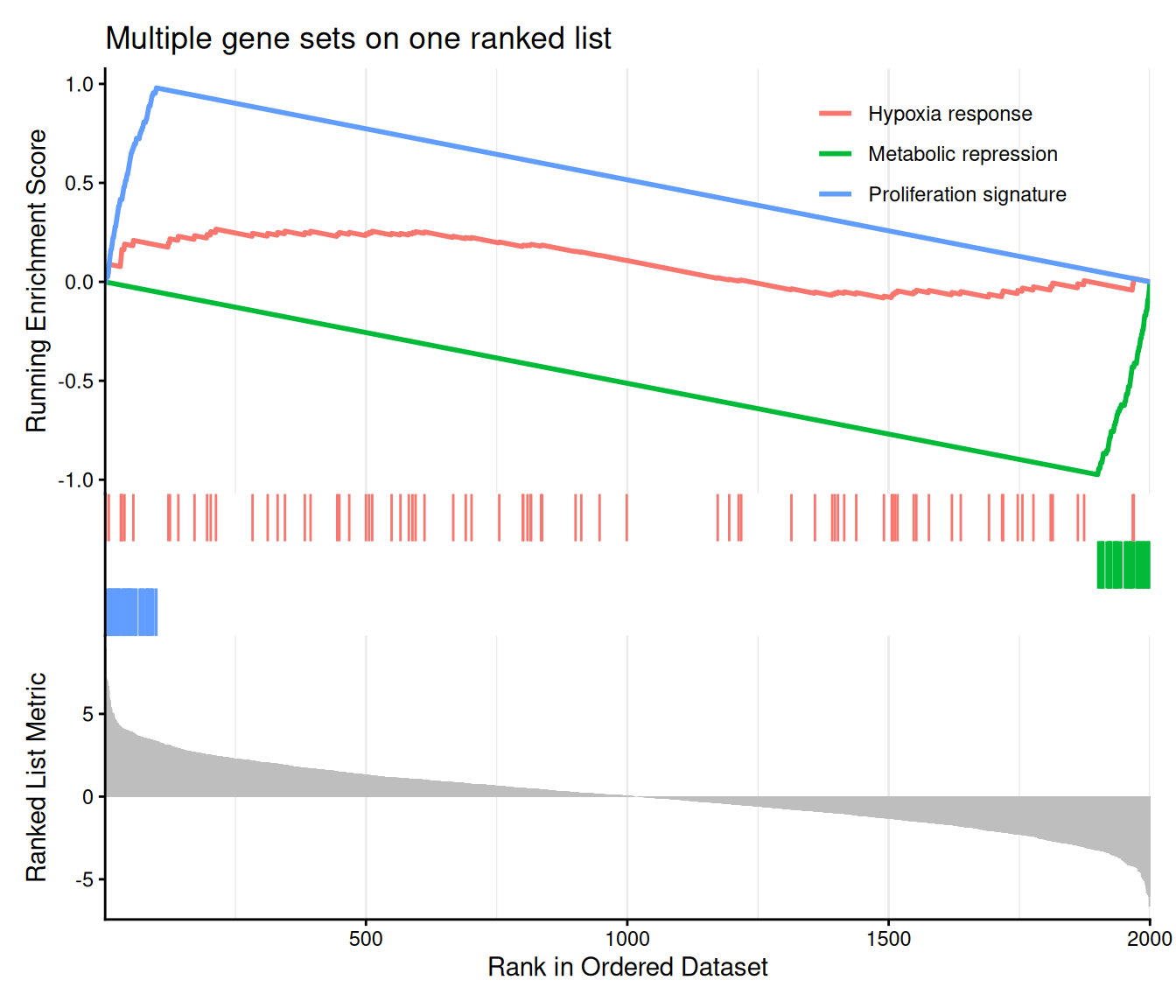
Overlaying sets is how GSEA results are compared in practice: up-enriched sets peak early and plateau, down-enriched sets dive to a negative minimum near the end of the list, and null sets wander near zero. Legend labels follow the selected sets; the color argument controls the palette.
3. Rebuilding the Running Score from Primitives
in_set  <- names(geneList) %in% gs_up
w       <- abs(geneList)
step    <- ifelse(in_set, w / sum(w[in_set]), -1 / sum(!in_set))
run_es  <- cumsum(step)
peak    <- which.max(run_es)

df <- data.frame(rank = seq_along(geneList),
                 stat = as.numeric(geneList),
                 es = run_es, hit = in_set)

p_top <- ggplot(df, aes(rank, stat)) +
  geom_segment(aes(xend = rank, yend = 0, color = hit),
               linewidth = 0.15, show.legend = FALSE) +
  scale_color_manual(values = c(`FALSE` = "grey70", `TRUE` = "#e63946")) +
  geom_vline(xintercept = peak, linetype = "dashed",
             color = "#1d3557", alpha = 0.5) +
  labs(y = "Ranked statistic", x = NULL) +
  theme_classic()

p_mid <- ggplot(df, aes(rank, es)) +
  geom_line(color = "#1d3557", linewidth = 0.8) +
  geom_point(data = df[peak, ], color = "#e63946", size = 2) +
  annotate("text", x = peak, y = max(run_es), vjust = -0.8, hjust = 0,
           label = sprintf("ES = %.2f at rank %d", max(run_es), peak), size = 3.5) +
  labs(y = "Running ES", x = NULL) +
  theme_classic()

p_rug <- ggplot(df[df$hit, ], aes(x = rank, y = 1)) +
  geom_segment(aes(xend = rank, yend = 0.55),
               linewidth = 0.3, color = "#e63946") +
  scale_y_continuous(limits = c(0, 1), expand = c(0, 0)) +
  theme_void()

p3 <- p_top / p_mid / p_rug +
  plot_layout(heights = c(3, 2, 0.5))
p3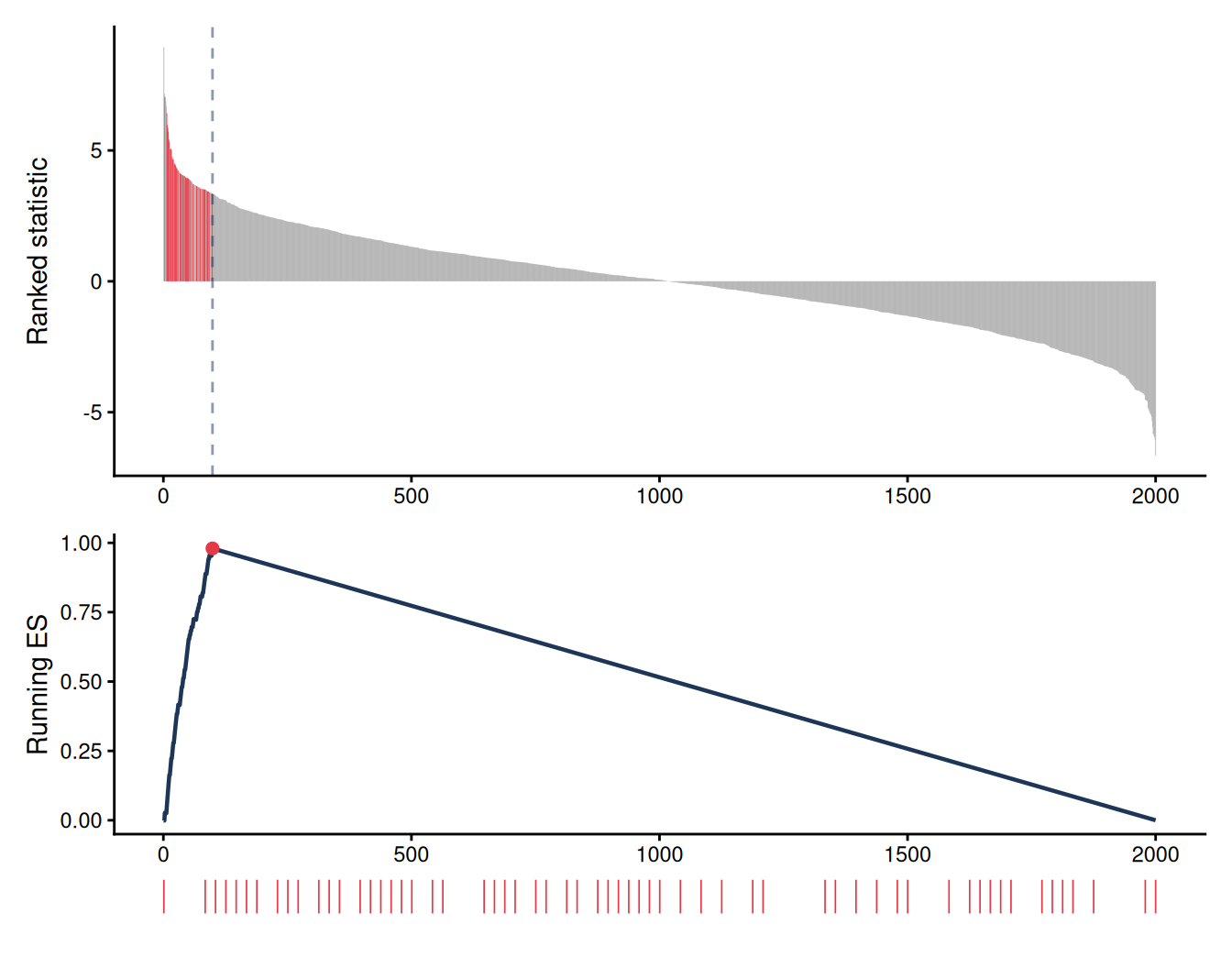
The weighted running ES is a cumulative sum: at each set member add its |statistic| normalized by the total member weight; at each miss subtract 1/(N − n). Rebuilding it from primitives demystifies gseaplot2 — the shapes in Section 1 are exactly this walk — and makes custom variants (annotation of the leading edge, per-panel themes, multi-figure layouts) straightforward.
TipPractice tips
-
geneListmust be a named, decreasing-sorted numeric vector, orGSEA()stops with “geneList should be a decreasing sorted vector”. - Use
pvalueCutoff = 1while exploring so filtered-out sets do not silently disappear from the result object. - Pass
seed = TRUE(plus aset.seed()call) for reproducible permutation p-values. - Report NES with p.adjust, not the raw ES: ES depends on set size, NES is normalized for it.
Application
Running-score GSEA plots are the standard figure for pathway-level interpretation of transcriptomic contrasts: tumor-vs-normal signatures, drug perturbation screens, and single-cell cluster markers. The panel below mirrors a typical publication layout: (A) the canonical single-set plot with p-value table and (B) the multi-set overlay.
Reference
[1] Subramanian A, Tamayo P, Mootha VK, et al. Gene set enrichment analysis: a knowledge-based approach for interpreting genome-wide expression profiles. Proc Natl Acad Sci USA. 2005;102(43):15545-15550. doi:10.1073/pnas.0506580102
[2] Wu T, Hu E, Xu S, et al. clusterProfiler 4.0: a universal enrichment tool for interpreting omics data. Innovation. 2021;2(3):100141. doi:10.1016/j.xinn.2021.100141
[3] Yu G. enrichplot: visualization of functional enrichment result. Bioconductor package. https://bioconductor.org/packages/enrichplot/