using CairoMakie
using DataFrames
using Statistics
using RandomForest Plot (Julia)
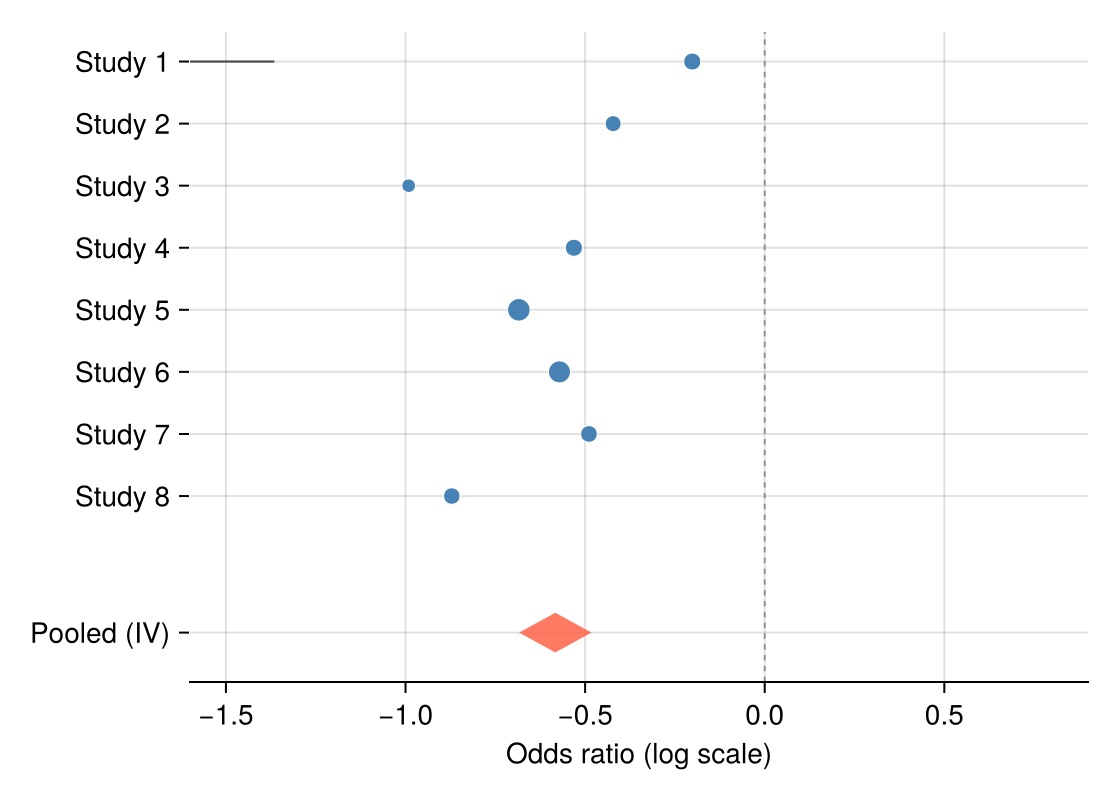
A forest plot places each study’s effect estimate as a marker with its confidence interval, above a pooled diamond — the standard display for meta-analysis. Julia has no maintained forest-plot package, so this tutorial assembles one from hlines!, scatter! and a four-point poly! diamond; the pooled estimate uses inverse-variance weighting in three lines.
Example
Setup
- System Requirements: Cross-platform (Linux/MacOS/Windows)
- Programming Language: Julia
- Dependencies:
CairoMakie,DataFrames,Statistics
Data Preparation
We simulate eight studies of a binary endpoint: log-odds-ratios scattered around −0.5 with study-specific standard errors, plus an inverse-variance pooled estimate.
Random.seed!(151)

studies = DataFrame(Study = ["Study $i" for i in 1:8],
                    logOR = -0.5 .+ 0.22 .* randn(8),
                    SE = 0.08 .+ 0.12 .* rand(8))
studies.CI_low = studies.logOR .- 1.96 .* studies.SE
studies.CI_high = studies.logOR .+ 1.96 .* studies.SE
studies.Weight = 1 ./ studies.SE .^ 2
pooled_logOR = sum(studies.logOR .* studies.Weight) / sum(studies.Weight)
pooled_SE = sqrt(1 / sum(studies.Weight))
pooled = (logOR = pooled_logOR,
          low = pooled_logOR - 1.96 * pooled_SE,
          high = pooled_logOR + 1.96 * pooled_SE)
(logOR = -0.5831819864888906, low = -0.6838798299173302, high = -0.48248414306045107)Visualization
Forest Plot with Pooled Diamond
Marker area scales with inverse-variance weight; the null (OR = 1) guide and a right-hand column of effect values complete the clinical layout.
y = collect(float.(range(nrow(studies), 1; step = -1)))
diamond_y = -1.2

fig = Figure(size = (560, 400))
ax = Axis(fig[1, 1], xlabel = "Odds ratio (log scale)")
hlines!(ax, y; xmin = studies.CI_low, xmax = studies.CI_high,
        color = :gray30, linewidth = 1.1)
scatter!(ax, studies.logOR, y;
         markersize = 6 .+ 10 .* studies.Weight ./ maximum(studies.Weight),
         color = :steelblue, strokewidth = 0.5, strokecolor = :white)
poly!(ax, Point2f[(pooled.low, diamond_y), (pooled.logOR, diamond_y + 0.32),
                  (pooled.high, diamond_y), (pooled.logOR, diamond_y - 0.32)];
      color = (:tomato, 0.85))
vlines!(ax, [0]; color = :gray55, linewidth = 0.9, linestyle = :dash)
ax.yticks = (vcat(y, [diamond_y]), vcat(studies.Study, ["Pooled (IV)"]))
xlims!(ax, -1.6, 0.9)
hidespines!(ax, :t, :r, :l)
fig
Subgrouped Forest Plot
Headers per subgroup with indented studies keep heterogeneous evidence organized; the pooled diamond moves to the bottom of the layout.
studies.Subgroup = repeat(["Retrospective", "Prospective"]; inner = 4)

fig = Figure(size = (560, 440))
ax = Axis(fig[1, 1], xlabel = "Odds ratio (log scale)")
row = 0.0
yticks = Float64[]; ylabels = String[]
for subgroup in ["Retrospective", "Prospective"]
    text!(ax, 0, row; text = subgroup, fontsize = 12, font = :bold,
          align = (:left, :center))
    push!(yticks, row); push!(ylabels, "")
    row -= 1
    for s in eachrow(studies[studies.Subgroup .== subgroup, :])
        hlines!(ax, [row]; xmin = s.CI_low, xmax = s.CI_high,
                color = :gray30, linewidth = 1.1)
        scatter!(ax, [s.logOR], [row]; markersize = 9, color = :steelblue,
                 strokewidth = 0.5, strokecolor = :white)
        push!(yticks, row); push!(ylabels, s.Study)
        row -= 1
    end
    row -= 0.6
end
poly!(ax, Point2f[(pooled.low, row), (pooled.logOR, row + 0.3),
                  (pooled.high, row), (pooled.logOR, row - 0.3)];
      color = (:tomato, 0.85))
text!(ax, 0, row; text = "Pooled (IV)", fontsize = 12, font = :bold,
      align = (:left, :center))
push!(yticks, row); push!(ylabels, "")
vlines!(ax, [0]; color = :gray55, linewidth = 0.9, linestyle = :dash)
ax.yticks = (yticks, ylabels)
xlims!(ax, -1.6, 0.9)
hidespines!(ax, :t, :r, :l)
fig
References
- Bax, L., Yu, L. M., Ikeda, N., Tsuruta, H., & Moons, K. G. (2006). Development and validation of MIX: comprehensive free software for meta-analysis of causal research data. BMC Medical Research Methodology, 6, 50.
- Danisch, S., & Krumbiegel, J. (2021). Makie.jl: Flexible high-performance data visualization for Julia. Journal of Open Source Software, 6(65), 3349.