# Installing necessary packages
if (!requireNamespace("ggalt", quietly = TRUE)) {
  install.packages("ggalt")
}
if (!requireNamespace("patchwork", quietly = TRUE)) {
  install.packages("patchwork")
}

# Load packages
library(ggplot2)
library(dplyr)
library(tidyr)
library(ggalt)
library(patchwork)Paired Before-After Plot
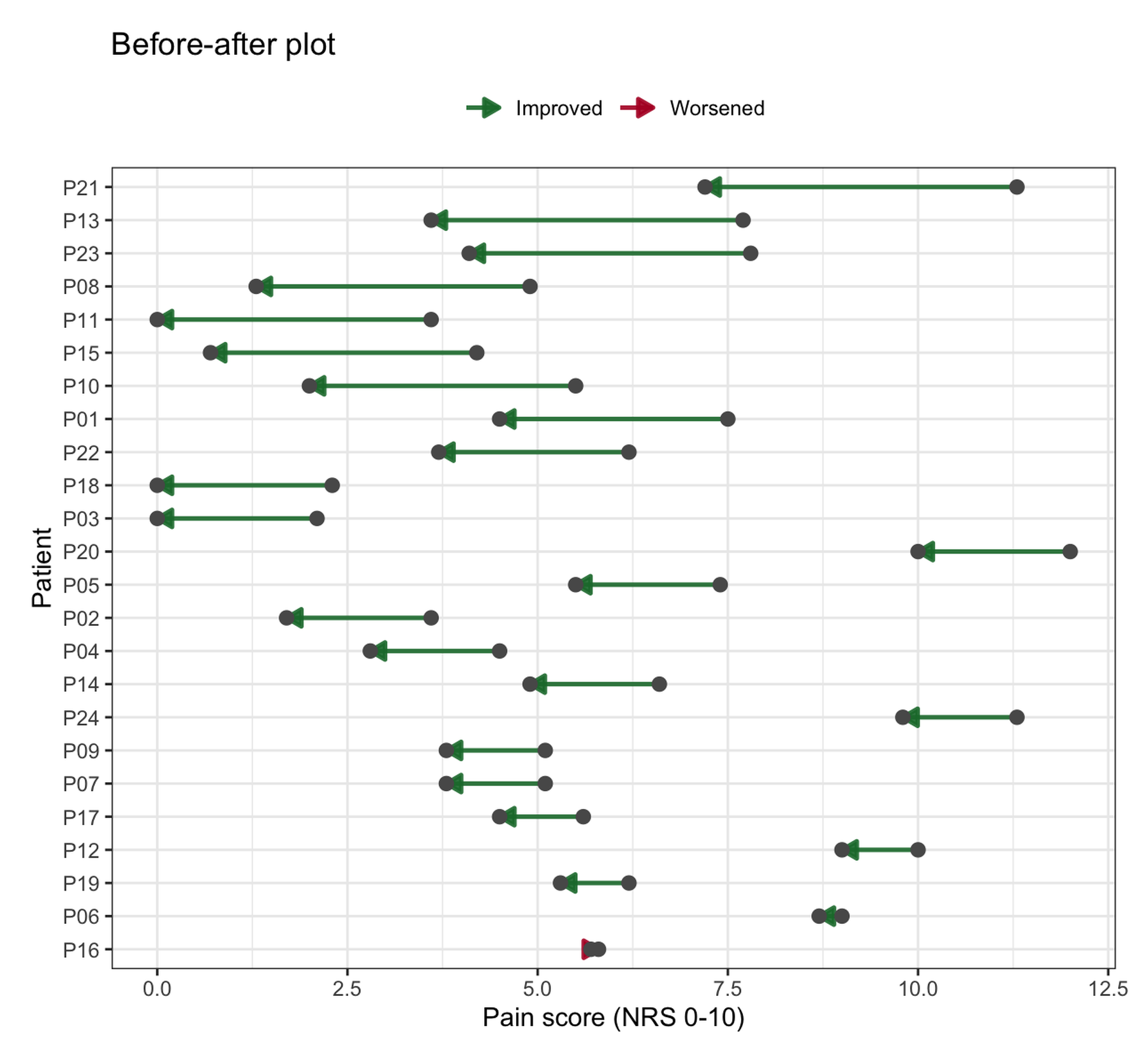
Paired data — the same subject measured twice (before/after treatment, left/right eye, two conditions) — must be visualized so that each subject’s change is visible. Grouped bar charts or side-by-side boxplots destroy the pairing: they show the two marginal distributions, not whether individuals improved [1]. The before-after plot connects each subject’s two measurements with a line (or arrow), instantly exposing individual trajectories, their consistency, and the outliers who move against the trend.
This tutorial shows the four most useful variants in ggplot2: connected before-after arrows, a slope chart, a paired dumbbell chart, and an individual-change panel with the paired mean difference and its confidence interval. The analysis of the paired design itself uses the paired t-test (or Wilcoxon signed-rank) — always paired, never the two-sample version.
Example
Setup
System Requirements: Cross-platform (Linux/MacOS/Windows)
Programming language: R
Dependent packages:
ggplot2;dplyr;tidyr;ggalt;patchwork
sessioninfo::session_info("attached")─ Session info ───────────────────────────────────────────────────────────────
setting value
version R version 4.6.2 (2026-10-29)
os Ubuntu 24.04.5 LTS
system x86_64, linux-gnu
ui X11
language (EN)
collate C.UTF-8
ctype C.UTF-8
tz UTC
date 2026-10-31
pandoc 3.1.3 @ /usr/bin/ (via rmarkdown)
quarto 1.10.20 @ /usr/local/bin/quarto
─ Packages ───────────────────────────────────────────────────────────────────
! package * version date (UTC) lib source
P dplyr * 1.2.1 2026-04-03 [?] RSPM
P ggalt * 0.8.0 2026-10-30 [?] Github (hrbrmstr/ggalt@7b5e9f9)
P ggplot2 * 4.0.3.9000 2026-10-30 [?] Github (tidyverse/ggplot2@b638d65)
P patchwork * 1.3.2 2025-08-25 [?] RSPM
P tidyr * 1.3.2 2025-12-19 [?] RSPM
[1] /home/runner/.cache/R/renv/library/Bizard-5140bdc6/linux-ubuntu-noble/R-4.6/x86_64-pc-linux-gnu
[2] /home/runner/work/_temp/Library
[3] /opt/R/4.6.2/lib/R/library
* ── Packages attached to the search path.
P ── Loaded and on-disk path mismatch.
──────────────────────────────────────────────────────────────────────────────Data Preparation
We simulate a single-arm analgesia trial: 24 patients’ pain scores (numeric rating scale 0–10) before and 4 weeks after treatment, with one non-responder included on purpose — the plot must show them, not hide them.
set.seed(2026)

n <- 24
pain <- data.frame(
  patient = paste0("P", sprintf("%02d", 1:n)),
  before  = round(rgamma(n, shape = 6, scale = 1.1), 1)
) |>
  mutate(after    = pmin(10, pmax(0, round(before - 2.2 + rnorm(n, 0, 1.6), 1))),
         change   = after - before,
         direction = ifelse(change <= 0, "Improved", "Worsened"))

pal <- c(Improved = "#1B7837", Worsened = "#B2182B")
head(pain)
patient before after change direction
1 P01 7.5 4.5 -3.0 Improved
2 P02 3.6 1.7 -1.9 Improved
3 P03 2.1 0.0 -2.1 Improved
4 P04 4.5 2.8 -1.7 Improved
5 P05 7.4 5.5 -1.9 Improved
6 P06 9.0 8.7 -0.3 ImprovedVisualization
1. Before-After Arrows
ggplot(pain, aes(x = before, xend = after, y = reorder(patient, -change),
                 color = direction)) +
  geom_segment(arrow = arrow(length = unit(0.1, "inches"), type = "closed"),
               linewidth = 0.9, alpha = 0.9) +
  geom_point(aes(x = before, y = reorder(patient, -change)),
             size = 2.4, color = "grey35") +
  geom_point(aes(x = after, y = reorder(patient, -change)),
             size = 2.4, color = "grey35") +
  scale_color_manual(values = pal, name = NULL) +
  labs(x = "Pain score (NRS 0-10)", y = "Patient", title = "Before-after plot") +
  theme_bw(base_size = 11) +
  theme(legend.position = "top")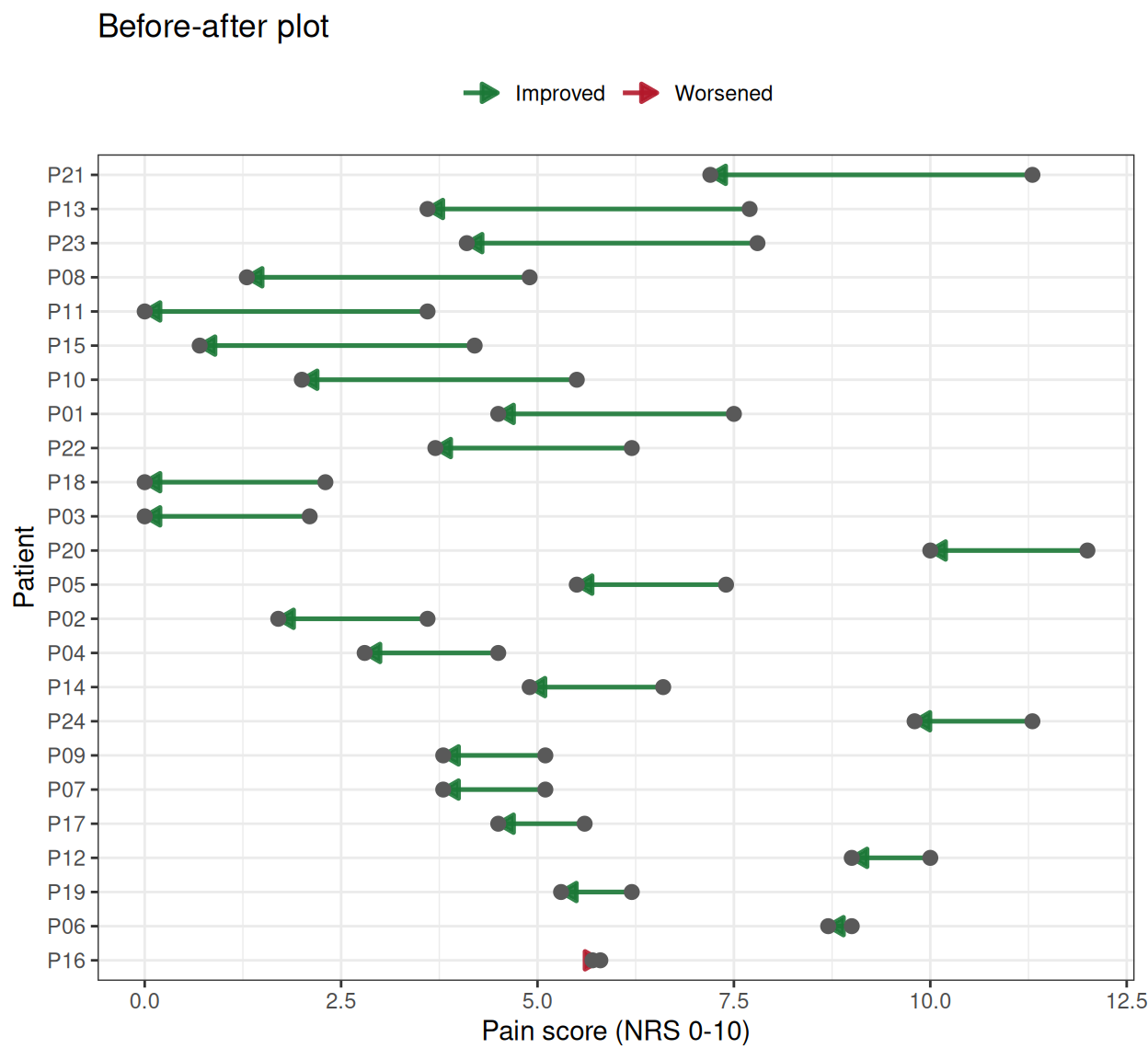
Sorting patients by their change (reorder by change) turns the plot into a response ranking; the arrow color splits responders from non-responders without any extra table.
2. Slope Chart
The slope chart is the two-timepoint special case of a parallel-coordinates plot: one column per time point, one line per subject. It is the most compact paired display for a publication figure.
long <- pain |>
  select(patient, direction, before, after) |>
  pivot_longer(-c(patient, direction), names_to = "Time", values_to = "score") |>
  mutate(Time = recode(Time, before = "Before", after = "After"))

ggplot(long, aes(Time, score, group = patient)) +
  geom_line(aes(color = direction), linewidth = 0.8, alpha = 0.85) +
  geom_point(size = 2.2, color = "grey30") +
  scale_color_manual(values = pal, guide = "none") +
  labs(x = NULL, y = "Pain score (NRS 0-10)", title = "Slope chart") +
  theme_bw(base_size = 12) +
  theme(panel.grid.minor = element_blank(),
        panel.grid.major.x = element_blank())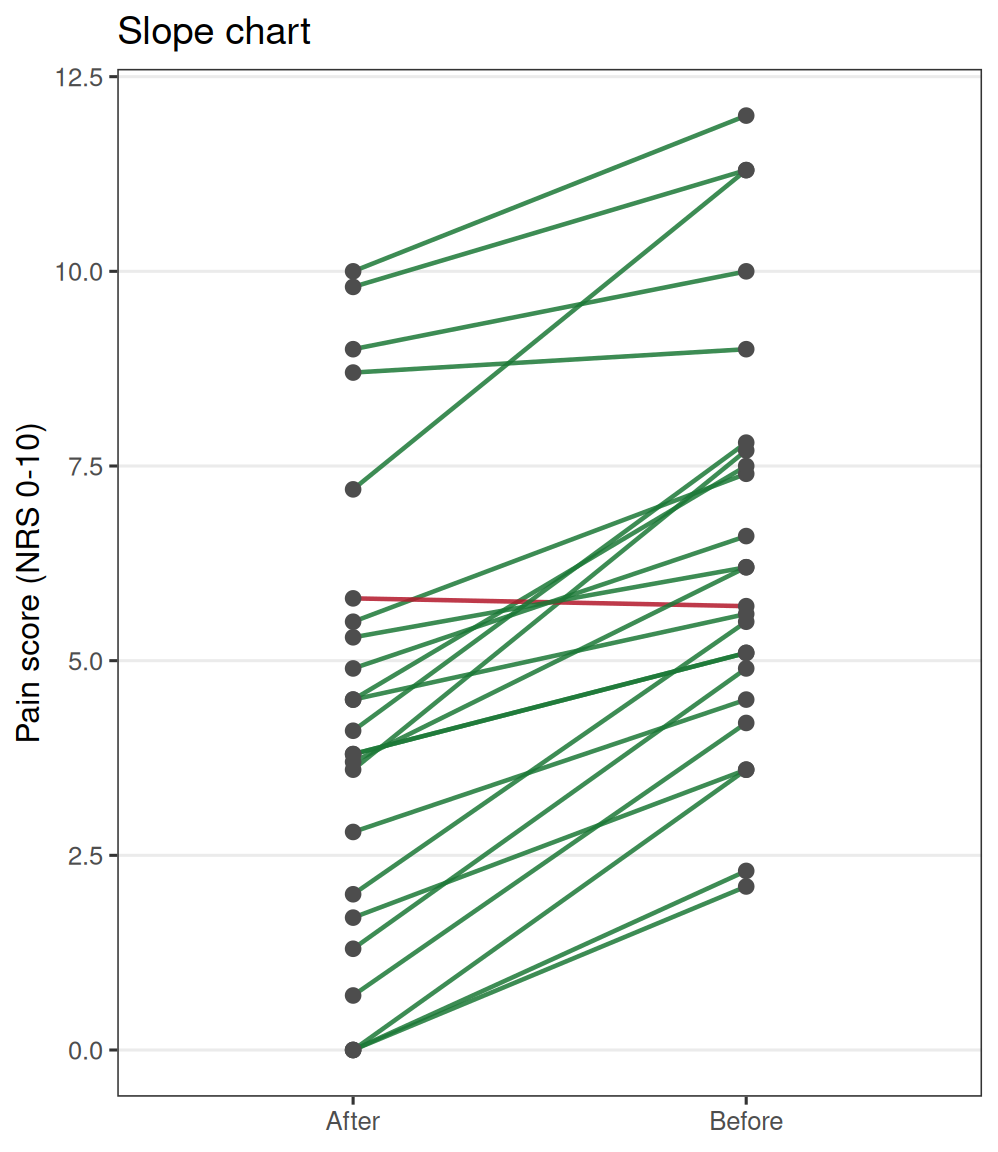
3. Paired Dumbbell Chart
The dumbbell variant lays one subject per row — best when patient labels carry meaning (IDs, doses, sites) and readers need to look up individuals.
ggplot(pain, aes(y = reorder(patient, change))) +
  geom_dumbbell(aes(x = after, xend = before),
                colour_x = "#1B7837", colour_xend = "grey45",
                size = 1.3, size_x = 2.4, size_xend = 2.4) +
  labs(x = "Pain score (green = after treatment, grey = baseline)", y = NULL,
       title = "Paired dumbbell chart") +
  theme_bw(base_size = 11) +
  theme(panel.grid.major.y = element_blank())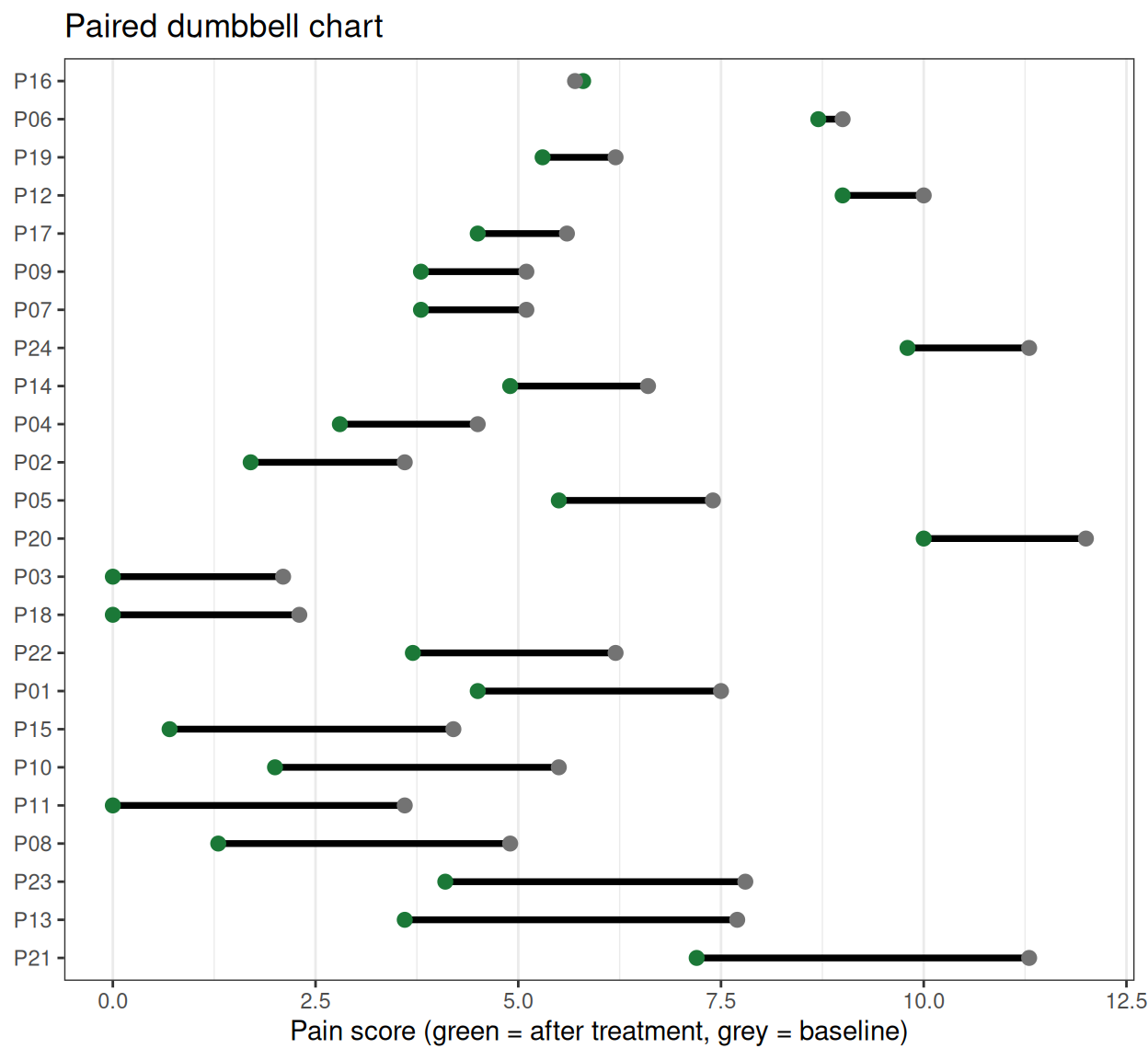
4. Individual Changes with the Paired Mean Difference
The statistically honest summary of a paired design is the distribution of differences: show every subject’s change plus the mean difference with its 95% confidence interval and the paired test.
tt <- t.test(pain$after, pain$before, paired = TRUE)
md <- mean(pain$change)
se <- sd(pain$change) / sqrt(nrow(pain))
lo <- md - qt(0.975, nrow(pain) - 1) * se
hi <- md + qt(0.975, nrow(pain) - 1) * se
xlim <- range(c(pain$change, lo, hi))

p4a <- ggplot(pain, aes(x = change, y = reorder(patient, change), fill = direction)) +
  geom_col(width = 0.65, alpha = 0.85) +
  geom_vline(xintercept = 0, color = "grey25") +
  scale_fill_manual(values = pal, guide = "none") +
  scale_x_continuous(limits = xlim) +
  labs(x = NULL, y = NULL, title = "Individual changes with mean 95% CI") +
  theme_bw(base_size = 11) +
  theme(axis.text.x = element_blank(), axis.ticks.x = element_blank())

p4b <- ggplot(data.frame(x = "Mean"), aes(x = md, y = x)) +
  geom_linerange(aes(xmin = lo, xmax = hi), orientation = "y", linewidth = 0.9) +
  geom_point(size = 2.6, color = "#B2182B") +
  geom_vline(xintercept = 0, color = "grey25", linetype = "dashed") +
  scale_x_continuous(limits = xlim) +
  annotate("text", x = md, y = 1.42, vjust = 1.1, size = 3.2,
           label = sprintf("Mean %.2f (95%% CI %.2f to %.2f), paired t p = %.2g",
                           md, lo, hi, tt$p.value)) +
  labs(x = "Change in pain score (after - before)", y = NULL) +
  theme_bw(base_size = 11)

p4a / p4b + plot_layout(heights = c(7, 1.3))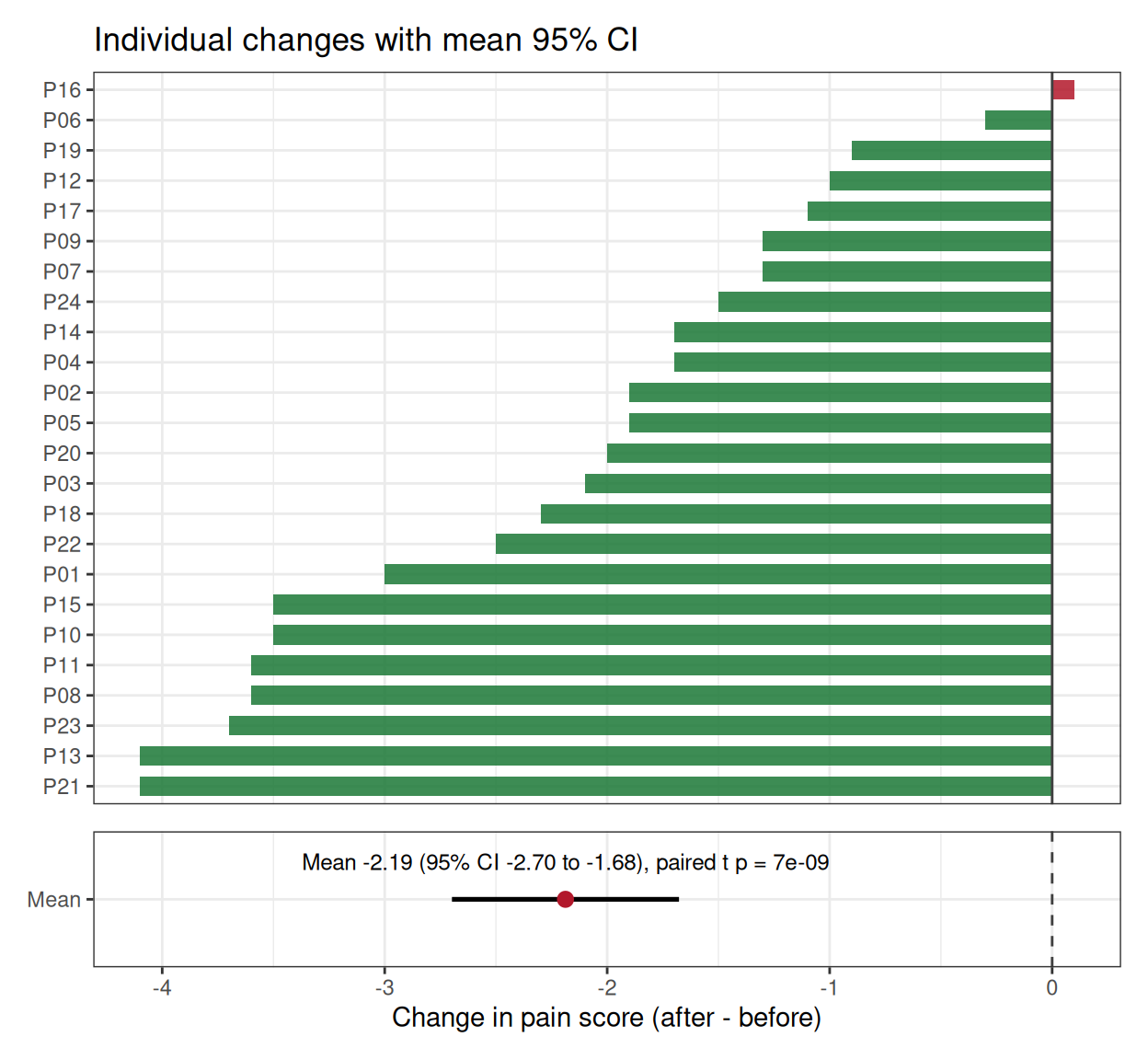
TipPractice tips
-
Test paired, always.
t.test(after, before, paired = TRUE)is not the same test as the unpaired one; quoting an unpaired test on paired data throws away power and can flip conclusions. - Keep the x/y range honest: pain scores live on 0–10, so
scale_x_continuous(limits = c(0, 10))(or an explicit break set) beats free scaling that exaggerates the change. - Non-responders belong in the plot. Color-coding by direction (or annotating them) is analysis, not decoration.
- For skewed outcomes report the median change with a Wilcoxon signed-rank test and show the same layouts.
Application
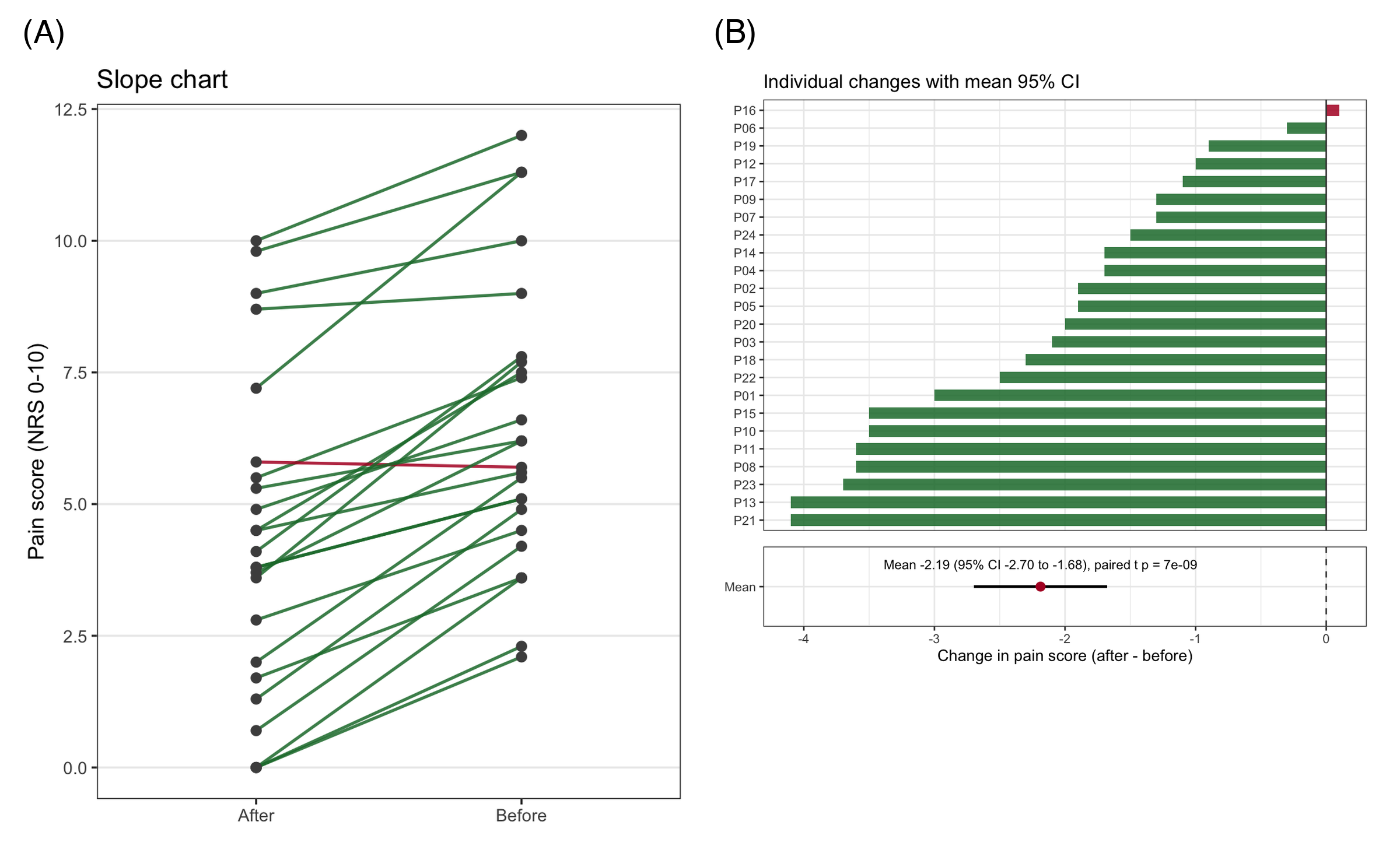
Before-after displays are the standard figure for single-arm intervention studies (rehabilitation, device training, psychological outcomes), lab-pair measurements (pre/post surgery biomarkers), and any within-subject experiment. The panel below mirrors a typical publication layout: (A) the before-after arrow plot and (B) the individual-change panel with paired mean CI.
Reference
[1] Krzywinski M, Altman N. Points of significance: visualizing samples with bar graphs. Nat Methods. 2014;11(9):878-879. doi:10.1038/nmeth.3075
[2] Attali D. ggalt: supplemental geoms for ggplot2. https://github.com/hrbrmstr/ggalt
[3] Pedersen TL. patchwork: the composer of plots. R package version 1.3.2. 2025. https://CRAN.R-project.org/package=patchwork