import matplotlib.pyplot as plt
import seaborn as sns
import pandas as pd
import numpy as npGSEA Running-Score Plot (Python)
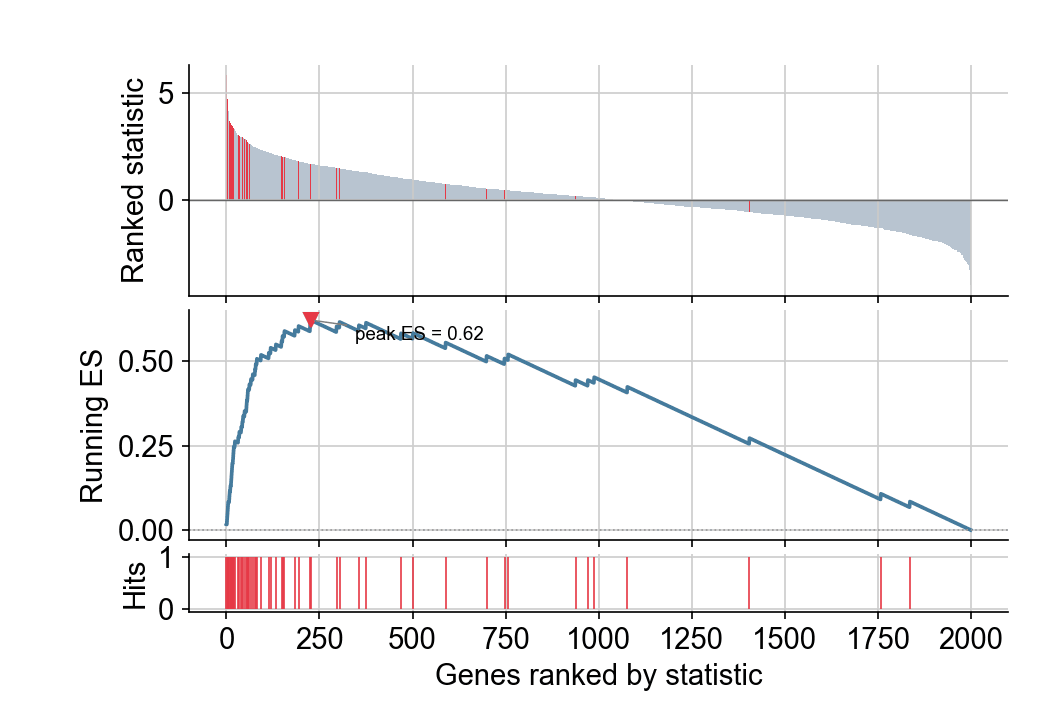
The GSEA running-score plot explains why a gene set is enriched: a ranked gene list (top panel), the walking enrichment score that rises at set-member hits and falls at misses (middle), and the set membership rug (bottom). Tools like gseapy produce it automatically; building it from primitives in matplotlib makes the statistic itself legible.
Example
Setup
- System Requirements: Cross-platform (Linux/MacOS/Windows)
- Programming Language: Python
- Dependencies:
matplotlib,seaborn,pandas,numpy
Data Preparation
We simulate a ranked gene table (2,000 genes sorted by a Wald-like statistic) and declare a 60-gene set concentrated among the top ranks — the configuration that produces a high enrichment score.
np.random.seed(251)

n = 2000
stats = np.random.normal(0, 1.2, n)
set_members = np.zeros(n, dtype=bool)
set_members[5:65] = True                      # 60 set genes near the top
stats[set_members] += np.random.normal(2.4, 0.8, 60)

ranked = pd.DataFrame({'Stat': stats},
                      index=[f'GENE{i:04d}' for i in range(1, n + 1)])
ranked = ranked.sort_values('Stat', ascending=False)

hit = set_members[np.argsort(-stats)]
# walking score: +1/|set| at a set gene, -1/(N-|set|) elsewhere
es = np.cumsum(np.where(hit, 1 / np.sum(hit), -1 / (n - np.sum(hit))))
peak = int(np.argmax(np.abs(es)))
Visualization
Two-Panel Running Score
The classic layout: the ranked statistic as bars (top), the running ES with its peak marked (middle), and set membership as a rug (bottom) — three panels sharing one x-axis of rank positions.
positions = np.arange(n)

fig, (ax_stat, ax_es, ax_hit) = plt.subplots(
    3, 1, figsize=(7, 4.8), sharex=True,
    gridspec_kw={'height_ratios': [2, 2, 0.5], 'hspace': 0.08})

ax_stat.bar(positions, ranked.Stat, color=np.where(hit, '#e63946', '#b8c4d0'),
            width=1.0, linewidth=0)
ax_stat.axhline(0, color='0.4', linewidth=0.7)
ax_stat.set_ylabel('Ranked statistic')

ax_es.plot(positions, es, color='#457b9d', linewidth=1.8)
ax_es.axhline(0, color='0.6', linewidth=0.8, linestyle=':')
ax_es.plot(peak, es[peak], marker='v', color='#e63946', markersize=7)
ax_es.annotate(f'peak ES = {es[peak]:.2f}', xy=(peak, es[peak]),
               xytext=(peak + 120, es[peak] - 0.06), fontsize=9,
               arrowprops=dict(arrowstyle='-', color='0.5', lw=0.7))
ax_es.set_ylabel('Running ES')

ax_hit.vlines(positions[hit], 0, 1, color='#e63946', linewidth=0.8)
ax_hit.set_ylabel('Hits')

for ax in (ax_stat, ax_es, ax_hit):
    ax.spines[['top', 'right']].set_visible(False)
ax_hit.set_xlabel('Genes ranked by statistic')
plt.tight_layout()
plt.show()
/mnt/TMP/ipykernel_16651/651908172.py:26: UserWarning: This figure includes Axes that are not compatible with tight_layout, so results might be incorrect.
plt.tight_layout()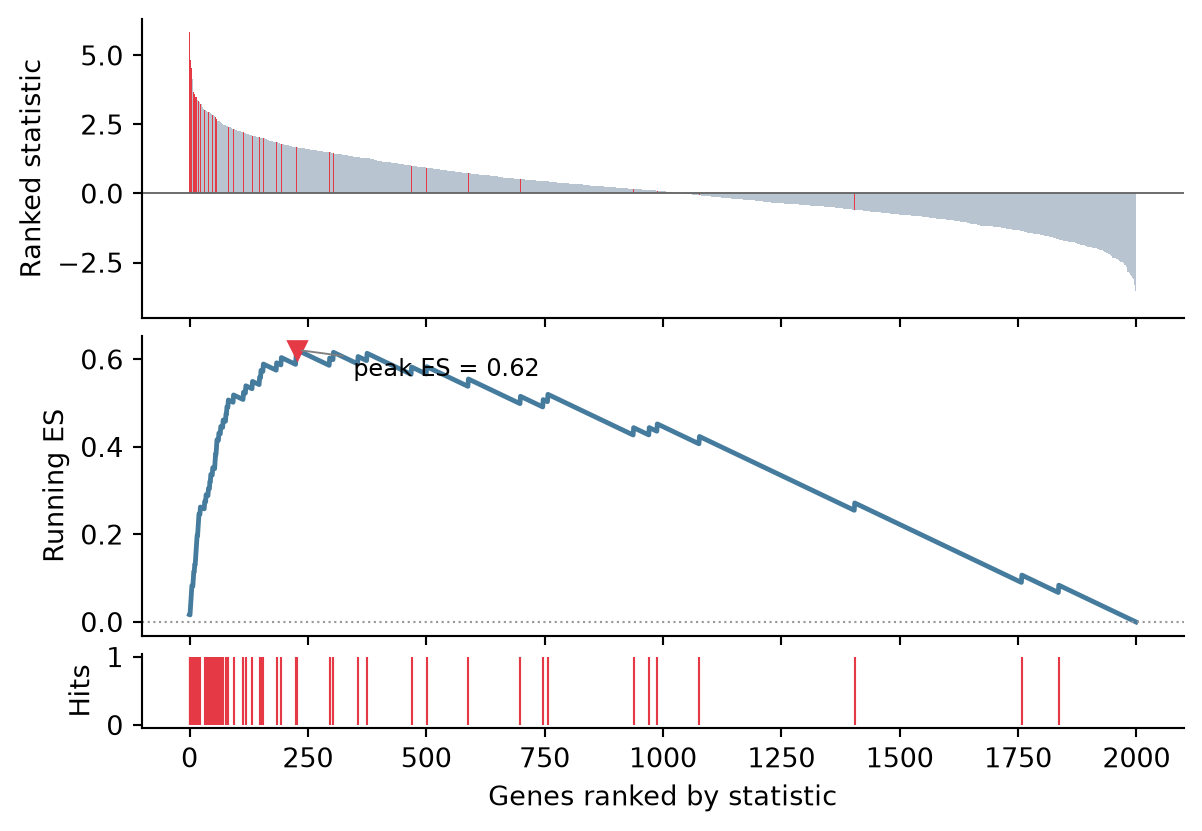
Two Contrasts Compared
Overlaid running scores for two gene sets show contrast in specificity at a glance; the legend carries each set’s peak ES.
set2 = np.zeros(n, dtype=bool)
set2[800:900] = True
hit2 = set2[np.argsort(-stats)]
es2 = np.cumsum(np.where(hit2, 1 / 100, -1 / (n - 100)))

fig, ax = plt.subplots(figsize=(7, 3.6))
ax.plot(positions, es, color='#e63946', linewidth=1.8,
        label=f'Set 1 (peak {es[peak]:.2f})')
ax.plot(positions, es2, color='#457b9d', linewidth=1.8,
        label=f'Set 2 (peak {es2[np.argmax(np.abs(es2))]:.2f})')
ax.axhline(0, color='0.6', linewidth=0.8, linestyle=':')
ax.set_xlabel('Genes ranked by statistic')
ax.set_ylabel('Running ES')
ax.legend(frameon=False)
ax.spines[['top', 'right']].set_visible(False)
plt.tight_layout()
plt.show()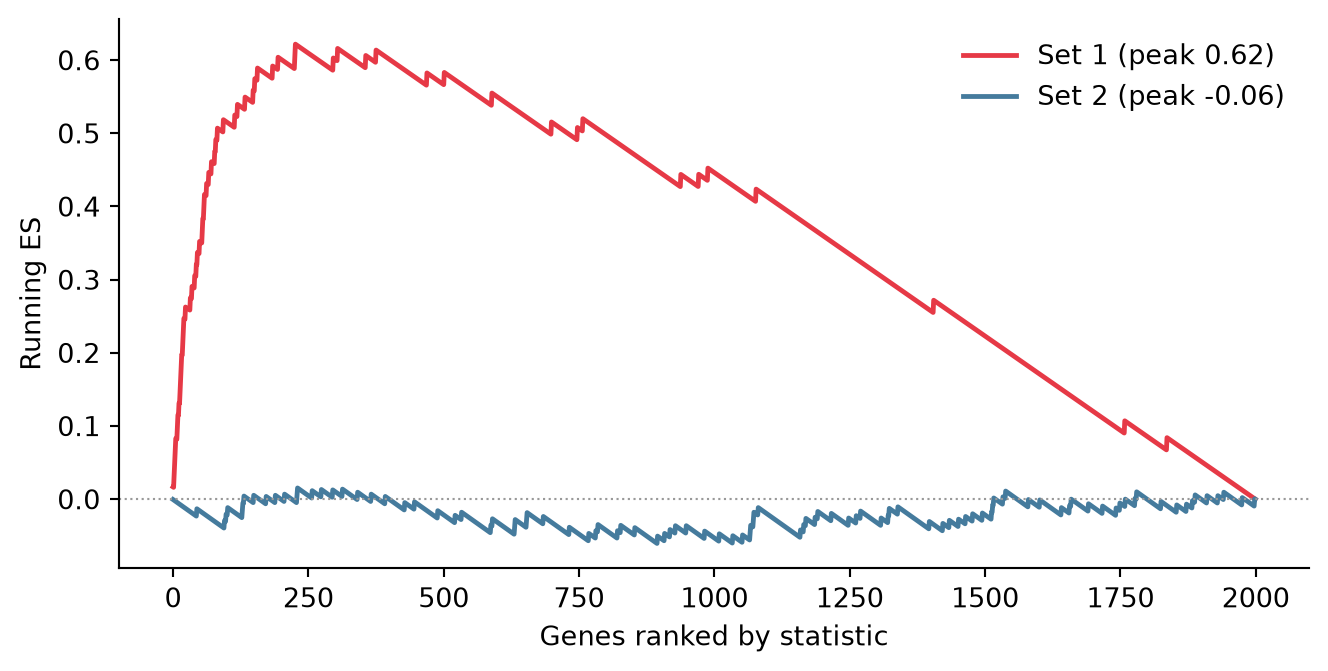
References
- Subramanian, A., et al. (2005). Gene Set Enrichment Analysis: A Knowledge-Based Approach for Interpreting Genome-Wide Expression Profiles. PNAS, 102(43), 15545-15550.
- Korotkevich, G., et al. (2021). Fast gene set enrichment analysis. bioRxiv 060012.