import matplotlib.pyplot as plt
import seaborn as sns
import pandas as pd
import numpy as np
import ptitprince as ptRaincloud Plot (Python)
A raincloud plot combines a half violin (the “cloud”), a box plot, and jittered raw points (the “rain”) in a single display, showing the full distribution, summary statistics, and individual observations at once. In biomedical research it has become the preferred replacement for bar graphs of grouped continuous data. In Python the ptitprince package assembles the three layers on top of seaborn.
Example
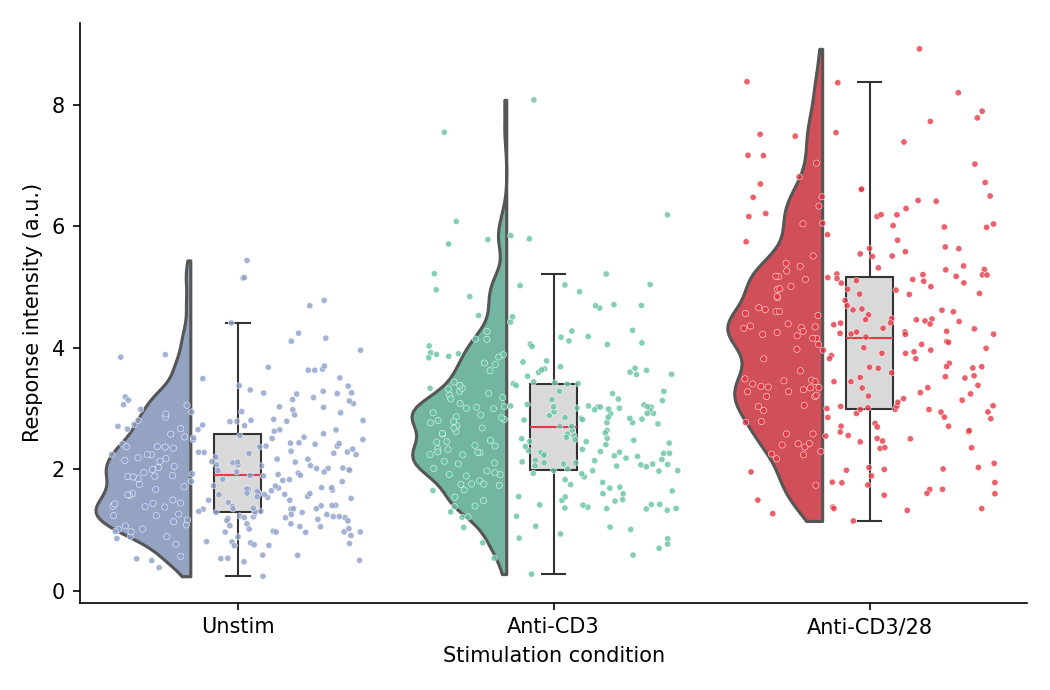
Setup
- System Requirements: Cross-platform (Linux/MacOS/Windows)
- Programming Language: Python
- Dependencies:
matplotlib,seaborn,pandas,numpy,ptitprince
Data Preparation
We simulate flow-cytometry response intensities across three stimulation conditions, with enough cells per condition for the half-violin outlines to be informative.
np.random.seed(41)

conditions = ['Unstim', 'Anti-CD3', 'Anti-CD3/28']
n_cells = 250
df = pd.DataFrame({
    'Condition': np.repeat(conditions, n_cells),
    'Response': np.concatenate([
        np.random.gamma(4.0, 0.5, n_cells),
        np.random.gamma(5.0, 0.55, n_cells),
        np.random.gamma(7.0, 0.6, n_cells),
    ])
})
palette = {'Unstim': '#8da0cb', 'Anti-CD3': '#66c2a5', 'Anti-CD3/28': '#e63946'}
Visualization
Basic Raincloud Plot
Three stacked layers build the cloud: a half violin shifted left of the category tick, a narrow box at the tick, and jittered points shifted right.
dx = 'Condition'; dy = 'Response'; ort = 'v'

fig, ax = plt.subplots(figsize=(7, 4.6))
ax = pt.half_violinplot(x=dx, y=dy, hue=dx, data=df, palette=palette, order=conditions,
                        dodge=False, bw=0.2, cut=0, scale='area', width=0.6,
                        inner=None, orient=ort, ax=ax)
ax = sns.boxplot(x=dx, y=dy, data=df, order=conditions, orient=ort,
                 width=0.15, color='0.85', showcaps=True,
                 boxprops=dict(edgecolor='0.2'),
                 whiskerprops=dict(color='0.2'), capprops=dict(color='0.2'),
                 medianprops=dict(color='#e63946'),
                 showfliers=False, ax=ax)
ax = sns.stripplot(x=dx, y=dy, data=df, hue=dx, order=conditions, orient=ort,
                   palette=palette, legend=False, edgecolor='white', linewidth=0.3,
                   size=3, jitter=0.4, alpha=0.8, ax=ax)
if ax.get_legend() is not None:
    ax.get_legend().remove()
ax.set_xlabel('Stimulation condition')
ax.set_ylabel('Response intensity (a.u.)')
ax.spines[['top', 'right']].set_visible(False)
plt.tight_layout()
plt.show()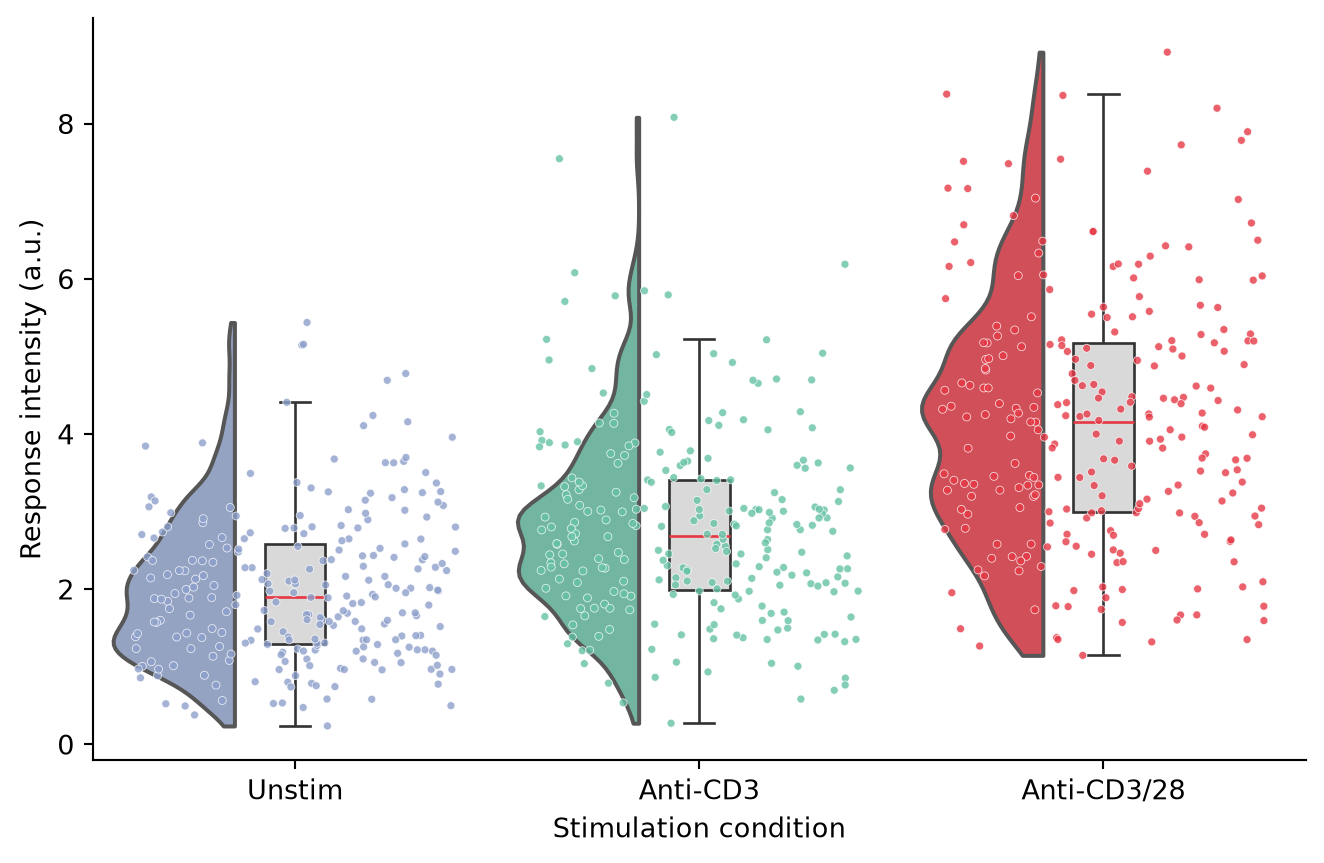
Horizontal Raincloud Plot
Long category labels read better in the horizontal orientation (orient='h'), with the clouds hanging above the boxes.
ort = 'h'

fig, ax = plt.subplots(figsize=(7, 4.6))
# For the horizontal orientation ptitprince expects the numeric variable in x
ax = pt.half_violinplot(x=dy, y=dx, hue=dx, data=df, palette=palette, order=conditions,
                        dodge=False, bw=0.2, cut=0, scale='area', width=0.6,
                        inner=None, orient=ort, ax=ax)
ax = sns.boxplot(x=dy, y=dx, data=df, order=conditions, orient=ort,
                 width=0.15, color='0.85',
                 boxprops=dict(edgecolor='0.2'),
                 whiskerprops=dict(color='0.2'), capprops=dict(color='0.2'),
                 medianprops=dict(color='#e63946'),
                 showfliers=False, ax=ax)
ax = sns.stripplot(x=dy, y=dx, data=df, hue=dx, order=conditions, orient=ort,
                   palette=palette, legend=False, edgecolor='white', linewidth=0.3,
                   size=3, jitter=0.4, alpha=0.8, ax=ax)
if ax.get_legend() is not None:
    ax.get_legend().remove()
ax.set_xlabel('Response intensity (a.u.)')
ax.set_ylabel('Stimulation condition')
ax.spines[['top', 'right']].set_visible(False)
plt.tight_layout()
plt.show()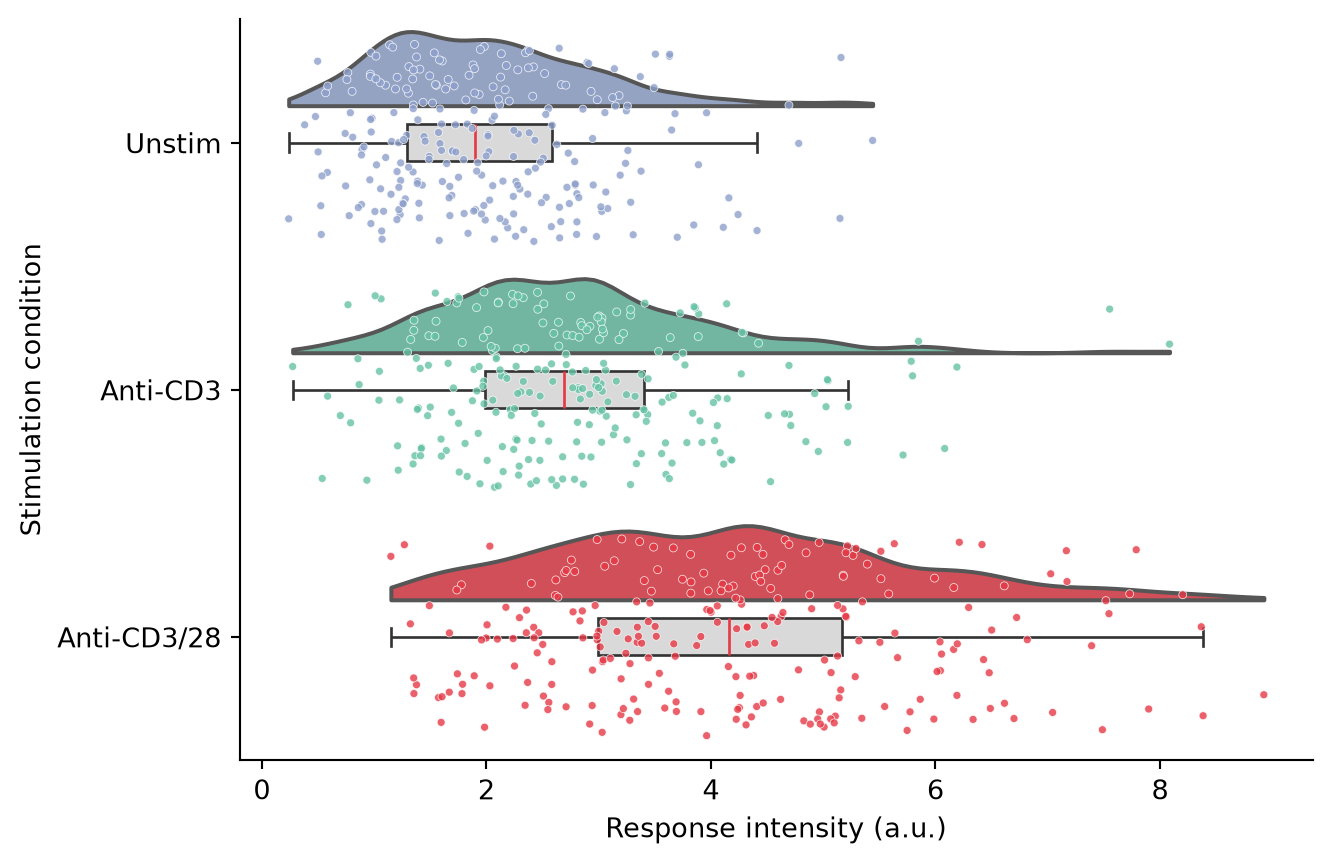
Grouped Raincloud Plot
Mapping a second factor to hue splits each cloud into paired halves, e.g., responder vs non-responder cells within each stimulation.
ort = 'v'
df2 = df.copy()
df2['Subpopulation'] = np.random.choice(['Responder', 'Non-responder'], len(df2), p=[0.6, 0.4])

fig, ax = plt.subplots(figsize=(7.5, 4.6))
ax = pt.half_violinplot(x=dx, y=dy, hue='Subpopulation', data=df2, order=conditions,
                        hue_order=['Responder', 'Non-responder'],
                        palette=['#457b9d', '#e78ac3'],
                        bw=0.2, cut=0, scale='area', width=0.9,
                        inner=None, orient=ort, dodge=True, ax=ax)
ax = sns.boxplot(x=dx, y=dy, hue='Subpopulation', data=df2, order=conditions,
                 hue_order=['Responder', 'Non-responder'], orient=ort,
                 width=0.3, color='0.88',
                 boxprops=dict(edgecolor='0.2'),
                 whiskerprops=dict(color='0.2'), capprops=dict(color='0.2'),
                 medianprops=dict(color='#e63946'),
                 showfliers=False, dodge=True, ax=ax)
ax = sns.stripplot(x=dx, y=dy, hue='Subpopulation', data=df2, order=conditions,
                   hue_order=['Responder', 'Non-responder'],
                   palette=['#457b9d', '#e78ac3'], dodge=True,
                   edgecolor='white', linewidth=0.3, size=2.5, jitter=0.4,
                   alpha=0.8, ax=ax)
ax.set_xlabel('Stimulation condition')
ax.set_ylabel('Response intensity (a.u.)')
handles, labels = ax.get_legend_handles_labels()
ax.legend(handles[:2], labels[:2], frameon=False, title=None, loc='upper left')
ax.spines[['top', 'right']].set_visible(False)
plt.tight_layout()
plt.show()
/mnt/TMP/ipykernel_25568/1734680523.py:11: FutureWarning:
Setting a gradient palette using color= is deprecated and will be removed in v0.14.0. Set `palette='dark:0.88'` for the same effect.
ax = sns.boxplot(x=dx, y=dy, hue='Subpopulation', data=df2, order=conditions,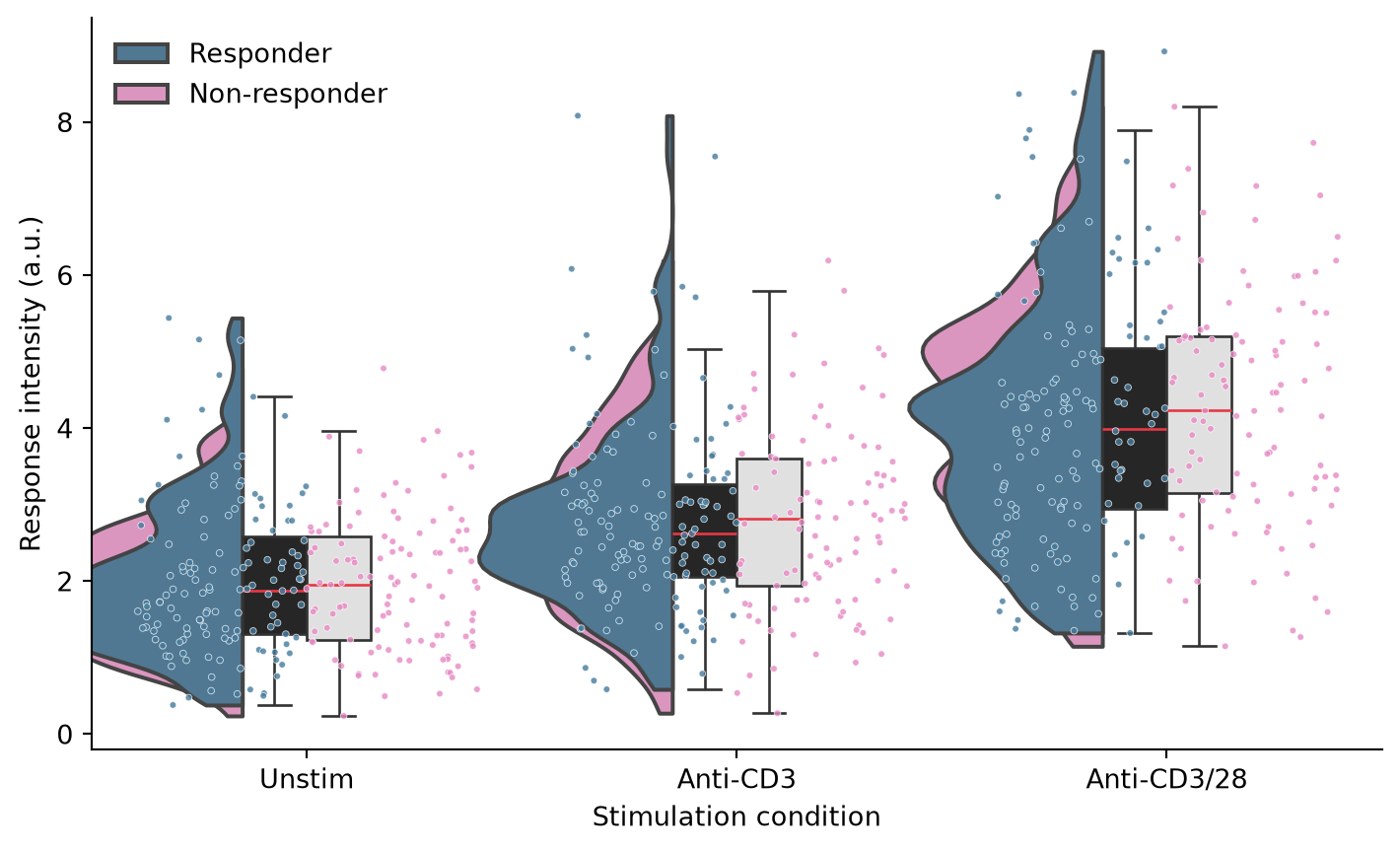
References
- Allen, M., Poggiali, D., Whitaker, K., et al. (2019). Raincloud plots: a multi-platform tool for robust data visualization. Wellcome Open Research, 4, 63.
- Hunter, J. D. (2007). Matplotlib: A 2D graphics environment. Computing in Science & Engineering, 9(3), 90-95.
- Waskom, M. L. (2021). seaborn: statistical data visualization. Journal of Open Source Software, 6(60), 3021.