using CairoMakie
using DataFrames
using Statistics
using RandomLine Plot (Julia)
A line plot displays the trend of a continuous variable over an ordered axis such as time. In biomedical research, line plots are the standard figure for growth curves, pharmacokinetic profiles, and longitudinal omics time courses, usually with an uncertainty band around the group mean. CairoMakie composes them from lines!, band!, and scatter! primitives with exact control over layering.
Example
Setup
- System Requirements: Cross-platform (Linux/MacOS/Windows)
- Programming Language: Julia
- Dependencies:
CairoMakie,DataFrames,Statistics
Data Preparation
We simulate a preclinical tumor-growth study: 12 mice per arm (vehicle vs treatment) measured weekly for 8 weeks, using a two-phase exponential growth model with mouse-to-mouse variability.
Random.seed!(21)

weeks = 0.0:8
n_mice = 12
arms = Dict("Vehicle" => 0.32, "Treatment" => 0.18)
curves = Dict{String, Matrix{Float64}}()
for (arm, rate) in arms
    curves[arm] = [100 * exp(rate * (1 + 0.08 * randn()) * w) for m in 1:n_mice, w in weeks]
end
arm_colors = Dict("Vehicle" => :steelblue, "Treatment" => :tomato)
Dict{String, Symbol} with 2 entries:
"Vehicle" => :steelblue
"Treatment" => :tomatoVisualization
Basic Line Plot
Aggregate first, then draw: one line per group with distinct markers keeps small summaries readable.
fig = Figure(size = (460, 340))
ax = Axis(fig[1, 1], xlabel = "Week", ylabel = "Tumor volume (mm\$^3\$)")
for (arm, mat) in curves
    lines!(ax, weeks, vec(mean(mat, dims = 1)); color = arm_colors[arm],
           linewidth = 2)
    scatter!(ax, weeks, vec(mean(mat, dims = 1)); color = arm_colors[arm],
             markersize = 10, marker = arm == "Vehicle" ? :circle : :rect)
end
hidespines!(ax, :t, :r)
Legend(fig[1, 2], [LineElement(color = :steelblue, linewidth = 2),
                   LineElement(color = :tomato, linewidth = 2)],
       ["Vehicle", "Treatment"], framevisible = false)
fig
Line Plot with Confidence Band
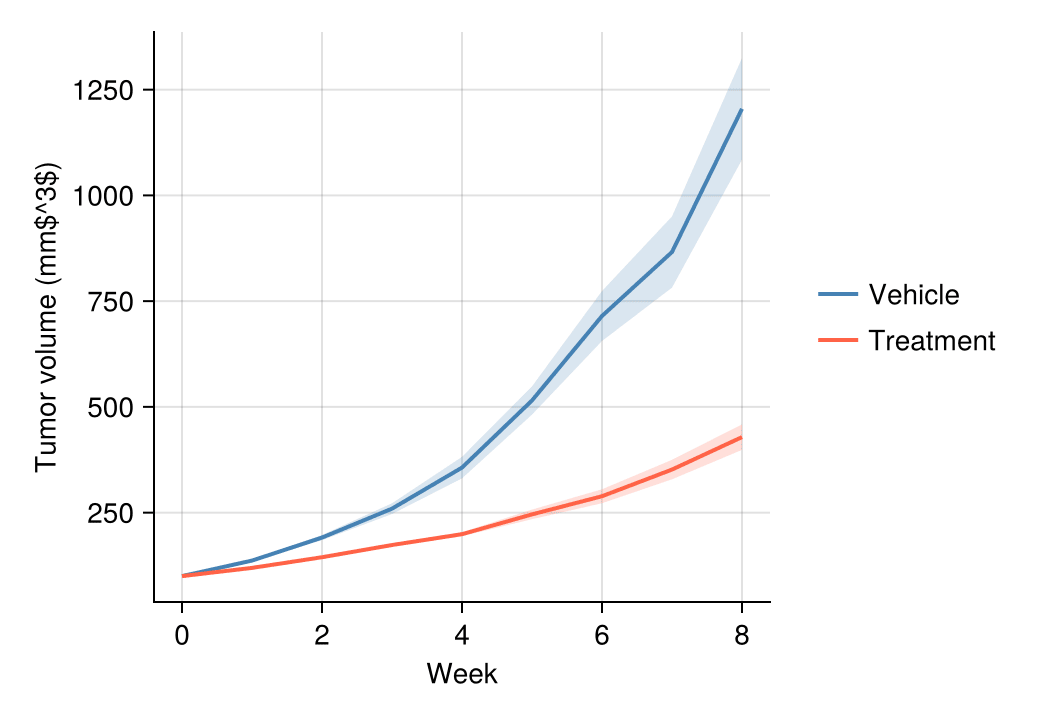
A band between the mean ± 1.96 × SEM communicates sampling uncertainty; build it with band! behind the mean line.
fig = Figure(size = (460, 340))
ax = Axis(fig[1, 1], xlabel = "Week", ylabel = "Tumor volume (mm\$^3\$)")
for (arm, mat) in curves
    m = vec(mean(mat, dims = 1))
    sem = vec(std(mat, dims = 1)) ./ sqrt(n_mice)
    band!(ax, weeks, m .- 1.96 .* sem, m .+ 1.96 .* sem;
          color = (arm_colors[arm], 0.2))
    lines!(ax, weeks, m; color = arm_colors[arm], linewidth = 2)
end
hidespines!(ax, :t, :r)
Legend(fig[1, 2], [LineElement(color = :steelblue, linewidth = 2),
                   LineElement(color = :tomato, linewidth = 2)],
       ["Vehicle", "Treatment"], framevisible = false)
fig
Spaghetti Plot with Population Mean
Showing every subject as a thin line behind the bold group mean communicates both the trend and the animal-to-animal variability.
fig = Figure(size = (460, 340))
ax = Axis(fig[1, 1], xlabel = "Week", ylabel = "Tumor volume (mm\$^3\$)")
for (arm, mat) in curves
    for m in 1:n_mice
        lines!(ax, weeks, mat[m, :]; color = (arm_colors[arm], 0.25), linewidth = 1)
    end
    lines!(ax, weeks, vec(mean(mat, dims = 1)); color = arm_colors[arm], linewidth = 2.6)
end
hidespines!(ax, :t, :r)
Legend(fig[1, 2], [LineElement(color = :steelblue, linewidth = 2.6),
                   LineElement(color = :tomato, linewidth = 2.6)],
       ["Vehicle", "Treatment"], framevisible = false)
fig
References
- Makie development team. Makie.jl documentation — lines, band. https://docs.makie.org/stable/reference/plots/lines
- Danisch, S., & Krumbiegel, J. (2021). Makie.jl: Flexible high-performance data visualization for Julia. Journal of Open Source Software, 6(65), 3349.