import matplotlib.pyplot as plt
import pandas as pd
import squarify
import plotly.graph_objects as go树图与旭日图 (Python)
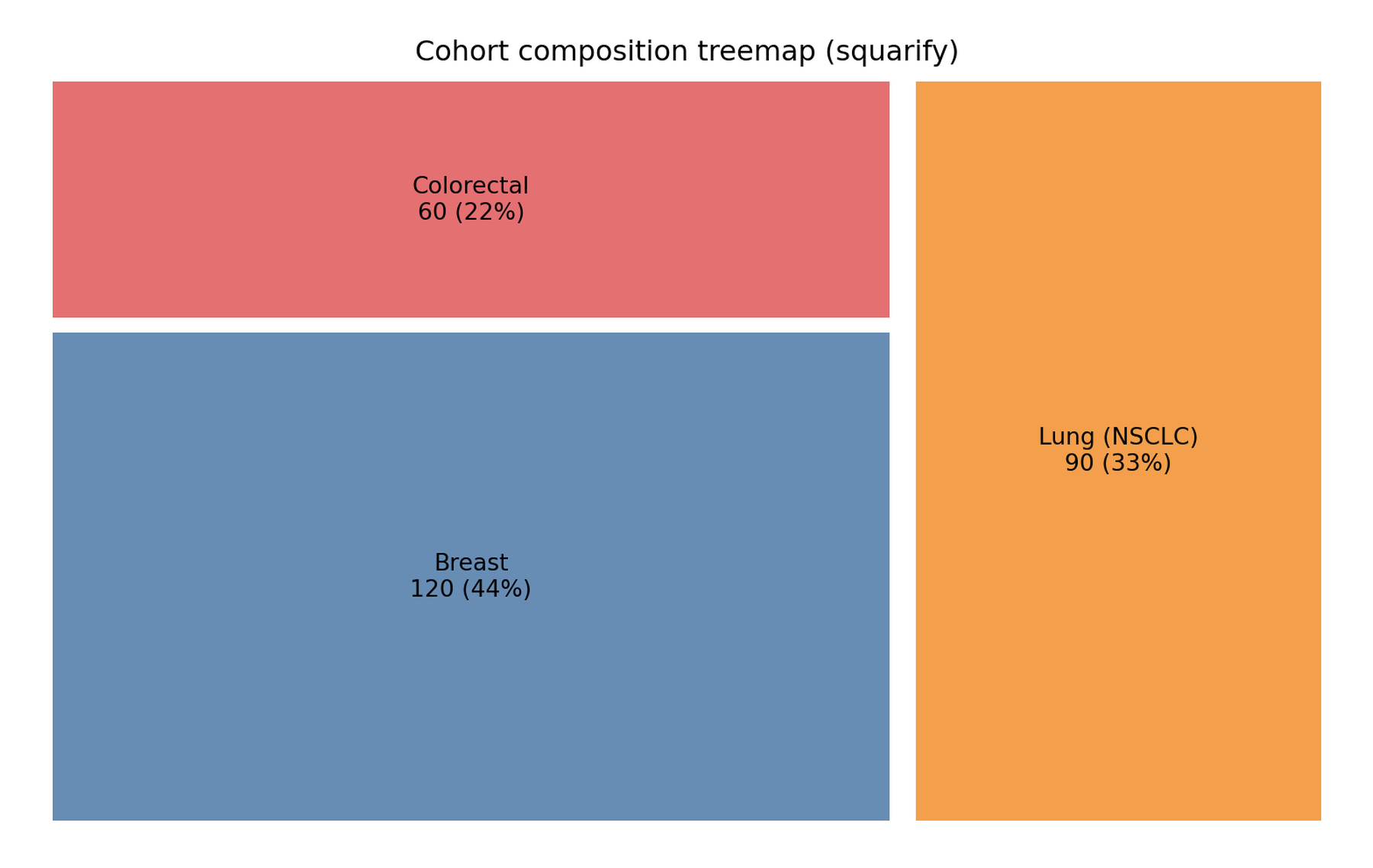
树图与旭日图的 Python 对应版本:两种层次组成的展示。树图以矩形面积编码数值嵌套——一两个层级的最佳静态总览;旭日图径向嵌套环形且保持交互——层级结构与点击缩放。临床数据中凡能自然分解的队列(癌种 → 疗效)、费用树与物种丰度都适用。
本教程用 squarify [1](matplotlib)构建静态树图,用 plotly.graph_objects [2] 构建交互式旭日图,两者使用同一队列以便直接对比设计。
本教程涵盖两种工作流:
- 队列组成的静态树图(
squarify); - 交互式两层旭日图(
plotly)。
Example
Setup
- 系统要求:跨平台(Linux/MacOS/Windows)
- 编程语言:Python
- 依赖包:
matplotlib、pandas、squarify、plotly
Data Preparation
270 例患者的肿瘤队列:三个癌种(120/90/60)各有三类疗效。使用 branchvalues="total" 时父节点 value 必须等于子节点之和——绘图前程序化验证。
counts = {"Breast": (55, 25, 40),          # (PR, SD, PD)
          "Lung (NSCLC)": (30, 35, 25),
          "Colorectal": (18, 24, 18)}
cnt = pd.DataFrame(
    [{"cancer": c, "response": r, "n": n}
     for c, resp in counts.items() for r, n in zip(["PR", "SD", "PD"], resp)])
cnt["id"] = cnt.cancer + "-" + cnt.response

agg = cnt.groupby("cancer", as_index=False)["n"].sum()

# 父节点 value 必须等于子节点之和
parents_ok = all(int(agg.loc[agg.cancer == c, "n"].iloc[0])
                 == int(cnt.loc[cnt.cancer == c, "n"].sum())
                 for c in counts)
assert parents_ok
cnt| cancer | response | n | id | |
|---|---|---|---|---|
| 0 | Breast | PR | 55 | Breast-PR |
| 1 | Breast | SD | 25 | Breast-SD |
| 2 | Breast | PD | 40 | Breast-PD |
| 3 | Lung (NSCLC) | PR | 30 | Lung (NSCLC)-PR |
| 4 | Lung (NSCLC) | SD | 35 | Lung (NSCLC)-SD |
| 5 | Lung (NSCLC) | PD | 25 | Lung (NSCLC)-PD |
| 6 | Colorectal | PR | 18 | Colorectal-PR |
| 7 | Colorectal | SD | 24 | Colorectal-SD |
| 8 | Colorectal | PD | 18 | Colorectal-PD |
Visualization
1. squarify 静态树图
colors = {"Breast": "#4E79A7", "Lung (NSCLC)": "#F28E2B", "Colorectal": "#E15759"}
total = agg.n.sum()

fig, ax = plt.subplots(figsize=(8, 5))
squarify.plot(
    sizes=agg.n,
    label=[f"{r.cancer}\n{r.n} ({r.n / total:.0%})" for r in agg.itertuples()],
    color=[colors[r.cancer] for r in agg.itertuples()],
    ax=ax, alpha=0.85, pad=True)
ax.axis("off")
ax.set_title("Cohort composition treemap (squarify)")
fig.tight_layout()
plt.show()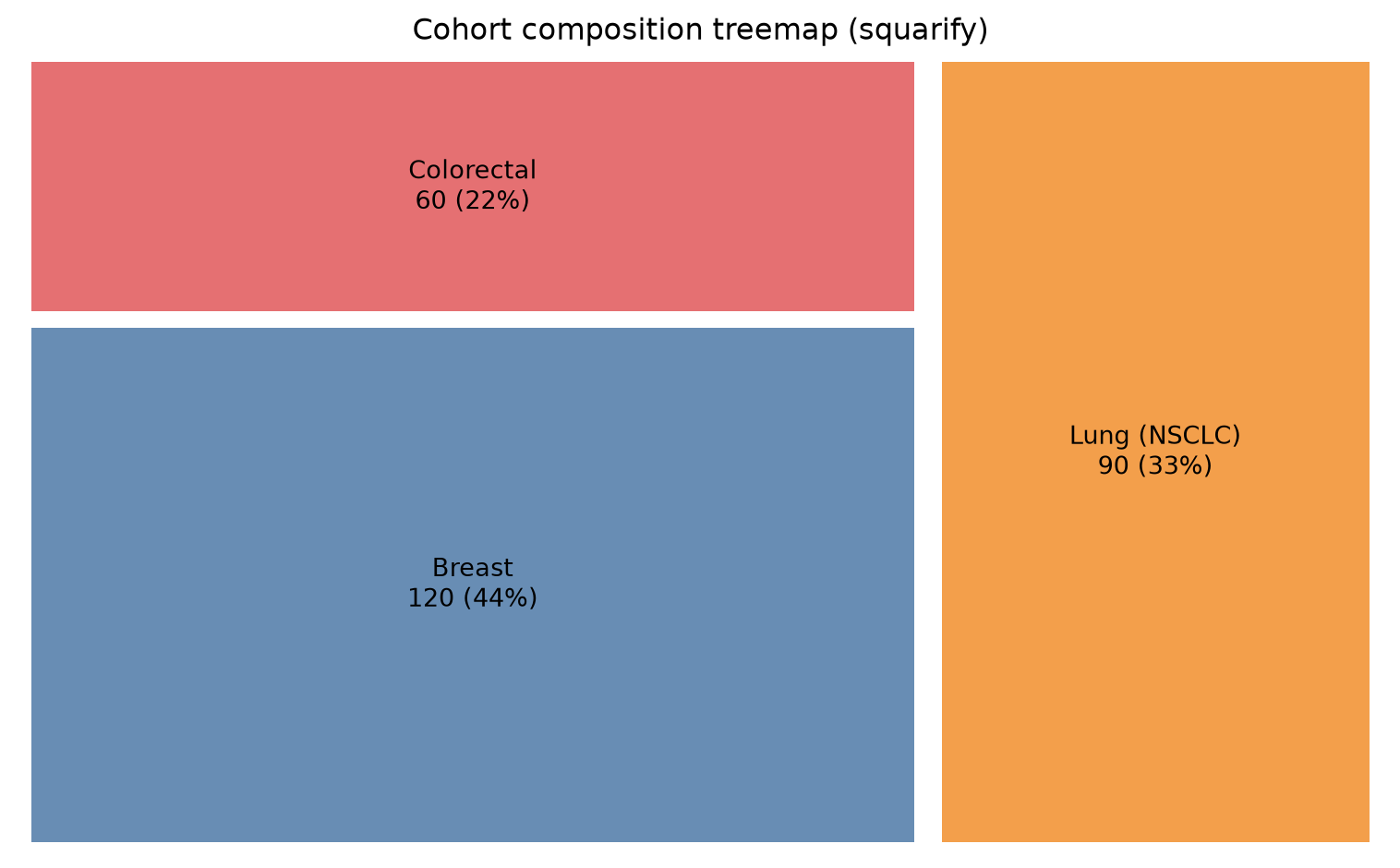
squarify 只排一个扁平矩形列表;要展示两层,先画父矩形再把子项裁剪进父矩形内(或把整个层级交给 plotly 的 treemap trace,自动嵌套)。
2. plotly 交互式旭日图
roots = agg.cancer.tolist()          # groupby sorts alphabetically: use ITS order
rcolors = {"Breast": "#4E79A7", "Lung (NSCLC)": "#F28E2B", "Colorectal": "#E15759"}
lcolors = {"PR": "#7fa8cc", "SD": "#f5b767", "PD": "#e98a8a"}

fig = go.Figure(go.Sunburst(
    ids=roots + cnt.id.tolist(),
    labels=roots + cnt.response.tolist(),
    parents=[""] * len(roots) + cnt.cancer.tolist(),
    values=agg.n.tolist() + cnt.n.tolist(),
    branchvalues="total",
    marker=dict(colors=[rcolors[c] for c in roots]
                + [lcolors[r] for r in cnt.response]),
    hovertemplate="%{id}<br>n = %{value}<extra></extra>"))
fig.update_layout(width=800, height=800,
                  title="Cohort hierarchy: cancer → response")
fig
提示实践要点
-
branchvalues="total"要求父节点value= 子节点之和——像 Data Preparation 一样断言它,否则 plotly 会画出重叠扇形;备选"remainder"(父节点只填自身值)。 -
squarify不帮你排序:把sizes按降序传入得到经典的大到小布局,并加pad=True让相邻矩形保持可读。 - 两类图都会隐藏小类别:低于约 2% 的类别先折叠为 “Other”。
- plotly 图形是 HTML 部件——渲染页面可交互;印刷用静态导出需要截图(本环境无 kaleido)。
Application
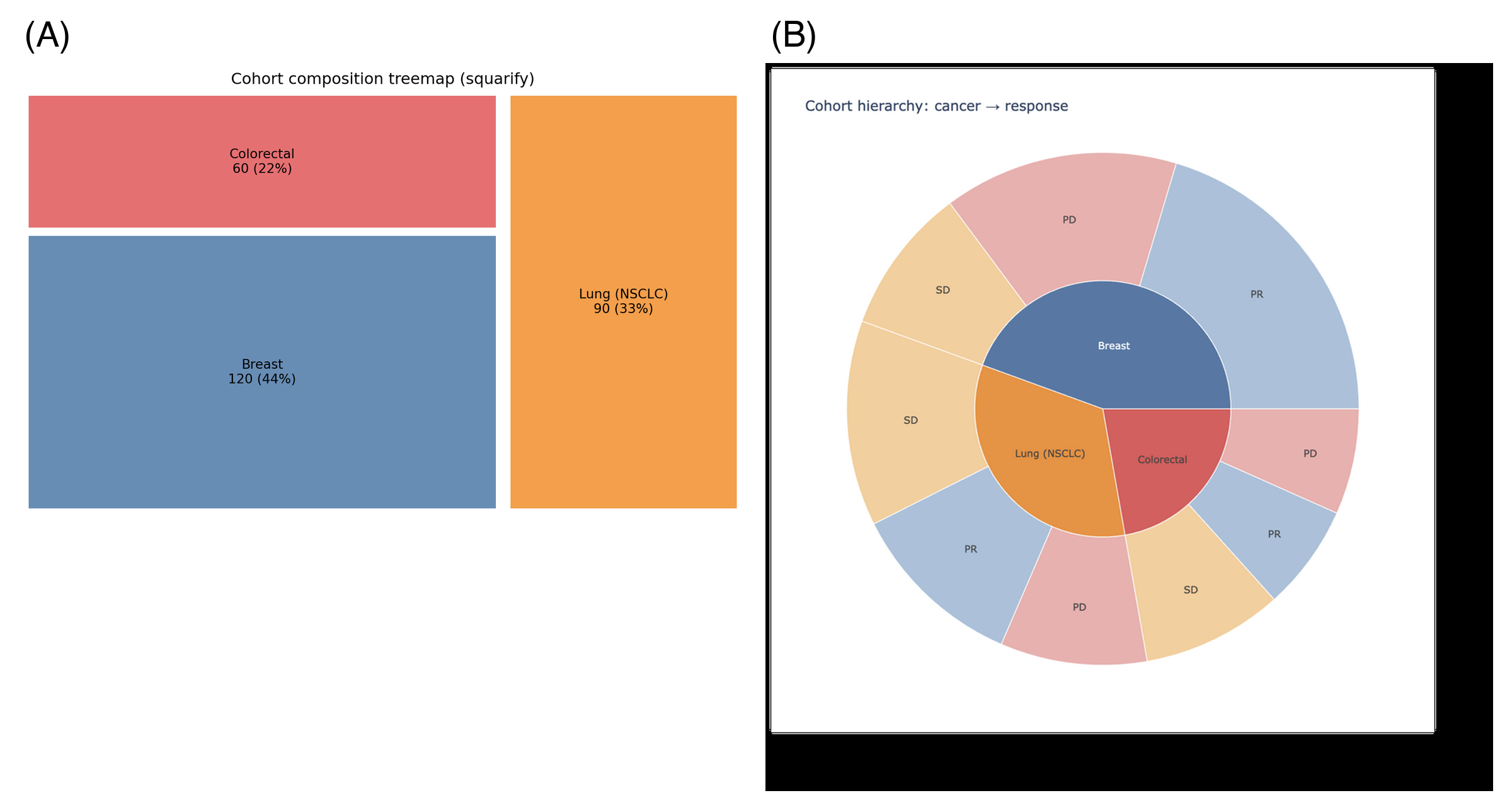
树图与旭日图用于队列报告(注册研究组成)、费用/使用分解与宏基因组(门 → 种)。下图模拟典型报告版式:(A) 静态树图与 (B) 交互式旭日图。
Reference
[1] Lambrechts G. squarify: pure Python implementation of the squarified treemap layout. https://github.com/gregorl/squarify
[2] Sievert C. Interactive Web-Based Data Visualization with R, plotly, and shiny. Chapman and Hall/CRC; 2020. doi:10.1201/9780429447273