# Install packages
if (!requireNamespace("data.table", quietly = TRUE)) {
  install.packages("data.table")
}
if (!requireNamespace("jsonlite", quietly = TRUE)) {
  install.packages("jsonlite")
}
if (!requireNamespace("ggplot2", quietly = TRUE)) {
  install.packages("ggplot2")
}

# Load packages
library(data.table)
library(jsonlite)
library(ggplot2)Circular Pie Chart
Note
Hiplot website
This page is the tutorial for source code version of the Hiplot Circular Pie Chart plugin. You can also use the Hiplot website to achieve no code ploting. For more information please see the following link:
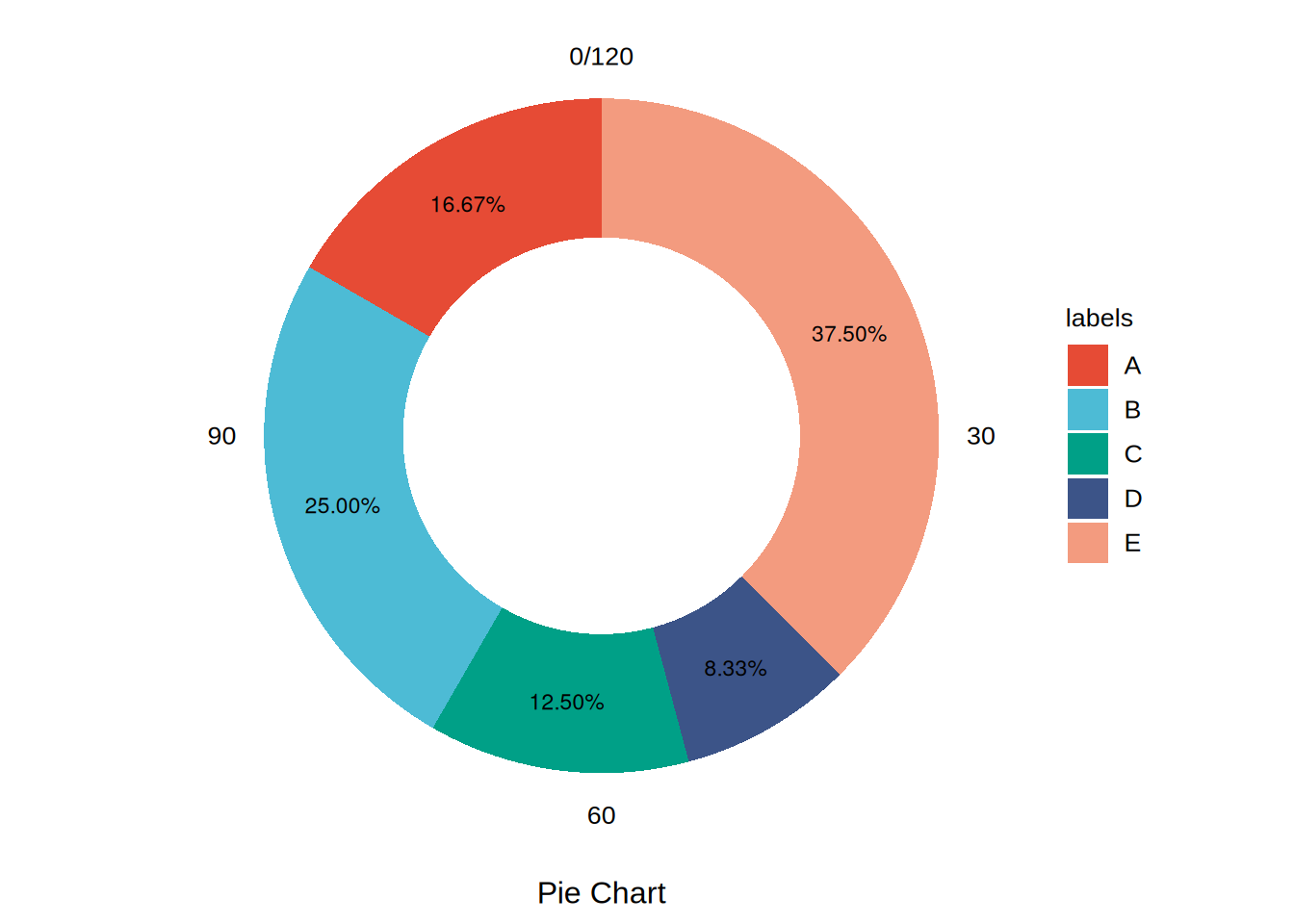
Another form of the pie chart.
Setup
System Requirements: Cross-platform (Linux/MacOS/Windows)
Programming language: R
Dependent packages:
data.table;jsonlite;ggplot2
sessioninfo::session_info("attached")─ Session info ───────────────────────────────────────────────────────────────
setting value
version R version 4.6.0 (2026-04-24)
os Ubuntu 24.04.4 LTS
system x86_64, linux-gnu
ui X11
language (EN)
collate C.UTF-8
ctype C.UTF-8
tz UTC
date 2026-05-09
pandoc 3.1.3 @ /usr/bin/ (via rmarkdown)
quarto 1.9.37 @ /usr/local/bin/quarto
─ Packages ───────────────────────────────────────────────────────────────────
package * version date (UTC) lib source
data.table * 1.18.4 2026-05-06 [1] RSPM
ggplot2 * 4.0.3.9000 2026-05-04 [1] Github (tidyverse/ggplot2@6870419)
jsonlite * 2.0.0 2025-03-27 [1] RSPM
[1] /home/runner/work/_temp/Library
[2] /opt/R/4.6.0/lib/R/site-library
[3] /opt/R/4.6.0/lib/R/library
* ── Packages attached to the search path.
──────────────────────────────────────────────────────────────────────────────Data Preparation
# Load data
data <- data.table::fread(jsonlite::read_json("https://hiplot.cn/ui/basic/circular-pie-chart/data.json")$exampleData$textarea[[1]])
data <- as.data.frame(data)

# convert data structure
data$draw_percent <- data[["values"]] / sum(data[["values"]]) * 100
data$draw_class <- 1
data2 <- data
data2[["values"]] <- 0
data2$draw_class <- 0
data <- rbind(data, data2)
filtered_data <- data[data[["values"]] > 0,]

# View data
head(data)
labels values draw_percent draw_class
1 A 20 16.666667 1
2 B 30 25.000000 1
3 C 15 12.500000 1
4 D 10 8.333333 1
5 E 45 37.500000 1
6 A 0 16.666667 0Visualization
# Circular Pie Chart
p <- ggplot(data, aes(x = draw_class, y = values, fill = labels)) +
  geom_bar(position = "stack", stat = "identity", width = 0.7) +
  geom_text(data = filtered_data, aes(label = sprintf("%.2f%%", draw_percent)),
            position = position_stack(vjust = 0.5), size = 3) +
  coord_polar(theta = "y") +
  xlab("") +
  ylab("Pie Chart") +
  scale_fill_manual(values = c("#e64b35ff","#4dbbd5ff","#00a087ff","#3c5488ff","#f39b7fff")) +
  theme_minimal() +
  theme(text = element_text(family = "Arial"),
        plot.title = element_text(size = 12,hjust = 0.5),
        axis.title = element_text(size = 12),
        axis.text = element_text(size = 10),
        axis.text.x = element_text(color = "black"),
        axis.text.y = element_blank(),
        legend.position = "right",
        legend.direction = "vertical",
        legend.title = element_text(size = 10),
        legend.text = element_text(size = 10),
        panel.grid.major = element_blank(),
        panel.grid.minor = element_blank())

p