# Installing necessary packages
if (!requireNamespace("ComplexHeatmap", quietly = TRUE)) {
  install.packages("ComplexHeatmap")
}
if (!requireNamespace("tidyverse", quietly = TRUE)) {
  install.packages("tidyverse")
}
if (!requireNamespace("maftools", quietly = TRUE)) {
  BiocManager::install("maftools")
}

# Load packages
library(ComplexHeatmap)
library(tidyverse)
library(maftools)Mutation Landscape Oncoplot
A mutation landscape plot (oncoplot, also called a mutation waterfall plot) displays the somatic alteration profile of a cohort gene by gene and sample by sample: rows are the most frequently mutated genes, columns are the samples, and each filled cell is a mutation, colored by its consequence (missense, nonsense, frameshift, splice site, …). Mutation frequency labels on the left, burden bars on top and the option to split samples by molecular subtype or cohort make the oncoplot the standard summary figure of cancer genomics studies, where it reveals which genes drive which subgroup. This tutorial reproduces the chart type covered by the 顶刊图社 series (issue 008); see the Reference section below.
Example
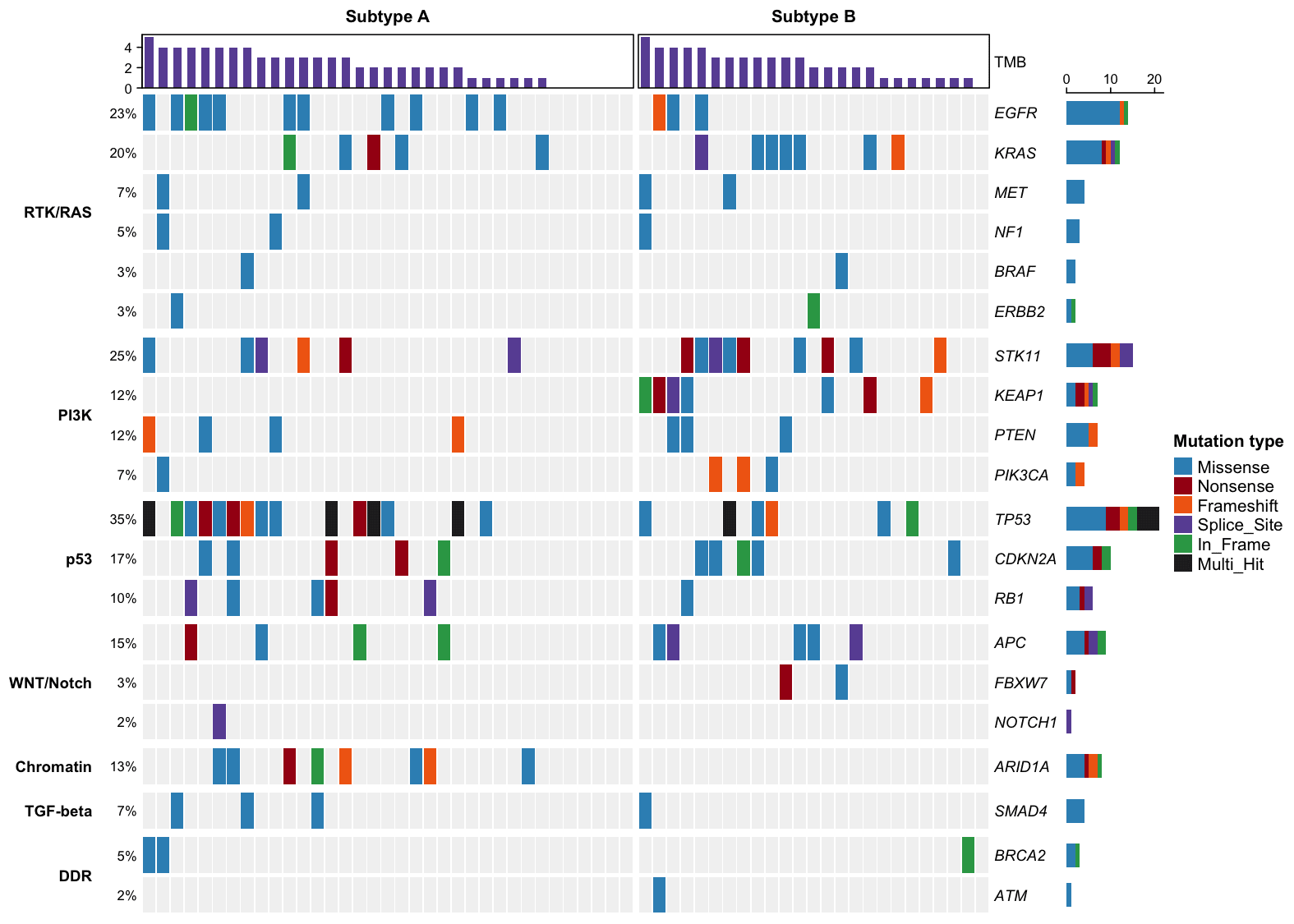
This oncoplot summarizes a simulated 60-sample cohort across 20 cancer driver genes. Samples are grouped by two molecular subtypes (Subtype A and Subtype B), genes are grouped by signaling pathway (RTK/RAS, PI3K, p53, …), and the top barplot shows each sample’s total mutation count. Subtype A is dominated by TP53 (35% of all samples) and EGFR mutations, while Subtype B carries most of the STK11, KEAP1 and KRAS alterations — exactly the kind of subgroup-specific pattern an oncoplot is meant to expose. Mutation types are color-coded and TP53 occasionally shows Multi_Hit (more than one event). The same cohort is drawn again with the maftools engine in sections 4–5.
Setup
System Requirements: Cross-platform (Linux/MacOS/Windows)
Programming Language: R
Dependencies:
ComplexHeatmap;tidyverse;maftools
Data Preparation
The example simulates a small cohort so the tutorial is fully reproducible without downloading protected TCGA data: 60 samples, two molecular subtypes, and 20 common cancer driver genes mutated with subtype-specific probabilities. Multi_Hit marks genes carrying more than one event in a sample.
set.seed(2026)

genes <- c("TP53", "EGFR", "KRAS", "STK11", "KEAP1", "PIK3CA", "PTEN", "RB1",
           "APC", "ARID1A", "NF1", "NOTCH1", "BRAF", "CDKN2A", "SMAD4", "FBXW7",
           "ATM", "BRCA2", "ERBB2", "MET")
cohort <- rep(c("Subtype A", "Subtype B"), c(35, 25))
samples <- sprintf("S%02d", 1:60)

# Subtype-specific mutation probabilities per gene
p_a <- c(.52, .34, .10, .14, .10, .10, .12, .10, .06, .22, .08, .06, .04, .10, .05, .06, .06, .05, .05, .04)
p_b <- c(.22, .08, .42, .40, .36, .14, .10, .10, .10, .06, .10, .06, .06, .10, .10, .08, .05, .05, .06, .08)
mut_types <- c("Missense", "Nonsense", "Frameshift", "Splice_Site", "In_Frame")
type_p <- c(.58, .14, .12, .08, .08)

mutations <- map_dfr(seq_along(samples), function(i) {
  p <- if (cohort[i] == "Subtype A") p_a else p_b
  hit <- genes[runif(length(genes)) < p]
  if (length(hit) == 0) return(NULL)
  type <- sample(mut_types, length(hit), replace = TRUE, prob = type_p)
  # Tumor suppressors such as TP53 can receive a second hit, shown as Multi_Hit
  if (runif(1) < .15 && "TP53" %in% hit) {
    type[hit == "TP53"] <- "Multi_Hit"
  }
  tibble(sample = samples[i], gene = hit, type = type)
})

head(mutations)
# A tibble: 6 × 3
sample gene type
<chr> <chr> <chr>
1 S01 PIK3CA Missense
2 S01 NF1 Missense
3 S01 BRCA2 Missense
4 S01 MET Missense
5 S02 TP53 Missense
6 S02 STK11 Splice_SiteNote: In your own analysis the input is a long table with one row per mutation, containing at least the sample name, the gene name and the mutation type (from a MAF file, maftools, or your variant caller). The code below reshapes it into the alternating matrix used by oncoPrint().
# Reshape the mutation table into a gene x sample matrix; a cell holds one or
# several alteration types separated by ";"
gene_levels <- names(sort(table(factor(mutations$gene, levels = genes)), decreasing = TRUE))
mat <- matrix("", nrow = length(genes), ncol = length(samples),
              dimnames = list(genes, samples))
for (i in seq_len(nrow(mutations))) {
  cell <- mat[mutations$gene[i], mutations$sample[i]]
  mat[mutations$gene[i], mutations$sample[i]] <-
    if (cell == "") mutations$type[i] else paste(cell, mutations$type[i], sep = ";")
}

# Order samples: by subtype, then by mutation count (waterfall look)
mut_count <- colSums(mat != "")
ord <- order(factor(cohort, levels = c("Subtype A", "Subtype B")), -mut_count)
mat <- mat[gene_levels, ord]

# Annotation vectors aligned with the reordered matrix
cohort_ordered <- factor(cohort[ord], levels = c("Subtype A", "Subtype B"))
tmb <- mut_count[ord]

# Colors for alteration types
mutation_colors <- c(
  Missense = "#3690C0", Nonsense = "#A50F15", Frameshift = "#F16913",
  Splice_Site = "#6A51A3", In_Frame = "#31A354", Multi_Hit = "#252525"
)

# One drawing function per alteration type
rect_fun <- function(color) {
  function(x, y, w, h) grid.rect(x, y, w * 0.9, h * 0.9, gp = gpar(fill = color, col = NA))
}
alter_fun <- list(
  background = rect_fun("#F2F2F2"),
  Missense = rect_fun(mutation_colors["Missense"]),
  Nonsense = rect_fun(mutation_colors["Nonsense"]),
  Frameshift = rect_fun(mutation_colors["Frameshift"]),
  Splice_Site = rect_fun(mutation_colors["Splice_Site"]),
  In_Frame = rect_fun(mutation_colors["In_Frame"]),
  Multi_Hit = rect_fun(mutation_colors["Multi_Hit"])
)
The matrix above is the native ComplexHeatmap input. The maftools workflow instead consumes a MAF-style table — one row per variant, with the gene, the sample barcode and the Variant_Classification (e.g. Missense_Mutation, Nonsense_Mutation, Frame_Shift_Del). Two details matter when converting:
-
Multi_Hit is derived, not stored. Our simulated table marks the five gene-sample cells that carry two events with the explicit class
Multi_Hit, butread.maf()does not know it as a mutation class: rows whoseVariant_Classificationis outside its vocabulary are moved to the silent set (maf@maf.silent) and excluded from the plots — and a file consisting only of such rows fails with “No non-synonymous mutations found”. We therefore expand everyMulti_Hitcell back into two individual events (Missense+Nonsense); maftools then re-derives the multi-hit cells itself — which is also how real MAF files behave (one row per variant). - Coordinates and alleles are required by the MAF schema. For plotting they only need to be well-formed; real files carry the actual genomic positions.
# Expand explicit Multi_Hit cells into two individual events
mutations_long <- bind_rows(
  mutations |> filter(type != "Multi_Hit"),
  mutations |> filter(type == "Multi_Hit") |> mutate(type = "Missense"),
  mutations |> filter(type == "Multi_Hit") |> mutate(type = "Nonsense"))

# Our short type names -> the MAF Variant_Classification vocabulary
maf_class <- c(Missense = "Missense_Mutation", Nonsense = "Nonsense_Mutation",
               Frameshift = "Frame_Shift_Del", Splice_Site = "Splice_Site",
               In_Frame = "In_Frame_Del")
variant_type <- c(Missense = "SNP", Nonsense = "SNP", Frameshift = "DEL",
                  Splice_Site = "SNP", In_Frame = "DEL")

set.seed(7)
maf_data <- mutations_long |>
  mutate(
    Hugo_Symbol = gene,
    Variant_Classification = maf_class[type],
    Variant_Type = variant_type[type],
    Chromosome = paste0("chr", (match(gene, genes) %% 22) + 1),
    Start_Position = 100000L + as.integer(match(gene, genes)) * 54321L +
      row_number() * 37L + sample(1:99L, n(), replace = TRUE),
    End_Position = Start_Position,
    Reference_Allele = "A",
    Tumor_Seq_Allele2 = "G",
    Tumor_Sample_Barcode = sample) |>
  select(Hugo_Symbol, Chromosome, Start_Position, End_Position,
         Reference_Allele, Tumor_Seq_Allele2, Variant_Classification,
         Variant_Type, Tumor_Sample_Barcode)

# Sample-level annotation (kept alongside the MAF)
clin_data <- tibble(Tumor_Sample_Barcode = samples, Subtype = cohort)

# Read everything into a maftools MAF object
maf <- read.maf(maf = as.data.frame(maf_data),
                clinicalData = as.data.frame(clin_data), verbose = FALSE)

head(maf_data)
# A tibble: 6 × 9
Hugo_Symbol Chromosome Start_Position End_Position Reference_Allele
<chr> <chr> <int> <int> <chr>
1 PIK3CA chr7 426005 426005 A
2 NF1 chr12 697688 697688 A
3 BRCA2 chr19 1077920 1077920 A
4 MET chr21 1186660 1186660 A
5 TP53 chr2 154572 154572 A
6 STK11 chr5 317521 317521 A
# ℹ 4 more variables: Tumor_Seq_Allele2 <chr>, Variant_Classification <chr>,
# Variant_Type <chr>, Tumor_Sample_Barcode <chr>Visualization
The same cohort is drawn twice: sections 1–3 build the landscape on ComplexHeatmap::oncoPrint() — full control over annotation tracks and cell rendering — while sections 4–5 use the maftools engine on the MAF representation prepared above, the standard route for real mutation files.
1. Basic Plot
The basic oncoplot shows the alteration matrix with one colored block per mutation; the left labels give each gene’s mutation frequency and the right barplot counts alterations per gene.
p1 <- oncoPrint(mat,
  alter_fun = alter_fun, alter_fun_is_vectorized = FALSE, col = mutation_colors,
  column_order = samples[ord], show_column_names = FALSE,
  row_names_gp = gpar(fontsize = 9, fontface = "italic"), pct_gp = gpar(fontsize = 8),
  heatmap_legend_param = list(title = "Mutation type"))
draw(p1)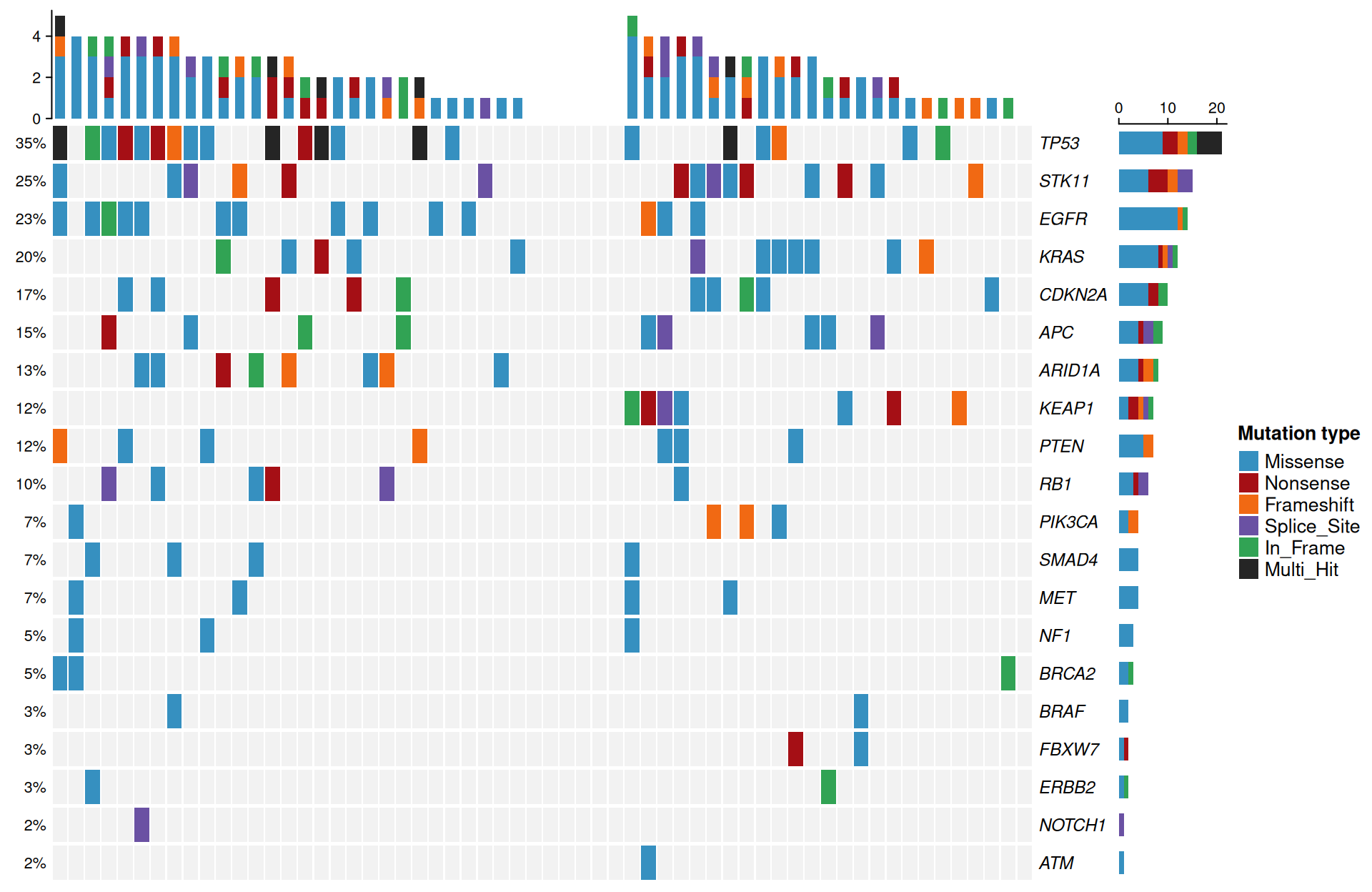
2. Add Cohort Split and Mutation Burden
Splitting the columns by molecular subtype and adding a top barplot of each sample’s mutation count turns the matrix into the classic landscape figure: subgroup-specific genes become visually obvious.
top_annotation <- HeatmapAnnotation(
  TMB = anno_barplot(tmb, height = unit(1.1, "cm"),
                     gp = gpar(fill = "#6A51A3", col = NA)),
  annotation_name_gp = gpar(fontsize = 9))

p2 <- oncoPrint(mat,
  alter_fun = alter_fun, alter_fun_is_vectorized = FALSE, col = mutation_colors,
  column_order = samples[ord], show_column_names = FALSE,
  column_split = cohort_ordered, column_title_gp = gpar(fontsize = 10, fontface = "bold"),
  top_annotation = top_annotation,
  bottom_annotation = HeatmapAnnotation(
    Subtype = as.character(cohort_ordered),
    col = list(Subtype = c("Subtype A" = "#E08214", "Subtype B" = "#5E3C99")),
    annotation_name_side = "left", annotation_name_gp = gpar(fontsize = 9)),
  row_names_gp = gpar(fontsize = 9, fontface = "italic"), pct_gp = gpar(fontsize = 8),
  heatmap_legend_param = list(title = "Mutation type"))
draw(p2)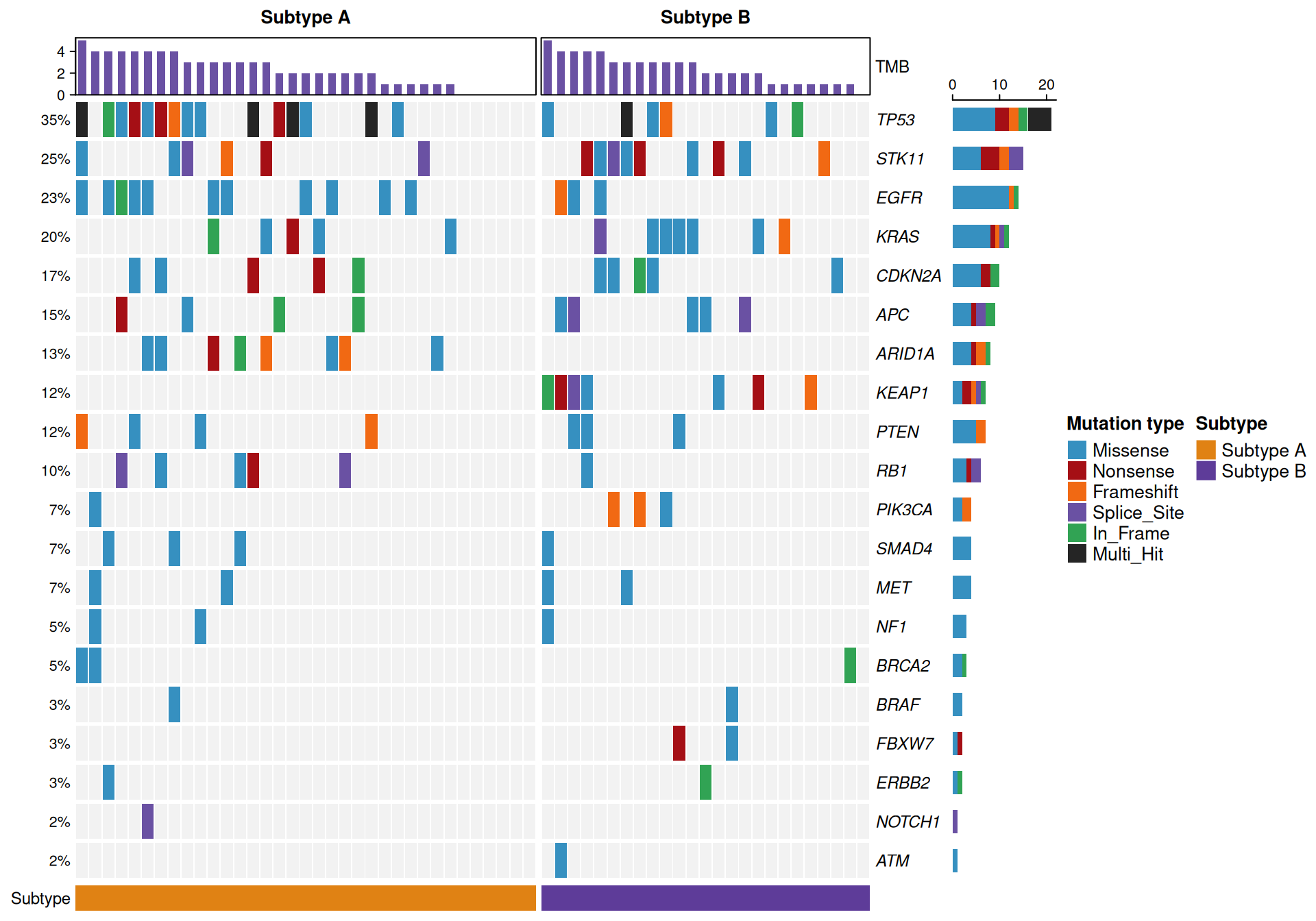
Tip
Key Parameters:
-
column_split: splits the columns into panels, here by molecular subtype;row_splitworks the same way for genes (used in Figure 3). -
top_annotation: anyHeatmapAnnotation— the mutation burden barplot (anno_barplot) is the conventional choice. -
alter_fun_is_vectorized = FALSE: draw alteration blocks one cell at a time; required when the functions above are not vectorized.
3. Group Genes by Pathway
Grouping the rows by signaling pathway (RTK/RAS, PI3K, p53, …) organizes the waterfall into functional blocks, which is how oncoplots are usually laid out in publications.
pathway <- c(
  TP53 = "p53", RB1 = "p53", CDKN2A = "p53",
  EGFR = "RTK/RAS", ERBB2 = "RTK/RAS", MET = "RTK/RAS", KRAS = "RTK/RAS",
  BRAF = "RTK/RAS", NF1 = "RTK/RAS",
  PIK3CA = "PI3K", PTEN = "PI3K", STK11 = "PI3K", KEAP1 = "PI3K",
  APC = "WNT/Notch", NOTCH1 = "WNT/Notch", FBXW7 = "WNT/Notch",
  ARID1A = "Chromatin", SMAD4 = "TGF-beta", ATM = "DDR", BRCA2 = "DDR")
pathway_levels <- c("RTK/RAS", "PI3K", "p53", "WNT/Notch", "Chromatin", "TGF-beta", "DDR")

p3 <- oncoPrint(mat,
  alter_fun = alter_fun, alter_fun_is_vectorized = FALSE, col = mutation_colors,
  column_order = samples[ord], show_column_names = FALSE,
  row_split = factor(pathway[gene_levels], levels = pathway_levels),
  row_title_gp = gpar(fontsize = 9, fontface = "bold"), row_title_rot = 0,
  column_split = cohort_ordered, column_title_gp = gpar(fontsize = 10, fontface = "bold"),
  top_annotation = top_annotation,
  row_names_gp = gpar(fontsize = 9, fontface = "italic"), pct_gp = gpar(fontsize = 8),
  heatmap_legend_param = list(title = "Mutation type"))
draw(p3)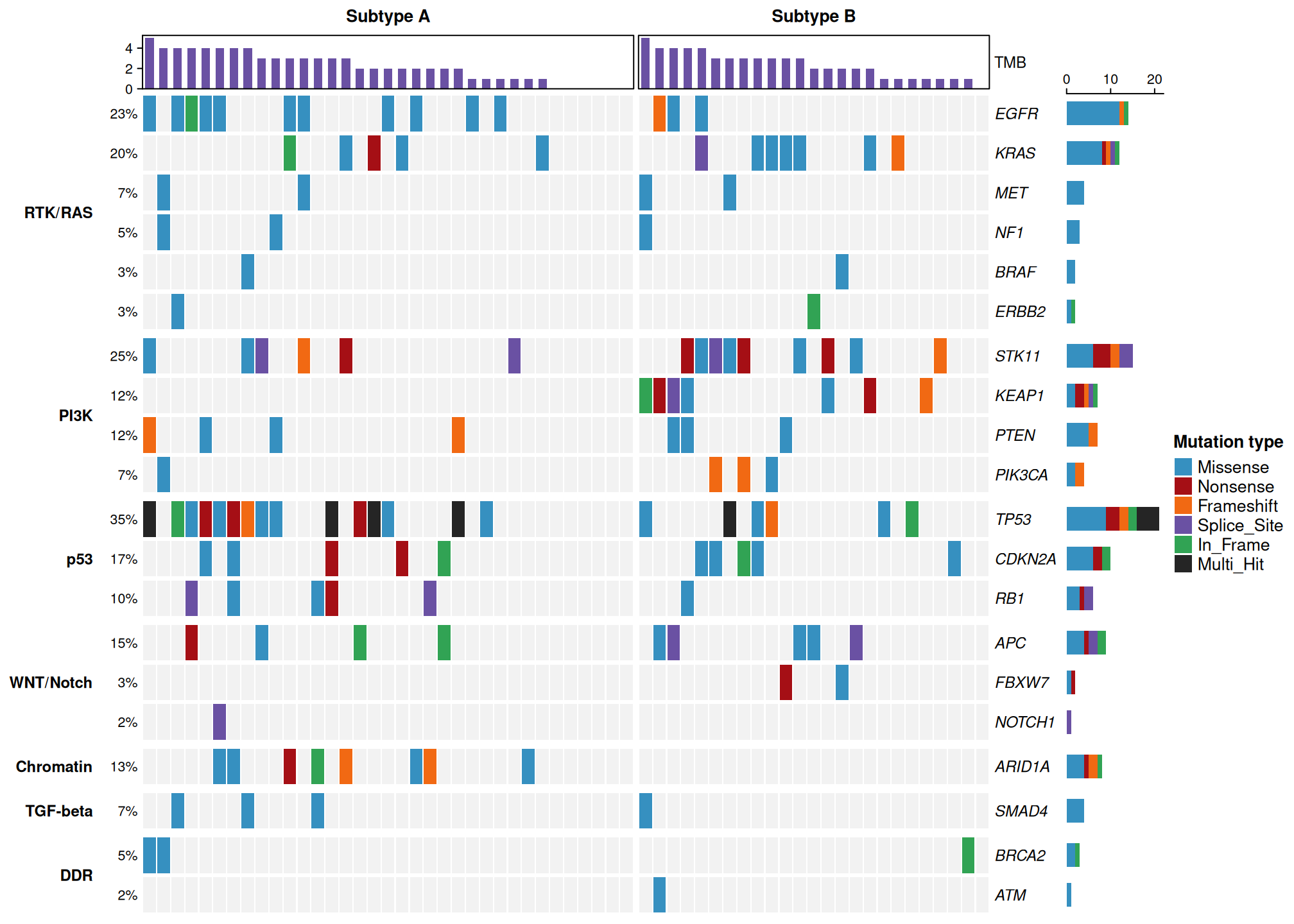
Figure 3 reveals the same cohort structure with a functional reading: Subtype A accumulates TP53 events and RTK/RAS-pathway EGFR mutations, while Subtype B concentrates STK11/KEAP1 (PI3K pathway) and KRAS alterations.
4. maftools Oncoplot
With the cohort available as a MAF object (maf), maftools::oncoplot() draws the classic cancer-genomics landscape: per-sample mutation-burden bars on top, per-gene frequency and variant-class breakdown on the right, automatic percentage labels and its own colour vocabulary. sortByMutation = TRUE arranges the samples into the familiar waterfall order (they are ordered on the binarised mutation matrix).
oncoplot(maf = maf, top = 20, sortByMutation = TRUE)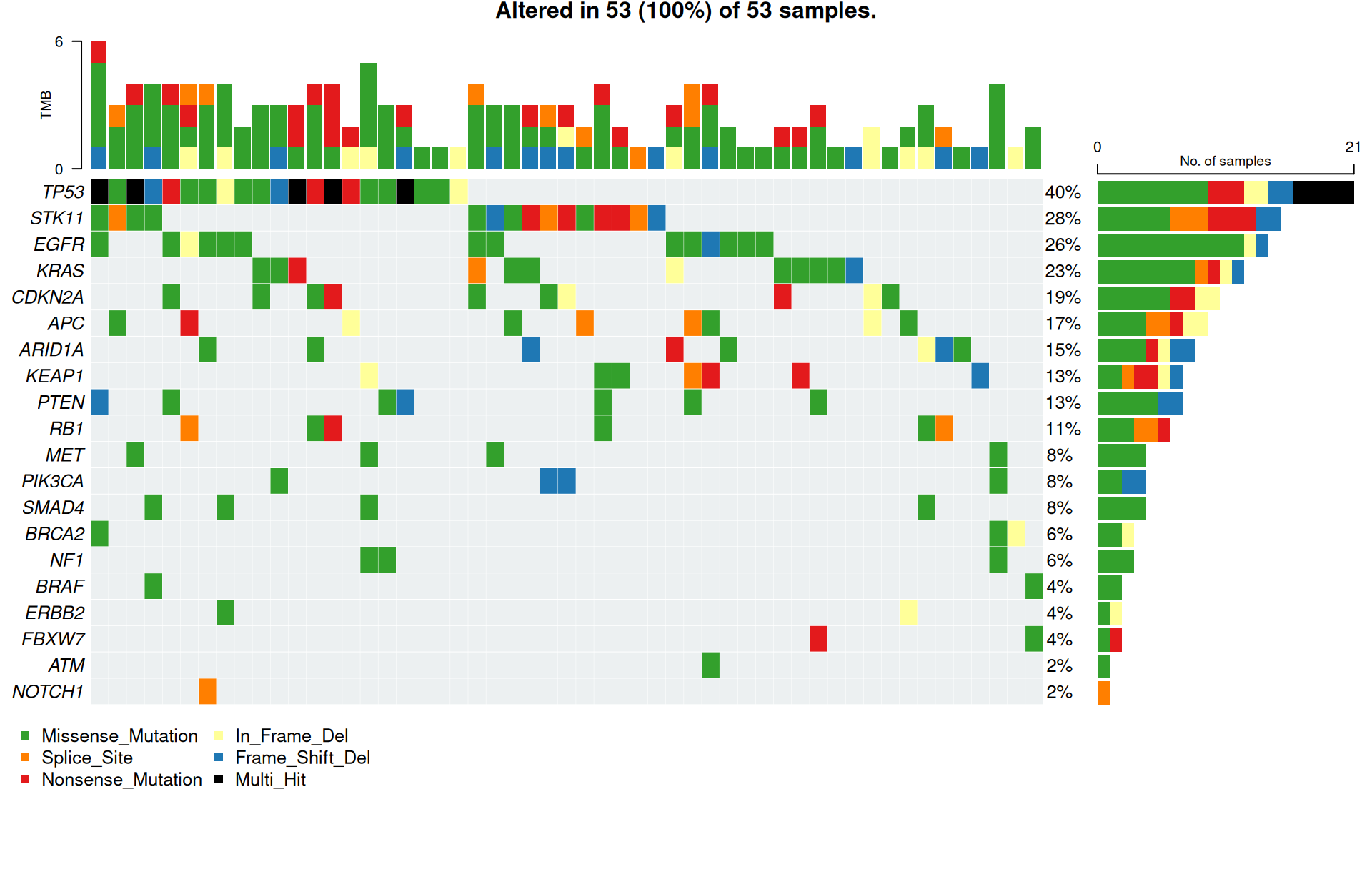
Tip
Key Parameters:
-
top: how many of the most frequently mutated genes to draw (here all 20). -
sortByMutation: order samples by mutation count (TRUE) or keep file order (FALSE). - Samples without a single alteration are not shown: maftools only knows the samples present in the MAF, so the subtitle reads “Altered in 53 (100%) of 53 samples” — the 53 of the 60 cohort samples that carry at least one mutation.
5. maftools with Clinical Annotation
clinicalFeatures adds annotation tracks from the clinical table — the direct counterpart of the column_split view in Figure 2. sortByAnnotation = TRUE groups samples by the annotation, so the subtype-specific genes line up in blocks again (compare the TP53 block on the left with the STK11/KEAP1 block on the right).
oncoplot(maf = maf, top = 20,
         clinicalFeatures = "Subtype", sortByAnnotation = TRUE)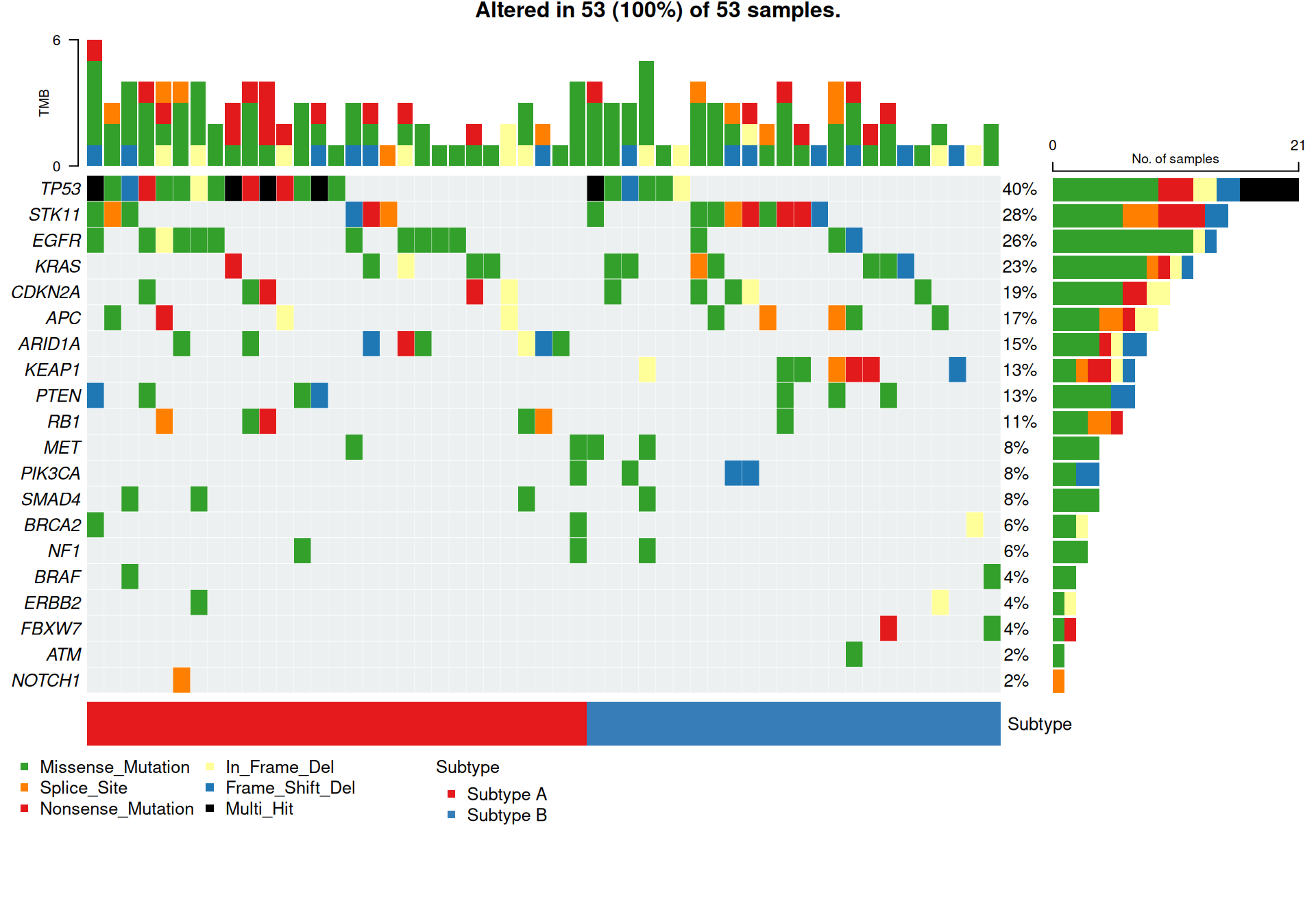
Tip
Key Parameters:
-
clinicalFeatures: column(s) of the clinical table drawn as annotation tracks below the matrix. -
sortByAnnotation: sort samples within the annotation groups (TRUE).
6. Choosing an Engine
Both routes describe the same cohort — TP53 altered in 40% of the mutated samples (35% of all 60), STK11/KEAP1/KRAS concentrated in Subtype B — but they optimise for different workflows:
-
ComplexHeatmap::oncoPrint()(sections 1–3): full control — custom cell renderers, arbitrary annotation tracks from any data, arbitrary row/column grouping, integration with the rest of the heatmap ecosystem. Best when the oncoplot must compose with other heatmap panels or needs bespoke styling. -
maftools::oncoplot()(sections 4–5): the standard intake for real MAF files — read a cohort’s variants in one call and get publication-ready summaries (burden bars, variant-class breakdown, clinical annotations, derived multi-hit cells). Best for routine cohort figures and for anything downstream in the maftools toolkit (mutual exclusivity, TiTv, driver analysis).
Applications
- Cohort characterization: first-line summary of a cancer genomics study, usually split by subtype, stage or treatment arm.
- Driver discovery: recurrently altered genes and their co-occurrence or mutual exclusivity patterns.
- Mutation burden: the top barplot summarises the per-sample burden — the ComplexHeatmap route counts mutated genes, the maftools route counts individual variants (they differ only for multi-hit samples).
- Both engines shown above accept real cohorts:
ComplexHeatmapcomposes with any heatmap panel, whilemaftools::read.maf()ingests MAF files from your variant caller directly — it addsclinicalDataannotation tracks (sections 4–5) and unlocks the wider maftools toolkit (mutual exclusivity, TiTv, driver analysis) downstream.
Reference
[1] 顶刊图社 | 第008期:基因突变全景瀑布图. WeChat article. http://mp.weixin.qq.com/s?__biz=MzU5NjE2ODU0OQ==&mid=2247483816&idx=1&sn=73bb796a166fb501934ab4fab2aaf28a
[2] Mayakonda A, Lin DC, Assenov Y, Plass C, Koeffler HP. Maftools: efficient and comprehensive analysis of somatic variants in cancer. Genome Res. 2018;28(11):1747-1756. doi:10.1101/gr.239244.118
[3] Gu Z, Eils R, Schlesner M. Complex heatmaps reveal patterns and correlations in multidimensional genomic data. Bioinformatics. 2016;32(18):2847-2849. doi:10.1093/bioinformatics/btw313