# Installing necessary packages
if (!requireNamespace("tidyverse", quietly = TRUE)) {
  install.packages("tidyverse")
}
if (!requireNamespace("ggbeeswarm", quietly = TRUE)) {
  install.packages("ggbeeswarm")
}
if (!requireNamespace("palmerpenguins", quietly = TRUE)) {
  install.packages("palmerpenguins")
}

# Load packages
library(tidyverse)
library(ggbeeswarm)
library(palmerpenguins)Raincloud Plot
A raincloud plot shows one distribution three ways at once: a half-violin (the cloud) renders its kernel density, a narrow boxplot marks the median and quartiles, and a beeswarm of individual points (the rain) exposes every observation. Unlike a bar-or-box-only summary, outliers, skew and sample size stay visible — which is why the layout has become a recommended alternative to bar charts with error bars when distributions differ in shape, not just in mean. This tutorial reproduces the chart type covered by the 顶刊图社 series (issue 017); see the Reference section below.
Example
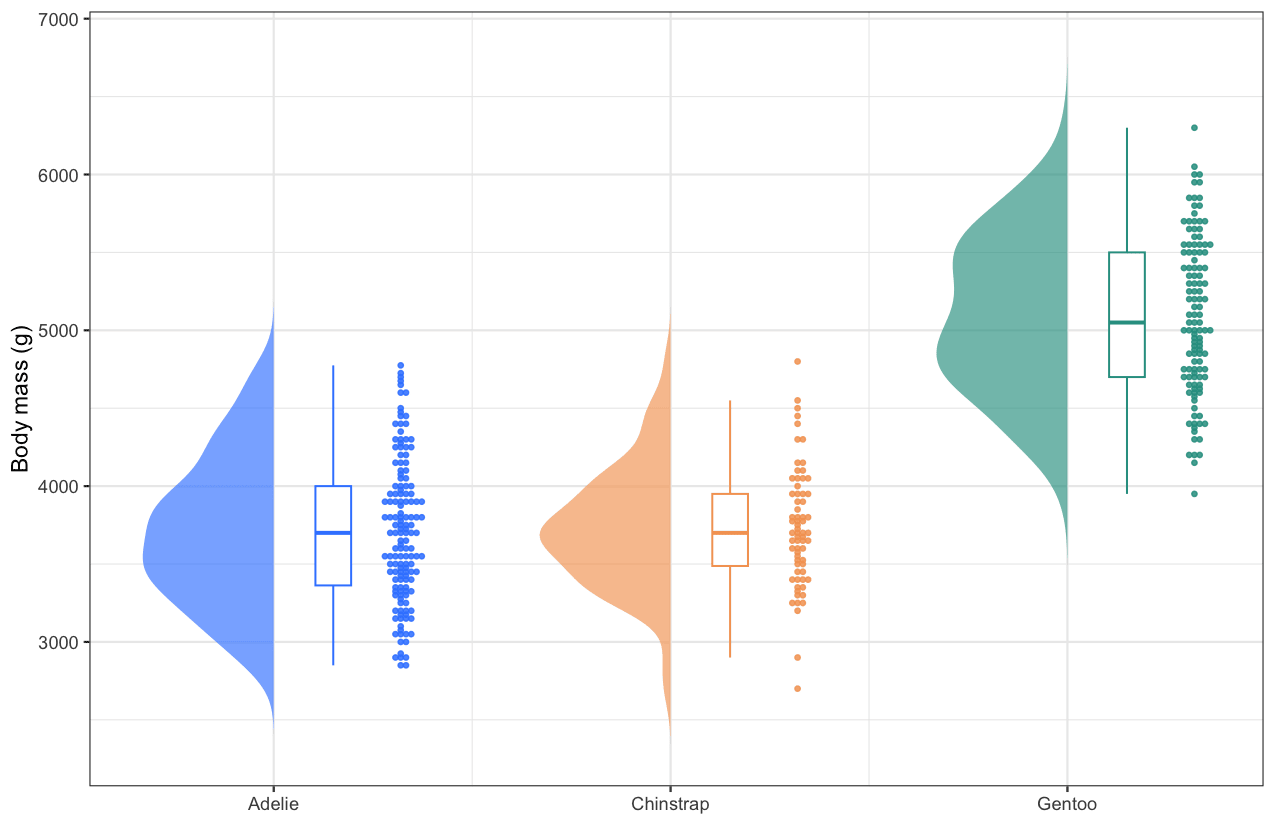
This raincloud plot compares the body mass of three penguin species (the palmerpenguins dataset). For each species the half-violin on the left sketches the density, the slim boxplot marks the median and the two quartiles, and the beeswarm on the right plots every individual bird along the value axis — Gentoo penguins are clearly heavier (median 5,050 g vs 3,700 g), while the two other species overlap heavily below 5,000 g.
Setup
System Requirements: Cross-platform (Linux/MacOS/Windows)
Programming Language: R
Dependencies:
tidyverse;ggbeeswarm;palmerpenguins
Data Preparation
The example uses the penguins dataset shipped with palmerpenguins (344 observations of three penguin species). The raincloud plot needs one row per observation with a grouping column (species) and a numeric column (body_mass_g).
data("penguins")

penguins_clean <- penguins |>
  filter(!is.na(body_mass_g)) |>
  mutate(species = factor(species))

head(penguins_clean, 3)
# A tibble: 3 × 8
species island bill_length_mm bill_depth_mm flipper_length_mm body_mass_g
<fct> <fct> <dbl> <dbl> <int> <int>
1 Adelie Torgersen 39.1 18.7 181 3750
2 Adelie Torgersen 39.5 17.4 186 3800
3 Adelie Torgersen 40.3 18 195 3250
# ℹ 2 more variables: sex <fct>, year <int>The left half of the violin is not a special geom — we estimate the density of each group and draw it as a polygon that opens to the left of the group’s centre. The helper below keeps the rest of the tutorial compact.
# Half-violin polygons: for each group, the density curve is mirrored to the
# left of the group centre (x = group position) and closed as a polygon.
half_violin <- function(data, group_col, value_col, width = 0.33) {
  groups <- levels(factor(data[[group_col]]))
  map_dfr(groups, function(g) {
    values <- data[[value_col]][as.character(data[[group_col]]) == g]
    d <- density(values, n = 200)
    tibble(
      group = g,
      x = which(groups == g) - d$y / max(d$y) * width,
      y = d$x)
  })
}
Visualization
1. Basic Plot
The three components are stacked at increasing x offsets per group: the half-violin at the group centre, a slim boxplot just right of it, and the beeswarm on the outside.
violin_data <- half_violin(penguins_clean, "species", "body_mass_g")
centres <- set_names(seq_along(levels(penguins_clean$species)),
                     levels(penguins_clean$species))
x_pos <- centres[as.character(penguins_clean$species)]

raincloud_colors <- c(Adelie = "#3a86ff", Chinstrap = "#f4a261", Gentoo = "#2a9d8f")

ggplot(penguins_clean) +
  geom_polygon(data = violin_data, aes(x = x, y = y, fill = group, group = group),
               alpha = .65, colour = NA) +
  geom_boxplot(aes(x = x_pos + .15, y = body_mass_g, group = species, colour = species),
               width = .09, outlier.shape = NA, fill = "white", linewidth = .45) +
  geom_beeswarm(aes(x = x_pos + .32, y = body_mass_g, colour = species),
                cex = .5, size = .85, alpha = .85) +
  scale_fill_manual(values = raincloud_colors) +
  scale_colour_manual(values = raincloud_colors) +
  scale_x_continuous(breaks = centres, labels = levels(penguins_clean$species)) +
  labs(x = NULL, y = "Body mass (g)") +
  theme_bw() +
  theme(legend.position = "none")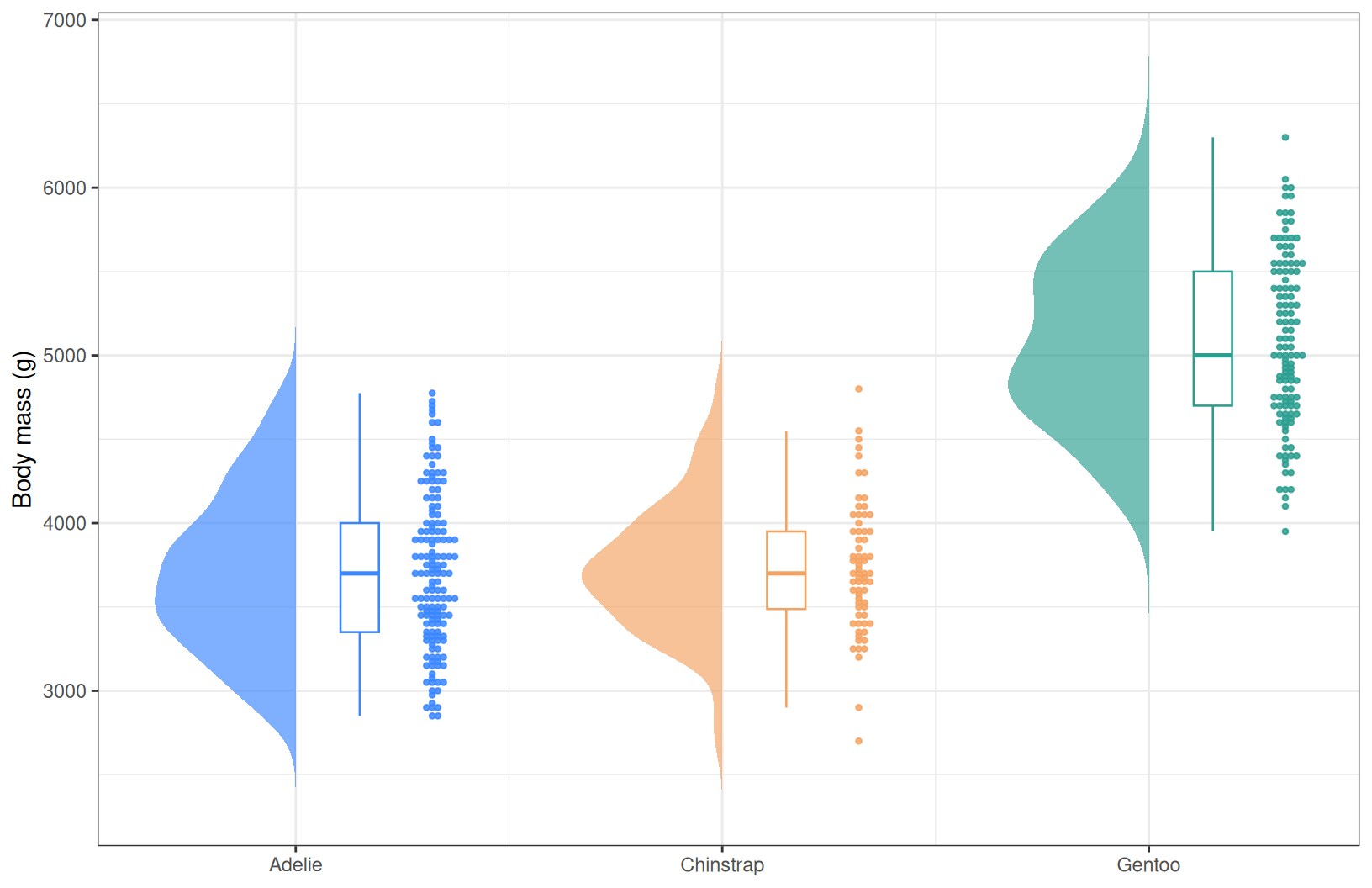
Tip
Key Parameters:
-
width: how far the half-violin extends from the group centre (also the visual balance between the three components). -
+ .15/+ .32: the x offsets that place the boxplot and the beeswarm right of the centre; tune them together withwidth. -
cex: beeswarm point spacing; lower values pack the points tighter.
2. Annotated Plot
Adding mean markers and group sizes turns the plot into a complete summary: the diamond marks the mean inside each box, and the axis labels carry the sample size.
ggplot(penguins_clean) +
  geom_polygon(data = violin_data, aes(x = x, y = y, fill = group, group = group),
               alpha = .65, colour = NA) +
  geom_boxplot(aes(x = x_pos + .15, y = body_mass_g, group = species, colour = species),
               width = .09, outlier.shape = NA, fill = "white", linewidth = .45) +
  geom_beeswarm(aes(x = x_pos + .32, y = body_mass_g, colour = species),
                cex = .5, size = .85, alpha = .85) +
  stat_summary(aes(x = x_pos + .15, y = body_mass_g, group = species),
               fun = mean, geom = "point", shape = 18, size = 3, colour = "grey15") +
  scale_fill_manual(values = raincloud_colors) +
  scale_colour_manual(values = raincloud_colors) +
  scale_x_continuous(
    breaks = centres,
    labels = paste0(levels(penguins_clean$species), "\n(n = ",
                    table(penguins_clean$species)[levels(penguins_clean$species)], ")")) +
  labs(x = NULL, y = "Body mass (g)") +
  theme_bw() +
  theme(legend.position = "none", panel.grid.minor = element_blank())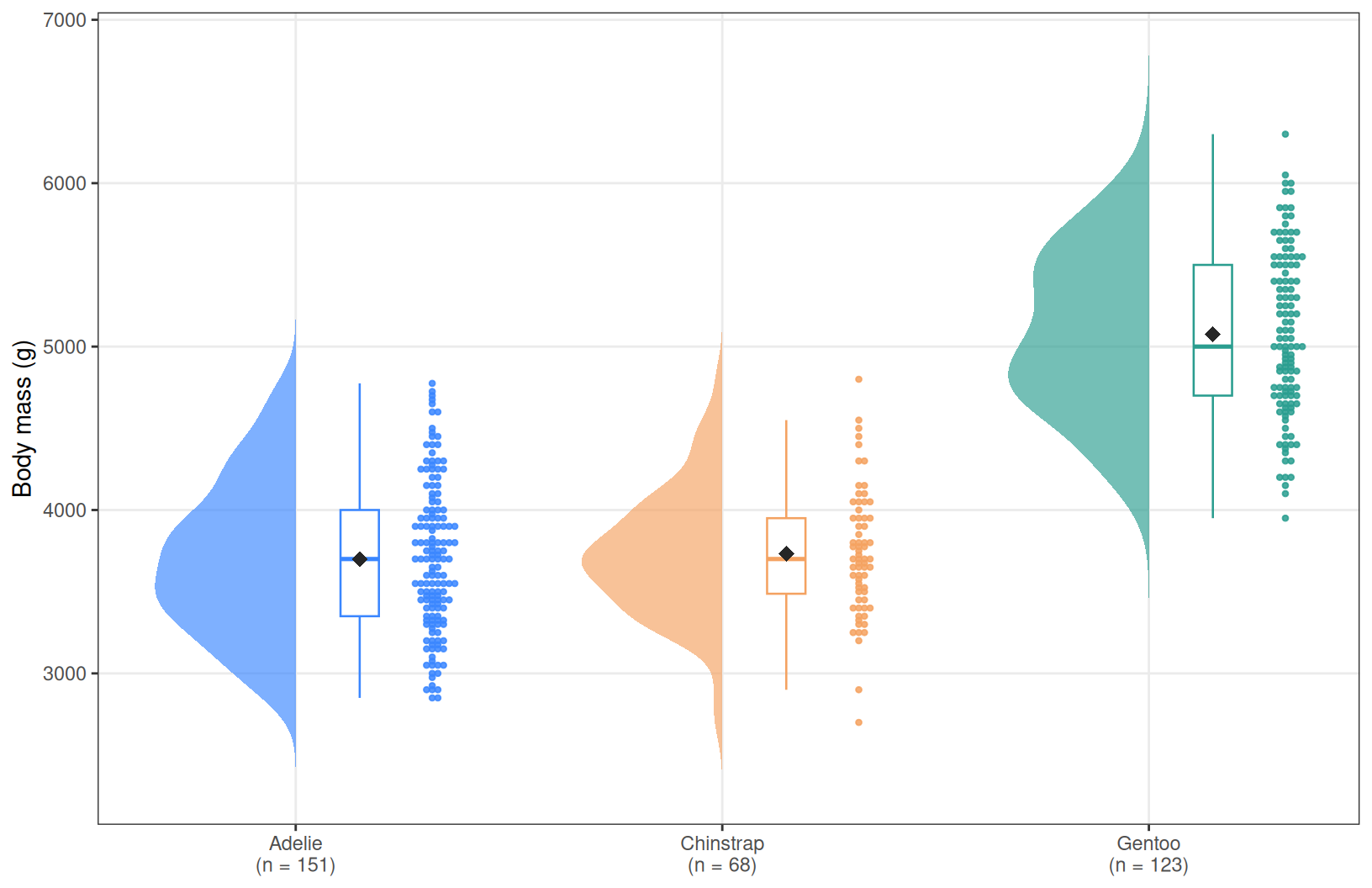
3. Horizontal Orientation
When group names are long (clinical cohorts, omics clusters), flipping the axes puts them on the y axis where they read comfortably; coord_flip() turns the whole raincloud sideways without touching the layers.
ggplot(penguins_clean) +
  geom_polygon(data = violin_data, aes(x = x, y = y, fill = group, group = group),
               alpha = .65, colour = NA) +
  geom_boxplot(aes(x = x_pos + .15, y = body_mass_g, group = species, colour = species),
               width = .09, outlier.shape = NA, fill = "white", linewidth = .45) +
  geom_beeswarm(aes(x = x_pos + .32, y = body_mass_g, colour = species),
                cex = .5, size = .85, alpha = .85) +
  scale_fill_manual(values = raincloud_colors) +
  scale_colour_manual(values = raincloud_colors) +
  scale_x_continuous(breaks = centres, labels = levels(penguins_clean$species)) +
  labs(x = NULL, y = "Body mass (g)") +
  theme_bw() +
  theme(legend.position = "none", panel.grid.minor = element_blank()) +
  coord_flip()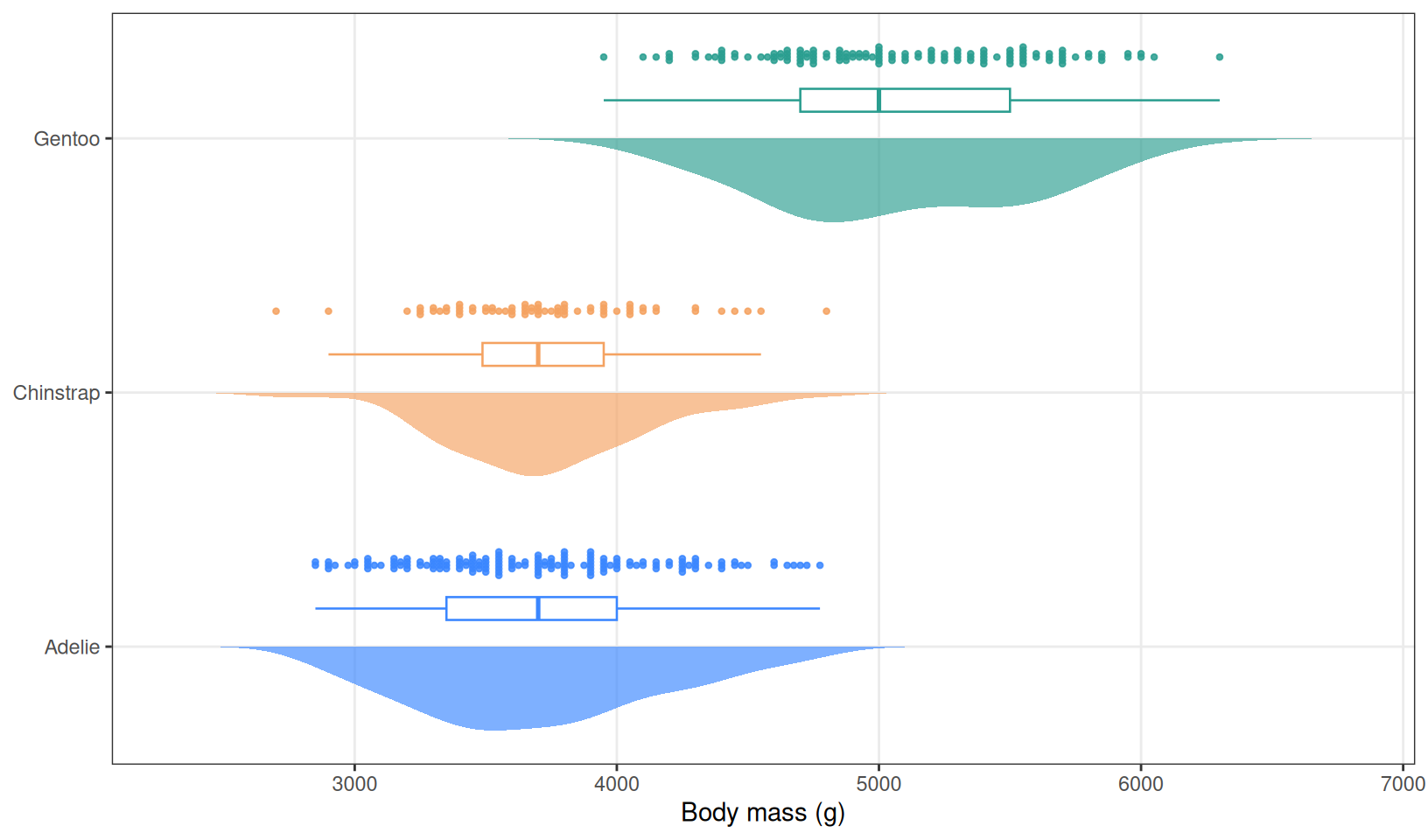
Applications
- Comparing distributions across groups: the standard upgrade from bar-plus-error-bar figures whenever reviewers ask for the raw data.
- Clinical and omics cohorts: group sizes are unequal and skew is common; the beeswarm keeps every patient visible.
- Small samples: with n < 20 the beeswarm alone almost replaces the violin, and the boxplot still summarises the quartiles.
- The half-violin polygon recipe (
density()+geom_polygon()) works for any density layer, horizontal or vertical, without extra packages.
Reference
[1] 顶刊图社 | 第017期:箱线图/小提琴图/云雨图. WeChat article. http://mp.weixin.qq.com/s?__biz=MzU5NjE2ODU0OQ==&mid=2247483936&idx=1&sn=cf22ad37b9afc52a0af1f27daf8a4711
[2] Allen M, Poggiali D, Whitaker K, Marshall TR, Kievit RA. Raincloud plots: a multi-platform tool for robust data visualization. Wellcome Open Res. 2019;4:63. doi:10.12688/wellcomeopenres.15191.1