import matplotlib.pyplot as plt
from matplotlib.lines import Line2D
import numpy as np
import pandas as pdSwimmer Plot (Python)
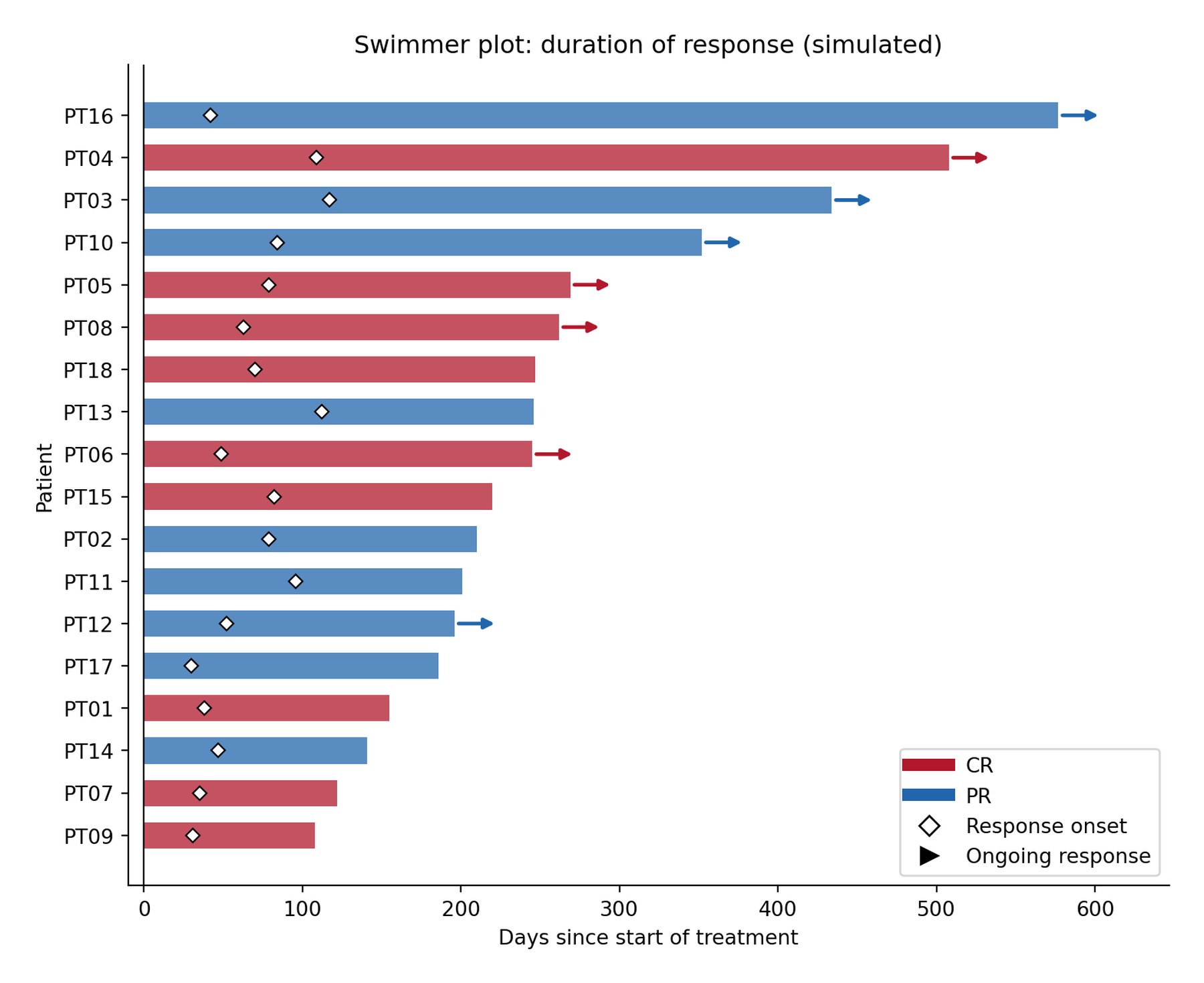
A swimmer plot shows each patient’s treatment/response timeline as one horizontal “lane”: bar length = time on study, color = best response, a marker at response onset, and an arrow for responses still ongoing at data cut [1]. It is the oncology-trial standard for duration of response (DOR) — a Kaplan–Meier curve summarizes the same cohort but hides who is still responding, who started responding late, and how heterogeneous the trajectories are.
This tutorial builds one with matplotlib from primitives: barh lanes, response-onset markers, and ongoing-response arrows, on a simulated RECIST-style cohort. The chart reads in seconds once the legend maps the three encodings.
This tutorial covers one workflow with three extensions:
- The canonical swimmer plot (bars + onset markers + ongoing arrows);
- Sorting by duration to expose response-duration patterns;
- Adding a second event marker (e.g., progression or death).
Example
Setup
- System Requirements: Cross-platform (Linux/MacOS/Windows)
- Programming Language: Python
- Dependencies:
matplotlib,numpy,pandas
Data Preparation
We simulate 18 patients with time to response (30–120 days), duration of response, best response (CR/PR), and an ongoing flag at data cut. One patient deliberately shows a short response — swimmer plots exist to show them.
rng = np.random.default_rng(251)

n = 18
swim = pd.DataFrame({
    "patient": [f"PT{i:02d}" for i in range(1, n + 1)],
    "respond_day": rng.integers(30, 120, n),
    "response": rng.choice(["CR", "PR"], n, p=[0.4, 0.6]),
    "ongoing": rng.random(n) < 0.45,
})
duration = swim.respond_day + rng.integers(90, 540, n)
# non-ongoing responses end early: duration truncated
swim["end_day"] = np.where(swim.ongoing, duration,
                           swim.respond_day + (duration - swim.respond_day) // 3)
swim = swim.sort_values("end_day").reset_index(drop=True)   # longest swimmer on top
swim.head()| patient | respond_day | response | ongoing | end_day | |
|---|---|---|---|---|---|
| 0 | PT09 | 31 | CR | False | 108 |
| 1 | PT07 | 35 | CR | False | 122 |
| 2 | PT14 | 47 | PR | False | 141 |
| 3 | PT01 | 38 | CR | False | 155 |
| 4 | PT17 | 30 | PR | False | 186 |
Visualization
1. Canonical Swimmer Plot
rc = {"CR": "#B2182B", "PR": "#2166AC"}

fig, ax = plt.subplots(figsize=(8, 6.5))
for _, r in swim.iterrows():
    ax.barh(r.patient, r.end_day, color=rc[r.response], alpha=0.75, height=0.62)
    ax.plot(r.respond_day, r.patient, "D", color="white", markersize=5,
            markeredgecolor="black", markeredgewidth=0.8, zorder=5)
    if r.ongoing:
        ax.annotate("", xy=(r.end_day + 28, r.patient),
                    xytext=(r.end_day, r.patient),
                    arrowprops=dict(arrowstyle="-|>", color=rc[r.response], lw=1.8))

ax.axvline(0, color="black", lw=0.8)
ax.set_xlabel("Days since start of treatment")
ax.set_ylabel("Patient")
ax.set_title("Swimmer plot: duration of response (simulated)")
ax.spines[["top", "right"]].set_visible(False)
ax.set_xlim(-10, swim.end_day.max() + 70)
ax.legend(handles=[
    Line2D([0], [0], color=rc["CR"], lw=6, label="CR"),
    Line2D([0], [0], color=rc["PR"], lw=6, label="PR"),
    Line2D([0], [0], marker="D", color="white", markeredgecolor="black",
           markersize=7, label="Response onset", linestyle="none"),
    Line2D([0], [0], marker=">", color="black", markersize=8,
           linestyle="none", label="Ongoing response")],
    loc="lower right", frameon=True)
fig.tight_layout()
plt.show()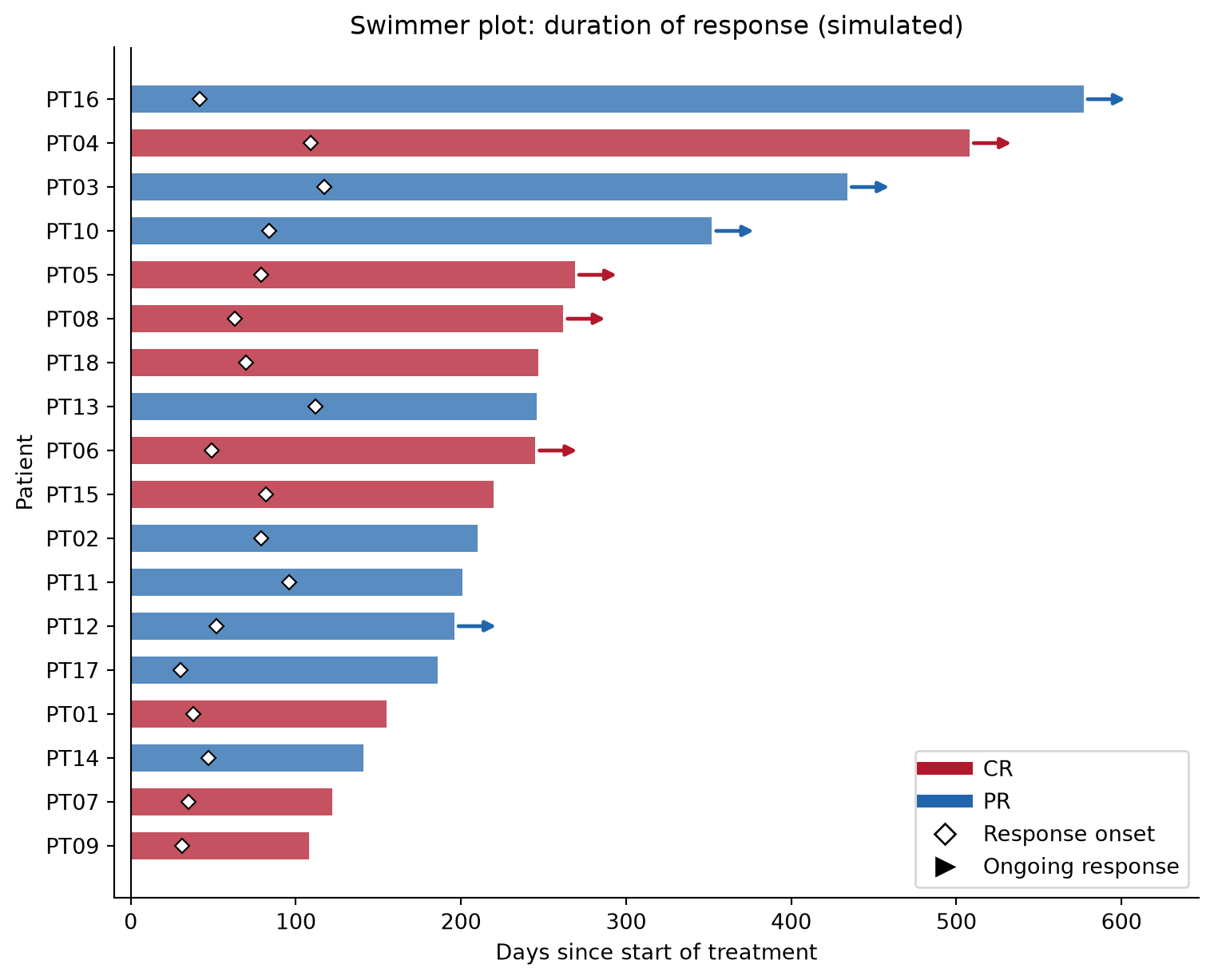
2. Adding a Second Event Marker
Trials mark progression or death on the lane as well; add a second scatter call with a distinct marker and extend the legend.
swim_ev = swim.assign(
    prog_day=np.where(~swim.ongoing, swim.end_day + rng.integers(10, 60, n), np.nan))

fig, ax = plt.subplots(figsize=(8, 6.5))
for _, r in swim_ev.iterrows():
    ax.barh(r.patient, r.end_day, color=rc[r.response], alpha=0.75, height=0.62)
    ax.plot(r.respond_day, r.patient, "D", color="white", markersize=5,
            markeredgecolor="black", markeredgewidth=0.8, zorder=5)
    if r.ongoing:
        ax.annotate("", xy=(r.end_day + 28, r.patient), xytext=(r.end_day, r.patient),
                    arrowprops=dict(arrowstyle="-|>", color=rc[r.response], lw=1.8))
prog = swim_ev.dropna(subset=["prog_day"])
ax.scatter(prog.prog_day, prog.patient, marker="x", color="black", s=45, zorder=6)

ax.axvline(0, color="black", lw=0.8)
ax.set_xlabel("Days since start of treatment")
ax.set_ylabel("Patient")
ax.set_title("Swimmer plot with progression events")
ax.spines[["top", "right"]].set_visible(False)
ax.set_xlim(-10, swim_ev.end_day.max() + 70)
ax.legend(handles=[
    Line2D([0], [0], color=rc["CR"], lw=6, label="CR"),
    Line2D([0], [0], color=rc["PR"], lw=6, label="PR"),
    Line2D([0], [0], marker="D", color="white", markeredgecolor="black",
           markersize=7, label="Response onset", linestyle="none"),
    Line2D([0], [0], marker=">", color="black", markersize=8,
           linestyle="none", label="Ongoing response"),
    Line2D([0], [0], marker="x", color="black", markersize=8,
           linestyle="none", label="Progression")],
    loc="lower right", frameon=True)
fig.tight_layout()
plt.show()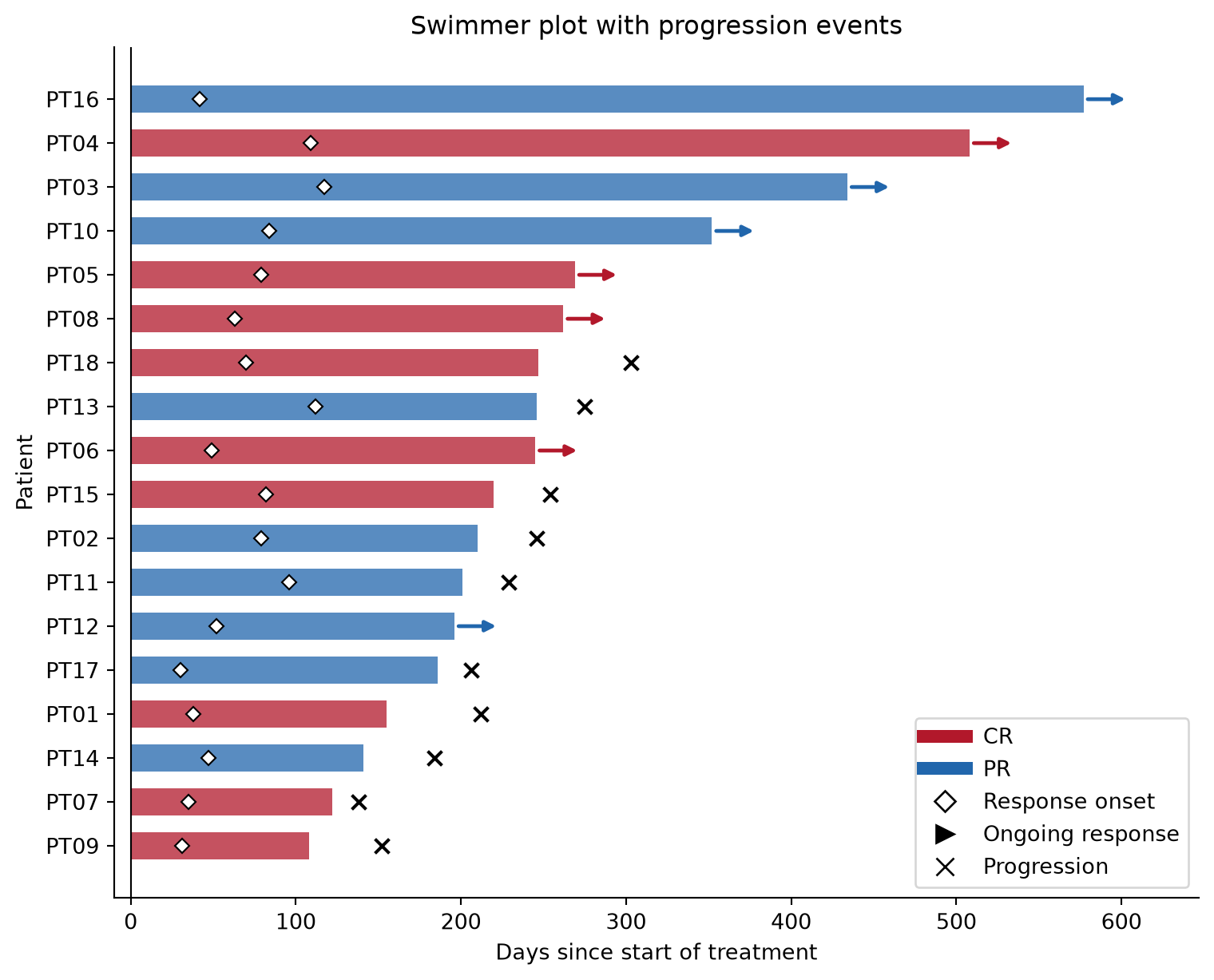
TipPractice tips
- Sort lanes by duration (or by response onset) — an unsorted swimmer plot wastes its most readable dimension.
- The three encodings must be in the legend: bar color (best response), onset marker, ongoing arrow. Anything unmarked will be misread as “treatment duration”.
- Ongoing arrows point beyond the data cut: leave x-axis headroom (
xlimpast the longest bar) so arrows stay visible. - Censoring ≠ ongoing response: state in the caption whether the arrow means “still responding at cut” or “censored”; trials differ.
Application
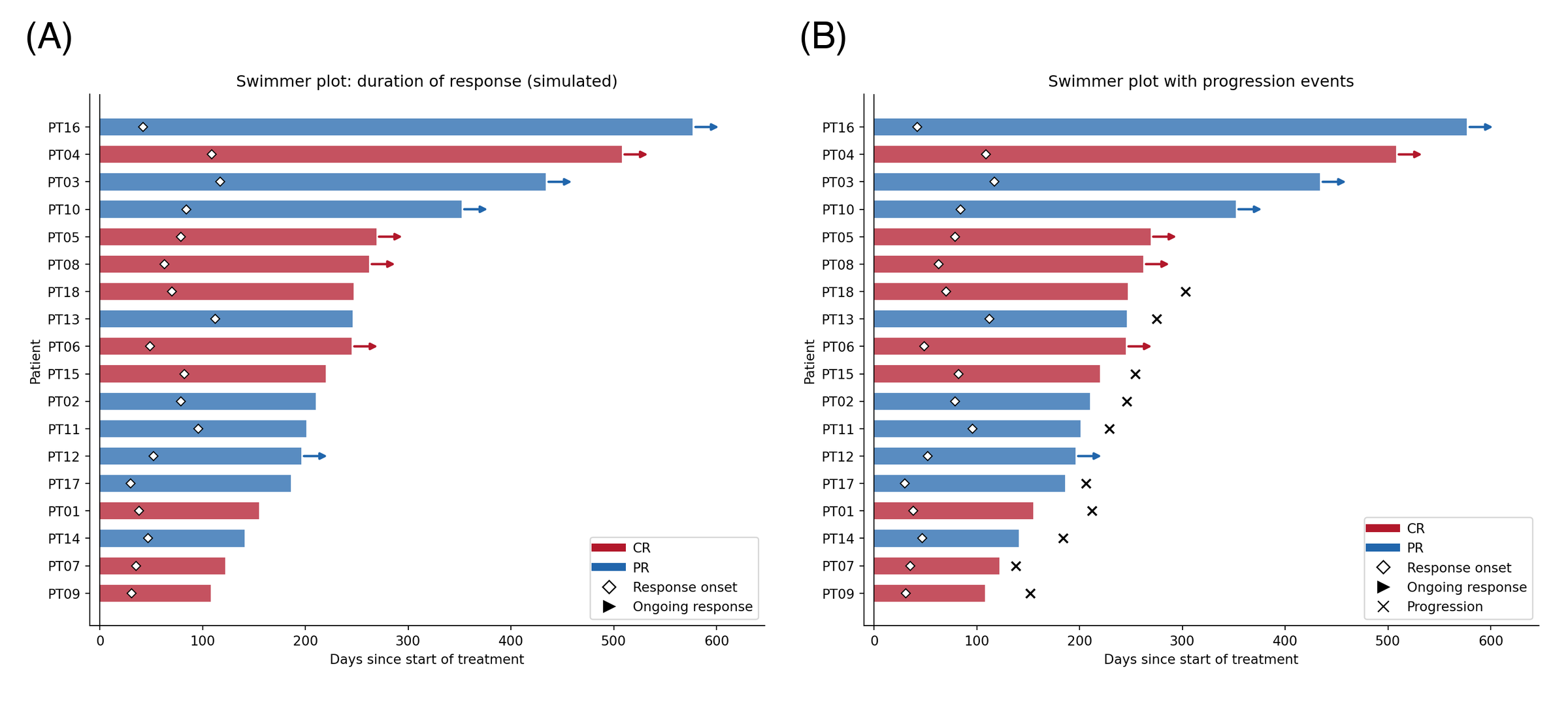
Swimmer plots headline immunotherapy and CAR-T papers (duration of response by best response), dose-escalation safety reports (time on treatment by dose level), and cell-therapy durability figures. The panel below mirrors a typical publication layout: (A) the canonical plot and (B) the progression-annotated variant.
Reference
[1] IASLC. What do all those lines and colors mean? A guide to swimmer plots in oncology trials. https://www.iaslc.org
[2] Hunter JD. Matplotlib: a 2D graphics environment. Comput Sci Eng. 2007;9(3):90-95. doi:10.1109/MCSE.2007.55