import matplotlib.pyplot as plt
import scanpy as sc
import pandas as pd
import numpy as np

sc.settings.verbosity = 0
sc.settings.set_figure_params(dpi=90, facecolor='white')scRNA-seq Dot Plot (Python)
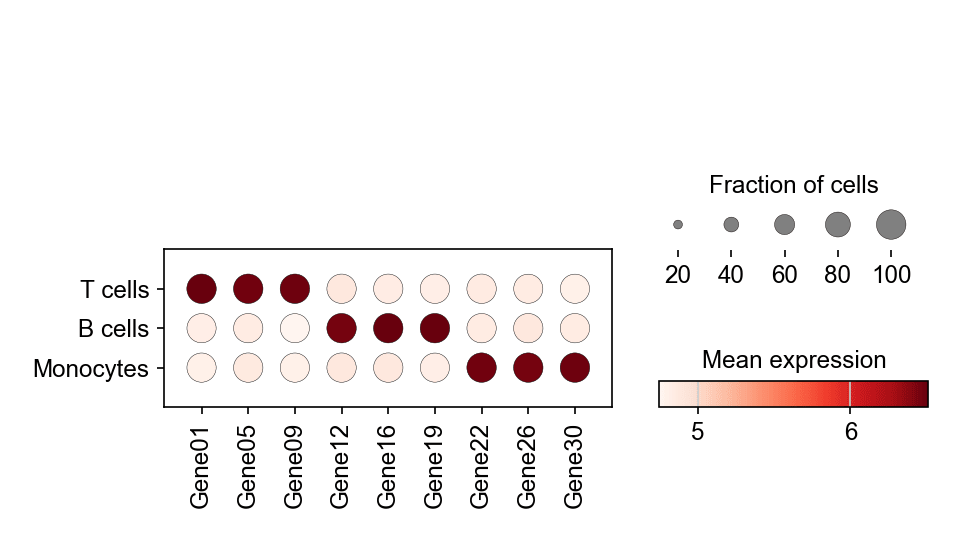
The single-cell dot plot summarizes marker expression across clusters in one dense panel: dot size encodes the fraction of cells expressing the gene, dot colour the mean expression level. It is the standard “which markers define which cluster” summary in scRNA-seq papers. scanpy.pl.dotplot computes both encodings from the raw object.
Example
Setup
- System Requirements: Cross-platform (Linux/MacOS/Windows)
- Programming Language: Python
- Dependencies:
scanpy,anndata,pandas,numpy,matplotlib
Data Preparation
We reuse the simulated three-population PBMC dataset and identify each cluster’s top markers with rank_genes_groups, then keep a curated set spanning all populations.
np.random.seed(241)

n_per = 400
genes = [f'Gene{i:02d}' for i in range(1, 31)]
blocks = {'T cells': (0, 10), 'B cells': (10, 20), 'Monocytes': (20, 30)}
counts = np.zeros((n_per * 3, 30))
labels = []
for i, (cell_type, (lo, hi)) in enumerate(blocks.items()):
    sl = slice(i * n_per, (i + 1) * n_per)
    counts[sl] = np.random.negative_binomial(4, 0.3, (n_per, 30))
    counts[sl, lo:hi] += np.random.negative_binomial(8, 0.2, (n_per, hi - lo))
    labels += [cell_type] * n_per

adata = sc.AnnData(counts.astype(np.float32))
adata.var_names = genes
adata.obs['CellType'] = pd.Categorical(labels, categories=blocks)

sc.pp.normalize_total(adata, target_sum=1e4)
sc.pp.log1p(adata)
sc.tl.rank_genes_groups(adata, 'CellType')
marker_genes = ['Gene01', 'Gene05', 'Gene09',
                'Gene12', 'Gene16', 'Gene19',
                'Gene22', 'Gene26', 'Gene30']
Visualization
Dot Plot of Curated Markers
var_names fixes the gene order, dendrogram=False keeps the biological grouping explicit, and the size legend explains the fraction encoding.
fig, ax = plt.subplots(figsize=(6.4, 3.6))
sc.pl.dotplot(adata, var_names=marker_genes, groupby='CellType',
              ax=ax, show=False, cmap='Reds',
              size_title='Fraction of cells', colorbar_title='Mean expression')
plt.tight_layout()
plt.show()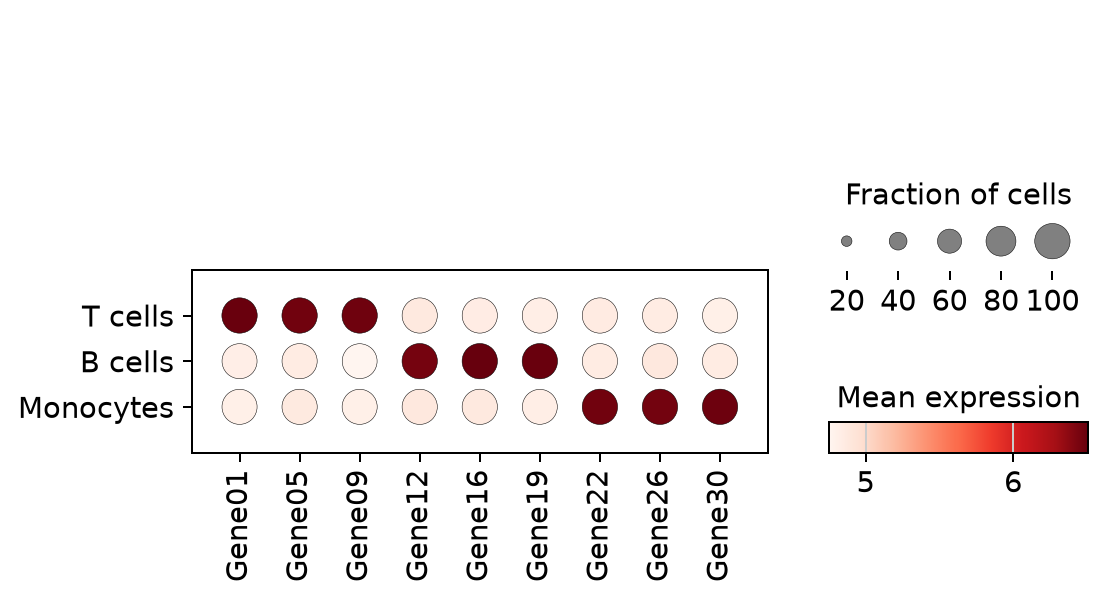
Ranked Markers per Cluster
Instead of a hand-curated list, feed each cluster’s top-3 ranked genes — the quick-look version right after rank_genes_groups.
rg = sc.get.rank_genes_groups_df(adata, group=None)
ranked = sorted(set(rg.names.head(9)))
fig, ax = plt.subplots(figsize=(6.4, 3.2))
sc.pl.dotplot(adata, var_names=ranked, groupby='CellType',
              ax=ax, show=False, cmap='Reds',
              size_title='Fraction of cells', colorbar_title='Mean expression')
plt.tight_layout()
plt.show()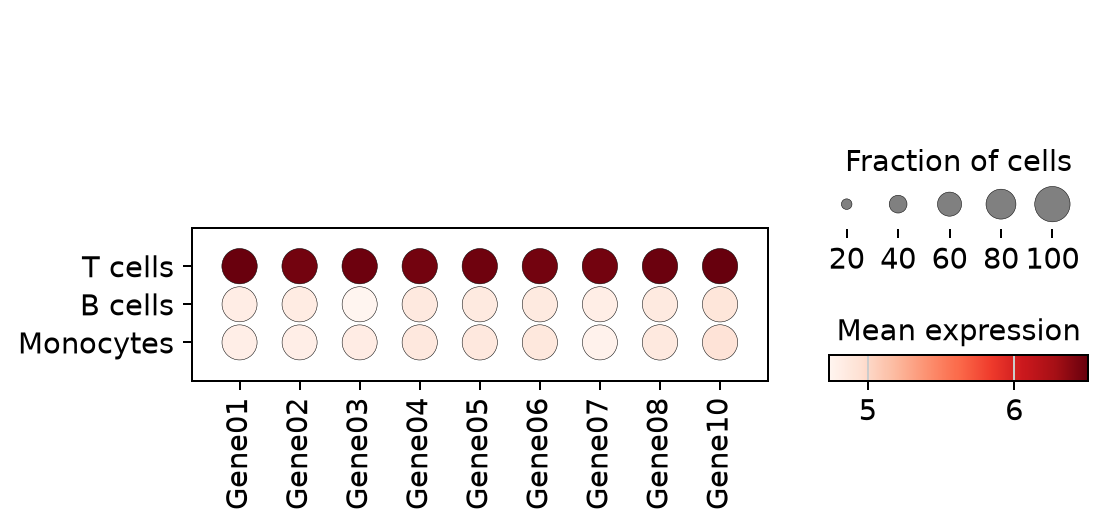
References
- Wolf, F. A., Angerer, P., & Theis, F. J. (2018). SCANPY: large-scale single-cell gene expression data analysis. Genome Biology, 19, 15.
- Trapnell, C. (2015). Defining cell types and states with single-cell genomics. Genome Research, 25(10), 1491-1498.