using CairoMakie
using DataFrames
using Statistics
using RandomHistogram & Density Plot (Julia)
Histograms and kernel density estimates (KDE) reveal the shape of a distribution — modality, skewness, and spread that summary statistics conceal. In biomedical research they are routinely used to inspect gene expression distributions, fluorescence intensity profiles, and quality-control metrics before statistical modeling. CairoMakie provides hist, density, and ecdfplot in one consistent style.
Example
Setup
- System Requirements: Cross-platform (Linux/MacOS/Windows)
- Programming Language: Julia
- Dependencies:
CairoMakie,DataFrames,Statistics
Data Preparation
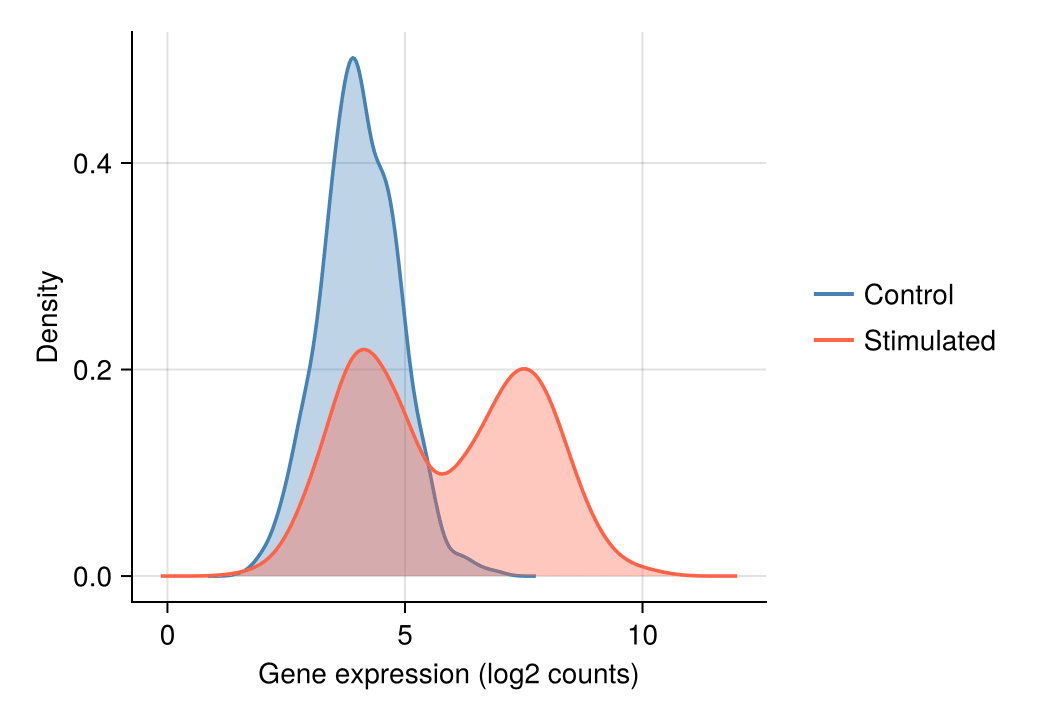
We simulate the expression of one gene measured in control and stimulated conditions. The stimulated condition is a mixture of two cell subpopulations, producing the bimodality that histograms and KDE are designed to expose.
Random.seed!(11)

n = 800
control = 4.0 .+ 0.8 .* randn(n)
stimulated = vcat(4.2 .+ 0.8 .* randn(n ÷ 2),     # subpopulation A
                  7.5 .+ 0.9 .* randn(n ÷ 2))     # subpopulation B
800-element Vector{Float64}:
3.865937421494608
3.974499458766426
5.381090416248313
4.110384484371341
3.7223752847320704
4.39180807907198
4.330339266391583
4.148369000454984
5.054781277267091
3.2025996007194766
⋮
5.9133709566761254
6.211074468067516
6.648365564220777
7.991501574926472
7.918335795750192
7.957618819674784
6.908673960979235
6.625134971802873
7.20347852264799Visualization
Histogram
Bin width controls the bias–variance trade-off: too few bins hide structure, too many amplify noise. Compare bins = 15 with finer settings when in doubt.
fig = Figure(size = (460, 340))
ax = Axis(fig[1, 1], xlabel = "Gene expression (log2 counts)", ylabel = "Count")
hist!(ax, control; bins = 30, color = :skyblue,
      strokecolor = :white, strokewidth = 0.6)
hidespines!(ax, :t, :r)
fig
Histogram with KDE Overlay
A kernel density estimate drawn on the count axis outlines the distribution while the bars keep the raw counts visible.
fig = Figure(size = (460, 340))
ax = Axis(fig[1, 1], xlabel = "Gene expression (log2 counts)", ylabel = "Count")
hist!(ax, control; bins = 30, color = :seagreen,
      strokecolor = :white, strokewidth = 0.6)
density!(ax, control; color = (:seagreen, 0.0), strokecolor = :darkgreen,
         strokewidth = 2, offset = 0)
hidespines!(ax, :t, :r)
fig
Comparing Groups with Density Curves
For two or more groups, overlaid semi-transparent density curves make the bimodality of the stimulated sample directly visible.
fig = Figure(size = (460, 340))
ax = Axis(fig[1, 1], xlabel = "Gene expression (log2 counts)", ylabel = "Density")
density!(ax, control; color = (:steelblue, 0.35), strokecolor = :steelblue, strokewidth = 1.8)
density!(ax, stimulated; color = (:tomato, 0.35), strokecolor = :tomato, strokewidth = 1.8)
hidespines!(ax, :t, :r)
Legend(fig[1, 2], [LineElement(color = :steelblue, linewidth = 2),
                   LineElement(color = :tomato, linewidth = 2)],
       ["Control", "Stimulated"], framevisible = false)
fig
Empirical Cumulative Distribution Function
The ECDF shows every observation without binning or smoothing, making it ideal for auditing distributional shift between cohorts.
fig = Figure(size = (460, 340))
ax = Axis(fig[1, 1], xlabel = "Gene expression (log2 counts)", ylabel = "Proportion")
ecdfplot!(ax, control; color = :steelblue, linewidth = 2)
ecdfplot!(ax, stimulated; color = :tomato, linewidth = 2)
hidespines!(ax, :t, :r)
Legend(fig[1, 2], [LineElement(color = :steelblue, linewidth = 2),
                   LineElement(color = :tomato, linewidth = 2)],
       ["Control", "Stimulated"], framevisible = false)
fig
References
- Makie development team. Makie.jl documentation — hist, density, ecdfplot. https://docs.makie.org/stable/reference/plots/hist
- Danisch, S., & Krumbiegel, J. (2021). Makie.jl: Flexible high-performance data visualization for Julia. Journal of Open Source Software, 6(65), 3349.