import matplotlib.pyplot as plt
import seaborn as sns
import pandas as pd
import numpy as npOncoprint (Python)
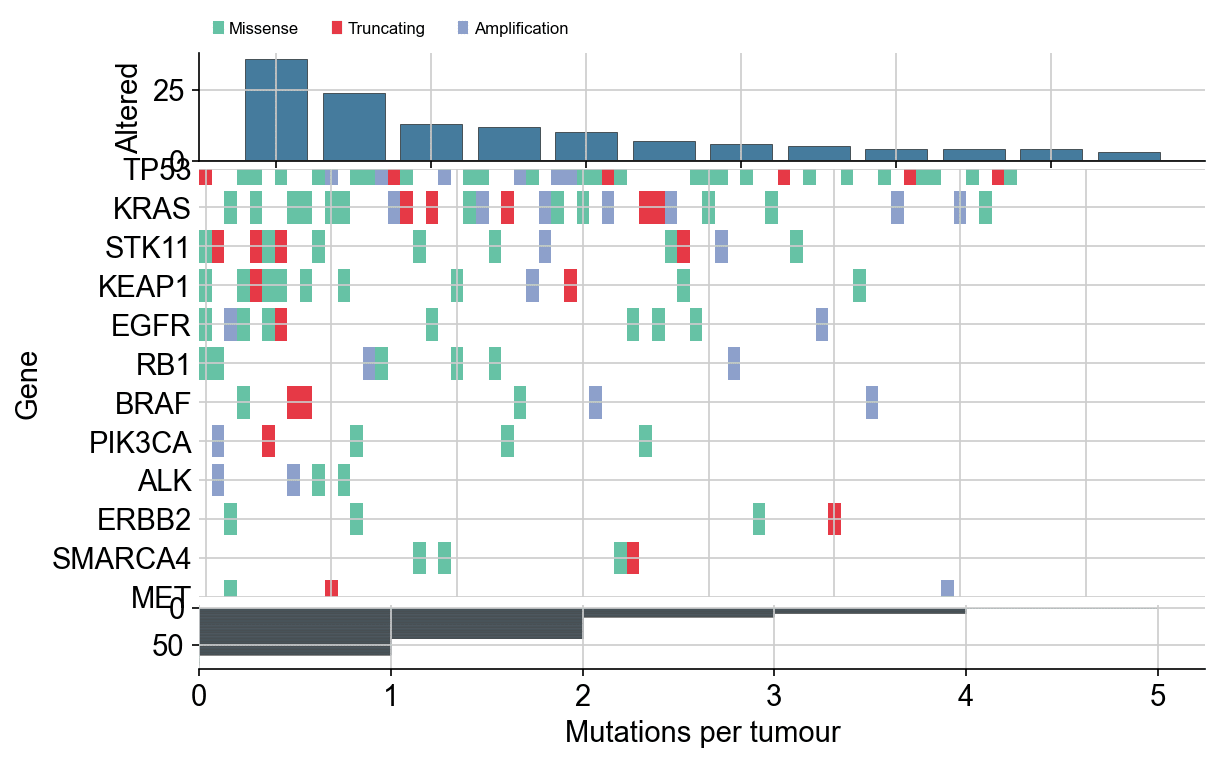
An oncoprint tiles one gene (row) against one tumour sample (column) per altered cell, colour-coded by alteration type, with per-gene frequency and per-sample mutation burden in flanking bars — the signature figure of tumour genomics papers. matplotlib builds it from one coloured-rectangle pass plus two bar axes; the hand-rolled version keeps every sorting rule explicit.
Example
Setup
- System Requirements: Cross-platform (Linux/MacOS/Windows)
- Programming Language: Python
- Dependencies:
matplotlib,seaborn,pandas,numpy
Data Preparation
We simulate a 12-gene × 80-tumour alteration table (Missense, Truncating, Amplification) with realistic frequency skew — TP53 near-ubiquitous, drivers rare but recurrent — plus per-sample mutation counts.
np.random.seed(261)

genes = ['TP53', 'KRAS', 'STK11', 'KEAP1', 'EGFR', 'BRAF',
         'PIK3CA', 'ALK', 'ERBB2', 'MET', 'RB1', 'SMARCA4']
freq = np.array([0.46, 0.30, 0.17, 0.15, 0.13, 0.08,
                 0.07, 0.05, 0.05, 0.04, 0.09, 0.06])
n_tumours = 80

alt_records = []
for gene, f in zip(genes, freq):
    for tumour in np.random.choice(n_tumours, size=int(f * n_tumours),
                                   replace=False):
        alt_records.append(
            (gene, tumour, np.random.choice(
                ['Missense', 'Truncating', 'Amplification'],
                p=[0.55, 0.2, 0.25])))
alts = pd.DataFrame(alt_records, columns=['Gene', 'Tumour', 'Type'])

type_colors = {'Missense': '#66c2a5', 'Truncating': '#e63946',
               'Amplification': '#8da0cb'}
alt_order = ['Truncating', 'Missense', 'Amplification']  # draw order
Visualization
Sorted Oncoprint with Flanking Bars
Genes are sorted by alteration frequency (top row = most altered), samples by total burden (left column = most loaded), and both flanking bars quantify the same two axes.
gene_order = alts.Gene.value_counts().index.tolist()
burden = alts.groupby('Tumour').size().reindex(range(n_tumours), fill_value=0)
sample_order = burden.sort_values(ascending=False).index.tolist()

fig, (ax_top, ax_mat, ax_right) = plt.subplots(
    3, 1, figsize=(8.6, 5.4), sharex=False,
    gridspec_kw={'height_ratios': [1, 4, 0.6], 'hspace': 0.04})

counts = alts.Gene.value_counts().reindex(gene_order)
ax_top.bar(range(len(gene_order)), counts.values, color='#457b9d',
           edgecolor='0.25', linewidth=0.4)
ax_top.set_ylabel('Altered')
ax_top.spines[['top', 'right']].set_visible(False)

for y, gene in enumerate(gene_order):
    sub = alts[alts.Gene == gene]
    for _, row in sub.iterrows():
        x = sample_order.index(row.Tumour)
        ax_mat.add_patch(plt.Rectangle(
            (x - 0.5, y - 0.42), 1.0, 0.84,
            color=type_colors[row.Type], linewidth=0))
ax_mat.set_yticks(range(len(gene_order)), gene_order)
ax_mat.invert_yaxis()
ax_mat.set_xlim(-0.5, n_tumours - 0.5)
ax_mat.spines[['top', 'right', 'left', 'bottom']].set_visible(False)
ax_mat.tick_params(length=0)
ax_mat.set_ylabel('Gene')

ax_right.barh(range(len(sample_order)),
              burden.loc[sample_order].values, color='#457b9d',
              edgecolor='0.25', linewidth=0.3, height=0.8)
ax_right.invert_yaxis()
ax_right.set_xlabel('Mutations per tumour')
ax_right.spines[['top', 'right', 'left']].set_visible(False)

handles = [plt.Rectangle((0, 0), 1, 1, color=c) for c in type_colors.values()]
ax_top.legend(handles, type_colors, frameon=False, ncol=3,
              loc='lower left', bbox_to_anchor=(0.0, 1.02), fontsize=8)
plt.show()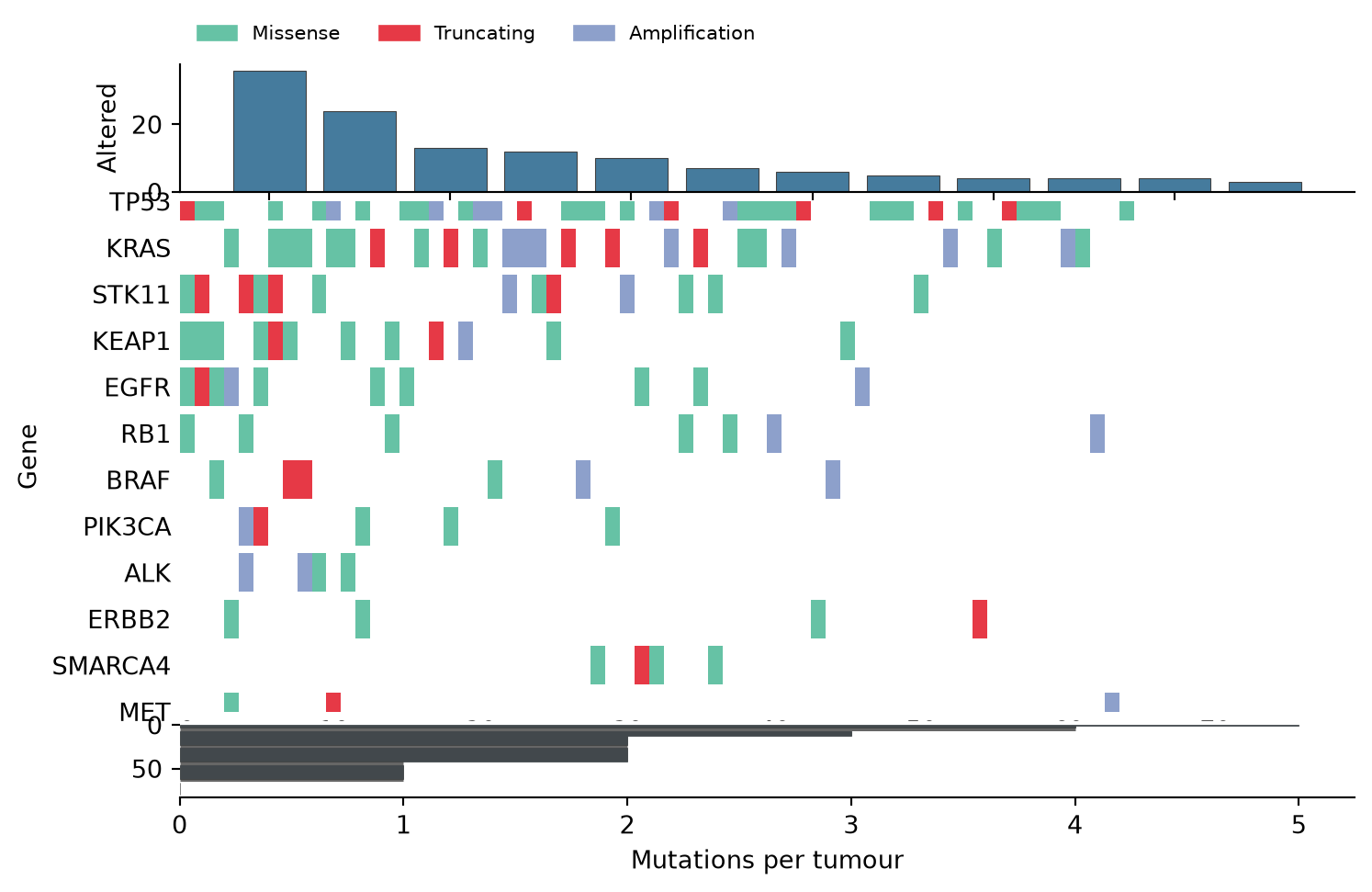
Highlighting One Alteration Type
Drawing non-Missense events with a thin outline keeps the dominant alteration class readable while still showing where truncating events cluster.
fig, (ax_top, ax_mat) = plt.subplots(
    2, 1, figsize=(8.6, 4.6), sharex=False,
    gridspec_kw={'height_ratios': [1, 4], 'hspace': 0.05})

ax_top.bar(range(len(gene_order)), counts.values, color='#457b9d',
           edgecolor='0.25', linewidth=0.4)
ax_top.set_ylabel('Altered')
ax_top.spines[['top', 'right']].set_visible(False)

for y, gene in enumerate(gene_order):
    sub = alts[alts.Gene == gene]
    for _, row in sub.iterrows():
        x = sample_order.index(row.Tumour)
        is_trunc = row.Type == 'Truncating'
        ax_mat.add_patch(plt.Rectangle(
            (x - 0.5, y - 0.42), 1.0, 0.84,
            facecolor=type_colors[row.Type] if is_trunc else '#d9dee6',
            edgecolor=type_colors[row.Type] if is_trunc else 'none',
            linewidth=1.2 if is_trunc else 0))
ax_mat.set_yticks(range(len(gene_order)), gene_order)
ax_mat.invert_yaxis()
ax_mat.set_xlim(-0.5, n_tumours - 0.5)
ax_mat.spines[['top', 'right', 'left', 'bottom']].set_visible(False)
ax_mat.tick_params(length=0)
ax_mat.set_ylabel('Gene')
plt.show()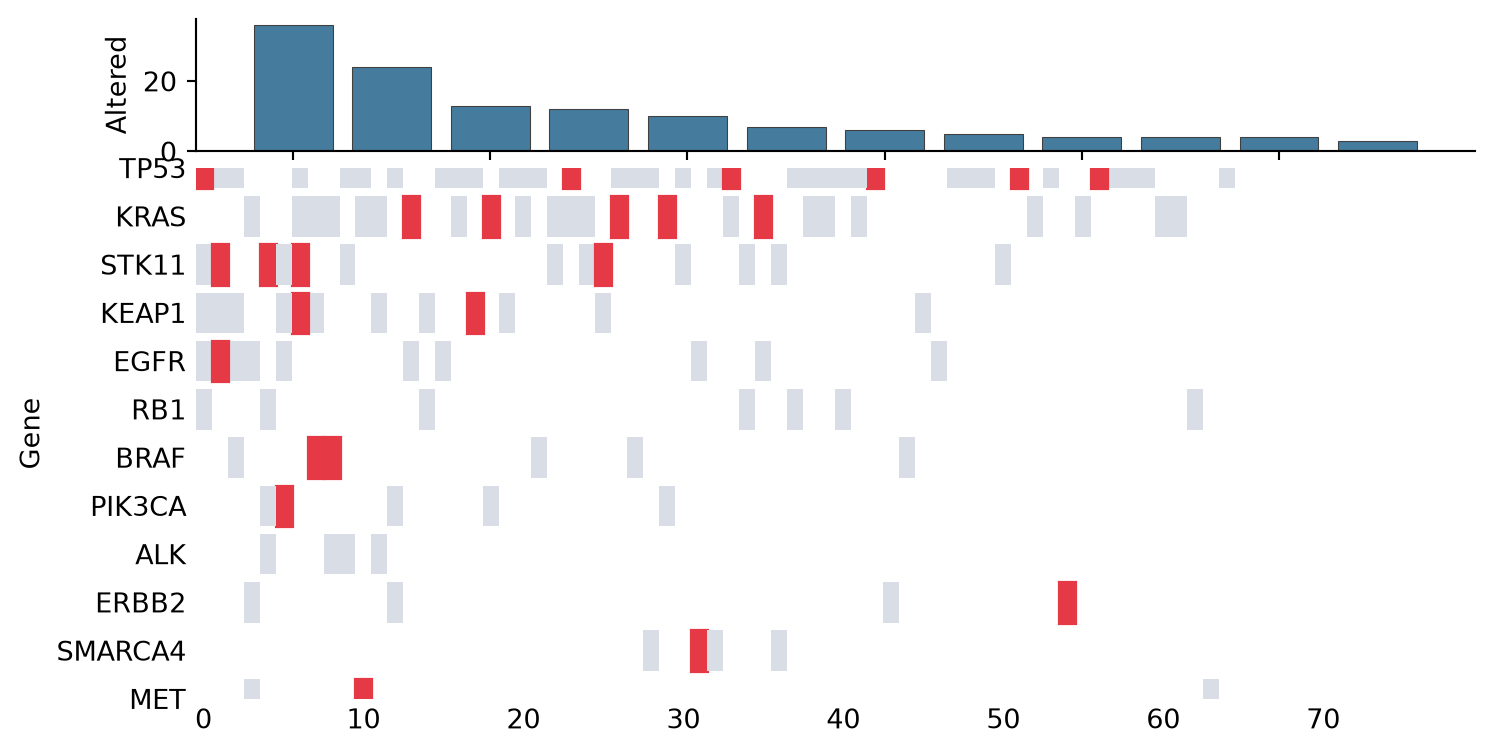
References
- Gao, J., et al. (2013). Integrating genomics data into the cBioPortal. Science Signaling, 6(268), pl4.
- Hunter, J. D. (2007). Matplotlib: A 2D graphics environment. Computing in Science & Engineering, 9(3), 90-95.