# Installing necessary packages
if (!requireNamespace("tidyverse", quietly = TRUE)) {
  install.packages("tidyverse")
}
if (!requireNamespace("ggbeeswarm", quietly = TRUE)) {
  install.packages("ggbeeswarm")
}
if (!requireNamespace("patchwork", quietly = TRUE)) {
  install.packages("patchwork")
}

# Load packages
library(tidyverse)
library(ggbeeswarm)
library(patchwork)Bar, Beeswarm and Line Combination Plot
A combination panel answers a comparison from three angles side by side: a bar chart of the group means with error bars, a beeswarm exposing every individual observation, and a paired line plot tracing each subject across the two conditions. Reading them together distinguishes what a single summary hides — an apparent mean difference can come from a consistent shift of every subject or from a few large responders, and only the paired panel shows which. This tutorial reproduces the chart type covered by the 顶刊图社 series (issue 006); see the Reference section below.
Example
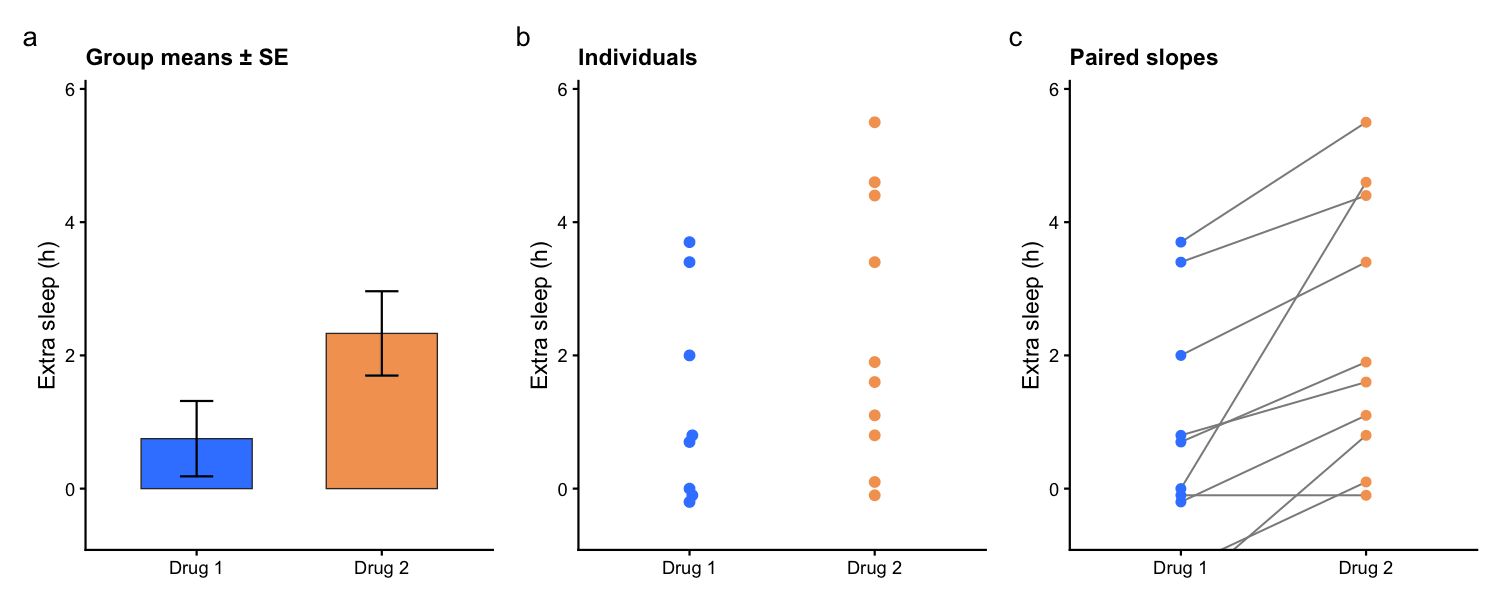
This combination panel analyses the classic sleep study (10 patients, two sleeping drugs, paired design). Panel a shows the mean extra sleep per drug with standard-error bars; panel b plots every patient’s result as a beeswarm; panel c connects each patient’s two measurements — the upward slopes show that most patients slept longer on Drug 2, exactly the paired evidence the means alone cannot provide.
Setup
System Requirements: Cross-platform (Linux/MacOS/Windows)
Programming Language: R
Dependencies:
tidyverse;ggbeeswarm;patchwork
Data Preparation
The example uses the base R sleep dataset: paired measurements of extra sleep for 10 patients under two drugs — one row per patient per condition, which is exactly the long shape all three panels need.
data("sleep")

sleep_data <- sleep |>
  mutate(group = factor(group, labels = c("Drug 1", "Drug 2")),
         ID = factor(ID))

head(sleep_data, 4)
extra group ID
1 0.7 Drug 1 1
2 -1.6 Drug 1 2
3 -0.2 Drug 1 3
4 -1.2 Drug 1 4The three panels share one y range so they can be read against each other; fixing it up front avoids three different automatic scales.
panel_colors <- c("Drug 1" = "#3a86ff", "Drug 2" = "#f4a261")
panel_theme <- theme_classic(base_size = 11) +
  theme(legend.position = "none",
        plot.title = element_text(size = 11, face = "bold"))
shared_range <- coord_cartesian(ylim = c(-0.6, 5.8))

summary_stats <- sleep_data |>
  group_by(group) |>
  summarise(mean_extra = mean(extra), se = sd(extra) / sqrt(n()), .groups = "drop")
Visualization
1. The Three Panels
Each panel is an ordinary ggplot; patchwork composes them with + and adds panel tags. The bar panel draws the mean with an error bar, the beeswarm panel needs ggbeeswarm, and the pairing panel adds group = ID to connect each patient’s two points.
panel_a <- ggplot(summary_stats, aes(group, mean_extra, fill = group)) +
  geom_col(width = .6, colour = "grey20", linewidth = .3) +
  geom_errorbar(aes(ymin = mean_extra - se, ymax = mean_extra + se),
                width = .18, linewidth = .5) +
  scale_fill_manual(values = panel_colors) +
  labs(x = NULL, y = "Extra sleep (h)", title = "Group means ± SE") +
  panel_theme + shared_range

panel_b <- ggplot(sleep_data, aes(group, extra, colour = group)) +
  geom_beeswarm(cex = 1.6, size = 2) +
  scale_colour_manual(values = panel_colors) +
  labs(x = NULL, y = "Extra sleep (h)", title = "Individuals") +
  panel_theme + shared_range

panel_c <- ggplot(sleep_data, aes(group, extra, group = ID)) +
  geom_line(colour = "grey55", linewidth = .45) +
  geom_point(aes(colour = group), size = 1.8) +
  scale_colour_manual(values = panel_colors) +
  labs(x = NULL, y = "Extra sleep (h)", title = "Paired slopes") +
  panel_theme + shared_range

panel_a + panel_b + panel_c + plot_annotation(tag_levels = "a")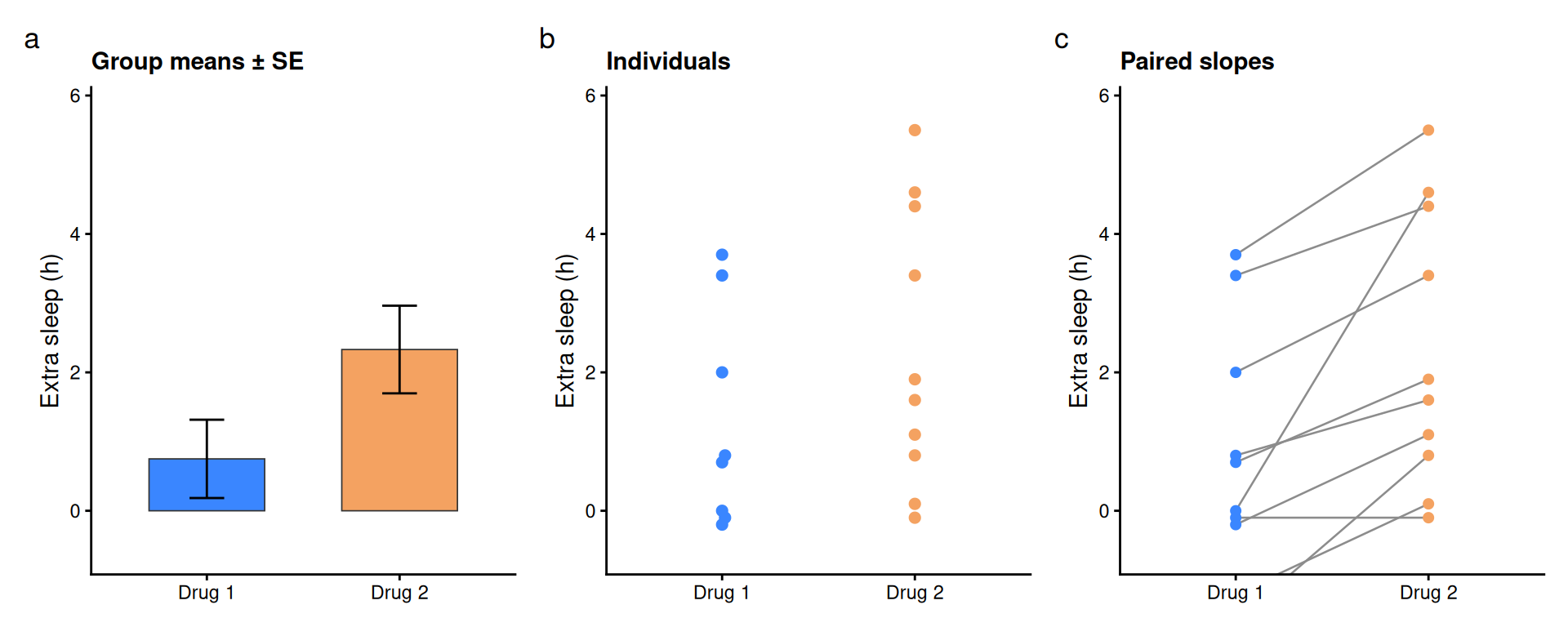
Tip
Key Parameters:
-
group = IDin the pairing panel: what switches a scatter into a slope chart; keep one row per subject per condition. -
coord_cartesian(ylim = ...): crops the view without dropping data — use it to give all panels the same range. -
patchwork: compose with+(side by side) orplot_layout(ncol = 1)(stacked);plot_annotation(tag_levels = "a")adds the panel letters.
2. Vertical Stack with a Paired Test
Stacking the panels vertically suits narrow figures, and the paired design allows the matching test to be reported right on the slope panel. Note the R idiom: t.test() cannot combine a formula with paired = TRUE — pass the two vectors instead.
wide <- sleep_data |>
  select(ID, group, extra) |>
  pivot_wider(names_from = group, values_from = extra)
paired_test <- t.test(wide[["Drug 2"]], wide[["Drug 1"]], paired = TRUE)
test_label <- sprintf("paired t-test: p = %.3f, mean diff = %.2f h",
                      paired_test$p.value, paired_test$estimate)

panel_c2 <- panel_c +
  labs(title = NULL) +
  annotate("text", x = 1.5, y = 5.6, label = test_label, size = 3.2)

panel_a + panel_b + panel_c2 +
  plot_layout(ncol = 1) +
  plot_annotation(tag_levels = "a")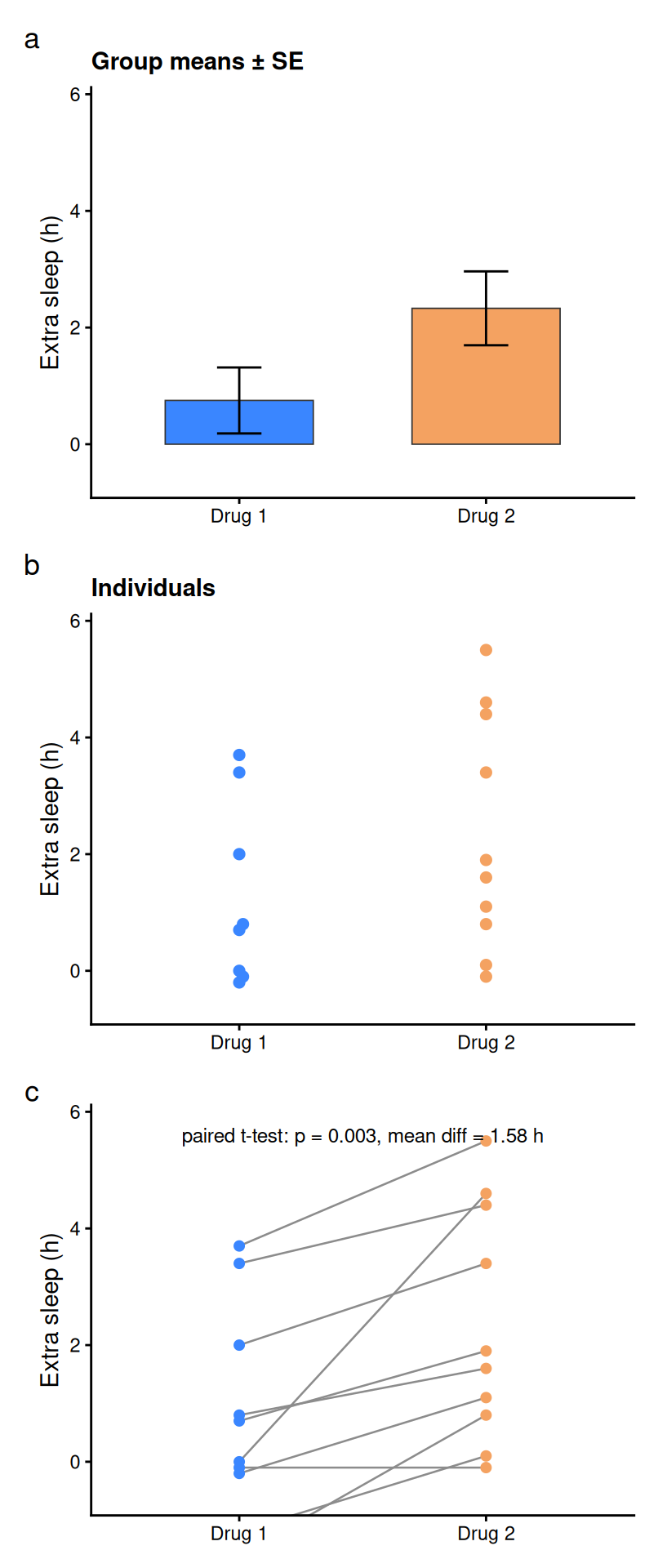
3. Highlighting the Mean Trajectory
Adding the mean trajectory on top of the individual slopes separates the group-level shift from the individual scatter — the bold line is the story, the thin lines are the evidence behind it.
panel_c +
  stat_summary(aes(group = 1), fun = mean, geom = "line",
               colour = "grey10", linewidth = 1.1) +
  stat_summary(aes(group = 1), fun = mean, geom = "point",
               shape = 18, size = 3.2, colour = "grey10") +
  labs(title = "Mean trajectory (bold)")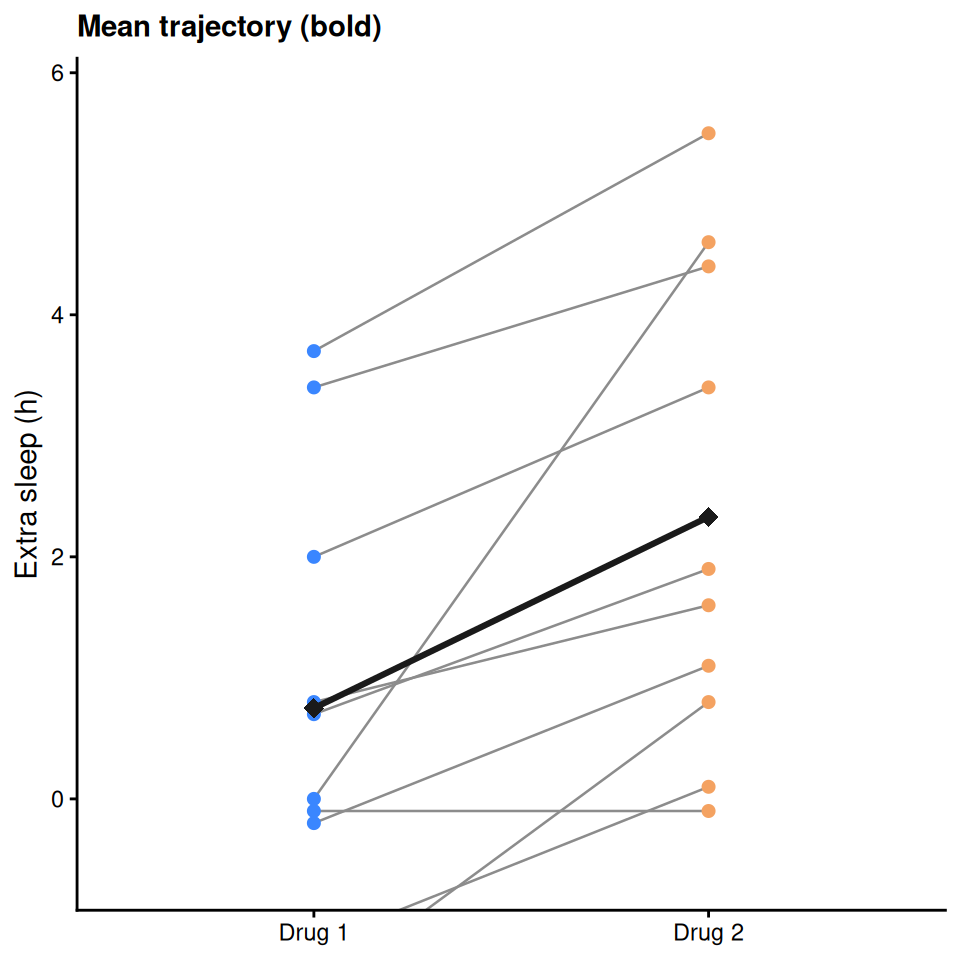
Applications
- Paired clinical designs: before/after treatment, matched case-control, crossover trials.
- Any two-condition comparison: panels a–c together pre-empt the usual reviewer requests (variability, outliers, pairing).
- Reporting: the annotation ties the visual to the test instead of leaving the statistics implicit.
- The composition is plain patchwork — each panel can be swapped for a boxplot, density or any other summary without touching the others.
Reference
[1] 顶刊图社 | 第006期:分组折线图+蜂群点图+柱状图. WeChat article. http://mp.weixin.qq.com/s?__biz=MzU5NjE2ODU0OQ==&mid=2247483799&idx=1&sn=2de1939cc2f43454563fbd9ae297a492
[2] Student (Gosset WS). The probable error of a mean. Biometrika. 1908;6(1):1-25. doi:10.2307/2331554 (the study that analysed the sleep measurements).