# Installing necessary packages
pkgs <- c("tidyverse", "colorspace", "RColorBrewer", "viridisLite",
          "paletteer", "ggsci", "patchwork")
for (pkg in pkgs) {
  if (!requireNamespace(pkg, quietly = TRUE)) {
    install.packages(pkg, repos = "https://cloud.r-project.org")
  }
}

# Load packages
library(tidyverse)
library(colorspace)
library(RColorBrewer)
library(viridisLite)
library(ggsci)
library(patchwork)

# The standard 8-color Okabe-Ito palette (Okabe & Ito 2008; black variant popularized by Wong 2011)
okabe <- c("#000000", "#E69F00", "#56B4E9", "#009E73",
"#F0E442", "#0072B2", "#D55E00", "#CC79A7")Colors & Palettes
Color is the most-used — and most-abused — encoding channel in scientific figures. This guide is a complete, self-contained course in three parts: Part I teaches the vocabulary (what a color is, the three jobs a palette can do); Part II goes into the science (perception, accessibility, failure modes) and surveys the R/Python ecosystem package by package; Part III applies everything to the scenarios you actually meet — grouped comparisons, heatmaps, survival curves, genomic tracks, and the extreme case of single-cell data with dozens to hundreds of categories. Every figure is generated by the code shown, and every palette is expressed as hex codes — the portable currency shared by R, Python and Illustrator. (Print production is the one place where hex is not the final word; see From screen to print in Part II.)
Note
How to read this page. If you are in a hurry: read Part I, then the checklist at the end. If you are designing a new figure standard for a lab or a paper: read Part II carefully, then follow the workflow diagram in Part III.
Setup
System Requirements: Cross-platform (Linux/MacOS/Windows)
Programming Language: R (Python equivalents are shown in Part II)
Dependencies:
tidyverse;colorspace;RColorBrewer;viridisLite;paletteer;ggsci;patchwork
Part I · Getting started
Data Preparation · Part I — colors are data
On screen every color is a triple of channel intensities — red, green and blue, each 0–255 — written as a six-digit hex string. #3A86FF means R = 58, G = 134, B = 255. Hex codes are the lingua franca: R, Python, Inkscape, Illustrator and most journal production systems understand the same strings.
hex <- "#3A86FF"
channels <- strtoi(substring(hex, c(2, 4, 6), c(3, 5, 7)), 16)

tibble(value = channels, x = 1:3,
       color = c("#E63946", "#2A9D3F", "#3A86FF")) |>
  ggplot() +
  annotate("text", x = 2, y = 300, label = hex, size = 9, family = "mono", fontface = "bold") +
  annotate("text", x = 2, y = 278, label = "= #RRGGBB  (0-255 per channel)", size = 3.6, colour = "grey30") +
  geom_col(aes(x = x, y = value, fill = color), width = .62) +
  geom_text(aes(x = x, y = value + 12, label = value), fontface = "bold", size = 4) +
  scale_fill_identity() +
  scale_x_continuous(breaks = 1:3, labels = c("R (red)", "G (green)", "B (blue)"), limits = c(.4, 3.6)) +
  scale_y_continuous(limits = c(0, 322)) +
  labs(x = NULL, y = "channel value (0-255)") +
  theme_minimal(base_size = 11) + theme(panel.grid = element_blank())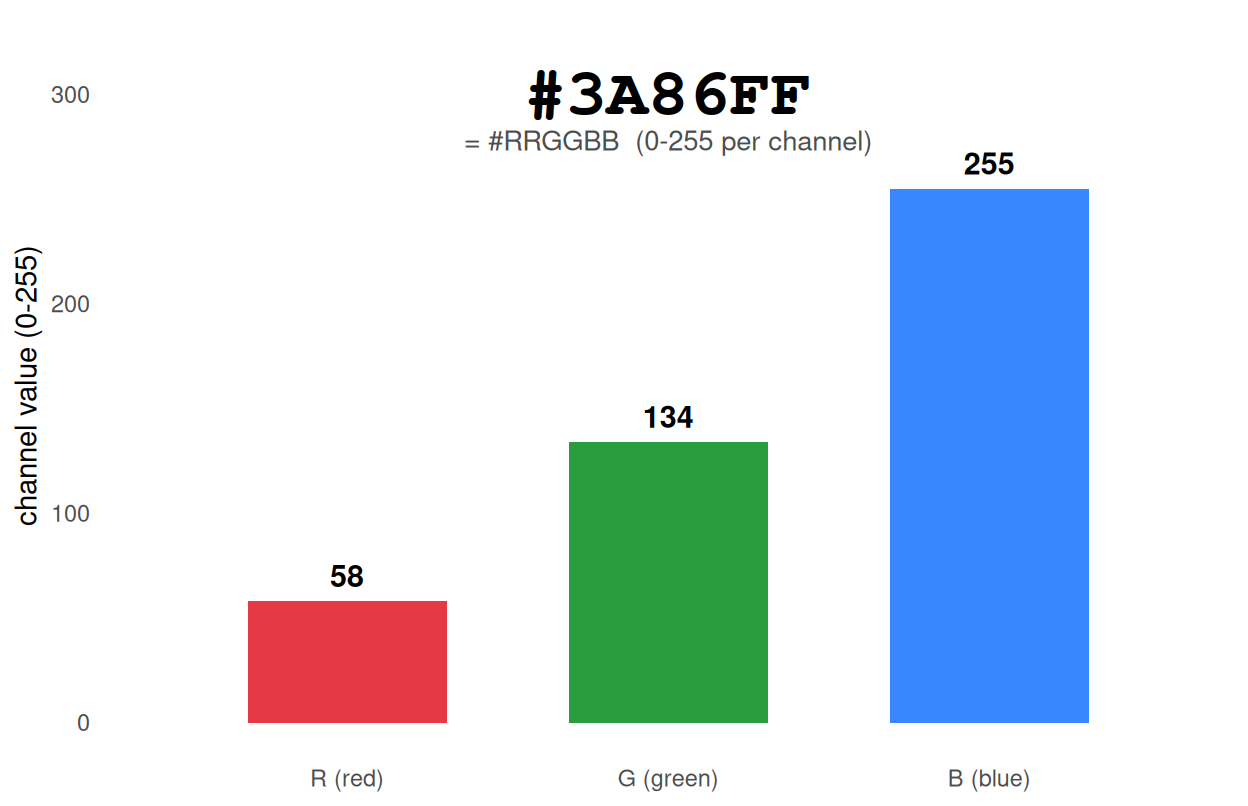
RGB is a device description, not a perceptual one: equal steps in RGB are not equal steps in perceived color. That mismatch is the root cause of most bad palettes — and the reason modern palettes are designed in perceptual spaces (HCL (polar CIELUV), CIELAB, and more recently OKLab), which Part II develops.
Example · Part I — three jobs, three palette types
A palette answers exactly one of three questions. Deciding which is the first fork in every design:
| Job | Type | Encodes | Typical examples |
|---|---|---|---|
| Distinguish categories | Qualitative | unordered labels | clusters, treatments, tissues |
| Show magnitude | Sequential | ordered low to high | expression, density, -log10(P) |
| Show deviation | Diverging | signed value around a centre | z-scores, log fold changes, correlations |
strip <- function(colors, label) tibble(col = colors, x = seq_along(colors), pal = label)
bind_rows(
  strip(okabe,                   "Qualitative - Okabe-Ito (8)"),
  strip(brewer.pal(11, "RdBu"),  "Diverging - ColorBrewer RdBu (11)"),
  strip(viridis(9),               "Sequential - viridis (9)")
) |>
  mutate(pal = factor(pal, levels = c("Qualitative - Okabe-Ito (8)",
                                      "Diverging - ColorBrewer RdBu (11)",
                                      "Sequential - viridis (9)"))) |>
  ggplot(aes(x, 1, fill = col)) +
  geom_tile(width = 1, height = .82, colour = "white", linewidth = .3) +
  facet_wrap(~pal, ncol = 1, strip.position = "left") +
  scale_fill_identity() + scale_y_continuous(expand = c(0, 0)) +
  theme_minimal(base_size = 11) +
  theme(axis.text = element_blank(), axis.title = element_blank(),
        panel.grid = element_blank(),
        strip.text.y.left = element_text(angle = 0, hjust = 0, size = 9.5),
        strip.background = element_blank(), panel.spacing.y = unit(4, "mm"))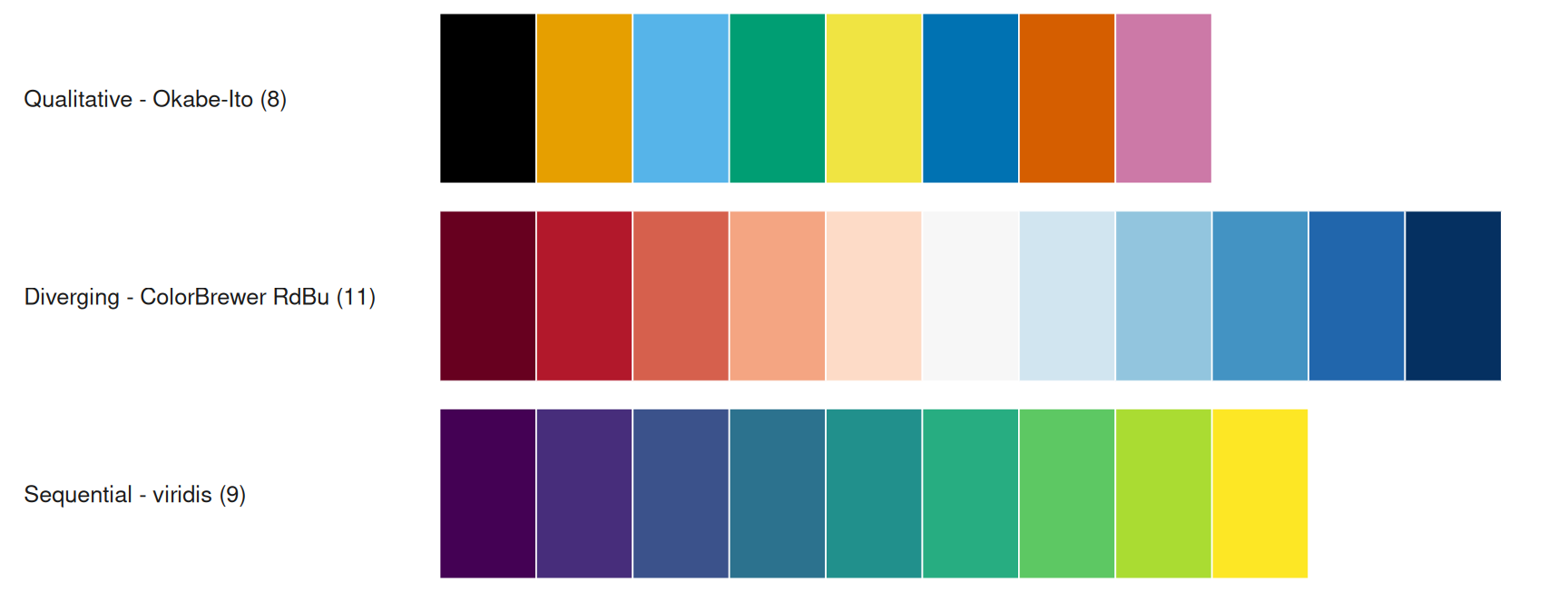
A fourth case is easy to overlook: ordered categories (dose levels, risk strata) are categorical but not unordered. Use an ordered ramp or a qualitative palette whose legend follows the order, and keep that order everywhere.
The decision tree below is the entire taxonomy on one page; Part II explains why each branch exists, and Part III walks through each scenario.
flowchart TD
    A[What does the color encode?] --> B{Unordered categories?}
    accTitle: Palette type decision tree
    accDescr: Choose qualitative, sequential or diverging by unordered categories, group count and signed values, then check colour-vision deficiency and greyscale before export.
    B -- yes --> C{How many groups?}
    C -- "<= 12" --> D["CVD-vetted qualitative set<br/>Okabe-Ito / Set2 (<= 8)<br/>Paired (<= 12)"]
    C -- "journal house style" --> D2["Journal palette (aesthetic,<br/>not CVD-validated): ggsci / Set3 — keep direct labels"]
    C -- "13-50" --> E["Luminance tiers<br/>10 hues x 5 lightness"]
    C -- "> 50 or focus needed" --> F["Highlight: colour the few,<br/>grey the rest; facet for the rest"]
    B -- no --> G{Signed around a<br/>meaningful centre?}
    G -- yes --> H["Diverging ramp,<br/>symmetric limits at the centre"]
    G -- no --> I["Sequential ramp:<br/>viridis / cividis / scico"]
    D --> J[Check: colorblind simulation + greyscale]
    D2 --> J
    E --> J
    F --> J
    H --> J
    I --> J
    J --> K[Apply consistently; export hex codes]
Your first palette in three lines
A minimal but correct pair of figures — one qualitative, one sequential — using the same data. The moment you set fill, you are choosing a palette type; here the choice is explicit:
set.seed(7)
quick <- tibble(group = rep(c("A", "B", "C", "D"), each = 20),
                value = c(rnorm(20, 5, 1), rnorm(20, 6.5, 1.2),
                          rnorm(20, 4.4, .8), rnorm(20, 7, 1.1)))
p_q1 <- ggplot(quick, aes(group, value, fill = group)) +
  geom_boxplot(width = .6, outlier.shape = NA) +
  scale_fill_brewer(palette = "Set2") +
  labs(title = "categorical: fill = group", x = NULL, y = "value") +
  theme_minimal(base_size = 11) + theme(legend.position = "none", panel.grid = element_blank())
p_q2 <- ggplot(quick, aes(group, value, fill = after_stat(middle))) +
  geom_boxplot(width = .6, outlier.shape = NA) +
  scale_fill_viridis_c(name = "median value") +
  labs(title = "continuous: fill = median", x = NULL, y = NULL) +
  theme_minimal(base_size = 11) + theme(axis.text.y = element_blank(), panel.grid = element_blank())
p_q1 + p_q2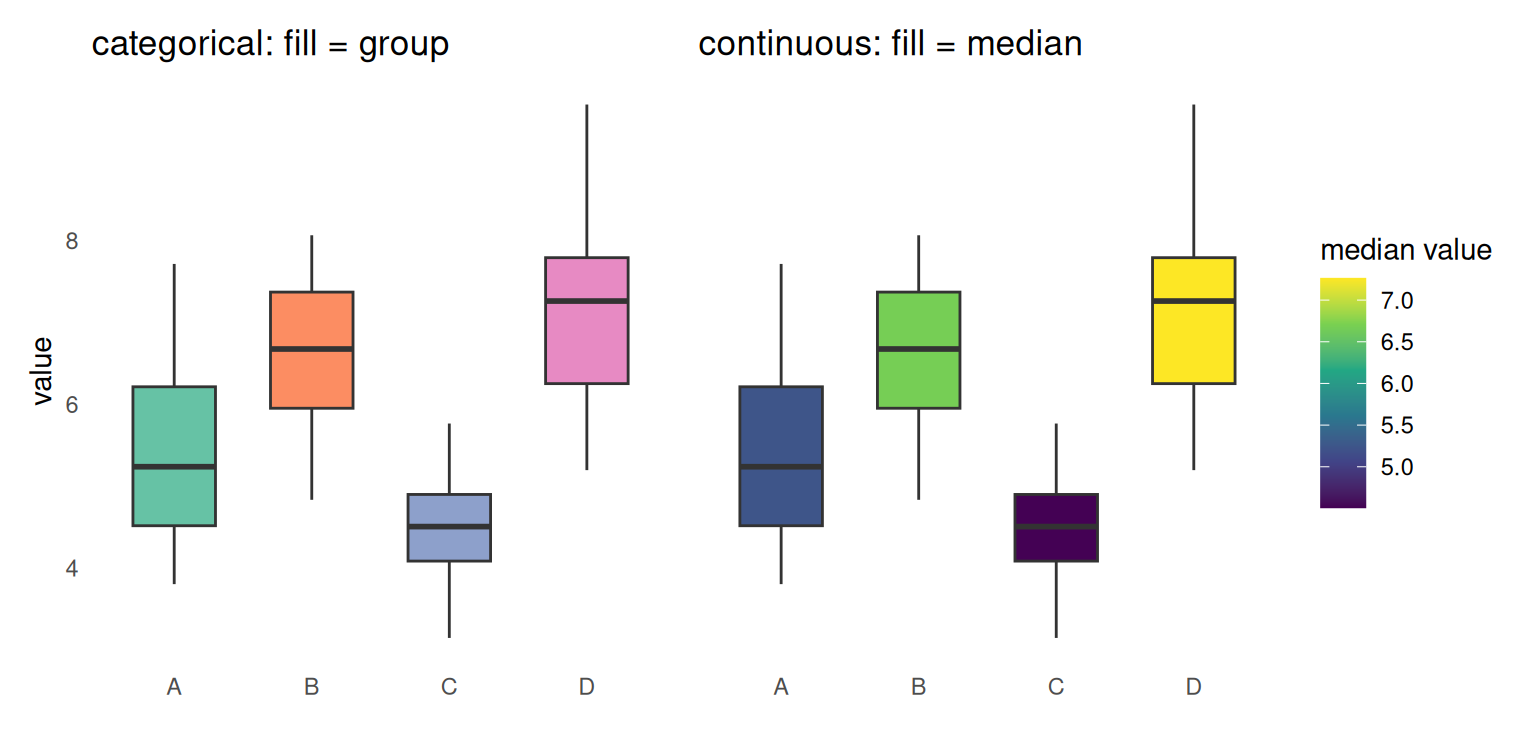
Part II · Going deeper
Going deeper · Part II — perception: HCL and OKLab
Palettes should vary hue (which color) and luminance (how light) in perceptual spaces, not in RGB:
-
Sequential ramps must be monotone in lightness — each step is lighter or darker than the last at the step counts actually used, so values survive greyscale printing and colorblind readers.
viridis,scicoandcolorspace::sequential_hcl()are designed this way; naive RGB hue gradients are not. - Qualitative palettes should keep roughly constant luminance — equal visual weight — unless you deliberately add luminance tiers to multiply the number of distinguishable colors. CVD-optimized palettes such as Okabe-Ito are the deliberate exception: they use lightness as an additional cue.
R’s HCL tools make the geometry explicit: hcl() builds a color from Hue (0–360°), Chroma (colorfulness) and Luminance (0–100; perceptual lightness, not the relative luminance used by WCAG contrast ratios); colorspace::qualitative_hcl(), sequential_hcl() and diverging_hcl() generate whole families within these constraints. The wheel below is that space: hue runs around the circle, luminance across the three rings — and the path of a sequential ramp should always travel radially, never around.
expand.grid(hue = 1:36, ring = 1:3) |>
  mutate(angle = (hue - .5) * 10,
         col = hcl(h = (hue - .5) * 10, c = 70, l = c(75, 60, 45)[ring]),
         r = c(.58, .79, 1)[ring],
         x = r * cos(angle * pi / 180), y = r * sin(angle * pi / 180)) |>
  ggplot() +
  geom_point(aes(x, y, colour = col), size = 6.5) +
  scale_colour_identity() +
  annotate("text", x = 0, y = 0, label = "HCL\nwheel", fontface = "bold", size = 5, colour = "grey30") +
  annotate("text", x = 1.32, y = 0, label = "H = 0°", size = 3.2, colour = "grey30") +
  annotate("text", x = 0, y = 1.32, label = "H = 90°", size = 3.2, colour = "grey30") +
  annotate("text", x = -1.32, y = 0, label = "H = 180°", size = 3.2, colour = "grey30") +
  annotate("text", x = 0, y = -1.32, label = "H = 270°", size = 3.2, colour = "grey30") +
  annotate("text", x = 0, y = -1.52, label = "rings: inner L = 75 · middle L = 60 · outer L = 45", size = 3, colour = "grey30") +
  coord_fixed() + labs(title = "hue angle (H) around the wheel; luminance (L) across rings") +
  theme_minimal(base_size = 11) +
  theme(axis.text = element_blank(), axis.ticks = element_blank(), axis.title = element_blank(),
        panel.grid = element_blank())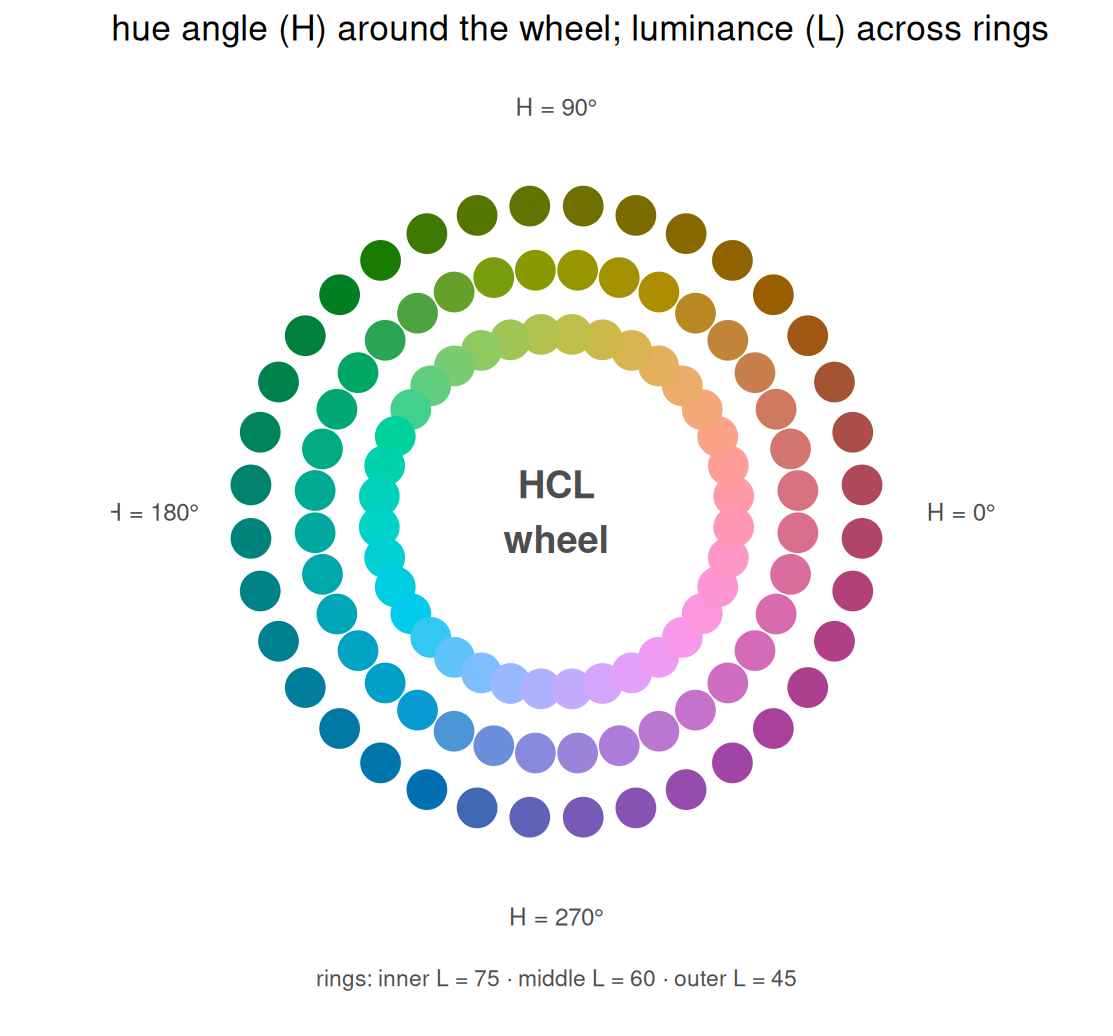
OKLab/OKLCH (CSS Color 4) is the newer, even more uniform space; farver::convert_colour() converts between representations when you need to compute rather than eyeball.
Going deeper · Part II — accessibility: color-vision deficiency
About 8% of men of Northern European descent have a red–green color-vision deficiency (including deuteranopia, protanopia and anomalous trichromacy); about 0.5% of women are affected — roughly one-sixteenth — and tritanopia (blue–yellow) is far rarer (Wong 2011). Three rules follow:
- Never encode a distinction in red vs green alone. Prefer the 8-color Okabe–Ito palette, or luminance-separated palettes.
- Add redundant encoding — shape, line type, direct labels — once the group count exceeds ~5.
-
Check with a simulator.
colorspace::deutan()/protan()/tritan()transform hex colors, so you can render your own figure as a colorblind reader sees it.
mk_panel <- function(cols, title) {
  tibble(x = 1:8, y = c(3, 5, 4, 7, 6, 8, 5.5, 4.5), g = factor(1:8)) |>
    ggplot(aes(x, y, colour = g)) +
    geom_segment(aes(xend = x, yend = y - .8), linewidth = .8) +
    geom_point(size = 5) +
    geom_text(aes(label = g, y = y - 1.05), size = 2.9, colour = "grey30", show.legend = FALSE) +
    scale_colour_manual(values = cols) + labs(title = title, x = NULL, y = NULL) +
    theme_minimal(base_size = 11) +
    theme(legend.position = "none", axis.text = element_blank(), axis.ticks = element_blank(),
          panel.grid = element_blank())
}
(mk_panel(okabe, "normal vision") +
   mk_panel(colorspace::deutan(okabe), "deuteranopia (red-green)") +
   mk_panel(colorspace::protan(okabe), "protanopia (red-green)")) + plot_layout(ncol = 3)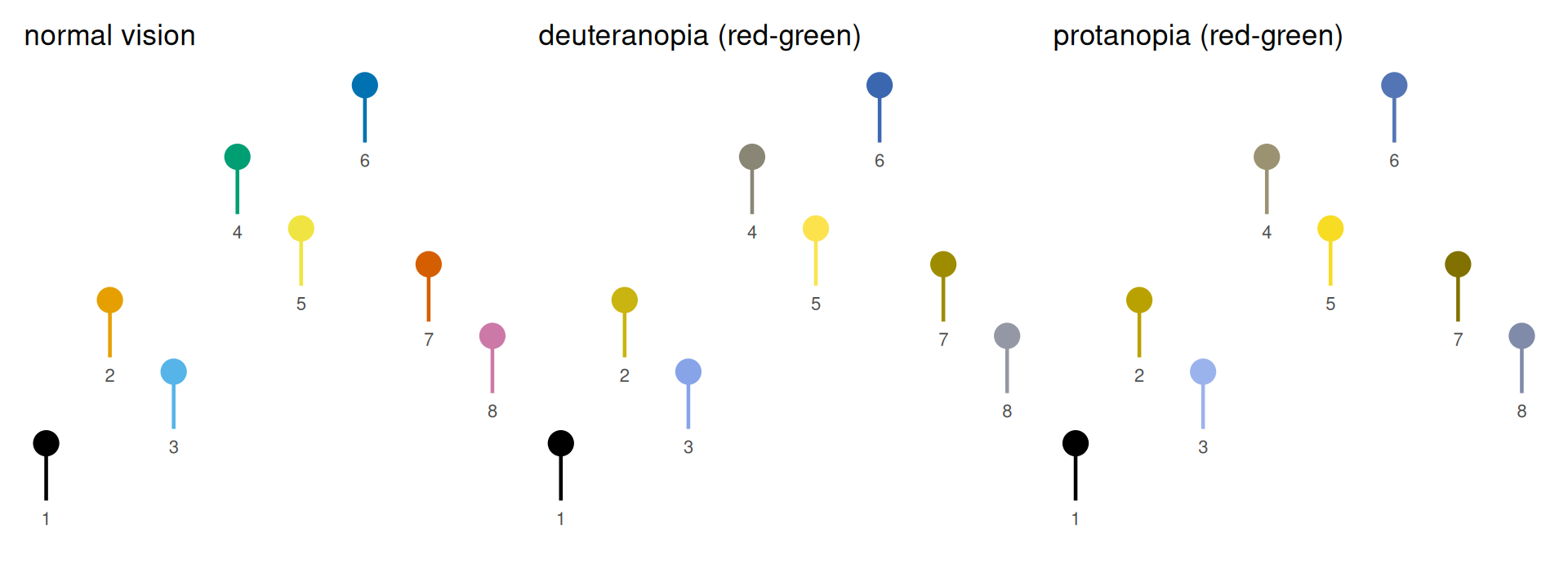
Going deeper · Part II — the rainbow is (still) harmful
The rainbow spectrum is the default of many legacy tools and the most common bad choice in science. It is not perceptually uniform: it introduces artificial band boundaries where the data are smooth, has non-monotone luminance, and creates false landmarks. Crameri, Shephard & Heron (2020) document how such maps mislead readers. A rainbow built from rainbow() has an extra defect: it is cyclic, so both ends are red. For continuous data use a perceptually uniform, colorblind-safe ramp — viridis (matplotlib’s default since version 2.0, and a common choice in R), cividis (optimized for color-vision deficiency; Nuñez et al. 2018), scico (the Crameri maps), or colorspace::sequential_hcl().
field <- expand.grid(x = seq(-3, 3, length.out = 120), y = seq(-3, 3, length.out = 120)) |>
  mutate(z = exp(-(x^2 + y^2)) + 0.5 * exp(-((x - 1.6)^2 + (y + 1.2)^2) / .6))
base_map <- function() {
  ggplot(field, aes(x, y, fill = z)) + geom_raster() +
    theme_minimal(base_size = 11) +
    theme(axis.text = element_blank(), axis.ticks = element_blank(),
          panel.grid = element_blank(), axis.title = element_blank())
}
p_uniform <- base_map() + scale_fill_viridis_c(guide = "none") +
  labs(title = "viridis (perceptually uniform)")
p_rainbow <- base_map() + scale_fill_gradientn(colours = rainbow(30), guide = "none") +
  labs(title = "rainbow (bands; red at both ends)")
p_uniform + p_rainbow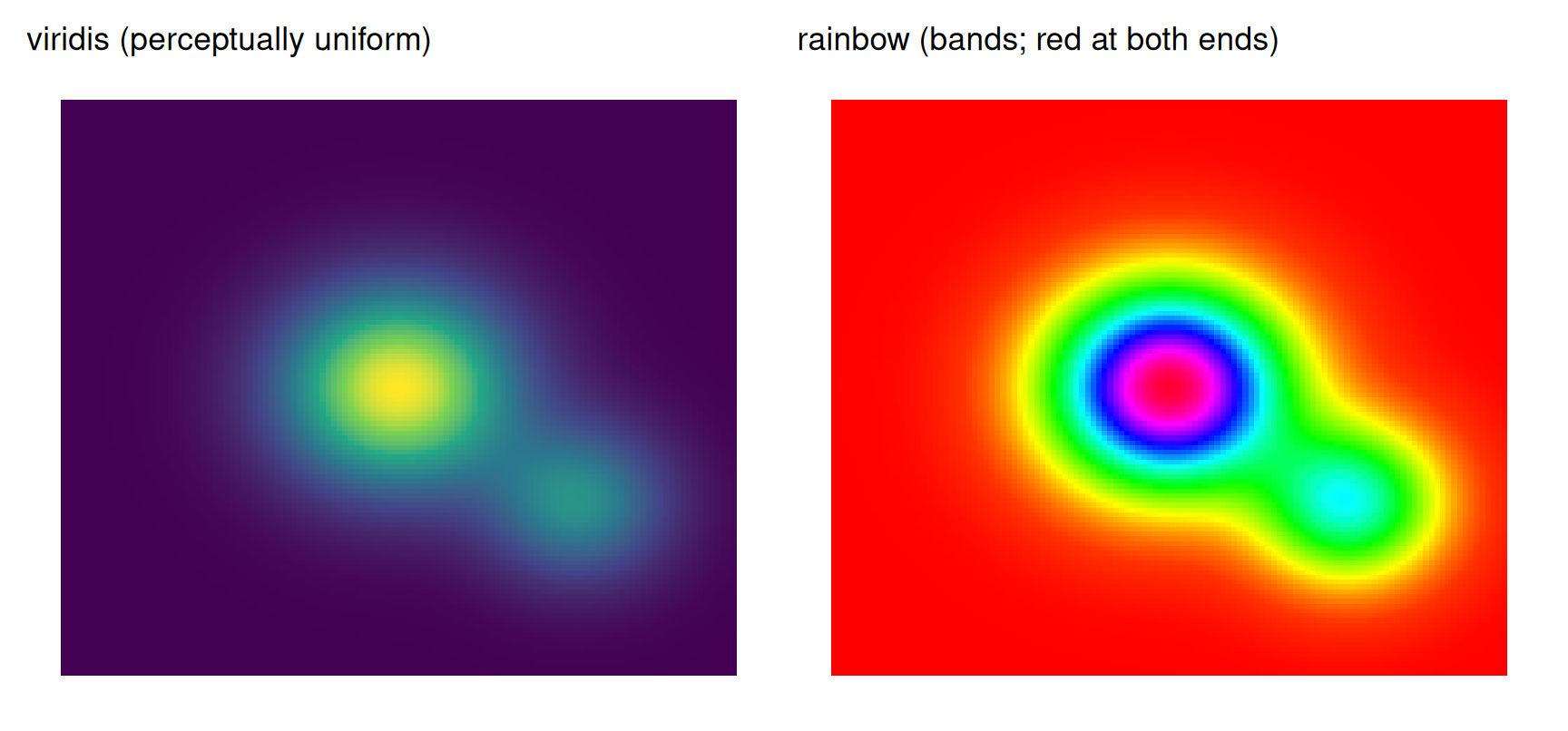
Going deeper · Part II — contrast, background, and simultaneous contrast
Colorblind-safety is not contrast-safety, and neither is guaranteed by a palette name. WCAG 2.2 sets the working thresholds: 4.5:1 for normal text and 3:1 for large text and graphical objects against their background. Many celebrated palette colors fail on white — Okabe-Ito yellow #F0E442 is 1.32:1, the RdBu midpoint is 1.07:1, and Set3’s palest yellow #FFFFB3 is 1.04:1. The practical consequences:
- Pale fills need tile borders, darker outlines, or a light grey panel.
- Thin lines and small points need a darker variant than a large filled area does.
- Legends must be judged against their final background, not a white editing canvas.
-
colorspace::contrast_ratio()computes the WCAG ratio for any pair;colorspace::darken()produces a print-safe variant.
Simultaneous contrast is the perceptual side: the same hex looks lighter on black and darker on white. Judge colors in context, and never compare two palettes on different backgrounds:
sq <- function(bg, label) {
  ggplot() +
    annotate("rect", xmin = .1, xmax = .9, ymin = .1, ymax = .9, fill = "#777777") +
    coord_fixed(xlim = c(0, 1), ylim = c(0, 1)) +
    labs(title = label) +
    theme_void(base_size = 11) +
    theme(plot.background = element_rect(fill = bg, colour = NA),
          plot.margin = margin(8, 8, 8, 8),
          plot.title = element_text(colour = if (bg == "black") "white" else "grey20"))
}
sq("black", "on black") + sq("grey50", "on mid-grey") + sq("white", "on white")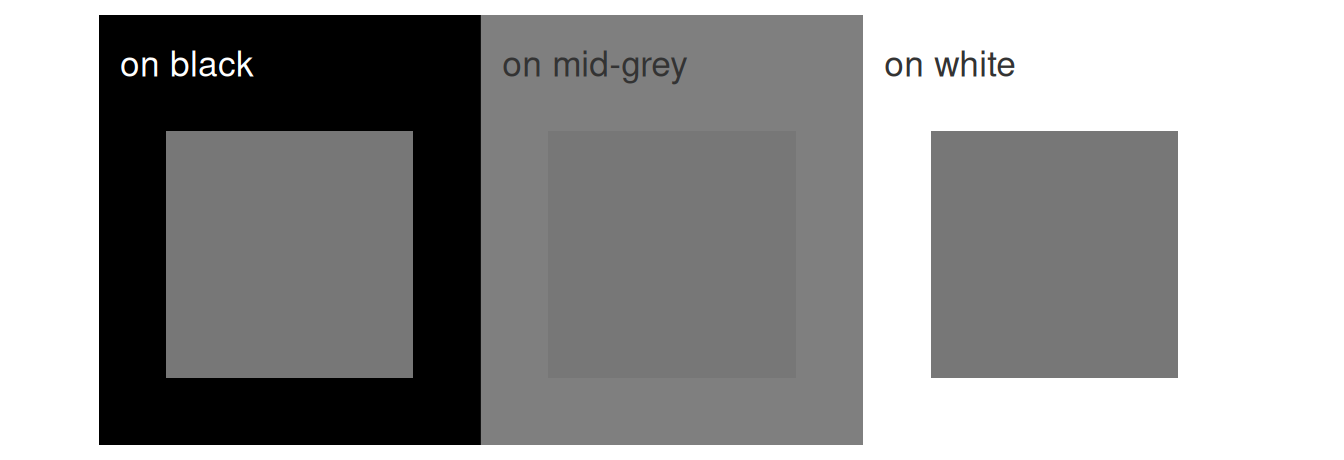
Going deeper · Part II — from screen to print
Hex is an sRGB recipe; a journal’s CMYK press is a different gamut, and saturated blues, greens and yellows shift or clip in conversion. A production-safe workflow:
- Vector first. Export line art and text as PDF/SVG; rasterize only photographs and heatmaps, at 300–600 dpi at final size.
- Set final size before judging type. Journals use single (~85 mm) and double (~170 mm) column widths; 6–7 pt is the practical minimum for axis text, 0.25–0.5 pt for rules.
- Soft-proof the CMYK conversion and inspect gamut warnings; keep a greyscale proof as well.
- Flatten transparency and avoid alpha below ~0.2 on white — it will disappear in print.
- Bleed only for full-page artwork; ordinary figures need none.
- Alt text is part of production, not an afterthought: describe the encoding, not the colors.
These are the reasons the example figures on this page carry explicit limits, direct labels and redundant cues rather than relying on subtle color differences.
Going deeper · Part II — the ecosystem, surveyed
The R ecosystem offers an unusually rich set of color toolkits; this table is the map. The Executed here column marks what this page demonstrates live (all executed packages are pinned in the repository lockfile; the survey-tier ones are optional installs, shown in the reference blocks):
| Package | What it adds | Executed here |
|---|---|---|
grDevices (base) |
hcl.colors(), hcl(), colorRampPalette()
|
yes (wheel) |
RColorBrewer |
ColorBrewer’s 35 classic schemes | yes |
scales |
hue_pal(), gradient_n_pal(), show_col()
|
yes |
colorspace |
HCL palette families + deutan()/protan() simulation |
yes |
viridisLite / viridis
|
perceptually uniform ramps (viridis, cividis, magma, …) | yes |
scico |
Crameri’s scientific colour maps as ggplot2/scales functions | no |
ggsci |
journal palettes (Nature, Lancet, JAMA, NEJM, JCO, …) | yes |
pals |
100+ curated palettes incl. Kovesi’s CET maps | no |
paletteer |
a meta-package: one accessor for ~79 packages’ palettes (2,800+) | yes |
dichromat |
color-vision-deficiency transformations and dichromat()
|
no |
Polychrome |
createPalette(): dozens of distinct colors (JSS validates ≥24) |
no |
cols4all |
the systematic option: 689 palettes scored for CVD-safety, fairness, nameability and contrast, with cyclic and bivariate types | no |
colorblindcheck |
quantitative CVD-distance checks for any palette | no |
The measured ceilings
Two numbers worth internalizing. RColorBrewer deliberately caps its qualitative families at 12 colors — a practical ceiling for reliable hue discrimination. cols4all then turns palette choice into a query: its catalog (689 palettes in version 0.10) comes with scores for colorblind-friendliness, fairness (“do colors stand out equally?”), nameability (for categorical palettes) and contrast (against white and black backgrounds), so comparison replaces guesswork.
brewer.pal.info |>
  tibble::rownames_to_column("palette") |>
  count(category, maxcolors) |>
  ggplot(aes(factor(maxcolors), n, fill = category)) +
  geom_col(position = position_dodge(preserve = "single"), colour = "grey20", linewidth = .3) +
  geom_text(aes(label = n), position = position_dodge(width = .9, preserve = "single"), vjust = -.4, size = 3.2) +
  scale_fill_manual(values = c(div = "#7B3294", qual = "#008837", seq = "#2C7BB6"),
                    labels = c("diverging", "qualitative", "sequential"), name = NULL) +
  labs(x = "maximum colors in a ColorBrewer palette", y = "number of palettes") +
  scale_y_continuous(expand = expansion(mult = c(0, .12))) +
  theme_minimal(base_size = 11) + theme(panel.grid.minor = element_blank())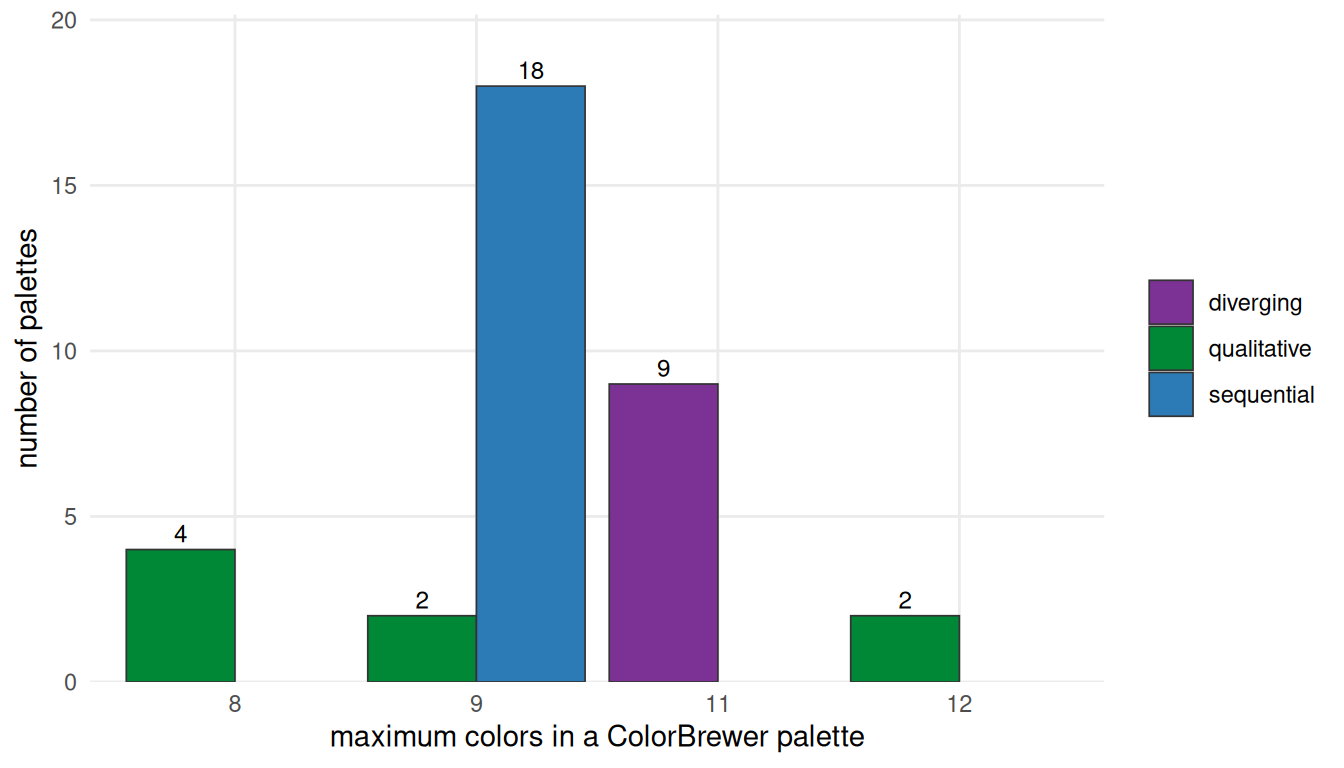
# Optional survey-tier packages (pak::pak("cols4all") / pak::pak("colorblindcheck")):
library(cols4all)
c4a("brewer.set2", 8)                 # exact hex colors from the 689-palette catalog (v0.10)
c4a_palettes(type = "div") |> head()  # browse by type: cat / seq / div / cyc / bivs / bivc / bivd / bivg
c4a_plot("brewer.set2")               # palette overview figure
c4a_scores(palette = "brewer.set2")   # scores: cbfriendly, fairness, contrastWT, contrastBK

# quantitative CVD distances (pak::pak("colorblindcheck")):
okabe <- c("#000000", "#E69F00", "#56B4E9", "#009E73",
           "#F0E442", "#0072B2", "#D55E00", "#CC79A7")
pc <- colorblindcheck::palette_check(okabe, plot = FALSE)
pc[, c("name", "min_dist")]           # minimum pairwise distance per simulated vision type

# Crameri maps and Kovesi palettes via the survey-tier packages:
scico::scico(10, palette = "batlow")  # pak::pak("scico")
pals::cols25(10)                      # pak::pak("pals")
For high-count qualitative palettes, see the Polychrome paper; for palette scoring, see the cols4all package. The broader scientific arguments are Zeileis et al. (2009) for statistical palettes and Crameri et al. (2020) for colormaps.
Living examples across packages
pkg_rows <- list(
  "paletteer: RColorBrewer::Set2 (8)" = as.character(paletteer::paletteer_d("RColorBrewer::Set2")),
  "colorspace: qualitative_hcl (8)"   = qualitative_hcl(8),
  "ggsci: Nature npg (10)"            = pal_npg("nrc")(10),
  "viridisLite: cividis (10)"         = viridis(10, option = "cividis"))
purrr::imap_dfr(pkg_rows, ~ tibble(col = .x, x = seq_along(.x), pal = .y)) |>
  mutate(pal = factor(pal, levels = names(pkg_rows))) |>
  ggplot(aes(x, 1, fill = col)) +
  geom_tile(width = 1, height = .8, colour = "white", linewidth = .3) +
  facet_wrap(~pal, ncol = 1, strip.position = "left") +
  scale_fill_identity() + scale_y_continuous(expand = c(0, 0)) +
  theme_minimal(base_size = 11) +
  theme(axis.text = element_blank(), axis.title = element_blank(), panel.grid = element_blank(),
        strip.text.y.left = element_text(angle = 0, hjust = 0, size = 10),
        strip.background = element_blank(), panel.spacing.y = unit(3, "mm"))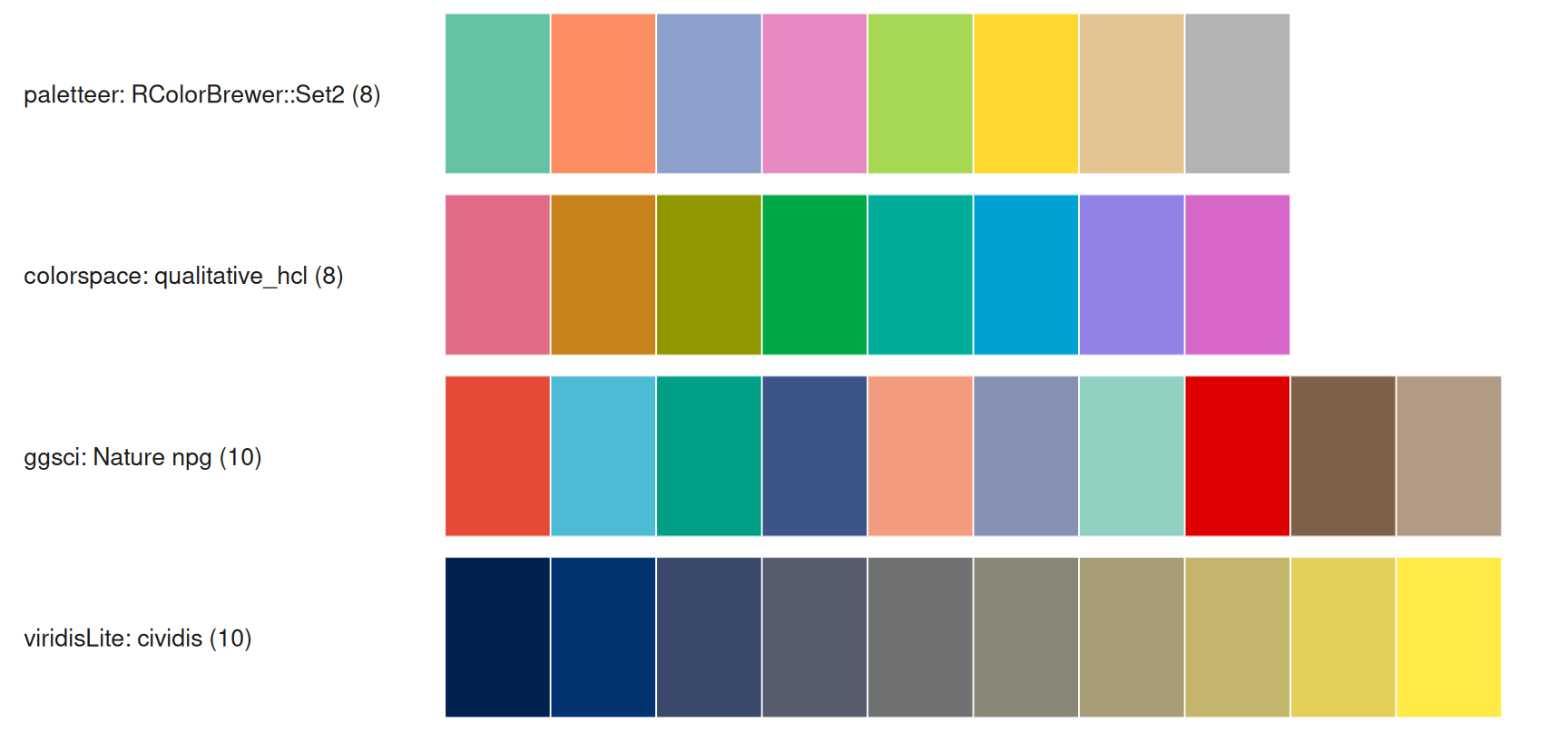
The Python side
The same principles exist in Python, and hex codes are portable — but the correspondence is not name-for-name. Use the mapping, not a guessed palette name:
| R | Python | Note |
|---|---|---|
RColorBrewer |
palettable.colorbrewer / sns.color_palette("Set2", 8)
|
exact hex available |
viridisLite |
matplotlib.colormaps |
same design; sampled hex may differ by one or two channel steps |
scico (Crameri) |
cmcrameri |
official port; palettable.scientific also bundles 10-class variants |
pals (Kovesi CET) |
colorcet |
CET maps |
paletteer |
palettable + colorcet + cmcrameri
|
no single meta-package; the stack covers the families above |
ggsci |
no direct port | copy the hex codes from R |
colorspace::deutan/protan |
colorspacious (or daltonlens for images) |
different simulation models — compare patterns, not exact hex |
colorblindcheck |
cvdlint (immature) or export hex to R |
no mature exact equivalent |
Polychrome |
distinctipy / colorcet.glasbey
|
many-category case |
cols4all |
no equivalent | R-side scoring catalog |
# Requires matplotlib >= 3.5 (mpl.colormaps) and seaborn
import matplotlib as mpl
import numpy as np
import seaborn as sns

# 1. The exact Okabe-Ito palette. Do NOT use sns.color_palette("colorblind"):
#    seaborn's "colorblind" is a different, seaborn-designed set.
okabe_ito = ["#000000", "#E69F00", "#56B4E9", "#009E73",
             "#F0E442", "#0072B2", "#D55E00", "#CC79A7"]
sns.color_palette(okabe_ito).as_hex()     # same hex as the R section

# 2. Sequential ramps
mpl.colormaps["viridis"]                  # perceptually uniform
mpl.colormaps["cividis"]                  # CVD-optimized

# 3. Diverging: ColorBrewer's RdBu has low = red, high = blue.
#    The z-score heatmap on this page reverses it (negative = blue), so use RdBu_r:
mpl.colormaps["RdBu_r"]
# sns.heatmap(z, cmap="RdBu_r", center=0)  # or TwoSlopeNorm(vcenter=0)

# 4. Dump a palette (or a sampled colormap) as hex:
sns.color_palette(okabe_ito).as_hex()
[mpl.colors.to_hex(c) for c in mpl.colormaps["viridis"](np.linspace(0, 1, 9))]

# 5. Crameri maps in Python: pip install cmcrameri
# import cmcrameri.cm as cmc
# mpl.colormaps["cmc.batlow"]
Part III · Applications
Visualization · Part III — the workflow
Every figure palette goes through the same six steps; skipping the checks in step D is what produces the figures criticized in Crameri et al. (2020).
flowchart LR
    A[Data + question] --> B[Pick palette type<br/>qual / seq / div]
    accTitle: Palette selection workflow
    accDescr: Pick a palette type, construct it in a perceptual space, check colour-vision deficiency, greyscale and print, apply it consistently, and export hex codes.
    B --> C[Construct in a perceptual space<br/>HCL / OKLab or a vetted library]
    C --> D[Check: CVD simulation<br/>+ greyscale + print]
    D --> E[Apply consistently<br/>one palette per meaning]
    E --> F[Export hex codes<br/>into the methods/legend]
    D -- fails --> B
Visualization · Part III — grouped comparisons
The classic bar/box/violin comparison with 2–6 groups. The journal palette below (ggsci npg) is aesthetic, not CVD-vetted: its relative luminance varies by a factor of ~4.6, and its closest pair under deuteranopia is green vs light blue (ΔE ≈ 19), with smaller gaps under tritanopia. That is acceptable here because the x-axis labels carry identity; when color is the only cue, switch to Okabe-Ito. Four groups is comfortably inside the reliable range.
set.seed(11)
groups <- tibble(
  group = factor(rep(c("Control", "Low dose", "High dose", "Combo"), each = 24),
                 levels = c("Control", "Low dose", "High dose", "Combo")),
  value = c(rnorm(24, 4, 1), rnorm(24, 5, 1.1), rnorm(24, 6.2, 1.2), rnorm(24, 7.4, 1.3)))
ggplot(groups, aes(group, value, fill = group)) +
  geom_violin(width = .75, colour = NA, alpha = .85, scale = "width") +
  geom_boxplot(width = .12, fill = "white", outlier.shape = NA, linewidth = .35) +
  scale_fill_manual(values = pal_npg("nrc")(4)) +
  labs(x = NULL, y = "Response score") +
  theme_minimal(base_size = 11) +
  theme(legend.position = "none", panel.grid.minor = element_blank(),
        axis.text.x = element_text(size = 10))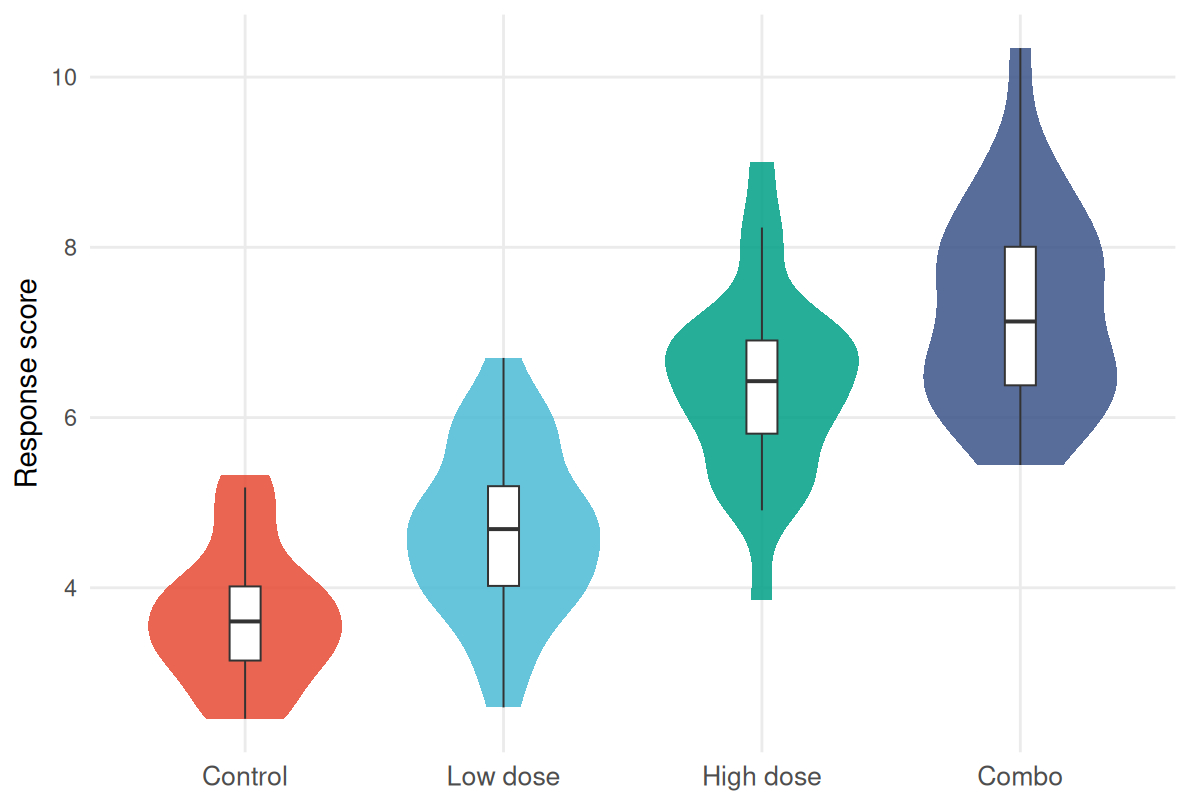
Visualization · Part III — heatmaps and matrices
For a heatmap the palette follows the data, not the package: unsigned magnitudes get a sequential ramp; signed values get a diverging ramp centred and symmetric at a meaningful midpoint — zero for a z-score or a log ratio (e.g., log2 fold change), one for an untransformed ratio, zero for a percentage change, and an assay-specific reference otherwise. Four practical rules:
-
Centre on the meaning, not the data range. Use
scale_fill_gradient2(midpoint = ...),scales::rescale_mid(), orTwoSlopeNormin Python. -
Check the midpoint against the background. The RdBu centre
#F7F7F7is only 1.07:1 on white, so zero cells look like holes; add tile borders, a slightly darker neutral, or a light grey panel. -
Document clipping.
oob = scales::squishsilently clamps outliers — state the chosen limits, or useoob = scales::censorwithna.value. -
Handle missing values and bins explicitly. Give
na.valuea distinct neutral; when binning, use 5–7 classes and an odd number for diverging scales with a neutral middle class.
With ComplexHeatmap, anchor the scale at meaningful values: colorRamp2(c(0, 5, 10), viridis(3)).
set.seed(3)
mat <- matrix(rnorm(120), 12, 10, dimnames = list(paste0("G", 1:12), paste0("S", 1:10)))
hm_panel <- function(m, title, fill, limits, legend) {
  as_tibble(m, rownames = "gene") |>
    mutate(gene = factor(gene, levels = rev(paste0("G", 1:12)))) |>
    pivot_longer(-gene, names_to = "sample") |>
    mutate(sample = factor(sample, levels = paste0("S", 1:10))) |>
    ggplot(aes(sample, gene, fill = value)) + geom_tile(colour = "grey90", linewidth = .2) +
    scale_fill_gradientn(colours = fill, limits = limits,
                         oob = scales::squish, name = legend) +
    labs(title = title, x = NULL, y = NULL) +
    theme_minimal(base_size = 11) +
    theme(axis.text.x = element_text(angle = 45, hjust = 1, size = 8),
          axis.text.y = element_text(size = 8), panel.grid = element_blank())
}
hm_panel(mat, "z-score: diverging, symmetric at 0",
         rev(brewer.pal(11, "RdBu")), c(-max(abs(mat)), max(abs(mat))), "z-score") +
  hm_panel(abs(mat), "magnitude: sequential (viridis)",
           viridis(11), c(0, max(abs(mat))), "|z|")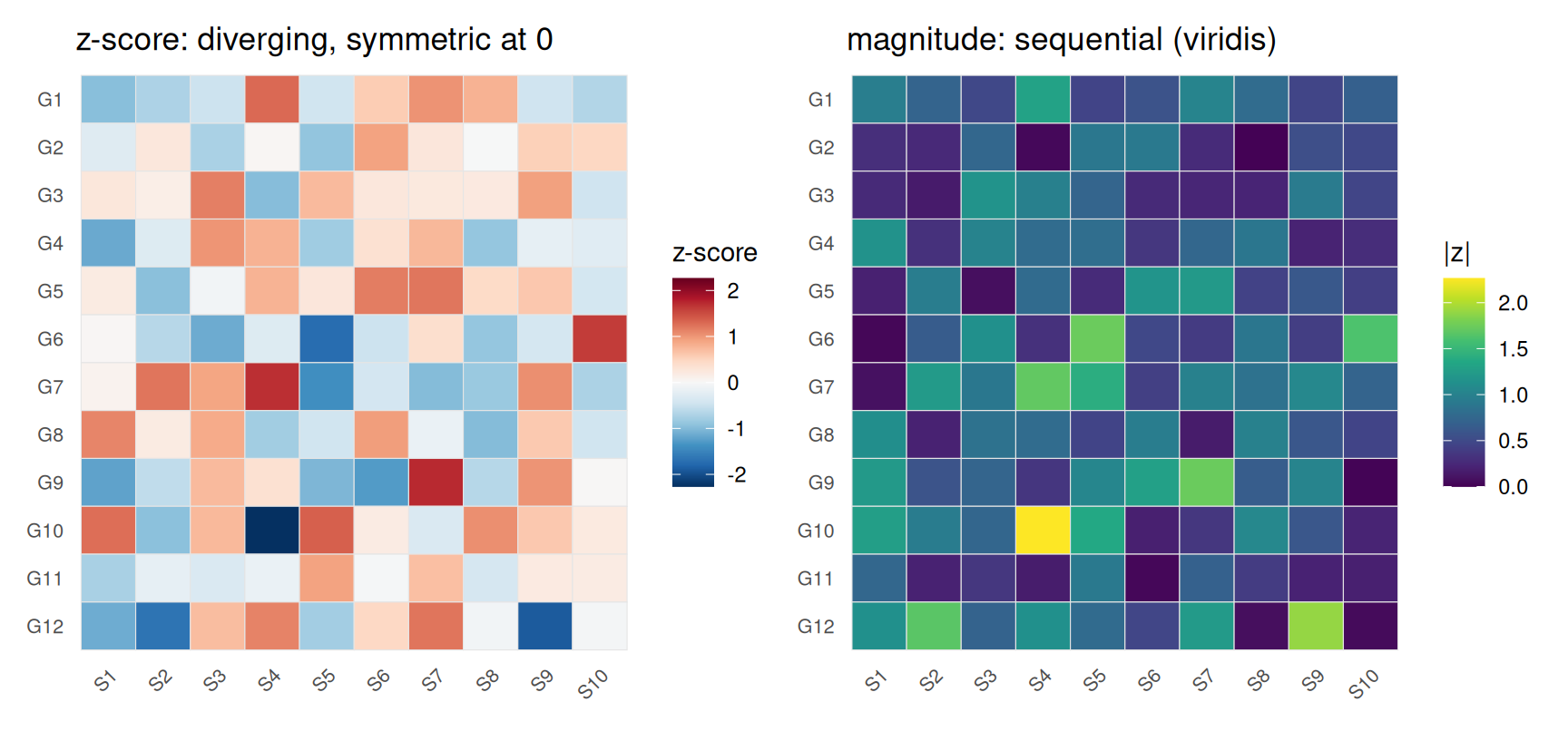
Visualization · Part III — survival and clinical curves
Clinical curves usually carry 2–4 groups, where the Okabe-Ito colors plus direct labels (not a legend far away) are ideal. Keep one palette across all clinical panels of the paper — a consistency requirement, not a style preference.
set.seed(5)
grid <- seq(0, 24, by = 1)
km <- purrr::map_dfr(1:3, function(g) {
  rate <- c(.028, .05, .09)[g]
  surv <- cumprod(c(1, exp(-rate * diff(grid) * rnorm(length(grid) - 1, 1, .15))))
  tibble(time = grid, surv = surv,
         group = factor(c("Low risk", "Intermediate", "High risk")[g],
                        levels = c("Low risk", "Intermediate", "High risk")))
})
ends <- km |> slice_max(time, by = group)
ggplot(km, aes(time, surv, colour = group)) +
  geom_step(linewidth = .9) +
  geom_text(data = ends, aes(label = group), hjust = -.15, size = 3.4,
            colour = "grey20", show.legend = FALSE) +
  scale_colour_manual(values = c("Low risk" = "#0072B2",
                                 "Intermediate" = "#E69F00",
                                 "High risk" = "#D55E00")) +
  scale_y_continuous(labels = scales::percent, limits = c(0, 1)) +
  scale_x_continuous(expand = expansion(mult = c(.02, .22))) +
  labs(x = "Months", y = "Overall survival") +
  theme_minimal(base_size = 11) +
  theme(legend.position = "none", panel.grid.minor = element_blank())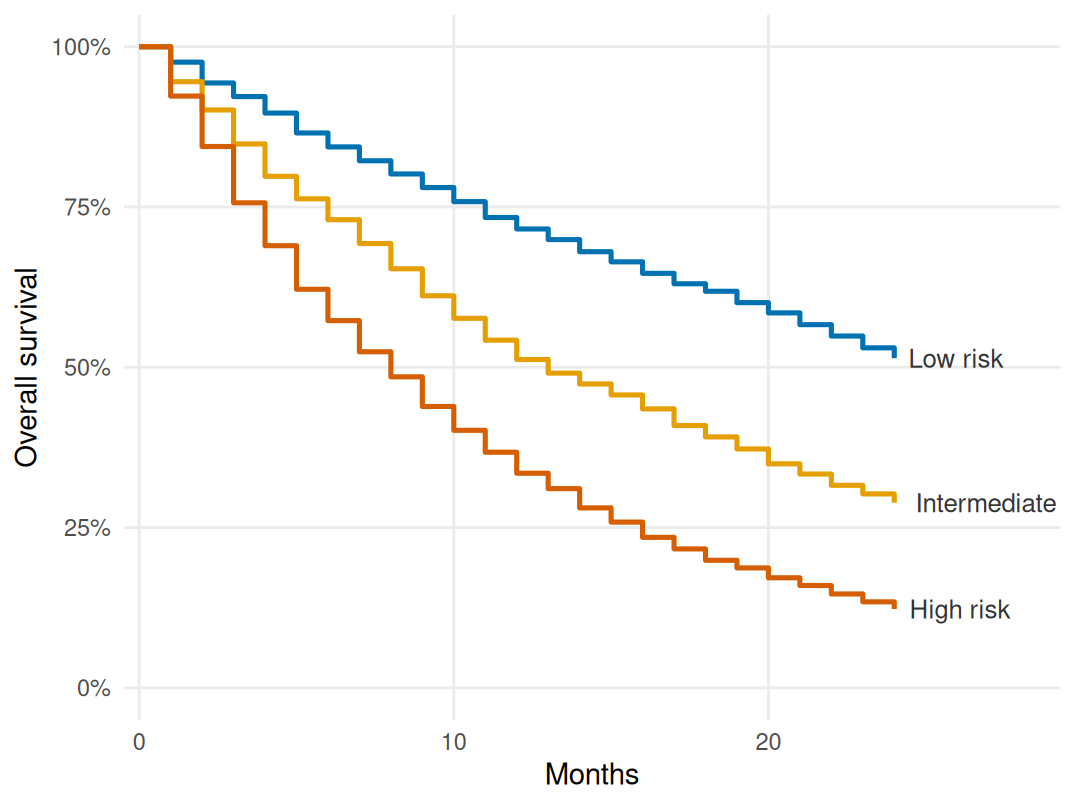
Visualization · Part III — genomic tracks and enrichment figures
Genomics has its own conventions: each chromosome gets one stable color; the figure below uses 24 HCL hue-wheel colors from hcl.colors(24, "Dark 3"); adjacent hues can be similar and several pairs collapse under CVD, so the x-axis labels — not color — carry identity, and mutation-type legends follow the same logic at 5–10 categories. Enrichment bar/dot plots are a hybrid: a sequential scale carries significance (-log10(P)) while categories stay near-neutral — tempting to rainbow, but the sequential rule wins.
chrom_cols <- hcl.colors(24, "Dark 3")   # hue-wheel colors; labels, not hues, carry identity
chrom <- tibble(
  chr = factor(paste0("chr", c(1:22, "X", "Y")), levels = paste0("chr", c(1:22, "X", "Y"))),
  col = chrom_cols,
  n = c(249, 243, 198, 191, 181, 171, 159, 146, 141, 135, 135, 134,
        115, 107, 102, 90, 83, 80, 59, 64, 47, 51, 156, 57))
ggplot(chrom, aes(chr, n, fill = col)) +
  geom_col(width = .8, colour = "white", linewidth = .2) + scale_fill_identity() +
  labs(x = NULL, y = "Genes (schematic)") +
  theme_minimal(base_size = 11) +
  theme(axis.text.x = element_text(angle = 45, hjust = 1, size = 8),
        panel.grid.minor = element_blank())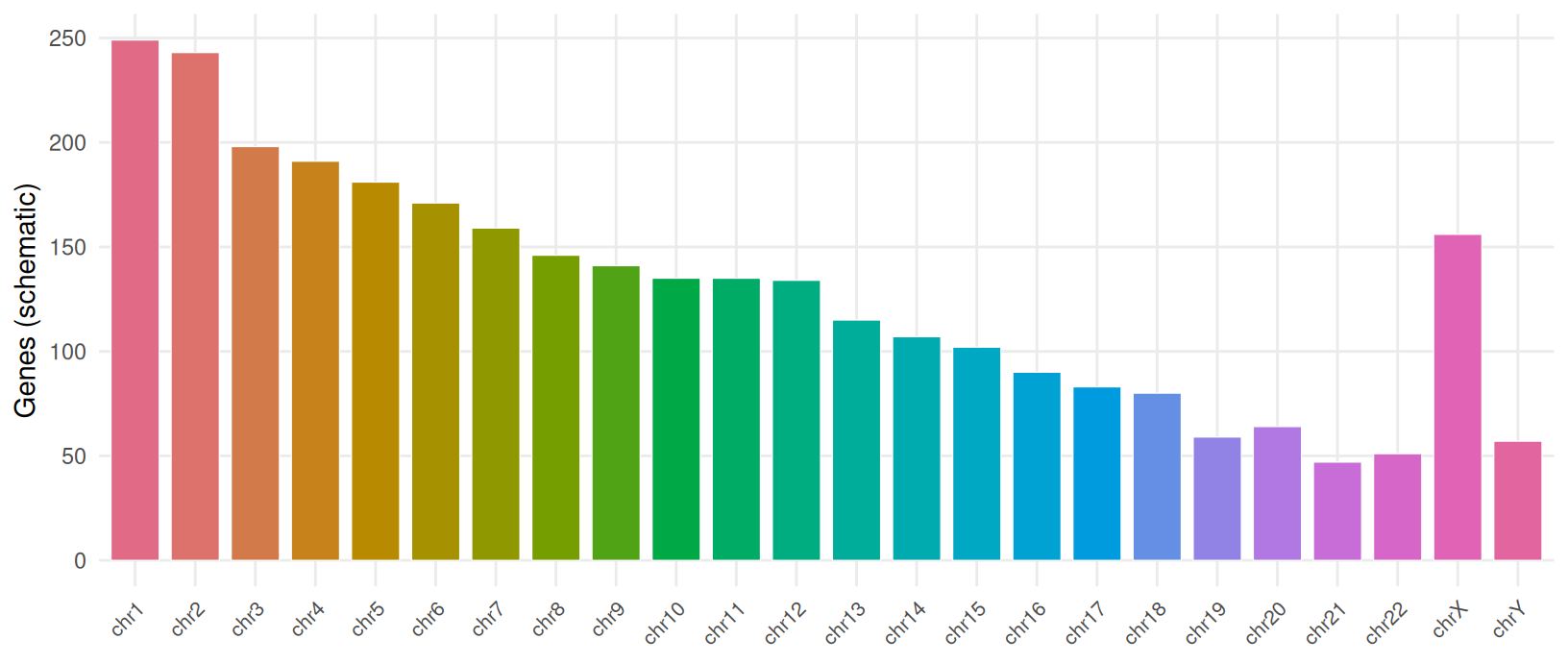
Visualization · Part III — the extreme case: many categories
A scRNA-seq UMAP routinely has 20–50 clusters — the hardest case for color. ggplot2’s default discrete scale generates one hue per level, so 50 classes land ~7° apart on the hue wheel: all distinct hex codes, perceptually one continuous blur.
set.seed(2026)
n_cl <- 50
centres <- tibble(
                  cx = cos(2 * pi * (0:(n_cl - 1)) / n_cl) * 10 + rnorm(n_cl, 0, 1.2),
                  cy = sin(2 * pi * (0:(n_cl - 1)) / n_cl) * 10 + rnorm(n_cl, 0, 1.2))
embed <- purrr::map_dfr(1:n_cl, function(i) {
  tibble(cl = i, x = rnorm(45, centres$cx[i], .55), y = rnorm(45, centres$cy[i], .55))
}) |> mutate(cl = factor(sprintf("C%02d", cl)))

pal50 <- hcl(h = rep(seq(15, 351, length.out = 10), times = 5),
             c = rep(c(75, 85, 75, 65, 55), each = 10),
             l = rep(c(74, 66, 57, 47, 37), each = 10))
names(pal50) <- levels(embed$cl)

map_base <- function() {
  ggplot(embed, aes(x, y, colour = cl)) + geom_point(size = .7, alpha = .9) +
    coord_fixed() + theme_minimal(base_size = 11) +
    theme(axis.text = element_blank(), axis.ticks = element_blank(),
          legend.position = "none", axis.title = element_blank(), panel.grid = element_blank())
}
p_default <- map_base() + labs(title = "ggplot default hue palette (50 classes)")
p_tiers <- map_base() + scale_colour_manual(values = pal50) +
  labs(title = "10 hues x 5 luminance tiers")
p_default + p_tiers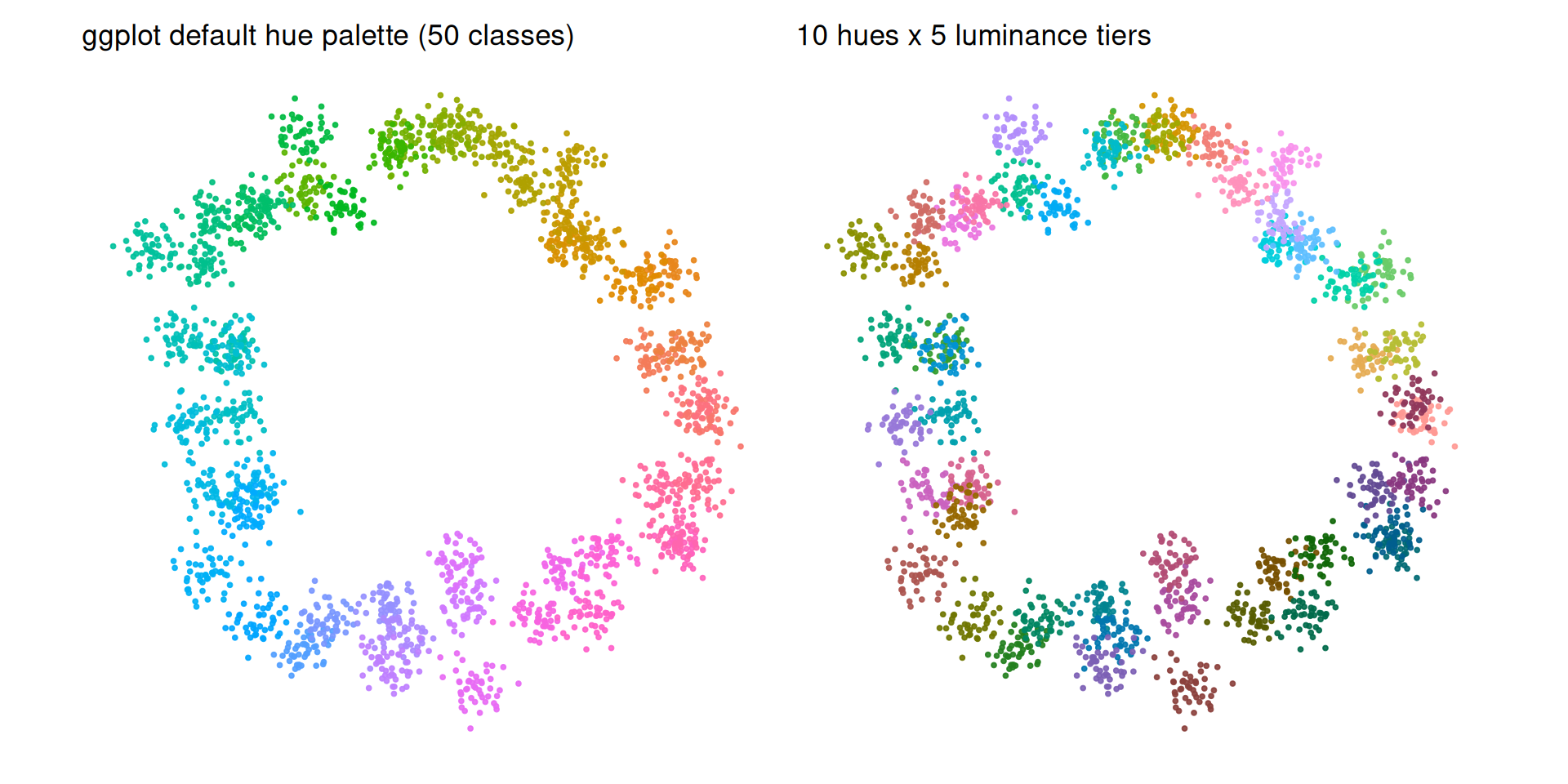
Even a well-built 50-color palette is at the edge of human discrimination, and luminance tiers do not make it CVD-safe: several pairs still collapse under deuteranopia and protanopia. Use labels or the highlighting strategy below when groups must be told apart. The published strategies, in order of reliability:
- Highlight — colour the clusters you discuss, grey the rest. This is what real papers do when a panel carries more than ~15 groups and only a few of them matter.
-
Luminance tiers — 10 hues × 5 lightness levels is a practical ceiling; reuse the same palette across every plot (
DimPlot(cols = ...)/scale_colour_manual(values = ...)). -
Split — facet the UMAP by condition (or Seurat’s
split.by) so each panel carries ~10 categories. -
Programmatic generation —
Polychrome::createPalette()optimizes hue, chroma and luminance jointly for dozens of distinguishable colors.
# `embed` is created in the previous chunk; regenerate it if you copy this chunk alone.
focal <- c("C07", "C23", "C41")
focal_lab <- embed |>
  filter(cl %in% focal) |>
  group_by(cl) |>
  summarise(x = mean(x), y = mean(y), .groups = "drop")
embed |>
  mutate(col = if_else(cl %in% focal, as.character(cl), "other")) |>
  ggplot(aes(x, y, colour = col)) +
  geom_point(size = .7, alpha = .9) +
  geom_label(data = focal_lab, aes(x, y, label = cl), inherit.aes = FALSE,
             size = 3.1, fontface = "bold", colour = "grey20",
             fill = "white", alpha = .85, linewidth = 0, nudge_y = .8) +
  scale_colour_manual(values = c(set_names(c("#D55E00", "#0072B2", "#009E73"), focal),
                                 other = "#B3B3B3"),
                      breaks = focal) +
  coord_fixed() + labs(colour = NULL) +
  theme_minimal(base_size = 11) +
  theme(axis.text = element_blank(), axis.ticks = element_blank(),
        axis.title = element_blank(), panel.grid = element_blank(),
        legend.position = "bottom")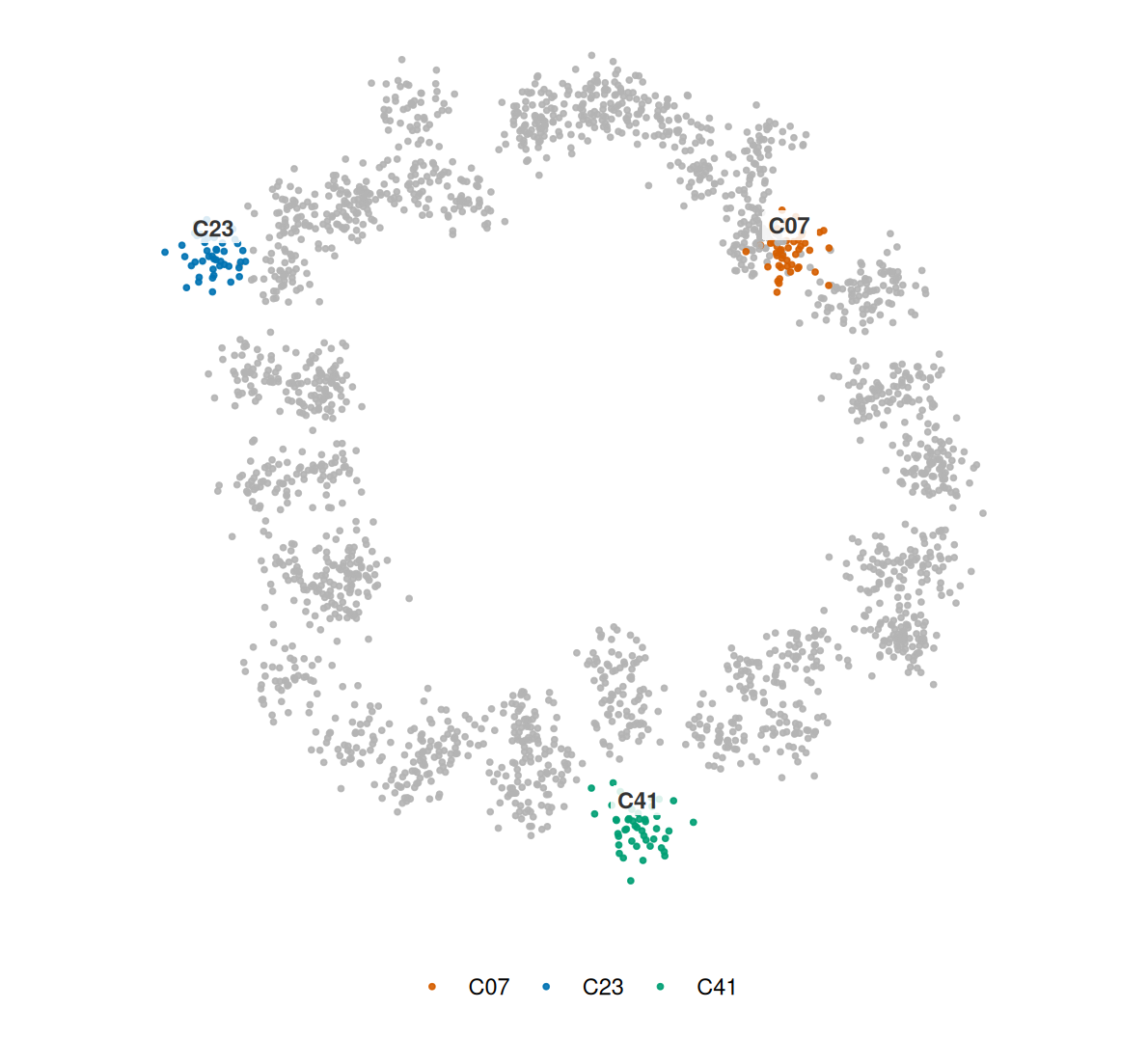
Visualization · Part III — one palette everywhere
The final discipline: a paper is a system, not a collection of figures. Define one palette per meaning, reuse it across every panel and every figure type, and document the hex codes. The triptych below uses the same four colors for the same four groups — with the group labels left visible and a shared legend — in a box plot, a line chart and a bar chart.
set.seed(9)
cons_cols <- c(A = "#4C78A8", B = "#F58518", C = "#54A24B", D = "#B279A2")
cons_means <- c(A = 4.0, B = 5.2, C = 6.4, D = 7.6)
cons <- expand_grid(g = factor(names(cons_cols), levels = names(cons_cols)), t = 1:8) |>
  mutate(v = cons_means[as.character(g)] + .35 * t + rnorm(n(), 0, .6))
counts <- tibble(g = factor(names(cons_cols), levels = names(cons_cols)),
                 n = c(10, 14, 9, 12))
c1 <- ggplot(cons, aes(g, v, fill = g)) + geom_boxplot(width = .55, outlier.shape = NA, show.legend = FALSE) +
  scale_fill_manual(values = cons_cols) + labs(title = "box", x = NULL, y = "value") +
  theme_minimal(base_size = 11) +
  theme(legend.position = "none", panel.grid.minor = element_blank())
c2 <- ggplot(cons, aes(t, v, colour = g, group = g)) + geom_line(linewidth = .8) +
  scale_colour_manual(values = cons_cols, name = "Group") +
  labs(title = "line", x = "time", y = NULL) +
  theme_minimal(base_size = 11) +
  theme(legend.position = "bottom", panel.grid.minor = element_blank())
c3 <- ggplot(counts, aes(g, n, fill = g)) + geom_col(width = .6, show.legend = FALSE) +
  scale_fill_manual(values = cons_cols) + labs(title = "bar", x = NULL, y = "n") +
  theme_minimal(base_size = 11) +
  theme(legend.position = "none", panel.grid.minor = element_blank())
(c1 + c2 + c3) + plot_layout(guides = "collect") &
  theme(legend.position = "bottom")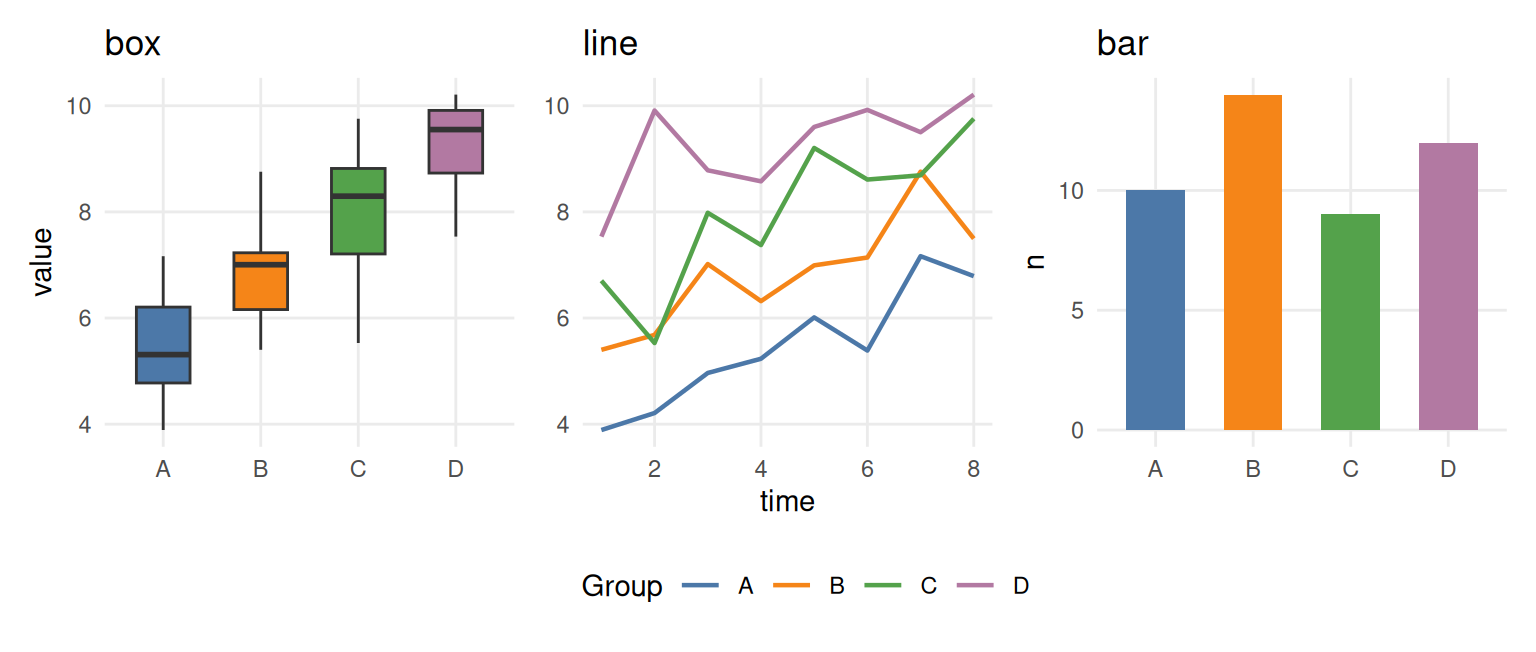
Rules of thumb
Tip
A checklist for every figure
- Match the palette type to the job: qualitative ≠ sequential ≠ diverging.
- Continuous values get luminance-monotone ramps; never the rainbow.
- Signed data gets a diverging scale centred and symmetric at a meaningful midpoint (zero is not universal); check that the midpoint is visible on the background.
-
Categorical data: ≤ 8 colors from Okabe-Ito or Set2; 9–12 from Paired (the CVD-safe 12-color ColorBrewer set) with redundant encoding. Journal palettes (
ggsci) are aesthetic, not CVD-validated — keep direct labels when you use them. Beyond 12, use luminance tiers, redundant encodings, highlighting or facets. -
Check colorblind readability (
colorspace::deutan(),colorblindcheck::palette_check()); prefer Okabe-Ito / viridis / cividis / scico. - One palette per meaning, everywhere in the paper; document the hex codes.
- Never rely on color alone for a categorical decision.
- Check contrast and background: 4.5:1 for text, 3:1 for graphical objects (WCAG 2.2); judge colors on their final background, not on white.
- Print check: convert to greyscale — if two groups merge, add shape/line-type/label redundancy rather than rejecting an otherwise sound palette; soft-proof CMYK and export at final size.
- Alt text for every figure: describe the encoding and the comparison, not the colors.
References
[1] Zeileis A, Hornik K, Murrell P. Escaping RGBland: Selecting colors for statistical graphics. Comput Stat Data Anal. 2009;53(9):3259-3270. doi:10.1016/j.csda.2008.11.033
[2] Zeileis A, Fisher JC, Hornik K, Ihaka R, McWhite CD, Murrell P, Stauffer R, Wilke CO. colorspace: A Toolbox for Manipulating and Assessing Colors and Palettes. J Stat Softw. 2020;96(1):1-49. doi:10.18637/jss.v096.i01
[3] Crameri F, Shephard GE, Heron PJ. The misuse of colour in science communication. Nat Commun. 2020;11:5444. doi:10.1038/s41467-020-19160-7
[4] Wong B. Points of view: Color blindness. Nat Methods. 2011;8(6):441. doi:10.1038/nmeth.1618
[5] Nuñez JR, Anderton CR, Renslow RS. Optimizing colormaps with consideration for color vision deficiency to enable accurate interpretation of scientific data. PLoS ONE. 2018;13(7):e0199239. doi:10.1371/journal.pone.0199239
[6] Harrower M, Brewer CA. ColorBrewer.org: An Online Tool for Selecting Colour Schemes for Maps. Cartogr J. 2003;40(1):27-37. doi:10.1179/000870403235002042
[7] Coombes KR, Brock G, Abrams ZB, Abruzzo LV. Polychrome: Creating and Assessing Qualitative Palettes with Many Colors. J Stat Softw. 2019;90(Code Snippet 1). doi:10.18637/jss.v090.c01
[8] Tennekes M. cols4all: Colors for all. R package version 0.10. 2025. doi:10.32614/CRAN.package.cols4all
[9] Nowosad J. colorblindcheck: Check Color Palettes for Problems with Color Vision Deficiency. R package version 1.0.4. doi:10.32614/CRAN.package.colorblindcheck
[10] Wilke CO. Fundamentals of Data Visualization. O’Reilly Media, 2019. https://clauswilke.com/dataviz/
[11] Crameri F. Scientific colour maps. 2023. https://www.fabiocrameri.ch/colourmaps/
[12] Okabe M, Ito K. Color Universal Design (CUD): How to make figures and presentations that are friendly to colorblind people. 2008. https://jfly.uni-koeln.de/color/
[13] W3C. Web Content Accessibility Guidelines (WCAG) 2.2. W3C Recommendation, 2023. https://www.w3.org/TR/WCAG22/