# Installing necessary packages
if (!requireNamespace("tidyverse", quietly = TRUE)) {
  install.packages("tidyverse")
}
if (!requireNamespace("ggbeeswarm", quietly = TRUE)) {
  install.packages("ggbeeswarm")
}

# Load packages
library(tidyverse)
library(ggbeeswarm)Circular Multi-track Annotation Plot
A circular multi-track sample annotation plot arranges every sample of a cohort as one sector of a ring: each sector carries an outer label, concentric tracks encode different variables (continuous variables as lollipop tracks whose dots’ distance from the centre marks the value, categorical variables as colored bands), and the gap of the ring hosts the cohort summary — a white panel per continuous track with a boxplot, beeswarm points and quartile labels, a 100% stacked proportion bar per categorical track, and compact value axes for the two continuous scales. Every summary panel sits directly across from its own track (same radial position, mirrored to the left) and all panels share one uniform height, so the gap reads as a clean column of statistics; a per-track legend is generated automatically. It is designed for cohort figures that must show many samples and several variables at once (the reference figure shows 108 participants of a longitudinal multi-omics cohort), so individual-level patterns, group composition and overall distributions can be read in a single glance. This tutorial reproduces the chart type covered by the 顶刊图社 series (issue 094, after Shen et al., Nature Aging 2024); see the Reference section below.
Example
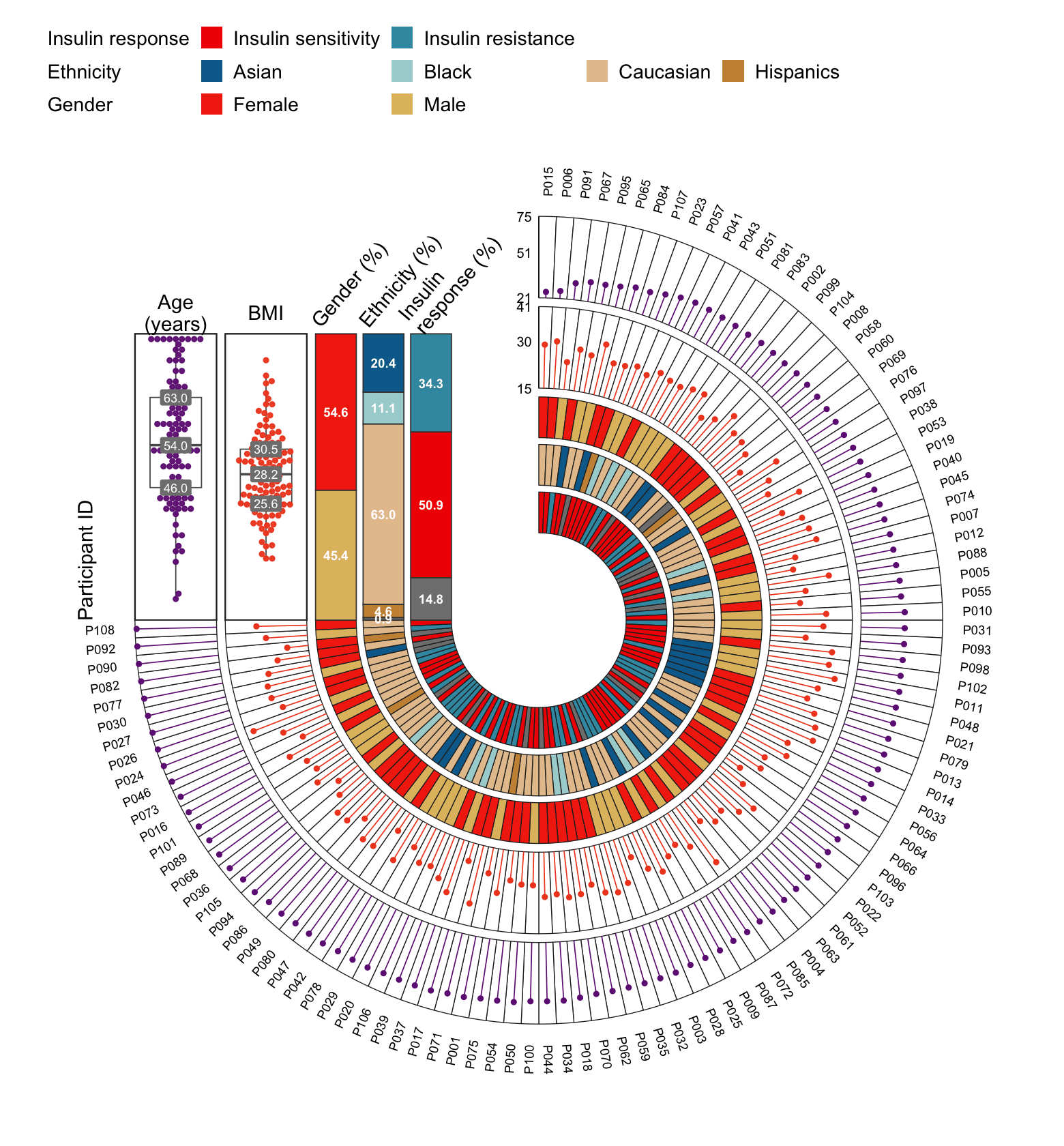
This example shows a simulated 108-participant cohort. Samples are sorted by age around the ring (outer labels); the two outer lollipop tracks show age and BMI (a dot’s distance from the centre = value), and the three inner bands encode insulin response, ethnicity and gender. In the upper-left gap, each continuous track gets a white panel with a boxplot, beeswarm points and grey labels for the three quartiles, while each categorical track gets a tall 100% stacked bar with percentage labels for every segment; the two numeric value axes (75 / 51 / 21 for age, 15 / 30 / 41 for BMI) sit at the ring’s centre line, and the legend at the top dedicates one row to each categorical track.
Setup
System Requirements: Cross-platform (Linux/MacOS/Windows)
Programming Language: R
Dependencies:
tidyverse;ggbeeswarm
Data Preparation
The example simulates a cohort comparable to the reference figure (108 participants) so the tutorial runs without external data. Every row is one participant; age and bmi are the continuous variables, iris, ethnicity and gender the categorical ones.
set.seed(2026)
n <- 108
dat <- tibble(
  id = sprintf("P%03d", 1:n),
  age = round(pmin(pmax(rnorm(n, 56, 12), 21), 74)),
  bmi = round(pmin(pmax(rnorm(n, 28, 4), 15), 41), 1),
  iris = sample(c("IS", "IR", "Unknown"), n, TRUE, prob = c(.52, .33, .15)),
  ethnicity = sample(c("Asian", "Black", "Caucasian", "Hispanics", "Unknown"), n, TRUE,
                     prob = c(.20, .07, .66, .04, .03)),
  gender = sample(c("Female", "Male"), n, TRUE, prob = c(.52, .48))
)

head(dat)
# A tibble: 6 × 6
id age bmi iris ethnicity gender
<chr> <dbl> <dbl> <chr> <chr> <chr>
1 P001 62 23.3 IR Caucasian Male
2 P002 43 23.8 IS Asian Female
3 P003 58 22.1 Unknown Caucasian Male
4 P004 55 23.2 IS Asian Male
5 P005 48 26.6 Unknown Caucasian Male
6 P006 26 30.1 IS Caucasian FemaleThe track layout is described declaratively. Each numeric track defines its column, the radius band it occupies (inner/outer), the value range mapped onto that band (min/max), the track color and optional tick values. Each category track defines its column and radius band; colors (and their order) are supplied through a named vector, and categories without a color receive one automatically.
numeric_tracks <- tribble(
  ~name,  ~column, ~title,          ~inner, ~outer, ~min, ~max, ~color,
  "Age",  "age",   "Age\n(years)",  3.32,   4.16,    21,   75,   "#702083",
  "BMI",  "bmi",   "BMI",           2.39,   3.23,    15,   41,   "#F04A22")

category_tracks <- tribble(
  ~name,               ~column,      ~title,                   ~inner, ~outer,
  "Insulin response",  "iris",       "Insulin\nresponse (%)",  0.90,   1.32,
  "Ethnicity",         "ethnicity",  "Ethnicity (%)",          1.39,   1.81,
  "Gender",            "gender",     "Gender (%)",             1.88,   2.30)

category_colors <- c(
  Female = "#F33010", Male = "#E2BD6E",
  Asian = "#046C9B", Black = "#A8D3D4", Caucasian = "#E5C39C", Hispanics = "#CA9143",
  Unknown = "#BDBDBD", IS = "#F21901", IR = "#3C99B0")

# Stacking order inside each proportion bar (bottom-to-top) and legend order
bar_order <- list(
  iris = c("Unknown", "IS", "IR"),
  ethnicity = c("Unknown", "Hispanics", "Caucasian", "Black", "Asian"),
  gender = c("Male", "Female"))
legend_order <- list(
  iris = c("IS", "IR"),
  ethnicity = c("Asian", "Black", "Caucasian", "Hispanics"),
  gender = c("Female", "Male"))

# Display names for short category codes, and the tick values of the axes
legend_labels <- c(IS = "Insulin sensitivity", IR = "Insulin resistance")
tick_values <- list(Age = c(21, 51, 75), BMI = c(15, 30, 41))
Visualization
The complete figure is produced by one reusable function, circular_annotation_plot(). It converts every sample sector into ordinary cartesian coordinates (so the ring and the summary panels live in a single ggplot2 coordinate system and align exactly), then stacks the category bands, the lollipop tracks, the sample labels, the circular ticks and the gap panels.
circular_annotation_plot <- function(data, id_col, sort_col,
                                     numeric_tracks, category_tracks,
                                     category_order = list(), legend_order = list(),
                                     category_colors = c(), legend_labels = c(),
                                     tick_values = list(), panel_height = 2.95,
                                     gap_degrees = 90, font_scale = 1,
                                     show_summary = TRUE, show_unknown = FALSE) {
  for (column in category_tracks$column) {
    data[[column]] <- coalesce(na_if(as.character(data[[column]]), ""), "Unknown")
  }
  data <- data |>
    arrange(.data[[sort_col]]) |>
    mutate(.i = row_number(),
           .step = (360 - gap_degrees) * pi / 180 / n(),
           .start = pi / 2 - (.i - 1) * .step,
           .end = pi / 2 - .i * .step,
           .angle = (.start + .end) / 2)

  sector_polygons <- function(inner, outer) {
    map_dfr(seq_len(nrow(data)), function(i) {
      a <- seq(data$.start[i], data$.end[i], length.out = 10)
      tibble(.i = i,
             x = c(outer * cos(a), inner * cos(rev(a))),
             y = c(outer * sin(a), inner * sin(rev(a))))
    })
  }
  numeric_rings <- map_dfr(seq_len(nrow(numeric_tracks)), function(i) {
    tb <- numeric_tracks[i, ]
    sector_polygons(tb$inner, tb$outer) |> mutate(.track = tb$name)
  })
  category_rings <- map_dfr(seq_len(nrow(category_tracks)), function(i) {
    tb <- category_tracks[i, ]
    sector_polygons(tb$inner, tb$outer) |>
      mutate(.track = tb$name, value = data[[tb$column]][.i])
  })

  all_values <- unique(category_rings$value)
  missing_values <- setdiff(all_values, names(category_colors))
  if (length(missing_values) > 0) {
    category_colors <- c(category_colors,
      rlang::set_names(scales::hue_pal()(length(missing_values)), missing_values))
  }
  key_colors <- category_rings |>
    distinct(.track, value) |>
    mutate(key = paste(.track, value, sep = "::"), color = unname(category_colors[value]))
  key_pal <- rlang::set_names(key_colors$color, key_colors$key)

  lollipops <- map_dfr(seq_len(nrow(numeric_tracks)), function(i) {
    tb <- numeric_tracks[i, ]
    r <- scales::rescale(data[[tb$column]], to = c(tb$inner, tb$outer), from = c(tb$min, tb$max))
    tibble(.track = tb$name,
           x0 = tb$inner * cos(data$.angle), y0 = tb$inner * sin(data$.angle),
           x1 = r * cos(data$.angle), y1 = r * sin(data$.angle))
  })

  # gap summary: numeric points/quartiles
  numeric_points <- map_dfr(seq_len(nrow(numeric_tracks)), function(i) {
    tb <- numeric_tracks[i, ]
    tibble(.track = tb$name, x = -(tb$inner + tb$outer) / 2,
           y = scales::rescale(data[[tb$column]], to = c(0, panel_height), from = c(tb$min, tb$max)))
  })
  quartiles <- map_dfr(seq_len(nrow(numeric_tracks)), function(i) {
    tb <- numeric_tracks[i, ]
    q <- quantile(data[[tb$column]], c(.25, .5, .75))
    tibble(x = rep(-(tb$inner + tb$outer) / 2, 3),
           y = scales::rescale(q, to = c(0, panel_height), from = c(tb$min, tb$max)),
           label = sprintf("%.1f", q))
  })
  panel_boxes <- numeric_tracks |>
    transmute(xmin = -outer, xmax = -inner, ymin = 0, ymax = panel_height, .track = name)

  bars <- map_dfr(seq_len(nrow(category_tracks)), function(i) {
    tb <- category_tracks[i, ]
    observed <- unique(data[[tb$column]])
    preferred <- category_order[[tb$column]]
    if (is.null(preferred)) preferred <- character()
    lv <- c(preferred[preferred %in% observed], sort(setdiff(observed, preferred)))
    tibble(value = factor(data[[tb$column]], levels = lv)) |>
      count(value, .drop = FALSE) |>
      mutate(fraction = n / sum(n),
             ymin = lag(cumsum(fraction * panel_height), default = 0),
             ymax = cumsum(fraction * panel_height),
             xmin = -tb$outer, xmax = -tb$inner,
             x = -(tb$inner + tb$outer) / 2, y = (ymin + ymax) / 2,
             .track = tb$name, key = paste(.track, value, sep = "::"))
  })

  outer_radius <- max(numeric_tracks$outer, category_tracks$outer) + 0.21
  sample_labels <- data |>
    mutate(x = outer_radius * cos(.angle), y = outer_radius * sin(.angle),
           text_angle = .angle * 180 / pi,
           flip = text_angle < -90,
           text_angle = if_else(flip, text_angle + 180, text_angle),
           hjust = if_else(flip, 1, 0))

  panel_titles <- bind_rows(
    numeric_tracks |> transmute(x = -(inner + outer) / 2, y = panel_height + .22,
                                label = title, angle = 0, hjust = .5),
    if (show_summary) category_tracks |> transmute(x = -outer, y = panel_height + .10,
                                label = title, angle = 50, hjust = 0))

  axis_labels <- map_dfr(seq_len(nrow(numeric_tracks)), function(i) {
    tb <- numeric_tracks[i, ]
    v <- tick_values[[tb$name]]
    if (is.null(v)) v <- round(seq(tb$min, tb$max, length.out = 3))
    tibble(label = v, y = scales::rescale(v, to = c(tb$inner, tb$outer), from = c(tb$min, tb$max)))
  })
  axis_lines <- numeric_tracks |> transmute(x = 0, xend = 0, y = inner, yend = outer)

  # legend table: one row per category track (header + items + spacers)
  legend_items <- map_dfr(seq_len(nrow(category_tracks)), function(i) {
    tb <- category_tracks[i, ]
    observed <- unique(data[[tb$column]])
    preferred <- legend_order[[tb$column]]
    if (is.null(preferred)) preferred <- character()
    ord <- c(preferred[preferred %in% observed], sort(setdiff(observed, preferred)))
    tibble(.track = tb$name, .track_no = i, value = ord,
           key = paste(.track, ord, sep = "::"))
  })
  if (!show_unknown) legend_items <- filter(legend_items, value != "Unknown")
  legend_items <- legend_items |> mutate(label = value)
  if (length(legend_labels) > 0) {
    hit <- legend_items$value %in% names(legend_labels)
    legend_items$label[hit] <- unname(legend_labels[legend_items$value[hit]])
  }
  legend_cols <- max(count(legend_items, .track_no)$n) + 1
  legend_table <- map_dfr(seq_len(nrow(category_tracks)), function(i) {
    tb <- category_tracks[i, ]
    items <- filter(legend_items, .track_no == i) |>
      transmute(.track_no, .track, value, key, label)
    hdr <- tibble(.track_no = i, .track = tb$name, value = NA_character_,
                  key = paste0(".h", i), label = tb$name)
    pad <- tibble(.track_no = rep(i, legend_cols - nrow(items) - 1),
                  .track = tb$name, value = NA_character_,
                  key = paste0(".s", i, "_", seq_len(legend_cols - nrow(items) - 1)), label = "")
    bind_rows(hdr, items, pad)
  })
  transparent <- legend_table$key[is.na(legend_table$value)]
  legend_pal <- c(key_pal, rlang::set_names(rep("#00000000", length(transparent)), transparent))

  p <- ggplot() +
    if (show_summary) geom_rect(data = panel_boxes, aes(xmin = xmin, xmax = xmax, ymin = ymin, ymax = ymax),
        fill = "white", colour = "grey15", linewidth = .52) else NULL
  p <- p +
    geom_polygon(data = numeric_rings, aes(x, y, group = interaction(.track, .i)),
                 fill = "white", colour = "grey15", linewidth = .30) +
    geom_polygon(data = category_rings, aes(x, y, group = interaction(.track, .i), fill = paste(.track, value, sep = "::")),
                 colour = "grey15", linewidth = .30) +
    scale_fill_manual(values = legend_pal,
                      limits = legend_table$key, breaks = legend_table$key,
                      labels = legend_table$label, name = NULL, drop = FALSE,
                      guide = guide_legend(nrow = nrow(category_tracks), byrow = TRUE,
                                           override.aes = list(colour = NA))) +
    geom_segment(data = lollipops, aes(x0, y0, xend = x1, yend = y1),
                 colour = lollipops$.track |> map_chr(~ numeric_tracks$color[numeric_tracks$name == .x]), linewidth = .38) +
    geom_point(data = lollipops, aes(x1, y1),
               colour = lollipops$.track |> map_chr(~ numeric_tracks$color[numeric_tracks$name == .x]), size = 1.15) +
    geom_text(data = sample_labels, aes(x, y, label = .data[[id_col]], angle = text_angle, hjust = hjust),
              size = 2.5 * font_scale) +
    if (show_summary) geom_boxplot(data = numeric_points, aes(x, y, group = .track),
        width = .53, outlier.shape = NA, fill = "white", colour = "grey35", linewidth = .40) else NULL
  p <- p +
    { if (show_summary) geom_beeswarm(data = numeric_points, aes(x, y, colour = .track, group = .track),
                  cex = 0.7, size = 1.15, alpha = .95, show.legend = FALSE) } +
    scale_colour_manual(values = rlang::set_names(numeric_tracks$color, numeric_tracks$name), guide = "none") +
    { if (show_summary) geom_label(data = quartiles, aes(x, y, label = label), fill = "grey50", colour = "white",
               linewidth = 0, size = 2.45 * font_scale) } +
    { if (show_summary) geom_rect(data = bars, aes(xmin = xmin, xmax = xmax, ymin = ymin, ymax = ymax, fill = key), colour = "grey25", linewidth = .40) } +
    { if (show_summary) geom_text(data = bars, aes(x, y, label = sprintf("%.1f", 100 * fraction)),
              colour = "white", fontface = "bold", size = 2.55 * font_scale) } +
    { if (show_summary) geom_segment(data = axis_lines, aes(x, y, xend = xend, yend = yend), linewidth = .34) } +
    { if (show_summary) geom_text(data = axis_labels, aes(x = -.07, y, label = label), hjust = 1, size = 2.7 * font_scale) } +
    { if (show_summary) geom_text(data = panel_titles, aes(x, y, label = label, angle = angle, hjust = hjust),
              lineheight = .88, size = 4 * font_scale) } +
    { if (show_summary) annotate("text", x = -max(numeric_tracks$outer) - .51, y = .62, label = "Participant ID",
             angle = 90, size = 4 * font_scale) } +
    coord_fixed(xlim = c(-outer_radius - .55, outer_radius + .41),
                ylim = c(-outer_radius - .31, outer_radius + .28), ratio = 1, clip = "off") +
    theme_void(base_size = 12 * font_scale) +
    theme(plot.margin = margin(8, 10, 8, 10), legend.position = "top",
          legend.justification = "left",
          legend.text = element_text(size = 11 * font_scale),
          legend.key.size = grid::unit(.45 * font_scale, "cm"))
  p
}
1. Basic Ring
Setting show_summary = FALSE draws only the ring itself: ordered samples, category bands, the lollipop value tracks, the outer sample labels and the category legend.
p1 <- circular_annotation_plot(dat, id_col = "id", sort_col = "age",
  numeric_tracks = numeric_tracks, category_tracks = category_tracks,
  category_colors = category_colors, show_summary = FALSE)
p1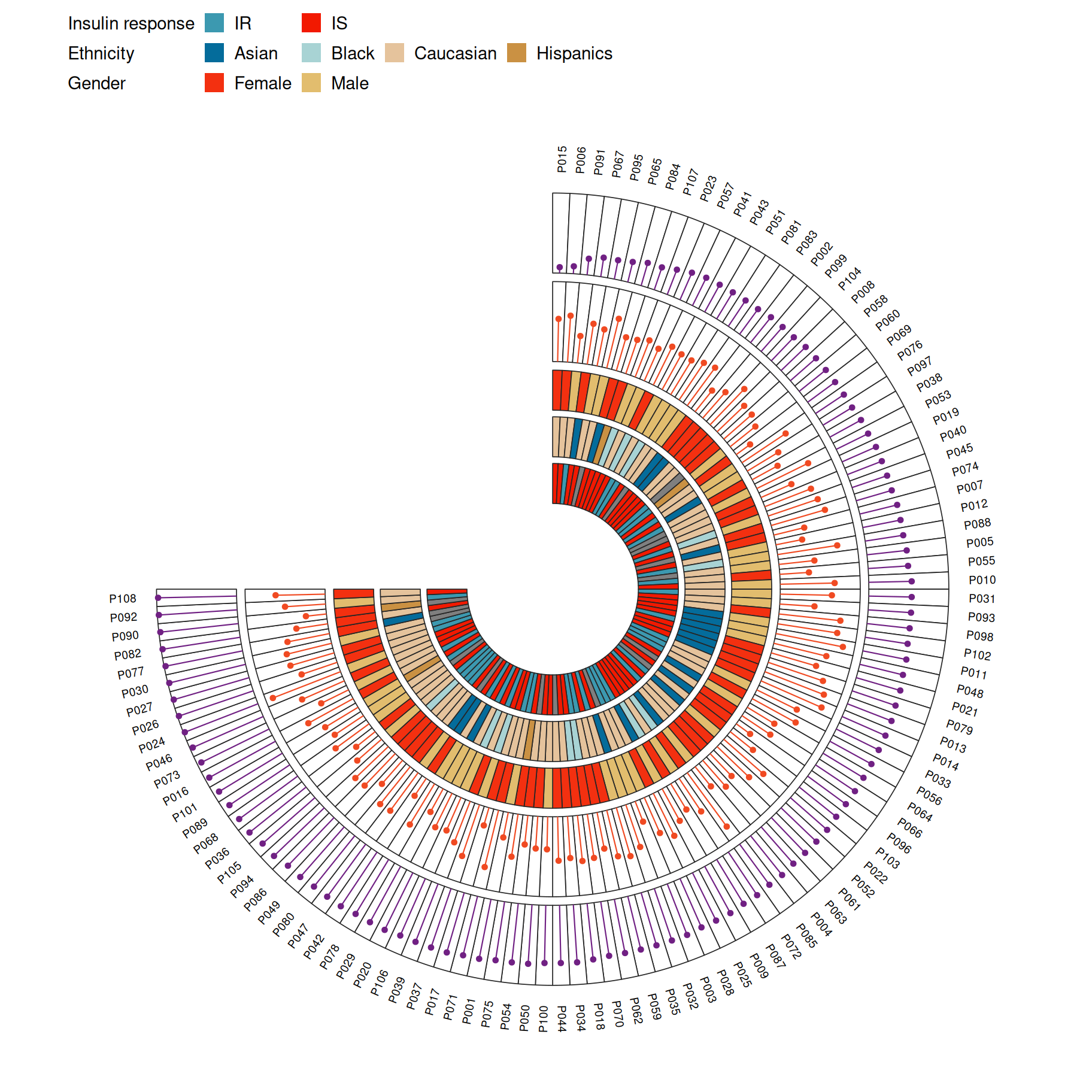
2. Summary Panels in the Gap
With the default show_summary = TRUE, the gap of the ring is filled with the cohort summary: one white panel per continuous track (boxplot, beeswarm, quartile labels) and one tall 100% stacked proportion bar per categorical track, plus the value axes at the centre line — the full layout shown in the Example figure above.
p2 <- circular_annotation_plot(dat, id_col = "id", sort_col = "age",
  numeric_tracks = numeric_tracks, category_tracks = category_tracks,
  category_order = bar_order, legend_order = legend_order,
  category_colors = category_colors, legend_labels = legend_labels,
  tick_values = tick_values, font_scale = 1.25)
p2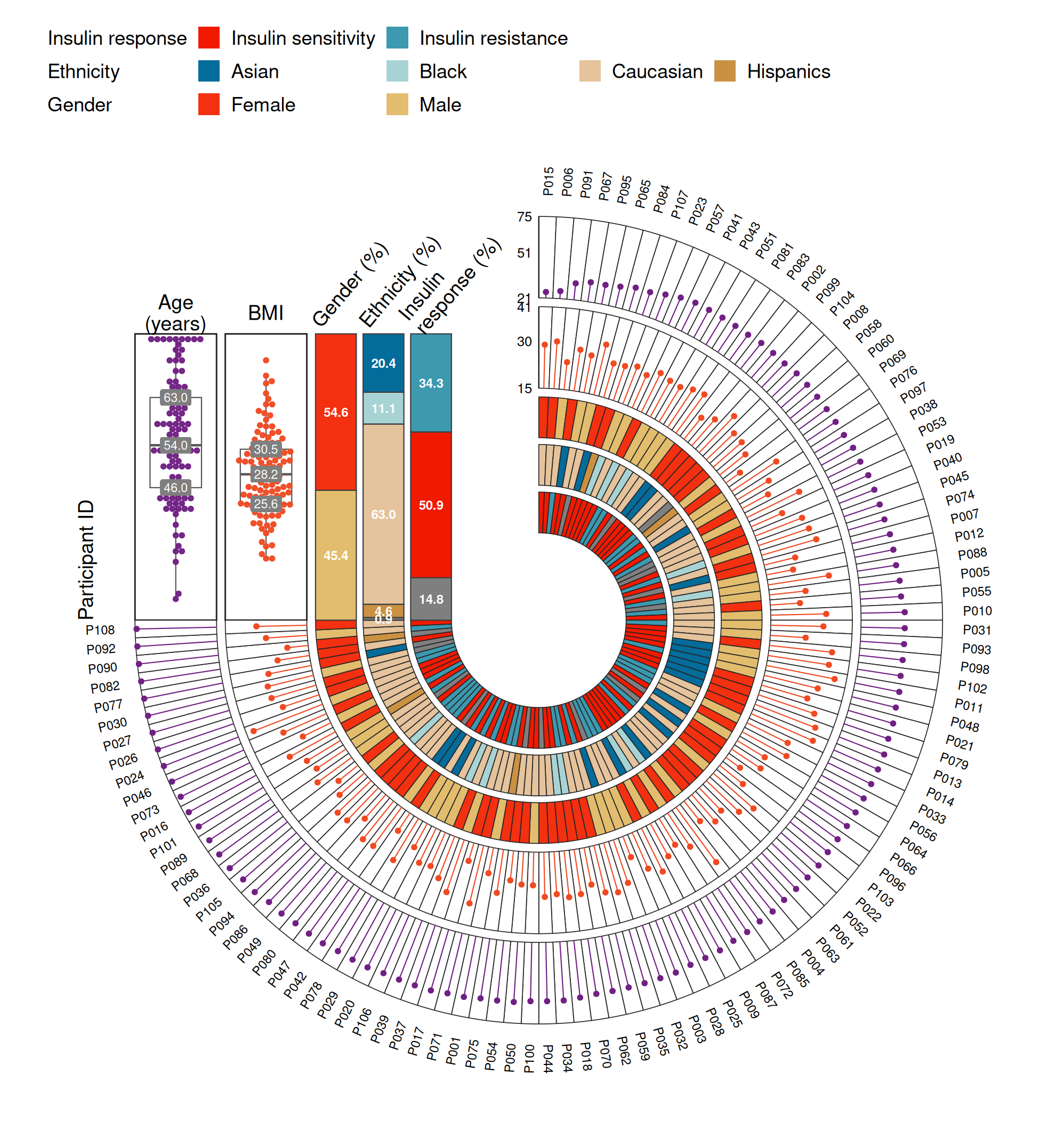
Tip
Key Parameters:
-
sort_col: the column that defines the sample order around the ring (sorted ascending). -
panel_height: uniform height of every summary panel in the gap (default2.95). -
gap_degrees: angular size of the gap (default 90°) that hosts the summary panels. -
tick_values: named list of axis tick values, e.g.list(Age = c(21, 51, 75)). -
category_order/legend_order: stacking order (bottom-to-top) inside each proportion bar and the order of legend entries. -
legend_labels: display names for short category codes (e.g.IS→ “Insulin sensitivity”);show_unknownhides theUnknownclass from the legend. -
show_summary/font_scale: draw the gap panels (TRUE) or the bare ring (FALSE); global text scaling.
3. Customization
The track tables and the function parameters make the figure easy to re-target: here the same cohort is re-sorted by BMI and drawn with a wider 120° gap.
p3 <- circular_annotation_plot(dat, id_col = "id", sort_col = "bmi",
  numeric_tracks = numeric_tracks, category_tracks = category_tracks,
  category_order = bar_order, legend_order = legend_order,
  category_colors = category_colors, legend_labels = legend_labels,
  tick_values = tick_values, font_scale = 1.25, gap_degrees = 120)
p3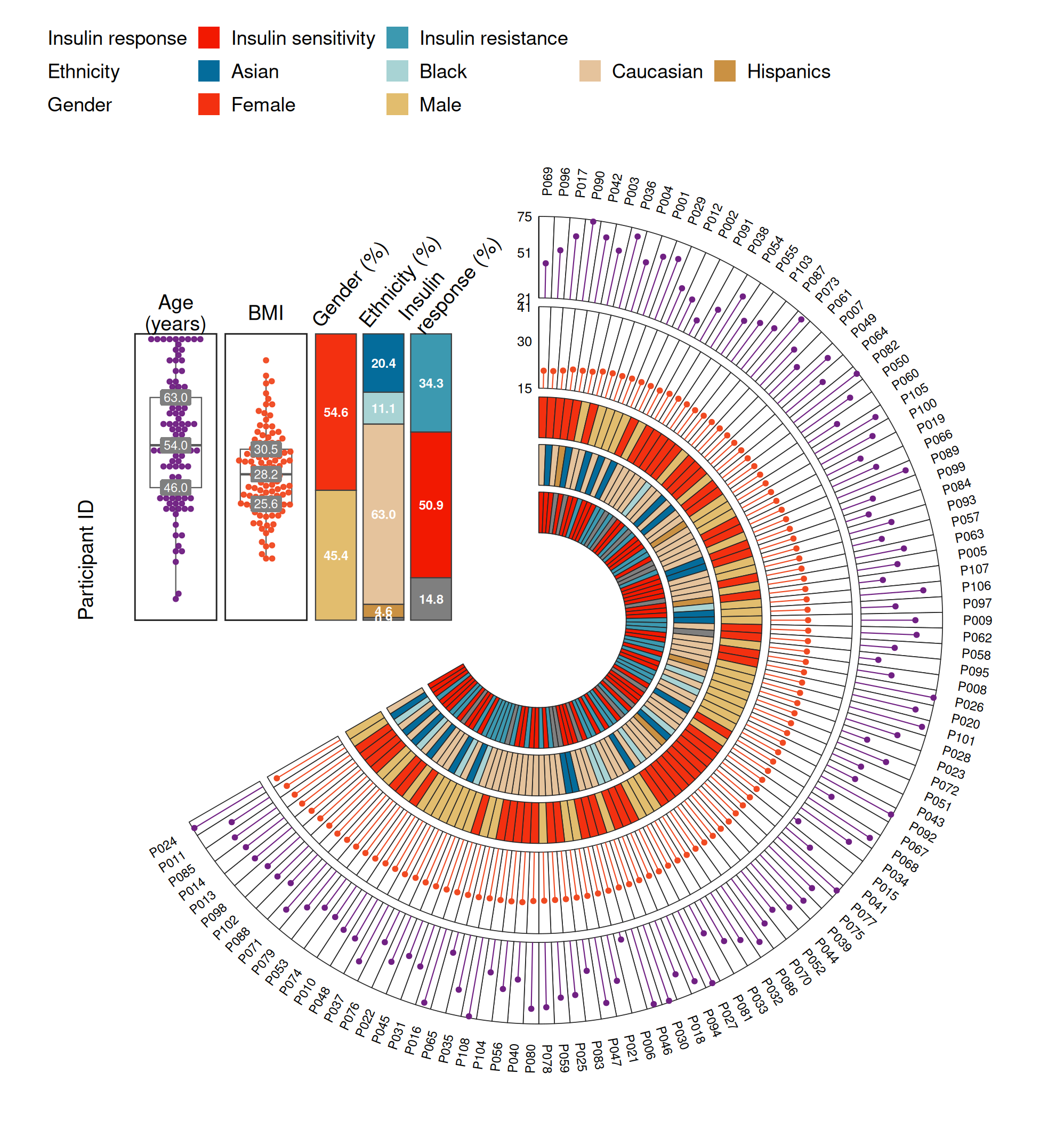
Applications
- Cohort overview figures: participant characteristics (demographics, clinical variables, omics groups) in the opening figure of multi-omics and longitudinal studies — the reference paper uses exactly this layout.
- Clinical trial arms: samples sorted by a biomarker or enrollment order, tracks encoding arm, response and key measurements.
- Single-cell / sample-level QC: per-sample quality metrics as continuous tracks with the panel distributions in the gap.
- The declarative track tables mean new variables are added by appending one row; the layout engine (sector angles, radius mapping, panel alignment) stays untouched.
Reference
[1] 顶刊图社 | 第094期:环形多轨道样本注释图. WeChat article. https://mp.weixin.qq.com/s/E2IZKV3eCi9ufdsGOAeE8g
[2] Shen X, Wang C, Zhou X, et al. Nonlinear dynamics of multi-omics profiles during human aging. Nat Aging. 2024;4(11):1619-1634. doi:10.1038/s43587-024-00692-2