using CairoMakie
using DataFrames
using Statistics
using RandomCorrelogram (Julia)
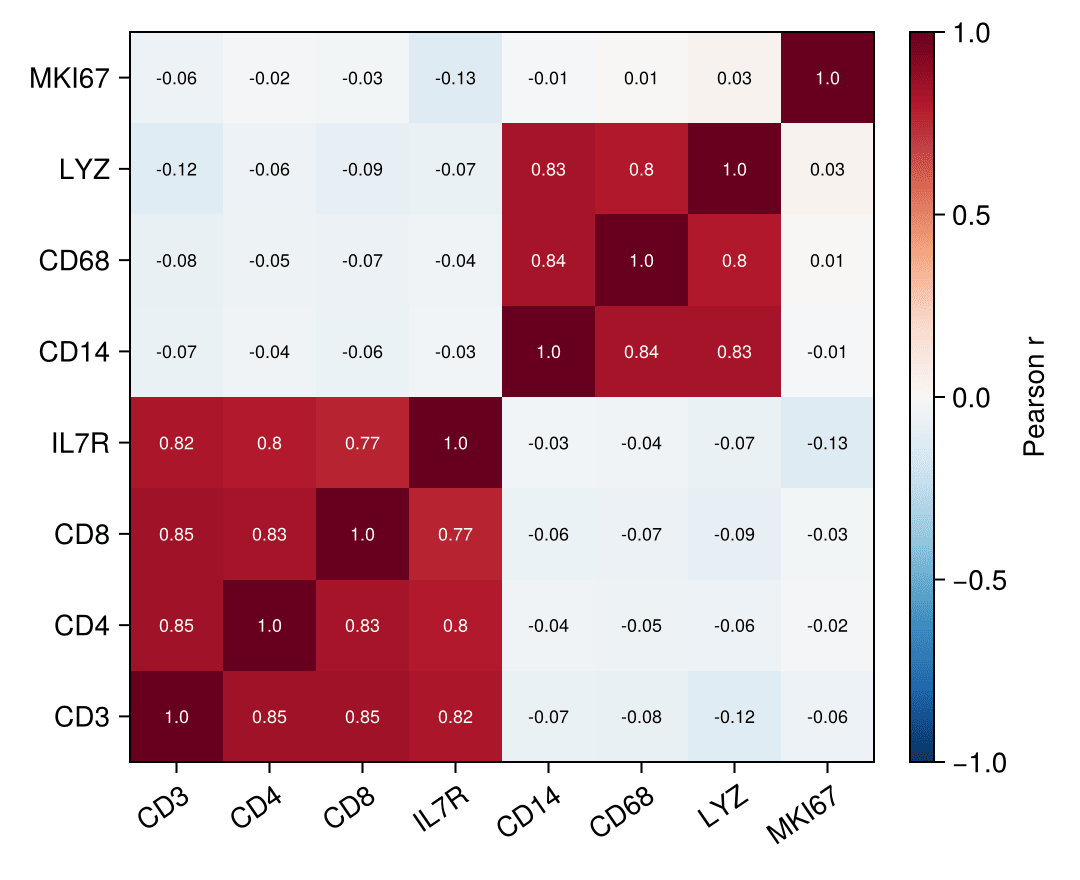
A correlogram (correlation matrix heatmap) encodes every pairwise correlation of a feature panel as a colored matrix cell, giving an instant read on co-expression blocks and redundant biomarkers. In biomedical research it is routine QC for marker panels. Julia’s Statistics.cor computes the matrix and CairoMakie.heatmap! renders it, with cell values annotated via text!.
Example
Setup
- System Requirements: Cross-platform (Linux/MacOS/Windows)
- Programming Language: Julia
- Dependencies:
CairoMakie,DataFrames,Statistics
Data Preparation
We simulate an 8-marker immune panel with two correlated blocks (T-cell markers and myeloid markers) plus a weakly related proliferation score, then compute the Pearson matrix.
Random.seed!(101)

n = 250
latent_t = randn(n)
latent_m = randn(n)
panel = DataFrame(
    CD3   = latent_t .+ 0.4 .* randn(n),
    CD4   = latent_t .+ 0.5 .* randn(n),
    CD8   = latent_t .+ 0.5 .* randn(n),
    IL7R  = latent_t .+ 0.6 .* randn(n),
    CD14  = latent_m .+ 0.4 .* randn(n),
    CD68  = latent_m .+ 0.5 .* randn(n),
    LYZ   = latent_m .+ 0.5 .* randn(n),
    MKI67 = randn(n))
markers = names(panel)
corr = Matrix(cor(Matrix(panel)))
8×8 Matrix{Float64}:
1.0 0.847918 0.851106 … -0.0763281 -0.121005 -0.0607499
0.847918 1.0 0.830831 -0.0535264 -0.0561228 -0.0197228
0.851106 0.830831 1.0 -0.0657583 -0.0852999 -0.0260574
0.817423 0.795928 0.77068 -0.0428039 -0.0724778 -0.129194
-0.0678254 -0.0418892 -0.0612808 0.835868 0.832141 -0.00942036
-0.0763281 -0.0535264 -0.0657583 … 1.0 0.803521 0.0111169
-0.121005 -0.0561228 -0.0852999 0.803521 1.0 0.0349363
-0.0607499 -0.0197228 -0.0260574 0.0111169 0.0349363 1.0Visualization
Annotated Correlation Heatmap
A diverging colormap reversed so red means positive, a fixed colorrange of ±1 for cross-study comparability, and one text! per cell keep the numbers readable.
fig = Figure(size = (540, 440))
ax = Axis(fig[1, 1]; xticks = (1:8, markers), yticks = (1:8, markers),
          xticklabelrotation = 0.6)
hm = heatmap!(ax, corr; colormap = Reverse(:RdBu), colorrange = (-1, 1))
for i in 1:8, j in 1:8
    text!(ax, j, i; text = string(round(corr[i, j]; digits = 2)),
          align = (:center, :center), fontsize = 9,
          color = abs(corr[i, j]) > 0.55 ? :white : :black)
end
Colorbar(fig[1, 2], hm; label = "Pearson r")
fig
Lower-Triangle Correlogram
Masking the mirrored upper triangle with NaN removes the redundancy; nan_color keeps the empty cells invisible.
corr_masked = [i < j ? NaN : corr[i, j] for i in 1:8, j in 1:8]

fig = Figure(size = (460, 420))
ax = Axis(fig[1, 1]; xticks = (1:8, markers), yticks = (1:8, markers),
          xticklabelrotation = 0.6)
heatmap!(ax, corr_masked; colormap = Reverse(:RdBu), colorrange = (-1, 1),
         nan_color = :white)
for i in 1:8, j in 1:i
    text!(ax, j, i; text = string(round(corr[i, j]; digits = 2)),
          align = (:center, :center), fontsize = 9,
          color = abs(corr[i, j]) > 0.55 ? :white : :black)
end
hidespines!(ax)
fig
References
- Makie development team. Makie.jl documentation — heatmap. https://docs.makie.org/stable/reference/plots/heatmap
- Danisch, S., & Krumbiegel, J. (2021). Makie.jl: Flexible high-performance data visualization for Julia. Journal of Open Source Software, 6(65), 3349.