# Installing necessary packages
if (!requireNamespace("palmerpenguins", quietly = TRUE)) {
  install.packages("palmerpenguins")
}
if (!requireNamespace("patchwork", quietly = TRUE)) {
  install.packages("patchwork")
}

# Load packages
library(ggplot2)
library(dplyr)
library(patchwork)
library(palmerpenguins)Scatter with Marginal Plots
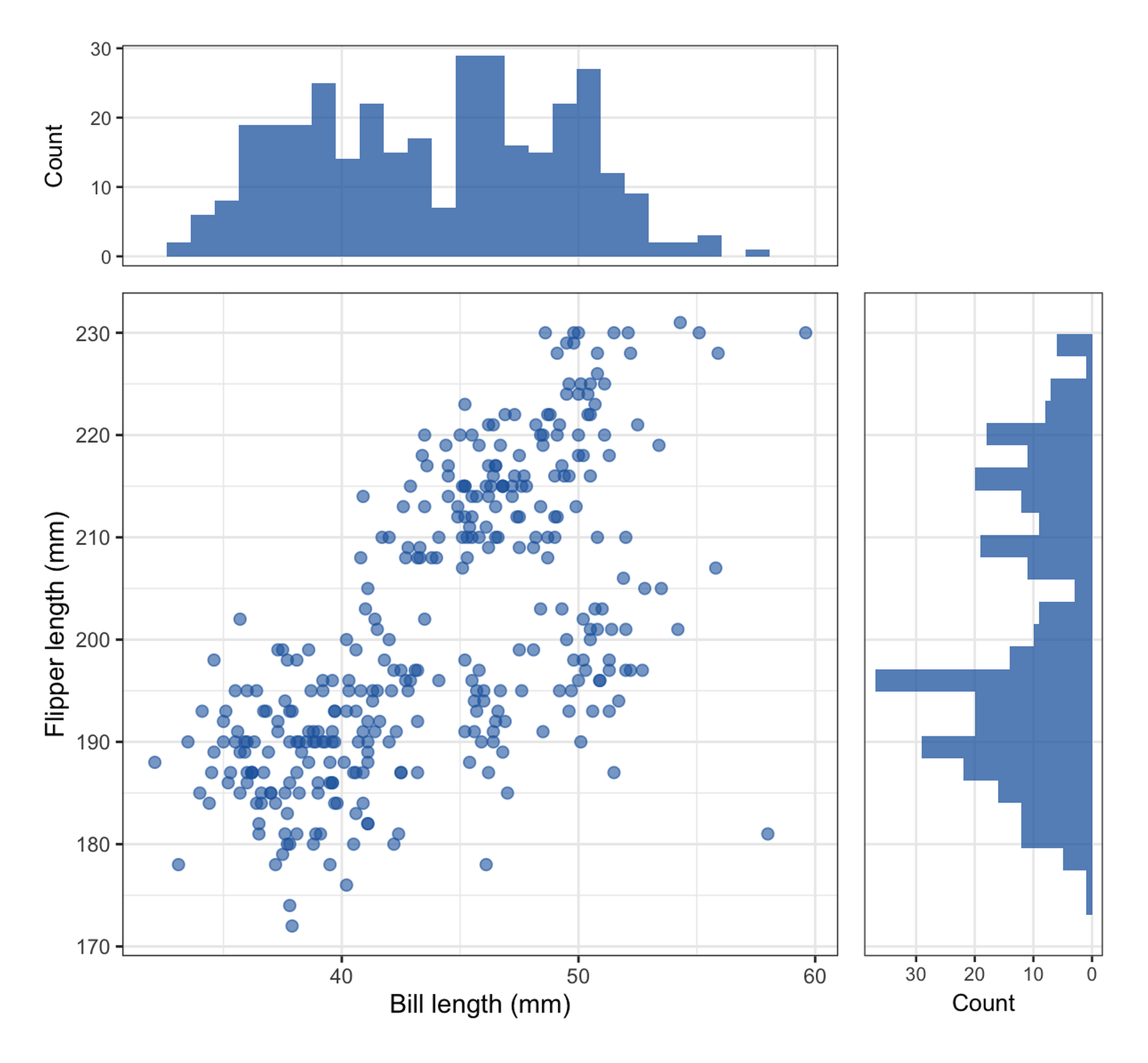
A scatter plot shows how two variables co-vary but hides their individual distributions — a top-right cloud can hide one bimodal variable and one skewed one. Marginal plots fix this by appending the x-variable’s distribution along the top edge and the y-variable’s along the right edge (histogram, density or boxplot), so the reader sees the joint relationship and the two marginal distributions in one figure [1]. The design is popular in clinical and biological scatter plots — e.g., biomarker correlation panels in oncology papers.
This tutorial builds the layout manually with ggplot2 + patchwork [2]. The assembly is fully explicit (which scales, which themes, which margins), version-proof, and transfers directly to any panel arrangement. A note on ggExtra::ggMarginal(), the popular one-liner for this design, appears in the callout below.
This tutorial covers two workflows:
- A scatter plot with marginal histograms;
- Species-stratified marginal densities with a shared color scale.
Example
Setup
System Requirements: Cross-platform (Linux/MacOS/Windows)
Programming language: R
Dependent packages:
ggplot2;dplyr;patchwork;palmerpenguins
sessioninfo::session_info("attached")─ Session info ───────────────────────────────────────────────────────────────
setting value
version R version 4.6.2 (2026-10-29)
os Ubuntu 24.04.5 LTS
system x86_64, linux-gnu
ui X11
language (EN)
collate C.UTF-8
ctype C.UTF-8
tz UTC
date 2026-10-31
pandoc 3.1.3 @ /usr/bin/ (via rmarkdown)
quarto 1.10.20 @ /usr/local/bin/quarto
─ Packages ───────────────────────────────────────────────────────────────────
! package * version date (UTC) lib source
P dplyr * 1.2.1 2026-04-03 [?] RSPM
P ggplot2 * 4.0.3.9000 2026-10-30 [?] Github (tidyverse/ggplot2@b638d65)
P palmerpenguins * 0.1.1 2022-08-15 [?] RSPM
P patchwork * 1.3.2 2025-08-25 [?] RSPM
[1] /home/runner/.cache/R/renv/library/Bizard-5140bdc6/linux-ubuntu-noble/R-4.6/x86_64-pc-linux-gnu
[2] /home/runner/work/_temp/Library
[3] /opt/R/4.6.2/lib/R/library
* ── Packages attached to the search path.
P ── Loaded and on-disk path mismatch.
──────────────────────────────────────────────────────────────────────────────Data Preparation
We use the penguins data from the palmerpenguins package [3]: 344 Antarctic penguins of three species with morphological measurements. Bill length and flipper length are complete for 342 animals — the classic correlation pair for this layout.
data(penguins, package = "palmerpenguins")

peng <- penguins |>
  filter(!is.na(bill_length_mm), !is.na(flipper_length_mm))
xr <- range(peng$bill_length_mm)
yr <- range(peng$flipper_length_mm)
cat("Rows used:", nrow(peng), "\n")
Rows used: 342 Visualization
1. Scatter with Marginal Histograms
The trick is three plots sharing scales: the main scatter, a top histogram with the same x scale, and a right histogram with the same y scale (drawn on a reversed x axis so its bars grow toward the scatter). patchwork’s design string places the three panels.
nb <- 28

pmain <- ggplot(peng, aes(bill_length_mm, flipper_length_mm)) +
  geom_point(color = "#2166AC", alpha = 0.6, size = 2) +
  scale_x_continuous(limits = xr) +
  scale_y_continuous(limits = yr) +
  labs(x = "Bill length (mm)", y = "Flipper length (mm)") +
  theme_bw(base_size = 11)

ptop <- ggplot(peng, aes(bill_length_mm)) +
  geom_histogram(bins = nb, fill = "#2166AC", alpha = 0.75) +
  scale_x_continuous(limits = xr) +
  labs(x = NULL, y = "Count") +
  theme_bw(base_size = 10) +
  theme(axis.text.x = element_blank(), axis.ticks.x = element_blank(),
        panel.grid.minor = element_blank())

pright <- ggplot(peng, aes(y = flipper_length_mm)) +
  geom_histogram(bins = nb, fill = "#2166AC", alpha = 0.75) +
  scale_y_continuous(limits = yr) +
  scale_x_continuous(trans = "reverse") +
  labs(x = "Count", y = NULL) +
  theme_bw(base_size = 10) +
  theme(axis.text.y = element_blank(), axis.ticks.y = element_blank(),
        panel.grid.minor = element_blank())

design <- "AB
CD"
p1 <- wrap_plots(A = ptop, B = plot_spacer(), C = pmain, D = pright,
                 design = design) +
  plot_layout(widths = c(3, 1), heights = c(1, 3))
p1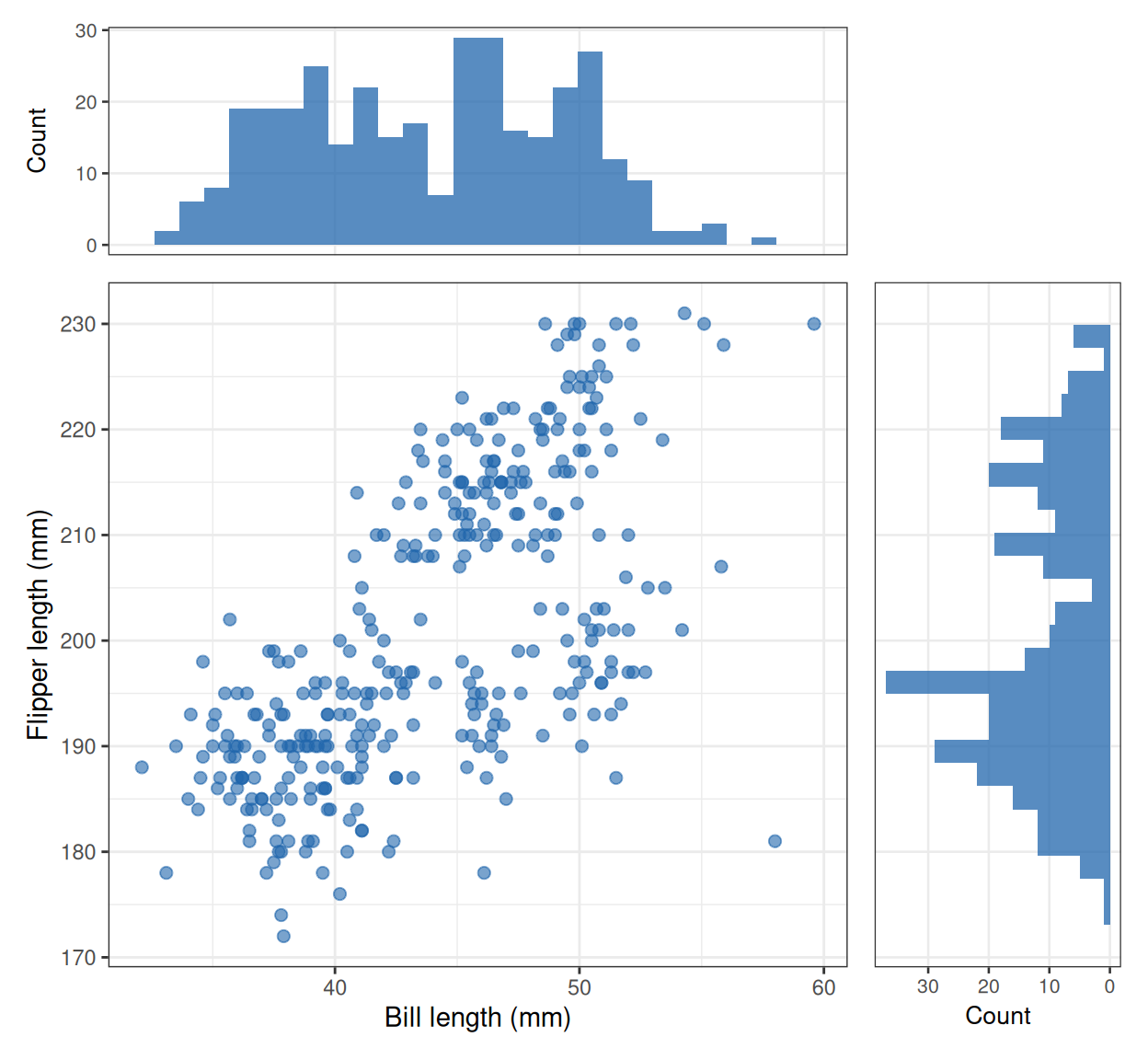
Note the marginal histograms carry information the scatter cannot: flipper length is bimodal even though the scatter looks like one continuous cloud.
2. Grouped Marginal Densities
pal <- c(Adelie = "#4E79A7", Chinstrap = "#F28E2B", Gentoo = "#E15759")

pmain_g <- ggplot(peng, aes(bill_length_mm, flipper_length_mm, color = species)) +
  geom_point(alpha = 0.6, size = 2) +
  scale_color_manual(values = pal) +
  scale_x_continuous(limits = xr) + scale_y_continuous(limits = yr) +
  labs(x = "Bill length (mm)", y = "Flipper length (mm)") +
  theme_bw(base_size = 11) +
  theme(legend.position = c(0.72, 0.22), legend.title = element_blank(),
        legend.background = element_rect(fill = "white", color = "grey80",
                                         linewidth = 0.2))

ptop_g <- ggplot(peng, aes(bill_length_mm, fill = species)) +
  geom_density(alpha = 0.45, linewidth = 0.4) +
  scale_fill_manual(values = pal) +
  scale_x_continuous(limits = xr) +
  labs(x = NULL, y = NULL) +
  theme_bw(base_size = 10) +
  theme(axis.text.x = element_blank(), axis.ticks.x = element_blank(),
        axis.text.y = element_blank(), panel.grid.minor = element_blank())

pright_g <- ggplot(peng, aes(y = flipper_length_mm, fill = species)) +
  geom_density(alpha = 0.45, linewidth = 0.4) +
  scale_fill_manual(values = pal) +
  scale_y_continuous(limits = yr) +
  scale_x_continuous(trans = "reverse") +
  labs(x = NULL, y = NULL) +
  theme_bw(base_size = 10) +
  theme(axis.text.y = element_blank(), axis.ticks.y = element_blank(),
        axis.text.x = element_blank(), panel.grid.minor = element_blank())

p2 <- wrap_plots(A = ptop_g, B = plot_spacer(), C = pmain_g, D = pright_g,
                 design = design) +
  plot_layout(widths = c(3, 1), heights = c(1, 3))
p2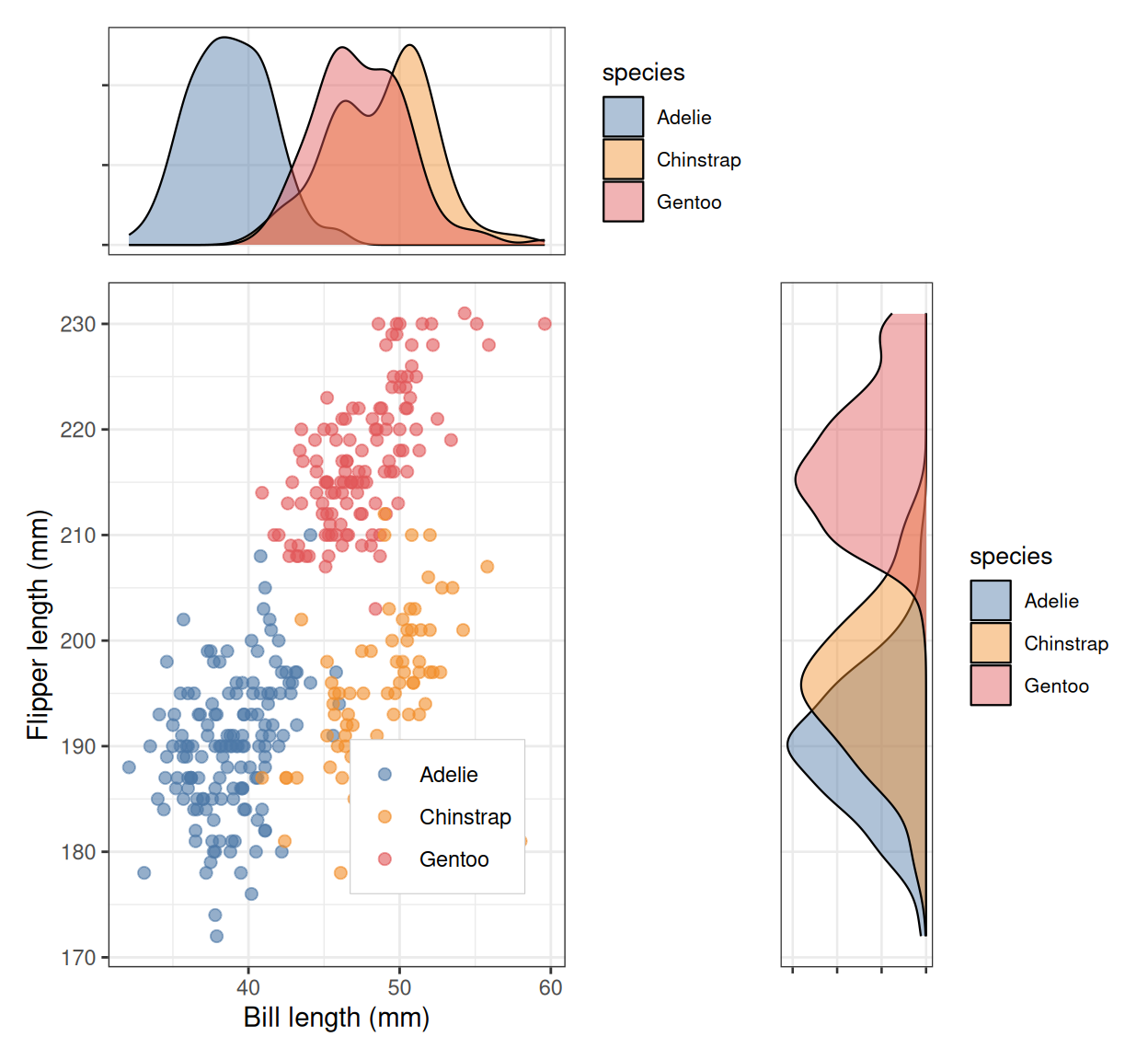
This is where the layout earns its keep: Adelie and Chinstrap are inseparable on flipper length (right marginal), but the top marginal splits them cleanly on bill length — a fact invisible in the scatter alone.
TipPractice tips
- Keep the three panels on identical scales: the marginal plot is only honest if its bars line up with the scatter’s axes. Freeze limits with
scale_*_continuous(limits = range(...))in every panel. - Reverse the side-panel axis (
scale_x_continuous(trans = "reverse")) so bars grow toward the scatter — the standard convention. - One row of code does this with
ggExtra::ggMarginal(p)[1] — but as of 2026-10 the package’s marginal panels collapse under ggplot2 ≥ 4.0 (rendered as black rectangles); if you see that, fall back to the manual assembly above, which is version-proof. - For n < ~30, swap histograms for marginal points/rug — binned counts of tiny samples mislead.
Application
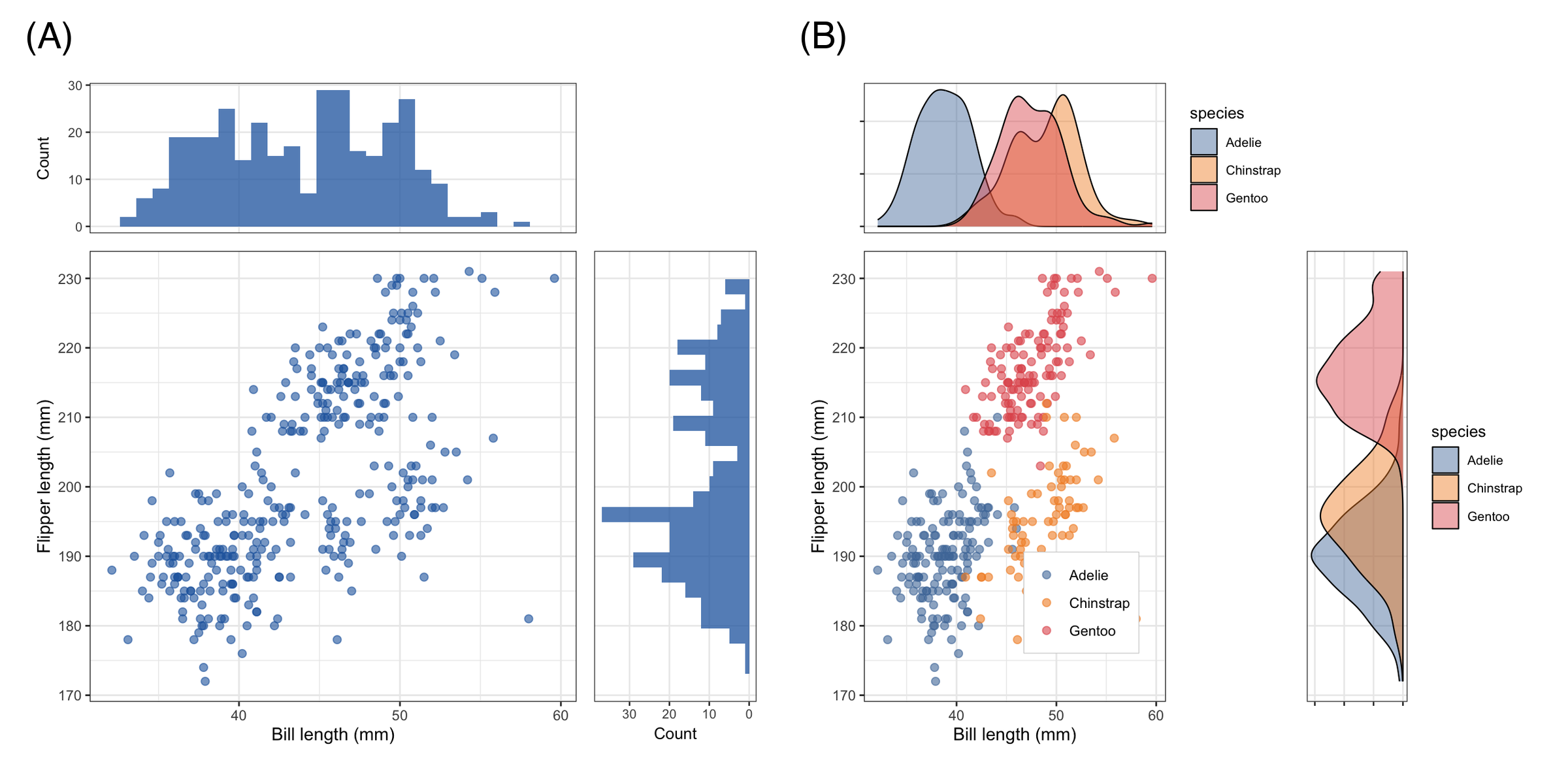
Marginal-enhanced scatters appear throughout method-comparison and biomarker papers: correlation of two assays with each assay’s distribution on the margins, dose-response panels, and PCA/t-SNE projections with per-axis score distributions. The panel below mirrors a typical publication layout: (A) marginal histograms for the pooled cohort and (B) grouped marginal densities by subpopulation.
Reference
[1] Attali D, Baker C. ggExtra: add marginal histograms to ‘ggplot2’, and more ‘ggplot2’ enhancements. https://github.com/daattali/ggExtra
[2] Pedersen TL. patchwork: the composer of plots. R package version 1.3.2. 2025. https://CRAN.R-project.org/package=patchwork
[3] Horst AM, Hill AP, Gorman KB. palmerpenguins: Palmer Archipelago (Antarctica) penguin data. R package version 0.1.1. 2022. doi:10.5281/zenodo.3965738