# Installing necessary packages
if (!requireNamespace("tidyverse", quietly = TRUE)) {
  install.packages("tidyverse")
}
if (!requireNamespace("ggrepel", quietly = TRUE)) {
  install.packages("ggrepel")
}
if (!requireNamespace("maps", quietly = TRUE)) {
  install.packages("maps")
}

# Load packages
library(tidyverse)
library(ggrepel)Sampling Site Map
A sampling site map places every collection site on a geographic basemap, with bubble size (and optionally colour) reporting how many samples came from each site. In genomics, epidemiology and ecology papers it is usually the first figure: it documents where the cohort was recruited, exposes geographic imbalance in the sampling, and anchors every downstream analysis to real places. This tutorial reproduces the chart type covered by the 顶刊图社 series (issue 012); see the Reference section below.
Example
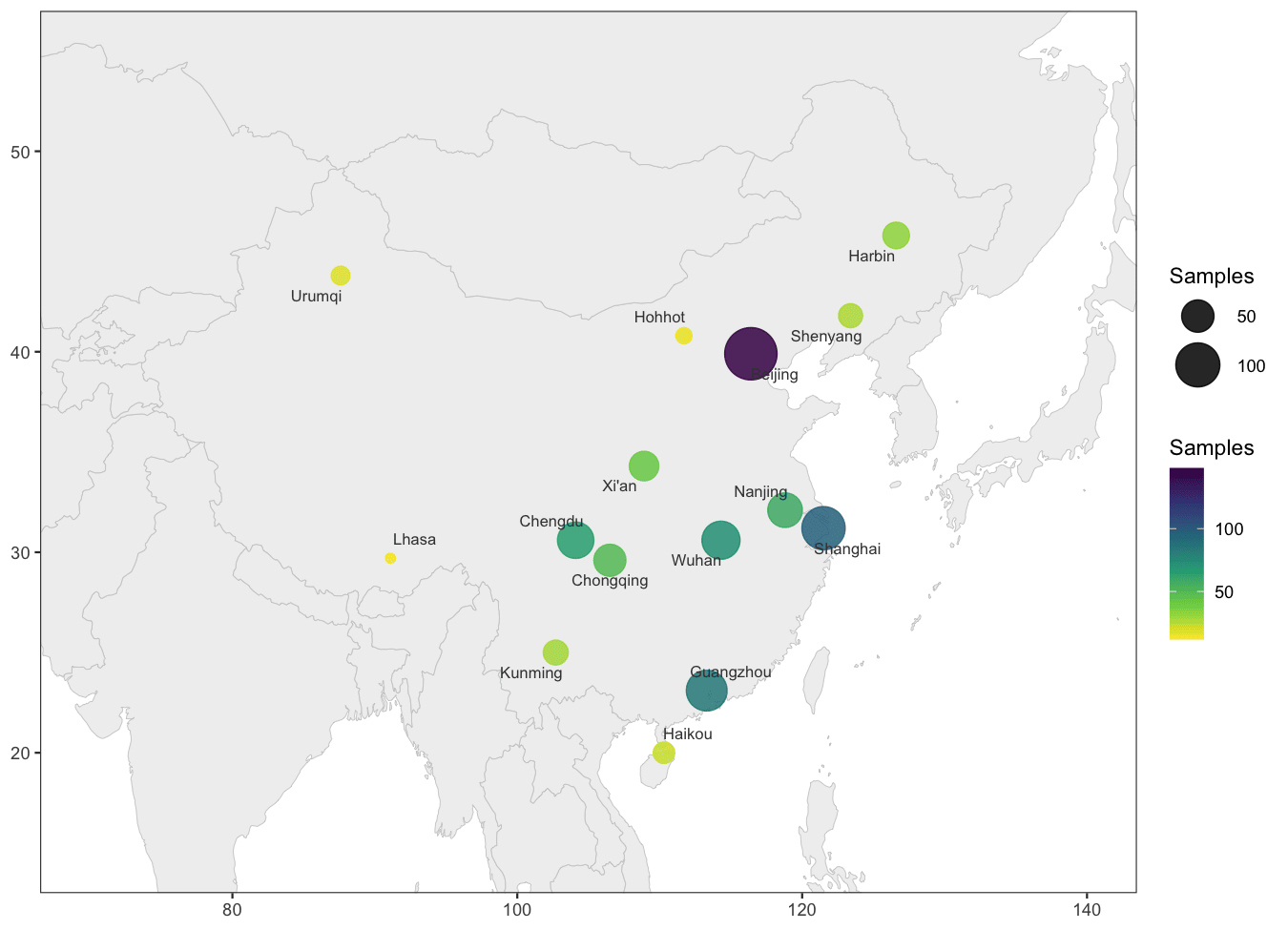
This example maps a simulated 15-site sampling campaign across China (city coordinates are real; the sample counts are simulated). Bubble size and colour both encode the number of samples per site — Beijing dominates with 148 samples while the western sites contribute a handful each — and ggrepel labels keep the site names legible without overlapping.
Setup
System Requirements: Cross-platform (Linux/MacOS/Windows)
Programming Language: R
Dependencies:
tidyverse;ggrepel;maps
Data Preparation
Two ingredients: a basemap (the maps package ships the world polygon data offline, so the figure renders without any network access) and one row per site with longitude, latitude and sample count.
world_map <- ggplot2::map_data("world")

sampling_sites <- tribble(
  ~site,       ~lon,   ~lat,   ~n,
  "Beijing",   116.4,  39.9,   148,
  "Shanghai",  121.5,  31.2,    96,
  "Guangzhou", 113.3,  23.1,    84,
  "Wuhan",     114.3,  30.6,    72,
  "Chengdu",   104.1,  30.6,    65,
  "Xi\'an",     108.9,  34.3,    41,
  "Harbin",    126.6,  45.8,    33,
  "Kunming",   102.7,  25.0,    29,
  "Lhasa",      91.1,  29.7,    12,
  "Urumqi",     87.6,  43.8,    18,
  "Shenyang",  123.4,  41.8,    27,
  "Nanjing",   118.8,  32.1,    58,
  "Chongqing", 106.5,  29.6,    49,
  "Hohhot",    111.7,  40.8,    15,
  "Haikou",    110.3,  20.0,    22)

head(sampling_sites, 3)
# A tibble: 3 × 4
site lon lat n
<chr> <dbl> <dbl> <dbl>
1 Beijing 116. 39.9 148
2 Shanghai 122. 31.2 96
3 Guangzhou 113. 23.1 84Note: in real studies the three columns come straight from your sample metadata (site name, GPS coordinates, specimen count). The basemap can be cropped to any region with coord_cartesian() — no projection packages needed.
Visualization
1. Basic Plot
The polygon layer draws the basemap (group is required — the world polygons have many disjoint parts), and the points layer is an ordinary bubble plot in geographic coordinates. Both the size and the colour scales carry the count, giving a double encoding.
ggplot() +
  geom_polygon(data = world_map, aes(long, lat, group = group),
               fill = "grey94", colour = "grey80", linewidth = .2) +
  geom_point(data = sampling_sites, aes(lon, lat, size = n, colour = n), alpha = .85) +
  geom_text_repel(data = sampling_sites, aes(lon, lat, label = site),
                  size = 2.8, colour = "grey25", min.segment.length = .2,
                  box.padding = .4, point.padding = .3) +
  scale_size_continuous(range = c(2, 12), name = "Samples") +
  scale_colour_viridis_c(option = "viridis", direction = -1, name = "Samples") +
  coord_cartesian(xlim = c(70, 140), ylim = c(15, 55)) +
  labs(x = NULL, y = NULL) +
  theme_bw(base_size = 11) +
  theme(panel.grid = element_blank())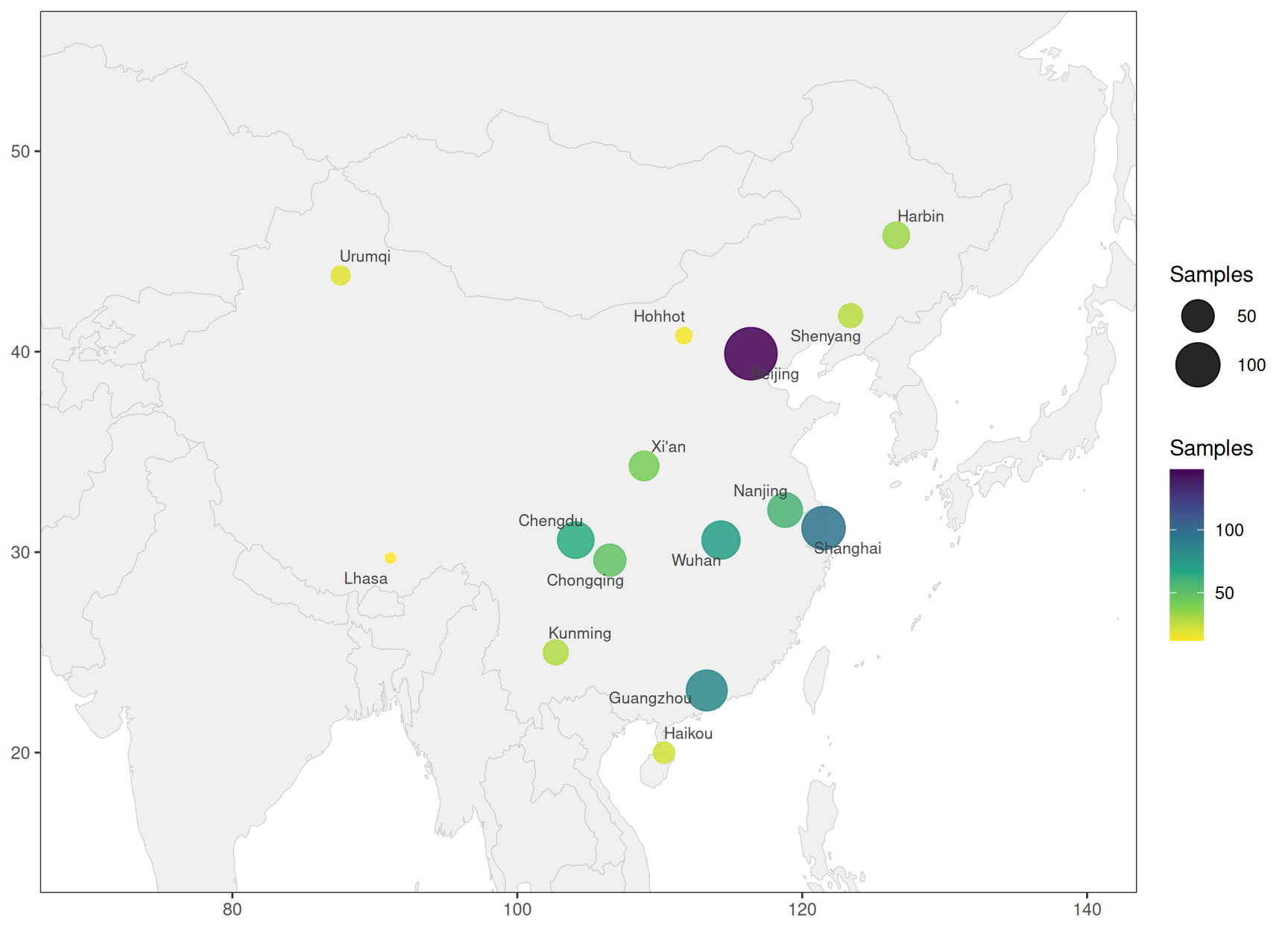
Tip
Key Parameters:
-
range = c(2, 12): smallest and largest bubble size; keep the minimum above zero so single-sample sites stay visible. -
coord_cartesian(xlim, ylim): crops the view to the study region; switching tocoord_fixed(ratio = 1.3)stretches the latitude for a world view (~1.3x, the usual aspect at mid latitudes). -
geom_text_repel(min.segment.length = .2): draws a leader line whenever a label is nudged away from its point;point.padding = .3keeps labels off their own bubbles.
2. Size Only, Counts in the Labels
Dropping the colour channel and folding the count into each label leaves a single legend and an unambiguous readout — the version most reviewers ask for when the size encoding must stand alone.
ggplot() +
  geom_polygon(data = world_map, aes(long, lat, group = group),
               fill = "grey94", colour = "grey80", linewidth = .2) +
  geom_point(data = sampling_sites, aes(lon, lat, size = n), colour = "#2a6f97", alpha = .85) +
  geom_text_repel(data = sampling_sites, aes(lon, lat, label = paste0(site, " (", n, ")")),
                  size = 2.7, colour = "grey25", min.segment.length = .2,
                  box.padding = .4, point.padding = .3) +
  scale_size_continuous(range = c(2, 12), name = "Samples") +
  coord_cartesian(xlim = c(70, 140), ylim = c(15, 55)) +
  labs(x = NULL, y = NULL) +
  theme_bw(base_size = 11) +
  theme(panel.grid = element_blank())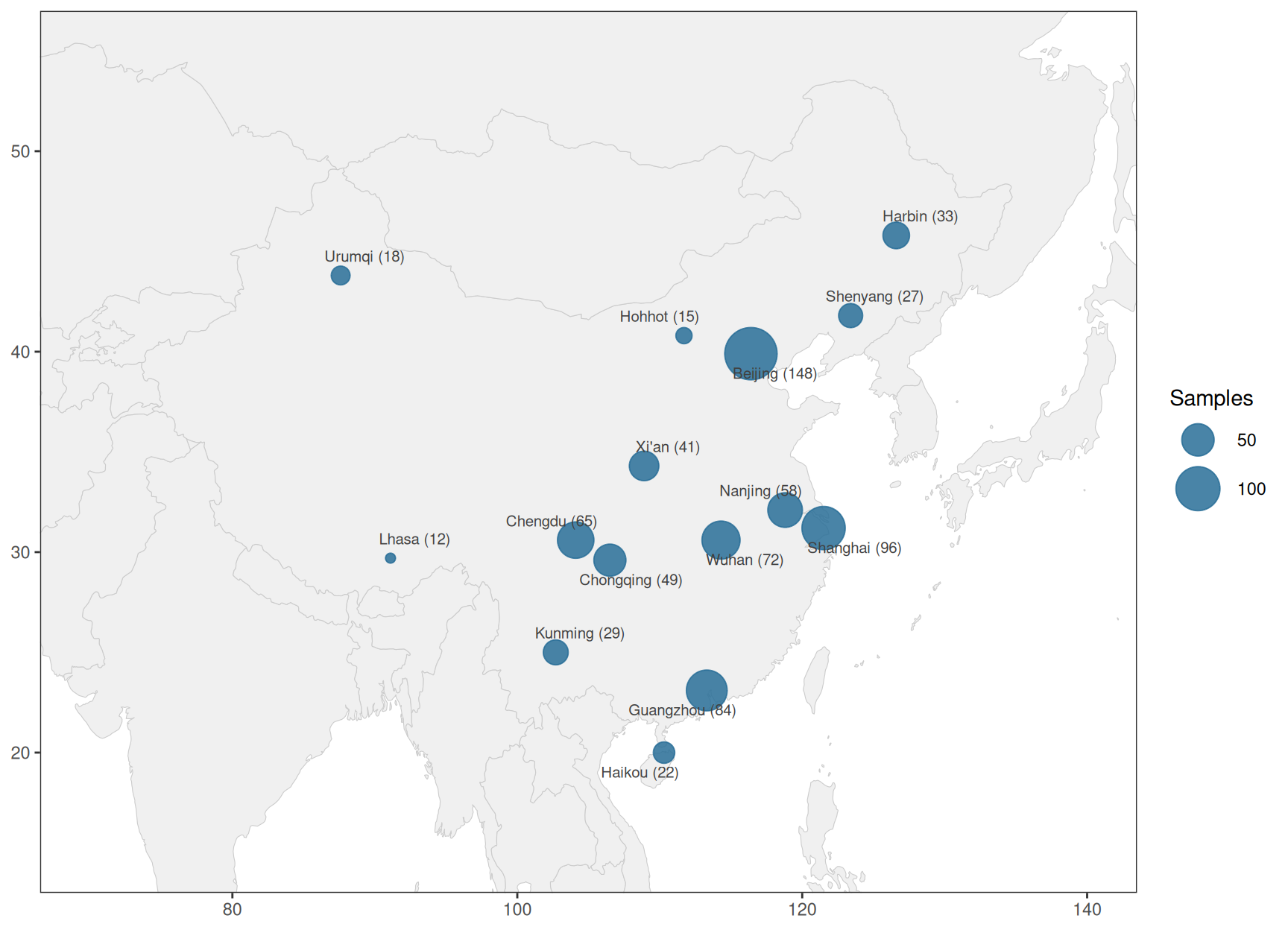
3. World View
The same layers without a crop show the campaign at global scale; coord_fixed(ratio = 1.3) approximates the usual map aspect without any projection package.
ggplot() +
  geom_polygon(data = world_map, aes(long, lat, group = group),
               fill = "grey95", colour = "grey82", linewidth = .15) +
  geom_point(data = sampling_sites, aes(lon, lat, size = n), colour = "#c1121f", alpha = .9) +
  scale_size_continuous(range = c(1.5, 10), name = "Samples") +
  coord_fixed(ratio = 1.3) +
  labs(x = NULL, y = NULL) +
  theme_void(base_size = 11)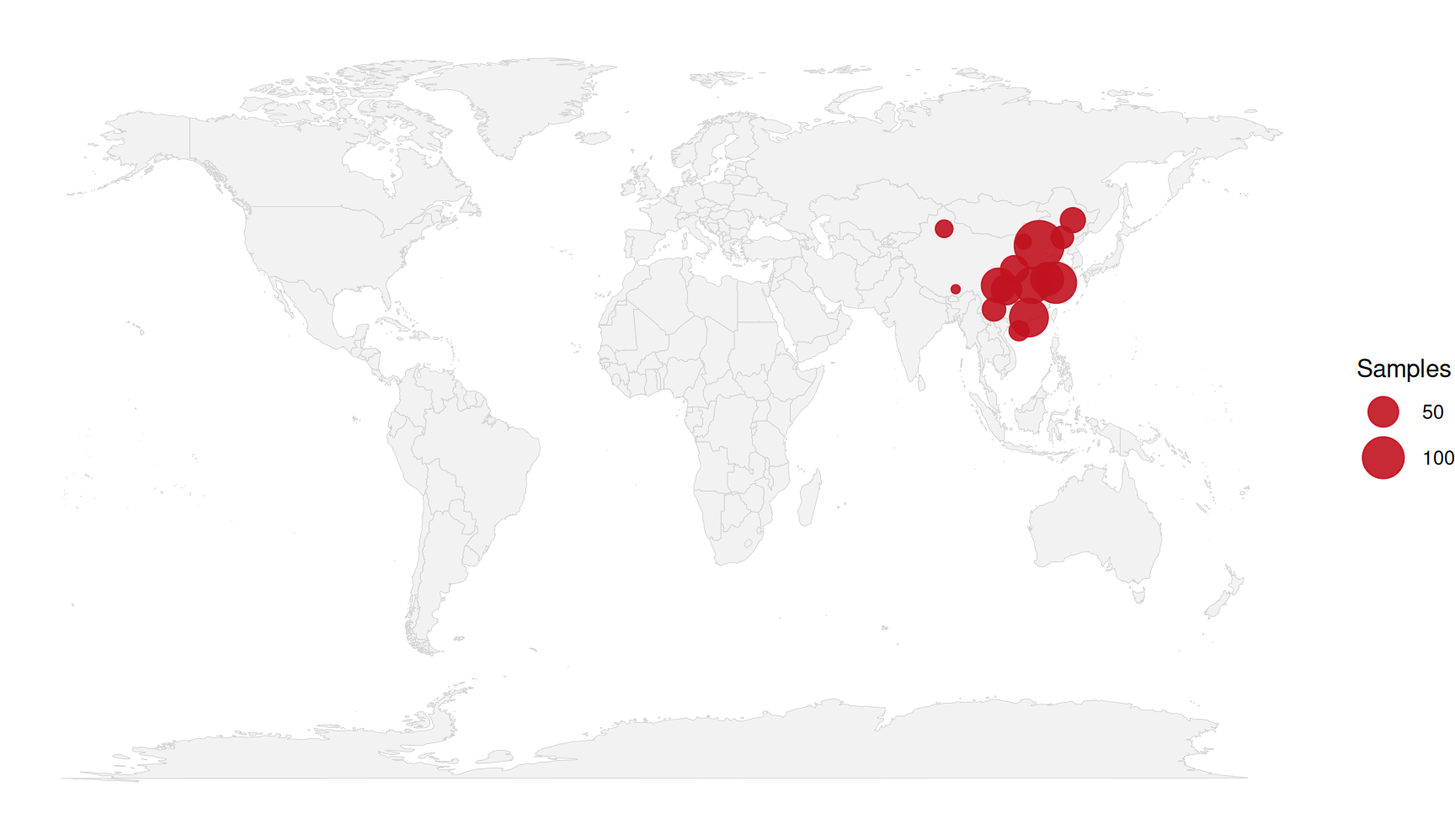
Applications
- Cohort documentation: the opening figure of multi-center studies — who was sampled, and where.
- Sampling bias checks: imbalanced geography is visible before it biases downstream statistics.
- Epidemiology and ecology: outbreak clusters, species ranges, field-station networks.
- The basemap is offline data and the layers are plain ggplot2 — swap
map_data("world")formap_data("state"),map_data("county")or your own polygon layer for regional maps.
Reference
[1] 顶刊图社 | 第012期:采样地图. WeChat article. http://mp.weixin.qq.com/s?__biz=MzU5NjE2ODU0OQ==&mid=2247483863&idx=1&sn=f9e1f4caca6fd8ee8f6663babd8f5da7
[2] Becker RA, Wilks AR, Brownrigg R, Minka TP, Deckmyn A. maps: Draw Geographical Maps. R package version 3.4.3, 2025. https://cran.r-project.org/package=maps