# CRAN dependencies
if (!requireNamespace("Seurat", quietly = TRUE)) install.packages("Seurat")
if (!requireNamespace("ggplot2", quietly = TRUE)) install.packages("ggplot2")
if (!requireNamespace("dplyr", quietly = TRUE)) install.packages("dplyr")
if (!requireNamespace("stringr", quietly = TRUE)) install.packages("stringr")
if (!requireNamespace("patchwork", quietly = TRUE)) install.packages("patchwork")
if (!requireNamespace("RColorBrewer", quietly = TRUE)) install.packages("RColorBrewer")
if (!requireNamespace("ggrepel", quietly = TRUE)) install.packages("ggrepel")
if (!requireNamespace("tidydr", quietly = TRUE)) install.packages("tidydr")
if (!requireNamespace("mascarade", quietly = TRUE)) install.packages("mascarade")
if (!requireNamespace("plotly", quietly = TRUE)) install.packages("plotly")

# GitHub dependencies
if (!requireNamespace("remotes", quietly = TRUE)) install.packages("remotes")
if (!requireNamespace("scRNAtoolVis", quietly = TRUE)) {
  remotes::install_github("junjunlab/scRNAtoolVis")
}
if (!requireNamespace("ggunchull", quietly = TRUE)) {
  remotes::install_github("sajuukLyu/ggunchull")
}

# Load packages
library(Seurat)
library(ggplot2)
library(dplyr)
library(stringr)
library(patchwork)
library(RColorBrewer)
library(ggrepel)
library(tidydr)
library(scRNAtoolVis)
library(ggunchull)
library(mascarade)
library(plotly)Publication-Ready UMAP Plot
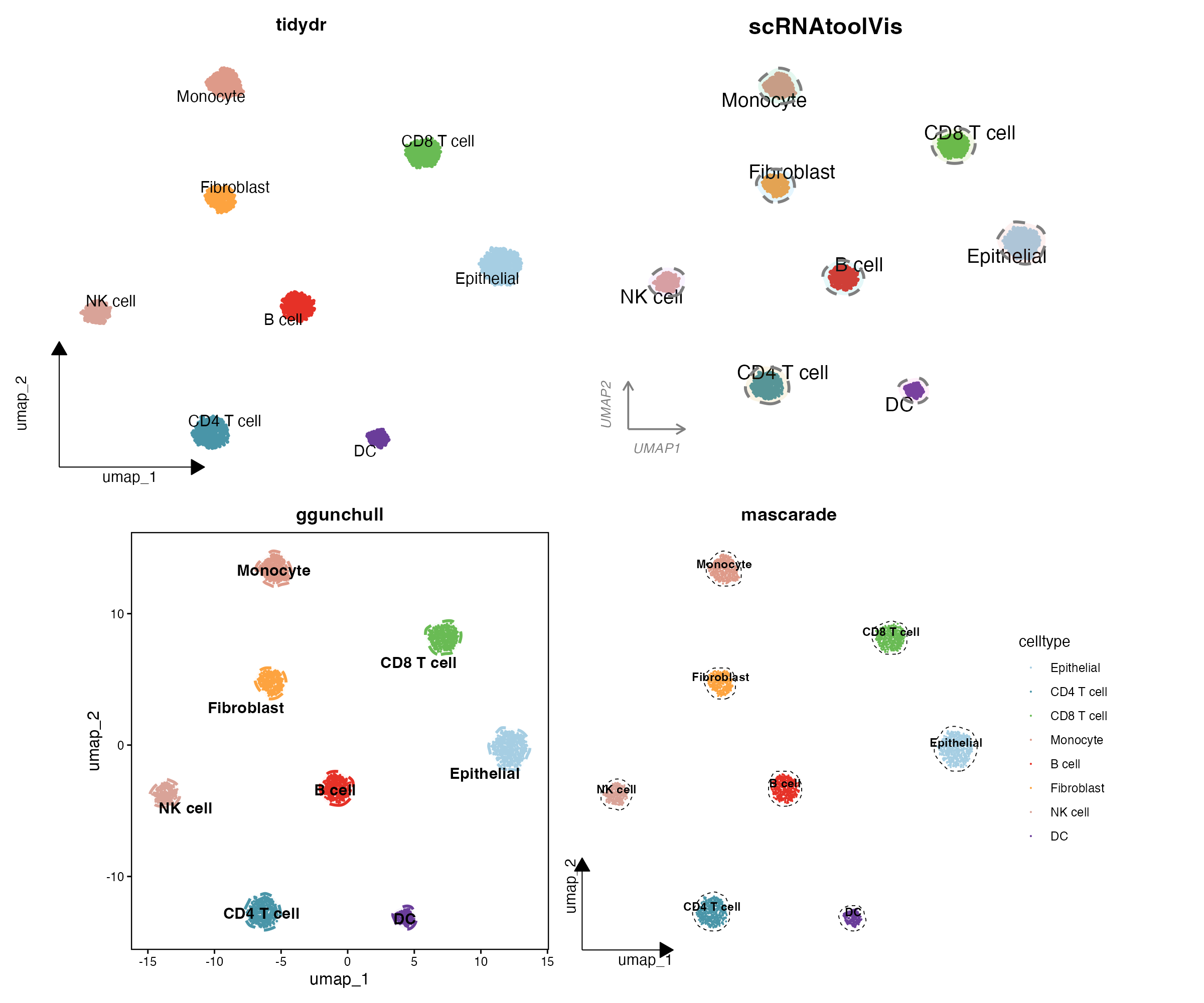
A plain DimPlot is rarely what a journal figure needs. Reviewers expect UMAP embeddings that carry precise cluster labels, consistent factor ordering, restrained axes, and — in the style of high-impact single-cell papers — soft outlines that wrap each cell population. This tutorial assembles a complete, publication-ready UMAP workflow for Seurat objects:
- Baseline panels: labelled UMAP, faceted UMAP, and a patchwork composite with journal-style letter tags.
- Scheme 1 — tidydr arrow axes: L-shaped arrow axes without grid lines; the safe, universal SCI style.
-
Scheme 2 — cloud outlines (
scRNAtoolVis::clusterCornerAxes): corner axes plus translucent “cloud” halos around clusters; the popular CNS-sub-journal look. -
Scheme 3 — dashed hulls (
ggunchull::stat_unchull): crisp dashed non-convex hulls with centred bold labels; the polished review-article style. -
Scheme 4 — fine masks (
mascarade::generateMask): density-based contours that hug high-density embeddings; for high-resolution, large-atlas figures. -
Bonus — 3D density landscape: an interactive three-dimensional kernel-density “terrain” of the embedding with
plotly.
All four schemes draw from one simulated PBMC-style Seurat object, so every panel is fully reproducible in the browser.
Example
Setup
System Requirements: Cross-platform (Linux/MacOS/Windows)
Programming Language: R
Dependent packages:
Seurat,ggplot2,dplyr,stringr,patchwork,RColorBrewer,ggrepel,tidydr,scRNAtoolVis,ggunchull,mascarade,sessioninfo,plotly
sessioninfo::session_info("attached")─ Session info ───────────────────────────────────────────────────────────────
setting value
version R version 4.6.1 (2026-06-24)
os Ubuntu 24.04.5 LTS
system x86_64, linux-gnu
ui X11
language (EN)
collate C.UTF-8
ctype C.UTF-8
tz UTC
date 2026-10-27
pandoc 3.1.3 @ /usr/bin/ (via rmarkdown)
quarto 1.10.19 @ /usr/local/bin/quarto
─ Packages ───────────────────────────────────────────────────────────────────
! package * version date (UTC) lib source
P dplyr * 1.2.1 2026-04-03 [?] RSPM
P forcats * 1.0.1 2025-09-25 [?] RSPM
P ggplot2 * 4.0.3.9000 2026-10-26 [?] Github (tidyverse/ggplot2@b638d65)
P ggrepel * 0.9.8 2026-03-17 [?] RSPM
P ggunchull * 1.0.1 2026-10-10 [?] Github (sajuukLyu/ggunchull@282c549)
P lubridate * 1.9.5 2026-02-04 [?] RSPM
mascarade * 0.4.3 2026-07-30 [1] RSPM
P patchwork * 1.3.2 2025-08-25 [?] RSPM
P plotly * 4.12.1 2026-07-22 [?] RSPM
P purrr * 1.2.2 2026-04-10 [?] RSPM
P RColorBrewer * 1.1-3 2022-04-03 [?] RSPM
P readr * 2.2.0 2026-02-19 [?] RSPM
P scRNAtoolVis * 0.1.0 2026-10-10 [?] Github (junjunlab/scRNAtoolVis@c99eaa8)
P Seurat * 5.6.0 2026-10-03 [?] RSPM
P SeuratObject * 5.4.0 2026-04-11 [?] RSPM
P sp * 2.2-4 2026-10-11 [?] RSPM
P stringr * 1.6.0 2025-11-04 [?] RSPM
P tibble * 3.3.1 2026-01-11 [?] RSPM
P tidydr * 0.0.7 2026-10-09 [?] RSPM
P tidyr * 1.3.2 2025-12-19 [?] RSPM
P tidyverse * 2.0.0 2023-02-22 [?] RSPM
[1] /home/runner/.cache/R/renv/library/Bizard-5140bdc6/linux-ubuntu-noble/R-4.6/x86_64-pc-linux-gnu
[2] /home/runner/work/_temp/Library
[3] /opt/R/4.6.1/lib/R/library
* ── Packages attached to the search path.
P ── Loaded and on-disk path mismatch.
──────────────────────────────────────────────────────────────────────────────Data Preparation
Simulated PBMC-style Seurat object
We simulate 3,360 cells across 8 cell types with unequal population sizes (200–660 cells each) and a marker-gene block structure, 6 sequencing samples mapped to 6 condition groups, and 3 tissue sites. Cell barcodes carry their sample name (0001-1_Sample_3), the way merged Seurat objects name cells. The same counts → normalization → PCA → UMAP/t-SNE chain you would run on a real object is executed so the embedding looks realistic.
set.seed(2026)

type_sizes <- c("CD4 T cell" = 500, "CD8 T cell" = 460, "NK cell" = 300,
                "B cell" = 420, "Monocyte" = 460, "DC" = 200,
                "Fibroblast" = 360, "Epithelial" = 660)
cell_types <- names(type_sizes)
n_type <- length(cell_types)
n_cell <- sum(type_sizes)
n_gene <- 1200
markers_per <- 40

gene_names <- paste0("Gene", 1:n_gene)
counts <- matrix(rnbinom(n_cell * n_gene, size = 4, prob = 0.25), n_gene, n_cell)
counts <- matrix(as.integer(pmin(counts, 30)), n_gene, n_cell)

# Add a marker block for each cell type
celltype <- factor(rep(cell_types, times = type_sizes), levels = cell_types)
for (i in seq_len(n_type)) {
  block <- ((i - 1) * markers_per + 1):(i * markers_per)
  idx_i <- which(celltype == cell_types[i])
  boost <- rnbinom(length(block) * length(idx_i), size = 8, prob = 0.2)
  counts[block, idx_i] <- pmin(counts[block, idx_i] + as.integer(boost), 120)
}
rownames(counts) <- gene_names

# Sample-level metadata: 6 samples map to 6 condition groups
groups <- c("Control", "4hours", "12hours", "2days", "14days", "6weeks")
site_lv <- c("Tumor", "Normal", "Margin")
orig.ident_raw <- sample(paste0("Sample_", 1:6), n_cell, TRUE)
lut <- setNames(rep(groups, length.out = 6), sort(unique(orig.ident_raw)))
Group <- factor(lut[orig.ident_raw], levels = groups)
site <- factor(sample(site_lv, n_cell, TRUE), levels = site_lv)

# Cell barcodes carry the sample name, as in merged Seurat objects
colnames(counts) <- paste0(sprintf("%04d", seq_len(n_cell)), "-1_", orig.ident_raw)

meta <- data.frame(
  celltype = celltype, Group = Group, orig.ident_raw = orig.ident_raw, site = site,
  row.names = colnames(counts)
)

sce <- CreateSeuratObject(counts = counts, meta.data = meta)
sce <- NormalizeData(sce, verbose = FALSE)
sce <- FindVariableFeatures(sce, nfeatures = 800, verbose = FALSE)
sce <- ScaleData(sce, verbose = FALSE)
sce <- RunPCA(sce, npcs = 20, verbose = FALSE)
sce <- RunUMAP(sce, dims = 1:15, verbose = FALSE)
sce <- RunTSNE(sce, dims = 1:15, verbose = FALSE)
Idents(sce) <- "celltype"
Journal practice 1: order clusters by cell count
Figure aesthetics break when every panel orders cell types differently. Sort the identity factor by decreasing cell count once, and every downstream figure inherits the same order (a step from the source article’s “data preprocessing” section). With the unequal populations simulated above, the reorder is visible: Epithelial (660 cells) comes first and DC (200 cells) last.
# Order cell types from largest to smallest population
celltype_counts <- table(sce$celltype)
ord <- names(sort(celltype_counts, decreasing = TRUE))
sce$celltype <- factor(sce$celltype, levels = ord)
Idents(sce) <- "celltype"
celltype_counts
CD4 T cell CD8 T cell    NK cell     B cell   Monocyte         DC Fibroblast
       500        460        300        420        460        200        360
Epithelial
       660
Journal practice 2: fix SeuratProject sample labels
Cells that lost their identity during multi-dataset merging carry the default SeuratProject origin, which scrambles sample grouping. Recover the real sample name from the cell barcode with a regular expression, as in the source article:
# Inject the pathology for demonstration
idx_bad <- sample(seq_len(ncol(sce)), 60)
sce$orig.ident_raw[idx_bad] <- "SeuratProject"

idx_to_fix <- which(sce$orig.ident_raw == "SeuratProject")
if (length(idx_to_fix) > 0) {
  message(paste("Found", length(idx_to_fix), "cells with a SeuratProject label"))
  cell_names <- colnames(sce)[idx_to_fix]
  new_idents <- str_extract(cell_names, "[^_]+_[^_]+$")
  if (any(is.na(new_idents))) {
    new_idents[is.na(new_idents)] <- cell_names[is.na(new_idents)]
  }
  sce$orig.ident_raw[idx_to_fix] <- new_idents
}
Found 60 cells with a SeuratProject labeltable(sce$orig.ident_raw)
Sample_1 Sample_2 Sample_3 Sample_4 Sample_5 Sample_6
586 546 529 546 577 576 Visualization
Baseline panels
A labelled UMAP by cell type, the embedding coloured by condition group and by original sample (batch-structure checks), the same embedding split by tissue site, and a patchwork composite combining cell-type and t-SNE views with journal letter tags (tag_levels = "A"). UMAP emphasizes local similarity between related populations; t-SNE separates distinct populations, so the two together make a stronger quality check.
p_base <- DimPlot(sce, reduction = "umap", group.by = "celltype",
                  label = TRUE, label.size = 4, repel = TRUE, cols = selCols) +
  theme_dr() +
  theme(panel.grid = element_blank(),
        legend.text = element_text(size = 10, color = "black")) +
  guides(color = guide_legend(title = "", override.aes = list(size = 3, alpha = 1)))
p_split <- DimPlot(sce, reduction = "umap", split.by = "site", group.by = "celltype",
                   label = FALSE, cols = selCols, ncol = 3) +
  theme(panel.grid = element_blank(), legend.position = "none")
p_base + p_split + plot_layout(widths = c(1, 1.4))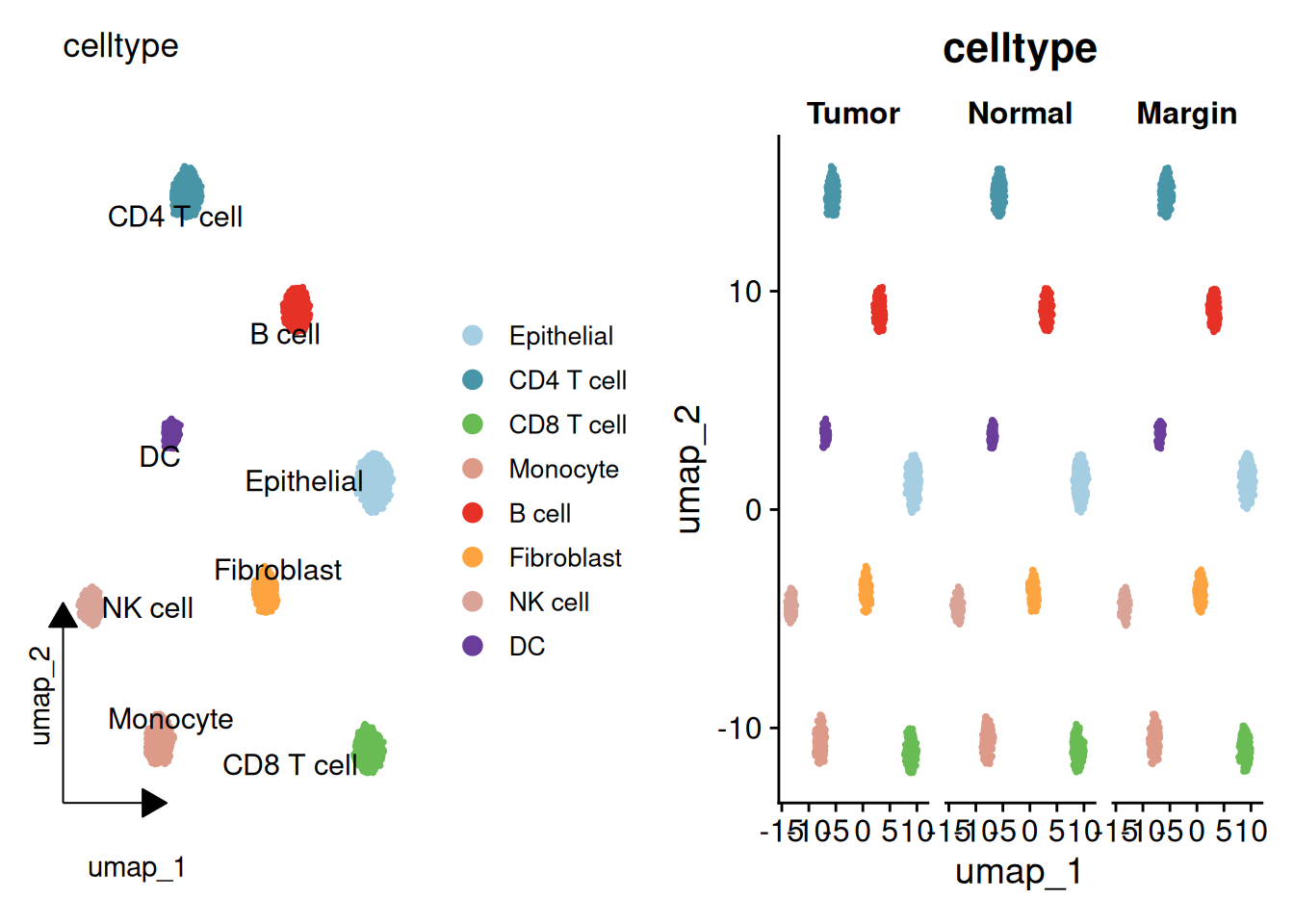
# A large palette keeps many samples distinguishable
sample_cols <- colorRampPalette(brewer.pal(n = 12, name = "Set3"))(length(unique(sce$orig.ident_raw)))
p_group <- DimPlot(sce, reduction = "umap", group.by = "Group",
                   label = TRUE, label.size = 4, repel = TRUE) +
  theme(panel.grid = element_blank())
p_sample <- DimPlot(sce, reduction = "umap", group.by = "orig.ident_raw",
                    label = FALSE, cols = sample_cols) +
  theme(panel.grid = element_blank())
p_group | p_sample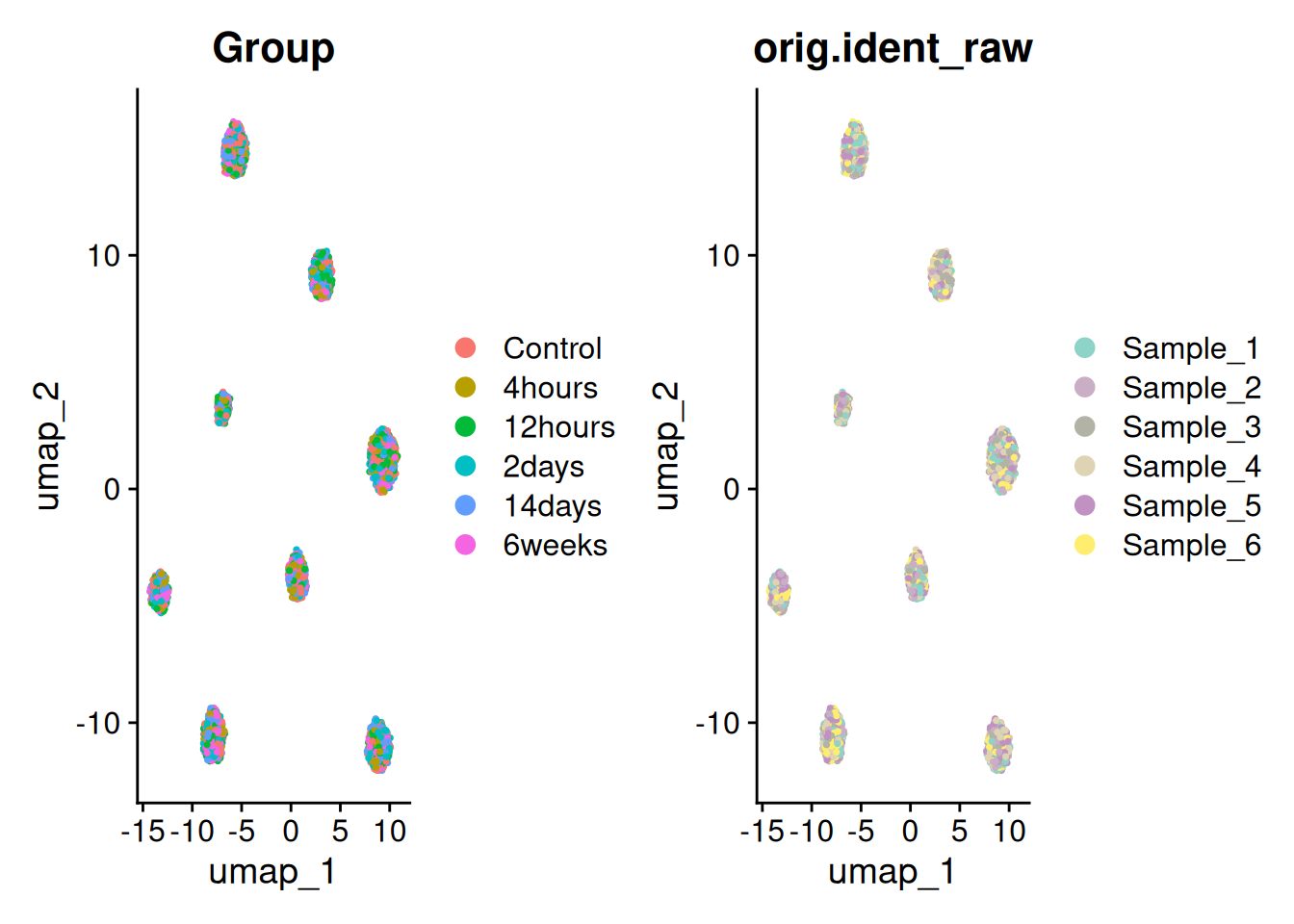
p1_umap <- DimPlot(sce, reduction = "umap", group.by = "celltype",
                   label = TRUE, label.size = 4, repel = TRUE, cols = selCols) +
  theme(panel.grid = element_blank())
p3_tsne <- DimPlot(sce, reduction = "tsne", group.by = "celltype",
                   label = TRUE, label.size = 4, repel = TRUE, cols = selCols) +
  theme(panel.grid = element_blank())
combined_plot <- p1_umap + p3_tsne +
  plot_annotation(tag_levels = "A") &
  theme(text = element_text(family = "Arial"),
        plot.tag = element_text(family = "Arial", size = 16, face = "bold"))
combined_plot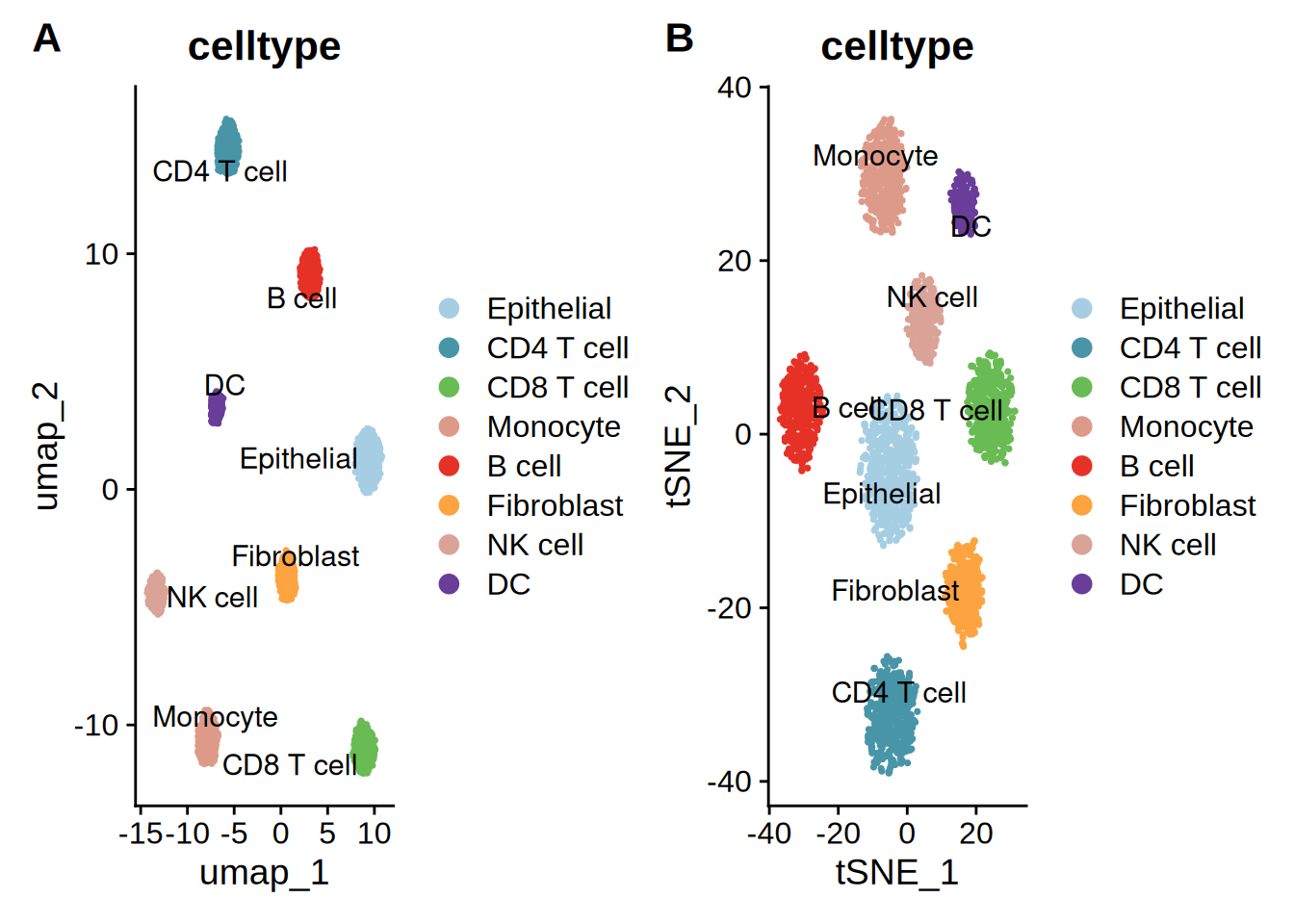
The composite is exported the standard way: ggsave(combined_plot, filename = "combined_umap.pdf", width = 16, height = 9).
Scheme 1: tidydr arrow axes — universal SCI style
theme_dr() replaces the grey grid with L-shaped arrow axes, strips the title, and keeps a single-column legend. High fault tolerance and suitable for main text figures in most SCI journals.
p_tidydr <- DimPlot(sce, reduction = "umap", group.by = "celltype",
                    label = TRUE, repel = TRUE, cols = selCols) +
  theme_dr() +
  theme(panel.grid = element_blank(),
        legend.text = element_text(size = 12, face = "plain", color = "black"),
        plot.title = element_blank()) +
  guides(color = guide_legend(title = "", override.aes = list(size = 4, alpha = 1), ncol = 1))
p_tidydr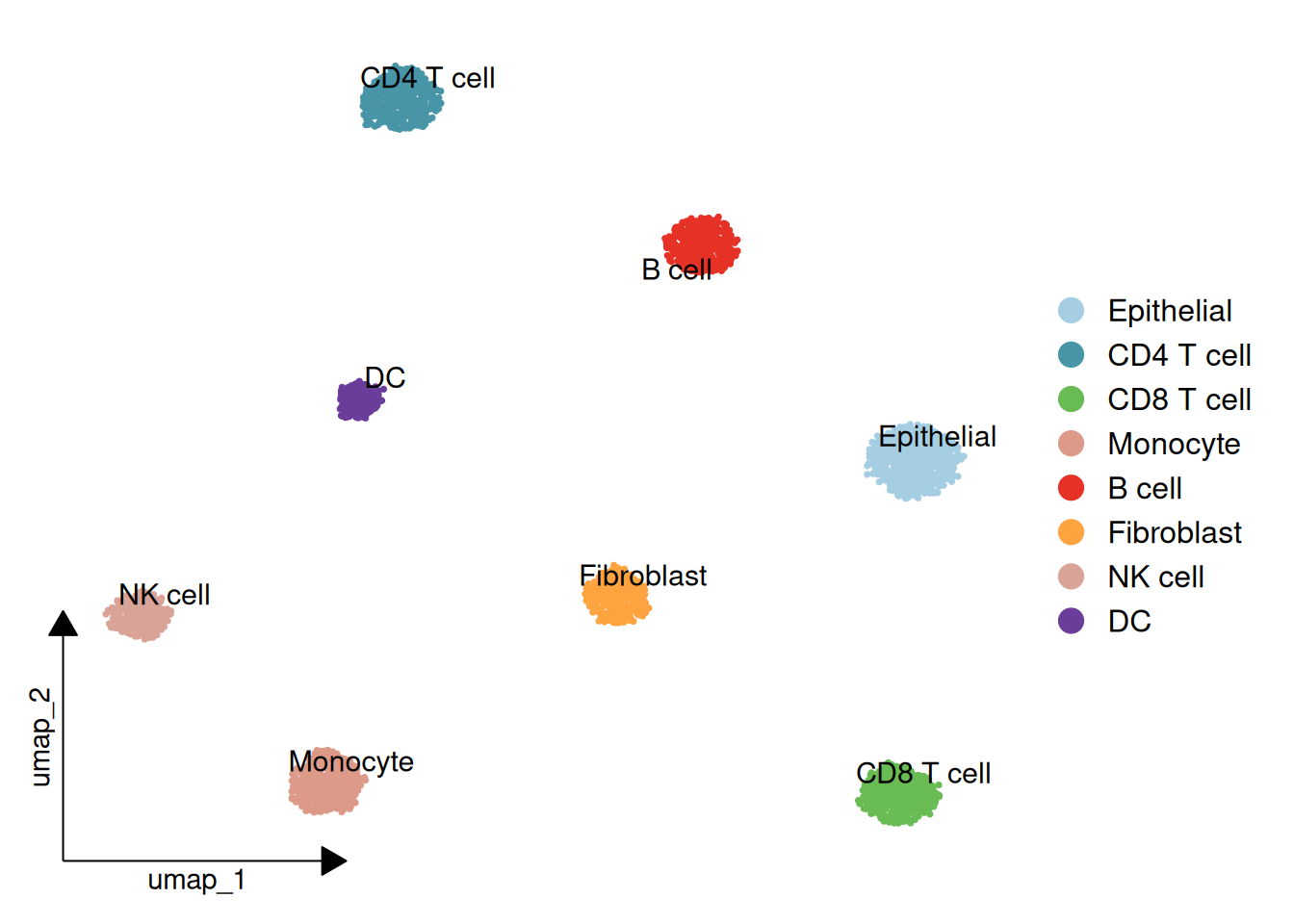
Scheme 2: scRNAtoolVis cloud outlines — CNS sub-journal style
clusterCornerAxes() draws corner axes plus translucent circular halos (addCircle = TRUE) around each cluster. Key parameters: cicAlpha (halo transparency) and cicDelta (how far the halo extends beyond the cell cloud, in data units). Note that nbin only takes effect in the legacy circle mode (addCircle.legacy = TRUE); with the current default it is ignored. Loosely packed populations yield softer, more cloud-like halos — decrease cicDelta for tighter outlines.
p_corneraxes <- clusterCornerAxes(
  object = sce,
  reduction = "umap",
  clusterCol = "celltype",
  pSize = 0.3,
  arrowType = "open",
  lineTextcol = "grey50",
  cornerTextSize = 3.5,
  keySize = 1.5,
  show.legend = FALSE,
  cellLabel = TRUE,
  cellLabelSize = 5,
  noSplit = TRUE,
  addCircle = TRUE,
  cicAlpha = 0.1,
  cicDelta = 0.5,
  nbin = 200
) + scale_color_manual(values = selCols) +
  scale_fill_manual(values = selCols)
Warning: `aes_string()` was deprecated in ggplot2 3.0.0.
ℹ Please use tidy evaluation idioms with `aes()`.
ℹ See also `vignette("ggplot2-in-packages")` for more information.
ℹ The deprecated feature was likely used in the scRNAtoolVis package.
Please report the issue to the authors.Warning: Using `size` aesthetic for lines was deprecated in ggplot2 3.4.0.
ℹ Please use `linewidth` instead.
ℹ The deprecated feature was likely used in the scRNAtoolVis package.
Please report the issue to the authors.p_corneraxes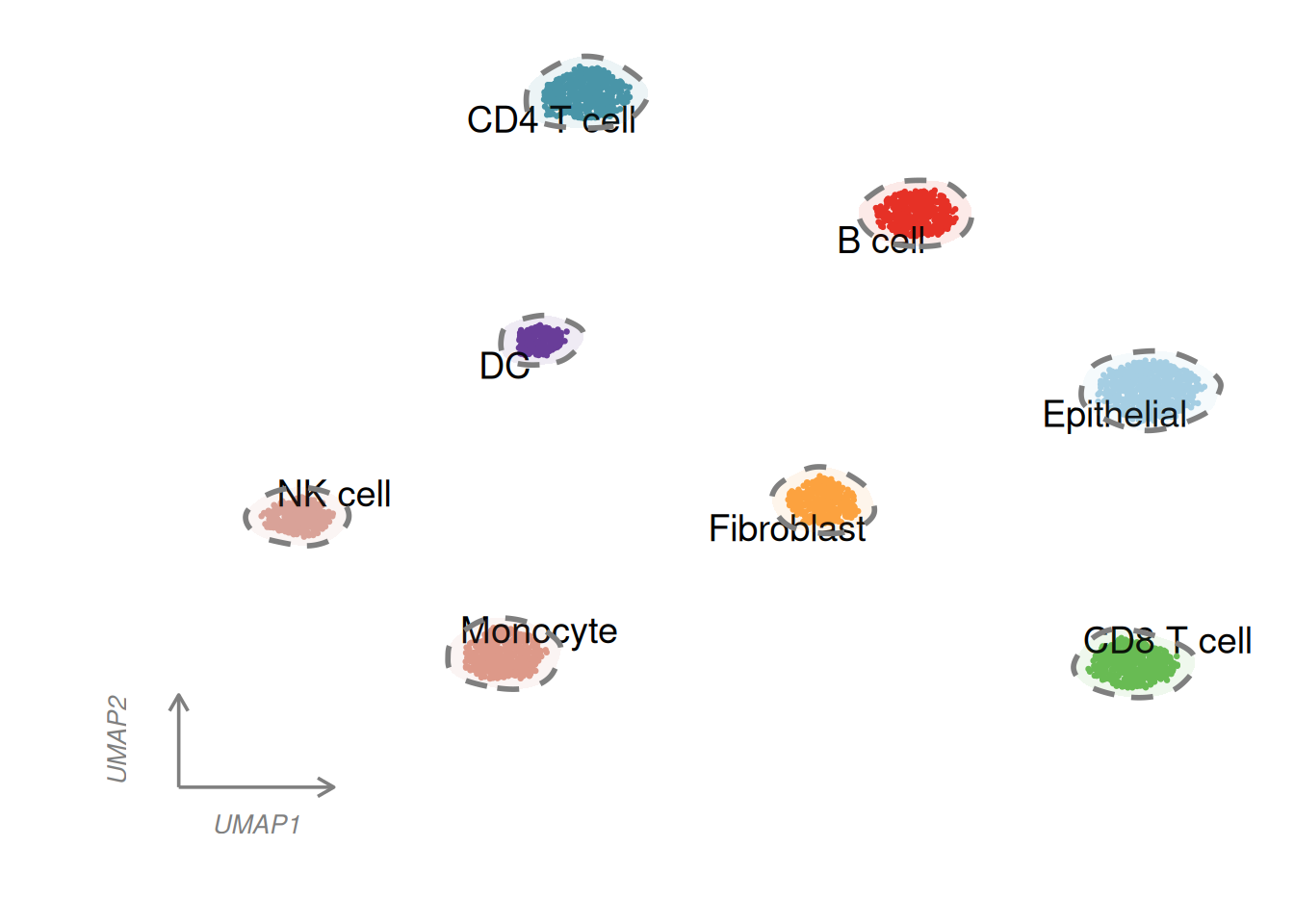
Scheme 3: ggunchull dashed hulls — polished review style
stat_unchull() wraps each population in a smooth, non-convex dashed hull. Cell-type labels are placed at shifted medians with geom_text_repel(), keeping the plot tidy without a legend.
meta <- cbind(sce@meta.data, sce@reductions$umap@cell.embeddings)
main_type_med <- meta %>%
  group_by(celltype) %>%
  summarise(umap_1 = median(umap_1) - 1, umap_2 = median(umap_2) - 1, .groups = "drop")

p_unchull <- ggplot(meta, aes(x = umap_1, y = umap_2)) +
  stat_unchull(aes(fill = celltype, color = celltype),
               alpha = 0.05, size = 1, lty = 2, delta = 0.25, show.legend = FALSE) +
  geom_point(aes(color = celltype), size = 0.2, show.legend = FALSE) +
  scale_color_manual(values = selCols) +
  scale_fill_manual(values = selCols) +
  geom_text_repel(data = main_type_med, aes(label = celltype),
                  fontface = "bold", color = "black", size = 4,
                  show.legend = FALSE, seed = 42) +
  coord_equal() +
  theme_classic() +
  theme(aspect.ratio = 1,
        panel.border = element_rect(color = "black", fill = NA, linewidth = 0.8),
        axis.line = element_blank(),
        axis.ticks = element_line(color = "black"),
        axis.title = element_text(size = 12))
p_unchull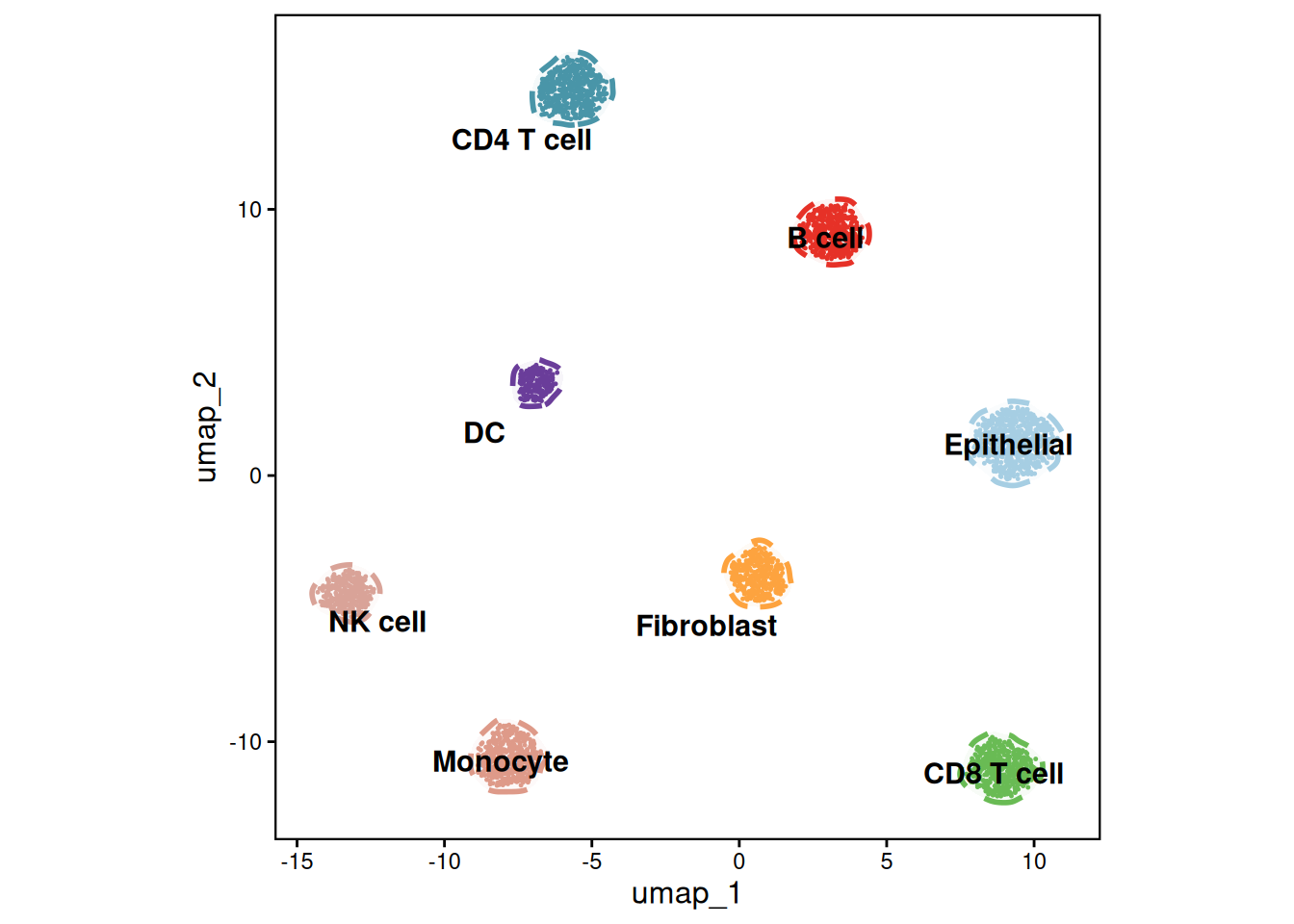
Scheme 4: mascarade fine masks — high-density atlas style
generateMask() turns per-cluster kernel densities into contour masks that follow the cell distribution. The mask table adds a group column, so a single geom_path(group = group) layer draws every outline. Cell-type labels sit on the medians of each population.
df <- FetchData(object = sce, vars = c("umap_1", "umap_2", "celltype"))
celltype_counts <- table(df$celltype)
valid_celltypes <- names(celltype_counts)[celltype_counts >= 2]
df_filtered <- df[df$celltype %in% valid_celltypes, ]
rownames(df_filtered) <- NULL

# Generate the fine contour masks
maskTable <- generateMask(
  dims = df_filtered[, 1:2],
  clusters = df_filtered$celltype
)

p <- ggplot(df, aes(x = umap_1, y = umap_2)) +
  geom_point(aes(color = celltype), size = 0.05) +
  geom_path(data = maskTable, aes(group = group), linewidth = 0.3, linetype = 2) +
  coord_fixed(ratio = 1) +
  theme_classic() +
  scale_color_manual(values = selCols) +
  theme_dr(xlength = 0.22, ylength = 0.22,
           arrow = grid::arrow(length = unit(0.15, "inches"), type = "closed")) +
  theme(panel.grid = element_blank())

centroids <- df %>%
  group_by(celltype) %>%
  summarise(centroid_x = median(umap_1, na.rm = TRUE),
            centroid_y = median(umap_2, na.rm = TRUE), .groups = "drop")

p_mascarade <- p + geom_text(data = centroids,
                             aes(label = celltype, x = centroid_x, y = centroid_y),
                             size = 3.5, vjust = -0.2, hjust = 0.5,
                             color = "black", fontface = "bold")
p_mascarade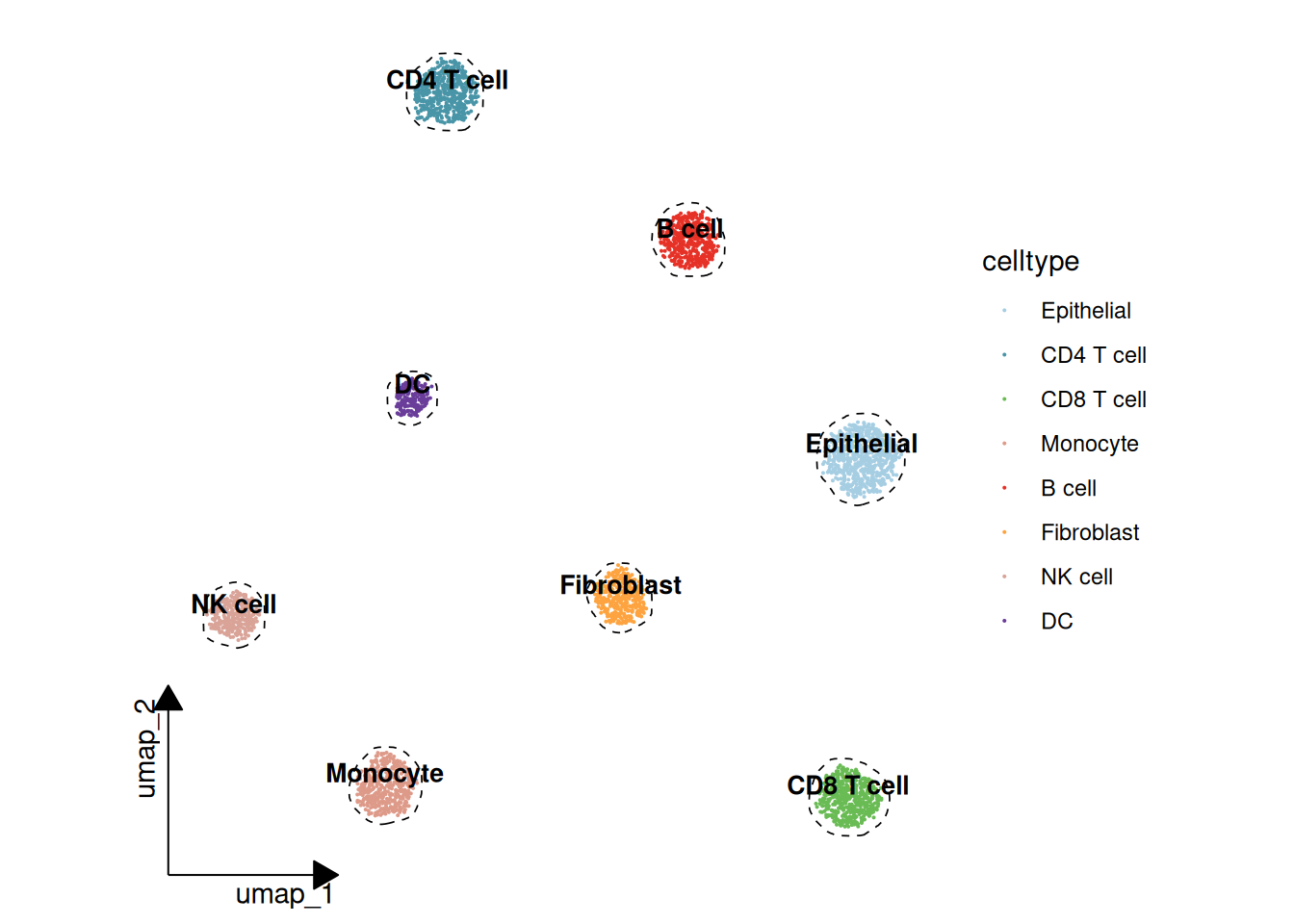
Note
generateMask() changed its interface in mascarade 0.2.0: minDensity/kernel/type were deprecated in favour of automatic bandwidth selection (smoothSigma = NA by default), and the cluster argument is now clusters — older examples passing cluster = only worked through R’s partial argument matching. The chunk above uses the current API.
Bonus: 3D density landscape
The viral “three-dimensional kernel-density landscape” builds one density terrain per cell type over the shared UMAP plane — a 3-D mountain scene where height is kernel density. Each terrain is a plotly surface with a shared white→blue→red colour scale, trimmed to the region where it is non-negligible; labels hover above the summits. It is an interactive widget — drag to rotate; for static export install the Python kaleido package and use plotly::save_image().
n_grid <- 80
lims <- c(range(df$umap_1), range(df$umap_2))
kd_list <- lapply(split(df, df$celltype), function(d) {
  MASS::kde2d(d$umap_1, d$umap_2, n = n_grid, lims = lims)
})
zmax <- max(sapply(kd_list, function(k) max(k$z))) * 1.05

# One shared white -> blue -> red density scale across all terrains
terrain <- list(c(0, "#f7f6f1"), c(0.35, "#9fc4dd"), c(0.65, "#33506e"), c(1, "#b2182b"))
fig <- plot_ly()
for (ct in levels(df$celltype)) {
  k <- kd_list[[ct]]
  # Trim the grid to the region where this terrain is non-negligible
  keep_x <- which(apply(k$z, 1, max) > zmax * 0.01)
  keep_y <- which(apply(k$z, 2, max) > zmax * 0.01)
  pad <- 3
  keep_x <- seq(max(1, min(keep_x) - pad), min(nrow(k$z), max(keep_x) + pad))
  keep_y <- seq(max(1, min(keep_y) - pad), min(ncol(k$z), max(keep_y) + pad))
  fig <- add_surface(fig, x = k$x[keep_x], y = k$y[keep_y],
                     z = k$z[keep_x, keep_y, drop = FALSE],
                     colorscale = terrain, cmin = 0, cmax = zmax,
                     showscale = (ct == levels(df$celltype)[1]),
                     colorbar = list(title = list(text = "Density"), x = 1.02, len = 0.7),
                     opacity = 0.95, name = ct,
                     hovertemplate = paste0(ct, "<br>UMAP_1: %{x:.2f}<br>UMAP_2: %{y:.2f}<br>Density: %{z:.4f}<extra></extra>"))
}

# Cell-type labels hovering above each summit
centroids <- df %>%
  group_by(celltype) %>%
  summarise(x = median(umap_1), y = median(umap_2), .groups = "drop")
kd_at <- function(ct, xx, yy) {
  k <- kd_list[[ct]]
  k$z[cbind(findInterval(xx, k$x), findInterval(yy, k$y))]
}
centroids$z <- mapply(kd_at, centroids$celltype, centroids$x, centroids$y) + zmax * 0.12
fig <- add_text(fig, data = centroids, x = ~x, y = ~y, z = ~z, text = ~celltype,
                textfont = list(color = "black", size = 12), showlegend = FALSE,
                hoverinfo = "skip")

no_bg <- list(showbackground = FALSE, zeroline = FALSE, showline = FALSE)
fig <- fig %>% layout(
  scene = list(xaxis = c(list(title = "UMAP_1"), no_bg),
               yaxis = c(list(title = "UMAP_2"), no_bg),
               zaxis = c(list(title = "Density"), no_bg))
)
fig
Choosing among the schemes
| Scheme | Style | Best for |
|---|---|---|
| tidydr | Arrow axes, no grid | Main-text figures in most SCI journals |
| scRNAtoolVis | Corner axes + cloud halos | High-impact original-research figures |
| ggunchull | Dashed hulls + bold labels | Review articles and polished main figures |
| mascarade | Density-fitted fine masks | High-density, large single-cell atlases |
References
[1] Hao Y, Hao S, Andersen-Nissen E, et al. Integrated analysis of multimodal single-cell data. Cell. 2021;184(13):3573–3587. https://doi.org/10.1016/j.cell.2021.04.048 (Seurat)
[2] Yu G. tidydr: an R package to create dimension reduction plots with styled axes. https://cran.r-project.org/package=tidydr
[3] Zhang J. scRNAtoolVis: Making single-cell RNA-seq visualization easier and better. https://github.com/junjunlab/scRNAtoolVis
[4] Lyu Y. ggunchull: A ggplot extension for drawing smooth non-convex circles around a set of points. https://github.com/sajuukLyu/ggunchull
[5] Sergushichev A. mascarade: Generating Cluster Masks for Single-Cell Dimensional Reduction Plots. https://github.com/alserglab/mascarade
[6] 罗小黑. AI分析单细胞+空转:umap大合集(三). WeChat article. https://mp.weixin.qq.com/s/ItyeGIJRhSFEaibw9KUbgw