using CairoMakie
using DataFrames
using Statistics
using RandomArea & Streamgraph (Julia)
Area charts emphasize the magnitude of one or more quantities over an ordered axis by filling the region under the line; stacked variants decompose a total into layers, and a streamgraph stacks layers around a wobbling baseline for a smooth composition-over-time view. In biomedical research they fit immune-population dynamics and cohort accrual. CairoMakie composes them from band! layers.
Example
Setup
- System Requirements: Cross-platform (Linux/MacOS/Windows)
- Programming Language: Julia
- Dependencies:
CairoMakie,DataFrames,Statistics
Data Preparation
We simulate weekly flow-cytometry counts of three lymphocyte populations across an 8-week vaccination study.
Random.seed!(71)

weeks = collect(1.0:8)
n_weeks = length(weeks)
counts = DataFrame(
    Week = weeks,
    CD4 = 400 .* exp.(0.10 .* weeks) .+ 25 .* randn(n_weeks),
    CD8 = 300 .* exp.(0.16 .* weeks) .+ 22 .* randn(n_weeks),
    B = 200 .* exp.(0.06 .* weeks) .+ 15 .* randn(n_weeks))
series = [counts.CD4, counts.CD8, counts.B]
series_names = ["CD4 T", "CD8 T", "B cells"]
band_colors = [:steelblue, :plum, :seagreen]
3-element Vector{Symbol}:
:steelblue
:plum
:seagreenVisualization
Single Area Chart
band! fills the region between a lower and an upper bound — the minimal emphasis form for one series.
fig = Figure(size = (460, 340))
ax = Axis(fig[1, 1], xlabel = "Week", ylabel = "Cell count (×10\$^3\$)")
band!(ax, counts.Week, zero(weeks), counts.CD8; color = (:plum, 0.45))
lines!(ax, counts.Week, counts.CD8; color = :magenta3, linewidth = 1.8)
hidespines!(ax, :t, :r)
fig
Stacked Area Chart
Cumulative sums define each layer’s bounds; drawing the bands bottom-up with white strokes keeps the layers separable.
upper = reduce(hcat, series) |> x -> cumsum(x, dims = 2)   # n_weeks × 3
lower = hcat(zeros(n_weeks), upper[:, 1:end-1])

fig = Figure(size = (500, 360))
ax = Axis(fig[1, 1], xlabel = "Week", ylabel = "Cell count (×10\$^3\$)")
for k in 1:3
    band!(ax, counts.Week, lower[:, k], upper[:, k];
          color = (band_colors[k], 0.85), strokecolor = :white, strokewidth = 0.6)
end
hidespines!(ax, :t, :r)
elements = [PolyElement(polycolor = band_colors[k]) for k in 1:3]
Legend(fig[1, 2], elements, series_names, framevisible = false)
fig
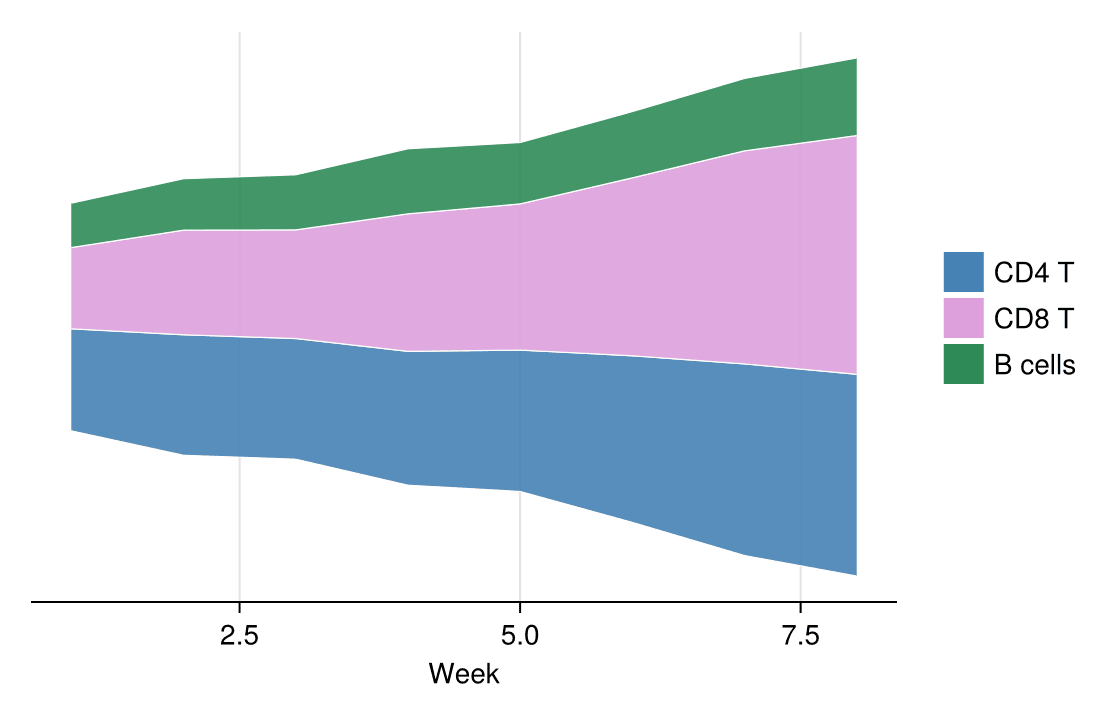
Streamgraph
A streamgraph offsets the whole stack around a symmetric (“wiggle”-style) baseline so the eye follows each band’s shape rather than a zero line.
total = vec(sum(reduce(hcat, series), dims = 2))
baseline = .-total ./ 2            # symmetric baseline centers the stack

fig = Figure(size = (560, 360))
ax = Axis(fig[1, 1], xlabel = "Week",
          ylabel = "Cell count (×10\$^3\$, offset baseline)")
for k in 1:3
    band!(ax, counts.Week, baseline .+ (k == 1 ? 0.0 : sum(series[1:k-1]; dims = 1)[1]),
          baseline .+ sum(series[1:k]; dims = 1)[1];
          color = (band_colors[k], 0.9), strokecolor = :white, strokewidth = 0.6)
end
hidespines!(ax, :t, :r, :l)
hideydecorations!(ax)
elements = [PolyElement(polycolor = band_colors[k]) for k in 1:3]
Legend(fig[1, 2], elements, series_names, framevisible = false)
fig
References
- Makie development team. Makie.jl documentation — band. https://docs.makie.org/stable/reference/plots/band
- Danisch, S., & Krumbiegel, J. (2021). Makie.jl: Flexible high-performance data visualization for Julia. Journal of Open Source Software, 6(65), 3349.