# Installing necessary packages
if (!requireNamespace("qqman", quietly = TRUE)) {
  install.packages("qqman")
}

# Load packages
library(ggplot2)
library(dplyr)
library(qqman)Q-Q Plot
A quantile–quantile (Q-Q) plot compares a sample’s quantiles against a theoretical distribution’s quantiles (or against a second sample’s). If the distributional shapes match, the points fall on a straight line; how they depart from the line diagnoses the mismatch — an S-curve means skew, a U-shape means heavy tails, a shifted intercept means different location. It is the single most informative normality diagnostic for model residuals, and the genome-wide-association (GWAS) variant — observed versus expected −log₁₀(p) — is the standard null-calibration check of association studies [1].
This tutorial covers four workflows:
- A basic normal Q-Q plot of a skewed sample (
qqnorm/stat_qq); - A Q-Q plot with a 95% simulation envelope (the honest version of “is this a departure?”);
- A two-sample Q-Q plot comparing two empirical distributions;
- The GWAS p-value Q-Q plot with the genomic inflation factor λ (qqman) [2].
Example
Setup
System Requirements: Cross-platform (Linux/MacOS/Windows)
Programming language: R
Dependent packages:
ggplot2;dplyr;qqman
sessioninfo::session_info("attached")─ Session info ───────────────────────────────────────────────────────────────
setting value
version R version 4.6.2 (2026-10-29)
os Ubuntu 24.04.5 LTS
system x86_64, linux-gnu
ui X11
language (EN)
collate C.UTF-8
ctype C.UTF-8
tz UTC
date 2026-10-31
pandoc 3.1.3 @ /usr/bin/ (via rmarkdown)
quarto 1.10.20 @ /usr/local/bin/quarto
─ Packages ───────────────────────────────────────────────────────────────────
! package * version date (UTC) lib source
P dplyr * 1.2.1 2026-04-03 [?] RSPM
P ggplot2 * 4.0.3.9000 2026-10-30 [?] Github (tidyverse/ggplot2@b638d65)
P qqman * 0.1.9 2023-08-23 [?] RSPM
[1] /home/runner/.cache/R/renv/library/Bizard-5140bdc6/linux-ubuntu-noble/R-4.6/x86_64-pc-linux-gnu
[2] /home/runner/work/_temp/Library
[3] /opt/R/4.6.2/lib/R/library
* ── Packages attached to the search path.
P ── Loaded and on-disk path mismatch.
──────────────────────────────────────────────────────────────────────────────Data Preparation
Three seeded samples: a right-skewed biomarker (log-normal, the “diagnose me” sample), a genuinely normal sample (for the simulation envelope), and two treatment-arm biomarker distributions for the two-sample Q-Q plot. The GWAS example draws 10,000 null p-values plus 40 associated loci.
set.seed(251)

n <- 500
skew_sample  <- rlnorm(n, meanlog = 1.2, sdlog = 0.8)  # right-skewed biomarker
norm_sample  <- rnorm(n, 50, 8)                        # well-behaved control
control_g <- rnorm(400, 42, 9)
case_g    <- rgamma(450, shape = 12, scale = 3.4)

pvals <- runif(10000)
idx <- sample(1:10000, 40)
pvals[idx] <- 10^(-rnorm(40, 3, 0.7))                  # association signals
Visualization
1. Normal Q-Q Plot of a Skewed Sample
qq <- qqnorm(skew_sample, plot.it = FALSE)
# qqnorm returns theoretical quantiles paired with the data IN DATA ORDER;
# sort both by the plotting position for a clean line
ord <- order(qq$x)
df1 <- data.frame(theoretical = qq$x[ord], sample = qq$y[ord])

ggplot(df1, aes(theoretical, sample)) +
  geom_point(color = "#2166AC", alpha = 0.65, size = 1.9) +
  geom_abline(slope = sd(skew_sample), intercept = mean(skew_sample),
              linetype = "dashed", color = "#B2182B") +
  labs(x = "Theoretical N(0,1) quantiles", y = "Sample quantiles",
       title = "Right-skewed sample: convex departure") +
  theme_bw(base_size = 11)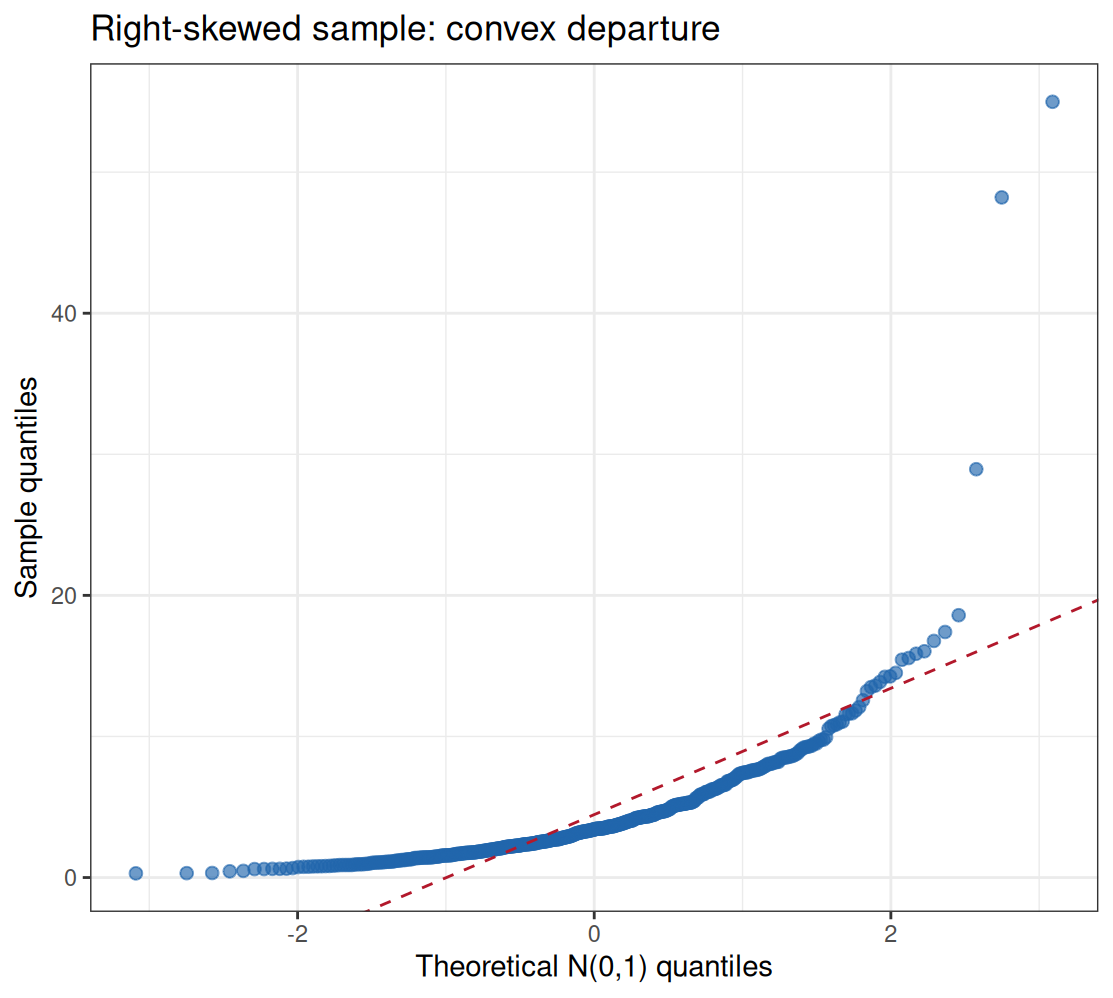
Reading guide: tails above the line at the right = heavy right tail; a single smooth bend = skew; points peeling off at both ends = heavy tails. Model residuals should show none of these before you trust t-intervals.
2. Q-Q Plot with a 95% Simulation Envelope
Every sample wiggles; the question is whether the wiggle is bigger than sampling noise. Simulate many samples from the fitted normal, sort each, and band the order statistics — points outside the envelope are genuine departures.
M <- 500
srt <- matrix(rnorm(n * M, mean(norm_sample), sd(norm_sample)), nrow = n) |>
  apply(2, sort)
band <- t(apply(srt, 1, quantile, probs = c(0.025, 0.975)))
theory <- qnorm(ppoints(n))                # ascending plotting positions
samp  <- sort(norm_sample)
env <- data.frame(theory, lo = band[, 1], hi = band[, 2], samp)

ggplot(env, aes(theory)) +
  geom_ribbon(aes(ymin = lo, ymax = hi), fill = "#2166AC", alpha = 0.18) +
  geom_point(aes(y = samp), color = "#2166AC", size = 1.8) +
  geom_abline(slope = sd(norm_sample), intercept = mean(norm_sample),
              linetype = "dashed", color = "grey40") +
  labs(x = "Theoretical quantiles", y = "Sample quantiles",
       title = "Normal sample with 95% simulation envelope") +
  theme_bw(base_size = 11)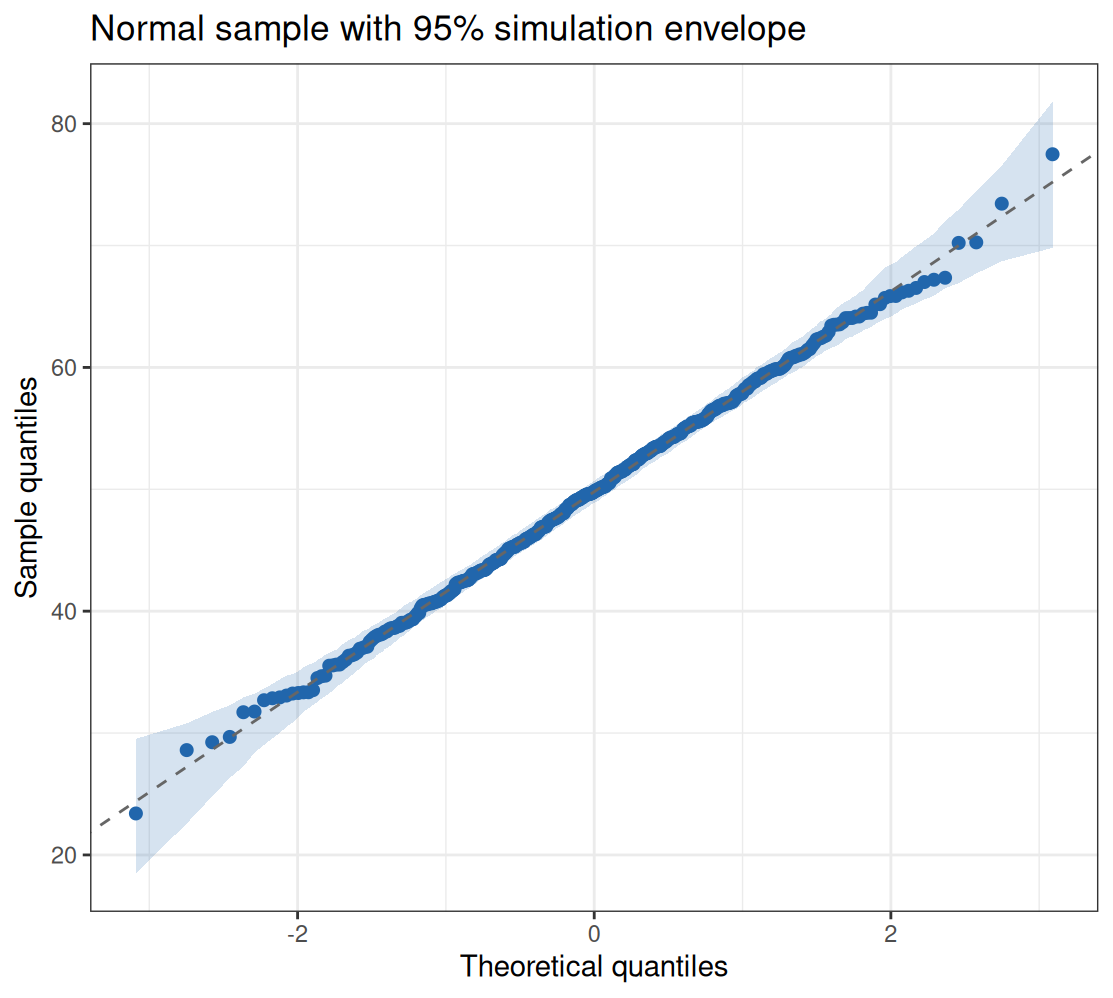
Note
qqnorm(x, plot.it = FALSE) returns quantiles paired with the data in data order (y is the unsorted sample). Pairing its x with a sorted sample — a common copy-paste slip — produces a meaningless cloud. The safe pattern is qnorm(ppoints(n)) against sort(x).
3. Two-Sample Q-Q Plot
probs <- seq(0.01, 0.99, 0.01)
qx <- quantile(control_g, probs = probs, type = 7)
qy <- quantile(case_g, probs = probs, type = 7)

ggplot(data.frame(x = qx, y = qy), aes(x, y)) +
  geom_point(color = "#2166AC", size = 2) +
  geom_abline(slope = 1, intercept = 0, linetype = "dashed", color = "#B2182B") +
  labs(x = "Quantiles: Control biomarker", y = "Quantiles: Case biomarker",
       title = "Two-sample Q-Q plot") +
  theme_bw(base_size = 11)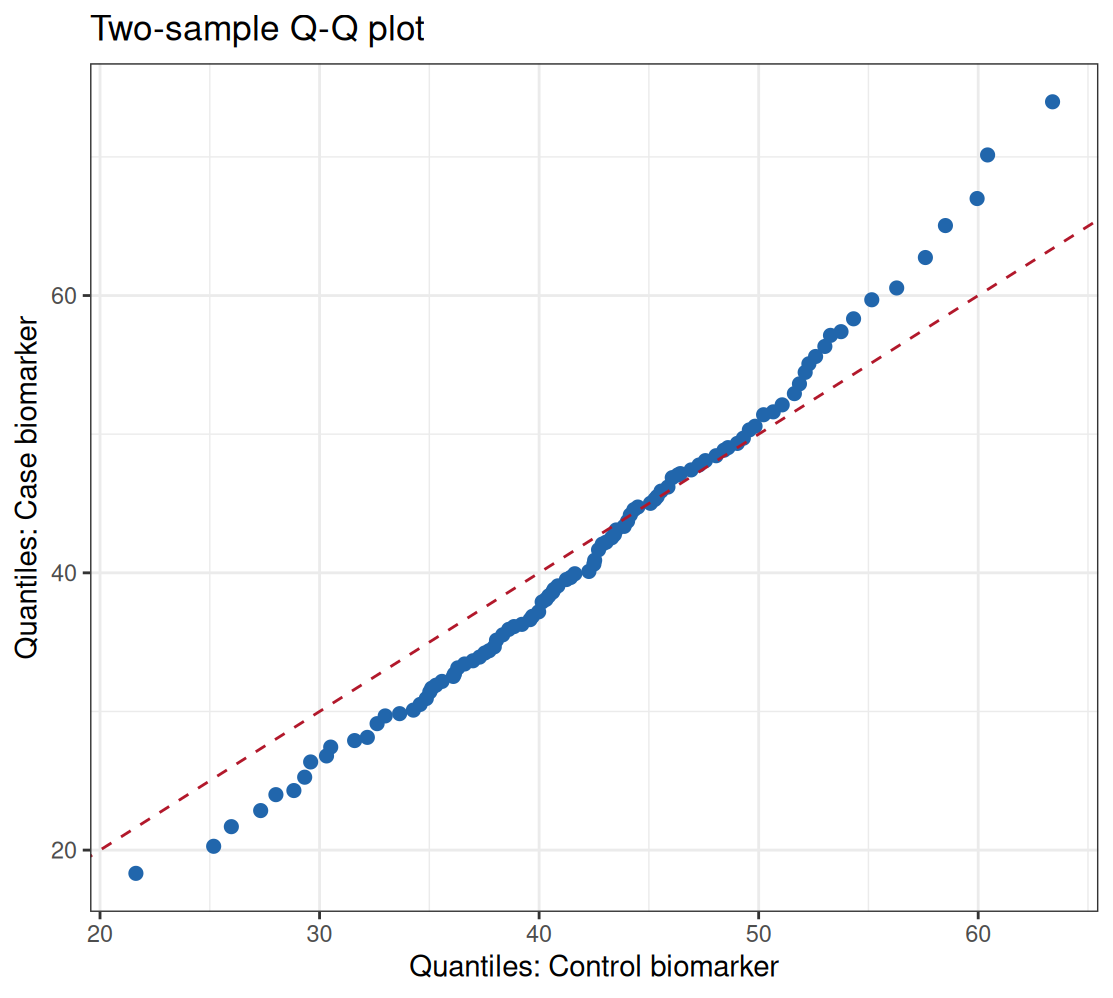
This plot compares entire distributions without assuming either is normal — a parallel offset means a location shift, a changing slope means a scale difference.
4. GWAS Q-Q Plot with the Genomic Inflation Factor
The genomic inflation factor λ is the ratio of the observed median test statistic to its null expectation; values near 1.0 indicate a well-calibrated null.
chisq <- qchisq(1 - pvals, 1)
lambda <- median(chisq) / qchisq(0.5, 1)
cat(sprintf("Genomic inflation factor lambda_GC = %.3f\n", lambda))
Genomic inflation factor lambda_GC = 1.007qq(pvals, main = sprintf("GWAS Q-Q plot (lambda_GC = %.2f)", lambda))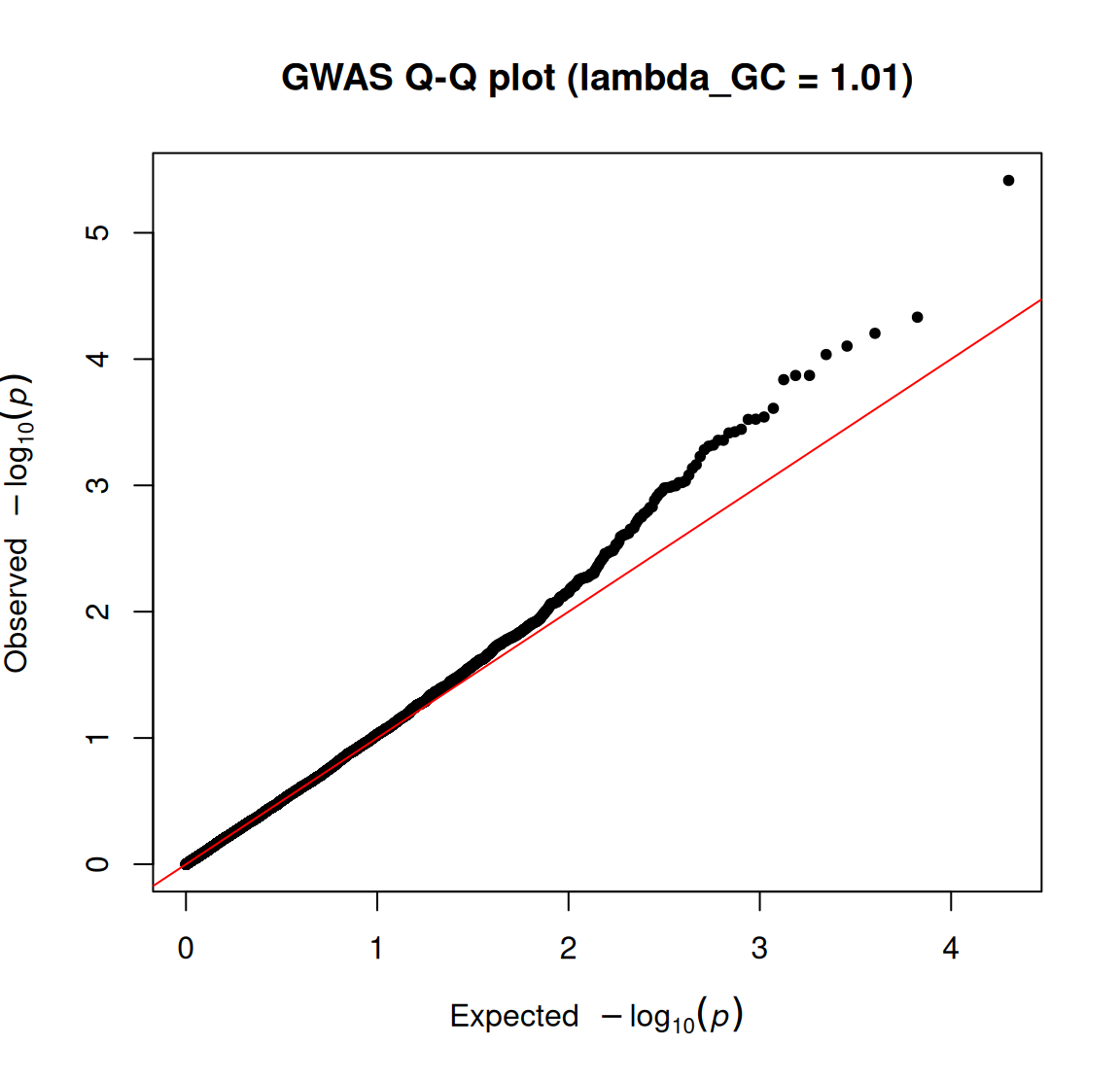
Under a well-calibrated null the points sit on the diagonal; λ close to 1.0 indicates no systematic inflation (λ ≫ 1.1 flags population stratification or batch effects), and a lifted tail with a diagonal bulk is the signature of true associations.
TipPractice tips
- Reference line choices: through the quartiles (
stat_qq_line()default) is more robust than mean/SD when tails are wild. - Envelope or it did not happen: eyeballing a Q-Q plot without a reference band over-interprets ordinary sampling noise, especially for n < 100.
- Q-Q plots need the raw sample — plotting z-scores only relabels the axes.
- In GWAS, λ is computed on the median χ² (1 df); report it next to every Q-Q plot, and investigate λ > 1.1 before claiming loci.
Application
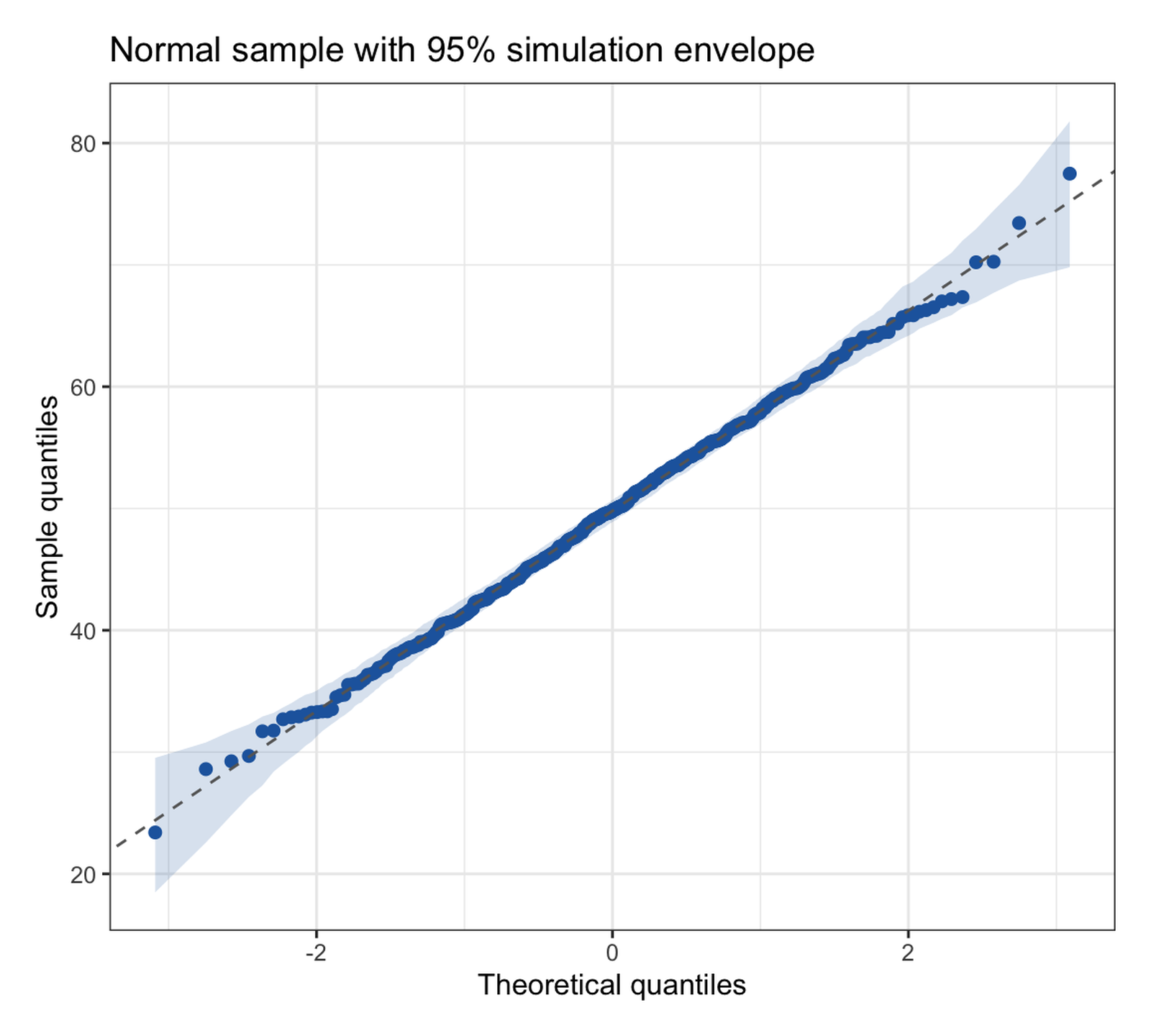
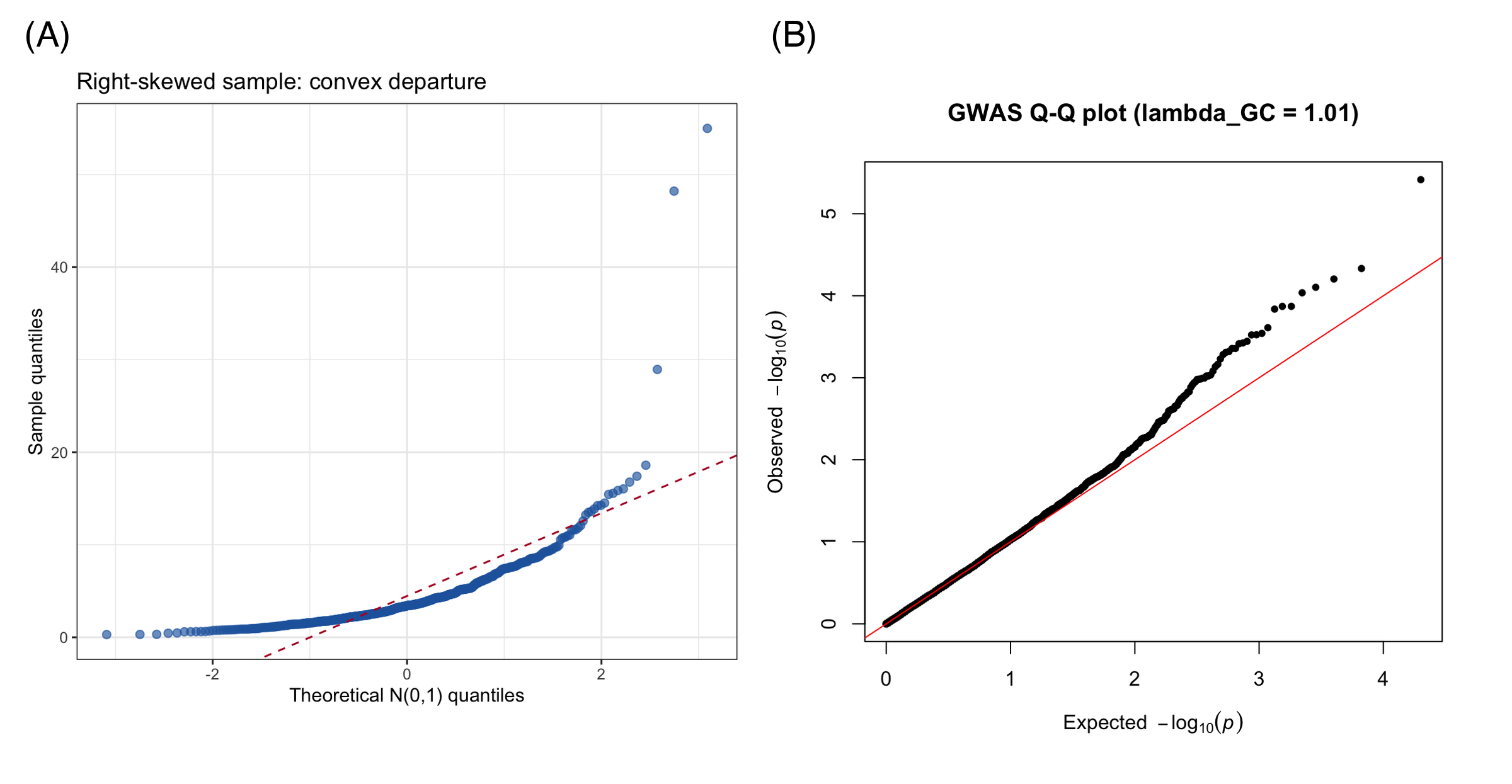
Q-Q plots appear in every GWAS/omics paper (p-value calibration), in regression diagnostics (residual normality), and in method-comparison studies (distribution-level agreement). The panel below mirrors a typical publication layout: (A) the simulation-envelope Q-Q of a sample and (B) the GWAS p-value Q-Q with λ.
Reference
[1] Razali NM, Wah YB. Power comparisons of Shapiro-Wilk, Kolmogorov-Smirnov, Lilliefors and Anderson-Darling tests. J Stat Model Anal. 2011;2(1):21-33.
[2] Turner SD. qqman: an R package for visualizing GWAS results using Q-Q and Manhattan plots. J Open Source Softw. 2018;3(25):731. doi:10.21105/joss.00731