using CairoMakie
using DataFrames
using Statistics
using RandomLollipop & Dumbbell Plot (Julia)
A lollipop plot replaces each bar of a bar chart with a thin line ending in a dot, cutting chart ink while keeping the ranking readable; a dumbbell plot connects two dots per row to expose the change between two conditions. In biomedical research, lollipops rank enrichment terms or effect sizes, and dumbbells compare two cohorts or treatment arms per feature. Both are assembled in CairoMakie from lines!/line_segments! and scatter!.
Example
Setup
- System Requirements: Cross-platform (Linux/MacOS/Windows)
- Programming Language: Julia
- Dependencies:
CairoMakie,DataFrames,Statistics
Data Preparation
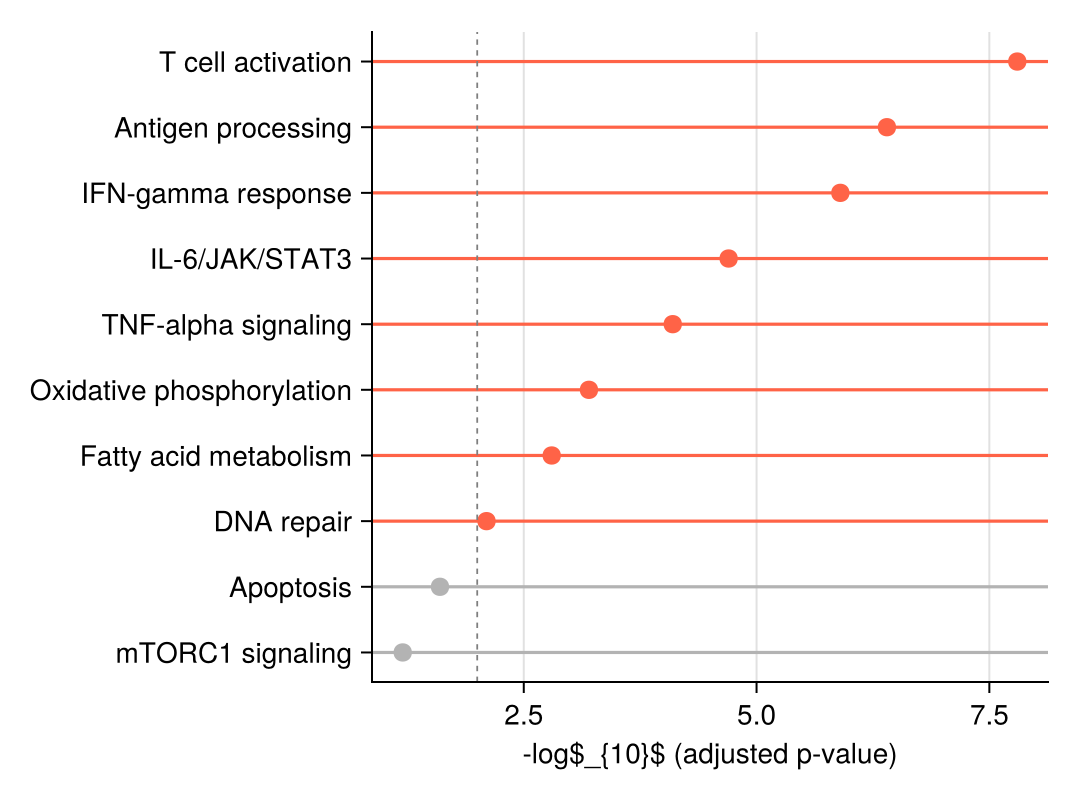
We simulate a pathway-enrichment result (gene sets with −log10 adjusted p-values) and a two-condition differential-expression table used for the dumbbell.
pathways = ["T cell activation", "Antigen processing", "IFN-gamma response",
            "IL-6/JAK/STAT3", "TNF-alpha signaling", "Oxidative phosphorylation",
            "Fatty acid metabolism", "DNA repair", "Apoptosis", "mTORC1 signaling"]
enrichment = DataFrame(Pathway = pathways,
                       NegLogFDR = [7.8, 6.4, 5.9, 4.7, 4.1, 3.2, 2.8, 2.1, 1.6, 1.2])
sort!(enrichment, :NegLogFDR)

dumbbell = DataFrame(Gene = ["CD274", "IFIT1", "CXCL10", "MKI67", "STAT1"],
                     Sham = [-0.3, 2.1, 2.8, 0.5, 1.9],
                     Treat = [1.4, 3.9, 4.6, -1.2, 3.3])
sort!(dumbbell, :Treat)
5×3 DataFrame
| Row | Gene | Sham | Treat |
|---|---|---|---|
| String | Float64 | Float64 | |
| 1 | MKI67 | 0.5 | -1.2 |
| 2 | CD274 | -0.3 | 1.4 |
| 3 | STAT1 | 1.9 | 3.3 |
| 4 | IFIT1 | 2.1 | 3.9 |
| 5 | CXCL10 | 2.8 | 4.6 |
Visualization
Horizontal Lollipop Plot
Each row is one line segment (linesegments!) plus a marker (scatter!); significant terms are highlighted by colour with a threshold guide.
y_pos = 1:nrow(enrichment)
sig = enrichment.NegLogFDR .>= 2
dot_colors = ifelse.(sig, :tomato, :gray70)

fig = Figure(size = (540, 400))
ax = Axis(fig[1, 1], xlabel = "-log\$_{10}\$ (adjusted p-value)")
hlines!(ax, y_pos; xmin = 0.0, xmax = enrichment.NegLogFDR,
        color = dot_colors, linewidth = 1.6)
scatter!(ax, enrichment.NegLogFDR, y_pos; color = dot_colors, markersize = 13)
vlines!(ax, [2]; color = :gray50, linestyle = :dash, linewidth = 0.9)
ax.yticks = (y_pos, enrichment.Pathway)
hidespines!(ax, :t, :r)
fig
Vertical Lollipop Plot
The same construction rotated with vlines! suits short labels and slide-friendly figures.
top8 = enrichment[end-7:end, :]

fig = Figure(size = (540, 380))
ax = Axis(fig[1, 1], ylabel = "-log\$_{10}\$ (adjusted p-value)")
x_pos = 1:nrow(top8)
vlines!(ax, x_pos; ymin = 0.0, ymax = top8.NegLogFDR,
        color = :steelblue, linewidth = 1.6)
scatter!(ax, x_pos, top8.NegLogFDR; color = :steelblue, markersize = 13)
ax.xticks = (x_pos, top8.Pathway)
ax.xticklabelrotation = 0.7
hidespines!(ax, :t, :r)
fig
Dumbbell Plot
For each feature, a connecting line spans the two condition values; dots at both ends and a colour per condition make direction and magnitude of change legible.
y = 1:nrow(dumbbell)

fig = Figure(size = (540, 380))
ax = Axis(fig[1, 1], xlabel = "log\$_{2}\$ fold change")
hlines!(ax, y; xmin = min.(dumbbell.Sham, dumbbell.Treat),
        xmax = max.(dumbbell.Sham, dumbbell.Treat),
        color = :gray70, linewidth = 2)
scatter!(ax, dumbbell.Sham, y; color = :steelblue, markersize = 13, label = "Sham")
scatter!(ax, dumbbell.Treat, y; color = :tomato, markersize = 13, label = "Treatment")
vlines!(ax, [0]; color = :gray40, linewidth = 0.9)
axislegend(ax; framevisible = false, position = :rb)
ax.yticks = (y, dumbbell.Gene)
hidespines!(ax, :t, :r)
fig
References
- Makie development team. Makie.jl documentation — linesegments, scatter. https://docs.makie.org/stable/reference/plots/linesegments
- From Data to Viz. Lollipop plot. https://www.data-to-viz.com/graph/lollipop.html