using CairoMakie
using DataFrames
using Statistics
using RandomRaincloud Plot (Julia)
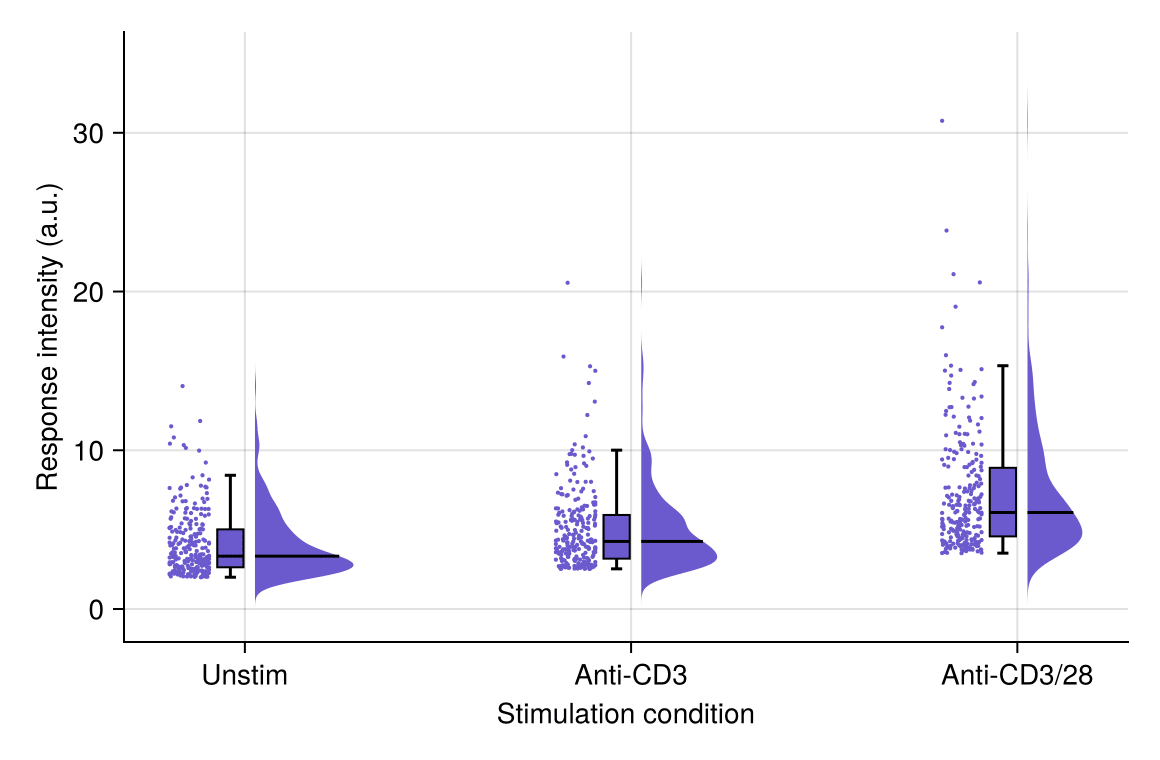
A raincloud plot combines a half violin (the “cloud”), a box plot, and jittered raw points (the “rain”) in a single display, showing the full distribution, summary statistics, and individual observations at once. In biomedical research it has become the preferred replacement for bar graphs of grouped continuous data — and CairoMakie ships it as a single native recipe, rainclouds.
Example
Setup
- System Requirements: Cross-platform (Linux/MacOS/Windows)
- Programming Language: Julia
- Dependencies:
CairoMakie,DataFrames,Statistics
Data Preparation
We simulate flow-cytometry response intensities across three stimulation conditions, with enough cells per condition for the half-violin outlines to be informative.
Random.seed!(41)

conditions = ["Unstim", "Anti-CD3", "Anti-CD3/28"]
n_cells = 250
# Scaled exponential samples mimic positive fluorescence intensities
response = vcat(
    2.0 .- 2.0 .* log.(rand(n_cells)),
    2.5 .- 2.5 .* log.(rand(n_cells)),
    3.5 .- 3.5 .* log.(rand(n_cells)),
)
df = DataFrame(Condition = repeat(conditions, inner = n_cells),
               Response = response)
750×2 DataFrame
725 rows omitted
| Row | Condition | Response |
|---|---|---|
| String | Float64 | |
| 1 | Unstim | 2.65434 |
| 2 | Unstim | 2.02358 |
| 3 | Unstim | 2.00056 |
| 4 | Unstim | 2.50641 |
| 5 | Unstim | 2.44635 |
| 6 | Unstim | 4.32714 |
| 7 | Unstim | 3.33015 |
| 8 | Unstim | 7.64955 |
| 9 | Unstim | 2.61691 |
| 10 | Unstim | 3.24195 |
| 11 | Unstim | 4.77048 |
| 12 | Unstim | 5.01465 |
| 13 | Unstim | 4.98033 |
| ⋮ | ⋮ | ⋮ |
| 739 | Anti-CD3/28 | 3.96686 |
| 740 | Anti-CD3/28 | 6.06405 |
| 741 | Anti-CD3/28 | 30.7562 |
| 742 | Anti-CD3/28 | 8.76583 |
| 743 | Anti-CD3/28 | 7.73528 |
| 744 | Anti-CD3/28 | 11.1738 |
| 745 | Anti-CD3/28 | 4.25204 |
| 746 | Anti-CD3/28 | 12.2347 |
| 747 | Anti-CD3/28 | 14.2449 |
| 748 | Anti-CD3/28 | 11.484 |
| 749 | Anti-CD3/28 | 9.90509 |
| 750 | Anti-CD3/28 | 23.8423 |
Visualization
Basic Raincloud Plot
One rainclouds call draws the cloud, box, and rain; side controls which half holds the violin relative to the points.
fig = Figure(size = (540, 360))
ax = Axis(fig[1, 1], xlabel = "Stimulation condition",
          ylabel = "Response intensity (a.u.)")
rainclouds!(ax, df.Condition, df.Response; orientation = :vertical,
            side = :right, cloud_width = 0.6, gap = 0.15,
            jitter_width = 0.12, markersize = 3, color = :slateblue)
ax.xticks = (1:3, conditions)
hidespines!(ax, :t, :r)
fig
Horizontal Raincloud Plot
Long category labels read better in the horizontal orientation (orientation = :horizontal), with the cloud hanging beside the box.
fig = Figure(size = (540, 320))
ax = Axis(fig[1, 1], xlabel = "Response intensity (a.u.)",
          ylabel = "Stimulation condition")
rainclouds!(ax, df.Condition, df.Response; orientation = :horizontal,
            side = :left, cloud_width = 0.6, gap = 0.15,
            jitter_width = 0.12, markersize = 3, color = :salmon)
ax.yticks = (1:3, conditions)
hidespines!(ax, :t, :r)
fig
Histogram Clouds
Setting clouds = hist (the plot function object) replaces the smooth violin with stacked bin counts, keeping the discrete sampling visible in smaller cohorts.
fig = Figure(size = (540, 360))
ax = Axis(fig[1, 1], xlabel = "Stimulation condition",
          ylabel = "Response intensity (a.u.)")
rainclouds!(ax, df.Condition, df.Response; orientation = :vertical,
            side = :right, clouds = hist, hist_bins = 20,
            cloud_width = 0.6, gap = 0.15,
            jitter_width = 0.12, markersize = 3, color = :seagreen)
ax.xticks = (1:3, conditions)
hidespines!(ax, :t, :r)
fig
References
- Allen, M., Poggiali, D., Whitaker, K., et al. (2019). Raincloud plots: a multi-platform tool for robust data visualization. Wellcome Open Research, 4, 63.
- Makie development team. Makie.jl documentation — rainclouds. https://docs.makie.org/stable/reference/plots/rainclouds
- Danisch, S., & Krumbiegel, J. (2021). Makie.jl: Flexible high-performance data visualization for Julia. Journal of Open Source Software, 6(65), 3349.