using CairoMakie
using DataFrames
using Statistics
using RandomBox Plot (Julia)
A box plot summarizes the distribution of a numeric variable through its median, quartiles, and outliers. In biomedical research, box plots are the standard compact display for comparing biomarker levels across genotypes, batches, or treatment arms. CairoMakie provides box plots with jittered-point overlays for the publication-recommended “show the data” style.
Example
Setup
- System Requirements: Cross-platform (Linux/MacOS/Windows)
- Programming Language: Julia
- Dependencies:
CairoMakie,DataFrames,Statistics
Data Preparation
We simulate a serum biomarker assay across three genotypes (WT, HET, KO) with 60 replicates each, including a few extreme values in KO to demonstrate outlier display.
Random.seed!(7)

genotypes = ["WT", "HET", "KO"]
n_per_genotype = 60
values = vcat(
    exp.(1.2 .+ 0.45 .* randn(n_per_genotype)),
    exp.(1.55 .+ 0.45 .* randn(n_per_genotype)),
    exp.(1.95 .+ 0.55 .* randn(n_per_genotype)),
)
values[end-2:end] .*= 3.5            # extreme values in KO
df = DataFrame(Genotype = repeat(genotypes, inner = n_per_genotype),
               Biomarker = values)
180×2 DataFrame
155 rows omitted
| Row | Genotype | Biomarker |
|---|---|---|
| String | Float64 | |
| 1 | WT | 1.87811 |
| 2 | WT | 4.25669 |
| 3 | WT | 3.4972 |
| 4 | WT | 3.62601 |
| 5 | WT | 1.9446 |
| 6 | WT | 4.89356 |
| 7 | WT | 9.61532 |
| 8 | WT | 2.78055 |
| 9 | WT | 1.60657 |
| 10 | WT | 1.60722 |
| 11 | WT | 3.65945 |
| 12 | WT | 1.78551 |
| 13 | WT | 2.97571 |
| ⋮ | ⋮ | ⋮ |
| 169 | KO | 6.93621 |
| 170 | KO | 5.51431 |
| 171 | KO | 7.59819 |
| 172 | KO | 3.71913 |
| 173 | KO | 7.91828 |
| 174 | KO | 8.12042 |
| 175 | KO | 7.1711 |
| 176 | KO | 24.6837 |
| 177 | KO | 7.21306 |
| 178 | KO | 14.0128 |
| 179 | KO | 15.2286 |
| 180 | KO | 18.0943 |
Visualization
Basic Box Plot
The box spans the interquartile range (IQR), the line marks the median, and whiskers extend to 1.5 × IQR; points beyond are drawn as outliers.
fig = Figure(size = (440, 340))
ax = Axis(fig[1, 1], xlabel = "Genotype", ylabel = "Biomarker level (ng/mL)")
boxplot!(ax, fill(1, n_per_genotype), df.Biomarker[df.Genotype .== "WT"]; width = 0.5, color = :slateblue)
boxplot!(ax, fill(2, n_per_genotype), df.Biomarker[df.Genotype .== "HET"]; width = 0.5, color = :slateblue)
boxplot!(ax, fill(3, n_per_genotype), df.Biomarker[df.Genotype .== "KO"]; width = 0.5, color = :slateblue)
ax.xticks = (1:3, genotypes)
hidespines!(ax, :t, :r)
fig
Box Plot with Jittered Points
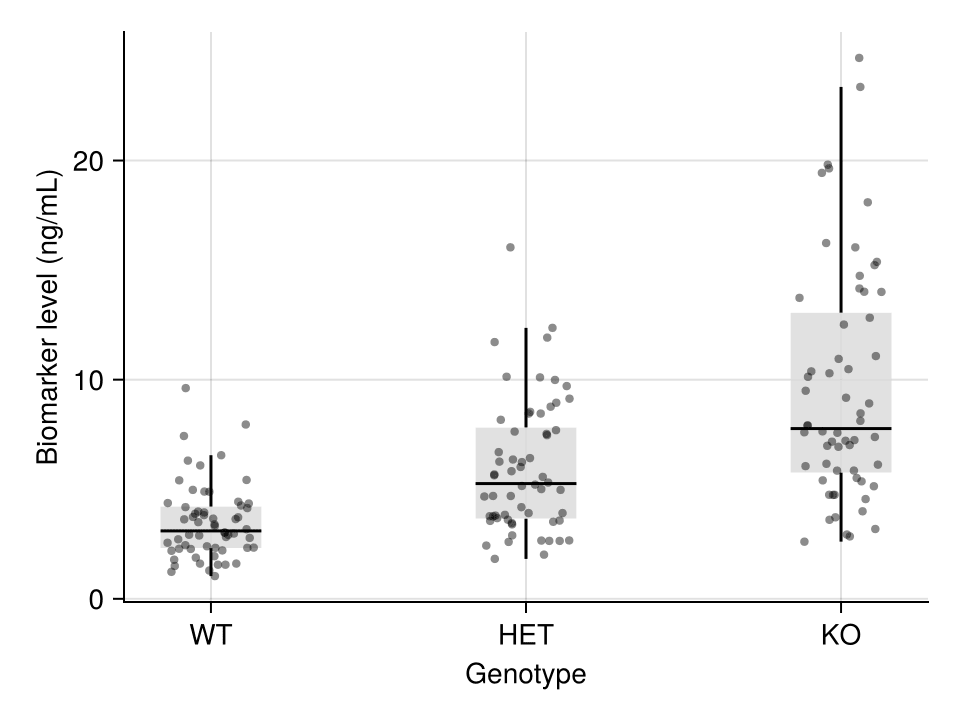
Because a box hides the raw data, overlaying the individual observations is the publication-recommended style: a light box plus a scatter! layer with random x jitter.
fig = Figure(size = (440, 340))
ax = Axis(fig[1, 1], xlabel = "Genotype", ylabel = "Biomarker level (ng/mL)")
for (i, g) in enumerate(genotypes)
    v = df.Biomarker[df.Genotype .== g]
    boxplot!(ax, fill(i, length(v)), v; width = 0.4,
             color = (:gray85, 0.8), show_outliers = false)
    jitter = i .+ 0.28 .* (rand(length(v)) .- 0.5)
    scatter!(ax, jitter, v; color = (:black, 0.45), markersize = 6)
end
ax.xticks = (1:3, genotypes)
hidespines!(ax, :t, :r)
fig
Horizontal Box Plot
Long category labels read better in the horizontal orientation (orientation = :horizontal).
fig = Figure(size = (500, 300))
ax = Axis(fig[1, 1], xlabel = "Biomarker level (ng/mL)", ylabel = "Genotype")
for (i, g) in enumerate(genotypes)
    v = df.Biomarker[df.Genotype .== g]
    boxplot!(ax, fill(i, length(v)), v; orientation = :horizontal,
             width = 0.5, color = :olivedrab)
end
ax.yticks = (1:3, genotypes)
hidespines!(ax, :t, :r)
fig
References
- Makie development team. Makie.jl documentation — boxplot. https://docs.makie.org/stable/reference/plots/boxplot
- Danisch, S., & Krumbiegel, J. (2021). Makie.jl: Flexible high-performance data visualization for Julia. Journal of Open Source Software, 6(65), 3349.
- Spitzer, M., Wildenhain, J., Rappsilber, J., & Tyers, M. (2014). BoxPlotR: a web tool for generation of box plots. Nature Methods, 11(2), 121-122.