import matplotlib.pyplot as plt
import seaborn as sns
import pandas as pd
import numpy as np
import scienceplots # noqa: F401 (注册 plt.style 条目)出版级样式与导出(Python)
从能用的图到可投稿的图,差距在样式与导出:最终印刷尺寸下一致的字号、克制的坐标轴脊线、色盲安全配色,以及按精确栏宽输出的 300 dpi 位图或矢量图。matplotlib 的 rcParams 把「 house style 」一次编码;SciencePlots 包在其上提供期刊调优样式(science、nature、ieee)。
示例
环境配置
- 系统要求:跨平台(Linux/MacOS/Windows)
- 编程语言:Python
- 依赖包:
matplotlib、seaborn、pandas、numpy、SciencePlots
数据准备
一个小型剂量响应汇总与色盲安全的 Okabe–Ito 调色板——配色选择本身就是样式的一部分,而非事后补充。
np.random.seed(221)

groups = ['Vehicle', 'Low', 'Mid', 'High']
summary = pd.DataFrame({
    'Group': pd.Categorical(groups, categories=groups, ordered=True),
    'Mean': [1.0, 1.9, 3.2, 4.4],
    'SEM': [0.28, 0.25, 0.30, 0.26],
})
OKABE_ITO = ['#0072B2', '#E69F00', '#009E73', '#CC79A7']
可视化
一套 house rcParams
每个 notebook 设置一次样式:按最终印刷宽度(单栏 89 mm ≈ 3.5 in)设定字号、细脊线、外向刻度——之后的每张图自动继承。
HOUSE = {
    'figure.figsize': (3.5, 2.6),
    'font.size': 7, 'axes.titlesize': 8, 'axes.labelsize': 7,
    'xtick.labelsize': 6.5, 'ytick.labelsize': 6.5, 'legend.fontsize': 6.5,
    'axes.spines.top': False, 'axes.spines.right': False,
    'xtick.direction': 'out', 'ytick.direction': 'out',
    'axes.linewidth': 0.7, 'savefig.dpi': 300,
    'svg.fonttype': 'none',
}

with plt.rc_context(HOUSE):
    fig, ax = plt.subplots()
    ax.bar(summary.Group, summary.Mean, yerr=summary.SEM, capsize=2.5,
           color=OKABE_ITO[0], edgecolor='0.2', linewidth=0.6, width=0.62)
    ax.set_xlabel('Dose group')
    ax.set_ylabel('Response (a.u.)')
    fig.savefig('house_style.png', dpi=300, bbox_inches='tight')
plt.show()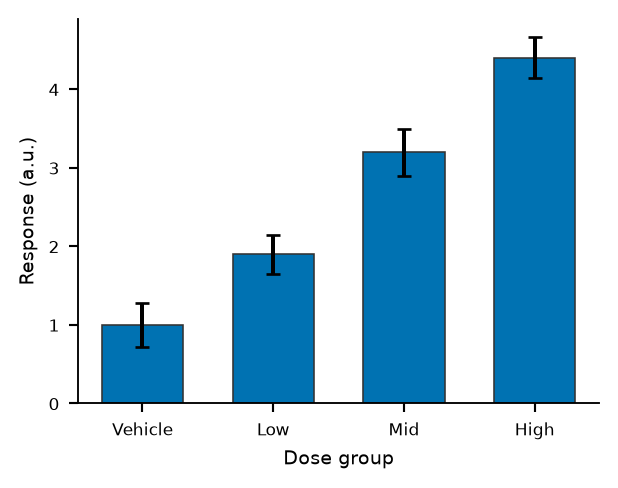
SciencePlots 期刊样式
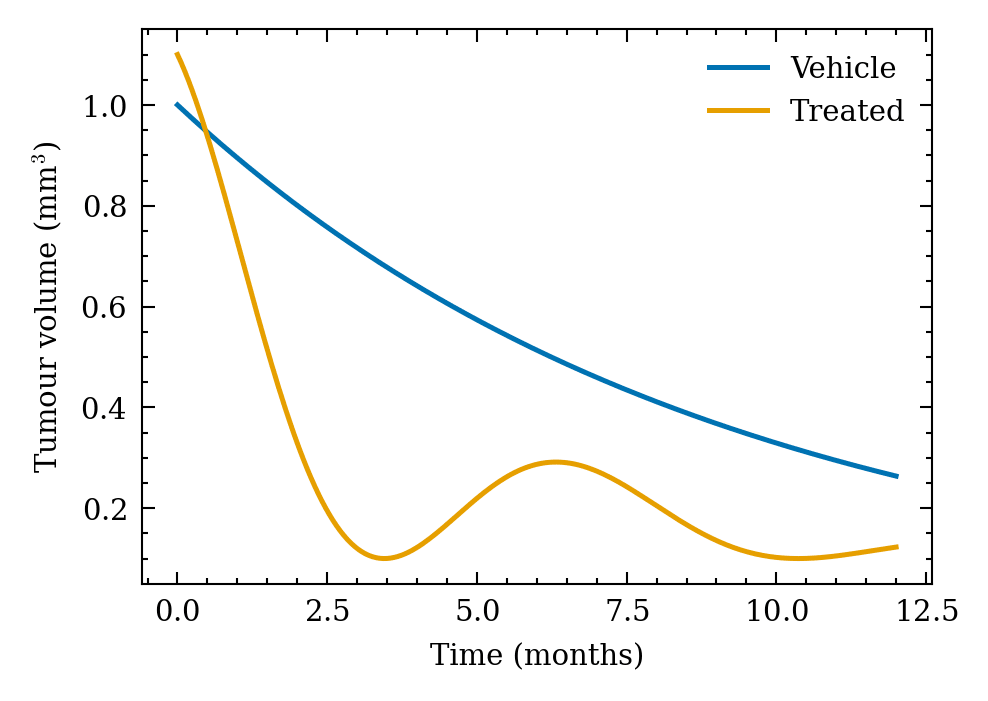
plt.style.context(['science', 'nature']) 临时应用 Nature 调优的 rcParams——全局状态不会在图间泄漏;无 LaTeX 的机器可叠加 no-latex。
x = np.linspace(0, 12, 200)
series = {'Vehicle': 1.0 * np.exp(-x / 9),
          'Treated': 1.0 * np.exp(-x / 4) * np.cos(x / 2.2) ** 2 + 0.1}

with plt.style.context(['science', 'nature', 'no-latex']):
    fig, ax = plt.subplots(figsize=(3.4, 2.4))
    for (name, y), color in zip(series.items(), OKABE_ITO[:2]):
        ax.plot(x, y, label=name, color=color, linewidth=1.2)
    ax.set_xlabel('Time (months)')
    ax.set_ylabel('Tumour volume (mm$^3$)')
    ax.legend(frameon=False)
    fig.savefig('scienceplots_style.svg', bbox_inches='tight')
plt.show()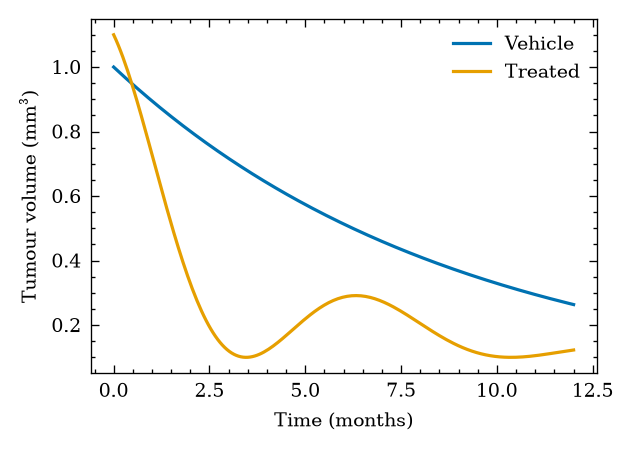
参考文献
- SciencePlots: Matplotlib styles for scientific figures. https://github.com/garrettj403/SciencePlots
- Rougier, N. P., Droettboom, M., & Bourne, P. E. (2014). Ten Simple Rules for Better Figures. PLoS Computational Biology, 10(9), e1003833.