import matplotlib.pyplot as plt
import seaborn as sns
import pandas as pd
import numpy as np
from sklearn.decomposition import PCA
from sklearn.preprocessing import StandardScalerPCA 图(Python)
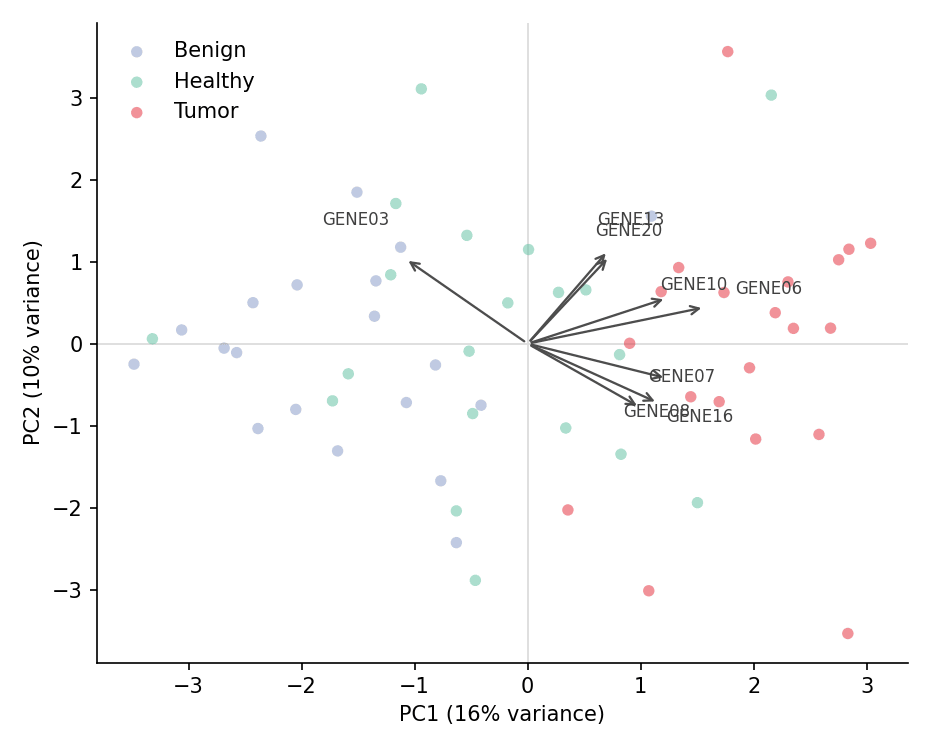
PCA 得分图将样本投影到前几个主成分上,揭示高维数据中的批次结构、 cluster 分离与离群点;载荷(loadings)则说明每个轴由哪些特征驱动。在生物医学研究中,它是查看表达矩阵、代谢组面板和任何多特征队列表的标准第一步。scikit-learn 负责拟合,matplotlib 负责绘制投影。
示例
环境配置
- 系统要求:跨平台(Linux/MacOS/Windows)
- 编程语言:Python
- 依赖包:
matplotlib、seaborn、pandas、numpy、scikit-learn
数据准备
我们模拟一个 60 样本 × 20 基因的表达矩阵(三个均值偏移不同的队列),并在分解前做 z 标准化——PCA 基于方差,特征量纲不同时标准化是必须的。
np.random.seed(91)

cohorts = ['Healthy', 'Benign', 'Tumor']
n_per = 20
base = np.random.normal(0, 1, (n_per * 3, 20))
shifts = np.concatenate([
    np.zeros((n_per, 20)),
    np.tile(np.r_[np.full(5, 1.2), np.zeros(15)], (n_per, 1)),
    np.tile(np.r_[np.zeros(5), np.full(5, 1.6), np.full(10, 0.5)], (n_per, 1)),
])
expr = base + shifts + np.random.normal(0, 0.6, base.shape)

genes = [f'GENE{i:02d}' for i in range(1, 21)]
X = StandardScaler().fit_transform(expr)
df = pd.DataFrame(X, columns=genes)
df['Cohort'] = np.repeat(cohorts, n_per)

pca = PCA(n_components=5).fit(X)
scores = pd.DataFrame(pca.transform(X), columns=[f'PC{i+1}' for i in range(5)])
scores['Cohort'] = df['Cohort']
loadings = pca.components_.T * np.sqrt(pca.explained_variance_)
可视化
带方差标签的得分图
每个主成分解释的方差比例必须写进轴标签——没有方差比例的 PCA 图是无法解读的。
palette = {'Healthy': '#66c2a5', 'Benign': '#8da0cb', 'Tumor': '#e63946'}
pc1 = pca.explained_variance_ratio_[0] * 100
pc2 = pca.explained_variance_ratio_[1] * 100

fig, ax = plt.subplots(figsize=(5.8, 4.6))
for cohort, sub in scores.groupby('Cohort'):
    ax.scatter(sub['PC1'], sub['PC2'], s=42, alpha=0.85,
               color=palette[cohort], edgecolor='white', linewidth=0.5,
               label=cohort)
ax.axhline(0, color='0.85', linewidth=0.8, zorder=0)
ax.axvline(0, color='0.85', linewidth=0.8, zorder=0)
ax.set_xlabel(f'PC1 ({pc1:.0f}% variance)')
ax.set_ylabel(f'PC2 ({pc2:.0f}% variance)')
ax.legend(frameon=False)
ax.spines[['top', 'right']].set_visible(False)
plt.tight_layout()
plt.show()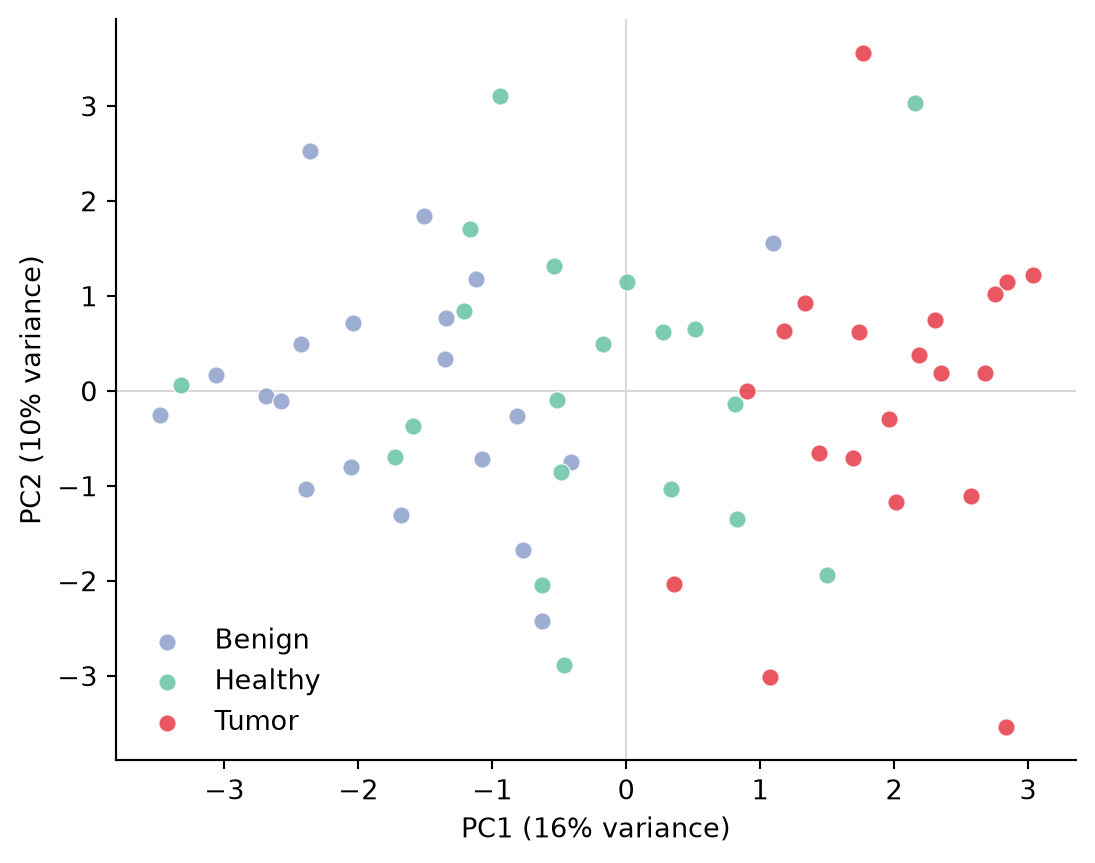
带载荷箭头的双标图(biplot)
高方差基因的箭头把特征空间投影到得分图上——指向某个队列方向的箭头即提示该队列中上调的标志基因。
top_genes = np.argsort(np.abs(loadings[:, :2]).sum(axis=1))[-8:]
scale = 2.2
radii = np.linspace(1.10, 1.40, len(top_genes))  # 交错的标签半径防重叠

fig, ax = plt.subplots(figsize=(6.2, 5))
for cohort, sub in scores.groupby('Cohort'):
    ax.scatter(sub['PC1'], sub['PC2'], s=30, alpha=0.55,
               color=palette[cohort], edgecolor='none', label=cohort)
for j, i in enumerate(top_genes):
    ax.annotate('', xy=(loadings[i, 0] * scale, loadings[i, 1] * scale),
                xytext=(0, 0), arrowprops=dict(arrowstyle='->', color='0.3', lw=1.1))
    ax.text(loadings[i, 0] * scale * radii[j], loadings[i, 1] * scale * radii[j],
            genes[i], fontsize=8, color='0.25', ha='center')
ax.axhline(0, color='0.85', linewidth=0.8, zorder=0)
ax.axvline(0, color='0.85', linewidth=0.8, zorder=0)
ax.set_xlabel(f'PC1 ({pc1:.0f}% variance)')
ax.set_ylabel(f'PC2 ({pc2:.0f}% variance)')
ax.legend(frameon=False, loc='upper left')
ax.spines[['top', 'right']].set_visible(False)
plt.tight_layout()
plt.show()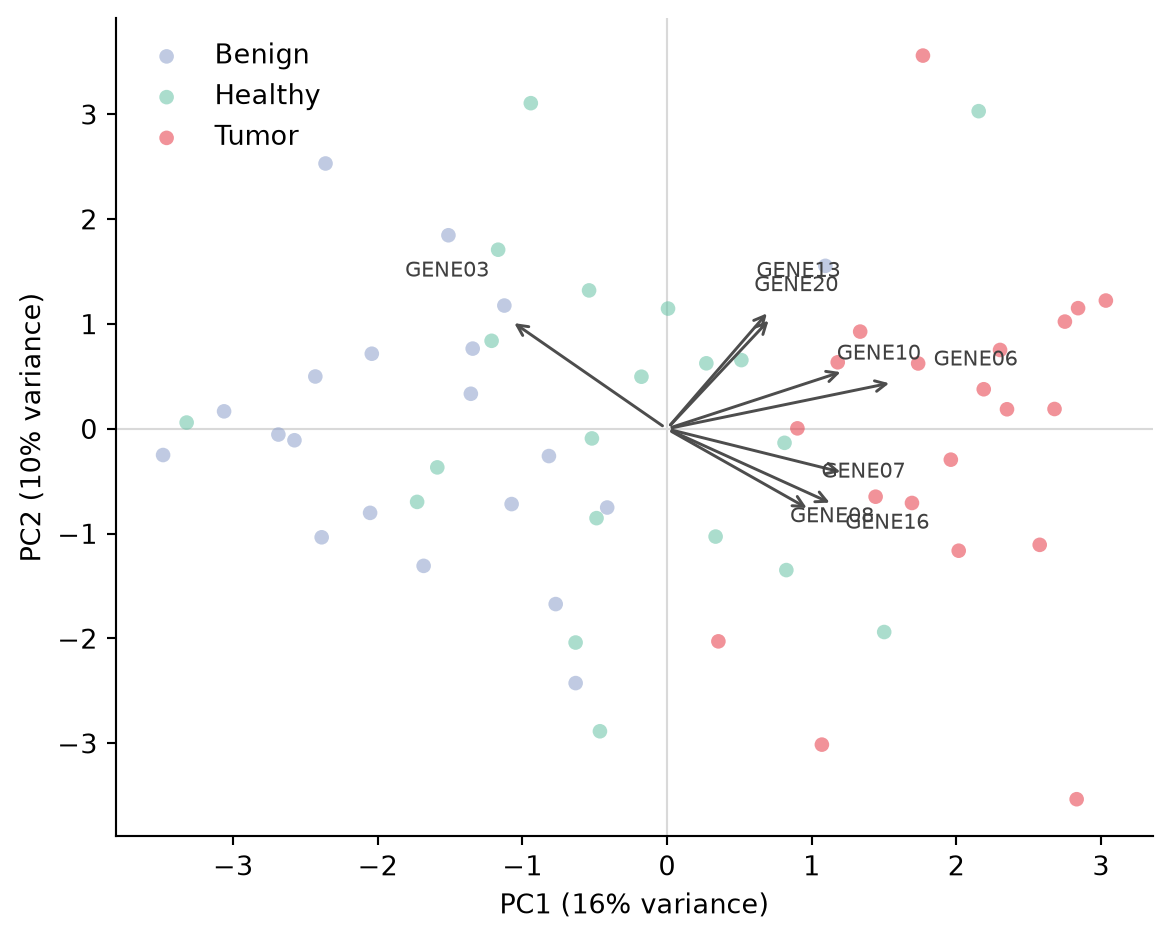
碎石图(Scree Plot)
解释方差剖面决定保留几个主成分;肘点(本例在 PC3 之后)是常用截断。
evr = pca.explained_variance_ratio_ * 100
comps = np.arange(1, len(evr) + 1)

fig, ax = plt.subplots(figsize=(5.8, 4))
ax.bar(comps, evr, color='#8da0cb', edgecolor='0.25', linewidth=0.6,
       label='Per component')
ax.plot(comps, np.cumsum(evr), color='#e63946', marker='o', markersize=5,
        linewidth=1.6, label='Cumulative')
ax.set_xlabel('Principal component')
ax.set_ylabel('Explained variance (%)')
ax.set_xticks(comps)
ax.legend(frameon=False)
ax.spines[['top', 'right']].set_visible(False)
plt.tight_layout()
plt.show()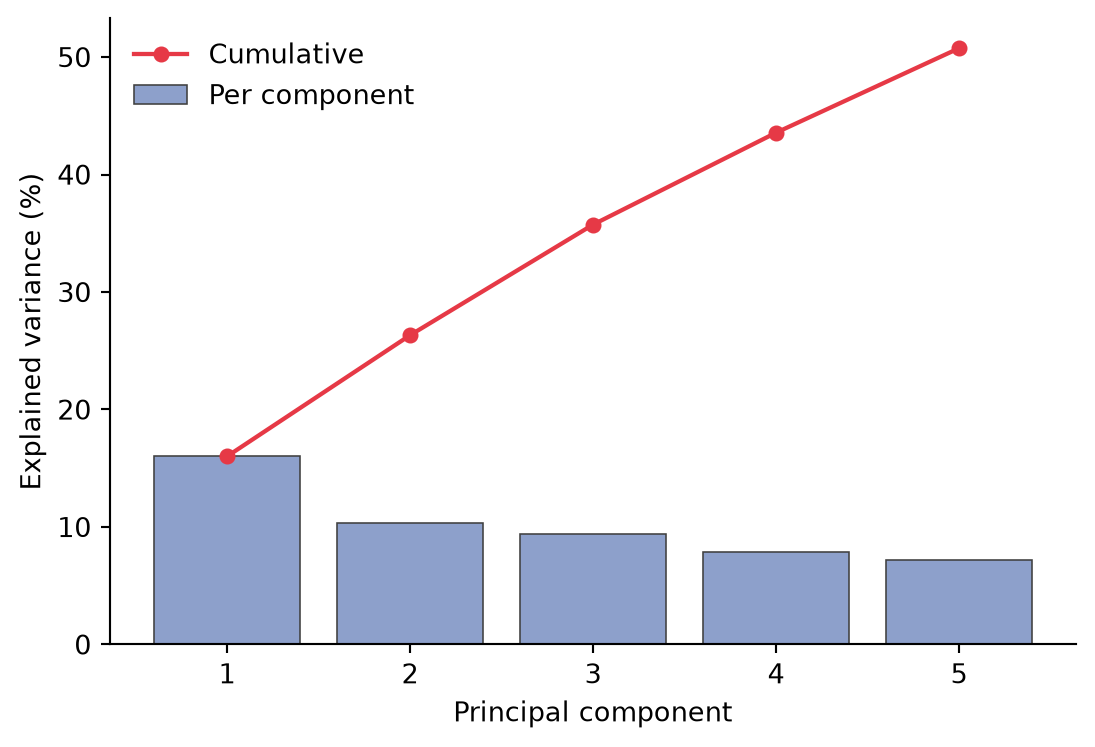
参考文献
- Pedregosa, F., et al. (2011). Scikit-learn: Machine Learning in Python. Journal of Machine Learning Research, 12, 2825-2830.
- Hunter, J. D. (2007). Matplotlib: A 2D graphics environment. Computing in Science & Engineering, 9(3), 90-95.