# CRAN 依赖
if (!requireNamespace("Seurat", quietly = TRUE)) install.packages("Seurat")
if (!requireNamespace("ggplot2", quietly = TRUE)) install.packages("ggplot2")
if (!requireNamespace("dplyr", quietly = TRUE)) install.packages("dplyr")
if (!requireNamespace("stringr", quietly = TRUE)) install.packages("stringr")
if (!requireNamespace("patchwork", quietly = TRUE)) install.packages("patchwork")
if (!requireNamespace("RColorBrewer", quietly = TRUE)) install.packages("RColorBrewer")
if (!requireNamespace("ggrepel", quietly = TRUE)) install.packages("ggrepel")
if (!requireNamespace("tidydr", quietly = TRUE)) install.packages("tidydr")
if (!requireNamespace("mascarade", quietly = TRUE)) install.packages("mascarade")
if (!requireNamespace("plotly", quietly = TRUE)) install.packages("plotly")

# GitHub 依赖
if (!requireNamespace("remotes", quietly = TRUE)) install.packages("remotes")
if (!requireNamespace("scRNAtoolVis", quietly = TRUE)) {
  remotes::install_github("junjunlab/scRNAtoolVis")
}
if (!requireNamespace("ggunchull", quietly = TRUE)) {
  remotes::install_github("sajuukLyu/ggunchull")
}

# 载入包
library(Seurat)
library(ggplot2)
library(dplyr)
library(stringr)
library(patchwork)
library(RColorBrewer)
library(ggrepel)
library(tidydr)
library(scRNAtoolVis)
library(ggunchull)
library(mascarade)
library(plotly)期刊风格 UMAP 精修图
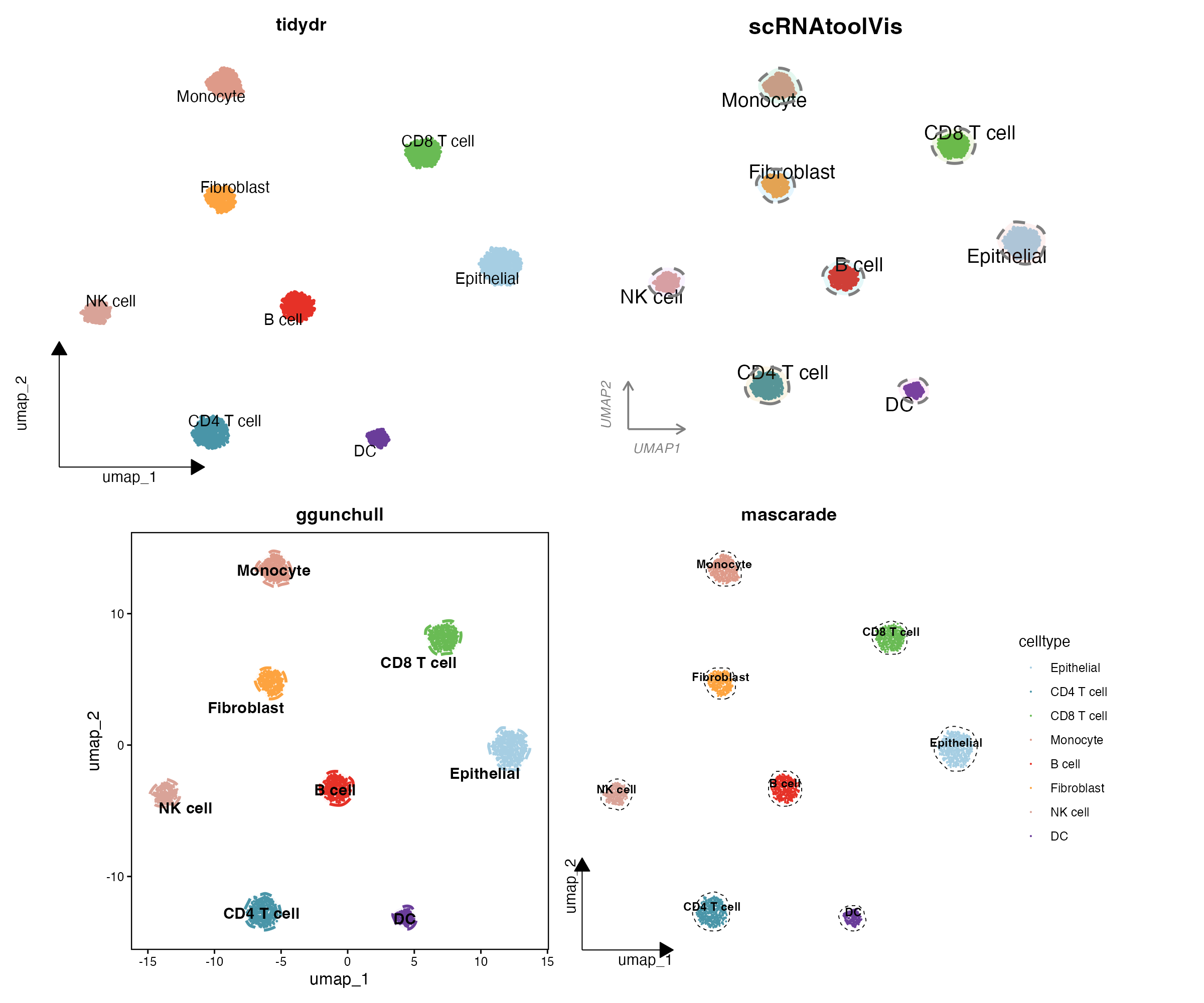
朴素的 DimPlot 往往达不到期刊插图的要求。审稿人期待 UMAP 嵌入图具备精确的亚群标签、一致的因子排序、克制的坐标轴,以及高分单细胞论文常见的”包裹细胞群体的柔和轮廓”。本教程汇总一套面向 Seurat 对象的出版级 UMAP 完整流程:
- 基础面板:带标签 UMAP、分面 UMAP,以及带期刊字母标注的 patchwork 组合图。
- 方案一 — tidydr 箭头坐标轴:L 型箭头坐标轴、无网格;通用性最强的常规 SCI 款。
-
方案二 — 云朵包围圈(
scRNAtoolVis::clusterCornerAxes):角轴 + 半透明”云朵”轮廓;CNS 子刊热门风格。 -
方案三 — 虚线包围圈(
ggunchull::stat_unchull):清晰的非凸虚线轮廓 + 居中加粗标签;精致综述风。 -
方案四 — 精细轮廓(
mascarade::generateMask):基于核密度、贴合细胞分布的轮廓线;适合高密度、大型图谱。 -
附加 — 三维核密度景观图:用
plotly绘制可交互的降维密度”地形图”。
四个方案共用一个模拟 PBMC 风格 Seurat 对象,所有面板均可在线复现。
示例
环境配置
系统要求:跨平台(Linux/MacOS/Windows)
编程语言:R
依赖包:
Seurat、ggplot2、dplyr、stringr、patchwork、RColorBrewer、ggrepel、tidydr、scRNAtoolVis、ggunchull、mascarade、sessioninfo、plotly
sessioninfo::session_info("attached")─ Session info ───────────────────────────────────────────────────────────────
setting value
version R version 4.6.1 (2026-06-24)
os Ubuntu 24.04.5 LTS
system x86_64, linux-gnu
ui X11
language (EN)
collate C.UTF-8
ctype C.UTF-8
tz UTC
date 2026-10-27
pandoc 3.1.3 @ /usr/bin/ (via rmarkdown)
quarto 1.10.19 @ /usr/local/bin/quarto
─ Packages ───────────────────────────────────────────────────────────────────
! package * version date (UTC) lib source
P dplyr * 1.2.1 2026-04-03 [?] RSPM
P forcats * 1.0.1 2025-09-25 [?] RSPM
P ggplot2 * 4.0.3.9000 2026-10-26 [?] Github (tidyverse/ggplot2@b638d65)
P ggrepel * 0.9.8 2026-03-17 [?] RSPM
P ggunchull * 1.0.1 2026-10-10 [?] Github (sajuukLyu/ggunchull@282c549)
P lubridate * 1.9.5 2026-02-04 [?] RSPM
mascarade * 0.4.3 2026-07-30 [1] RSPM
P patchwork * 1.3.2 2025-08-25 [?] RSPM
P plotly * 4.12.1 2026-07-22 [?] RSPM
P purrr * 1.2.2 2026-04-10 [?] RSPM
P RColorBrewer * 1.1-3 2022-04-03 [?] RSPM
P readr * 2.2.0 2026-02-19 [?] RSPM
P scRNAtoolVis * 0.1.0 2026-10-10 [?] Github (junjunlab/scRNAtoolVis@c99eaa8)
P Seurat * 5.6.0 2026-10-03 [?] RSPM
P SeuratObject * 5.4.0 2026-04-11 [?] RSPM
P sp * 2.2-4 2026-10-11 [?] RSPM
P stringr * 1.6.0 2025-11-04 [?] RSPM
P tibble * 3.3.1 2026-01-11 [?] RSPM
P tidydr * 0.0.7 2026-10-09 [?] RSPM
P tidyr * 1.3.2 2025-12-19 [?] RSPM
P tidyverse * 2.0.0 2023-02-22 [?] RSPM
[1] /home/runner/.cache/R/renv/library/Bizard-5140bdc6/linux-ubuntu-noble/R-4.6/x86_64-pc-linux-gnu
[2] /home/runner/work/_temp/Library
[3] /opt/R/4.6.1/lib/R/library
* ── Packages attached to the search path.
P ── Loaded and on-disk path mismatch.
──────────────────────────────────────────────────────────────────────────────数据准备
模拟 PBMC 风格 Seurat 对象
我们模拟 8 种细胞类型共 3,360 个细胞,群体大小不等(每种 200–660 个),带有 marker 基因块结构,6 个测序样本对应 6 个条件分组、3 种组织来源。细胞条形码携带样本名(0001-1_Sample_3),与合并后的 Seurat 对象命名方式一致。真实数据的 标准化 → PCA → UMAP/t-SNE 流程在此完整执行,保证降维效果逼真。
set.seed(2026)

type_sizes <- c("CD4 T cell" = 500, "CD8 T cell" = 460, "NK cell" = 300,
                "B cell" = 420, "Monocyte" = 460, "DC" = 200,
                "Fibroblast" = 360, "Epithelial" = 660)
cell_types <- names(type_sizes)
n_type <- length(cell_types)
n_cell <- sum(type_sizes)
n_gene <- 1200
markers_per <- 40

gene_names <- paste0("Gene", 1:n_gene)
counts <- matrix(rnbinom(n_cell * n_gene, size = 4, prob = 0.25), n_gene, n_cell)
counts <- matrix(as.integer(pmin(counts, 30)), n_gene, n_cell)

# 为每种细胞类型添加 marker 基因块
celltype <- factor(rep(cell_types, times = type_sizes), levels = cell_types)
for (i in seq_len(n_type)) {
  block <- ((i - 1) * markers_per + 1):(i * markers_per)
  idx_i <- which(celltype == cell_types[i])
  boost <- rnbinom(length(block) * length(idx_i), size = 8, prob = 0.2)
  counts[block, idx_i] <- pmin(counts[block, idx_i] + as.integer(boost), 120)
}
rownames(counts) <- gene_names

# 样本级元数据:6 个样本对应 6 个条件分组
groups <- c("Control", "4hours", "12hours", "2days", "14days", "6weeks")
site_lv <- c("Tumor", "Normal", "Margin")
orig.ident_raw <- sample(paste0("Sample_", 1:6), n_cell, TRUE)
lut <- setNames(rep(groups, length.out = 6), sort(unique(orig.ident_raw)))
Group <- factor(lut[orig.ident_raw], levels = groups)
site <- factor(sample(site_lv, n_cell, TRUE), levels = site_lv)

# 细胞条形码携带样本名,与合并后的 Seurat 对象一致
colnames(counts) <- paste0(sprintf("%04d", seq_len(n_cell)), "-1_", orig.ident_raw)

meta <- data.frame(
  celltype = celltype, Group = Group, orig.ident_raw = orig.ident_raw, site = site,
  row.names = colnames(counts)
)

sce <- CreateSeuratObject(counts = counts, meta.data = meta)
sce <- NormalizeData(sce, verbose = FALSE)
sce <- FindVariableFeatures(sce, nfeatures = 800, verbose = FALSE)
sce <- ScaleData(sce, verbose = FALSE)
sce <- RunPCA(sce, npcs = 20, verbose = FALSE)
sce <- RunUMAP(sce, dims = 1:15, verbose = FALSE)
sce <- RunTSNE(sce, dims = 1:15, verbose = FALSE)
Idents(sce) <- "celltype"
期刊实践一:按细胞数量统一亚群排序
各面板亚群顺序不一致会破坏图形美感。按细胞数量从大到小对身份因子排序一次,后续所有图形自动继承相同顺序(源自原文”数据预处理”一节的关键步骤)。由于上面模拟的群体大小不等,排序效果肉眼可见:Epithelial(660 个细胞)排第一,DC(200 个细胞)排最后。
# 按细胞数量从大到小排序细胞类型
celltype_counts <- table(sce$celltype)
ord <- names(sort(celltype_counts, decreasing = TRUE))
sce$celltype <- factor(sce$celltype, levels = ord)
Idents(sce) <- "celltype"
celltype_counts
CD4 T cell CD8 T cell    NK cell     B cell   Monocyte         DC Fibroblast
       500        460        300        420        460        200        360
Epithelial
       660
期刊实践二:修复 SeuratProject 异常样本标签
多数据集合并时丢失身份信息的细胞会带上默认的 SeuratProject 来源标签,导致样本分组错乱。按原文思路,用正则表达式从细胞条形码中恢复真实样本名:
# 为演示注入异常标签
idx_bad <- sample(seq_len(ncol(sce)), 60)
sce$orig.ident_raw[idx_bad] <- "SeuratProject"

idx_to_fix <- which(sce$orig.ident_raw == "SeuratProject")
if (length(idx_to_fix) > 0) {
  message(paste("Found", length(idx_to_fix), "cells with a SeuratProject label"))
  cell_names <- colnames(sce)[idx_to_fix]
  new_idents <- str_extract(cell_names, "[^_]+_[^_]+$")
  if (any(is.na(new_idents))) {
    new_idents[is.na(new_idents)] <- cell_names[is.na(new_idents)]
  }
  sce$orig.ident_raw[idx_to_fix] <- new_idents
}
Found 60 cells with a SeuratProject labeltable(sce$orig.ident_raw)
Sample_1 Sample_2 Sample_3 Sample_4 Sample_5 Sample_6
     586      546      529      546      577      576
共享配色
selCols <- colorRampPalette(brewer.pal(n = 10, name = "Paired"))(8)
names(selCols) <- levels(sce$celltype)
可视化
基础面板
按细胞类型着色的带标签 UMAP、按条件分组与原始样本着色的 UMAP(批次结构检查)、按组织来源分面的 UMAP,以及组合细胞类型与 t-SNE 视图、带期刊字母标注(tag_levels = "A")的 patchwork 组合图。UMAP 强调相近亚群的聚集,t-SNE 强调不同亚群的区分,两图互补验证分群逻辑。
p_base <- DimPlot(sce, reduction = "umap", group.by = "celltype",
                  label = TRUE, label.size = 4, repel = TRUE, cols = selCols) +
  theme_dr() +
  theme(panel.grid = element_blank(),
        legend.text = element_text(size = 10, color = "black")) +
  guides(color = guide_legend(title = "", override.aes = list(size = 3, alpha = 1)))
p_split <- DimPlot(sce, reduction = "umap", split.by = "site", group.by = "celltype",
                   label = FALSE, cols = selCols, ncol = 3) +
  theme(panel.grid = element_blank(), legend.position = "none")
p_base + p_split + plot_layout(widths = c(1, 1.4))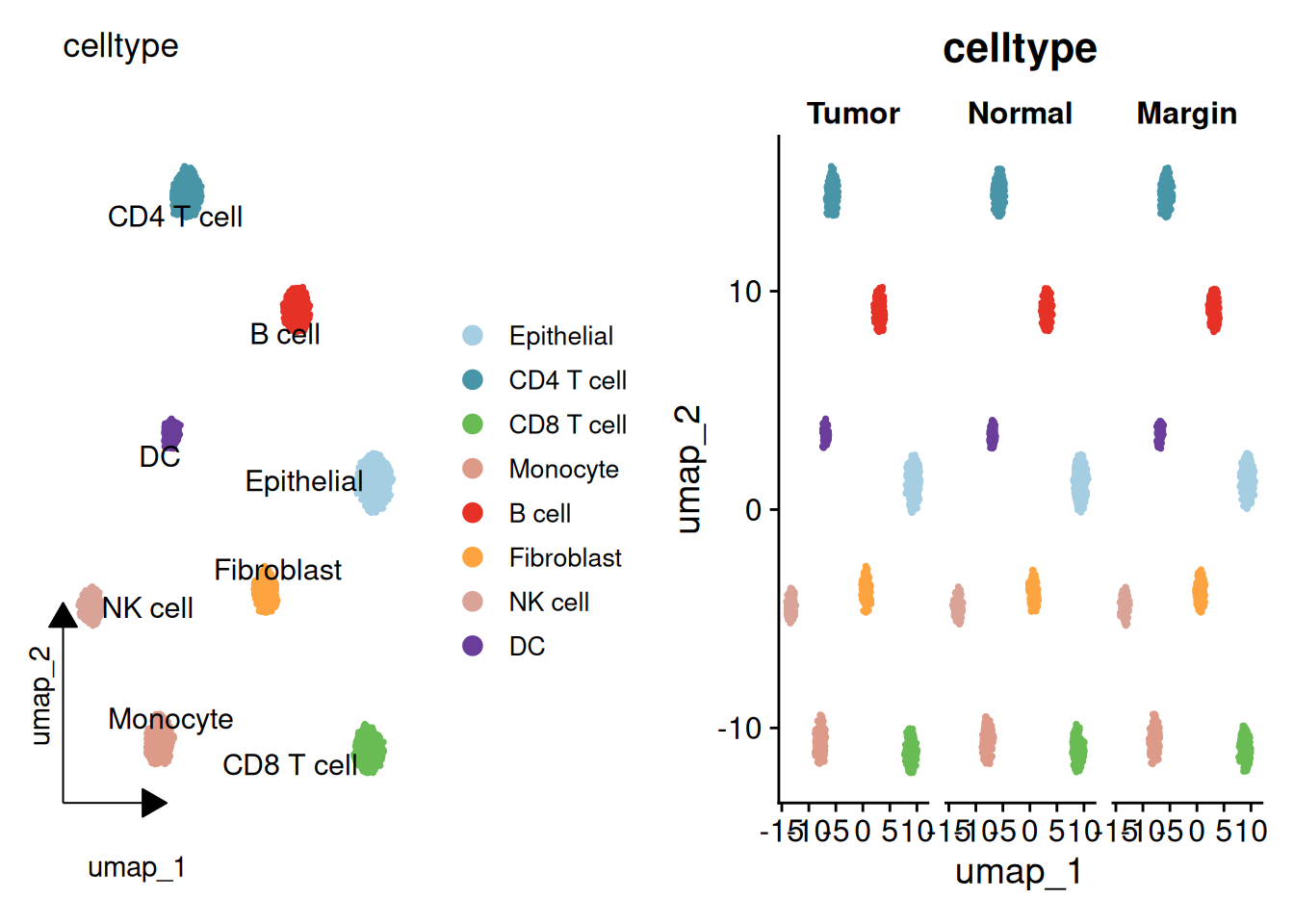
# 大调色板保证多样本可辨识
sample_cols <- colorRampPalette(brewer.pal(n = 12, name = "Set3"))(length(unique(sce$orig.ident_raw)))
p_group <- DimPlot(sce, reduction = "umap", group.by = "Group",
                   label = TRUE, label.size = 4, repel = TRUE) +
  theme(panel.grid = element_blank())
p_sample <- DimPlot(sce, reduction = "umap", group.by = "orig.ident_raw",
                    label = FALSE, cols = sample_cols) +
  theme(panel.grid = element_blank())
p_group | p_sample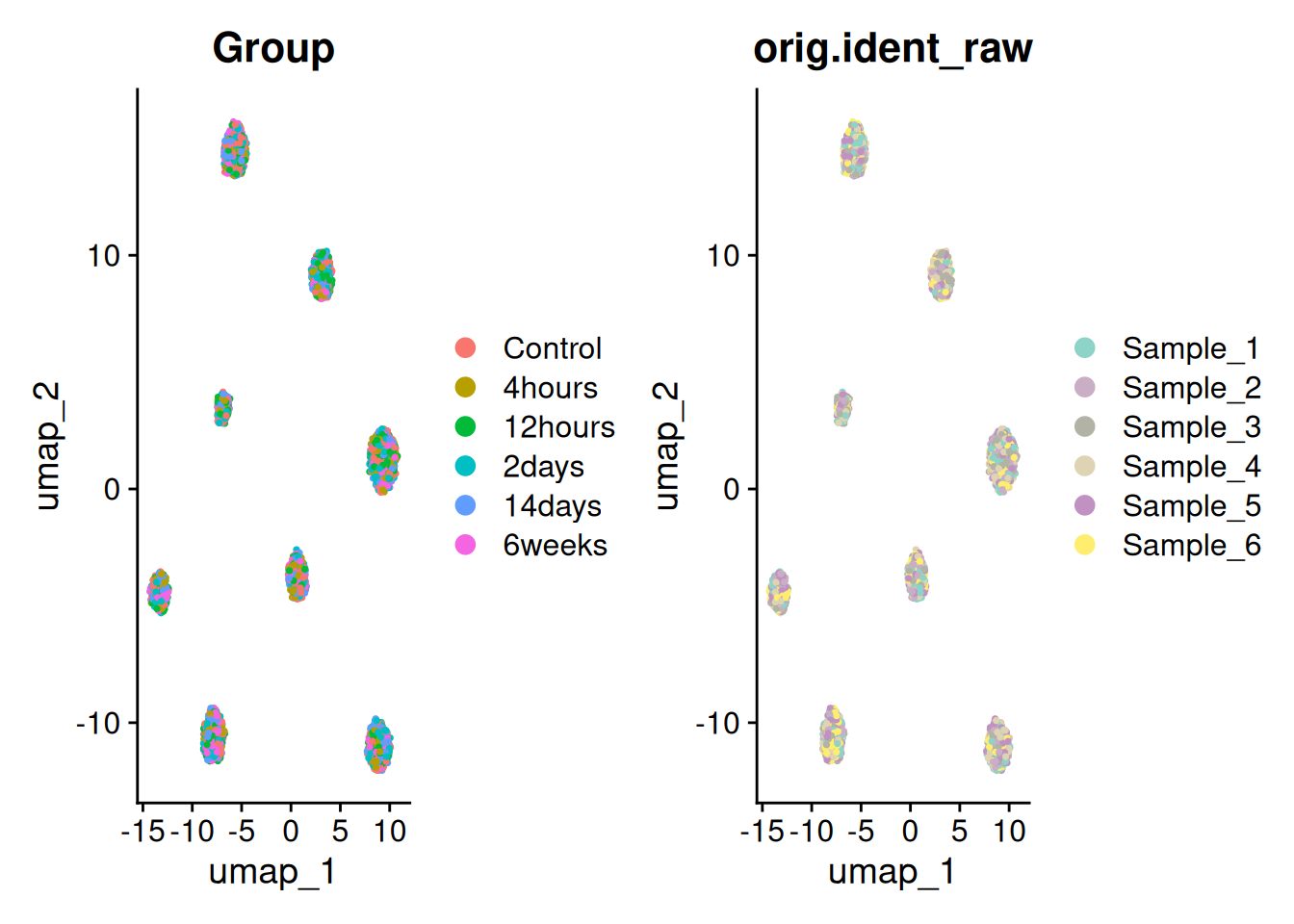
p1_umap <- DimPlot(sce, reduction = "umap", group.by = "celltype",
                   label = TRUE, label.size = 4, repel = TRUE, cols = selCols) +
  theme(panel.grid = element_blank())
p3_tsne <- DimPlot(sce, reduction = "tsne", group.by = "celltype",
                   label = TRUE, label.size = 4, repel = TRUE, cols = selCols) +
  theme(panel.grid = element_blank())
combined_plot <- p1_umap + p3_tsne +
  plot_annotation(tag_levels = "A") &
  theme(text = element_text(family = "Arial"),
        plot.tag = element_text(family = "Arial", size = 16, face = "bold"))
combined_plot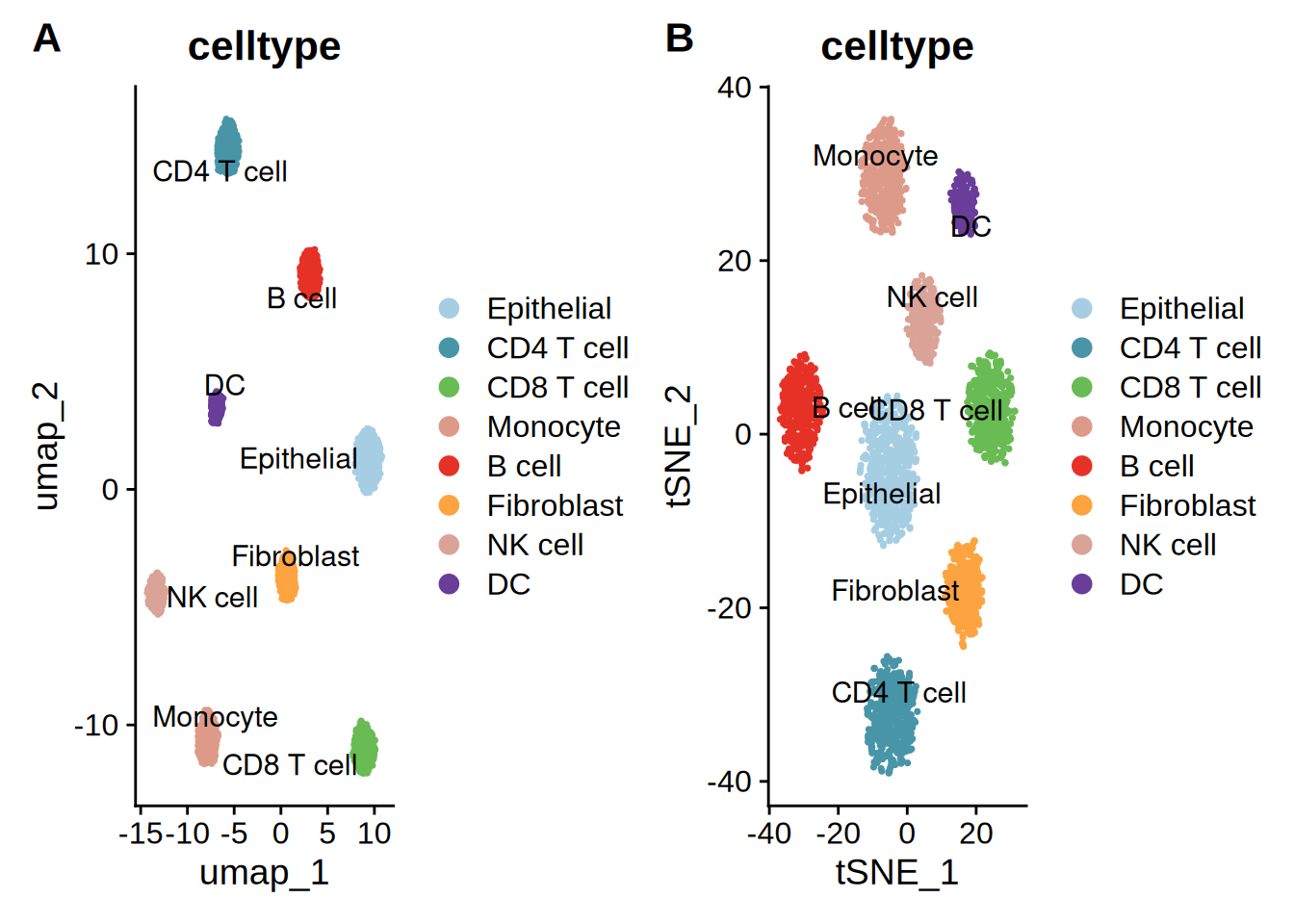
组合图按标准方式导出:ggsave(combined_plot, filename = "combined_umap.pdf", width = 16, height = 9)。
方案一:tidydr 箭头坐标轴——常规 SCI 通用款
theme_dr() 用 L 型箭头坐标轴替换灰色网格,去除标题,保留单列图例。容错率高,适合大多数 SCI 期刊正文主图。
p_tidydr <- DimPlot(sce, reduction = "umap", group.by = "celltype",
                    label = TRUE, repel = TRUE, cols = selCols) +
  theme_dr() +
  theme(panel.grid = element_blank(),
        legend.text = element_text(size = 12, face = "plain", color = "black"),
        plot.title = element_blank()) +
  guides(color = guide_legend(title = "", override.aes = list(size = 4, alpha = 1), ncol = 1))
p_tidydr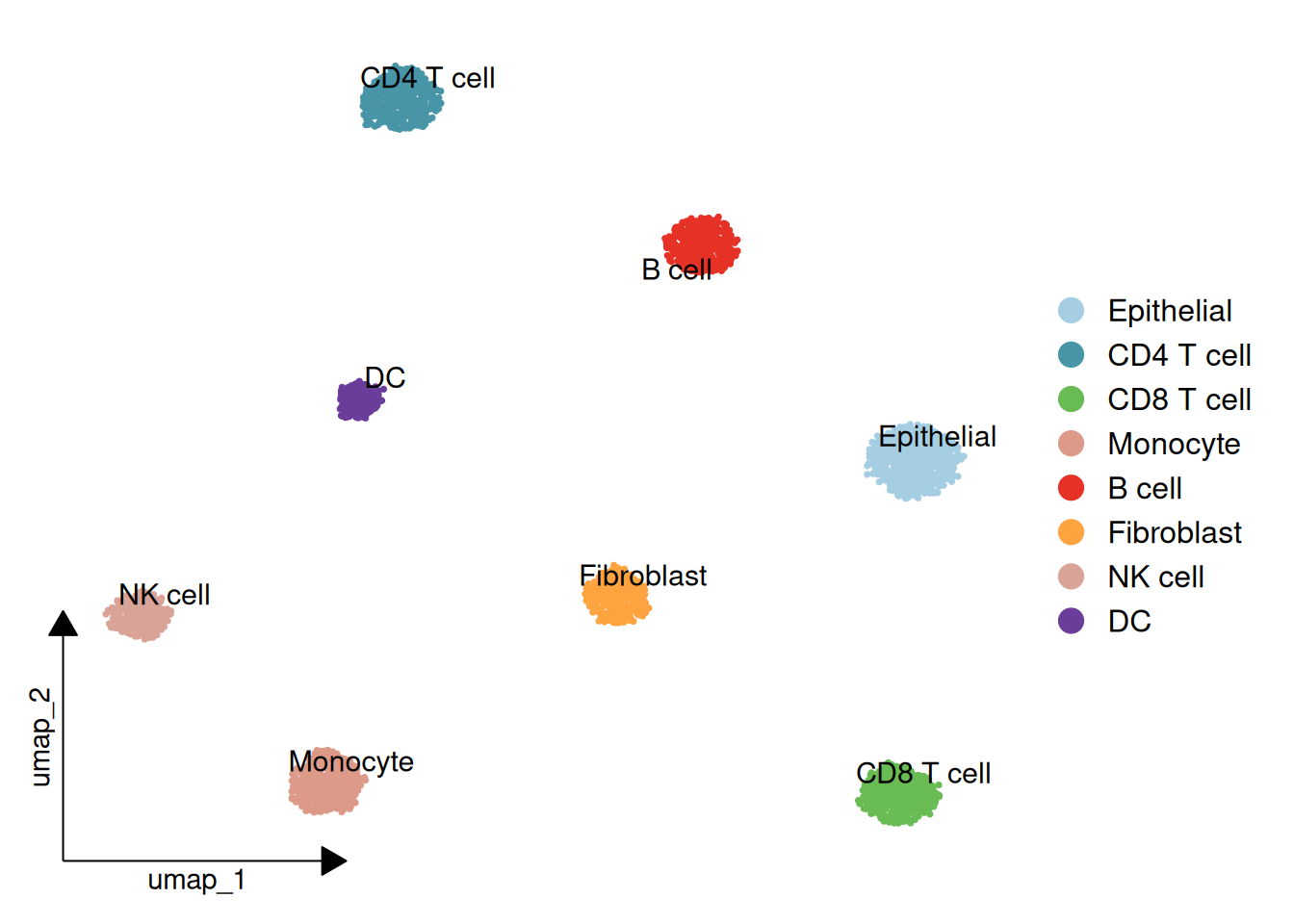
方案二:scRNAtoolVis 云朵包围圈——CNS 子刊风格
clusterCornerAxes() 绘制角轴,并为每个亚群添加半透明圆形”云朵”轮廓(addCircle = TRUE)。关键参数:cicAlpha(轮廓透明度)与 cicDelta(晕圈相对点云的外扩距离,数据单位)。注意 nbin 仅在旧版圆形模式(addCircle.legacy = TRUE)下生效,当前默认路径下会被忽略。亚群分布越松散,晕圈越接近朦胧云朵——想要更贴合的轮廓可调小 cicDelta。
p_corneraxes <- clusterCornerAxes(
  object = sce,
  reduction = "umap",
  clusterCol = "celltype",
  pSize = 0.3,
  arrowType = "open",
  lineTextcol = "grey50",
  cornerTextSize = 3.5,
  keySize = 1.5,
  show.legend = FALSE,
  cellLabel = TRUE,
  cellLabelSize = 5,
  noSplit = TRUE,
  addCircle = TRUE,
  cicAlpha = 0.1,
  cicDelta = 0.5,
  nbin = 200
) + scale_color_manual(values = selCols) +
  scale_fill_manual(values = selCols)
Warning: `aes_string()` was deprecated in ggplot2 3.0.0.
ℹ Please use tidy evaluation idioms with `aes()`.
ℹ See also `vignette("ggplot2-in-packages")` for more information.
ℹ The deprecated feature was likely used in the scRNAtoolVis package.
Please report the issue to the authors.Warning: Using `size` aesthetic for lines was deprecated in ggplot2 3.4.0.
ℹ Please use `linewidth` instead.
ℹ The deprecated feature was likely used in the scRNAtoolVis package.
Please report the issue to the authors.p_corneraxes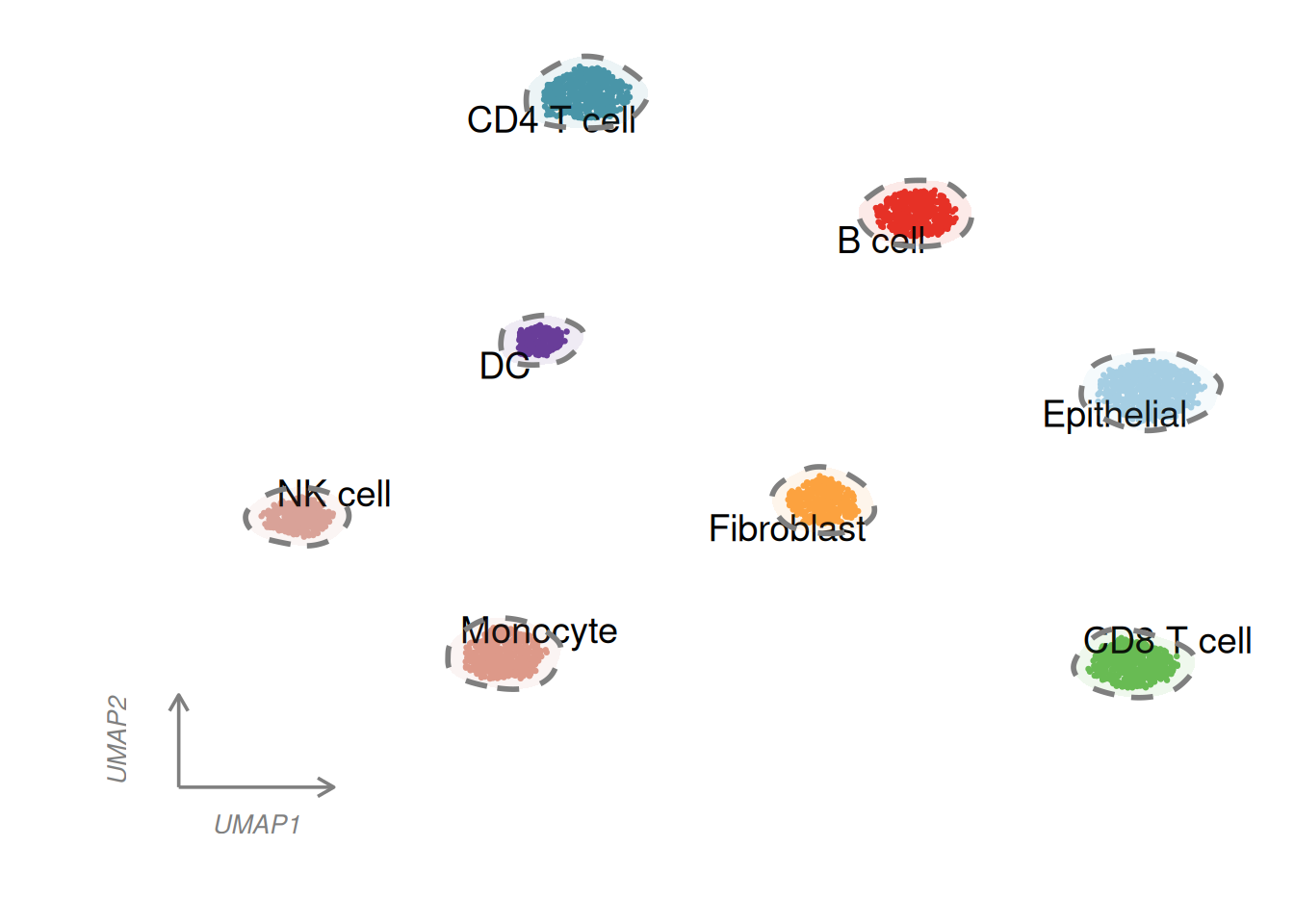
方案三:ggunchull 虚线包围圈——精致综述风
stat_unchull() 用平滑非凸虚线轮廓包裹每个亚群,标签通过 geom_text_repel() 放在偏移后的中位数位置,无需图例即可读图。
meta <- cbind(sce@meta.data, sce@reductions$umap@cell.embeddings)
main_type_med <- meta %>%
  group_by(celltype) %>%
  summarise(umap_1 = median(umap_1) - 1, umap_2 = median(umap_2) - 1, .groups = "drop")

p_unchull <- ggplot(meta, aes(x = umap_1, y = umap_2)) +
  stat_unchull(aes(fill = celltype, color = celltype),
               alpha = 0.05, size = 1, lty = 2, delta = 0.25, show.legend = FALSE) +
  geom_point(aes(color = celltype), size = 0.2, show.legend = FALSE) +
  scale_color_manual(values = selCols) +
  scale_fill_manual(values = selCols) +
  geom_text_repel(data = main_type_med, aes(label = celltype),
                  fontface = "bold", color = "black", size = 4,
                  show.legend = FALSE, seed = 42) +
  coord_equal() +
  theme_classic() +
  theme(aspect.ratio = 1,
        panel.border = element_rect(color = "black", fill = NA, linewidth = 0.8),
        axis.line = element_blank(),
        axis.ticks = element_line(color = "black"),
        axis.title = element_text(size = 12))
p_unchull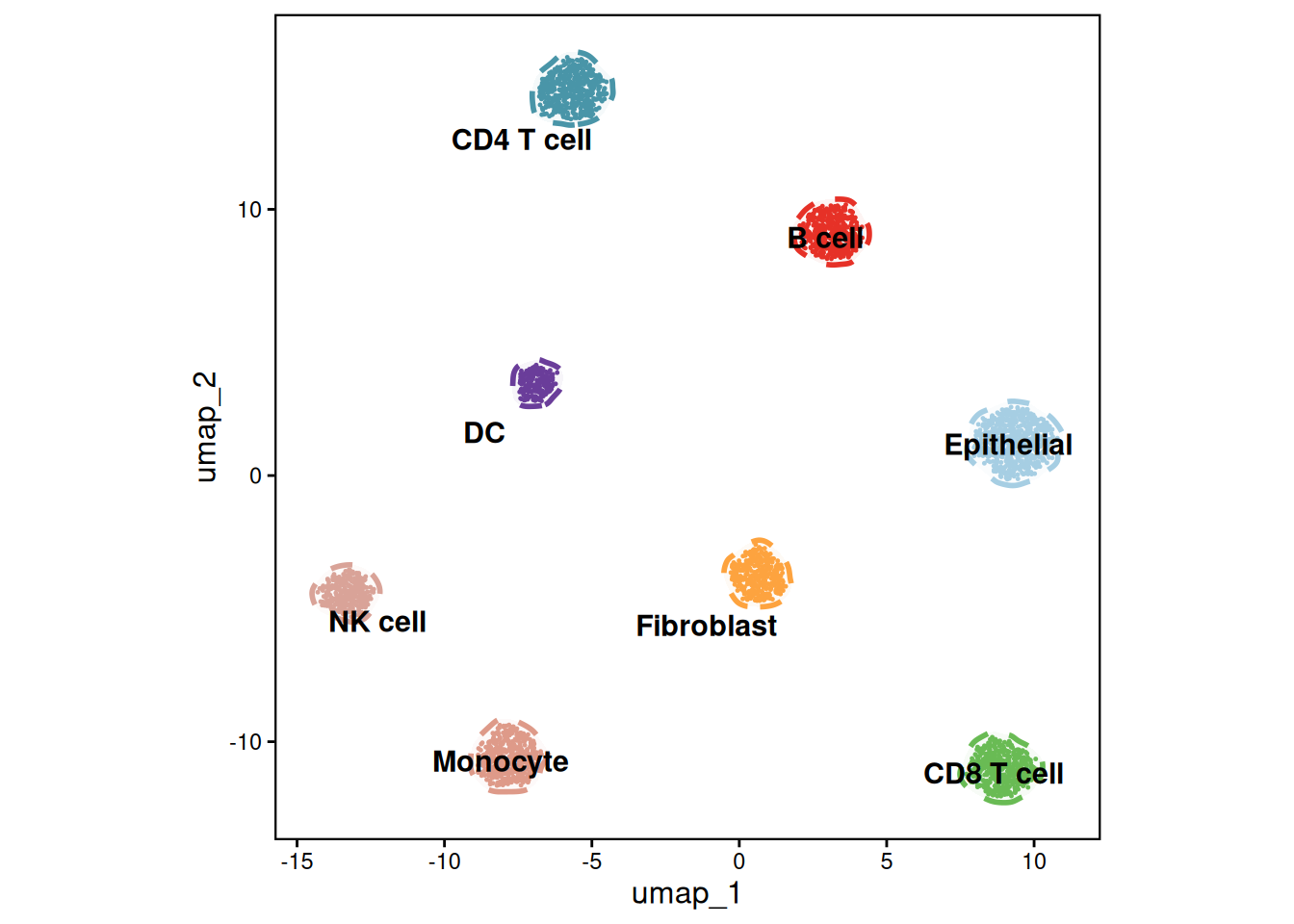
方案四:mascarade 精细轮廓——高密度图谱风
generateMask() 将每个亚群的核密度转换为贴合细胞分布的轮廓蒙版。蒙版表自带 group 列,因此一层 geom_path(group = group) 即可绘制所有轮廓线。亚群标签放在各自中位数位置。
df <- FetchData(object = sce, vars = c("umap_1", "umap_2", "celltype"))
celltype_counts <- table(df$celltype)
valid_celltypes <- names(celltype_counts)[celltype_counts >= 2]
df_filtered <- df[df$celltype %in% valid_celltypes, ]
rownames(df_filtered) <- NULL

# 生成精细轮廓蒙版
maskTable <- generateMask(
  dims = df_filtered[, 1:2],
  clusters = df_filtered$celltype
)

p <- ggplot(df, aes(x = umap_1, y = umap_2)) +
  geom_point(aes(color = celltype), size = 0.05) +
  geom_path(data = maskTable, aes(group = group), linewidth = 0.3, linetype = 2) +
  coord_fixed(ratio = 1) +
  theme_classic() +
  scale_color_manual(values = selCols) +
  theme_dr(xlength = 0.22, ylength = 0.22,
           arrow = grid::arrow(length = unit(0.15, "inches"), type = "closed")) +
  theme(panel.grid = element_blank())

centroids <- df %>%
  group_by(celltype) %>%
  summarise(centroid_x = median(umap_1, na.rm = TRUE),
            centroid_y = median(umap_2, na.rm = TRUE), .groups = "drop")

p_mascarade <- p + geom_text(data = centroids,
                             aes(label = celltype, x = centroid_x, y = centroid_y),
                             size = 3.5, vjust = -0.2, hjust = 0.5,
                             color = "black", fontface = "bold")
p_mascarade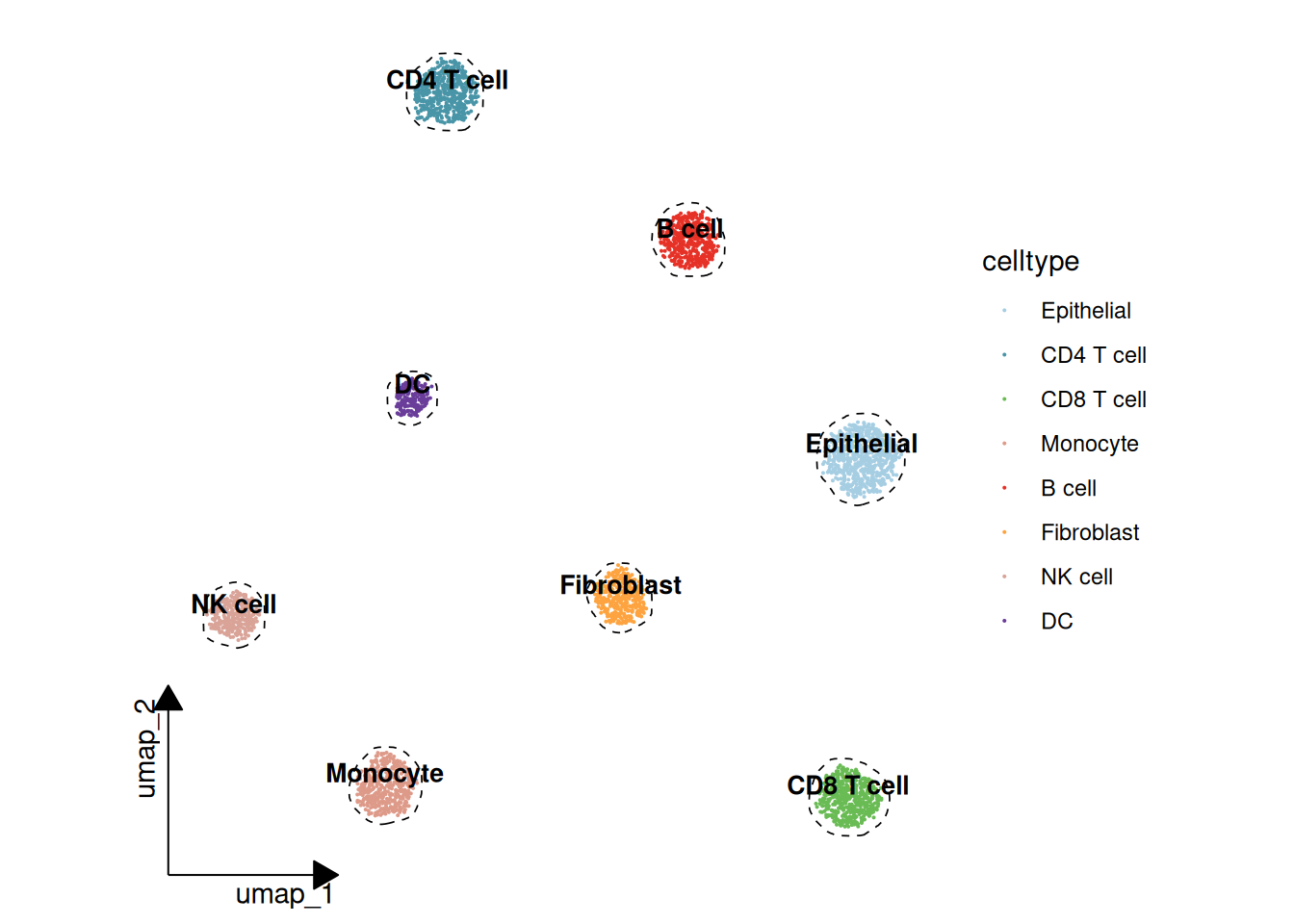
注记
generateMask() 在 mascarade 0.2.0 版本更改了接口:minDensity/kernel/type 被弃用,改为自动带宽选择(默认 smoothSigma = NA),cluster 参数更名为 clusters——旧示例中的 cluster = 只是靠 R 的部分参数匹配侥幸可用。上面的代码块使用当前 API。
附加:三维核密度景观图
网红”三维核密度景观图”在共享的 UMAP 平面上为每种细胞类型构建一层密度”地形”——高度为核密度、配色为 白→蓝→红 的三维山景。每层地形是一个 plotly surface,共享同一色阶并裁剪到密度可忽略区域之外;标签悬浮在山峰上方。这是一个可交互的组件——可拖拽旋转查看;如需静态导出,安装 Python 的 kaleido 包后调用 plotly::save_image()。
n_grid <- 80
lims <- c(range(df$umap_1), range(df$umap_2))
kd_list <- lapply(split(df, df$celltype), function(d) {
  MASS::kde2d(d$umap_1, d$umap_2, n = n_grid, lims = lims)
})
zmax <- max(sapply(kd_list, function(k) max(k$z))) * 1.05

# 所有地形共享 白->蓝->红 的密度色阶
terrain <- list(c(0, "#f7f6f1"), c(0.35, "#9fc4dd"), c(0.65, "#33506e"), c(1, "#b2182b"))
fig <- plot_ly()
for (ct in levels(df$celltype)) {
  k <- kd_list[[ct]]
  # 把网格裁剪到该地形不可忽略的区域
  keep_x <- which(apply(k$z, 1, max) > zmax * 0.01)
  keep_y <- which(apply(k$z, 2, max) > zmax * 0.01)
  pad <- 3
  keep_x <- seq(max(1, min(keep_x) - pad), min(nrow(k$z), max(keep_x) + pad))
  keep_y <- seq(max(1, min(keep_y) - pad), min(ncol(k$z), max(keep_y) + pad))
  fig <- add_surface(fig, x = k$x[keep_x], y = k$y[keep_y],
                     z = k$z[keep_x, keep_y, drop = FALSE],
                     colorscale = terrain, cmin = 0, cmax = zmax,
                     showscale = (ct == levels(df$celltype)[1]),
                     colorbar = list(title = list(text = "Density"), x = 1.02, len = 0.7),
                     opacity = 0.95, name = ct,
                     hovertemplate = paste0(ct, "<br>UMAP_1: %{x:.2f}<br>UMAP_2: %{y:.2f}<br>Density: %{z:.4f}<extra></extra>"))
}

# 亚群标签悬浮在各自山峰上方
centroids <- df %>%
  group_by(celltype) %>%
  summarise(x = median(umap_1), y = median(umap_2), .groups = "drop")
kd_at <- function(ct, xx, yy) {
  k <- kd_list[[ct]]
  k$z[cbind(findInterval(xx, k$x), findInterval(yy, k$y))]
}
centroids$z <- mapply(kd_at, centroids$celltype, centroids$x, centroids$y) + zmax * 0.12
fig <- add_text(fig, data = centroids, x = ~x, y = ~y, z = ~z, text = ~celltype,
                textfont = list(color = "black", size = 12), showlegend = FALSE,
                hoverinfo = "skip")

no_bg <- list(showbackground = FALSE, zeroline = FALSE, showline = FALSE)
fig <- fig %>% layout(
  scene = list(xaxis = c(list(title = "UMAP_1"), no_bg),
               yaxis = c(list(title = "UMAP_2"), no_bg),
               zaxis = c(list(title = "Density"), no_bg))
)
fig
方案选择建议
| 方案 | 风格 | 适用场景 |
|---|---|---|
| tidydr | 箭头坐标轴、无网格 | 大多数 SCI 期刊正文主图 |
| scRNAtoolVis | 角轴 + 云朵轮廓 | 高分原创研究配图 |
| ggunchull | 虚线轮廓 + 加粗标签 | 综述文章与精修主图 |
| mascarade | 密度贴合的精细轮廓 | 高密度、大型单细胞图谱 |
参考文献
[1] Hao Y, Hao S, Andersen-Nissen E, et al. Integrated analysis of multimodal single-cell data. Cell. 2021;184(13):3573–3587. https://doi.org/10.1016/j.cell.2021.04.048(Seurat)
[2] Yu G. tidydr: an R package to create dimension reduction plots with styled axes. https://cran.r-project.org/package=tidydr
[3] Zhang J. scRNAtoolVis: Making single-cell RNA-seq visualization easier and better. https://github.com/junjunlab/scRNAtoolVis
[4] Lyu Y. ggunchull: A ggplot extension for drawing smooth non-convex circles around a set of points. https://github.com/sajuukLyu/ggunchull
[5] Sergushichev A. mascarade: Generating Cluster Masks for Single-Cell Dimensional Reduction Plots. https://github.com/alserglab/mascarade
[6] 罗小黑. AI分析单细胞+空转:umap大合集(三). 微信公众号文章. https://mp.weixin.qq.com/s/ItyeGIJRhSFEaibw9KUbgw