using CairoMakie
using DataFrames
using Statistics
using Random箱线图(Julia)
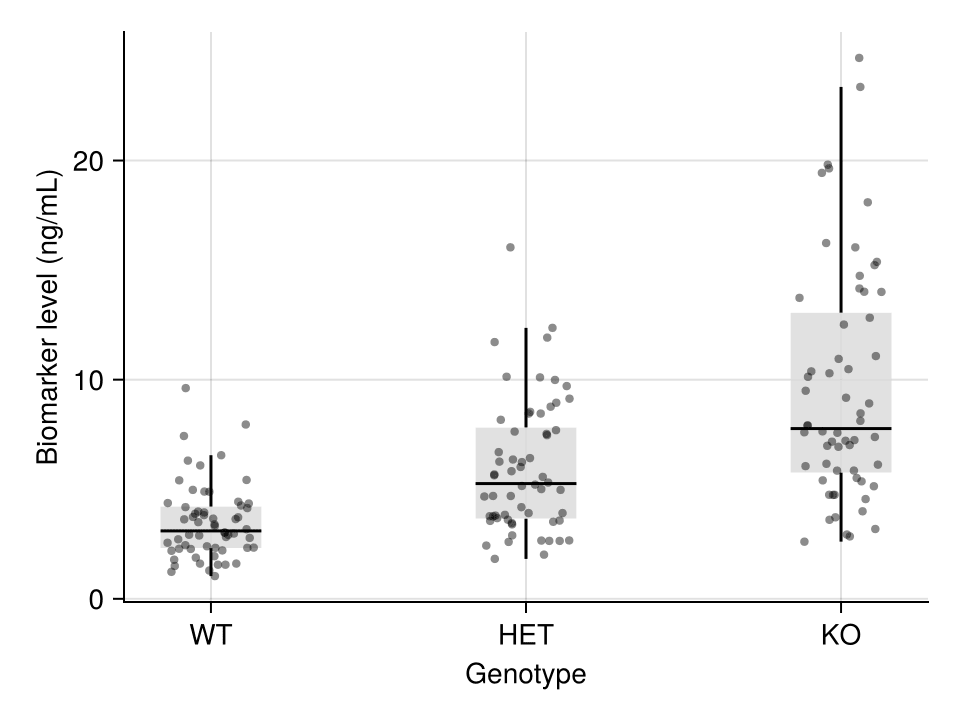
箱线图通过中位数、四分位数和离群值概括数值型变量的分布。在生物医学研究中,箱线图是比较不同基因型、批次或处理组之间生物标志物水平的标准紧凑展示方式。CairoMakie 提供箱线图与抖动散点叠加,支持出版界推荐的「展示原始数据」风格。
示例
环境配置
- 系统要求:跨平台(Linux/MacOS/Windows)
- 编程语言:Julia
- 依赖包:
CairoMakie、DataFrames、Statistics
数据准备
我们模拟三种基因型(WT、HET、KO)的血清生物标志物检测数据,每组 60 个重复,并在 KO 组注入若干极端值用于演示离群值展示。
Random.seed!(7)

genotypes = ["WT", "HET", "KO"]
n_per_genotype = 60
values = vcat(
    exp.(1.2 .+ 0.45 .* randn(n_per_genotype)),
    exp.(1.55 .+ 0.45 .* randn(n_per_genotype)),
    exp.(1.95 .+ 0.55 .* randn(n_per_genotype)),
)
values[end-2:end] .*= 3.5            # KO 组的极端值
df = DataFrame(Genotype = repeat(genotypes, inner = n_per_genotype),
               Biomarker = values)
180×2 DataFrame
155 rows omitted
| Row | Genotype | Biomarker |
|---|---|---|
| String | Float64 | |
| 1 | WT | 1.87811 |
| 2 | WT | 4.25669 |
| 3 | WT | 3.4972 |
| 4 | WT | 3.62601 |
| 5 | WT | 1.9446 |
| 6 | WT | 4.89356 |
| 7 | WT | 9.61532 |
| 8 | WT | 2.78055 |
| 9 | WT | 1.60657 |
| 10 | WT | 1.60722 |
| 11 | WT | 3.65945 |
| 12 | WT | 1.78551 |
| 13 | WT | 2.97571 |
| ⋮ | ⋮ | ⋮ |
| 169 | KO | 6.93621 |
| 170 | KO | 5.51431 |
| 171 | KO | 7.59819 |
| 172 | KO | 3.71913 |
| 173 | KO | 7.91828 |
| 174 | KO | 8.12042 |
| 175 | KO | 7.1711 |
| 176 | KO | 24.6837 |
| 177 | KO | 7.21306 |
| 178 | KO | 14.0128 |
| 179 | KO | 15.2286 |
| 180 | KO | 18.0943 |
可视化
基础箱线图
箱体跨越四分位距(IQR),中线为中位数,须线延伸至 1.5 × IQR;超出该范围的点以离群值绘制。
fig = Figure(size = (440, 340))
ax = Axis(fig[1, 1], xlabel = "Genotype", ylabel = "Biomarker level (ng/mL)")
boxplot!(ax, fill(1, n_per_genotype), df.Biomarker[df.Genotype .== "WT"]; width = 0.5, color = :slateblue)
boxplot!(ax, fill(2, n_per_genotype), df.Biomarker[df.Genotype .== "HET"]; width = 0.5, color = :slateblue)
boxplot!(ax, fill(3, n_per_genotype), df.Biomarker[df.Genotype .== "KO"]; width = 0.5, color = :slateblue)
ax.xticks = (1:3, genotypes)
hidespines!(ax, :t, :r)
fig
箱线图叠加散点
由于箱体会隐藏原始数据,叠加单个观测值是出版界推荐的风格:浅色箱体配以随机 x 抖动的 scatter! 散点层。
fig = Figure(size = (440, 340))
ax = Axis(fig[1, 1], xlabel = "Genotype", ylabel = "Biomarker level (ng/mL)")
for (i, g) in enumerate(genotypes)
    v = df.Biomarker[df.Genotype .== g]
    boxplot!(ax, fill(i, length(v)), v; width = 0.4,
             color = (:gray85, 0.8), show_outliers = false)
    jitter = i .+ 0.28 .* (rand(length(v)) .- 0.5)
    scatter!(ax, jitter, v; color = (:black, 0.45), markersize = 6)
end
ax.xticks = (1:3, genotypes)
hidespines!(ax, :t, :r)
fig
横向箱线图
类别标签较长时,横向布局(orientation = :horizontal)更易读。
fig = Figure(size = (500, 300))
ax = Axis(fig[1, 1], xlabel = "Biomarker level (ng/mL)", ylabel = "Genotype")
for (i, g) in enumerate(genotypes)
    v = df.Biomarker[df.Genotype .== g]
    boxplot!(ax, fill(i, length(v)), v; orientation = :horizontal,
             width = 0.5, color = :olivedrab)
end
ax.yticks = (1:3, genotypes)
hidespines!(ax, :t, :r)
fig
参考文献
- Makie development team. Makie.jl documentation — boxplot. https://docs.makie.org/stable/reference/plots/boxplot
- Danisch, S., & Krumbiegel, J. (2021). Makie.jl: Flexible high-performance data visualization for Julia. Journal of Open Source Software, 6(65), 3349.
- Spitzer, M., Wildenhain, J., Rappsilber, J., & Tyers, M. (2014). BoxPlotR: a web tool for generation of box plots. Nature Methods, 11(2), 121-122.