# 下载 micromamba(单个二进制文件,无需 sudo);macOS 上把 linux-64
# 换成 osx-arm64(Apple Silicon)或 osx-64
curl -Ls https://micro.mamba.pm/api/micromamba/linux-64/latest | tar -xvj bin/micromamba
# 按规格创建环境(预编译二进制)
./bin/micromamba create -n plot1cell -f plot1cell-env.yml -y
# 补装 GitHub-only 包。请用 git clone + R CMD INSTALL,而不是
# remotes::install_github():后者在 macOS 的 conda R 中可能崩溃
# (curl 库冲突)。把 R_LIBS_USER 固定到环境库,避免与系统 R
# 用户库互相污染。
for repo in TheHumphreysLab/plot1cell chris-mcginnis-ucsf/DoubletFinder mojaveazure/loomR; do
git clone --depth 1 "https://github.com/$repo.git"
done
./bin/micromamba run -n plot1cell bash -c '
export R_LIBS_USER=$CONDA_PREFIX/lib/R/library
Rscript -e "options(repos = c(CRAN = \"https://cloud.r-project.org\"));
if (!requireNamespace(\"BiocManager\", quietly = TRUE)) install.packages(\"BiocManager\");
BiocManager::install(c(\"simplifyEnrichment\"), update = FALSE, ask = FALSE)"
R CMD INSTALL --no-multiarch plot1cell DoubletFinder loomR
'
# 之后都按同样方式在环境内运行 R
./bin/micromamba run -n plot1cell bash -c 'export R_LIBS_USER=$CONDA_PREFIX/lib/R/library; Rscript -e "library(plot1cell)"'单细胞 UMAP 圈中圈图
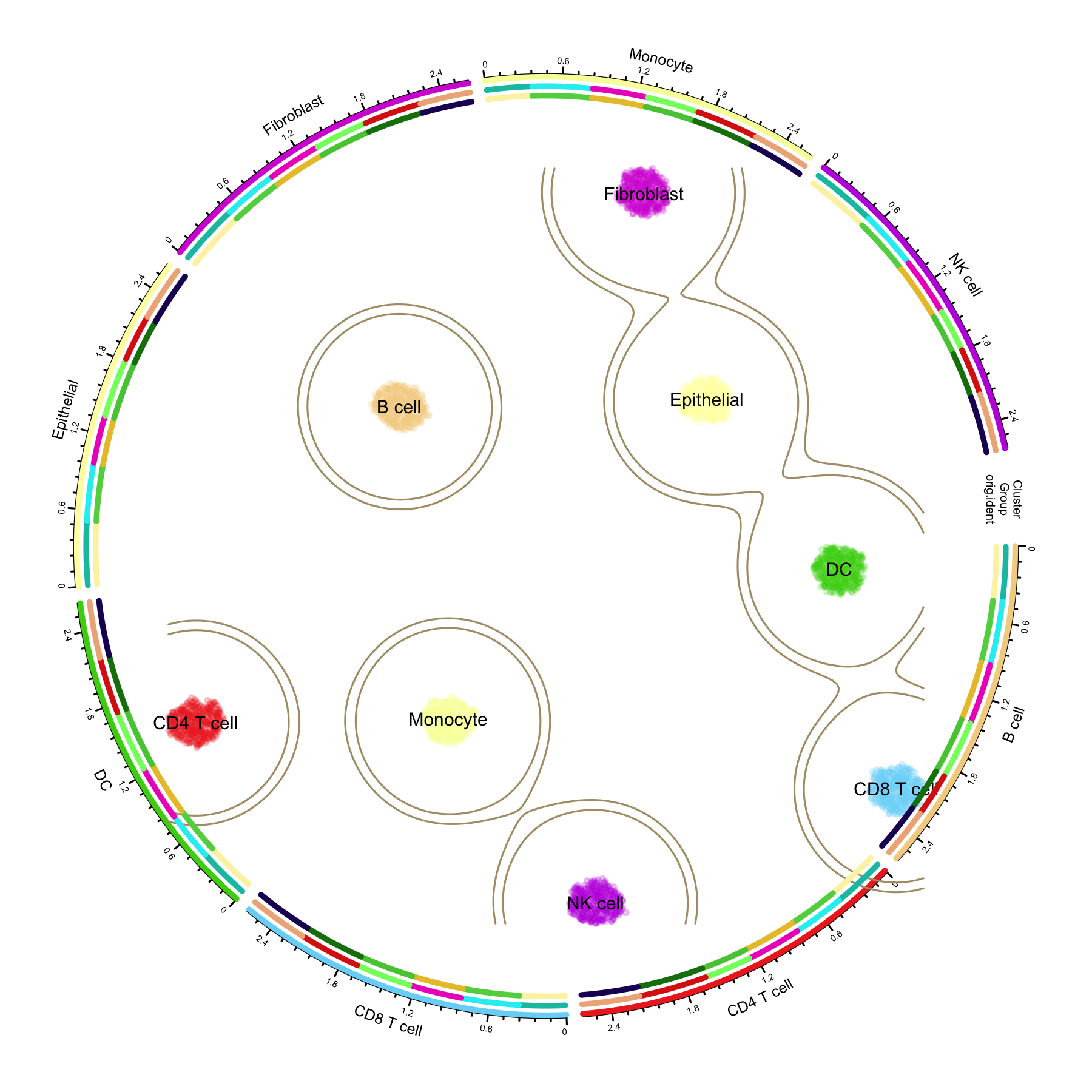
单细胞 UMAP 圈中圈图将单细胞 UMAP 降维图置于图形中央,四周包裹一圈又一圈的环形注释轨道——最内圈对应细胞类型,外圈依次映射分组条件和原始样本。外圈的扇区顺序与中心 UMAP 上的聚类位置一一对应,读者可以在一张图里同时读出”连续的细胞图谱平面”和”离散的层次注释信息”。
这一设计因 Linnarsson 实验室发表在 Nature 上的小鼠大脑发育分子架构论文而广为人知:中心 t-SNE 外围绕以放射状层次结构和多个色环注释(cluster 分类、脑区、年龄、细胞周期等)。plot1cell R 包将这种风格封装成了面向 Seurat 对象的少量函数调用,常用于高分单细胞图谱论文配图。
本教程使用 plot1cell 绘制经典的三环布局:中心 UMAP 按细胞类型着色并绘制密度轮廓线,Cluster 环带每个细胞类型的扇区与坐标轴,外圈轨道将分组与样本信息映射到每个细胞类型上。
注记
如需在本地复现本教程:所有代码块均设为 eval: false,因为 plot1cell 需从 GitHub 安装且会拉取多个重依赖(包括体积庞大的人类基因组注释包),不属于 Bizard 的构建环境。上方渲染图正是用这份代码在模拟数据上运行的产物;将各代码块复制到装有 plot1cell 的 R 会话中即可复现。下一节给出用 micromamba 快速、可复现地搭建该环境的方法。
环境配置
系统要求:跨平台(Linux/MacOS/Windows)
编程语言:R
依赖包:
plot1cell、Seurat、circlize、randomcoloR、dplyr、ggplot2
用 micromamba 快速搭建环境(推荐)
plot1cell 声明了较多 Imports,标准 install.packages() 路线需要全部从源码编译——仅人类基因注释包 EnsDb.Hsapiens.v86 就是一个约 2 GB 的大工程。micromamba(单文件、无需 sudo 的包管理器)可以直接用预编译的 conda 二进制解决:下面的配方已在干净机器上端到端验证——环境(R 4.5、Seurat、circlize 以及真实的 EnsDb.Hsapiens.v86)一次事务装完,补上三个 GitHub-only 包后,本教程的完整圈图流程无需任何源码编译即可运行。
将以下内容保存为 plot1cell-env.yml:
name: plot1cell
channels:
  - conda-forge
  - bioconda
dependencies:
  - r-base>=4.3
  - r-seurat
  - r-circlize
  - r-randomcoloR
  - r-ggplot2
  - r-dplyr
  - r-mass
  - r-scales
  - r-data.table
  - r-matrixstats
  - r-cowplot
  - r-plotly
  - r-progress
  - r-reshape2
  - r-ggbeeswarm
  - r-ggh4x
  - r-fields
  - r-itertools
  - r-hdf5r
  - r-complexupset
  - bioconductor-biomart
  - bioconductor-geoquery
  - r-wordcloud
  - bioconductor-ensdb.hsapiens.v86
  - bioconductor-genomeinfodb
  - bioconductor-genomicranges
  - r-remotes
  - r-rmarkdown
然后创建环境,并补装四个 conda 提供不了的组件:三个仅发布在 GitHub 的包(plot1cell、DoubletFinder、loomR)与轻量级的 Bioconductor 包 simplifyEnrichment(其 conda 构建目前存在无法满足的版本约束):
不使用 conda 的话,下面的纯 R 路线依然可用——只是需要从源码编译全部依赖。
# 安装 CRAN 依赖
if (!requireNamespace("Seurat", quietly = TRUE)) install.packages("Seurat")
if (!requireNamespace("circlize", quietly = TRUE)) install.packages("circlize")
if (!requireNamespace("randomcoloR", quietly = TRUE)) install.packages("randomcoloR")
if (!requireNamespace("dplyr", quietly = TRUE)) install.packages("dplyr")
if (!requireNamespace("ggplot2", quietly = TRUE)) install.packages("ggplot2")

# 从 GitHub 安装 plot1cell。
# 注意:plot1cell 声明了较多 Imports(DoubletFinder、loomR、EnsDb.Hsapiens.v86、
# simplifyEnrichment 等)。下面的圈图流程只用其 circlize 系列函数,但标准安装会
# 拉取全部依赖——请为 EnsDb.Hsapiens.v86(约 2 GB)预留额外的时间和磁盘空间,
# 或者使用上面的 micromamba 方案。
if (!requireNamespace("remotes", quietly = TRUE)) install.packages("remotes")
remotes::install_github("TheHumphreysLab/plot1cell")

# 载入包
library(plot1cell)
library(Seurat)
library(circlize)
library(randomcoloR)
library(dplyr)
library(ggplot2)
示例
数据准备
参考数据:小鼠急性肾损伤图谱
plot1cell 提供了自动下载函数,用于获取小鼠缺血再灌注损伤(IRI)单细胞数据集(GSE139107,发表于 PNAS 2020《Cell profiling of mouse acute kidney injury reveals conserved cellular responses to injury》),用 Seurat RPCA 整合六个时间点样本,并将结果缓存为 RDS 文件(超过 12 万个细胞,26 种细胞类型):
library(plot1cell)
iri.integrated <- Install.example()

dir.create("data", showWarnings = FALSE)
saveRDS(iri.integrated, file = "data/iri.integrated.rds")
模拟 PBMC 风格数据(用于示例图)
为了让教程自包含,示例图取自一个模拟的 PBMC 风格数据集:8 种细胞类型共 3,360 个细胞(含 marker 基因块结构)、6 个样本分组和 3 种组织来源。如果你已有整合好的 Seurat 对象,跳过这一块,直接读取自己的 rds 文件即可。
library(Seurat)
set.seed(2026)

n_per_type <- 420
cell_types <- c("CD4 T cell", "CD8 T cell", "NK cell", "B cell",
                "Monocyte", "DC", "Fibroblast", "Epithelial")
n_type <- length(cell_types)
n_cell <- n_per_type * n_type
n_gene <- 1200
markers_per <- 40

gene_names <- paste0("Gene", 1:n_gene)
counts <- matrix(rnbinom(n_cell * n_gene, size = 4, prob = 0.25), n_gene, n_cell)
counts <- matrix(as.integer(pmin(counts, 30)), n_gene, n_cell)

# 为每种细胞类型添加 marker 基因块
cell_idx <- rep(seq_len(n_type), each = n_per_type)
for (i in seq_len(n_type)) {
  block <- ((i - 1) * markers_per + 1):(i * markers_per)
  boost <- rnbinom(length(block) * sum(cell_idx == i), size = 8, prob = 0.2)
  counts[block, cell_idx == i] <- pmin(counts[block, cell_idx == i] + as.integer(boost), 120)
}
rownames(counts) <- gene_names
colnames(counts) <- paste0("Cell_", 1:n_cell)

# 样本级元数据:6 个样本对应 6 个损伤时间点分组
groups <- c("Control", "4hours", "12hours", "2days", "14days", "6weeks")
site_lv <- c("Tumor", "Normal", "Margin")
orig.ident <- factor(sample(paste0("Sample_", 1:6), n_cell, TRUE))
lut <- setNames(rep(groups, length.out = 6), levels(orig.ident))
Group <- factor(lut[as.character(orig.ident)], levels = groups)
site <- factor(sample(site_lv, n_cell, TRUE), levels = site_lv)
celltype <- factor(rep(cell_types, each = n_per_type), levels = cell_types)

meta <- data.frame(
  celltype = celltype, Group = Group, orig.ident = orig.ident, site = site,
  row.names = colnames(counts)
)

sce <- CreateSeuratObject(counts = counts, meta.data = meta)
sce <- NormalizeData(sce, verbose = FALSE)
sce <- FindVariableFeatures(sce, nfeatures = 800, verbose = FALSE)
sce <- ScaleData(sce, verbose = FALSE)
sce <- RunPCA(sce, npcs = 20, verbose = FALSE)
sce <- RunUMAP(sce, dims = 1:15, verbose = FALSE)
Idents(sce) <- "celltype"

saveRDS(sce, "data/sce_sim.rds")
圈中圈图的数据要求
Seurat 对象的三个属性决定图形:
-
细胞身份(
Idents)同时决定中心 UMAP 的配色和环形布局的扇区。请为身份因子设置有意义的水平顺序。 -
身份因子水平决定扇区数量、间隙和颜色数目——
prepare_circlize_data()直接读取levels(seu_obj)。 -
外圈轨道对应的元数据列(
Group、orig.ident等)必须存在于seu_obj@meta.data中;建议使用因子,保证轨道分段颜色映射一致。
iri.integrated <- readRDS("data/iri.integrated.rds")
# Group 需要转换为具有明确水平顺序的因子
iri.integrated@meta.data$Group <- factor(
  iri.integrated@meta.data$Group,
  levels = c("Control", "4hours", "12hours", "2days", "14days", "6weeks")
)

dim(iri.integrated)
DefaultAssay(iri.integrated)
names(iri.integrated@reductions)
levels(iri.integrated)
levels(iri.integrated$Group)
colnames(iri.integrated@meta.data)
可视化
图形结构
- 中心:UMAP,每个点代表一个细胞,按细胞类型着色,KDE 密度轮廓线勾勒主要细胞群。
-
第 1 环(
Cluster):每个细胞类型一个扇区的环形轨道,细胞按极坐标归入所属扇区,并带有各扇区坐标轴。 -
外圈轨道(
add_track):在第 1 环之上叠加的注释环(此处为Group与orig.ident),每个细胞类型的弧段被进一步细分为条件/样本分段。
构建圈图数据并绘制三环图
library(plot1cell)
sce <- readRDS("data/sce_sim.rds")

# 1. 转换 Seurat 对象:提取元数据 + UMAP 坐标,
#    并把每个细胞映射到圆环上的极坐标位置
circ_data <- prepare_circlize_data(sce, scale = 0.8)

# 2. 配色。固定随机种子保证随机调色板可复现。
set.seed(1234)
cluster_colors <- rand_color(length(levels(sce)))
group_colors <- rand_color(length(names(table(sce$Group))))
rep_colors <- rand_color(length(names(table(sce$orig.ident))))

# 3. 输出 6 英寸正方形、300 dpi 的 PNG
png(filename = "circlize_plot.png", width = 6, height = 6, units = "in", res = 300)

# 中心 UMAP:散点 + 密度轮廓线 + 细胞类型标签
plot_circlize(
  circ_data,
  do.label = TRUE,
  pt.size = 0.4,
  col.use = cluster_colors,
  bg.color = "white",
  kde2d.n = 200,
  repel = TRUE,
  label.cex = 0.6
)

# 第 2 环:损伤时间点分组轨道;第 3 环:样本轨道
add_track(circ_data, group = "Group", colors = group_colors, track_num = 2)
add_track(circ_data, group = "orig.ident", colors = rep_colors, track_num = 3)

dev.off()
值得调整的关键参数:
| 参数 | 所在函数 | 作用 |
|---|---|---|
scale |
prepare_circlize_data() |
缩放中心 UMAP 相对圆环的大小(0.6–0.9 较合适) |
pt.size |
plot_circlize() |
中心 UMAP 点大小;超过 5 万细胞时建议调小 |
kde2d.n |
plot_circlize() |
密度轮廓线网格分辨率;大型图谱可调高 |
contour.levels |
plot_circlize() |
传给 contour() 的绝对密度阈值(默认 c(0.2, 0.3);取值范围 0–1) |
bg.color |
plot_circlize() |
画布颜色;"#F9F2E4" 可复现原文的暖纸色背景 |
repel、label.cex
|
plot_circlize() |
细胞类型标签避让与字号 |
track_lwd |
add_track() |
注释环分段的线宽 |
参考文献
[1] Wu H. plot1cell: A package for single cell data visualization. https://github.com/TheHumphreysLab/plot1cell
[2] La Manno G, Siletti K, Furlan A, et al. Molecular architecture of the developing mouse brain. Nature. 2021;596(7870):92–96. https://doi.org/10.1038/s41586-021-03775-x(圈中圈设计的来源)
[3] Kirita Y, Wu H, Uchimura K, Wilson PC, Humphreys BD. Cell profiling of mouse acute kidney injury reveals conserved cellular responses to injury. PNAS. 2020;117(27):15874–15883. https://doi.org/10.1073/pnas.2005477117(GSE139107 示例数据)
[4] 新叶910. plot1cell:绘制不一样的单细胞umap圈中圈. 微信公众号文章. https://mp.weixin.qq.com/s/IxwniDMSju02R2wGMC9EvQ