# Installing necessary packages
pkgs <- c("tidyverse", "colorspace", "RColorBrewer", "viridisLite",
          "paletteer", "ggsci", "patchwork")
for (pkg in pkgs) {
  if (!requireNamespace(pkg, quietly = TRUE)) {
    install.packages(pkg, repos = "https://cloud.r-project.org")
  }
}

# Load packages
library(tidyverse)
library(colorspace)
library(RColorBrewer)
library(viridisLite)
library(ggsci)
library(patchwork)

# The standard 8-color Okabe-Ito palette (Okabe & Ito 2008; black variant popularized by Wong 2011)
okabe <- c("#000000", "#E69F00", "#56B4E9", "#009E73",
"#F0E442", "#0072B2", "#D55E00", "#CC79A7")配色指南
颜色是科学图形中使用最多、也被误用最多的编码通道。本指南是一门完整的三部分课程:第一部分建立词汇(颜色是什么、调色板能做的三类任务);第二部分深入科学(感知、可及性、失败模式)并逐一调查 R/Python 生态中的相关包;第三部分把一切应用到真实场景——分组比较、热图、生存曲线、基因组轨道,以及拥有几十到几百个类别的单细胞数据这一极端情形。每一张图都由所示代码生成,每一种调色板都以十六进制码表述——这是 R、Python 与 Illustrator 共享的可移植载体。(印刷生产是十六进制码唯一不能完全说了算的环节,见第二部分的从屏幕到印刷。)
注记
阅读指南。 时间有限:读第一部分,再读文末的检查清单。若要为实验室或论文制定一套新的图形标准:请仔细阅读第二部分,并遵循第三部分的工作流示意图。为保持代码与英文版逐行一致,图中的标题、坐标轴与图例保留英文;正文、图注与替代文本为中文。
Setup
系统要求:跨平台(Linux/macOS/Windows)
编程语言:R(第二部分附 Python 对应物与 R↔︎Python 映射表)
依赖包:
tidyverse;colorspace;RColorBrewer;viridisLite;paletteer;ggsci;patchwork
第一部分 · 入门
Data Preparation · 第一部分 — 颜色即数据
屏幕上的每一种颜色都是三个通道强度的组合——红、绿、蓝各取 0–255——写作六位十六进制字符串。#3A86FF 表示 R = 58、G = 134、B = 255。十六进制码是通用语言:R、Python、Inkscape、Illustrator 以及大多数期刊的生产系统都认识同一串字符。
hex <- "#3A86FF"
channels <- strtoi(substring(hex, c(2, 4, 6), c(3, 5, 7)), 16)

tibble(value = channels, x = 1:3,
       color = c("#E63946", "#2A9D3F", "#3A86FF")) |>
  ggplot() +
  annotate("text", x = 2, y = 300, label = hex, size = 9, family = "mono", fontface = "bold") +
  annotate("text", x = 2, y = 278, label = "= #RRGGBB  (0-255 per channel)", size = 3.6, colour = "grey30") +
  geom_col(aes(x = x, y = value, fill = color), width = .62) +
  geom_text(aes(x = x, y = value + 12, label = value), fontface = "bold", size = 4) +
  scale_fill_identity() +
  scale_x_continuous(breaks = 1:3, labels = c("R (red)", "G (green)", "B (blue)"), limits = c(.4, 3.6)) +
  scale_y_continuous(limits = c(0, 322)) +
  labs(x = NULL, y = "channel value (0-255)") +
  theme_minimal(base_size = 11) + theme(panel.grid = element_blank())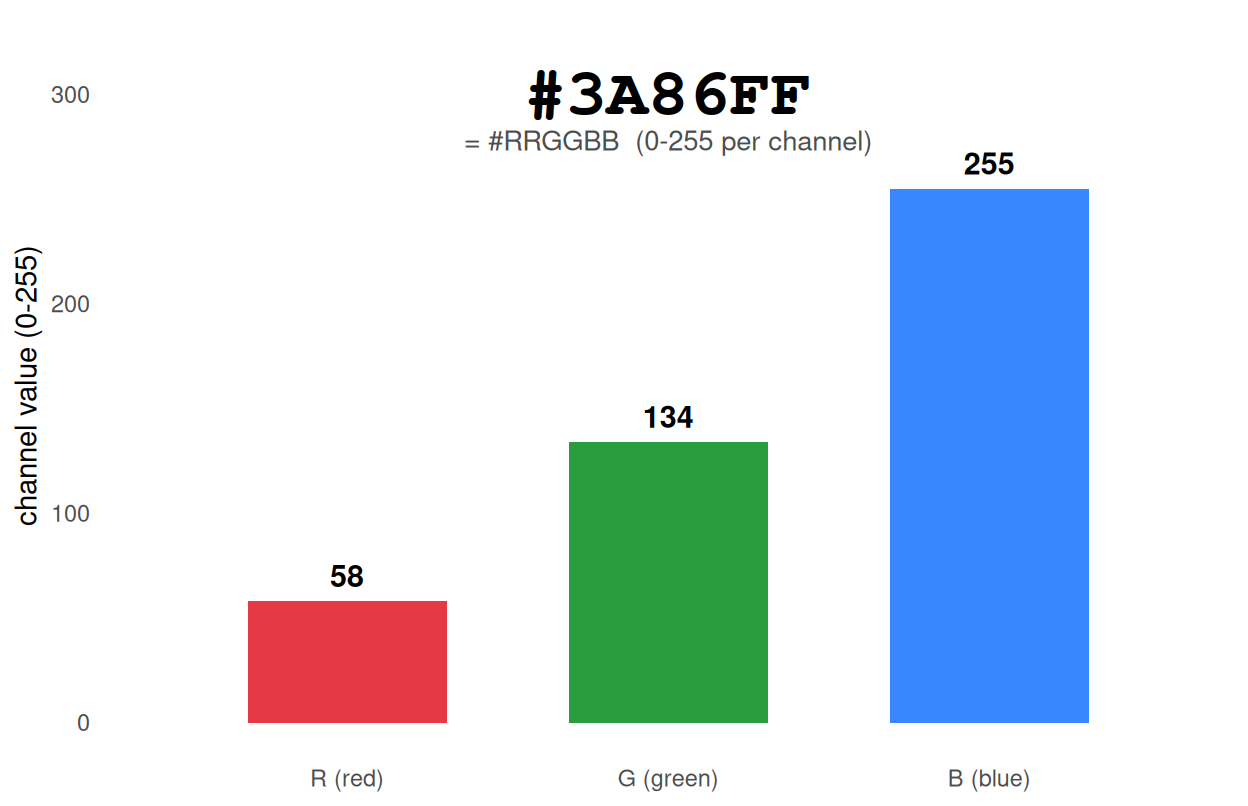
RGB 是设备描述,而非感知描述:RGB 中的相等数值步长并不等于感知上的相等颜色步长。这种失配正是大多数糟糕配色的根源——也是现代调色板改在感知空间(HCL——极坐标 CIELUV——、CIELAB,以及更新的 OKLab)中设计的原因,第二部分将展开讨论。
Example · 第一部分 — 三种任务,三种调色板
一个调色板只回答三类问题中的一个。决定是哪一类,是每次设计中的第一个岔路口:
| 任务 | 类型 | 编码内容 | 典型例子 |
|---|---|---|---|
| 区分类别 | 定性 | 无序标签 | 类群、治疗组、组织 |
| 展示量级 | 顺序 | 从低到高的有序量 | 表达量、密度、-log10(P) |
| 展示偏差 | 发散 | 围绕中心的带符号值 | z 分数、log 变化倍数、相关系数 |
strip <- function(colors, label) tibble(col = colors, x = seq_along(colors), pal = label)
bind_rows(
  strip(okabe,                   "Qualitative - Okabe-Ito (8)"),
  strip(brewer.pal(11, "RdBu"),  "Diverging - ColorBrewer RdBu (11)"),
  strip(viridis(9),               "Sequential - viridis (9)")
) |>
  mutate(pal = factor(pal, levels = c("Qualitative - Okabe-Ito (8)",
                                      "Diverging - ColorBrewer RdBu (11)",
                                      "Sequential - viridis (9)"))) |>
  ggplot(aes(x, 1, fill = col)) +
  geom_tile(width = 1, height = .82, colour = "white", linewidth = .3) +
  facet_wrap(~pal, ncol = 1, strip.position = "left") +
  scale_fill_identity() + scale_y_continuous(expand = c(0, 0)) +
  theme_minimal(base_size = 11) +
  theme(axis.text = element_blank(), axis.title = element_blank(),
        panel.grid = element_blank(),
        strip.text.y.left = element_text(angle = 0, hjust = 0, size = 9.5),
        strip.background = element_blank(), panel.spacing.y = unit(4, "mm"))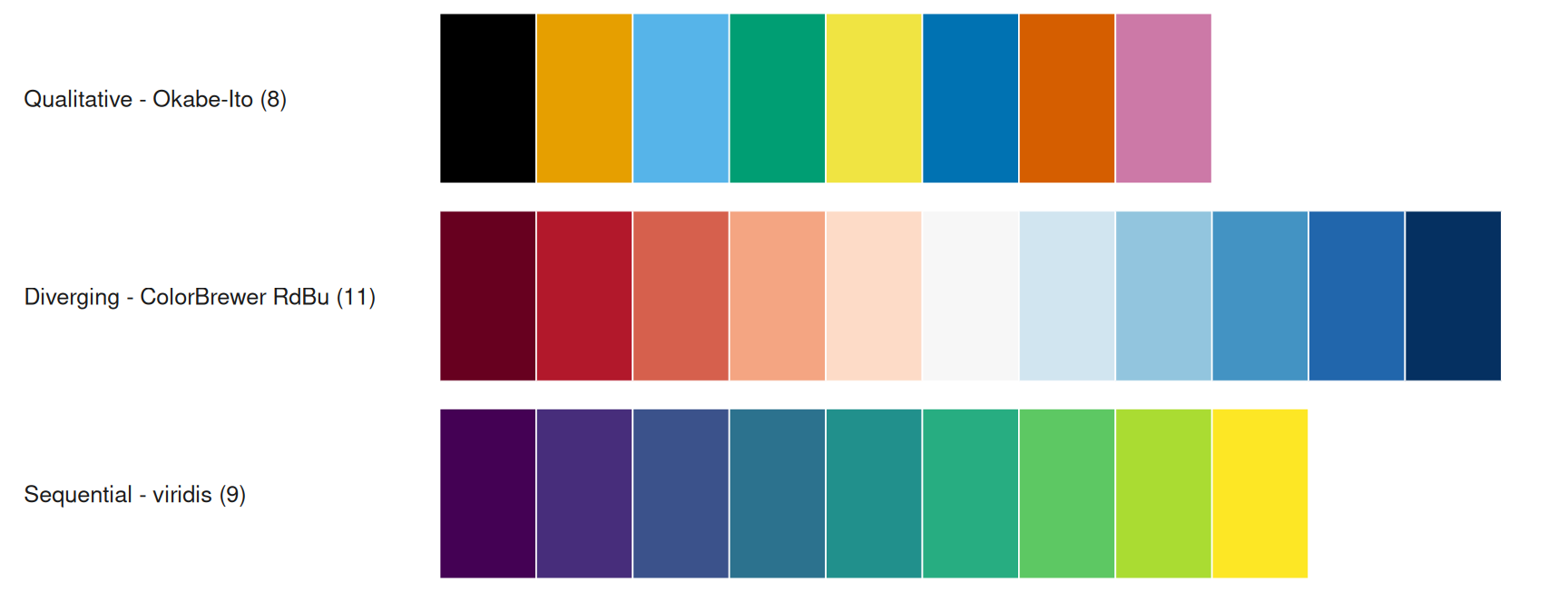
还有一个容易忽略的情形:有序类别(剂量层级、风险分层)属于类别数据,但并非无序。请使用有序渐变,或使用图例顺序与类别顺序一致的定性调色板,并在全文保持该顺序。
下图把整套分类体系浓缩成一页决策树;第二部分解释每个分支为什么存在,第三部分逐一走通各个场景。
flowchart TD
    A[颜色要编码什么?] --> B{无序类别?}
    accTitle: 调色板类型决策树
    accDescr: 按无序类别、组数与是否带符号选择定性、顺序或发散调色板,并在导出前做色盲与灰度检查。
    B -- 是 --> C{组数?}
    C -- "≤ 12" --> D["经色盲验证的定性集合<br/>Okabe-Ito / Set2(≤ 8)<br/>Paired(≤ 12)"]
    C -- "期刊风格" --> D2["期刊配色(审美选择,<br/>非色盲验证):ggsci / Set3——保留直接标注"]
    C -- "13–50" --> E["亮度层级<br/>10 色相 × 5 亮度"]
    C -- "> 50 或需聚焦" --> F["高亮:少数上色、<br/>其余置灰;必要时分面"]
    B -- 否 --> G{围绕有意义中心<br/>的带符号值?}
    G -- 是 --> H["发散渐变,<br/>上下限围绕中心对称"]
    G -- 否 --> I["顺序渐变:<br/>viridis / cividis / scico"]
    D --> J[检查:色盲模拟 + 灰度]
    D2 --> J
    E --> J
    F --> J
    H --> J
    I --> J
    J --> K[全文一致地应用;导出十六进制码]
三行代码的上手示例
一对最小但正确的图形——一个定性、一个顺序——使用同一份数据。你一旦设置 fill,就在选择一种调色板类型;这里把这个选择显式写出来:
set.seed(7)
quick <- tibble(group = rep(c("A", "B", "C", "D"), each = 20),
                value = c(rnorm(20, 5, 1), rnorm(20, 6.5, 1.2),
                          rnorm(20, 4.4, .8), rnorm(20, 7, 1.1)))
p_q1 <- ggplot(quick, aes(group, value, fill = group)) +
  geom_boxplot(width = .6, outlier.shape = NA) +
  scale_fill_brewer(palette = "Set2") +
  labs(title = "categorical: fill = group", x = NULL, y = "value") +
  theme_minimal(base_size = 11) + theme(legend.position = "none", panel.grid = element_blank())
p_q2 <- ggplot(quick, aes(group, value, fill = after_stat(middle))) +
  geom_boxplot(width = .6, outlier.shape = NA) +
  scale_fill_viridis_c(name = "median value") +
  labs(title = "continuous: fill = median", x = NULL, y = NULL) +
  theme_minimal(base_size = 11) + theme(axis.text.y = element_blank(), panel.grid = element_blank())
p_q1 + p_q2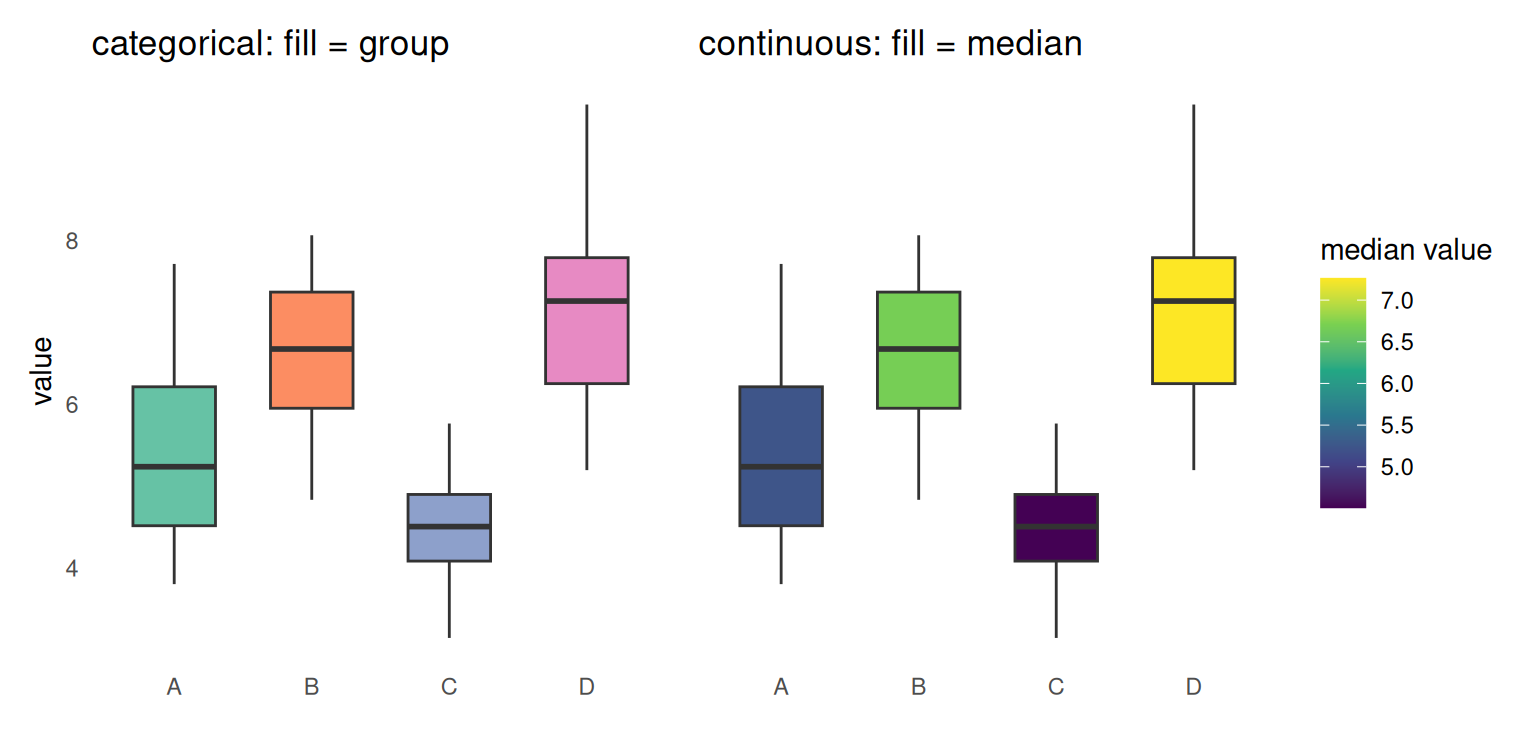
第二部分 · 深入
Going deeper · 第二部分 — 感知:HCL 与 OKLab
调色板应在感知空间中调整色相(哪种颜色)与亮度(多亮),而不是在 RGB 中:
-
顺序渐变必须在亮度上单调——在实际使用的步数下,每一步都比上一步更亮或更暗,这样数值在灰度打印与色盲读者面前仍然可读。
viridis、scico与colorspace::sequential_hcl()按此设计;朴素的 RGB 色相渐变则不是。 - 定性调色板应保持大致恒定的亮度——视觉重量相当——除非你有意加入亮度层级来成倍增加可区分颜色数。CVD 优化的调色板(如 Okabe-Ito)是有意的例外:它们把亮度作为额外的线索。
R 的 HCL 工具让这一几何变得显式:hcl() 从色相(0–360°)、彩度(鲜艳度)与亮度(0–100;这里指感知亮度,而非 WCAG 对比度所用的相对亮度)构造颜色;colorspace::qualitative_hcl()、sequential_hcl() 与 diverging_hcl() 在这些约束下生成整套方案。下图就是这一空间:色相绕圆一周,亮度横跨三个圆环——而顺序渐变的路径永远应沿半径方向走,而不是绕圈。
expand.grid(hue = 1:36, ring = 1:3) |>
  mutate(angle = (hue - .5) * 10,
         col = hcl(h = (hue - .5) * 10, c = 70, l = c(75, 60, 45)[ring]),
         r = c(.58, .79, 1)[ring],
         x = r * cos(angle * pi / 180), y = r * sin(angle * pi / 180)) |>
  ggplot() +
  geom_point(aes(x, y, colour = col), size = 6.5) +
  scale_colour_identity() +
  annotate("text", x = 0, y = 0, label = "HCL\nwheel", fontface = "bold", size = 5, colour = "grey30") +
  annotate("text", x = 1.32, y = 0, label = "H = 0°", size = 3.2, colour = "grey30") +
  annotate("text", x = 0, y = 1.32, label = "H = 90°", size = 3.2, colour = "grey30") +
  annotate("text", x = -1.32, y = 0, label = "H = 180°", size = 3.2, colour = "grey30") +
  annotate("text", x = 0, y = -1.32, label = "H = 270°", size = 3.2, colour = "grey30") +
  annotate("text", x = 0, y = -1.52, label = "rings: inner L = 75 · middle L = 60 · outer L = 45", size = 3, colour = "grey30") +
  coord_fixed() + labs(title = "hue angle (H) around the wheel; luminance (L) across rings") +
  theme_minimal(base_size = 11) +
  theme(axis.text = element_blank(), axis.ticks = element_blank(), axis.title = element_blank(),
        panel.grid = element_blank())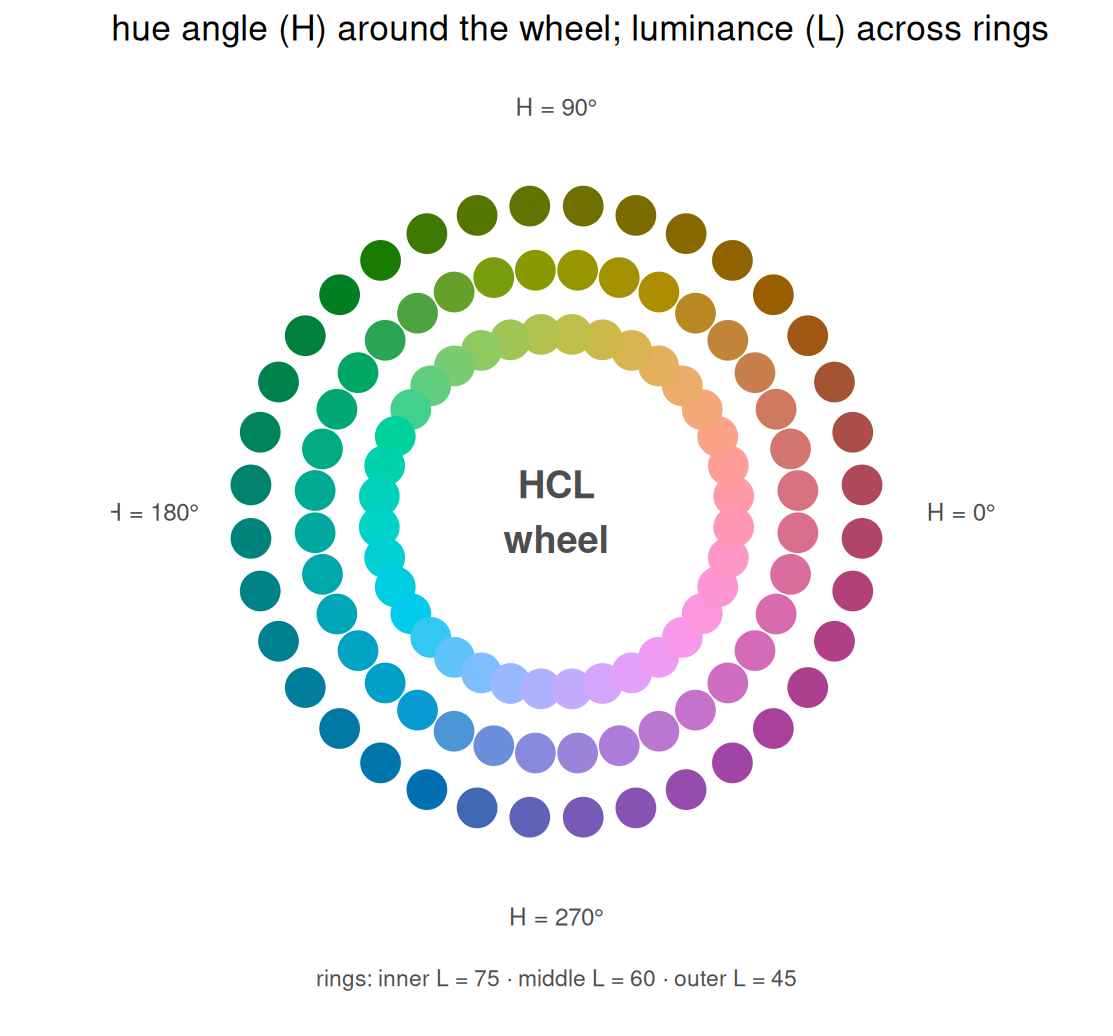
OKLab/OKLCH(CSS Color 4)是更新、更为均匀的空间;当需要计算而非目测时,可用 farver::convert_colour() 在表示之间转换。
Going deeper · 第二部分 — 可及性:色觉缺陷
约 8% 的北欧裔男性患有红绿型色觉缺陷(包括红绿色盲、红绿色弱与异常三色觉);女性约 0.5%(约为男性的十六分之一),蓝黄色盲(tritanopia)则罕见得多(Wong 2011)。由此有三条规则:
- 绝不把区分只建立在红与绿上。 优先使用八色 Okabe–Ito 方案,或按亮度分离的调色板。
- 加入冗余编码——形状、线型、直接标注——只要组数超过约 5。
-
用模拟器检查。
colorspace::deutan()/protan()/tritan()直接变换十六进制颜色,能把你的图渲染成色盲读者看到的样子。
mk_panel <- function(cols, title) {
  tibble(x = 1:8, y = c(3, 5, 4, 7, 6, 8, 5.5, 4.5), g = factor(1:8)) |>
    ggplot(aes(x, y, colour = g)) +
    geom_segment(aes(xend = x, yend = y - .8), linewidth = .8) +
    geom_point(size = 5) +
    geom_text(aes(label = g, y = y - 1.05), size = 2.9, colour = "grey30", show.legend = FALSE) +
    scale_colour_manual(values = cols) + labs(title = title, x = NULL, y = NULL) +
    theme_minimal(base_size = 11) +
    theme(legend.position = "none", axis.text = element_blank(), axis.ticks = element_blank(),
          panel.grid = element_blank())
}
(mk_panel(okabe, "normal vision") +
   mk_panel(colorspace::deutan(okabe), "deuteranopia (red-green)") +
   mk_panel(colorspace::protan(okabe), "protanopia (red-green)")) + plot_layout(ncol = 3)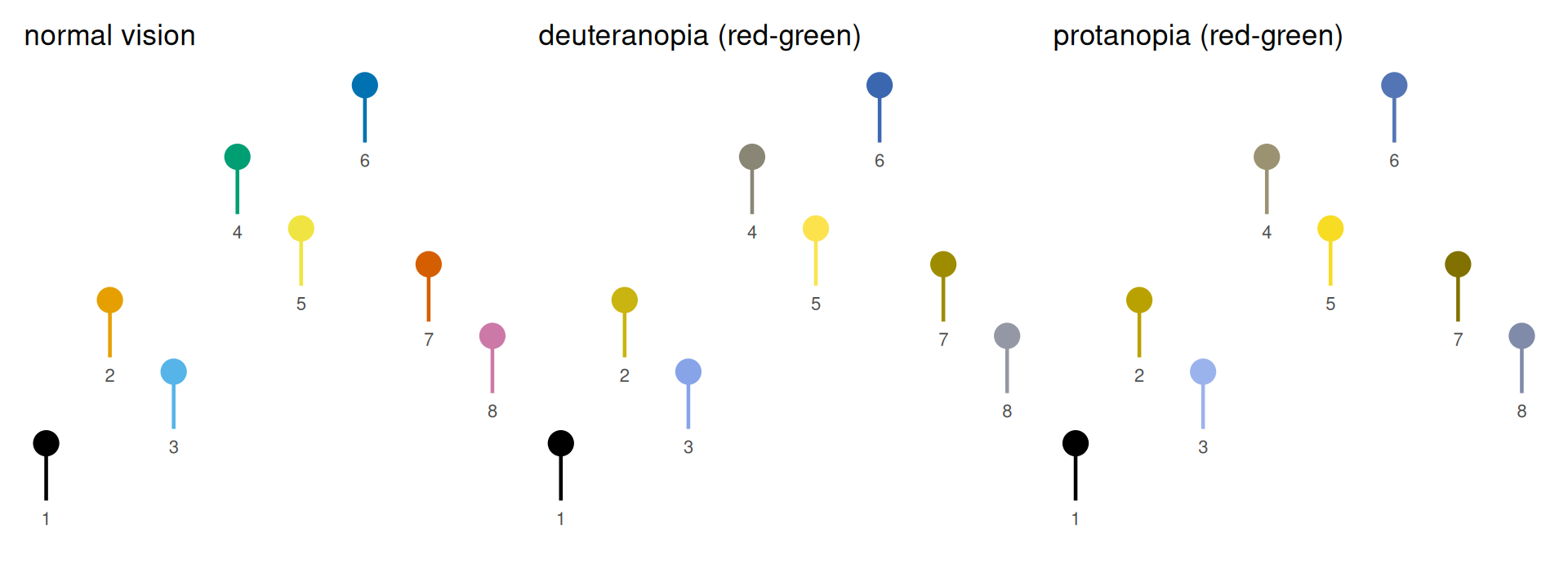
Going deeper · 第二部分 — 彩虹图(仍然)有害
彩虹光谱是许多旧工具的默认值,也是科学中最常见的糟糕选择。它并非感知均匀:会在数据平滑处制造人为的条带边界,亮度非单调,并产生虚假的地标。Crameri、Shephard 与 Heron(2020)记录了这类图谱如何误导读者。由 rainbow() 构造的彩虹还有一个额外缺陷:它是循环的,两端都是红色。连续数据请使用感知均匀、色盲友好的渐变——viridis(matplotlib 2.0 起的默认值,也是 R 中的常用选择)、cividis(针对色觉缺陷优化;Nuñez 等 2018)、scico(Crameri 色图),或 colorspace::sequential_hcl()。
field <- expand.grid(x = seq(-3, 3, length.out = 120), y = seq(-3, 3, length.out = 120)) |>
  mutate(z = exp(-(x^2 + y^2)) + 0.5 * exp(-((x - 1.6)^2 + (y + 1.2)^2) / .6))
base_map <- function() {
  ggplot(field, aes(x, y, fill = z)) + geom_raster() +
    theme_minimal(base_size = 11) +
    theme(axis.text = element_blank(), axis.ticks = element_blank(),
          panel.grid = element_blank(), axis.title = element_blank())
}
p_uniform <- base_map() + scale_fill_viridis_c(guide = "none") +
  labs(title = "viridis (perceptually uniform)")
p_rainbow <- base_map() + scale_fill_gradientn(colours = rainbow(30), guide = "none") +
  labs(title = "rainbow (bands; red at both ends)")
p_uniform + p_rainbow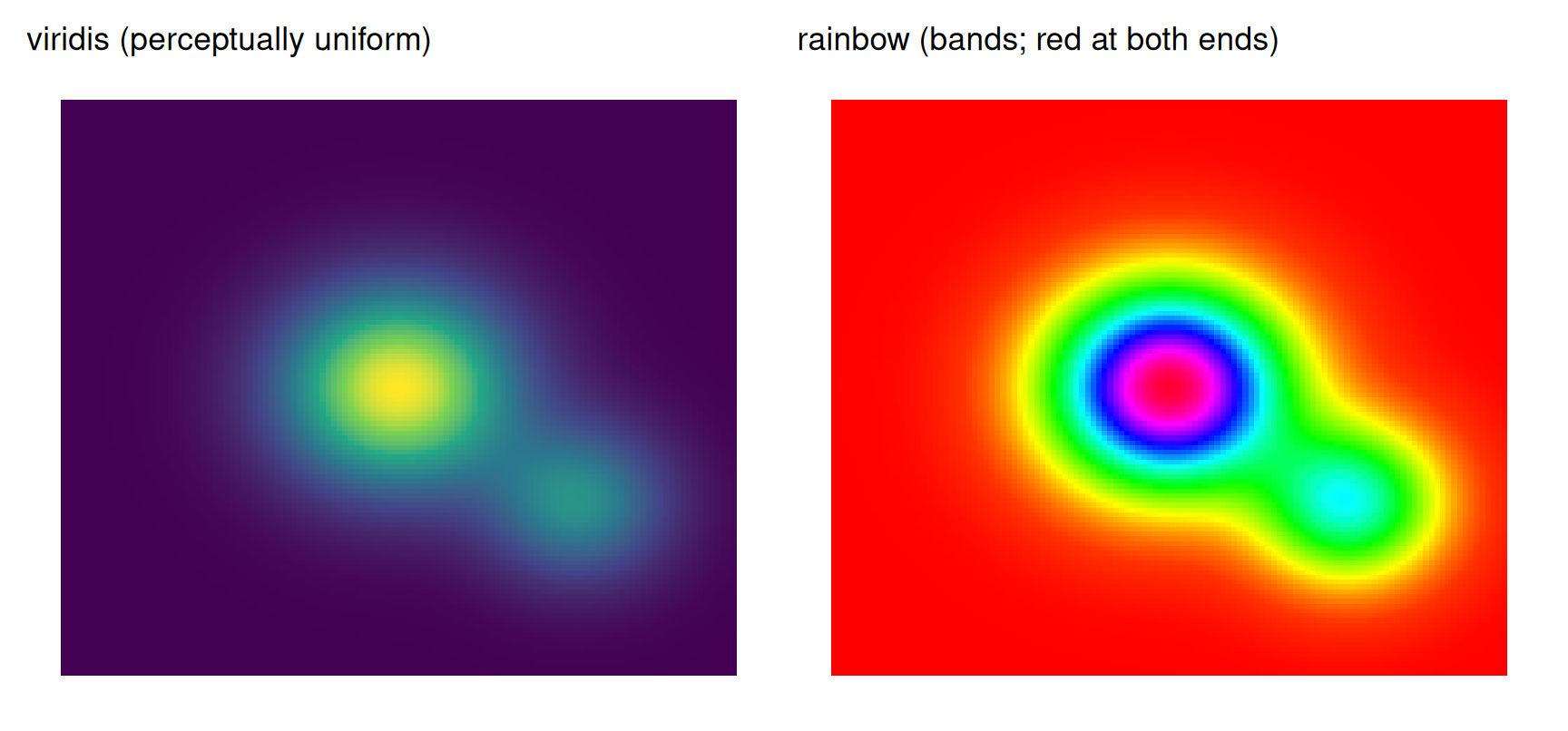
Going deeper · 第二部分 — 对比度、背景与同时对比
色盲安全并不等于对比度安全,调色板的名字也不提供任何保证。WCAG 2.2 给出了可操作的阈值:普通文本 4.5:1,大号文本与图形对象 3:1(相对于其背景)。许多著名调色板的颜色在白色背景上并不达标——Okabe-Ito 黄色 #F0E442 为 1.32:1,RdBu 中点为 1.07:1,Set3 最浅的黄色 #FFFFB3 仅 1.04:1。实际后果是:
- 浅色填充需要图块描边、更深的轮廓,或浅灰面板。
- 细线与小点需要比大面积填充更深的变体。
- 图例必须放在最终背景上判断,而不是白色编辑画布上。
-
colorspace::contrast_ratio()可计算任意颜色对的 WCAG 比值;colorspace::darken()可生成适合印刷的变体。
同时对比是感知层面的问题:同一个十六进制色在黑色上显得更亮,在白色上显得更暗。请在实际语境中判断颜色,绝不要在不同背景上比较两套配色:
sq <- function(bg, label) {
  ggplot() +
    annotate("rect", xmin = .1, xmax = .9, ymin = .1, ymax = .9, fill = "#777777") +
    coord_fixed(xlim = c(0, 1), ylim = c(0, 1)) +
    labs(title = label) +
    theme_void(base_size = 11) +
    theme(plot.background = element_rect(fill = bg, colour = NA),
          plot.margin = margin(8, 8, 8, 8),
          plot.title = element_text(colour = if (bg == "black") "white" else "grey20"))
}
sq("black", "on black") + sq("grey50", "on mid-grey") + sq("white", "on white")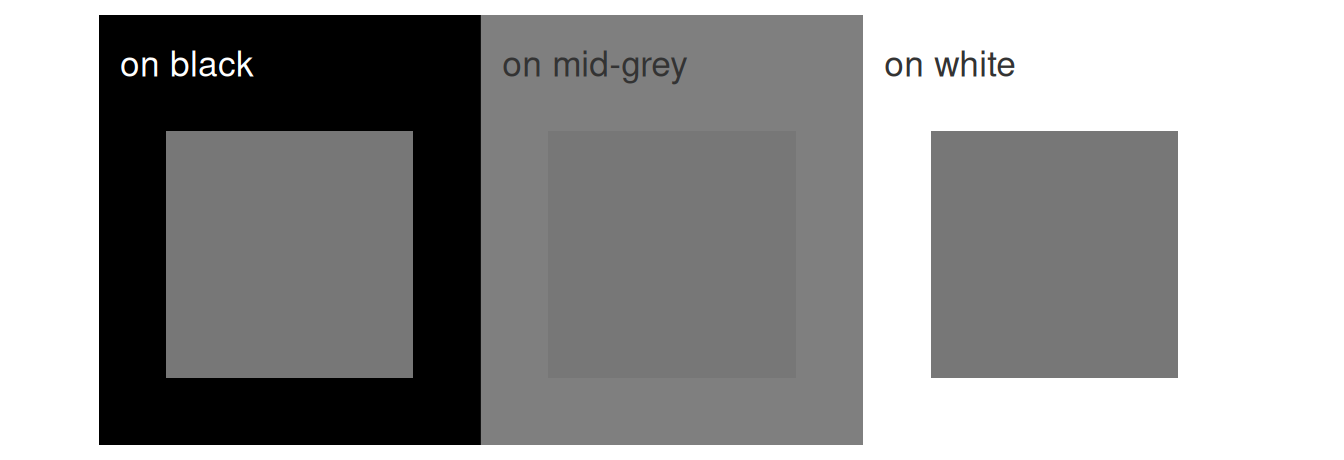
Going deeper · 第二部分 — 从屏幕到印刷
十六进制码是 sRGB 配方;期刊的 CMYK 印刷是另一个色域,饱和的蓝、绿、黄在转换中会偏移或被裁切。一条生产安全的工作流:
- 优先矢量。 线条与文字导出为 PDF/SVG;只有照片与热图需要栅格化,且按最终尺寸达到 300–600 dpi。
- 先定最终尺寸,再判断字号。 期刊常用单栏(约 85 mm)与双栏(约 170 mm);坐标轴文字的实际下限约为 6–7 pt,线条为 0.25–0.5 pt。
- 对 CMYK 转换做软打样,检查色域警告;同时保留一份灰度校样。
- 压平透明度;在白底上避免低于约 0.2 的 alpha——印刷时它会消失。
- 出血只用于整页图版;普通图形不需要。
- 替代文本是生产的一部分,不是事后补充:描述编码与比较,而不是颜色本身。
正因如此,本页的示例图都带有明确的上下限、直接标注与冗余线索,而不是依赖细微的颜色差异。
Going deeper · 第二部分 — 生态全景调查
R 生态提供了异常丰富的配色工具;这张表就是地图。“本页实测”一列标明本页现场演示的包(所有实测包都固定在仓库的锁文件中;调查级的包是可选的,仅在参考代码块中展示):
| 包 | 提供什么 | 本页实测 |
|---|---|---|
grDevices(base) |
hcl.colors()、hcl()、colorRampPalette()
|
是(色轮) |
RColorBrewer |
ColorBrewer 的 35 套经典方案 | 是 |
scales |
hue_pal()、gradient_n_pal()、show_col()
|
是 |
colorspace |
HCL 调色板家族 + deutan()/protan() 模拟 |
是 |
viridisLite / viridis
|
感知均匀渐变(viridis、cividis、magma 等) | 是 |
scico |
以 ggplot2/scales 函数提供的 Crameri 科学色图 | 否 |
ggsci |
期刊配色(Nature、Lancet、JAMA、NEJM、JCO 等) | 是 |
pals |
100+ 精选调色板,含 Kovesi 的 CET 色图 | 否 |
paletteer |
元包:一个访问器聚合约 79 个包的调色板(2,800+) | 是 |
dichromat |
色觉缺陷变换与 dichromat()
|
否 |
Polychrome |
createPalette():几十种可区分颜色(JSS 验证 ≥24) |
否 |
cols4all |
系统化方案:689 套调色板(0.10 版),按色盲友好性、公平性、可命名性与对比度评分,含循环与双变量类型 | 否 |
colorblindcheck |
对任意调色板做定量的色觉缺陷距离检查 | 否 |
实测的天花板
两个值得内化的数字。RColorBrewer 有意把定性系列限制在 12 色——这是可靠色相辨别的实用上限。cols4all 则把调色板选择变成一次查询:其目录(0.10 版的 689 套调色板)带有色盲友好性、公平性(“各颜色是否同样醒目?”)、可命名性(针对定性调色板)与对比度(相对于白底与黑底)的评分,选择因此从猜测变成比较。
brewer.pal.info |>
  tibble::rownames_to_column("palette") |>
  count(category, maxcolors) |>
  ggplot(aes(factor(maxcolors), n, fill = category)) +
  geom_col(position = position_dodge(preserve = "single"), colour = "grey20", linewidth = .3) +
  geom_text(aes(label = n), position = position_dodge(width = .9, preserve = "single"), vjust = -.4, size = 3.2) +
  scale_fill_manual(values = c(div = "#7B3294", qual = "#008837", seq = "#2C7BB6"),
                    labels = c("diverging", "qualitative", "sequential"), name = NULL) +
  labs(x = "maximum colors in a ColorBrewer palette", y = "number of palettes") +
  scale_y_continuous(expand = expansion(mult = c(0, .12))) +
  theme_minimal(base_size = 11) + theme(panel.grid.minor = element_blank())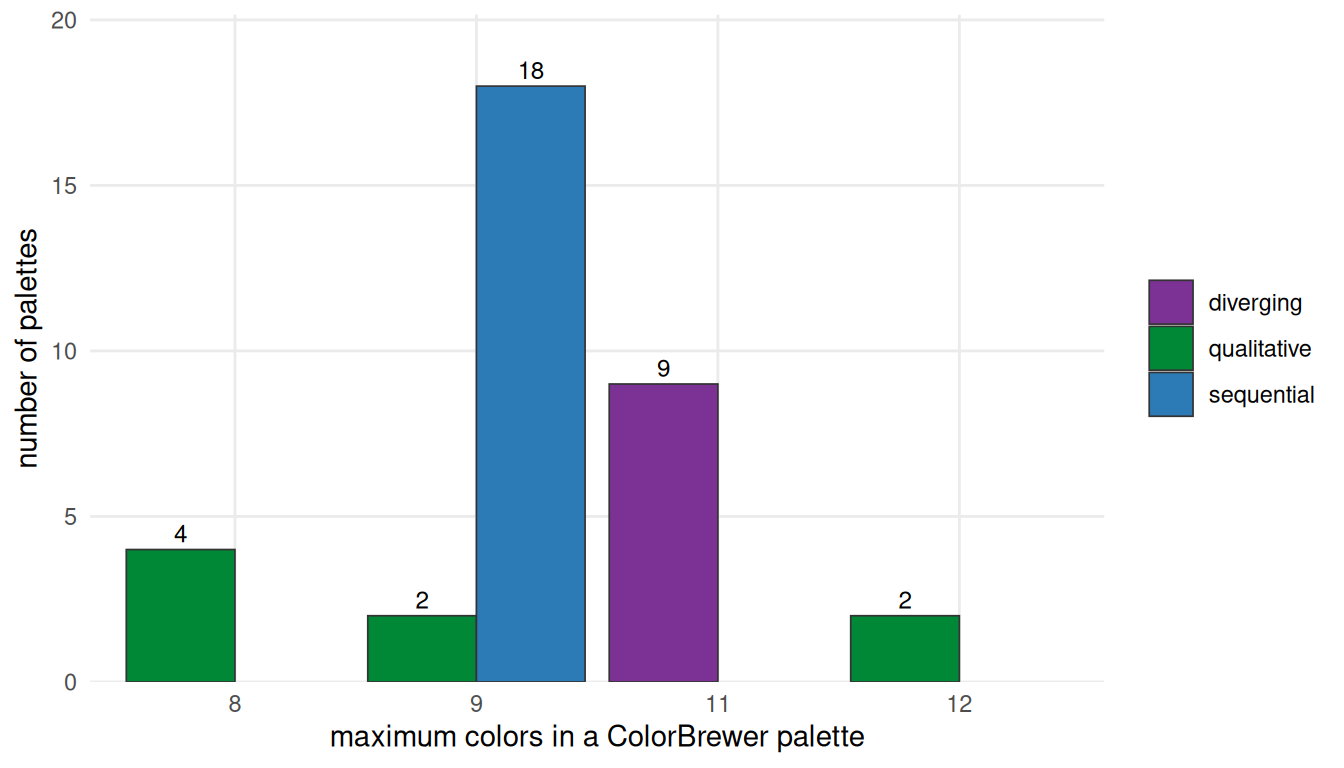
# Optional survey-tier packages (pak::pak("cols4all") / pak::pak("colorblindcheck")):
library(cols4all)
c4a("brewer.set2", 8)                 # exact hex colors from the 689-palette catalog (v0.10)
c4a_palettes(type = "div") |> head()  # browse by type: cat / seq / div / cyc / bivs / bivc / bivd / bivg
c4a_plot("brewer.set2")               # palette overview figure
c4a_scores(palette = "brewer.set2")   # scores: cbfriendly, fairness, contrastWT, contrastBK

# quantitative CVD distances (pak::pak("colorblindcheck")):
okabe <- c("#000000", "#E69F00", "#56B4E9", "#009E73",
           "#F0E442", "#0072B2", "#D55E00", "#CC79A7")
pc <- colorblindcheck::palette_check(okabe, plot = FALSE)
pc[, c("name", "min_dist")]           # minimum pairwise distance per simulated vision type

# Crameri maps and Kovesi palettes via the survey-tier packages:
scico::scico(10, palette = "batlow")  # pak::pak("scico")
pals::cols25(10)                      # pak::pak("pals")
高类别数定性调色板可参考 Polychrome 论文;调色板评分可参考 cols4all 包。更宏观的科学论证来自 Zeileis 等(2009,统计图形调色板)与 Crameri 等(2020,色图)。
跨包实例
pkg_rows <- list(
  "paletteer: RColorBrewer::Set2 (8)" = as.character(paletteer::paletteer_d("RColorBrewer::Set2")),
  "colorspace: qualitative_hcl (8)"   = qualitative_hcl(8),
  "ggsci: Nature npg (10)"            = pal_npg("nrc")(10),
  "viridisLite: cividis (10)"         = viridis(10, option = "cividis"))
purrr::imap_dfr(pkg_rows, ~ tibble(col = .x, x = seq_along(.x), pal = .y)) |>
  mutate(pal = factor(pal, levels = names(pkg_rows))) |>
  ggplot(aes(x, 1, fill = col)) +
  geom_tile(width = 1, height = .8, colour = "white", linewidth = .3) +
  facet_wrap(~pal, ncol = 1, strip.position = "left") +
  scale_fill_identity() + scale_y_continuous(expand = c(0, 0)) +
  theme_minimal(base_size = 11) +
  theme(axis.text = element_blank(), axis.title = element_blank(), panel.grid = element_blank(),
        strip.text.y.left = element_text(angle = 0, hjust = 0, size = 10),
        strip.background = element_blank(), panel.spacing.y = unit(3, "mm"))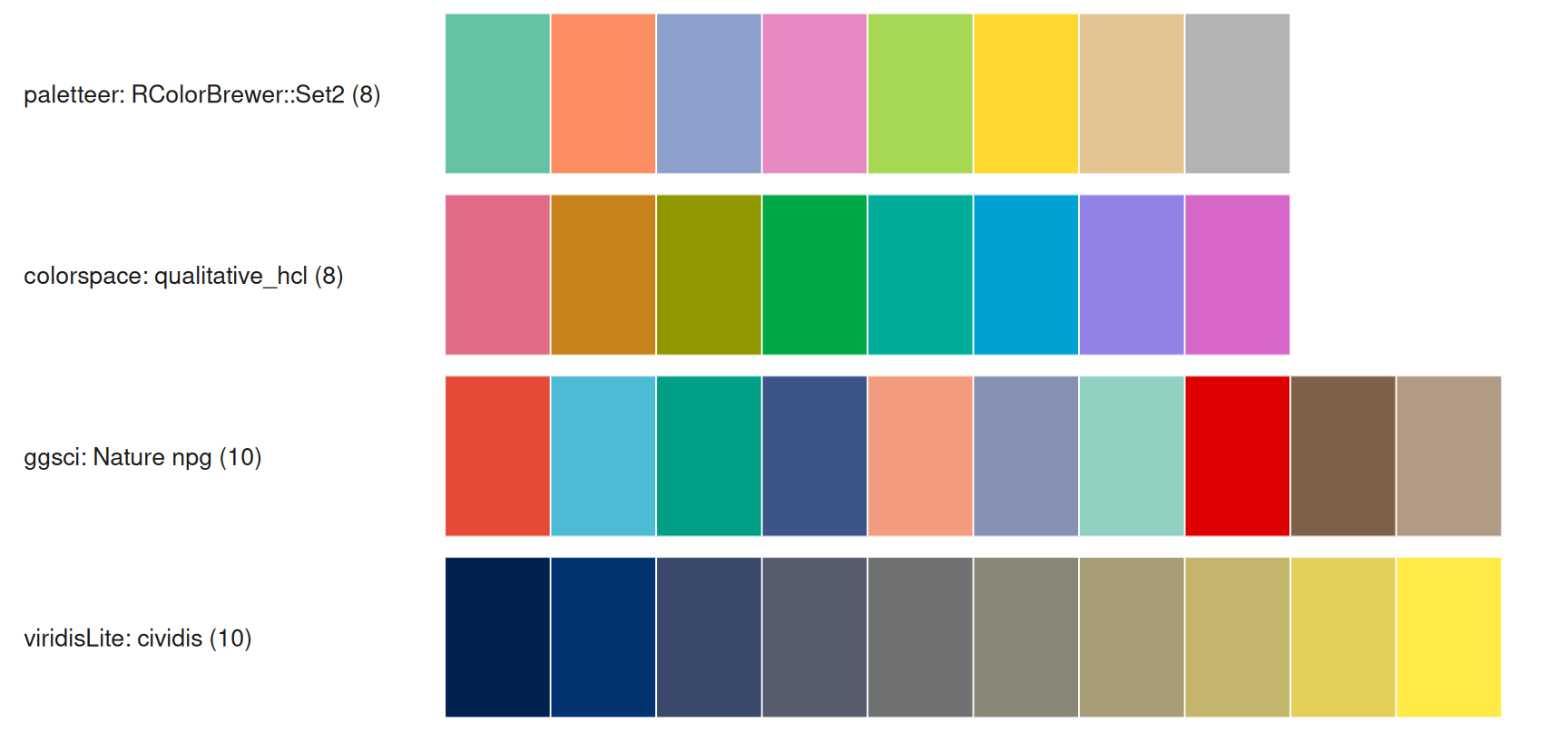
Python 对应物
同样的原理在 Python 中也存在,十六进制码也可移植——但对应关系并非一一同名。请使用映射表,不要凭名字猜测:
| R | Python | 说明 |
|---|---|---|
RColorBrewer |
palettable.colorbrewer / sns.color_palette("Set2", 8)
|
可获得精确十六进制码 |
viridisLite |
matplotlib.colormaps |
同一设计;采样得到的十六进制码可能相差一到两个通道步长 |
scico(Crameri) |
cmcrameri |
官方移植;palettable.scientific 也内置 10 级变体 |
pals(Kovesi CET) |
colorcet |
CET 色图 |
paletteer |
palettable + colorcet + cmcrameri
|
没有单一元包;这个组合覆盖上述家族 |
ggsci |
无直接移植 | 从 R 复制十六进制码 |
colorspace::deutan/protan |
colorspacious(图像用 daltonlens) |
模拟模型不同——比较模式,而非精确十六进制码 |
colorblindcheck |
cvdlint(尚不成熟)或把十六进制码导出到 R |
没有成熟的精确等价物 |
Polychrome |
distinctipy / colorcet.glasbey
|
多类别情形 |
cols4all |
无等价物 | R 侧的评分目录 |
# Requires matplotlib >= 3.5 (mpl.colormaps) and seaborn
import matplotlib as mpl
import numpy as np
import seaborn as sns

# 1. The exact Okabe-Ito palette. Do NOT use sns.color_palette("colorblind"):
#    seaborn's "colorblind" is a different, seaborn-designed set.
okabe_ito = ["#000000", "#E69F00", "#56B4E9", "#009E73",
             "#F0E442", "#0072B2", "#D55E00", "#CC79A7"]
sns.color_palette(okabe_ito).as_hex()     # same hex as the R section

# 2. Sequential ramps
mpl.colormaps["viridis"]                  # perceptually uniform
mpl.colormaps["cividis"]                  # CVD-optimized

# 3. Diverging: ColorBrewer's RdBu has low = red, high = blue.
#    The z-score heatmap on this page reverses it (negative = blue), so use RdBu_r:
mpl.colormaps["RdBu_r"]
# sns.heatmap(z, cmap="RdBu_r", center=0)  # or TwoSlopeNorm(vcenter=0)

# 4. Dump a palette (or a sampled colormap) as hex:
sns.color_palette(okabe_ito).as_hex()
[mpl.colors.to_hex(c) for c in mpl.colormaps["viridis"](np.linspace(0, 1, 9))]

# 5. Crameri maps in Python: pip install cmcrameri
# import cmcrameri.cm as cmc
# mpl.colormaps["cmc.batlow"]
第三部分 · 应用
Visualization · 第三部分 — 工作流
每一张图的配色都经过同样的六步;跳过步骤 D 中的检查就会产生 Crameri 等(2020)批评的那类图形。
flowchart LR
    A[数据 + 问题] --> B[选择调色板类型<br/>定性 / 顺序 / 发散]
    accTitle: 配色工作流
    accDescr: 选择调色板类型,在感知空间中构造,检查色盲、灰度与印刷,全文一致地应用并导出十六进制码。
    B --> C[在感知空间中构造<br/>HCL / OKLab 或经过验证的库]
    C --> D[检查:色盲模拟<br/>+ 灰度 + 印刷]
    D --> E[一致地应用<br/>每种含义一套配色]
    E --> F[导出十六进制码<br/>写入方法或图例]
    D -- 未通过 --> B
Visualization · 第三部分 — 分组比较
经典的 2–6 组柱状/箱线/小提琴比较。下图使用的期刊配色(ggsci npg)是审美选择,并非经过色盲验证:其相对亮度相差约 4.6 倍,在绿色盲下最接近的一对是绿色与浅蓝(ΔE ≈ 19),在蓝色盲下差距更小。这里可以接受,因为 x 轴标签承载了身份信息;当颜色是唯一线索时,请改用 Okabe-Ito。4 个组完全处于可靠范围内。
set.seed(11)
groups <- tibble(
  group = factor(rep(c("Control", "Low dose", "High dose", "Combo"), each = 24),
                 levels = c("Control", "Low dose", "High dose", "Combo")),
  value = c(rnorm(24, 4, 1), rnorm(24, 5, 1.1), rnorm(24, 6.2, 1.2), rnorm(24, 7.4, 1.3)))
ggplot(groups, aes(group, value, fill = group)) +
  geom_violin(width = .75, colour = NA, alpha = .85, scale = "width") +
  geom_boxplot(width = .12, fill = "white", outlier.shape = NA, linewidth = .35) +
  scale_fill_manual(values = pal_npg("nrc")(4)) +
  labs(x = NULL, y = "Response score") +
  theme_minimal(base_size = 11) +
  theme(legend.position = "none", panel.grid.minor = element_blank(),
        axis.text.x = element_text(size = 10))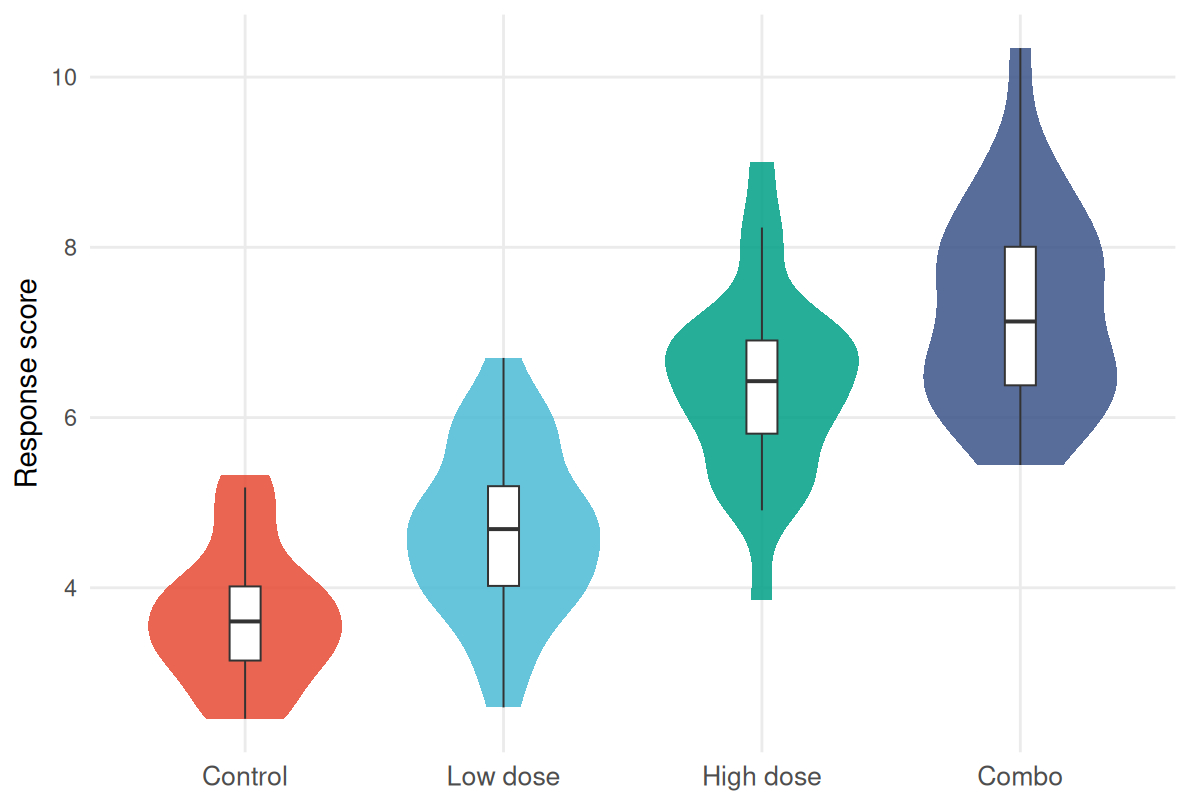
Visualization · 第三部分 — 热图与矩阵
热图的配色由数据决定,而不是由包决定:无符号量级用顺序渐变;带符号值用以有意义中点为中心且上下限对称的发散渐变——z 分数或对数比值(如 log2 fold change)用 0,未取对数的比值用 1,百分比变化用 0,其他情形用该检测的特异参考值。四条实用规则:
-
围绕含义设中心,而不是围绕数据范围。 使用
scale_fill_gradient2(midpoint = ...)、scales::rescale_mid(),或 Python 中的TwoSlopeNorm。 -
检查中点与背景的对比。 RdBu 中点
#F7F7F7在白底上只有 1.07:1,零值格看起来像空洞;请加图块描边、略深的中性色,或浅灰面板。 -
明确说明截断。
oob = scales::squish会静默钳制离群值——请写明所选上下限,或改用oob = scales::censor并设置na.value。 -
显式处理缺失值与分箱。 为
na.value指定独特的中性色;分箱时用 5–7 类,发散色标用奇数类并保留中性中间类。
使用 ComplexHeatmap 时把色标锚定到有意义的值:colorRamp2(c(0, 5, 10), viridis(3))。
set.seed(3)
mat <- matrix(rnorm(120), 12, 10, dimnames = list(paste0("G", 1:12), paste0("S", 1:10)))
hm_panel <- function(m, title, fill, limits, legend) {
  as_tibble(m, rownames = "gene") |>
    mutate(gene = factor(gene, levels = rev(paste0("G", 1:12)))) |>
    pivot_longer(-gene, names_to = "sample") |>
    mutate(sample = factor(sample, levels = paste0("S", 1:10))) |>
    ggplot(aes(sample, gene, fill = value)) + geom_tile(colour = "grey90", linewidth = .2) +
    scale_fill_gradientn(colours = fill, limits = limits,
                         oob = scales::squish, name = legend) +
    labs(title = title, x = NULL, y = NULL) +
    theme_minimal(base_size = 11) +
    theme(axis.text.x = element_text(angle = 45, hjust = 1, size = 8),
          axis.text.y = element_text(size = 8), panel.grid = element_blank())
}
hm_panel(mat, "z-score: diverging, symmetric at 0",
         rev(brewer.pal(11, "RdBu")), c(-max(abs(mat)), max(abs(mat))), "z-score") +
  hm_panel(abs(mat), "magnitude: sequential (viridis)",
           viridis(11), c(0, max(abs(mat))), "|z|")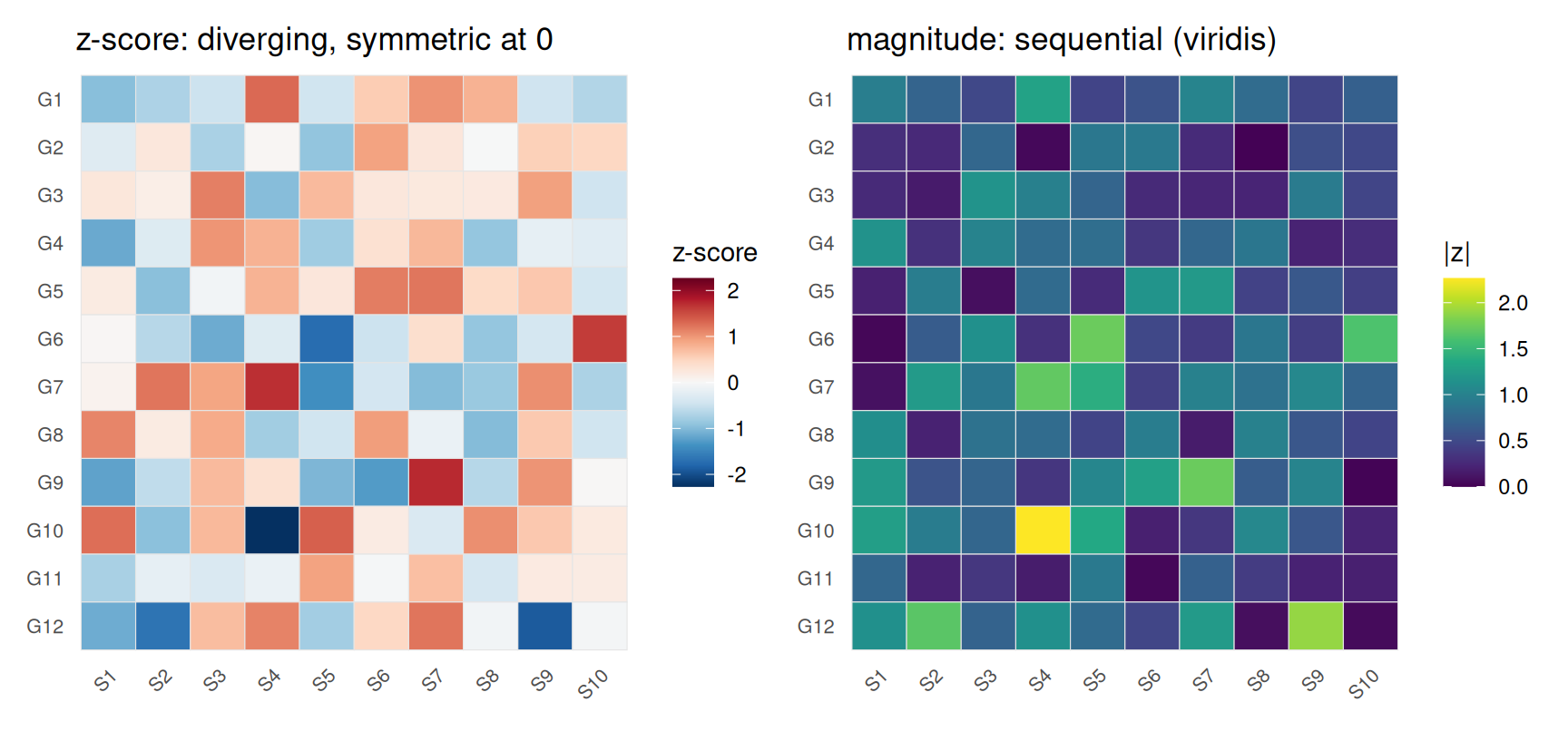
Visualization · 第三部分 — 生存与临床曲线
临床曲线通常只有 2–4 组,此时 Okabe-Ito 颜色加直接标注(而不是远远放一个图例)最为理想。论文的所有临床面板保持同一套配色——这是一致性要求,不是风格偏好。
set.seed(5)
grid <- seq(0, 24, by = 1)
km <- purrr::map_dfr(1:3, function(g) {
  rate <- c(.028, .05, .09)[g]
  surv <- cumprod(c(1, exp(-rate * diff(grid) * rnorm(length(grid) - 1, 1, .15))))
  tibble(time = grid, surv = surv,
         group = factor(c("Low risk", "Intermediate", "High risk")[g],
                        levels = c("Low risk", "Intermediate", "High risk")))
})
ends <- km |> slice_max(time, by = group)
ggplot(km, aes(time, surv, colour = group)) +
  geom_step(linewidth = .9) +
  geom_text(data = ends, aes(label = group), hjust = -.15, size = 3.4,
            colour = "grey20", show.legend = FALSE) +
  scale_colour_manual(values = c("Low risk" = "#0072B2",
                                 "Intermediate" = "#E69F00",
                                 "High risk" = "#D55E00")) +
  scale_y_continuous(labels = scales::percent, limits = c(0, 1)) +
  scale_x_continuous(expand = expansion(mult = c(.02, .22))) +
  labs(x = "Months", y = "Overall survival") +
  theme_minimal(base_size = 11) +
  theme(legend.position = "none", panel.grid.minor = element_blank())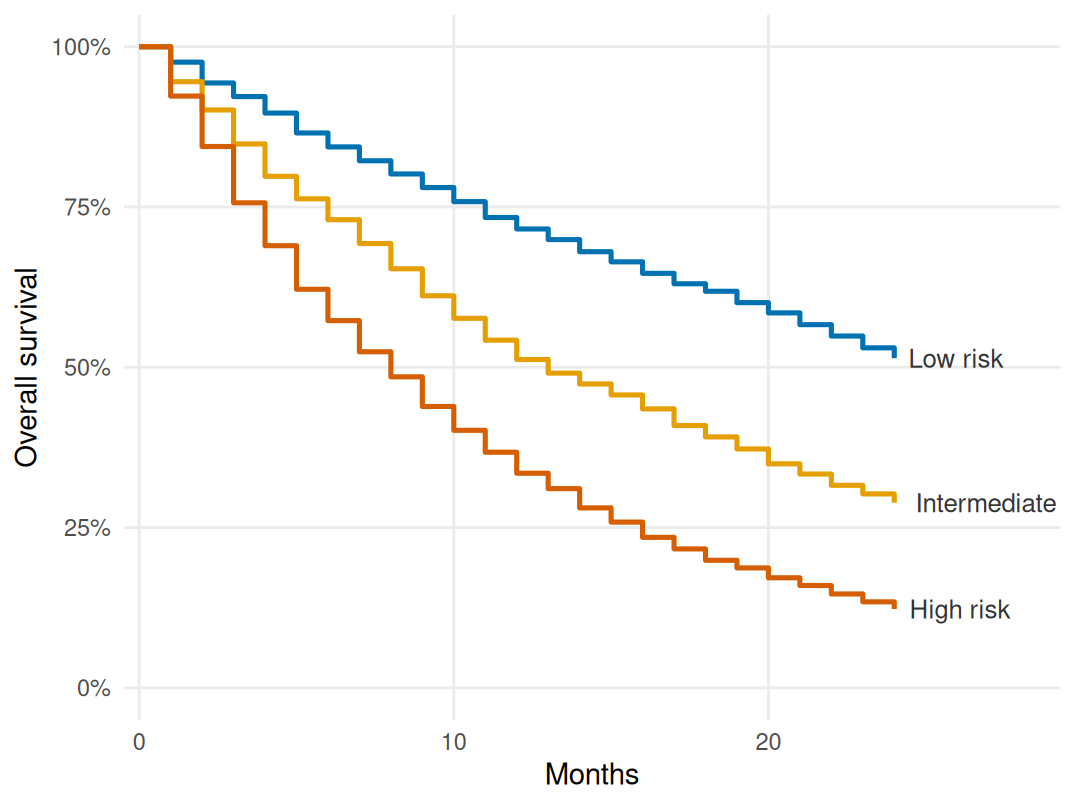
Visualization · 第三部分 — 基因组轨道与富集图
基因组学有自己的惯例:每条染色体有稳定的颜色;下图用 hcl.colors(24, "Dark 3") 的 24 种 HCL 色轮颜色;相邻色相可能相近,且若干颜色对在色觉缺陷下会合并,因此身份由 x 轴标签——而不是颜色——承载。突变类型图例在 5–10 个类别上遵循同样的逻辑。富集条形/点阵图是混合型:顺序标度承载显著性(-log10(P)),类别保持接近中性——很容易想用彩虹,但顺序规则优先。
chrom_cols <- hcl.colors(24, "Dark 3")   # hue-wheel colors; labels, not hues, carry identity
chrom <- tibble(
  chr = factor(paste0("chr", c(1:22, "X", "Y")), levels = paste0("chr", c(1:22, "X", "Y"))),
  col = chrom_cols,
  n = c(249, 243, 198, 191, 181, 171, 159, 146, 141, 135, 135, 134,
        115, 107, 102, 90, 83, 80, 59, 64, 47, 51, 156, 57))
ggplot(chrom, aes(chr, n, fill = col)) +
  geom_col(width = .8, colour = "white", linewidth = .2) + scale_fill_identity() +
  labs(x = NULL, y = "Genes (schematic)") +
  theme_minimal(base_size = 11) +
  theme(axis.text.x = element_text(angle = 45, hjust = 1, size = 8),
        panel.grid.minor = element_blank())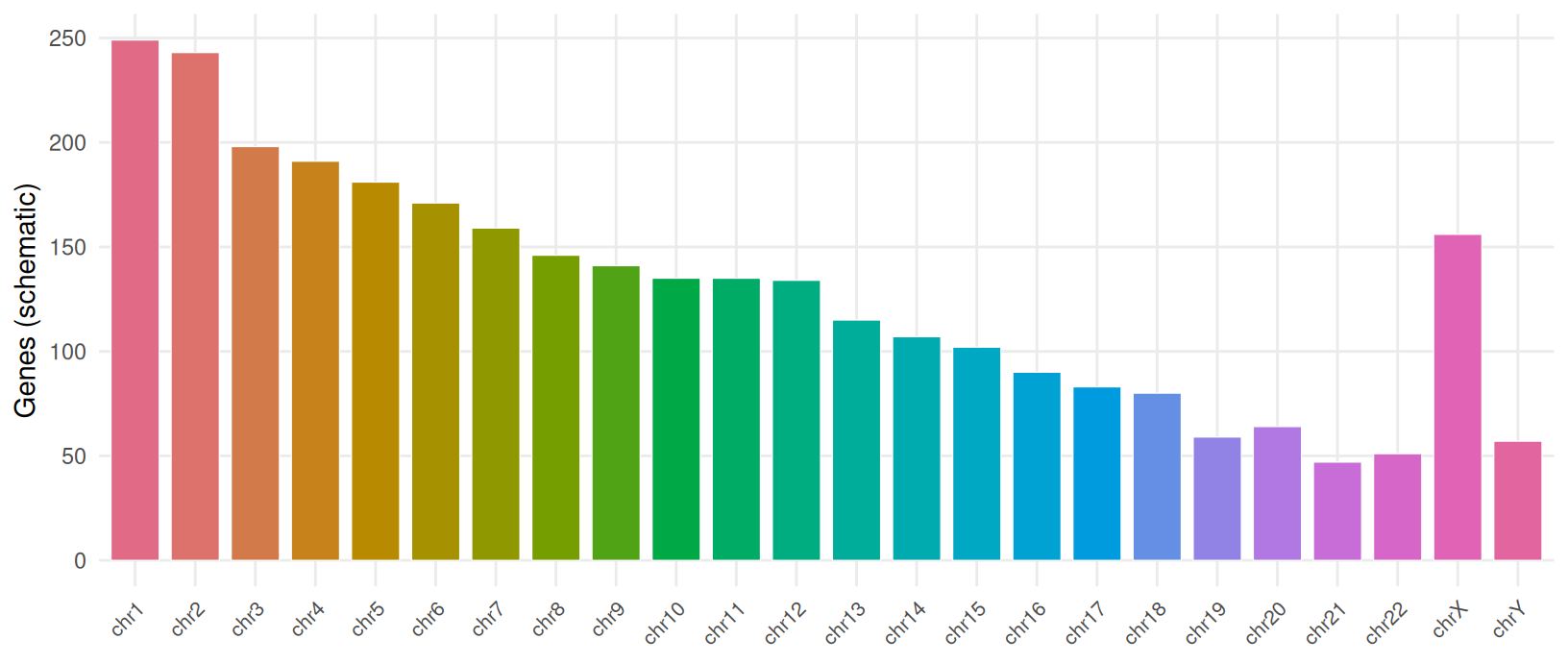
Visualization · 第三部分 — 极端情形:大量类别
scRNA-seq 的 UMAP 常有 20–50 个类群——颜色的最困难情形。ggplot2 的默认离散标度为每个水平生成一个色相,50 个类别在色轮上仅相隔约 7°:十六进制码各不相同,感知上却是一片连续的模糊。
set.seed(2026)
n_cl <- 50
centres <- tibble(
                  cx = cos(2 * pi * (0:(n_cl - 1)) / n_cl) * 10 + rnorm(n_cl, 0, 1.2),
                  cy = sin(2 * pi * (0:(n_cl - 1)) / n_cl) * 10 + rnorm(n_cl, 0, 1.2))
embed <- purrr::map_dfr(1:n_cl, function(i) {
  tibble(cl = i, x = rnorm(45, centres$cx[i], .55), y = rnorm(45, centres$cy[i], .55))
}) |> mutate(cl = factor(sprintf("C%02d", cl)))

pal50 <- hcl(h = rep(seq(15, 351, length.out = 10), times = 5),
             c = rep(c(75, 85, 75, 65, 55), each = 10),
             l = rep(c(74, 66, 57, 47, 37), each = 10))
names(pal50) <- levels(embed$cl)

map_base <- function() {
  ggplot(embed, aes(x, y, colour = cl)) + geom_point(size = .7, alpha = .9) +
    coord_fixed() + theme_minimal(base_size = 11) +
    theme(axis.text = element_blank(), axis.ticks = element_blank(),
          legend.position = "none", axis.title = element_blank(), panel.grid = element_blank())
}
p_default <- map_base() + labs(title = "ggplot default hue palette (50 classes)")
p_tiers <- map_base() + scale_colour_manual(values = pal50) +
  labs(title = "10 hues x 5 luminance tiers")
p_default + p_tiers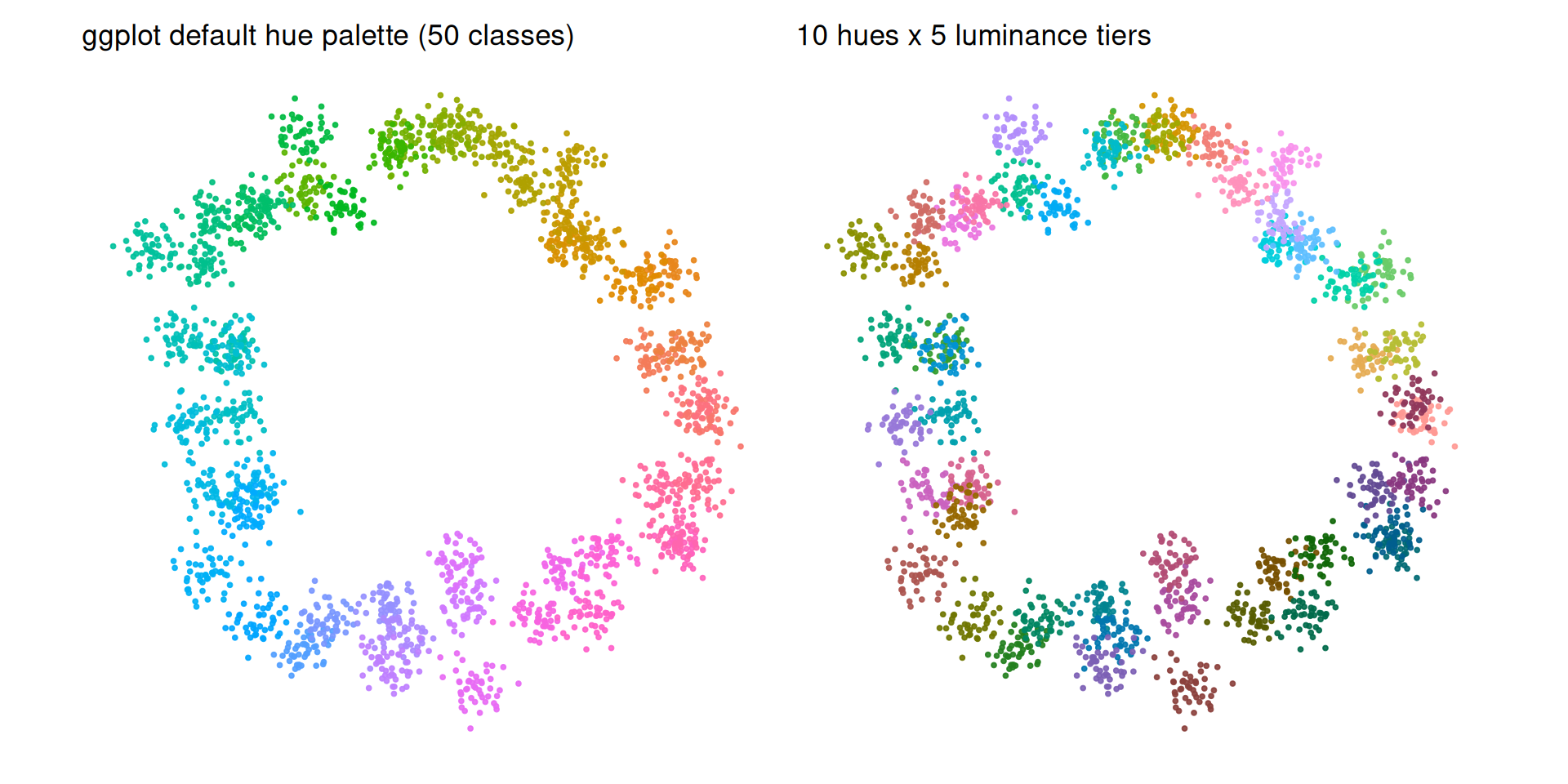
即使是精心构造的 50 色调色板也已处在人类辨别力的边缘,而且亮度层级并不能让它对色觉缺陷安全:若干颜色对在绿色盲与红色盲下仍会合并。当必须区分类群时,请使用标签或下文的“高亮”策略。按可靠性排序的公开策略:
- 高亮——只给你要讨论的类群上色,其余置灰。当面板承载超过约 15 个组、而只有少数几组重要时,真实论文正是这样做的。
-
亮度层级——10 色相 × 5 亮度层级是实用上限;在所有图中复用同一套配色(
DimPlot(cols = ...)/scale_colour_manual(values = ...))。 -
拆分——按条件对 UMAP 分面(或 Seurat 的
split.by),让每个面板只承载约 10 个类别。 -
程序化生成——
Polychrome::createPalette()联合优化色相、彩度与亮度,可生成几十种可区分颜色。
# `embed` is created in the previous chunk; regenerate it if you copy this chunk alone.
focal <- c("C07", "C23", "C41")
focal_lab <- embed |>
  filter(cl %in% focal) |>
  group_by(cl) |>
  summarise(x = mean(x), y = mean(y), .groups = "drop")
embed |>
  mutate(col = if_else(cl %in% focal, as.character(cl), "other")) |>
  ggplot(aes(x, y, colour = col)) +
  geom_point(size = .7, alpha = .9) +
  geom_label(data = focal_lab, aes(x, y, label = cl), inherit.aes = FALSE,
             size = 3.1, fontface = "bold", colour = "grey20",
             fill = "white", alpha = .85, linewidth = 0, nudge_y = .8) +
  scale_colour_manual(values = c(set_names(c("#D55E00", "#0072B2", "#009E73"), focal),
                                 other = "#B3B3B3"),
                      breaks = focal) +
  coord_fixed() + labs(colour = NULL) +
  theme_minimal(base_size = 11) +
  theme(axis.text = element_blank(), axis.ticks = element_blank(),
        axis.title = element_blank(), panel.grid = element_blank(),
        legend.position = "bottom")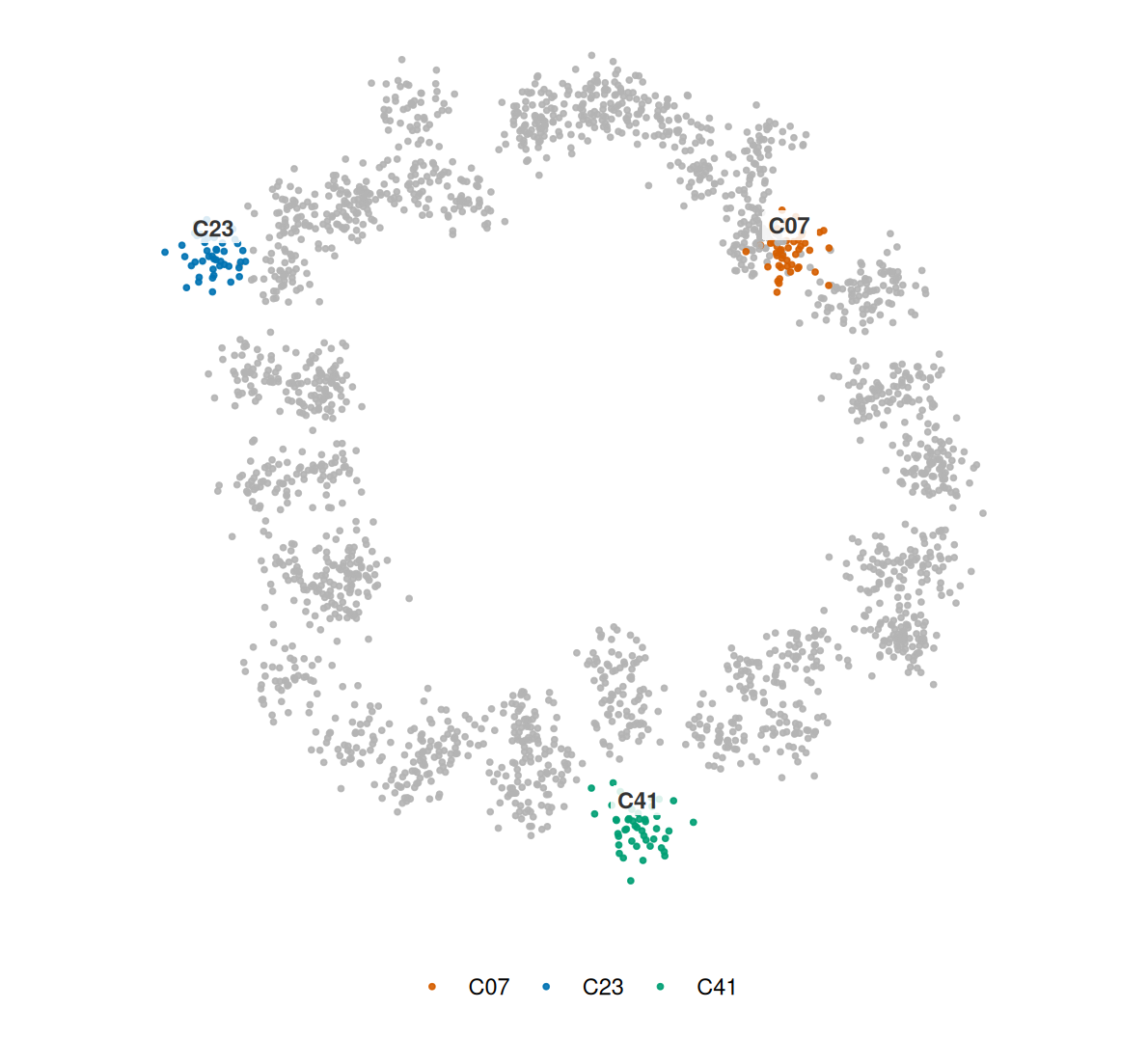
Visualization · 第三部分 — 全文一套配色
最后一项纪律:一篇论文是一个系统,而非图形的集合。为每种含义定义一套配色,在所有面板与所有图形类型中复用,并记录十六进制码。下面的三联图在同一份数据的箱线图、折线图与柱状图中使用同样的四种颜色代表同样的四组——保留组标签,并共享一个图例。
set.seed(9)
cons_cols <- c(A = "#4C78A8", B = "#F58518", C = "#54A24B", D = "#B279A2")
cons_means <- c(A = 4.0, B = 5.2, C = 6.4, D = 7.6)
cons <- expand_grid(g = factor(names(cons_cols), levels = names(cons_cols)), t = 1:8) |>
  mutate(v = cons_means[as.character(g)] + .35 * t + rnorm(n(), 0, .6))
counts <- tibble(g = factor(names(cons_cols), levels = names(cons_cols)),
                 n = c(10, 14, 9, 12))
c1 <- ggplot(cons, aes(g, v, fill = g)) + geom_boxplot(width = .55, outlier.shape = NA, show.legend = FALSE) +
  scale_fill_manual(values = cons_cols) + labs(title = "box", x = NULL, y = "value") +
  theme_minimal(base_size = 11) +
  theme(legend.position = "none", panel.grid.minor = element_blank())
c2 <- ggplot(cons, aes(t, v, colour = g, group = g)) + geom_line(linewidth = .8) +
  scale_colour_manual(values = cons_cols, name = "Group") +
  labs(title = "line", x = "time", y = NULL) +
  theme_minimal(base_size = 11) +
  theme(legend.position = "bottom", panel.grid.minor = element_blank())
c3 <- ggplot(counts, aes(g, n, fill = g)) + geom_col(width = .6, show.legend = FALSE) +
  scale_fill_manual(values = cons_cols) + labs(title = "bar", x = NULL, y = "n") +
  theme_minimal(base_size = 11) +
  theme(legend.position = "none", panel.grid.minor = element_blank())
(c1 + c2 + c3) + plot_layout(guides = "collect") &
  theme(legend.position = "bottom")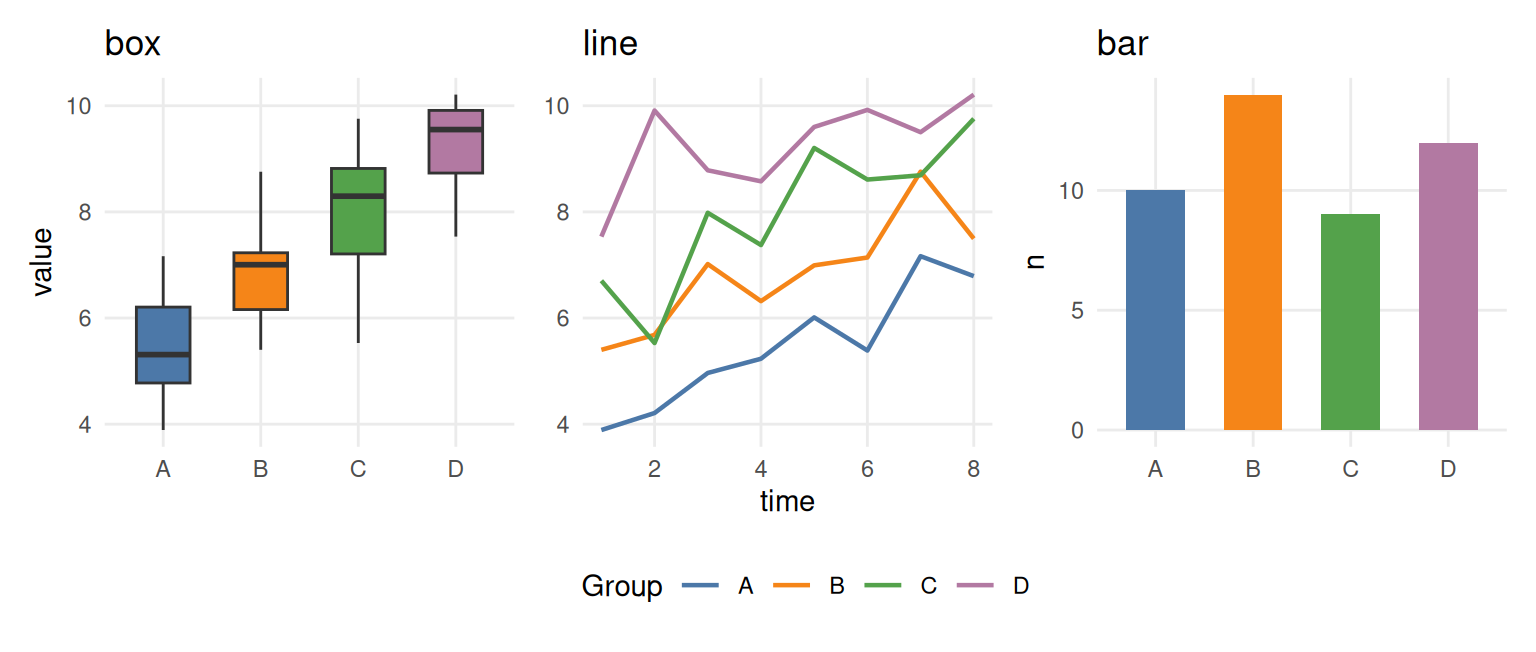
经验法则
提示
每张图都要过的检查清单
- 调色板类型匹配任务:定性 ≠ 顺序 ≠ 发散。
- 连续值用亮度单调的渐变;永远不用彩虹。
- 带符号数据用以有意义中点为中心且对称的发散色标(零并非唯一选择);确认中点在其背景上可见。
-
类别数据:≤ 8 色用 Okabe-Ito 或 Set2;9–12 色用 Paired(经色盲验证的 12 色 ColorBrewer 集合)并加入冗余编码。期刊配色(
ggsci)是审美选择,并非色盲验证——使用时保留直接标注。超过 12 类时用亮度层级、冗余编码、高亮或分面。 -
检查色盲可读性(
colorspace::deutan()、colorblindcheck::palette_check());优先 Okabe-Ito / viridis / cividis / scico。 - 每种含义一套配色、全文一致;记录十六进制码。
- 绝不只用颜色承载类别判断。
- 检查对比度与背景:文本 4.5:1,图形对象 3:1(WCAG 2.2);在最终背景上判断颜色,而不是白底。
- 印刷检查:转一次灰度——若两个组合并,应加入形状/线型/标签冗余,而不是仅凭灰度合并就否定一套本来合理的配色;对 CMYK 做软打样并按最终尺寸导出。
- 每张图都写替代文本:描述编码与比较,而不是颜色。
参考文献
[1] Zeileis A, Hornik K, Murrell P. Escaping RGBland: Selecting colors for statistical graphics. Comput Stat Data Anal. 2009;53(9):3259-3270. doi:10.1016/j.csda.2008.11.033
[2] Zeileis A, Fisher JC, Hornik K, Ihaka R, McWhite CD, Murrell P, Stauffer R, Wilke CO. colorspace: A Toolbox for Manipulating and Assessing Colors and Palettes. J Stat Softw. 2020;96(1):1-49. doi:10.18637/jss.v096.i01
[3] Crameri F, Shephard GE, Heron PJ. The misuse of colour in science communication. Nat Commun. 2020;11:5444. doi:10.1038/s41467-020-19160-7
[4] Wong B. Points of view: Color blindness. Nat Methods. 2011;8(6):441. doi:10.1038/nmeth.1618
[5] Nuñez JR, Anderton CR, Renslow RS. Optimizing colormaps with consideration for color vision deficiency to enable accurate interpretation of scientific data. PLoS ONE. 2018;13(7):e0199239. doi:10.1371/journal.pone.0199239
[6] Harrower M, Brewer CA. ColorBrewer.org: An Online Tool for Selecting Colour Schemes for Maps. Cartogr J. 2003;40(1):27-37. doi:10.1179/000870403235002042
[7] Coombes KR, Brock G, Abrams ZB, Abruzzo LV. Polychrome: Creating and Assessing Qualitative Palettes with Many Colors. J Stat Softw. 2019;90(Code Snippet 1). doi:10.18637/jss.v090.c01
[8] Tennekes M. cols4all: Colors for all. R package version 0.10. 2025. doi:10.32614/CRAN.package.cols4all
[9] Nowosad J. colorblindcheck: Check Color Palettes for Problems with Color Vision Deficiency. R package version 1.0.4. doi:10.32614/CRAN.package.colorblindcheck
[10] Wilke CO. Fundamentals of Data Visualization. O’Reilly Media, 2019. https://clauswilke.com/dataviz/
[11] Crameri F. Scientific colour maps. 2023. https://www.fabiocrameri.ch/colourmaps/
[12] Okabe M, Ito K. Color Universal Design (CUD): How to make figures and presentations that are friendly to colorblind people. 2008. https://jfly.uni-koeln.de/color/
[13] W3C. Web Content Accessibility Guidelines (WCAG) 2.2. W3C Recommendation, 2023. https://www.w3.org/TR/WCAG22/