using CairoMakie
using DataFrames
using Statistics
using Random直方图与密度图(Julia)
直方图与核密度估计(KDE)揭示分布的形状——众数、偏度和离散程度,这些是汇总统计量无法呈现的。在生物医学研究中,它们常用于在统计建模之前检查基因表达分布、荧光强度轮廓和质量控制指标。CairoMakie 以统一的风格提供 hist、density 与 ecdfplot。
示例
环境配置
- 系统要求:跨平台(Linux/MacOS/Windows)
- 编程语言:Julia
- 依赖包:
CairoMakie、DataFrames、Statistics
数据准备
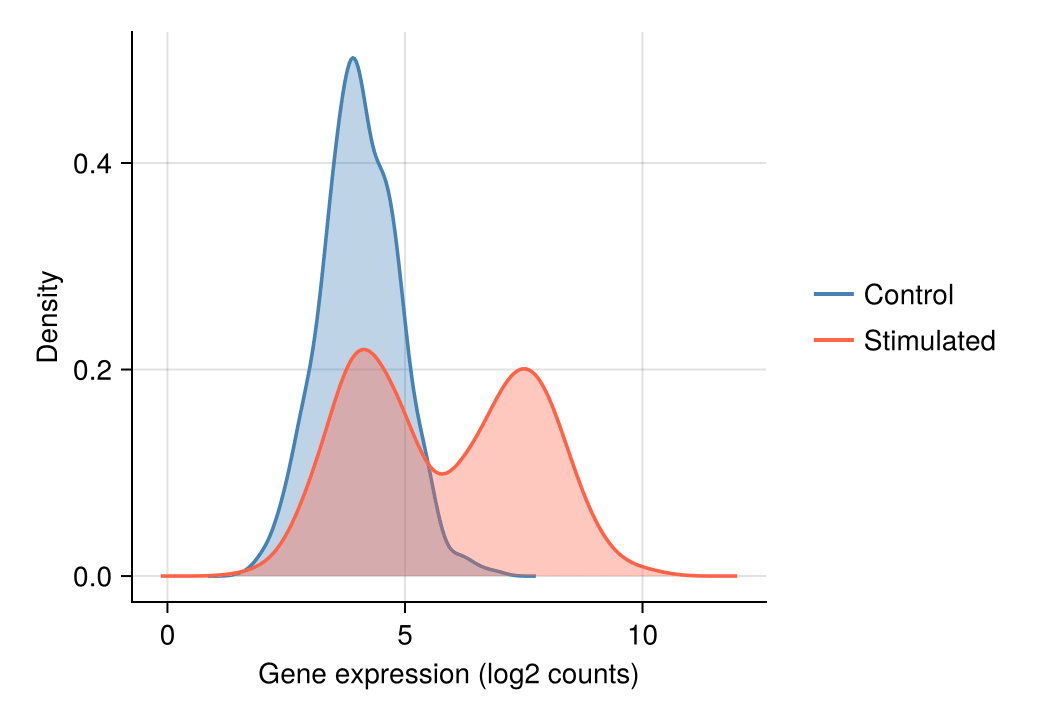
我们模拟一个基因在对照与刺激两种条件下的表达测量。刺激条件是两个细胞亚群的混合,产生直方图与 KDE 旨在揭示的双峰结构。
Random.seed!(11)

n = 800
control = 4.0 .+ 0.8 .* randn(n)
stimulated = vcat(4.2 .+ 0.8 .* randn(n ÷ 2),     # 亚群 A
                  7.5 .+ 0.9 .* randn(n ÷ 2))     # 亚群 B
800-element Vector{Float64}:
3.865937421494608
3.974499458766426
5.381090416248313
4.110384484371341
3.7223752847320704
4.39180807907198
4.330339266391583
4.148369000454984
5.054781277267091
3.2025996007194766
⋮
5.9133709566761254
6.211074468067516
6.648365564220777
7.991501574926472
7.918335795750192
7.957618819674784
6.908673960979235
6.625134971802873
7.20347852264799可视化
直方图
分箱宽度控制偏差–方差的权衡:分箱太少会隐藏结构,太多则放大噪声。拿不准时,可比较 bins = 15 与更细的分箱设置。
fig = Figure(size = (460, 340))
ax = Axis(fig[1, 1], xlabel = "Gene expression (log2 counts)", ylabel = "Count")
hist!(ax, control; bins = 30, color = :skyblue,
      strokecolor = :white, strokewidth = 0.6)
hidespines!(ax, :t, :r)
fig
直方图叠加核密度
在计数轴上叠加核密度曲线,既能勾勒分布轮廓,又保留了原始计数信息。
fig = Figure(size = (460, 340))
ax = Axis(fig[1, 1], xlabel = "Gene expression (log2 counts)", ylabel = "Count")
hist!(ax, control; bins = 30, color = :seagreen,
      strokecolor = :white, strokewidth = 0.6)
density!(ax, control; color = (:seagreen, 0.0), strokecolor = :darkgreen,
         strokewidth = 2, offset = 0)
hidespines!(ax, :t, :r)
fig
分组密度曲线比较
对于两组或多组数据,叠加半透明密度曲线可直接看出刺激样本的双峰特征。
fig = Figure(size = (460, 340))
ax = Axis(fig[1, 1], xlabel = "Gene expression (log2 counts)", ylabel = "Density")
density!(ax, control; color = (:steelblue, 0.35), strokecolor = :steelblue, strokewidth = 1.8)
density!(ax, stimulated; color = (:tomato, 0.35), strokecolor = :tomato, strokewidth = 1.8)
hidespines!(ax, :t, :r)
Legend(fig[1, 2], [LineElement(color = :steelblue, linewidth = 2),
                   LineElement(color = :tomato, linewidth = 2)],
       ["Control", "Stimulated"], framevisible = false)
fig
经验累积分布函数
ECDF 无需分箱或平滑即可展示每个观测值,是审查队列间分布漂移的理想工具。
fig = Figure(size = (460, 340))
ax = Axis(fig[1, 1], xlabel = "Gene expression (log2 counts)", ylabel = "Proportion")
ecdfplot!(ax, control; color = :steelblue, linewidth = 2)
ecdfplot!(ax, stimulated; color = :tomato, linewidth = 2)
hidespines!(ax, :t, :r)
Legend(fig[1, 2], [LineElement(color = :steelblue, linewidth = 2),
                   LineElement(color = :tomato, linewidth = 2)],
       ["Control", "Stimulated"], framevisible = false)
fig
参考文献
- Makie development team. Makie.jl documentation — hist, density, ecdfplot. https://docs.makie.org/stable/reference/plots/hist
- Danisch, S., & Krumbiegel, J. (2021). Makie.jl: Flexible high-performance data visualization for Julia. Journal of Open Source Software, 6(65), 3349.