# Installing necessary packages
if (!requireNamespace("tidyverse", quietly = TRUE)) {
  install.packages("tidyverse")
}
if (!requireNamespace("ggbeeswarm", quietly = TRUE)) {
  install.packages("ggbeeswarm")
}
if (!requireNamespace("palmerpenguins", quietly = TRUE)) {
  install.packages("palmerpenguins")
}

# Load packages
library(tidyverse)
library(ggbeeswarm)
library(palmerpenguins)云雨图
云雨图(raincloud plot)一次展示分布的三个层面:半小提琴(云)呈现核密度形状、窄箱线图标出中位数与四分位、蜂群散点(雨)逐点暴露每一次观测。与只画柱状图加误差棒或只画箱线图不同,离群点、偏态与样本量都保持可见——这正是当各组分布形状(而非仅均值)不同时,推荐用它替代柱状图的原因。本教程复现《顶刊图社》系列(第017期)介绍的图表类型,见文末参考文献。
示例
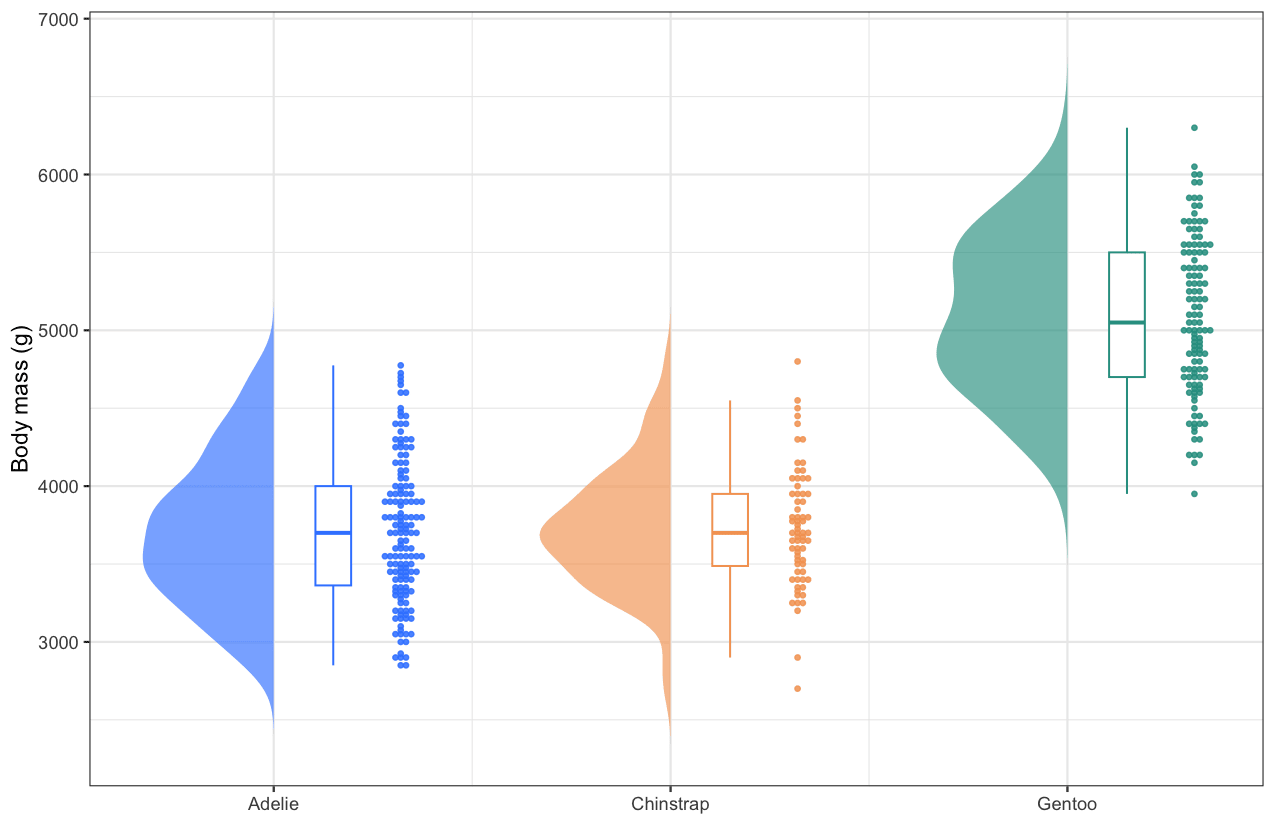
这张云雨图比较了三种企鹅的体重(palmerpenguins 数据集)。每种企鹅左侧的半小提琴勾勒密度形状,中间的窄箱线图标出中位数与两个四分位,右侧的蜂群散点把每一只鸟沿数值轴逐一画出——Gentoo 企鹅明显更重(中位数 5,050 g,对比 3,700 g),另外两种企鹅则在 5,000 g 以下大量重叠。
环境配置
系统要求:跨平台(Linux/MacOS/Windows)
编程语言:R
依赖包:
tidyverse;ggbeeswarm;palmerpenguins
数据准备
示例使用 palmerpenguins 内置的 penguins 数据集(344 条观测、三种企鹅)。云雨图需要每行一条观测,并包含一个分组列(species)与一个数值列(body_mass_g)。
data("penguins")

penguins_clean <- penguins |>
  filter(!is.na(body_mass_g)) |>
  mutate(species = factor(species))

head(penguins_clean, 3)
# A tibble: 3 × 8
species island bill_length_mm bill_depth_mm flipper_length_mm body_mass_g
<fct> <fct> <dbl> <dbl> <int> <int>
1 Adelie Torgersen 39.1 18.7 181 3750
2 Adelie Torgersen 39.5 17.4 186 3800
3 Adelie Torgersen 40.3 18 195 3250
# ℹ 2 more variables: sex <fct>, year <int>小提琴的左半边并不是特殊图层——我们对每组估计核密度,再把它画成从组中心向左展开的多边形。下面的辅助函数让教程其余部分保持简洁。
# Half-violin polygons: for each group, the density curve is mirrored to the
# left of the group centre (x = group position) and closed as a polygon.
half_violin <- function(data, group_col, value_col, width = 0.33) {
  groups <- levels(factor(data[[group_col]]))
  map_dfr(groups, function(g) {
    values <- data[[value_col]][as.character(data[[group_col]]) == g]
    d <- density(values, n = 200)
    tibble(
      group = g,
      x = which(groups == g) - d$y / max(d$y) * width,
      y = d$x)
  })
}
可视化
1. 基础绘图
三个组件按每组逐渐增大的 x 偏移堆叠:半小提琴在组中心,窄箱线图紧随其右,蜂群散点在最外侧。
violin_data <- half_violin(penguins_clean, "species", "body_mass_g")
centres <- set_names(seq_along(levels(penguins_clean$species)),
                     levels(penguins_clean$species))
x_pos <- centres[as.character(penguins_clean$species)]

raincloud_colors <- c(Adelie = "#3a86ff", Chinstrap = "#f4a261", Gentoo = "#2a9d8f")

ggplot(penguins_clean) +
  geom_polygon(data = violin_data, aes(x = x, y = y, fill = group, group = group),
               alpha = .65, colour = NA) +
  geom_boxplot(aes(x = x_pos + .15, y = body_mass_g, group = species, colour = species),
               width = .09, outlier.shape = NA, fill = "white", linewidth = .45) +
  geom_beeswarm(aes(x = x_pos + .32, y = body_mass_g, colour = species),
                cex = .5, size = .85, alpha = .85) +
  scale_fill_manual(values = raincloud_colors) +
  scale_colour_manual(values = raincloud_colors) +
  scale_x_continuous(breaks = centres, labels = levels(penguins_clean$species)) +
  labs(x = NULL, y = "Body mass (g)") +
  theme_bw() +
  theme(legend.position = "none")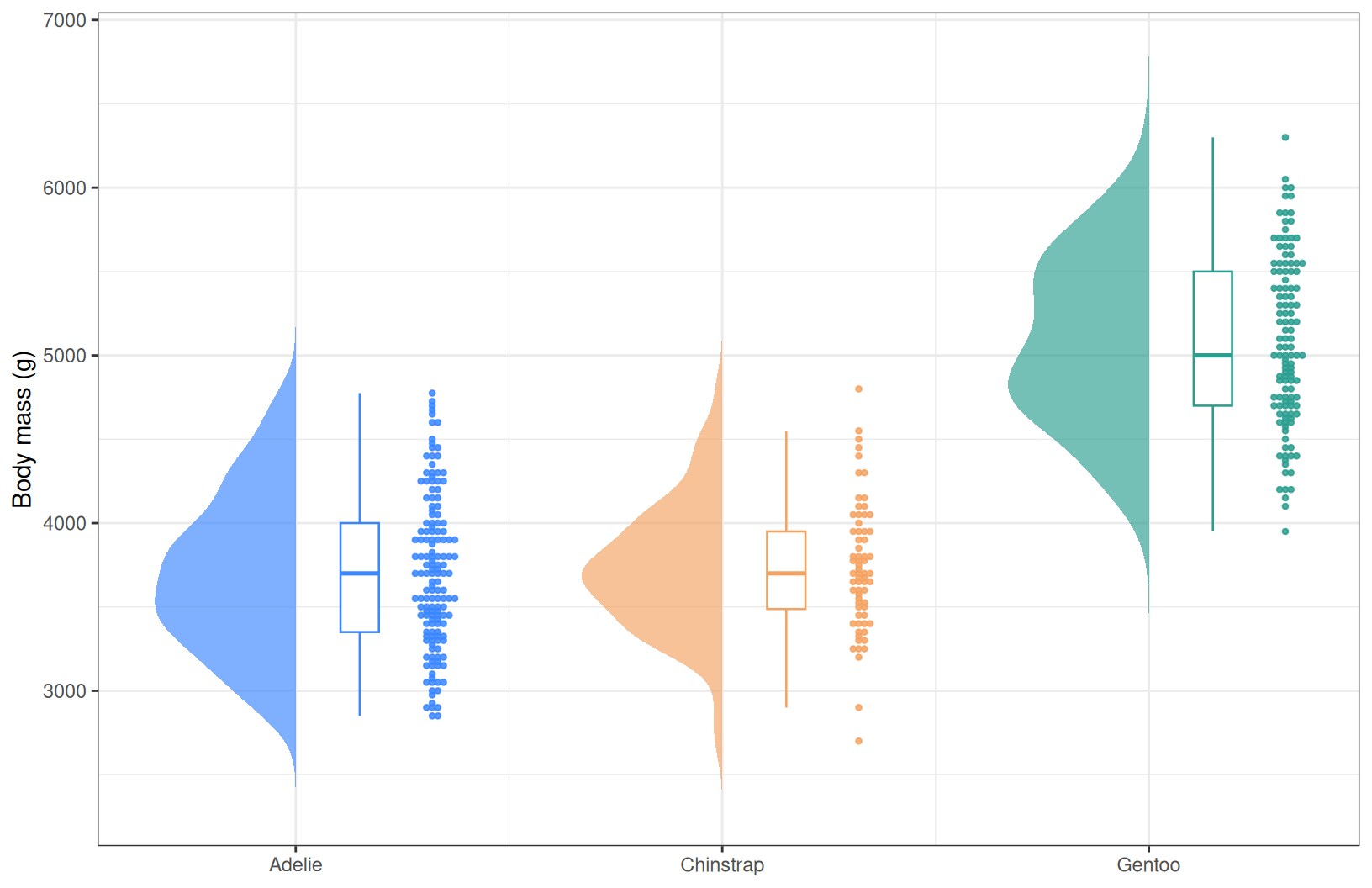
提示
关键参数:
-
width:半小提琴从组中心伸出的宽度(也是三个组件的视觉平衡点)。 -
+ .15/+ .32:把箱线图与蜂群散点放到中心右侧的 x 偏移;与width一起调节。 -
cex:蜂群散点的间距系数;越小越紧凑。
2. 带注释的云雨图
再加上均值标记与样本量,图形就是一份完整摘要:菱形标出每个箱体内部的均值,横轴标签携带样本量。
ggplot(penguins_clean) +
  geom_polygon(data = violin_data, aes(x = x, y = y, fill = group, group = group),
               alpha = .65, colour = NA) +
  geom_boxplot(aes(x = x_pos + .15, y = body_mass_g, group = species, colour = species),
               width = .09, outlier.shape = NA, fill = "white", linewidth = .45) +
  geom_beeswarm(aes(x = x_pos + .32, y = body_mass_g, colour = species),
                cex = .5, size = .85, alpha = .85) +
  stat_summary(aes(x = x_pos + .15, y = body_mass_g, group = species),
               fun = mean, geom = "point", shape = 18, size = 3, colour = "grey15") +
  scale_fill_manual(values = raincloud_colors) +
  scale_colour_manual(values = raincloud_colors) +
  scale_x_continuous(
    breaks = centres,
    labels = paste0(levels(penguins_clean$species), "\n(n = ",
                    table(penguins_clean$species)[levels(penguins_clean$species)], ")")) +
  labs(x = NULL, y = "Body mass (g)") +
  theme_bw() +
  theme(legend.position = "none", panel.grid.minor = element_blank())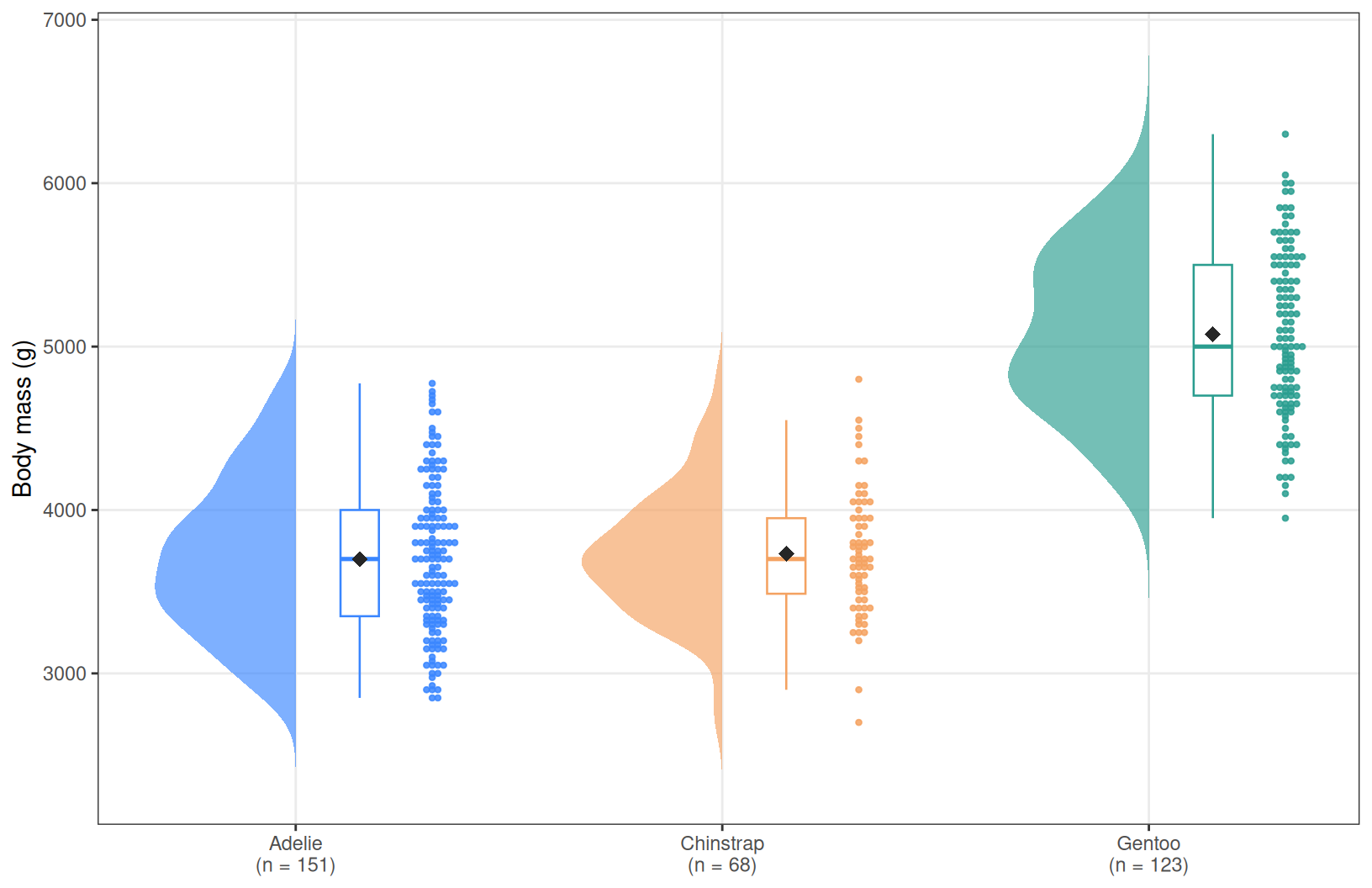
3. 横向排布
当组名较长(临床队列、组学聚类)时,翻转坐标轴把组名放到 y 轴更易阅读;coord_flip() 会让整个云雨图横过来,而无需改动任何图层。
ggplot(penguins_clean) +
  geom_polygon(data = violin_data, aes(x = x, y = y, fill = group, group = group),
               alpha = .65, colour = NA) +
  geom_boxplot(aes(x = x_pos + .15, y = body_mass_g, group = species, colour = species),
               width = .09, outlier.shape = NA, fill = "white", linewidth = .45) +
  geom_beeswarm(aes(x = x_pos + .32, y = body_mass_g, colour = species),
                cex = .5, size = .85, alpha = .85) +
  scale_fill_manual(values = raincloud_colors) +
  scale_colour_manual(values = raincloud_colors) +
  scale_x_continuous(breaks = centres, labels = levels(penguins_clean$species)) +
  labs(x = NULL, y = "Body mass (g)") +
  theme_bw() +
  theme(legend.position = "none", panel.grid.minor = element_blank()) +
  coord_flip()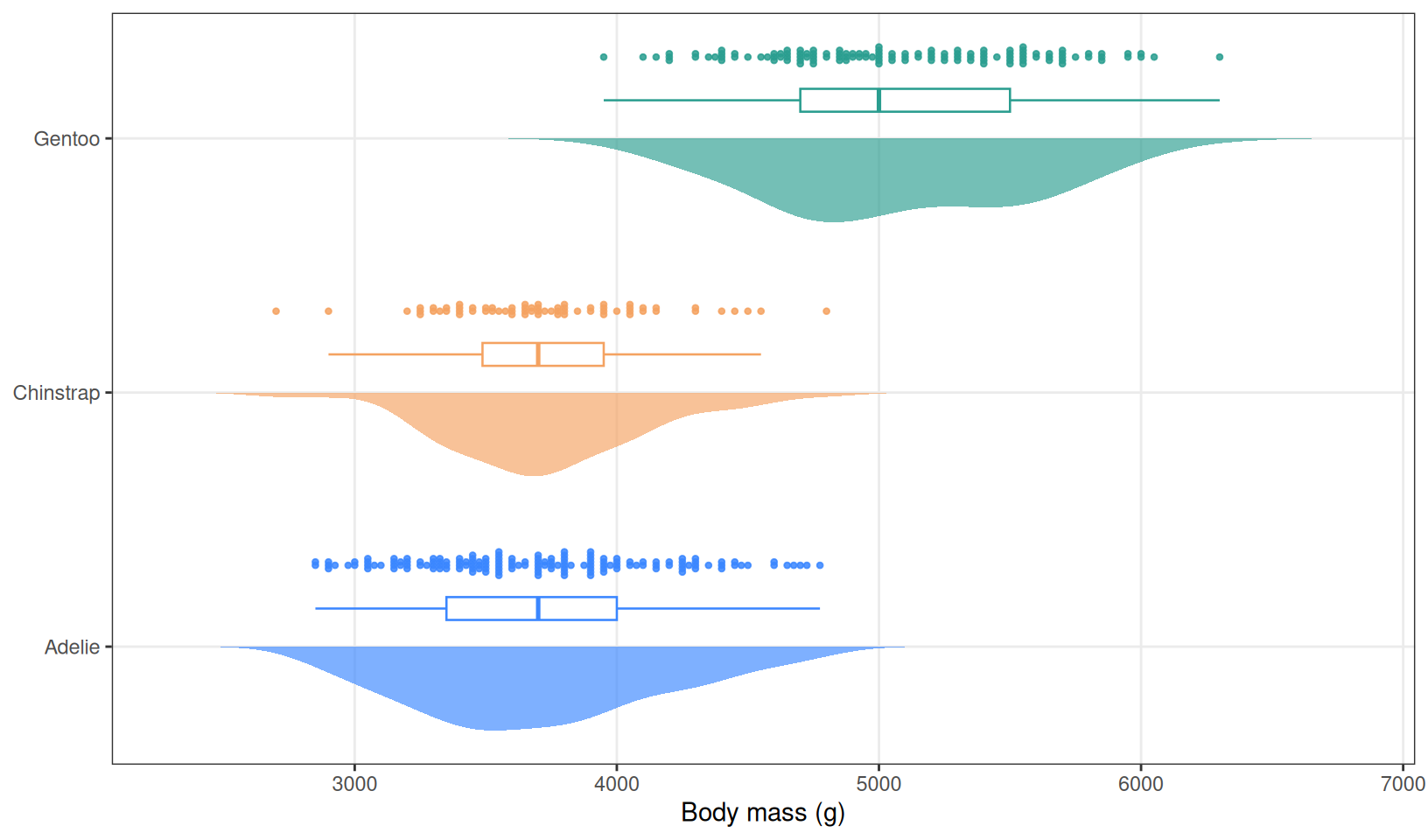
应用场景
- 跨组分布比较:当审稿人要求展示原始数据时,这是柱状图加误差棒的标准升级方案。
- 临床与组学队列:组间样本量不齐、偏态常见;蜂群散点让每一位患者保持可见。
- 小样本:当 n < 20 时,蜂群散点几乎可以替代小提琴,箱线图仍能概括四分位。
- 半小提琴配方(
density()+geom_polygon())适用于任何密度图层,纵向或横向皆可,且无需额外依赖包。
参考文献
[1] 顶刊图社 | 第017期:箱线图/小提琴图/云雨图. 微信公众号文章. http://mp.weixin.qq.com/s?__biz=MzU5NjE2ODU0OQ==&mid=2247483936&idx=1&sn=cf22ad37b9afc52a0af1f27daf8a4711
[2] Allen M, Poggiali D, Whitaker K, Marshall TR, Kievit RA. Raincloud plots: a multi-platform tool for robust data visualization. Wellcome Open Res. 2019;4:63. doi:10.12688/wellcomeopenres.15191.1