using CairoMakie
using DataFrames
using Statistics
using Random曼哈顿图与 QQ 图(Julia)
曼哈顿图把变异沿基因组排开(x = 染色体位置,y = −log10 p),关联峰从零假设天际线中升起;QQ 图把观测 p 值分布与均匀期望比较。Julia 没有维护良好的曼哈顿图辅助包,图形由两层带逐染色体累计偏移的 scatter! 组装。
示例
环境配置
- 系统要求:跨平台(Linux/MacOS/Windows)
- 编程语言:Julia
- 依赖包:
CairoMakie、DataFrames、Statistics
数据准备
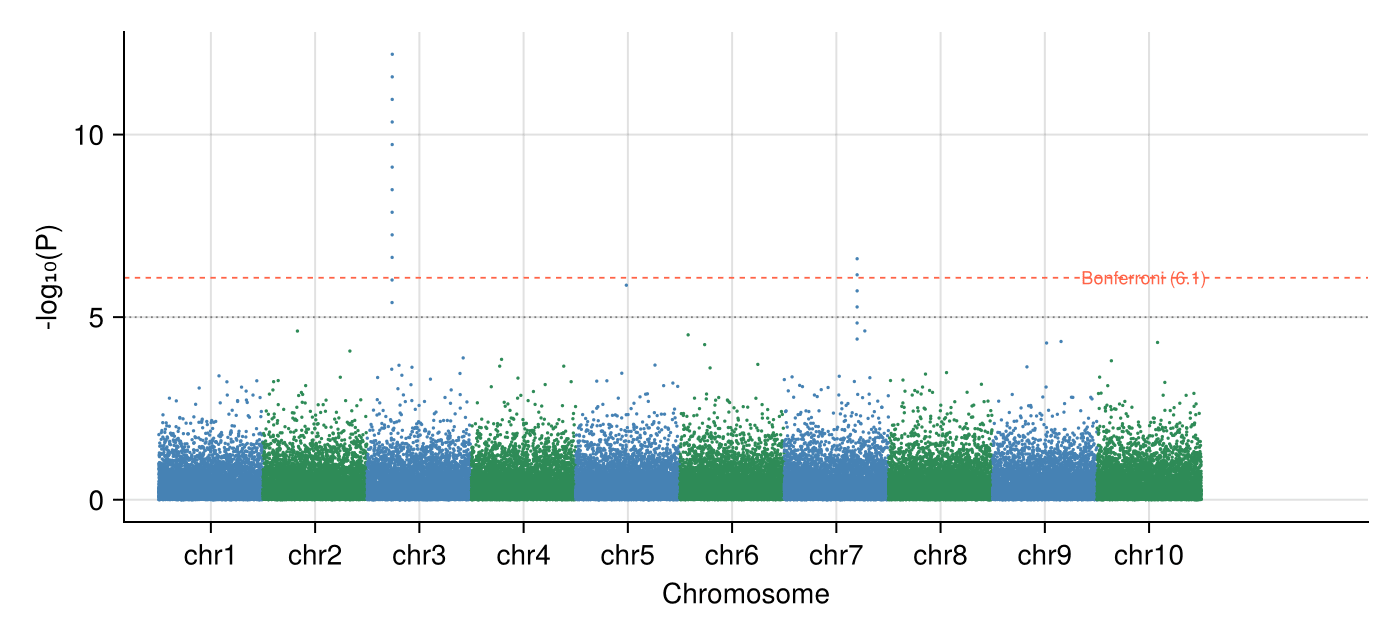
我们在 10 条染色体上模拟 60,000 个零假设下的 SNP(均匀 p 值),并在 3 号染色体注入一个强关联峰、7 号染色体注入一个较小峰。
Random.seed!(131)

snps_per_chr = 6_000
chr_n = 10
rows = []
for chr in 1:chr_n
    p = rand(snps_per_chr)
    if chr == 3
        p[1500:1511] .= 10.0 .^ (-range(5.4, 12.2; length = 12))
    elseif chr == 7
        p[4200:4205] .= 10.0 .^ (-range(4.4, 6.6; length = 6))
    end
    push!(rows, DataFrame(CHR = chr,
                          POS = sort(rand(snps_per_chr) .* 6_000),
                          P = p))
end
gwas = vcat(rows...)
gwas.MinusLogP = .-log10.(gwas.P)

offsets = DataFrame(CHR = 1:chr_n, Off = (0:chr_n-1) .* 6_000)
pos_range = combine(groupby(gwas, :CHR),
                    :POS => minimum => :Min, :POS => maximum => :Max)
pos_range.PosMid = (pos_range.Min .+ pos_range.Max) ./ 2 .+ offsets.Off
gwas.PosCum = gwas.POS + [offsets.Off[c] for c in gwas.CHR]
BONF = -log10(0.05 / nrow(gwas))
SUGG = -log10(1e-5)5.0可视化
经典曼哈顿图
逐染色体交替配色区分相邻染色体;Bonferroni 与提示线作为水平参考。
chr_colors = [c % 2 == 1 ? :steelblue : :seagreen for c in gwas.CHR]

fig = Figure(size = (700, 320))
ax = Axis(fig[1, 1], xlabel = "Chromosome", ylabel = "-log₁₀(P)")
scatter!(ax, gwas.PosCum, gwas.MinusLogP; markersize = 2.4,
         color = chr_colors, strokewidth = 0)
hlines!(ax, [BONF]; color = :tomato, linestyle = :dash, linewidth = 0.9)
hlines!(ax, [SUGG]; color = :gray50, linestyle = :dot, linewidth = 0.9)
text!(ax, nrow(gwas) * 1.005, BONF; text = "Bonferroni ($(round(BONF; digits = 1)))",
      fontsize = 9, color = :tomato, align = (:right, :center))
ax.xticks = (pos_range.PosMid, ["chr$c" for c in pos_range.CHR])
xlims!(ax, -2_000, nrow(gwas) * 1.16)
hidespines!(ax, :t, :r)
fig
带膨胀因子的 QQ 图
观测 −log10 p 与期望均匀分位数按序对齐;中位比值概括膨胀程度(均匀 p 下 ≈ 1.0)。
obs = sort(gwas.MinusLogP; rev = true)
m = length(obs)
expected = -log10.((1:m) ./ (m + 1))
inflation = median(-log.(10, gwas.P)) / median(-log.(10, rand(m)))

fig = Figure(size = (430, 430))
ax = Axis(fig[1, 1], xlabel = "Expected -log₁₀(P)",
          ylabel = "Observed -log₁₀(P)")
scatter!(ax, expected, obs; markersize = 2.6, color = (:steelblue, 0.6),
         strokewidth = 0)
lim = maximum(expected) * 1.05
lines!(ax, [0, lim], [0, lim]; color = :gray40, linewidth = 0.9)
text!(ax, 0.08, lim * 0.93; text = "λ ≈ $(round(inflation; digits = 2))",
      fontsize = 11)
xlims!(ax, 0, lim); ylims!(ax, 0, lim)
hidespines!(ax, :t, :r)
fig
参考文献
- Turner, S., et al. (2011). Quality Control for Population Association Studies. PLoS Currents, 3, RRN1222.
- Danisch, S., & Krumbiegel, J. (2021). Makie.jl: Flexible high-performance data visualization for Julia. Journal of Open Source Software, 6(65), 3349.