import matplotlib.pyplot as plt
import seaborn as sns
import pandas as pd
import numpy as np条形图(Python)
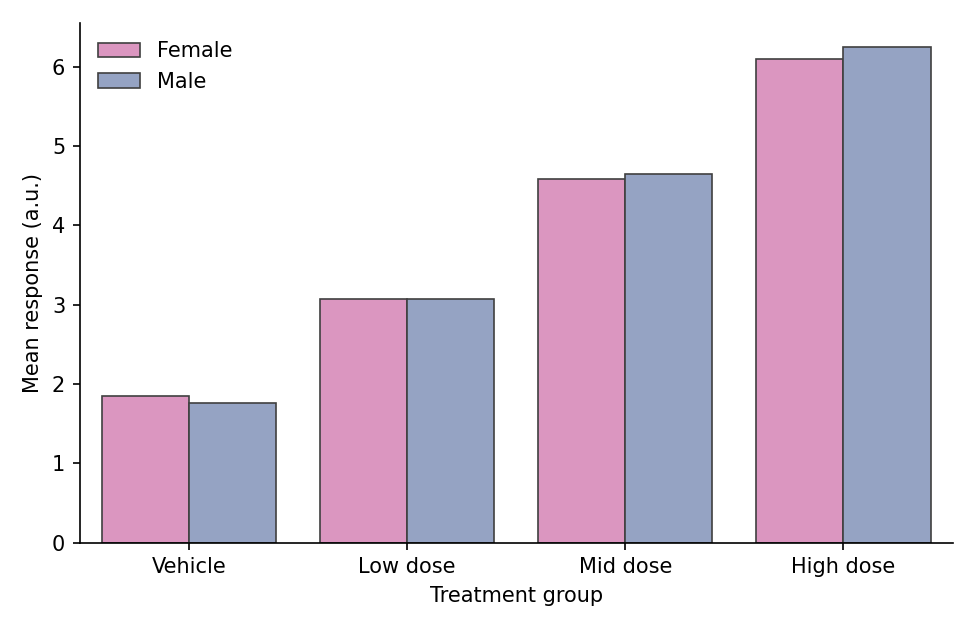
条形图通过高度比较离散类别间的数量差异。在生物医学研究中,条形图广泛用于报告不同处理组的平均响应、每个样本的细胞类型组成以及队列汇总统计。Python 的 matplotlib 和 seaborn 库提供了分组、堆叠和百分比堆叠等多种变体,并可输出出版级质量的图形。
示例
环境配置
- 系统要求:跨平台(Linux/MacOS/Windows)
- 编程语言:Python
- 依赖包:
matplotlib、seaborn、pandas、numpy
数据准备
我们模拟一个药物剂量响应实验(四个分组,含重复测量值)和一个细胞类型组成矩阵(六个流式细胞术检测样本)。
np.random.seed(42)

# 剂量响应:每组的原始重复测量值
groups = ['Vehicle', 'Low dose', 'Mid dose', 'High dose']
raw = pd.DataFrame({
    'Group': pd.Categorical(np.repeat(groups, 40), categories=groups, ordered=True),
    'Response': np.concatenate([
        np.random.normal(2.0, 0.9, 40),
        np.random.normal(3.1, 0.9, 40),
        np.random.normal(4.6, 0.9, 40),
        np.random.normal(6.2, 0.9, 40),
    ])
})

# 每个样本的细胞类型组成(行和为 1)
samples = [f'S{i}' for i in range(1, 7)]
cell_types = ['T cells', 'B cells', 'Macrophages', 'NK cells']
composition = pd.DataFrame(
    np.random.dirichlet([2, 1.5, 1, 0.8], size=6),
    index=samples, columns=cell_types
)
composition.index.name = 'Sample'
可视化
基础条形图(带误差棒)
当条形高度汇总分组测量值时,务必添加误差棒(SEM 或 95% 置信区间)——seaborn 会自动计算均值与区间。
plt.figure(figsize=(6, 4.2))
ax = sns.barplot(data=raw, x='Group', y='Response',
                 errorbar=('se', 1), capsize=0.15,
                 color='#8da0cb', edgecolor='0.25', linewidth=0.8)
ax.set_xlabel('Treatment group')
ax.set_ylabel('Mean response (a.u.)')
ax.spines[['top', 'right']].set_visible(False)
plt.tight_layout()
plt.show()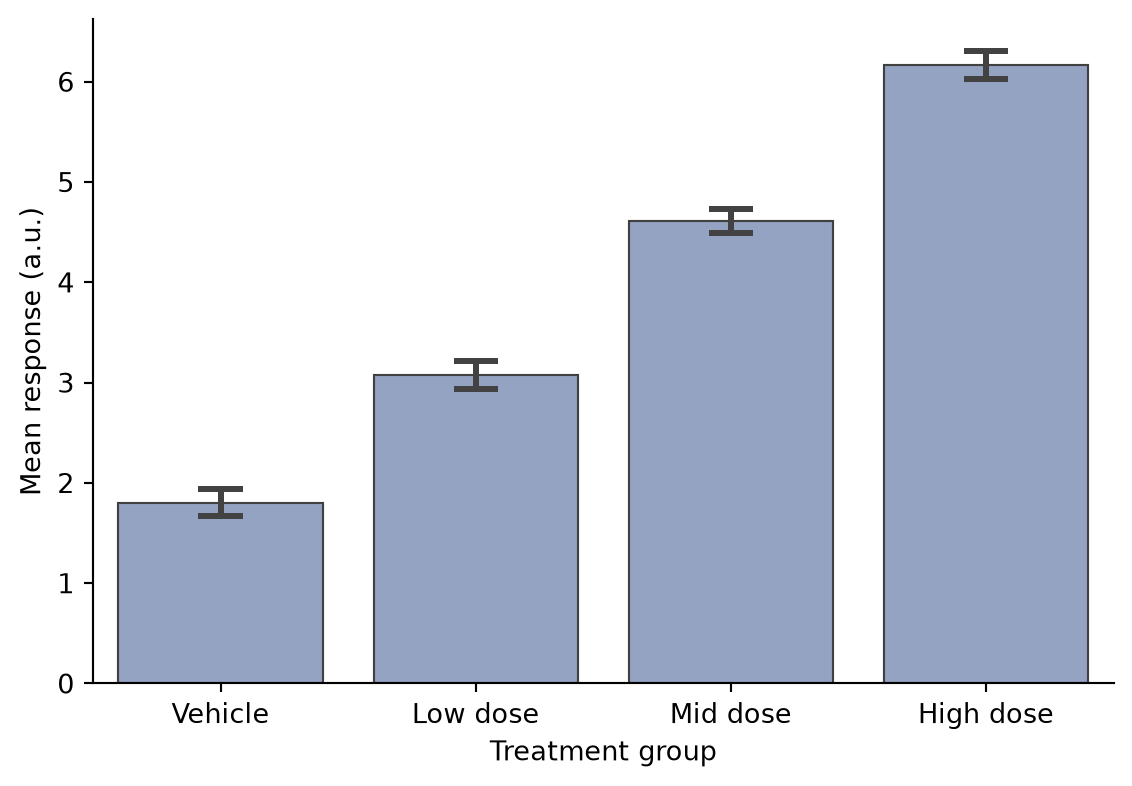
分组条形图
第二个因素(如性别或批次)映射到 hue,在每个类别内生成并排的条形。
grouped = raw.copy()
grouped['Sex'] = np.tile(np.repeat(['Female', 'Male'], 20), 4)
summary = grouped.groupby(['Group', 'Sex'], observed=True)['Response'].mean().reset_index()

plt.figure(figsize=(6.5, 4.2))
ax = sns.barplot(data=summary, x='Group', y='Response', hue='Sex',
                 palette={'Female': '#e78ac3', 'Male': '#8da0cb'},
                 edgecolor='0.25', linewidth=0.8)
ax.set_xlabel('Treatment group')
ax.set_ylabel('Mean response (a.u.)')
ax.legend(frameon=False, title=None)
ax.spines[['top', 'right']].set_visible(False)
plt.tight_layout()
plt.show()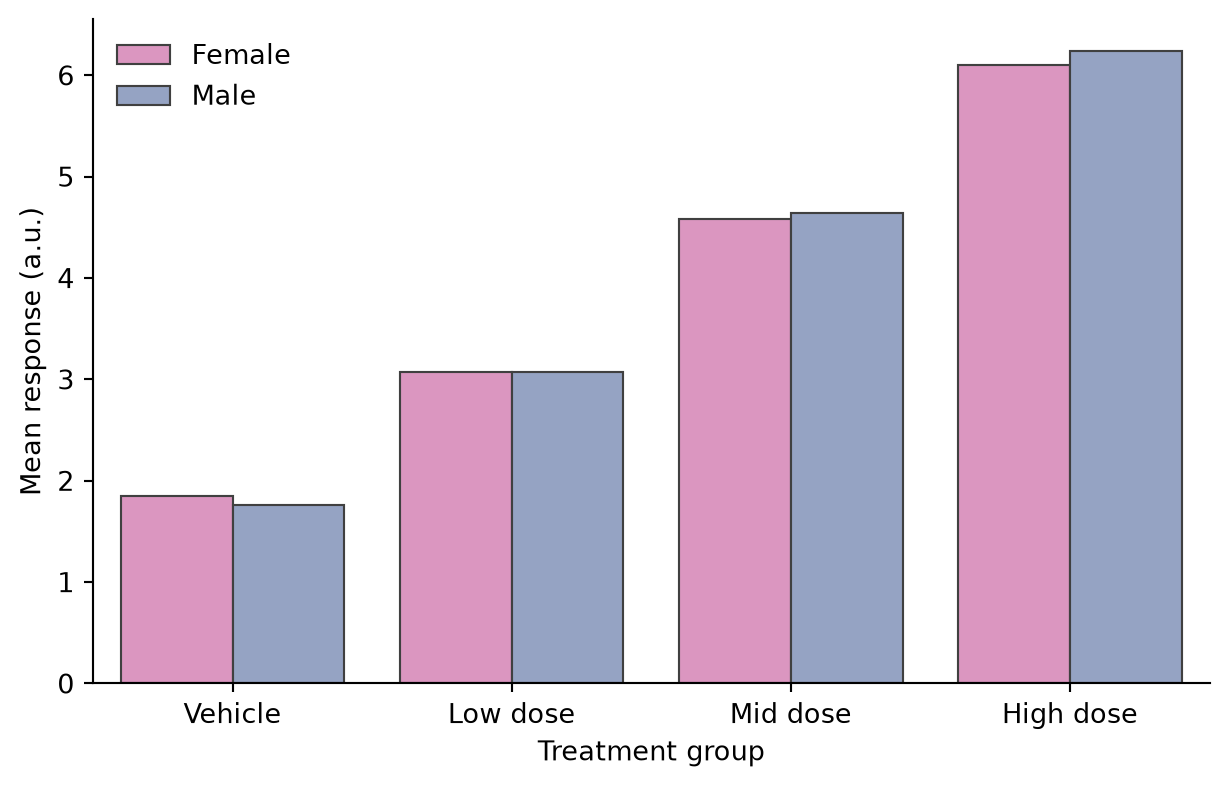
堆叠条形图
堆叠条形展示每个类别的组成。借助 pandas,组成矩阵可通过 plot.bar(stacked=True) 直接绘图。
colors = ['#66c2a5', '#8da0cb', '#e78ac3', '#a6d854']
ax = composition.plot.bar(stacked=True, color=colors,
                          edgecolor='0.25', linewidth=0.6,
                          figsize=(6.5, 4.2), rot=0)
ax.set_xlabel('Sample')
ax.set_ylabel('Cell fraction')
ax.legend(frameon=False, bbox_to_anchor=(1.02, 0.75))
ax.spines[['top', 'right']].set_visible(False)
plt.tight_layout()
plt.show()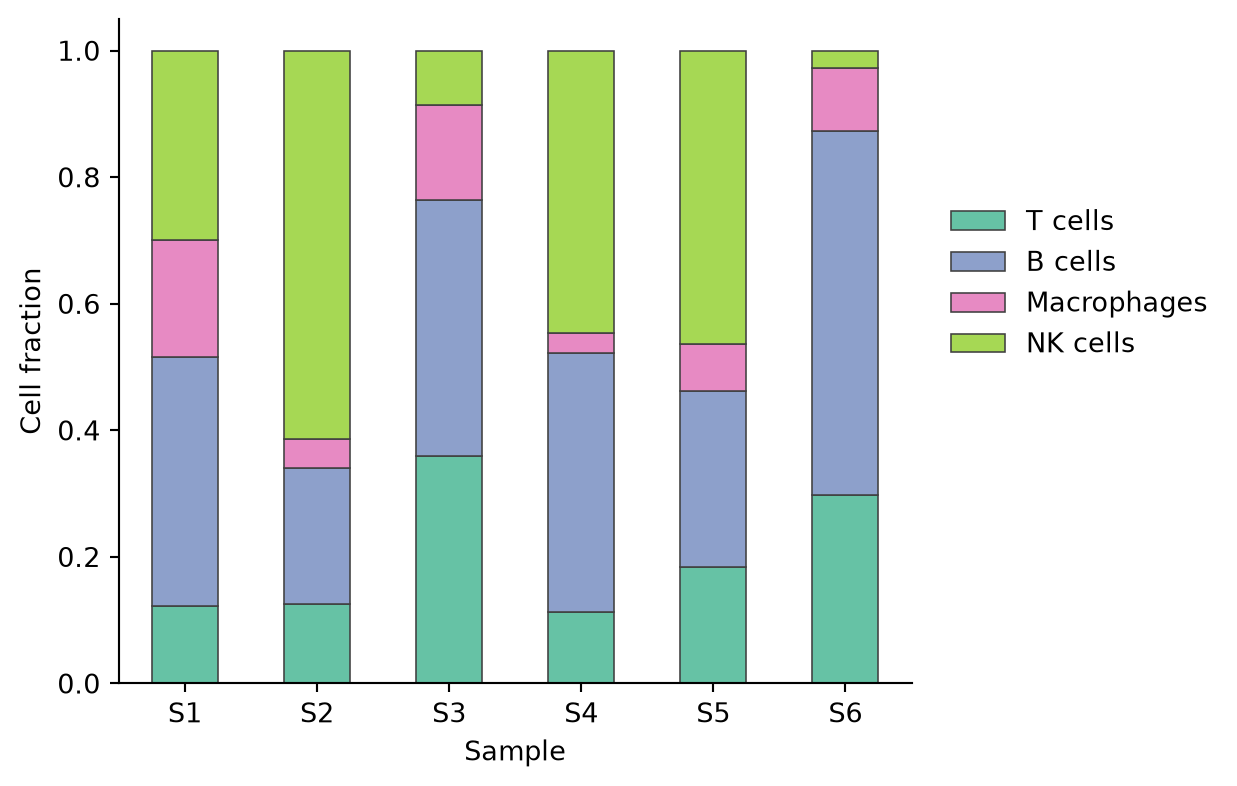
百分比堆叠条形图
将每个条形归一化到 100%,使总量不同的样本之间的组成具有可比性。
composition_pct = composition.div(composition.sum(axis=1), axis=0) * 100

ax = composition_pct.plot.bar(stacked=True, color=colors,
                              edgecolor='0.25', linewidth=0.6,
                              figsize=(6.5, 4.2), rot=0)
ax.set_xlabel('Sample')
ax.set_ylabel('Composition (%)')
ax.legend(frameon=False, bbox_to_anchor=(1.02, 0.75))
ax.spines[['top', 'right']].set_visible(False)
plt.tight_layout()
plt.show()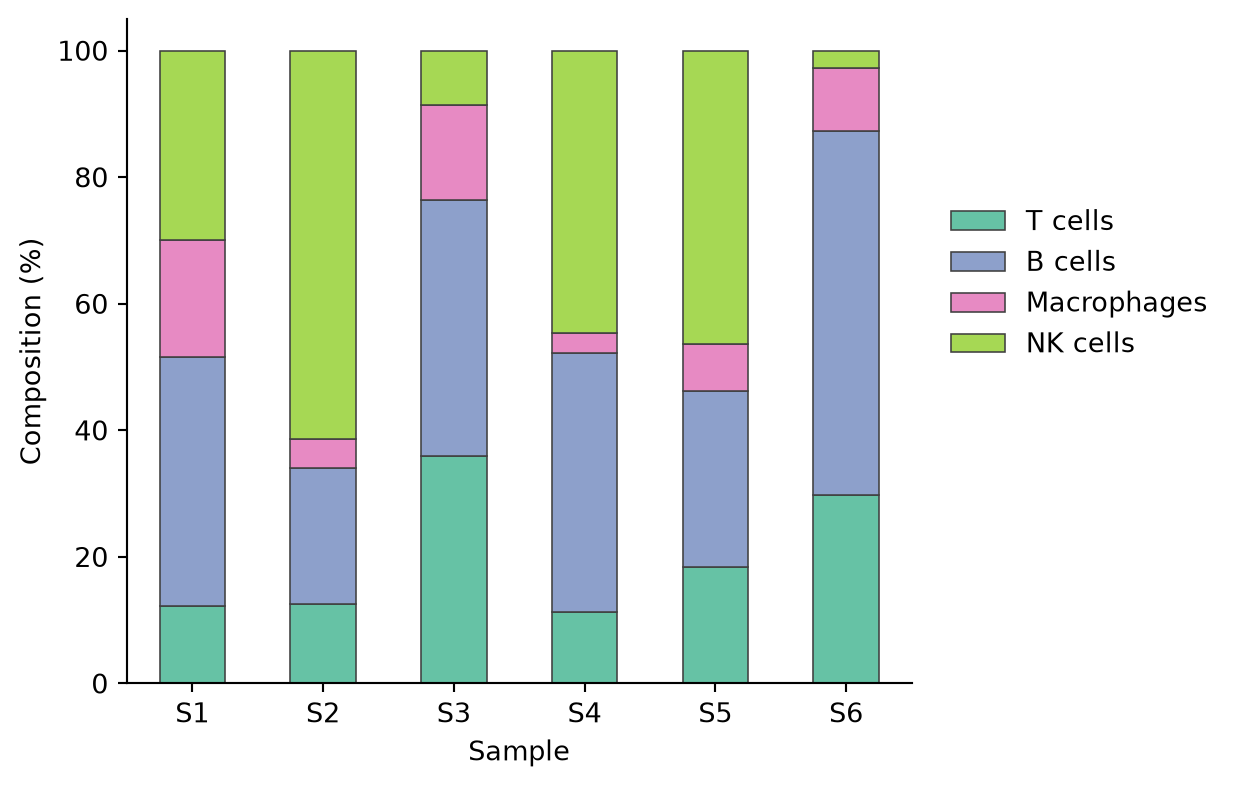
参考文献
- Hunter, J. D. (2007). Matplotlib: A 2D graphics environment. Computing in Science & Engineering, 9(3), 90-95.
- Waskom, M. L. (2021). seaborn: statistical data visualization. Journal of Open Source Software, 6(60), 3021.
- Weissgerber, T. L., et al. (2015). Beyond Bar and Line Graphs: Time for a New Data Presentation Paradigm. PLoS Biology, 13(4), e1002128.