using CairoMakie
using DataFrames
using Statistics
using Random雷达图(Julia)
雷达图(蛛网图)在极坐标上以多个可比轴刻画一个或少数样本的画像——适合每根轴都是同一 0–1 量尺的评分(免疫签名、质控面板),量纲不同时则有误导性。CairoMakie 提供 PolarAxis 区块,但把辐条手工投影到直角坐标轴上可以完全掌控外侧标签,三角计算只有两行。
示例
环境配置
- 系统要求:跨平台(Linux/MacOS/Windows)
- 编程语言:Julia
- 依赖包:
CairoMakie、DataFrames、Statistics
数据准备
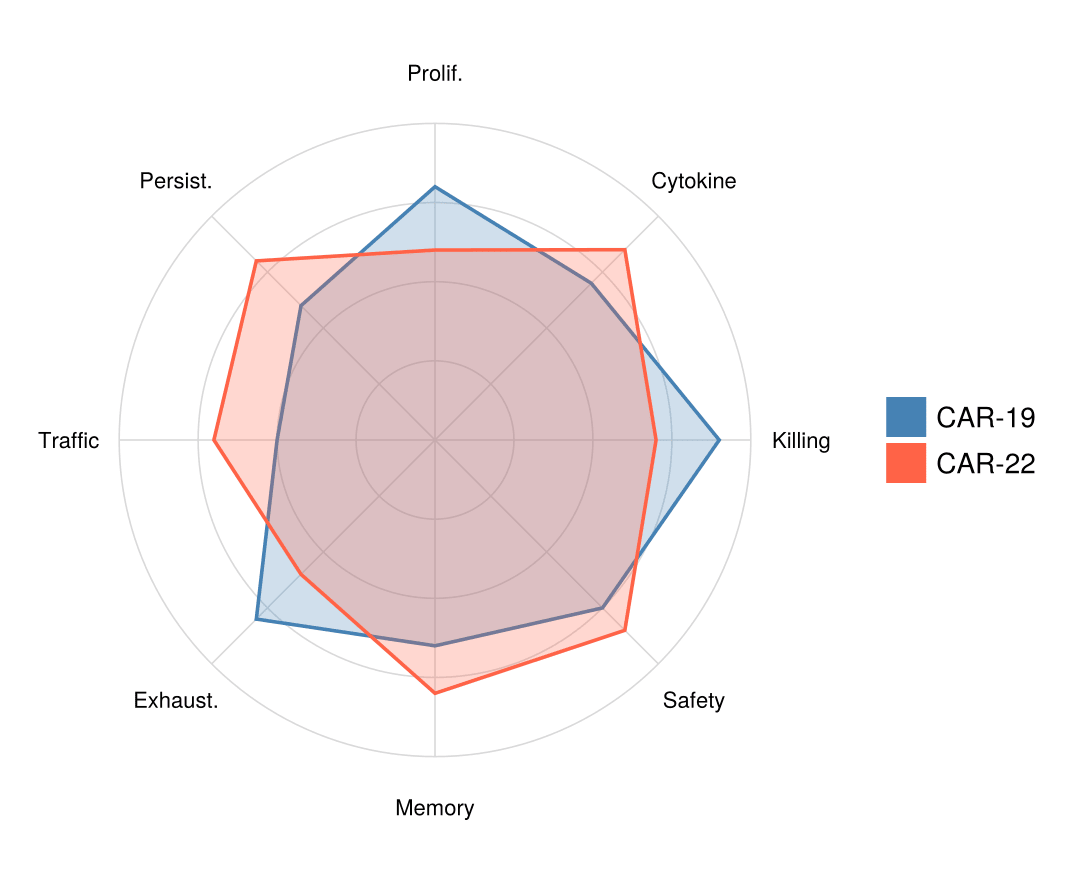
我们为两款 CAR-T 产品在八个归一化(0–1)免疫功能轴上打分,并将首点重复以闭合多边形。
axes_names = ["Killing", "Cytokine", "Prolif.", "Persist.",
              "Traffic", "Exhaust.", "Memory", "Safety"]
scores = DataFrame(
    Product = ["CAR-19", "CAR-22"],
    Values = [[0.9, 0.7, 0.8, 0.6, 0.5, 0.8, 0.65, 0.75],
              [0.7, 0.85, 0.6, 0.8, 0.7, 0.6, 0.8, 0.85]])
K = length(axes_names)
angles = [2π * k / K for k in 0:K]                 # 首角重复用于闭合
profile(v) = [v; v[1]]
xy(r, θ) = Point2f(r * cos(θ), r * sin(θ))
xy (generic function with 1 method)可视化
网格、辐条与单产品画像
同心参考环、辐条与轴标签各是三行小循环;画像本身就是一个闭合多边形。
θ_grid = range(0, 2π; length = 181)
fig = Figure(size = (480, 440))
ax = Axis(fig[1, 1]; aspect = DataAspect())
for r in 0.25:0.25:1.0                                   # 参考环
    lines!(ax, [xy(r, θ) for θ in θ_grid]; color = :gray85, linewidth = 0.8)
end
for k in 1:K                                             # 辐条 + 标签
    lines!(ax, [xy(0.0, angles[k]), xy(1.0, angles[k])];
           color = :gray85, linewidth = 0.8)
    text!(ax, xy(1.16, angles[k]); text = axes_names[k],
          align = (:center, :center), fontsize = 11)
end
poly!(ax, [xy(v, θ) for (v, θ) in zip(profile(scores.Values[1]), angles)];
      color = (:steelblue, 0.30), strokecolor = :steelblue, strokewidth = 1.8)
ax.xticks = []; ax.yticks = []
hidespines!(ax)
fig
双产品叠加
同一组辐条上的两个半透明填充,让权衡关系(杀伤 vs 持续性)一目了然。
θ_grid = range(0, 2π; length = 181)
fig = Figure(size = (540, 440))
ax = Axis(fig[1, 1]; aspect = DataAspect())
for r in 0.25:0.25:1.0
    lines!(ax, [xy(r, θ) for θ in θ_grid]; color = :gray85, linewidth = 0.8)
end
for k in 1:K
    lines!(ax, [xy(0.0, angles[k]), xy(1.0, angles[k])];
           color = :gray85, linewidth = 0.8)
    text!(ax, xy(1.16, angles[k]); text = axes_names[k],
          align = (:center, :center), fontsize = 11)
end
product_colors = [:steelblue, :tomato]
for (i, row) in enumerate(eachrow(scores))
    poly!(ax, [xy(v, θ) for (v, θ) in zip(profile(row.Values), angles)];
          color = (product_colors[i], 0.25),
          strokecolor = product_colors[i], strokewidth = 1.8)
end
elements = [PolyElement(polycolor = c) for c in product_colors]
Legend(fig[1, 2], elements, scores.Product, framevisible = false)
ax.xticks = []; ax.yticks = []
hidespines!(ax)
fig
参考文献
- Makie development team. Makie.jl documentation — PolarAxis. https://docs.makie.org/stable/reference/blocks/polaraxis
- Danisch, S., & Krumbiegel, J. (2021). Makie.jl: Flexible high-performance data visualization for Julia. Journal of Open Source Software, 6(65), 3349.