using CairoMakie
using DataFrames
using Statistics
using Random注释热图(Julia)
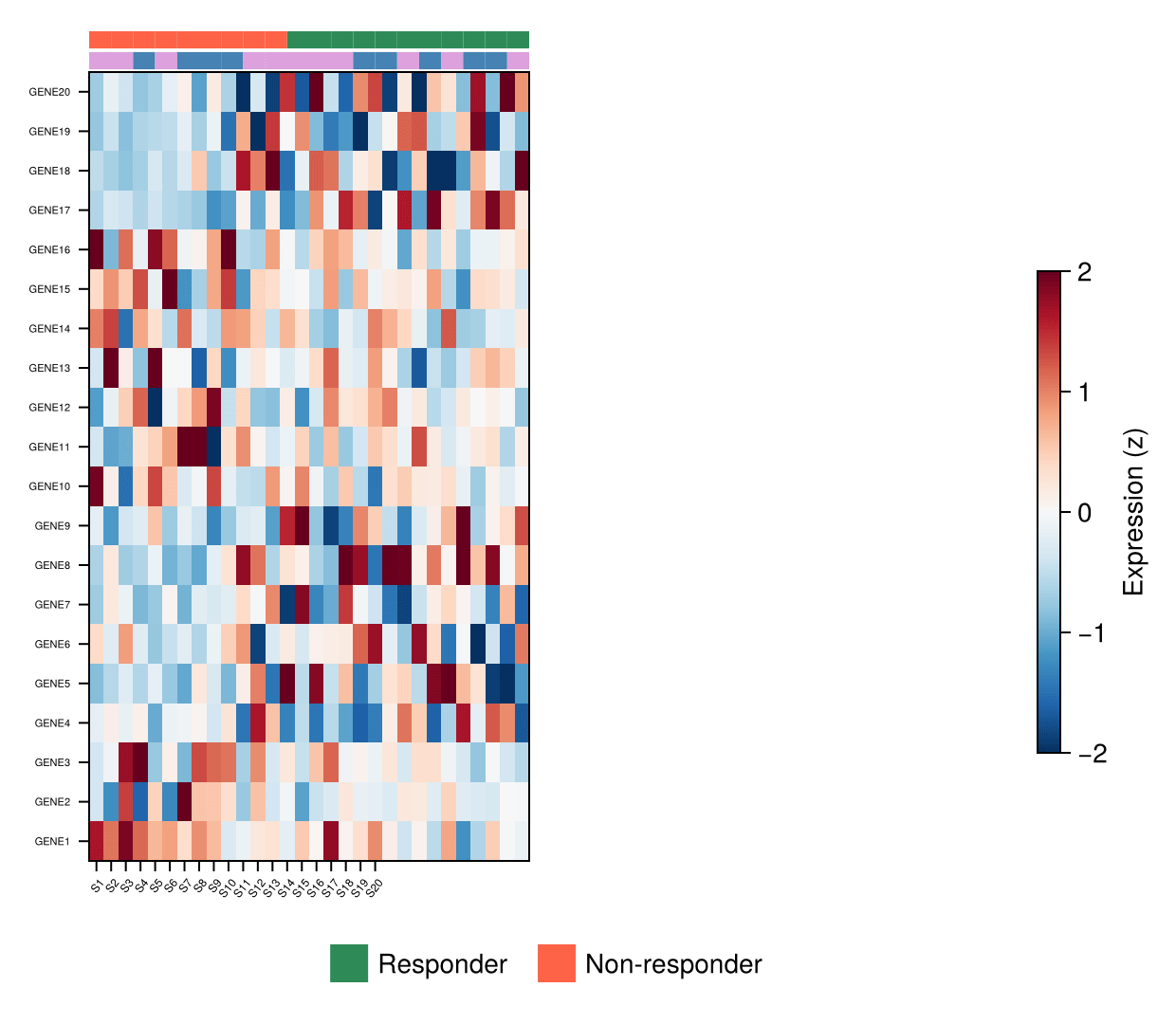
Julia 对 R ComplexHeatmap 的回答:把聚类表达矩阵与样本注释色带组装进一个 GridLayout——矩阵上方是细注释轴,旁侧是共享 Colorbar。无需额外包:heatmap! 加几条类别 poly! 色带,再加 Makie 的布局系统。
示例
环境配置
- 系统要求:跨平台(Linux/MacOS/Windows)
- 编程语言:Julia
- 依赖包:
CairoMakie、DataFrames、Statistics
数据准备
我们模拟一个 30 基因 × 20 样本的表达矩阵(两个表达程序 + 队列/性别样本注释),按基因 z 标准化,并按队列排序样本使程序块与注释条带对齐。
Random.seed!(181)

genes = ["GENE$i" for i in 1:30]
samples = ["S$i" for i in 1:20]
cohort = rand(["Responder", "Non-responder"], 20)
sex = rand(["F", "M"], 20)

expr = vcat(hcat(1.4 .* randn(10, 10) .+ 1.0, 0.5 .* randn(10, 10)),
            hcat(0.5 .* randn(20, 10), 1.2 .* randn(20, 10)))
expr = (expr .- mean(expr; dims = 2)) ./ std(expr; dims = 2)

perm = sortperm(cohort)                    # 按队列分组样本
mat = expr[:, perm]
cohort_o = cohort[perm]
sex_o = sex[perm]
cohort_colors = Dict("Responder" => :seagreen, "Non-responder" => :tomato)
sex_colors = Dict("F" => :plum, "M" => :steelblue)
Dict{String, Symbol} with 2 entries:
"M" => :steelblue
"F" => :plum可视化
注释条带与矩阵
两条细轴承载类别色带;每个样本是 poly! 绘制的一个色格。色带与热图共享列几何。
fig = Figure(size = (600, 480))
gd = fig[1, 1] = GridLayout()

coh_ax = Axis(gd[1, 1]; xticks = Int[])
sex_ax = Axis(gd[2, 1]; xticks = Int[])
main_ax = Axis(gd[3, 1]; yticks = (1:30, genes), yticklabelsize = 6,
               xticklabelsvisible = false)
hm = heatmap!(main_ax, mat; colormap = Reverse(:RdBu), colorrange = (-2, 2))
for (i, c) in enumerate(cohort_o)
    poly!(coh_ax, Rect2f(i - 0.5, -0.5, 1.0, 1.0);
          color = cohort_colors[c], strokewidth = 0)
end
for (i, s) in enumerate(sex_o)
    poly!(sex_ax, Rect2f(i - 0.5, -0.5, 1.0, 1.0);
          color = sex_colors[s], strokewidth = 0)
end
rowsize!(gd, 1, 10); rowsize!(gd, 2, 10)
colgap!(gd, 1); rowgap!(gd, 1)
hidespines!(coh_ax); hidespines!(sex_ax)
fig
带图例与色条的完整布局
打磨版加入样本列标签、注释轨道图例,以及一个服务表达量刻度的共享 Colorbar。
fig = Figure(size = (620, 540))
gd = fig[1, 1] = GridLayout()

coh_ax = Axis(gd[1, 1]; xticks = Int[])
sex_ax = Axis(gd[2, 1]; xticks = Int[])
main_ax = Axis(gd[3, 1]; yticks = (1:30, genes), yticklabelsize = 5.5,
               xticks = (1:20, samples), xticklabelsize = 6,
               xticklabelrotation = 0.9)
hm = heatmap!(main_ax, mat; colormap = Reverse(:RdBu), colorrange = (-2, 2))
for (i, c) in enumerate(cohort_o)
    poly!(coh_ax, Rect2f(i - 0.5, -0.5, 1.0, 1.0);
          color = cohort_colors[c], strokewidth = 0)
end
for (i, s) in enumerate(sex_o)
    poly!(sex_ax, Rect2f(i - 0.5, -0.5, 1.0, 1.0);
          color = sex_colors[s], strokewidth = 0)
end
rowsize!(gd, 1, 10); rowsize!(gd, 2, 10)
colgap!(gd, 1); rowgap!(gd, 1)
Colorbar(fig[1, 2], hm; height = Relative(0.5),
         label = "Expression (z)")
Legend(gd[4, 1:2],
       [PolyElement(polycolor = cohort_colors[c]) for c in
        ["Responder", "Non-responder"]],
       ["Responder", "Non-responder"]; orientation = :horizontal,
       framevisible = false, tellheight = true)
hidespines!(coh_ax); hidespines!(sex_ax)
fig
参考文献
- Makie development team. Makie.jl documentation — layouts. https://docs.makie.org/stable/tutorials/layout-tutorial
- Gu, Z., Eils, R., & Schlesner, M. (2016). Complex heatmaps reveal patterns and correlations in multidimensional genomic data. Bioinformatics, 32(18), 2847-2849.