using CairoMakie
using DataFrames
using Statistics
using Random条形图(Julia)
条形图通过高度比较离散类别间的数量差异。在生物医学研究中,条形图广泛用于报告不同处理组的平均响应、每个样本的细胞类型组成以及队列汇总统计。Julia 的 CairoMakie 通过 dodge 与 stack 关键字提供分组与堆叠变体,并输出出版级矢量图形。
示例
环境配置
- 系统要求:跨平台(Linux/MacOS/Windows)
- 编程语言:Julia
- 依赖包:
CairoMakie、DataFrames、Statistics
数据准备
我们模拟一个药物剂量响应实验(四个分组,含重复测量值)和一个细胞类型组成矩阵(六个样本)。
Random.seed!(42)

groups = ["Vehicle", "Low dose", "Mid dose", "High dose"]
n_per_group = 40
raw = DataFrame(
    Group = repeat(groups, inner = n_per_group),
    Response = vcat(
        2.0 .+ 0.9 .* randn(n_per_group),
        3.1 .+ 0.9 .* randn(n_per_group),
        4.6 .+ 0.9 .* randn(n_per_group),
        6.2 .+ 0.9 .* randn(n_per_group),
    ),
)

agg = combine(groupby(raw, :Group),
              :Response => mean => :Mean, :Response => std => :SD,
              :Response => (x -> std(x) / sqrt(length(x))) => :SEM)

# 每个样本的细胞类型组成(列和为 1)
comp = rand(4, 6)
comp ./= sum(comp, dims = 1)
cell_types = ["T cells", "B cells", "Macrophages", "NK cells"]
samples = ["S$i" for i in 1:6]
6-element Vector{String}:
"S1"
"S2"
"S3"
"S4"
"S5"
"S6"可视化
基础条形图(带误差棒)
当条形高度汇总分组测量值时,务必通过 errorbars! 添加误差棒(SEM 或 95% 置信区间)。
fig = Figure(size = (480, 340))
ax = Axis(fig[1, 1], xlabel = "Treatment group", ylabel = "Mean response (a.u.)")
barplot!(ax, 1:4, agg.Mean; color = :slateblue, gap = 0.35)
errorbars!(ax, 1:4, agg.Mean, agg.SEM; linewidth = 1.2, whiskerwidth = 8)
ax.xticks = (1:4, groups)
hidespines!(ax, :t, :r)
fig
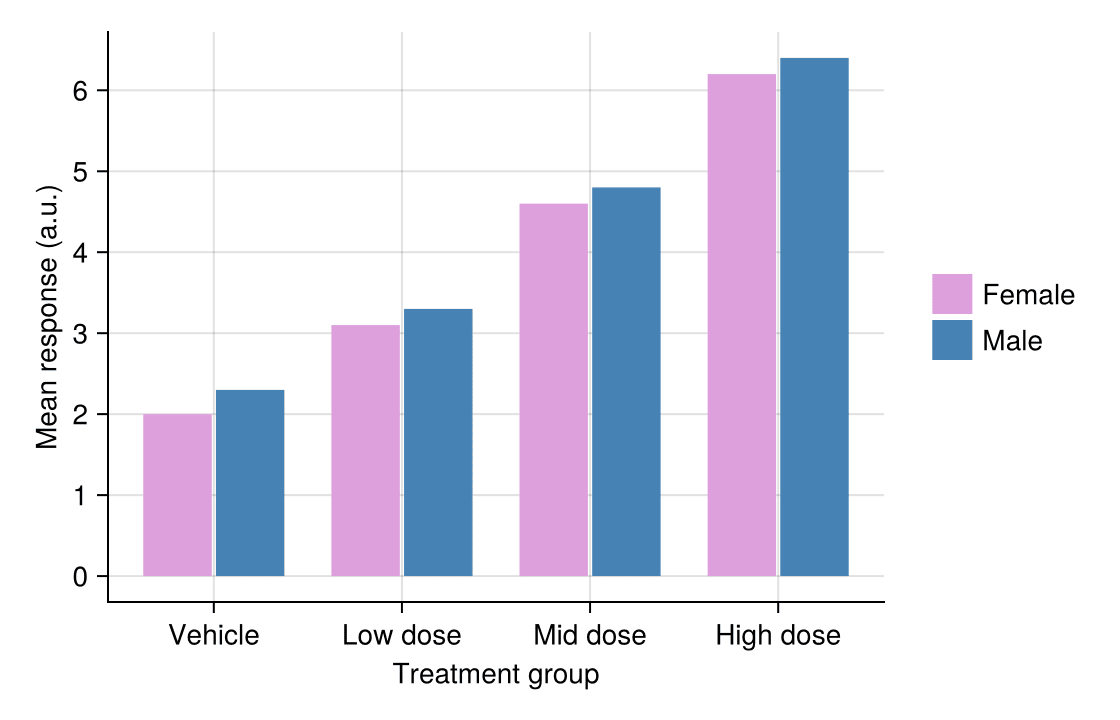
分组条形图
第二个因素映射到 dodge 关键字,在每个类别内生成并排的条形。
Random.seed!(43)
heights = vec([2.0, 2.3, 3.1, 3.3, 4.6, 4.8, 6.2, 6.4])
grp = repeat(1:4, inner = 2)          # 每根条形的类别 id
sex_ids = repeat(1:2, 4)              # 每根条形的亚组 id
sex_colors = [:plum, :steelblue]

fig = Figure(size = (540, 340))
ax = Axis(fig[1, 1], xlabel = "Treatment group", ylabel = "Mean response (a.u.)")
barplot!(ax, grp, heights; dodge = sex_ids, color = sex_colors[sex_ids], gap = 0.25)
ax.xticks = (1:4, groups)
labels = ["Female", "Male"]
elements = [PolyElement(polycolor = sex_colors[i]) for i in 1:2]
Legend(fig[1, 2], elements, labels, framevisible = false)
hidespines!(ax, :t, :r)
fig
堆叠条形图
stack 关键字将亚组数值堆叠在同一根条形上——展示每个样本组成的标准形式。
n_types, n_samples = size(comp)
heights = vec(comp)                    # 按条形优先展开
stack_ids = repeat(1:n_types, n_samples)
cat_ids = repeat(1:n_samples, inner = n_types)
type_colors = [:teal, :steelblue, :salmon, :olivedrab]

fig = Figure(size = (560, 340))
ax = Axis(fig[1, 1], xlabel = "Sample", ylabel = "Cell fraction")
barplot!(ax, cat_ids, heights; stack = stack_ids,
         color = type_colors[stack_ids], gap = 0.15)
ax.xticks = (1:6, samples)
elements = [PolyElement(polycolor = type_colors[i]) for i in 1:n_types]
Legend(fig[1, 2], elements, cell_types, framevisible = false)
hidespines!(ax, :t, :r)
fig
参考文献
- Makie development team. Makie.jl documentation — barplot. https://docs.makie.org/stable/reference/plots/barplot
- Danisch, S., & Krumbiegel, J. (2021). Makie.jl: Flexible high-performance data visualization for Julia. Journal of Open Source Software, 6(65), 3349.