using CairoMakie
using DataFrames
using Statistics
using Random折线图(Julia)
折线图展示连续变量沿有序轴(通常是时间)的趋势。在生物医学研究中,折线图是生长曲线、药代动力学轮廓和纵向组学时间序列的标准图形,通常在组均值周围附上不确定性带。CairoMakie 通过 lines!、band! 与 scatter! 原语组合折线图,并可精确控制图层顺序。
示例
环境配置
- 系统要求:跨平台(Linux/MacOS/Windows)
- 编程语言:Julia
- 依赖包:
CairoMakie、DataFrames、Statistics
数据准备
我们模拟一项临床前肿瘤生长实验:两个处理臂(Vehicle 与 Treatment)各 12 只小鼠,连续 8 周每周测量一次,采用带小鼠间变异的两相指数生长模型。
Random.seed!(21)

weeks = 0.0:8
n_mice = 12
arms = Dict("Vehicle" => 0.32, "Treatment" => 0.18)
curves = Dict{String, Matrix{Float64}}()
for (arm, rate) in arms
    curves[arm] = [100 * exp(rate * (1 + 0.08 * randn()) * w) for m in 1:n_mice, w in weeks]
end
arm_colors = Dict("Vehicle" => :steelblue, "Treatment" => :tomato)
Dict{String, Symbol} with 2 entries:
"Vehicle" => :steelblue
"Treatment" => :tomato可视化
基础折线图
先聚合再绘图:每组一条线并配以不同 marker,使小型汇总图保持易读。
fig = Figure(size = (460, 340))
ax = Axis(fig[1, 1], xlabel = "Week", ylabel = "Tumor volume (mm\$^3\$)")
for (arm, mat) in curves
    lines!(ax, weeks, vec(mean(mat, dims = 1)); color = arm_colors[arm],
           linewidth = 2)
    scatter!(ax, weeks, vec(mean(mat, dims = 1)); color = arm_colors[arm],
             markersize = 10, marker = arm == "Vehicle" ? :circle : :rect)
end
hidespines!(ax, :t, :r)
Legend(fig[1, 2], [LineElement(color = :steelblue, linewidth = 2),
                   LineElement(color = :tomato, linewidth = 2)],
       ["Vehicle", "Treatment"], framevisible = false)
fig
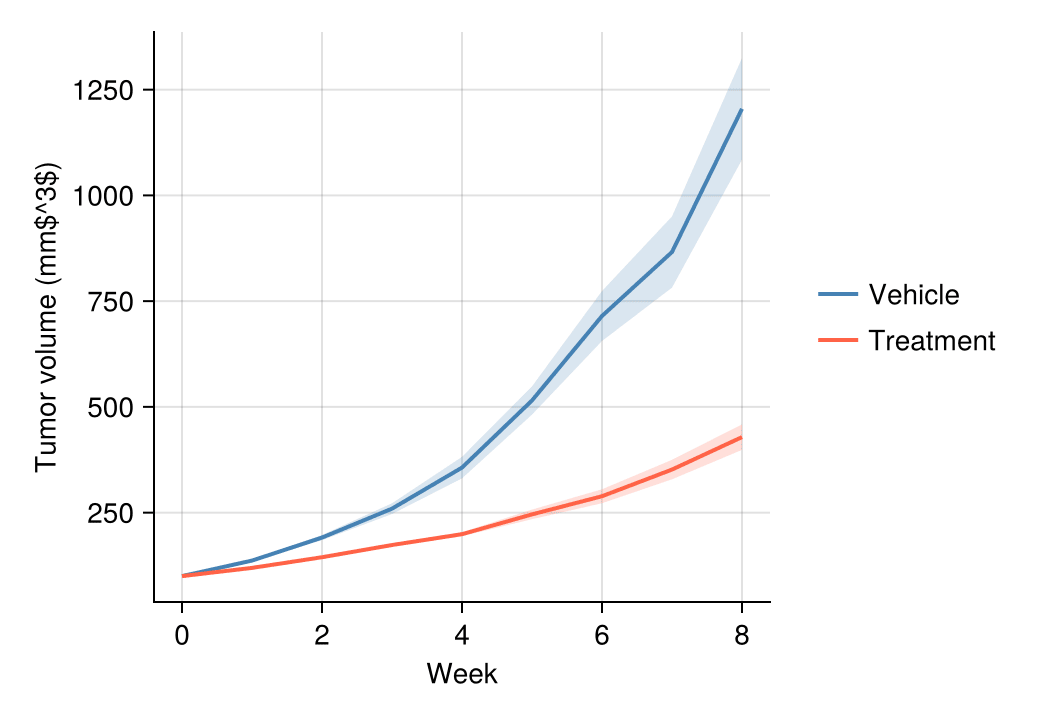
带置信带的折线图
均值 ± 1.96 × SEM 的色带传达抽样不确定性;用 band! 绘制在均值线之下。
fig = Figure(size = (460, 340))
ax = Axis(fig[1, 1], xlabel = "Week", ylabel = "Tumor volume (mm\$^3\$)")
for (arm, mat) in curves
    m = vec(mean(mat, dims = 1))
    sem = vec(std(mat, dims = 1)) ./ sqrt(n_mice)
    band!(ax, weeks, m .- 1.96 .* sem, m .+ 1.96 .* sem;
          color = (arm_colors[arm], 0.2))
    lines!(ax, weeks, m; color = arm_colors[arm], linewidth = 2)
end
hidespines!(ax, :t, :r)
Legend(fig[1, 2], [LineElement(color = :steelblue, linewidth = 2),
                   LineElement(color = :tomato, linewidth = 2)],
       ["Vehicle", "Treatment"], framevisible = false)
fig
意大利面条图叠加群体均值
将每个受试对象画为细线并置于加粗组均值之后,同时传达趋势与个体间变异。
fig = Figure(size = (460, 340))
ax = Axis(fig[1, 1], xlabel = "Week", ylabel = "Tumor volume (mm\$^3\$)")
for (arm, mat) in curves
    for m in 1:n_mice
        lines!(ax, weeks, mat[m, :]; color = (arm_colors[arm], 0.25), linewidth = 1)
    end
    lines!(ax, weeks, vec(mean(mat, dims = 1)); color = arm_colors[arm], linewidth = 2.6)
end
hidespines!(ax, :t, :r)
Legend(fig[1, 2], [LineElement(color = :steelblue, linewidth = 2.6),
                   LineElement(color = :tomato, linewidth = 2.6)],
       ["Vehicle", "Treatment"], framevisible = false)
fig
参考文献
- Makie development team. Makie.jl documentation — lines, band. https://docs.makie.org/stable/reference/plots/lines
- Danisch, S., & Krumbiegel, J. (2021). Makie.jl: Flexible high-performance data visualization for Julia. Journal of Open Source Software, 6(65), 3349.